|

-
May 5th, 2020, 04:51 PM
#14
Re: How to use a _declspec(dllexport) in VB6?
 Originally Posted by Jacob Roman

Schmidt, _declspec(dllexport) does more than methods.
Of course... that was the whole point of the "LS-Bit"-discussion between wqweto and me.
The convenient Linker-Switch in a VB6 *.vbp only works (without hacking around)
for procedures (Subs and Functions in a *.bas).
Originally Posted by Jacob Roman
NvOptimusEnablement is a variable, so the Sub Export trick is not gonna work.
I've already mentioned that it worked for me - so please don't guess,
check it out instead via a concrete (compiled) example.
Originally Posted by Jacob Roman
I even tested it on a sample DX app I made in VB6 years ago and got nothing.
Yep, and that's entirely explainable - because the so christened "Optimus-preference-GPU-switchery" -
only works from DX9 onwards (it is not supported on DX8, which you've used in your VB6-Demos).
Originally Posted by Jacob Roman
Even if that were to be the trick, it would be a function that returns a 4 byte value (DWORD) of &H1.
Wrong. Please inform yourself about "Exports of named symbols" in C or Assembly-forums.
What I've discussed with wqweto, is the "functions assembly-code behind a symbol" (starting with a Prolog) -
and not its return-result (which is a completely different thing).
The NVidia-switchery doesn't know that the exported Symbol(Name) points to a Function(Prolog).
It just reads the 4 DWord-Bytes "behind the pointer, a given SymbolName resolves to".
Originally Posted by Jacob Roman
I also tried extern "C" { _declspec(dllexport) DWORD NvOptimusEnablement = 0x00000002; }
just for funzies and it does nothing.
You either didn't test this, or you messed up your executable-location, or something...
My guess is, that you didn't compile and test it at all (with Value=2),
because your "VB6-tests were already failing"...
I've downloaded your Zip, and compiled your VC++Project (in Release-Mode, 64Bit),
using { _declspec(dllexport) DWORD NvOptimusEnablement = 0x00000002; } -
and the resulting executable switched perfectly from the Intel-default-GPU to the NVidia-GPU.
My system runs latest VC-2019, a fully upgraded Win10 - with the latest WHQL-certified NVidia-drivers.
As for VB6-Demos, which will show that the "symbol-export-switch" indeed works...:
- you'll have to use either a typelib for DX9 or higher
- or just use the patform-independent OpenGL
(which BTW offers an unchanged and stable API for those who want to do GPU-accelerated 3D-stuff in VB6,
it will always use the "latest and greatest" GPU-Driver that's installed on a given system (without any chance for DX-version-lockouts).
FWIW, below comes an OpenGL-Demo (not written by me, only slightly adapted)...
It does contain the NVidia-Preference-enforcement-switch (via the little "empty Sub"),
and also the accompanying Linker-Switches in the *.vbp.
Here the Demo-Project: VB6_OpenGL.zip
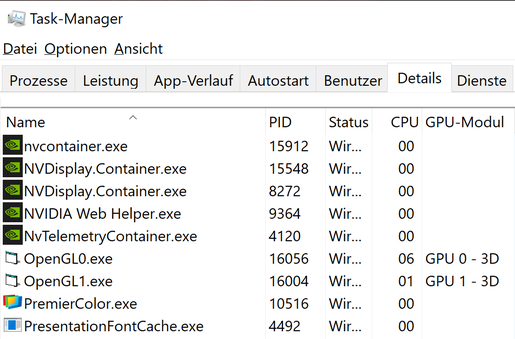
And here a ScreenShot:
(OpenGL0 is a binary I've compiled without the Linker-Switches, OpenGL1 the one which enforced the switch to NVidia).
One can see, that OpenGL0 is using the default-GPU (GPU0) and OpenGL1 the "other GPU on my Notebook" (NVidia).
Olaf
 Posting Permissions
- You may not post new threads
- You may not post replies
- You may not post attachments
- You may not edit your posts
-
Forum Rules
|
Click Here to Expand Forum to Full Width
|



 Reply With Quote