|

-
Feb 16th, 2023, 10:25 AM
#1
Thread Starter
Hyperactive Member

three questions about DirectDraw
Hello I have three questions regarding DirectDraw
The first one, how can I get the bit array from Dim cMemBitmap As ID2D1Bitmap
Code:
    Set cMemTarget = cRenderTarget.CreateCompatibleRenderTarget(D2D1.SizeF(100, 100), ByVal 0&, _
                      ByVal 0&, D2D1_COMPATIBLE_RENDER_TARGET_OPTIONS_NONE)

    Set cBrush = cMemTarget.CreateSolidColorBrush(D2D1.ColorF(Brown), ByVal 0&)

    cMemTarget.BeginDraw
    cMemTarget.FillRoundedRectangle D2D1.RoundedRect(D2D1.RectF(10, 10, 100, 100), 10, 10), cBrush
    cMemTarget.EndDraw ByVal 0&, ByVal 0&

    Set cMemBitmap = cMemTarget.GetBitmap()
    Dim dBytes() As Byte
    ReDim dBytes(cMemBitmap.GetSize.Width * 4 - 1&, cMemBitmap.GetSize.Height - 1&)

   'how do i copy it to dBytes()
the second question:
I want to round the corners of an image (RenderTarget.DrawBitmap), I think my two options are to put it in an ID2D1BitmapBrush and then use FillRoundedRectangle, but I still can't solve being able to resize the Bitmap, and the other way is to Clip with (CreatePathGeometry cSink.AddArc DrawGeometry) but I didn't know how building a round rectangle with AddArc, is very different from how it is done with GDI
And the third question, I am using the libraries (I think they are from The trick or at least its examples)
https://www.vbforums.com/showthread....=1#post5290635
Is there something newer or better that I'm missing? I'm asking this now so that I don't have to modify many things later.
-
Feb 16th, 2023, 12:47 PM
#2
Re: three questions about DirectDraw
 Originally Posted by LeandroA

Is there something newer or better that I'm missing? I'm asking this now so that I don't have to modify many things later.
Instead of DirectDraw, use Direct3D, and do not mix it with GDI unless absolutely necessary, do everything using Direct3D.
-
Feb 16th, 2023, 01:22 PM
#3
Re: three questions about DirectDraw
The first one, how can I get the bit array from Dim cMemBitmap As ID2D1Bitmap
You should use a WIC bitmap instead. See SaveImage example.
I want to round the corners of an image (RenderTarget.DrawBitmap), I think my two options are to put it in an ID2D1BitmapBrush and then use FillRoundedRectangle, but I still can't solve being able to resize the Bitmap, and the other way is to Clip with (CreatePathGeometry cSink.AddArc DrawGeometry) but I didn't know how building a round rectangle with AddArc, is very different from how it is done with GDI
See Clip example. You should create a clipping path.
Is there something newer or better that I'm missing? I'm asking this now so that I don't have to modify many things later.
OLEEXP seems contains a newer version. With all due respect to fafalone, I do not use it for rendering due to not using VB6-call semantics (out,retval attributes, optional parameters etc.)
-
Feb 16th, 2023, 01:48 PM
#4
Re: three questions about DirectDraw
I've never seen a TLB where functions have optional parameters...
-
Feb 16th, 2023, 02:30 PM
#5
Re: three questions about DirectDraw
Originally Posted by VanGoghGaming
I've never seen a TLB where functions have optional parameters...
See D2DVB.tlb, DX9VB.tlb
-
Feb 16th, 2023, 02:39 PM
#6
Thread Starter
Hyperactive Member
Re: three questions about DirectDraw
Originally Posted by The trick
You should use a WIC bitmap instead. See SaveImage example.
Thank you for your answers, regarding the first one. I do not want to save the image, my idea is to work with the bitarray to apply a blur and thus create a shadow of a round rectangle, this routine I use in gdi + but I was looking for a way not to depend on gdi and do it clearly with DirectDraw. now maybe you are suggesting that with WIC I can get the bitarray (without the file headers)? If so, I will look for an example.
Originally Posted by The trick
See Clip example. You should create a clipping path.
I'm basing myself on his example, but as I mentioned before I don't know how to make a round rectangle using AddArc
Originally Posted by The trick
OLEEXP seems contains a newer version. With all due respect to fafalone, I do not use it for rendering due to not using VB6-call semantics (out,retval attributes, optional parameters etc.)
Thank you, I will see if it is not very complicated for me to migrate the functions, otherwise I will continue with your tlb.
Thank you forum for this professional level
-
Feb 16th, 2023, 02:49 PM
#7
Re: three questions about DirectDraw
The issue is MKTYPLIB doesn't support optional and most people use that for VB6 typelibs, because midl is a colossal pain in the ass and forbids you from redefining anything in the IDL files it force-includes with no way to disable, and trying to get around that eventually dead-ends with it telling you it can't create the typelib, but can't tell you what the error is or where it's occurring. So you can't use it for typelibs that include anything low level from oaidl.idl.
Re: call semantics... I tend to not like rewriting things to be different from the documentation and how it's called in every other language... plus it's much more involved going through and doing it. It does make more sense in some ways, but matching other references is more important to me.
oleexp uses The trick's definitions for what was in D2DVB.tlb (minus optionals because of the need to compile with mktypelib), but for the rest of Direct 2D I recently added I don't rewrite things to out,retval.
-
Feb 16th, 2023, 06:46 PM
#8
Re: three questions about DirectDraw
hi leandro. look for VBC_D2D1Effects.zip in the upload/download area on activevb The ZIP contains all the D2D1 effects shown here -> https://docs.microsoft.com/en-us/win...ilt-in-effects There is also a blur effect included. For rounded corners, you could overlay two images (D2D1-Alpha mask effect or D2D1-Composite effect) or use the D2D1-Vignette effect. You can also combine multiple D2D1 effects.
Last edited by -Franky-; Feb 17th, 2023 at 04:29 AM.
-
Feb 17th, 2023, 03:12 PM
#9
Thread Starter
Hyperactive Member
Re: three questions about DirectDraw
Originally Posted by -Franky-
hi leandro. look for VBC_D2D1Effects.zip in the upload/download area on activevb The ZIP contains all the D2D1 effects shown here -> https://docs.microsoft.com/en-us/win...ilt-in-effects There is also a blur effect included. For rounded corners, you could overlay two images (D2D1-Alpha mask effect or D2D1-Composite effect) or use the D2D1-Vignette effect. You can also combine multiple D2D1 effects.
Hello Frank, it's good to see you here, I was looking at your work. D2D1Effects is very, very good, that shadow is very pretty, it has a very real border, now using your class I think I would have a conflict between mixing tlb and non-tlb, I'm not sure if you could combine them. and writing the rest of the functions (DispCallFunc) would take me a long time.
unfortunately oleexp56.tlb and D2DVB.tlb have not yet included D2D1Effects
In any case, I think I was able to find a solution by reviewing your old CreateSvgDocument code. I came across the CreateWicBitmapRenderTarget function and with that I can now obtain the array of bits
Thank you, surely later I will take advantage of D2D1Effects
-
Feb 17th, 2023, 03:21 PM
#10
Thread Starter
Hyperactive Member
Re: three questions about DirectDraw
Well, I think my questions have been solved, I have also learned something else along the way, for the shadow the best would be D2D1Effects but well for now I think it will not be easy for me, so I will continue with my old method of applying a blur to a shape, as soon as I clipped the image after several attempts I was able to apply AddArc.
and sorry for calling DirectDraw I meant Direct2D
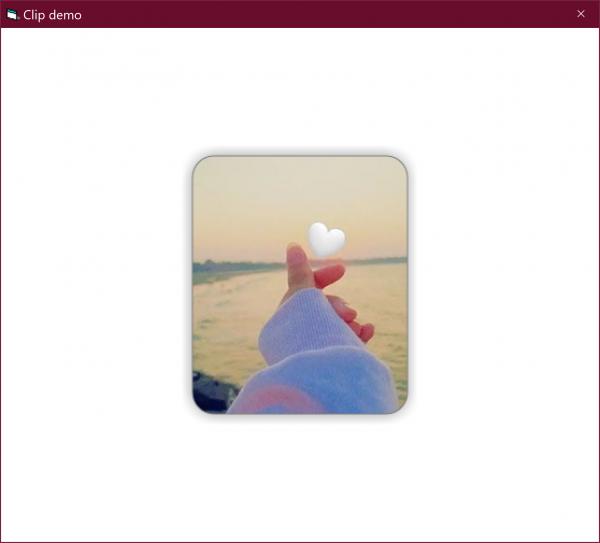
I leave the code in case someone else can use it.
Code:
Option Explicit

Private Declare Sub FillMemory Lib "Kernel32.dll" Alias "RtlFillMemory" (ByRef Destination As Any, ByVal Length As Long, ByVal Fill As Byte)
Private Declare Function GetSysColor Lib "user32.dll" (ByVal nIndex As Long) As Long
Private Const GENERIC_READ As Long = &H80000000

Dim cFactory        As ID2D1Factory
Dim cWICFactory     As WICImagingFactory
Dim cRenderTarget   As ID2D1HwndRenderTarget
Dim cBitmap         As ID2D1Bitmap
Dim cShadowBitmap   As ID2D1Bitmap
Dim Radius          As Single
Dim Rect            As D2D1_RECT_F
Dim RectShadow      As D2D1_RECT_F
Dim ImgWidth        As Long
Dim ImgHeight       As Long
Dim ShadowBlur      As Long
Dim ShadowOpacity   As Single
Dim ShadowColor     As Long


Private Sub Form_Load()
    Dim pLeft As Single
    Dim pTop As Single

    ' // Create a factory
    Set cFactory = D2D1.CreateFactory()

    ' // Create render target
    Set cRenderTarget = cFactory.CreateHwndRenderTarget(D2D1.RenderTargetProperties(D2D1.PixelFormat()), _
                                                        D2D1.HwndRenderTargetProperties(Me.hWnd, D2D1.SizeU()))

    cRenderTarget.Resize D2D1.SizeU(Me.ScaleWidth, Me.ScaleHeight)

    'load image
    Set cBitmap = LoadImageFromFile(cRenderTarget, App.Path & "/image.jpg")

    ImgWidth = cBitmap.GetSize.Width
    ImgHeight = cBitmap.GetSize.Height

    pLeft = Me.ScaleWidth / 2 - ImgWidth / 2
    pTop = Me.ScaleHeight / 2 - ImgHeight / 2

    ShadowBlur = 10
    Radius = 20
    ShadowOpacity = 0.5
    ShadowColor = vbBlack

    Rect = D2D1.RectF(pLeft, pTop, pLeft + ImgWidth, pTop + ImgHeight)
    RectShadow = D2D1.RectF(pLeft - ShadowBlur, pTop - ShadowBlur, pLeft + ImgWidth + ShadowBlur, pTop + ImgHeight + ShadowBlur)

    'Create bitmap shadow
    Set cShadowBitmap = CreateRoundRectShadow(cRenderTarget, ImgWidth, ImgHeight, Radius, ShadowColor, ShadowOpacity, ShadowBlur)

End Sub

Private Function LoadImageFromFile(cTarget As ID2D1HwndRenderTarget, sPath As String) As ID2D1Bitmap
    Dim cDecoder        As IWICBitmapDecoder
    Dim cFrameDecode    As IWICBitmapFrameDecode
    Dim cConverter      As IWICFormatConverter

    Set cWICFactory = New WICImagingFactory
    Set cDecoder = cWICFactory.CreateDecoderFromFilename(sPath, ByVal 0&, GENERIC_READ, WICDecodeMetadataCacheOnLoad)
    Set cFrameDecode = cDecoder.GetFrame(0)
    Set cConverter = cWICFactory.CreateFormatConverter()

    cConverter.Initialize cFrameDecode, GUID_WICPixelFormat32bppPBGRA, WICBitmapDitherTypeNone, Nothing, 0, WICBitmapPaletteTypeMedianCut
    Set LoadImageFromFile = cTarget.CreateBitmapFromWicBitmap(ByVal cConverter, ByVal 0&)

End Function

Private Sub Form_Paint()
    Dim cPath   As ID2D1PathGeometry
    Dim cSink   As ID2D1GeometrySink
    Dim cBrush  As ID2D1SolidColorBrush
    Dim cLayer  As ID2D1Layer


    cRenderTarget.BeginDraw

    'fill background
    cRenderTarget.Clear D2D1.ColorF(D2D1_COLORS.White)

    'Draw Shadow
    cRenderTarget.DrawBitmap cShadowBitmap, RectShadow, , D2D1_BITMAP_INTERPOLATION_MODE_NEAREST_NEIGHBOR, ByVal 0&

    'Create RoundRect Path
    Set cPath = cFactory.CreatePathGeometry

    Set cSink = cPath.Open

    cSink.BeginFigure Rect.Left + Radius, Rect.Top, D2D1_FIGURE_BEGIN_FILLED

    cSink.AddLine Rect.Right - Radius, Rect.Top
    cSink.AddArc D2D1.ArcSegment(D2D1.Point2F(Rect.Right, Rect.Top + Radius), D2D1.SizeF(Radius, Radius), 0, _
                  D2D1_SWEEP_DIRECTION_CLOCKWISE, D2D1_ARC_SIZE_SMALL)
    cSink.AddLine Rect.Right, Rect.bottom - Radius
    cSink.AddArc D2D1.ArcSegment(D2D1.Point2F(Rect.Right - Radius, Rect.bottom), D2D1.SizeF(Radius, Radius), 0, _
                 D2D1_SWEEP_DIRECTION_CLOCKWISE, D2D1_ARC_SIZE_SMALL)
    cSink.AddLine Rect.Left + Radius, Rect.bottom
    cSink.AddArc D2D1.ArcSegment(D2D1.Point2F(Rect.Left, Rect.bottom - Radius), D2D1.SizeF(Radius, Radius), 0, _
                 D2D1_SWEEP_DIRECTION_CLOCKWISE, D2D1_ARC_SIZE_SMALL)
    cSink.AddLine Rect.Left, Rect.Top + Radius
    cSink.AddArc D2D1.ArcSegment(D2D1.Point2F(Rect.Left + Radius, Rect.Top), D2D1.SizeF(Radius, Radius), 0, _
                 D2D1_SWEEP_DIRECTION_CLOCKWISE, D2D1_ARC_SIZE_SMALL)

    cSink.EndFigure D2D1_FIGURE_END_CLOSED

    cSink.Close

    'Clip
    Set cLayer = cRenderTarget.CreateLayer(ByVal 0&)

    cRenderTarget.PushLayer D2D1.LayerParameters(D2D1.RectF_InfiniteRect, cPath, D2D1_ANTIALIAS_MODE_PER_PRIMITIVE, _
                            D2D1.Matrix3x2F_Identity), cLayer

    'Draw Image
    cRenderTarget.DrawBitmap cBitmap, Rect, , D2D1_BITMAP_INTERPOLATION_MODE_NEAREST_NEIGHBOR, ByVal 0&

    cRenderTarget.PopLayer

    'Fill Border
    Set cBrush = cRenderTarget.CreateSolidColorBrush(D2D1.ColorF(D2D1_COLORS.Gray), ByVal 0&)
    cRenderTarget.DrawGeometry cPath, cBrush, 1

    cRenderTarget.EndDraw ByVal 0&, ByVal 0&

End Sub


Private Function CreateRoundRectShadow(cTarget As ID2D1HwndRenderTarget, ShadowWidth As Long, ShadowHeight As Long, _
                            ByVal Radius As Single, ShadowColor As Long, _
                            ByVal Opacity As Single, ByVal blurDepth As Long) As ID2D1Bitmap

    Dim cWICFactory     As WICImagingFactory
    Dim cWicBitmap      As IWICBitmap
    Dim cMemTarget      As ID2D1RenderTarget
    Dim tRTP            As D2D1_RENDER_TARGET_PROPERTIES
    Dim tRBP            As D2D1_BITMAP_PROPERTIES
    Dim cBrush          As ID2D1SolidColorBrush
    Dim tWICRect        As WICRect
    Dim DestRect        As WICRect
    Dim lStride         As Long
    Dim lBuffSize       As Long
    Dim srcBytes()      As Byte
    Dim dBytes()        As Byte
    Dim t2xBlur         As Long
    Dim vTally()        As Long
    Dim R As Long, G As Long, B As Long
    Dim tAlpha As Long, tColumn As Long, tAvg As Long
    Dim initY As Long, initYstop As Long, initYstart As Long
    Dim X As Long, Y As Long

    If cFactory Is Nothing Then Exit Function

    If (ShadowColor And &H80000000) Then ShadowColor = GetSysColor(ShadowColor And &HFF&)

    R = ShadowColor And &HFF
    G = (ShadowColor \ &H100&) And &HFF
    B = (ShadowColor \ &H10000) And &HFF

    Set cWICFactory = New WICImagingFactory

    Set cWicBitmap = cWICFactory.CreateBitmap(ShadowWidth, ShadowHeight, _
                                GUID_WICPixelFormat32bppPBGRA, WICBitmapCacheOnDemand)

    tRTP.PixelFormat.Format = DXGI_FORMAT_B8G8R8A8_UNORM
    tRTP.PixelFormat.alphaMode = D2D1_ALPHA_MODE_PREMULTIPLIED

    Set cMemTarget = cFactory.CreateWicBitmapRenderTarget(cWicBitmap, tRTP)

    Set cBrush = cMemTarget.CreateSolidColorBrush(D2D1.ColorF(ShadowColor, Opacity), ByVal 0&)

    cMemTarget.BeginDraw

    cMemTarget.FillRoundedRectangle D2D1.RoundedRect(D2D1.RectF(0, 0, _
                                ShadowWidth, ShadowHeight), Radius, Radius), cBrush

    cMemTarget.EndDraw ByVal 0&, ByVal 0&

    With tWICRect
        .Width = ShadowWidth
        .Height = ShadowHeight
    End With

    ReDim srcBytes(tWICRect.Width * 4 - 1&, tWICRect.Height - 1&)

    lStride = tWICRect.Width * 4 ' 32bppARGB!!!
    lBuffSize = tWICRect.Height * lStride

    cWicBitmap.CopyPixels tWICRect, lStride, lBuffSize, srcBytes(0, 0)

    t2xBlur = blurDepth * 2
    DestRect.Width = tWICRect.Width + t2xBlur
    DestRect.Height = tWICRect.Height + t2xBlur

    ReDim dBytes(DestRect.Width * 4 - 1&, DestRect.Height - 1&)

    tAvg = (t2xBlur + 1) * (t2xBlur + 1)    ' how many pixels are being blurred

    ReDim vTally(0 To t2xBlur)              ' number of blur columns per pixel

    For Y = 0 To tWICRect.Height + t2xBlur - 1     ' loop thru shadow dib

        FillMemory vTally(0), (t2xBlur + 1) * 4, 0  ' reset column totals

        If Y < t2xBlur Then         ' y does not exist in source
            initYstart = 0          ' use 1st row
        Else
            initYstart = Y - t2xBlur ' start n blur rows above y
        End If
        ' how may source rows can we use for blurring?
        If Y < tWICRect.Height Then initYstop = Y Else initYstop = tWICRect.Height - 1

        tAlpha = 0  ' reset alpha sum
        tColumn = 0    ' reset column counter

        ' the first n columns will all be zero
        ' only the far right blur column has values; tally them
        For initY = initYstart To initYstop
            tAlpha = tAlpha + srcBytes(3, initY)
        Next
        ' assign the right column value
        vTally(t2xBlur) = tAlpha

        For X = 3 To (tWICRect.Width - 2) * 4 - 1 Step 4
            ' loop thru each source pixel's alpha

            ' set shadow alpha using blur average
            dBytes(X, Y) = tAlpha \ tAvg
            ' and set shadow color
            Select Case dBytes(X, Y)
            Case 255
                dBytes(X - 1, Y) = R
                dBytes(X - 2, Y) = G
                dBytes(X - 3, Y) = B
            Case 0
            Case Else
                dBytes(X - 1, Y) = R * dBytes(X, Y) \ 255
                dBytes(X - 2, Y) = G * dBytes(X, Y) \ 255
                dBytes(X - 3, Y) = B * dBytes(X, Y) \ 255
            End Select
            ' remove the furthest left column's alpha sum
            tAlpha = tAlpha - vTally(tColumn)
            ' count the next column of alphas
            vTally(tColumn) = 0&
            For initY = initYstart To initYstop
                vTally(tColumn) = vTally(tColumn) + srcBytes(X + 4, initY)
            Next
            ' add the new column's sum to the overall sum
            tAlpha = tAlpha + vTally(tColumn)
            ' set the next column to be recalculated
            tColumn = (tColumn + 1) Mod (t2xBlur + 1)
        Next

        ' now to finish blurring from right edge of source
        For X = X To (tWICRect.Width + t2xBlur - 1) * 4 - 1 Step 4
            dBytes(X, Y) = tAlpha \ tAvg
            Select Case dBytes(X, Y)
            Case 255
                dBytes(X - 1, Y) = R
                dBytes(X - 2, Y) = G
                dBytes(X - 3, Y) = B
            Case 0
            Case Else
                dBytes(X - 1, Y) = R * dBytes(X, Y) \ 255
                dBytes(X - 2, Y) = G * dBytes(X, Y) \ 255
                dBytes(X - 3, Y) = B * dBytes(X, Y) \ 255
            End Select
            ' remove this column's alpha sum
            tAlpha = tAlpha - vTally(tColumn)
            ' set next column to be removed
            tColumn = (tColumn + 1) Mod (t2xBlur + 1)
        Next
    Next
    tRBP.PixelFormat.Format = DXGI_FORMAT_B8G8R8A8_UNORM
    tRBP.PixelFormat.alphaMode = D2D1_ALPHA_MODE_PREMULTIPLIED

    Set CreateRoundRectShadow = cTarget.CreateBitmap(DestRect.Width, DestRect.Height, ByVal VarPtr(dBytes(0&, 0&)), DestRect.Width * 4, tRBP)

End Function
Last edited by LeandroA; Feb 17th, 2023 at 03:39 PM.
-
Feb 18th, 2023, 03:11 AM
#11
Re: three questions about DirectDraw
Originally Posted by LeandroA
Hello Frank, it's good to see you here, I was looking at your work. D2D1Effects is very, very good, that shadow is very pretty, it has a very real border, now using your class I think I would have a conflict between mixing tlb and non-tlb, I'm not sure if you could combine them. and writing the rest of the functions (DispCallFunc) would take me a long time.
unfortunately oleexp56.tlb and D2DVB.tlb have not yet included D2D1Effects
In any case, I think I was able to find a solution by reviewing your old CreateSvgDocument code. I came across the CreateWicBitmapRenderTarget function and with that I can now obtain the array of bits
Thank you, surely later I will take advantage of D2D1Effects
Hi Leandro. It should definitely be possible to use a mix of TLB and non-TLB (DispCallFunc). Haven't needed that yet. My examples don't use TLBs.  fafalone is in the process of importing missing and newer D2D1 interfaces into the D2DVB.tlb. fafalone is in the process of importing missing and newer D2D1 interfaces into the D2DVB.tlb.
-
Feb 18th, 2023, 05:37 AM
#12
Re: three questions about DirectDraw
The initial pass of that is done; they're all in oleexp. I started by merging D2DVB so those use the same definitions, with the exception MKTYPLIB doesn't support 'optional' so those were removed. I'm probably going to have to go back and change some of those to 'as any' so ByVal 0 can be passed.
 Posting Permissions
- You may not post new threads
- You may not post replies
- You may not post attachments
- You may not edit your posts
-
Forum Rules
|
Click Here to Expand Forum to Full Width
|



 Reply With Quote


