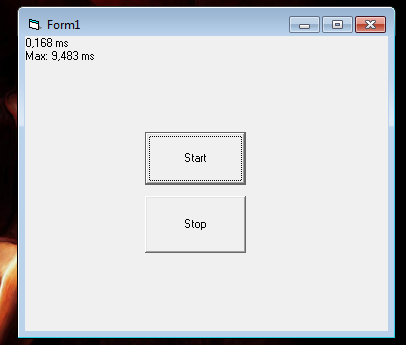
I've got a class setup with QueryPerformanceCounter + QueryPerformanceFrequency and it gives me a very precise timer. Everything is quite nice and fine, however, only issues is, if i do a Right Click or a Drag of a window it seems to be pausing the timer!
I've taken a look at the SelfTimer classes from Merri and The Trick's Timer which are both similar. They both run very smooth without any bottlenecks on drag or right lick menus etc.... and both use SetTimer/KillTimer APIs, but those are not as accurate / fast as QueryPerformanceFrequency.
So the question is, how can i get the accuracy of QueryPerformanceFrequency and the smoothness of the SetTimer approach?
Any Ideas?
Maybe run the class on a separate thread?
Last edited by some1uk03; Jan 6th, 2022 at 12:36 PM.
_____________________________________________________________________
----If this post has helped you. Please take time to Rate it.
----If you've solved your problem, then please mark it as RESOLVED from Thread Tools.
I was going through the SelfTimer everything is setup with LONG's whereas i'm dealing with 0.0013 precisions.
I've changed all LONG's to Currency but that has a major impact on speed. (not as fast as QueryPerformanceCounter).
I'll now try and implement QueryPerformanceCounter in to there.
_____________________________________________________________________
----If this post has helped you. Please take time to Rate it.
----If you've solved your problem, then please mark it as RESOLVED from Thread Tools.
Here's my implementation of a high-precision timer. As can be seen, I use Currency up until the last minute (when a precision timer is requested) and then I use Double. I've used it quite a bit and never had a problem with it.
I do like the idea though of combining it with the timer control (or the SetTimer API call) if we want a high precision timer on regular intervals. I know that the timer control's event will interrupt a form dragging operation, and I believe the SetTimer callback will as well.
Also, I'm not sure the use of Currency should have any major impact on speed. Currency is nothing but a 2's complement 8-byte integer with a decimal point four-from-the-right shoved into it when it's shown to the user. As such, I'd be shocked if Currency addition and subtraction wasn't done in CPU registers (which is faster than the FPU). In that little class I wrote, that final division is done as Doubles though (as VB6 converts Currency to Double for multiplication and division). But the way I've done it, there's no back-and-forth casting.
EDIT: Also, form dragging is weird. I don't believe it's done in the same thread as the application (<--- that's wrong, see next post), but it does (mostly) pause that application's thread. I don't believe the dragging is done in the same thread, or how could it be interrupted, and I certainly don't believe there's any equivalent to DoEvents in a Windows drag operation ... but maybe there is ... it would actually make some sense if there was, a loop in the thread would be paused but events would still be raised.
Last edited by Elroy; Jan 6th, 2022 at 12:41 PM.
Any software I post in these forums written by me is provided "AS IS" without warranty of any kind, expressed or implied, and permission is hereby granted, free of charge and without restriction, to any person obtaining a copy. To all, peace and happiness.
Now I'm convinced that's exactly what's happening ... when dragging a form by its title bar, the message pump is still monitored.
Here's some code I just wrote for a Form1 test (with a Timer1 on the form):
Code:
Option Explicit
Private Declare Sub Sleep Lib "kernel32" (ByVal dwMilliseconds As Long)

Private Sub Form_Load()
    Timer1.Interval = 5000
    Timer1.Enabled = True
End Sub

Private Sub Timer1_Timer()
    Debug.Print "sleeping"
    Sleep 2000
    Debug.Print "awake"
End Sub
You'll notice that you can't drag the form during the Sleep cycle. That suggests it's all in the same thread.
EDIT: Ahhh, and you can't drag a form if/when the application has the thread. Just put a Sleep in Form_Activate to test this. You can't drag the form until that Sleep expires.
Last edited by Elroy; Jan 6th, 2022 at 12:30 PM.
Any software I post in these forums written by me is provided "AS IS" without warranty of any kind, expressed or implied, and permission is hereby granted, free of charge and without restriction, to any person obtaining a copy. To all, peace and happiness.
Ok I'm attaching a short demo of bother classes. Mine vs Merri's.
You'll see the execution speed difference.
Also try and drag the form around and you'll see that Merri's timer continues to execute whilst myTimer pauses.
So I need the execution time of myTimer and it not to pause on form drag.
Last edited by some1uk03; Jan 20th, 2022 at 07:13 PM.
_____________________________________________________________________
----If this post has helped you. Please take time to Rate it.
----If you've solved your problem, then please mark it as RESOLVED from Thread Tools.
You cannot "setup" a timer class by calling DoEvents in a VB6 loop. The freeze while dragging is the least problem you have with your current code.
Both other classes use Set/KillTimer API functions to hook an OS provided TimerProc notification.
If you want to "outsmooth" these you'll need your plan B implemented: "Maybe run the class on a separate thread?" When implemented in a separate thread then a loop and DoEvents/Sleep is ok.
Btw, both API based classes bring nothing better that the builtin Timer control in terms of smoothness with only benefit that because these are implemented in classes they do not need a form to site the Timer control on i.e. classes can be used "headlessly" from other classes which is handy (but ofthen not crucial).
I'm not sure what the final objective is, but even putting it all in a separate thread may not accomplish what you want, Some1uk03. I mean, if you've got to get some perfectly timed events back into your main thread, I'm not sure that'll be possible. Sure, the events will be perfectly timed in the "worker" thread, but the messaging (with some event) to get them back into the main thread will have the same problems you're currently having. IMHO, it's not exactly timers you're struggling with, but rather the inconsistent monitoring of the message pump, and that's going to happen no matter what.
Now, if you do it all in some worker thread, then that might work ... some thread that's headless (with no forms to drag and nothing to stop it). Then, all you'll have to worry about is the consistency of the execution timeslices that Windows gives it to execute.
EDIT: You can partially solve the cpu/core timeslice issue by bumping up the thread priority. I wouldn't bump it up above "Above Normal" or bad things begin to happen, like your mouse not working and other things.
Last edited by Elroy; Jan 7th, 2022 at 11:16 AM.
Any software I post in these forums written by me is provided "AS IS" without warranty of any kind, expressed or implied, and permission is hereby granted, free of charge and without restriction, to any person obtaining a copy. To all, peace and happiness.
Some time ago I experimented with getting an accurate timer. You can only get as accurate as the CPU tick counter will permit, and it is a compromise. If it is set too low, it has a negative effect on other functions.
Option Explicit

Private Declare Sub Sleep Lib "kernel32.dll" (ByVal dwMilliseconds As Long)
Private Declare Function timeBeginPeriod Lib "winmm.dll" (ByVal uPeriod As Long) As Long
Private Declare Function timeEndPeriod Lib "winmm.dll" (ByVal uPeriod As Long) As Long
Private Declare Function QueryPerformanceCounter Lib "kernel32" (lpPerformanceCount As Currency) As Long
Private Declare Function QueryPerformanceFrequency Lib "kernel32" (lpFrequency As Currency) As Long

Private Function TimerEx() As Double
    Dim cFreq As Currency
    Dim cValue As Currency
    QueryPerformanceFrequency cFreq
    QueryPerformanceCounter cValue
    TimerEx = cValue / cFreq
End Function

Private Sub cmdStart_Click()
    Dim Start As Double
    Static Delay As Long
    Dim Result(4) As Long
    Dim N%
    Delay = Delay + CLng(Text2.Text)
    Text1.Text = CStr(Delay) & " ms Delay" & vbCrLf
    timeBeginPeriod 1
    Start = TimerEx
    Sleep Delay
    Result(0) = CLng((TimerEx - Start) * 1000)
    Sleep Delay
    Result(1) = CLng((TimerEx - Start) * 1000)
    Sleep Delay
    Result(2) = CLng((TimerEx - Start) * 1000)
    Sleep Delay
    Result(3) = CLng((TimerEx - Start) * 1000)
    Sleep Delay
    Result(4) = CLng((TimerEx - Start) * 1000)
    timeEndPeriod 1
    For N% = 0 To 4
        Text1.Text = Text1.Text & Result(N%) & vbCrLf
    Next N%
End Sub
I just tried via another method with SubClassing.
Rather than checking for Window messages, that's where i perform the QueryPerformanceCounter checks but in comparison it's just as fast as the SetTimer API. Nothing beats the execution speed of Do/Loop
_____________________________________________________________________
----If this post has helped you. Please take time to Rate it.
----If you've solved your problem, then please mark it as RESOLVED from Thread Tools.
another way is to not use the form controlbox, and instead use a borderless form, where u create your own caption and buttons.
I do that in my projects and the latest game, and theres no worry about freezing up.
and Im using a loop + VerticalBlankEvent, so I have my own timer, following the monitor refresh rate.
so, the loop is controlling everything, mouse, buttons, rendering, caption etc.
that way u have fully control of everything.
and no doevents, I use PeekMessage to control mouse and keyboard, that way I dont need subclassing either.
so its a all-in-one approach with many benefits.
but sure, u need to create everything yourself, from labels to buttons.
Final objective is to have a constant Loop/Feedback/monitoring.
Originally Posted by xiaoyao
QueryPerformanceCounter+doevents
That's the current problem. Doevents causes a pause/hang/freeze on form drag.
-----------
My next test, was to move the class and turn in to an ActiveX.dll which I thought would run in it's own thread, but it looks like nothing has changed. How do we get this to run on it's own thread?
_____________________________________________________________________
----If this post has helped you. Please take time to Rate it.
----If you've solved your problem, then please mark it as RESOLVED from Thread Tools.
Avoiding the built-in dragging-support of the system-rendered Form-Titlebar, is the only solution.
Even running your timing-trigger on a separate thread would not change that -
(not when you expect this thread to also cause "continuous visual updates" on your Main-Thread or Main-Form).
It's easy enough, to define a Form without a Titlebar
(which has your own titlebar-replacement in a PicBox or UserControl).
+ The issue is not just about dragging a form. Any form of interaction causes the same affect. Such a Menu or a button click etc....
Originally Posted by Schmidt
Even running your timing-trigger on a separate thread would not change that -
(not when you expect this thread to also cause "continuous visual updates" on your Main-Thread or Main-Form).
It would change it as Merris or The Tricks timer via SetTimer achieve that already? Their version does not interrupt the callback?
_____________________________________________________________________
----If this post has helped you. Please take time to Rate it.
----If you've solved your problem, then please mark it as RESOLVED from Thread Tools.
those api will not help. u need to create your own form-moving.
as I wrote (as u just ignore it)
you can use peekmessage and create such thing inside a loop.
will not halt/freeze anything.
and buttons/labels are very easy to create.
- PeekMessage
- Use uMsg.Message to get the window message (such as mouseup,down,keys,paint,doubleclick etc)
- u can use uMsg.hWnd to restrict a picturebox, if u want to make it easy for yourself for the titlebar
here is just check if mouse down in the right hwnd, if so, u can store it as "mouse-hold", and if u move the mouse, it will move the entire form, u can use MoveWindow API
here a list of messages (not everything works of course) https://wiki.winehq.org/List_Of_Windows_Messages
First your own form moving code (not the WM_NCLBUTTONDOWN hack everyone and you are using) then you own custom menubar and sub-menus, can’t even imagine what next )
The moment you yield control with DoEvent (it’s calling internally DispatchMessage which is calling other hwnds WndProc routines) this is equivalent to calling into foreign WndProc routines which might in turn spin Do/Loops like yours on their own and never yield back until user release mouse button so during this time your timer stalls.
These foreign WndProc routines do call DoEvent/DispatchMessage though in their modal loop so everything is redrawn correct and WM_TIMER notifications (originating from a worker thread) reach their TimerProc endpoints and that’s why the Set/KillTimer API based implementations continue ticking on menu or form drag.
If you are satisfied with not accurate but very tiny periods you could create a separate thread with an inifinite loop with QPC. Just use PostMessage to post notify to the main thread like that:
Code:
Private Function ThreadProc( _
                 ByRef tSet As tTimerSettings) As Long
    Dim cFreq   As Currency
    Dim cCt1    As Currency
    Dim cCt2    As Currency
    Dim cTicks  As Currency

    QueryPerformanceFrequency cFreq

    cTicks = cFreq * (tSet.lMicroSec / 1000000)

    QueryPerformanceCounter cCt1

    Do

        QueryPerformanceCounter cCt2

        If cCt2 - cCt1 >= cTicks Then

            PostMessage tSet.hWnd, WM_USER, 0, ByVal 0&
            cCt1 = cCt2 + ((cCt2 - cCt1) - cTicks)

        End If

    Loop While tSet.bEnable

End Function
It eats all the CPU time but for example i can maintain tiny (but "dirty" because Windows isn't RTOS) periods like 100 microseconds:
The Trick: Any example project attached with that?
_____________________________________________________________________
----If this post has helped you. Please take time to Rate it.
----If you've solved your problem, then please mark it as RESOLVED from Thread Tools.
Finally had time to get back on this and got it working they way i like, except one thing.
I have a thing against TLB's, & external .dll's so decided to remove the TLB and implement all necessary API's. Also, it's no longer an ActiveX Dll, but within a standard .exe project.
I got it working in IDE by bypassing CreateThread and it all works perfectly fine.
However, when compiled to an .exe, it crashes as soon as it reaches QueryPerformanceFrequency.
I remember reading somewhere that there's issues when calling VBRuntime files in a new thread, however QueryPerformanceFrequency & QueryPerformanceCounter are from kernel32.
Any ideas on that?
Last edited by some1uk03; Jan 23rd, 2022 at 08:43 AM.
_____________________________________________________________________
----If this post has helped you. Please take time to Rate it.
----If you've solved your problem, then please mark it as RESOLVED from Thread Tools.



 Super Precision Timer


 Reply With Quote

 Originally Posted by some1uk03


 )
)