Hello everyone!
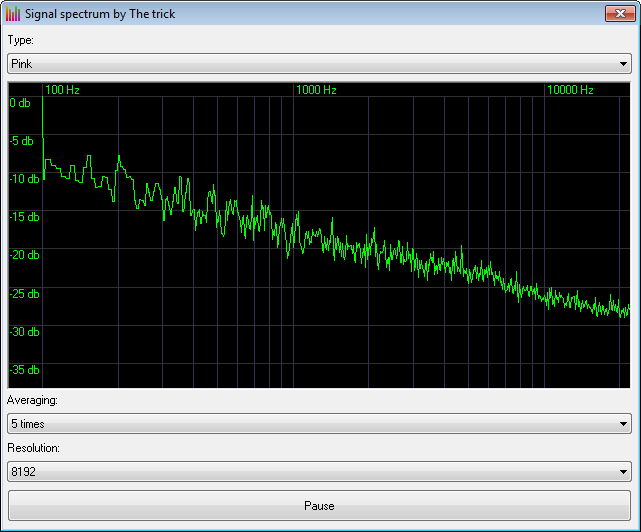
This project contains the sound signals generator with the spectrum visualizer. The list of signals contains the following forms:
White noise;
Pink noise;
Brown/Red noise;
Blue noise;
Violet noise;
Sine modulation by low frequency;
Square wave (odd harmonics with 6db/oct attenuation);
Saw wave (odd/even harmonics with 6db/oct attenuation);
Triangle wave (odd harmonics with 12db/oct attenuation);
Signal with only even harmonics;
Complex FM modulation;
AM modulation.
The spectrum visualizer supports resolutions up to 32768 points and averaging. The discrete complex FFT (Fast Fourier Transform) is used to visualize the spectrum. This procedure is optimized to processing a real signal using the even/odd decomposition in frequency domain which allows to performs the transformation of 2 real signals as single complex signal. The further synthesis of the spectrum is based on shifting in time domain and corresponding frequency domain rotation. The comments in the code describes everything in details.
Hello everyone!
This project contains the sound signals generator with the spectrum visualizer. The list of signals contains the following forms:
White noise;
Pink noise;
Brown/Red noise;
Blue noise;
Violet noise;
Sine modulation by low frequency;
Square wave (odd harmonics with 6db/oct attenuation);
Saw wave (odd/even harmonics with 6db/oct attenuation);
Triangle wave (odd harmonics with 12db/oct attenuation);
Signal with only even harmonics;
Complex FM modulation;
AM modulation.
The spectrum visualizer supports resolutions up to 32768 points and averaging. The discrete complex FFT (Fast Fourier Transform) is used to visualize the spectrum. This procedure is optimized to processing a real signal using the even/odd decomposition in frequency domain which allows to performs the transformation of 2 real signals as single complex signal. The further synthesis of the spectrum is based on shifting in time domain and corresponding frequency domain rotation. The comments in the code describes everything in details.
Best Regards,
The trick.
Dear Trick,
Thankyou for the nice program.
You please tell me how you are able to display graph continuously on the user control of the form without using new thread and the display continues even when I drag the form.
Thankyou for the nice program.
You please tell me how you are able to display graph continuously on the user control of the form without using new thread and the display continues even when I drag the form.
Everything is displayed in the main thread. We get the callback notification from the driver like you could get from a timer control.
Dear Trick,
If we have other processing loops also running in the same main thread we can use doevents in the loops for making the main thread responsive to driver notifications.Here how to make the application not to miss driver notifications.
Suppose we create new threads how to make main thread be responsive to driver notifications without missing them and manage all threads in a responsive way.Please clarify.
Stop hacking each thread with unrelated questions about threading.
This is just a sample for something completely different!
Dear Arnoutdv,
I understand this is a sample related to dsp signals.
I was asking this question so that the same can be used in practical situation where we have GUI displaying
graphs,receiving driver notifications etc simultaneously in different threads in a responsive way without missing
like in audio driver notifications missing some may make audio not understandable since continuity may be lost.
Hello everyone!
This project contains the sound signals generator with the spectrum visualizer. The list of signals contains the following forms:
White noise;
Pink noise;
Brown/Red noise;
Blue noise;
Violet noise;
Sine modulation by low frequency;
Square wave (odd harmonics with 6db/oct attenuation);
Saw wave (odd/even harmonics with 6db/oct attenuation);
Triangle wave (odd harmonics with 12db/oct attenuation);
Signal with only even harmonics;
Complex FM modulation;
AM modulation.
The spectrum visualizer supports resolutions up to 32768 points and averaging. The discrete complex FFT (Fast Fourier Transform) is used to visualize the spectrum. This procedure is optimized to processing a real signal using the even/odd decomposition in frequency domain which allows to performs the transformation of 2 real signals as single complex signal. The further synthesis of the spectrum is based on shifting in time domain and corresponding frequency domain rotation. The comments in the code describes everything in details.
Best Regards,
The trick.
Dear Trick,
When we use waveOutOpen with CALLBACK_THREAD option how can we catch MM_WOM_DONE event in the forms default message loop if we use this option instead of subclassing the form using CALLBACK_WINDOW in waveOutOpen as you did here.
There are other options in waveOutOpen like CALLBACK_FUNCTION,CALLBACK_EVENT etc.Which one is better to use.Please clarify.
regards,
JSVenu
Last edited by jsvenu; Feb 13th, 2020 at 08:13 PM.
When we use waveOutOpen with CALLBACK_THREAD option how can we catch MM_WOM_DONE event in the forms default message loop if we use this option instead of subclassing the form using CALLBACK_WINDOW in waveOutOpen as you did here.
In this case you need to create a Message-Pumping loop to extract the message from the message queue.
There are other options in waveOutOpen like CALLBACK_FUNCTION,CALLBACK_EVENT etc.Which one is better to use.Please clarify.
If you use the CALLBACK_FUNCTION mechanism it's called from a different thread and it requires the thread initialization. You could use my module for this scenario.
If you use the CALLBACK_EVENT mechanism you should test an event (which you specified when open the device). You can use this class for this reason.
If you want to simplify the development of the sound processing you could use the special class which is quite safe to debugging. To simplify code i don't use it here (i don't afraid subclassing ).
Just as default windowproc is not visible you made it accessible thru form window subclassing using setwindowlong and in that windowproc you were catching the MM_WOM_DONE.
I was asking same but with default invisible windows thread message loop by accessing it and in which I can catch the MM_WOM_DONE and proceed as in windowproc when we use waveOutOpen with CALLBACK_THREAD option .
Public Function GetMsgProc(ByVal uCode As Long _
    , ByVal wParam As Long _
    , ByRef lParam As MSG) As Long
    If uCode = 0 Then
        If wParam = PM_REMOVE Then


         Dim tHeader As WAVEHDR
    Dim lIndex  As Long

    Select Case lParam.message
    Case MM_WOM_DONE

        memcpy tHeader, ByVal lParam, Len(tHeader)

        ' // Search for free buffer
        For lIndex = 0 To UBound(m_tBuffer)
            If m_tBuffer(lIndex).tHeader.lpData = tHeader.lpData Then Exit For
        Next

        NeedNewData m_tBuffer(lIndex).bData()

        waveOutWrite m_hWaveOut, m_tBuffer(lIndex).tHeader, Len(m_tBuffer(lIndex).tHeader)

     Case Else
        GetMsgProc = CallNextHookEx(hHook, uCode, wParam, lParam)
    End Select

        End If

End If

End Sub
and use UnhookWindowsHookEx in UninitializeSubclassing as follows:
Code:
Private Sub UninitializeSubclassing()


   If bHooked Then
        UnhookWindowsHookEx hHook
        bHooked = False
    End If

End Sub
so that I can hook to default message loop and use the following code in InitPlayback
Public Function GetMsgProc(ByVal uCode As Long _
    , ByVal wParam As Long _
    , ByRef lParam As MSG) As Long
    If uCode = 0 Then
        If wParam = PM_REMOVE Then


         Dim tHeader As WAVEHDR
    Dim lIndex  As Long

    Select Case lParam.message
    Case MM_WOM_DONE

        memcpy tHeader, ByVal lParam, Len(tHeader)

        ' // Search for free buffer
        For lIndex = 0 To UBound(m_tBuffer)
            If m_tBuffer(lIndex).tHeader.lpData = tHeader.lpData Then Exit For
        Next

        NeedNewData m_tBuffer(lIndex).bData()

        waveOutWrite m_hWaveOut, m_tBuffer(lIndex).tHeader, Len(m_tBuffer(lIndex).tHeader)

     Case Else
        GetMsgProc = CallNextHookEx(hHook, uCode, wParam, lParam)
    End Select

        End If

End If

End Sub
and use UnhookWindowsHookEx in UninitializeSubclassing as follows:
Code:
Private Sub UninitializeSubclassing()


   If bHooked Then
        UnhookWindowsHookEx hHook
        bHooked = False
    End If

End Sub
so that I can hook to default message loop and use the following code in InitPlayback
I am sending the project code using waveOutOpen(m_hWaveOut, WAVE_MAPPER, tFormat, App.ThreadID, 0, CALLBACK_THREAD) as attachment.
When we compile and run the code I am getting the Play button disabled.Please clarify how to make the Play button enabled and make the code work properly.
Actually I am getting compile error when I try to use UDT(MSG struture) as parameter to a class sub.
Can you tell me how to give UDT as parameter to a class sub without using typelibrary.If you can tell me how to do this I think the problem is solved in the above code http://www.vbforums.com/attachment.p...7&d=1581857502 already sent to you.Please clarify.
Actually I am getting compile error when I try to use UDT(MSG struture) as parameter to a class sub.
Can you tell me how to give UDT as parameter to a class sub without using typelibrary.If you can tell me how to do this I think the problem is solved in the above code http://www.vbforums.com/attachment.p...7&d=1581857502 already sent to you.Please clarify.
regards,
JSVenu
Dear Trick,
I got the compile error solved by making the Form function as Friend function.Now the form function is able to take MSG structure as parameter.But when I run the application and click play button one sample is drawn and then it is crashing.When I run in IDE I am getting the following error in msgbox when I click play button after one sample is displayed in usercontrol.
Runtime error 16
Expression too complex
at the following code in usercontrol refresh method:
Code:
  ' // Draw spectrum
    Do While lPixelIndex < UserControl.ScaleWidth - tOffset.fX
I had to click End button in msgbox to exit the application.




 Reply With Quote
 Originally Posted by The trick


 ).
).

