|

-
Jan 6th, 2013, 05:00 PM
#11
Thread Starter
Lively Member

Re: LoadImage issue #2
 Originally Posted by Bonnie West

Whenever you call an API that was declared through the Declare statement, VB immediately calls the GetLastError function afterwards and stores the return value in the Err object's LastDllError property. API functions that do not return a value are not expected to fail, hence they do not set LastDllError. It's possible for VB to internally call an API that fails and thus erases the previous error code. For example, you SetLastError to 0 and then you call VB's MsgBox function ( MessageBox API) which somehow fails. Afterwards, you then call another API (which succeeds) and check Err.LastDllError. The value you'll get may either be 0 (if the API set the last error code on success) or the MsgBox's last error. Therefore, you should call SetLastError just before the API whose LastDllError value you would like to test. Also, LastDllError is usually only inspected when an API function failed.
Thanks for the explaination.
SetLastError and SetLastErrorEx are the official functions for setting the last error code. Dimensioning a String calls one of the String Manipulation Functions which most likely reset the last error code when it succeeded. Interestingly, Err. Clear does seem to reset the last error code. Here are my tests:
Code:
Private Sub Main()
    Debug.Print Err.LastDllError    ' 0
    SetLastError 100&
    Debug.Print Err.LastDllError    ' 100
    Err.Clear
    Debug.Print GetLastError        ' 0
    Debug.Print Err.LastDllError    ' 0
End Sub
I tried your code and I can confirm: Err.Clear does delete the 100, Debug.Print Err.LastDllError does not.
But now compare with my screen shots (it shows always the first message box):
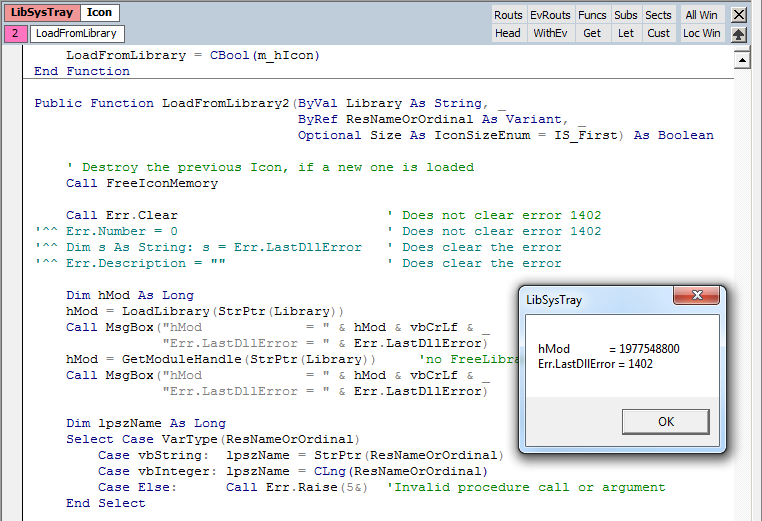

Very strange! Another thing, which is not explainable on first sight... ;(
Maybe the behavoir depends on the error code. 
But it might answer my question, if it is save to use such a line instead of SetLastError.
SetLastError and GetLastError were defined in a Type Library so as to directly call them and prevent VB from calling GetLastError again. But even if they were declared by the Declare statement, the results were still the same.
Do I have to add this Type Library additionally? - I had to declare SetLastError.
In my system, Resource Hacker confirms that shell32.dll has an icon resource with ID 300. It looks almost the same as in your screenshot.
Sorry, my bad! - Icon #130 was the one, which does not exist. I thought it was 300 and was wondering, why it could be loaded this time, even that there was no big change in the code. 
Well, sometimes it's useful to have different images for different locales.
Ok, I am convinced: flag icons for instance.  - Will LoadImage automatically load the right icon, or have all icons of an icon group the same local setting always? - Will LoadImage automatically load the right icon, or have all icons of an icon group the same local setting always?
Ok, now I have almost everything:
- The first icon load problem occured because of a wrong LR_SHARED declaration.
- The second icon load problem was actually none: I mixed #300 with #130...
Actually all no big deals. But there was a lot new information for me from you. So thanks again!
There is just ome more question:
It does not make sence to call both: LoadLibrary and GetModuleHandle.
I suppose GetModuleHandle does only work for system libraries, which are loaded already - but the function has no clue, from what kind of libraries the user wants to extract icons.
I do also suppose, that calling LoadLibrary is quite more costly than to call GetModuleHandle.
=> Therefore I would call GetModuleHandle first - and try it with LoadLibrary, if GetModuleHandle fails. Then free the library again in case it got loaded before exit.
Would you agree with this?
 Posting Permissions
- You may not post new threads
- You may not post replies
- You may not post attachments
- You may not edit your posts
-
Forum Rules
|
Click Here to Expand Forum to Full Width
|



 Reply With Quote