|

-
Jan 3rd, 2013, 06:48 AM
#1
Thread Starter
Lively Member

-
Jan 3rd, 2013, 11:35 AM
#2
Re: LoadImage issue
In my XP system, your code works as expected. I see the icon that's missing from your screenshot whether I run from the IDE or compiled. You might want to try this modification to your LoadFromResource routine.
Code:
Public Function LoadFromResource(ByRef ResName As Variant) As Boolean
   'Resource file has to be added to this library project!
   'pic has to be static, to not be destroyed if the routine quits
    Static Pic As StdPicture
    Dim lpszName As Long

   'The icon will be destroyed if you load a new one or if the class is terminated
    Call FreeIconMemory

    If App.LogMode Then
        Select Case VarType(ResName)
            Case vbString:  lpszName = StrPtr(ResName)
            Case vbInteger: lpszName = CLng(ResName)
            Case Else:      Err.Raise 5& 'Invalid procedure call or argument
        End Select

        m_hIcon = LoadImage(App.hInstance, lpszName, IMAGE_ICON, 32&, 32&, LR_SHARED)
    Else
        On Error Resume Next
        Set Pic = LoadResPicture(ResName, vbResIcon)
        On Error GoTo 0

        If Pic Is Nothing Then m_hIcon = 0& Else m_hIcon = Pic.Handle
    End If

    LoadFromResource = m_hIcon <> 0&
End Function
According to MSDN, the MAKEINTRESOURCE macro returns the specified value in the low-order word and zero in the high-order word. Although it returns a C/C++ string, it is technically not the same as a VB string (LPTSTR vs BSTR). However, both data types are really just pointers to the real strings. Since 32-bit pointers are of the same size as a Long data type, what MAKEINTRESOURCE(intResID) return is the same as MAKELONG(intResID, 0), which can be further simplified as just intResID. A positive Integer coerced to a Long will contain 0 in the high word.
LoadIcon is an older and simpler API than LoadImage. LoadIconMetric, on the other hand, is not available on systems earlier than Vista. LoadImage is the most versatile of the three and is the one recommended by Microsoft.
Last edited by Bonnie West; Jan 3rd, 2013 at 11:47 AM.
On Local Error Resume Next: If Not Empty Is Nothing Then Do While Null: ReDim i(True To False) As Currency: Loop: Else Debug.Assert CCur(CLng(CInt(CBool(False Imp True Xor False Eqv True)))): Stop: On Local Error GoTo 0
Declare Sub CrashVB Lib "msvbvm60" (Optional DontPassMe As Any)
-
Jan 3rd, 2013, 05:14 PM
#3
Thread Starter
Lively Member
Re: LoadImage issue
 Originally Posted by Bonnie West

In my XP system, your code works as expected.
Interesting. It seems, that on Win7 the 16x16 pixel icon cannot be loaded in this particular project, if the LR_SHARED flag is used.
I see the icon that's missing from your screenshot whether I run from the IDE or compiled.
Running it from the IDE does show the icon, because in this case the VB-LoadResPicture function is used.
You might want to try this modification to your LoadFromResource routine.
Code:
Public Function LoadFromResource(ByRef ResName As Variant) As Boolean
   'Resource file has to be added to this library project!
   'pic has to be static, to not be destroyed if the routine quits
    Static Pic As StdPicture
    Dim lpszName As Long

   'The icon will be destroyed if you load a new one or if the class is terminated
    Call FreeIconMemory

    If App.LogMode Then
        Select Case VarType(ResName)
            Case vbString:  lpszName = StrPtr(ResName)
            Case vbInteger: lpszName = CLng(ResName)
            Case Else:      Err.Raise 5& 'Invalid procedure call or argument
        End Select

        m_hIcon = LoadImage(App.hInstance, lpszName, IMAGE_ICON, 32&, 32&, LR_SHARED)
    Else
        On Error Resume Next
        Set Pic = LoadResPicture(ResName, vbResIcon)
        On Error GoTo 0

        If Pic Is Nothing Then m_hIcon = 0& Else m_hIcon = Pic.Handle
    End If

    LoadFromResource = m_hIcon <> 0&
End Function
Yes, I was thinking about this. Normally I don't like Variant arguments, since the user has no information about what parameter types are allowed.
But in this particular case, your suggestion would probably preferable.
According to MSDN, the MAKEINTRESOURCE macro returns the specified value in the low-order word and zero in the high-order word. Although it returns a C/C++ string, it is technically not the same as a VB string (LPTSTR vs BSTR). However, both data types are really just pointers to the real strings. Since 32-bit pointers are of the same size as a Long data type, what MAKEINTRESOURCE(intResID) return is the same as MAKELONG(intResID, 0), which can be further simplified as just intResID. A positive Integer coerced to a Long will contain 0 in the high word.
I wanted to stay close the the MSDN recommendation. I copied the makro from somewhere else and did not fully understand its function:
Code:
'—— Makro ———————————————————————————————————————————————————————————————————————
Private Function LOWORD(ByVal dwValue As Long) As Long
    Call CopyMemory(LOWORD, dwValue, 2)
End Function

Private Function MAKELONG(ByVal wLow As Long, ByVal wHi As Long) As Long
    If (wHi And &H8000&) Then
        MAKELONG = (((wHi And &H7FFF&) * 65536) Or (wLow And &HFFFF&)) Or &H80000000
    Else
        MAKELONG = LOWORD(wLow) Or (&H10000 * LOWORD(wHi))
    End If
End Function

Private Function MAKEINTRESOURCE(ByVal lID As Long) As String
    MAKEINTRESOURCE = "#" & CStr(MAKELONG(lID, 0))
End Function
'————————————————————————————————————————————————————————————————————————————————
Maybe it is giving some security, if the user is passing a value exeeding the range of an Integer type...
But the makro is also adding a pound sign, so your code should not work. - Did you test it?
EDIT:
Yes, your code is working. - But I don't understand why, since the MSDN is telling:
If IS_INTRESOURCE(lpszName) is TRUE, then lpszName specifies the integer identifier of the given resource. Otherwise, it is a pointer to a null- terminated string. If the first character of the string is a pound sign (#), then the remaining characters represent a decimal number that specifies the integer identifier of the resource. For example, the string "#258" represents the identifier 258.
LoadIcon is an older and simpler API than LoadImage. LoadIconMetric, on the other hand, is not available on systems earlier than Vista. LoadImage is the most versatile of the three and is the one recommended by Microsoft.
Ok, thanks. I agree with you.
Since my class is loading the SM_CXSMICON sized icon if a size of -1 and the SM_CXICON if a size of 0 got specified, it also has the advantages of LoadIconMetric.
Do you think, that there might be the need for loading non-square icons - my class is currently not able to load a 15x16 pixel icon for instance.
Btw: what is the LoadImage API doing, if a requested size is not available?
Last edited by NeedHelp!; Jan 3rd, 2013 at 05:38 PM.
-
Jan 4th, 2013, 02:46 AM
#4
Re: LoadImage issue
Originally Posted by NeedHelp!
It seems, that on Win7 the 16x16 pixel icon cannot be loaded in this particular project, if the LR_SHARED flag is used.
I don't think that flag is the culprit. It may be something else.
Originally Posted by NeedHelp!
Normally I don't like Variant arguments, since the user has no information about what parameter types are allowed.
It was meant to provide a syntax similar to LoadResPicture, so the programmer is probably already aware of what to pass.
Originally Posted by NeedHelp!
I wanted to stay close the the MSDN recommendation. I copied the makro from somewhere else and did not fully understand its function:
MAKEINTRESOURCE is defined in Winuser.h as:
Code:
#define MAKEINTRESOURCEA(i) ((LPSTR)((ULONG_PTR)((WORD)(i))))
#define MAKEINTRESOURCEW(i) ((LPWSTR)((ULONG_PTR)((WORD)(i))))
I'm not well-versed with C/C++, but I think that what that macro does is cast the Integer (Word in C/C++) i to a Long (ULONG_PTR) and then cast it again to a C/C++ string (LPSTR/LPWSTR). So, essentially, MAKEINTRESOURCE takes an Integer and puts it in the low word of a Long.
Originally Posted by NeedHelp!
... But I don't understand why, since the MSDN is telling:
If IS_INTRESOURCE(lpszName) is TRUE, then lpszName specifies the integer identifier of the given resource. Otherwise, it is a pointer to a null-terminated string. If the first character of the string is a pound sign (#), then the remaining characters represent a decimal number that specifies the integer identifier of the resource. For example, the string "#258" represents the identifier 258.
Code:
#define IS_INTRESOURCE(_r) ((((ULONG_PTR)(_r)) >> 16) == 0)
IS_INTRESOURCE examines the high word of the pointer variable to see if it is 0. I think pointer values usually start at &H10000. So, if the passed pointer value doesn't have any of its high word bits set, then it is assumed to be an integer identifier for a resource.
You've probably overlooked "Otherwise, it is a pointer to a null-terminated string. If the first character of the string is a pound sign (#), ..."
The lpszName parameter accepts two kinds of input. First, as its prefix implies, it accepts a pointer to a string. That string may either be the name of an image resource or a filename. Second, lpszName also accepts either the image ordinal or an OEM image (both are Integer/Word). MSDN specified that the MAKEINTRESOURCE macro should be used to convert the passed Integer value to the data type of the lpszName argument (which is a pointer). MAKEINTRESOURCE takes an Integer but it does not turn that into a pointer to a string. Rather, it places the Integer in the low word of the pointer value output.
Thus, the best way of declaring the LoadImage API in VB is by using the Unicode version. You'll get the flexibility of accepting either a String or Integer. Also, you won't need the MAKEINTRESOURCE macro anymore, as I've demonstrated in post #2.
Originally Posted by NeedHelp!
Do you think, that there might be the need for loading non-square icons - my class is currently not able to load a 15x16 pixel icon for instance.
If you get it to work properly, then why not?
Originally Posted by NeedHelp!
Btw: what is the LoadImage API doing, if a requested size is not available?
Testing showed that it scaled the image.
On Local Error Resume Next: If Not Empty Is Nothing Then Do While Null: ReDim i(True To False) As Currency: Loop: Else Debug.Assert CCur(CLng(CInt(CBool(False Imp True Xor False Eqv True)))): Stop: On Local Error GoTo 0
Declare Sub CrashVB Lib "msvbvm60" (Optional DontPassMe As Any)
-
Jan 4th, 2013, 01:38 PM
#5
Thread Starter
Lively Member
Re: LoadImage issue
Originally Posted by Bonnie West
I don't think that flag is the culprit. It may be something else.
But in fact it was the evildoer:
The example project used following LR_SHARED definition:
Code:
Private Const LR_SHARED As Long = &H8000&
And the ApiViewer gave me this LR_SHARED definition (without the ampersand at the end):
Code:
Private Const LR_SHARED As Long = &H8000
Thankfully, I got the new VBFusion addin today, which did call attention to this problem by providing following code alert:
Attachment 94841

It was meant to provide a syntax similar to LoadResPicture, so the programmer is probably already aware of what to pass.
Sure, but with a Variant we can get a runtime error, which we would get at compile time, if we use the actual needed type - I think this is preferable.
But here the Variant type is needed, because we could have a INT-resource 101 and a non-INT-resource named "101" at the same time for instance.
With using a String as parameter type, we can load only one of these two resources - with a Variant its no problem.
IS_INTRESOURCE examines the high word of the pointer variable to see if it is 0. I think pointer values usually start at &H10000. So, if the passed pointer value doesn't have any of its high word bits set, then it is assumed to be an integer identifier for a resource.
You've probably overlooked "Otherwise, it is a pointer to a null-terminated string. If the first character of the string is a pound sign (#), ..."
The lpszName parameter accepts two kinds of input. First, as its prefix implies, it accepts a pointer to a string. That string may either be the name of an image resource or a filename. Second, lpszName also accepts either the image ordinal or an OEM image (both are Integer/Word). MSDN specified that the MAKEINTRESOURCE macro should be used to convert the passed Integer value to the data type of the lpszName argument (which is a pointer). MAKEINTRESOURCE takes an Integer but it does not turn that into a pointer to a string. Rather, it places the Integer in the low word of the pointer value output.
Thus, the best way of declaring the LoadImage API in VB is by using the Unicode version. You'll get the flexibility of accepting either a String or Integer. Also, you won't need the MAKEINTRESOURCE macro anymore, as I've demonstrated in post #2.
So LoadImage lpszName parameter can can be:
1.) a pointer to a null-terminated string, containing the resource file path,
2.) a pointer to a null-terminated string, containing the resource name,
3.) a pointer to a null-terminated string, containing the resource ordinal with prefixed pound sign and
4.) a Long value with the resources ordinal in the low word
=> Basically two methods for passing the ordinal information. Correct?
If you get it to work properly, then why not?
Getting it to work should not be the problem, but we need another size parameter for this, which makes the whole thing not so clear for the user, because with the current size parameter it is possiible to give following information instead of the acutal icon size (changed it recently):
IS_First = 0 -> loads the first icon, independently from its size (used this as default)
IS_Small = -1 -> loads the icon with system small size (usuallly 16x16)
IS_Large = -2 -> loads the icon with system large size (usually 32x32)
If we have a second such parameter, we can get in conflict:
Code:
Ico.LoadFromResource("Icon_0", IS_First, IS_Large)
=> What icon to load here? - The first or the system large icon?
Ok, an error can be raised in this situation, but I thought, I can simplify it with just one parameter, since I never saw a non-square icon in practice.
I was wondering, if you know a case, where a non-square icon got used.
Testing showed that it scaled the image.
Yes, but I couldn't see, if the function takes
- the largest icon and scales it down
- the next larger icon and scales it down
- the most similar sized icon and scales it up or down
- the last/first icon and scales it up/down
- or a random icon and scales it up/down 
In most cases the difference would probably not very visible, but the various icons of an icon set can have completely different images, which makes this information interesting.
To check this, I have to create a special icon set with different icons - so I am asking first. (But from your last answer I see, that you have to test it too.)
PS:
How do you make the VB code format using the typical colors?
-
Jan 4th, 2013, 04:49 PM
#6
Re: LoadImage issue
Originally Posted by NeedHelp!
And the ApiViewer gave me this LR_SHARED definition (without the ampersand at the end):
For all values from &H8000 to &HFFFF, the literal must be closed off with the type-declaration character for Long (& ampersand) to explicitly type it as such, lest it will be treated as a negative Integer.
Originally Posted by NeedHelp!
Sure, but with a Variant we can get a runtime error, which we would get at compile time, if we use the actual needed type
Using a data type other than a Variant doesn't mean you're safe from implicit type conversion. Consider this:
Code:
Private Sub Form_Load()
    Call Routine("101", 101%)
End Sub

Private Sub Routine(ByVal nParam As Integer, ByRef sParam As String)
    Stop: End      'Add both Param arguments to the Watch Window
End Sub            'Note their values and types
Originally Posted by NeedHelp!
Basically two methods for passing the ordinal information. Correct?
Correct!
Originally Posted by NeedHelp!
... since I never saw a non-square icon in practice.
Me neither.
On Local Error Resume Next: If Not Empty Is Nothing Then Do While Null: ReDim i(True To False) As Currency: Loop: Else Debug.Assert CCur(CLng(CInt(CBool(False Imp True Xor False Eqv True)))): Stop: On Local Error GoTo 0
Declare Sub CrashVB Lib "msvbvm60" (Optional DontPassMe As Any)
-
Jan 5th, 2013, 06:06 AM
#7
Thread Starter
Lively Member
LoadImage issue #2
Originally Posted by Bonnie West
For all values from &H8000 to &HFFFF, the literal must be closed off with the type-declaration character for Long (& ampersand) to explicitly type it as such, lest it will be treated as a negative Integer.
Yes, normally I do add the ampersand to all hex values to ensure, that it is not a negative Integer.
But I used the ApiViewer to generate the LR_SHARED declaration and just pasted it without any change...
Using a data type other than a Variant doesn't mean you're safe from implicit type conversion.
That is true - but at least I can see the needed type by pressing Ctrl+i.
Unfortunatelly I have another issue regarding LoadImage:
In both projects (linked in my first post), the code is using the API ExtractIconEx to get an icon from an EXE or DLL file:
Code:
Public Function LoadFromLibrary(ByVal Library As String, ByVal lIconIndex As Long) As Boolean
    Call FreeIconMemory
    Call ExtractIconEx(StrPtr(Library), lIconIndex, m_hIcon, ByVal 0&, 1)
    LoadFromLibrary = CBool(m_hIcon)
End Function
But with this API we can get either the system large or system small icon only.
And we cannot use a resource name or ordinal to retrive the right icon - we have to use the index instead.
Additionally this API is not capable to load bitmap resources like LoadImage.
Therefore I wanted to apply LoadImage here too. - But following code is not working:
Code:
Public Function LoadFromLibrary2(ByVal Library As String, _
                                 ByRef ResNameOrOrdinal As Variant, _
                                 Optional Size As IconSizeEnum = IS_First) As Boolean

    ' Destroy the previous Icon, if a new one is loaded
    Call FreeIconMemory

    Dim hMod As Long
    hMod = LoadLibrary(StrPtr(Library))
    Call MsgBox("hMod             = " & hMod & vbCrLf & _
                "Err.LastDllError = " & Err.LastDllError)
    hMod = GetModuleHandle(StrPtr(Library))     'no FreeLibrary!
    Call MsgBox("hMod             = " & hMod & vbCrLf & _
                "Err.LastDllError = " & Err.LastDllError)

    Dim lpszName As Long
    Select Case VarType(ResNameOrOrdinal)
        Case vbString:  lpszName = StrPtr(ResNameOrOrdinal)
        Case vbInteger: lpszName = CLng(ResNameOrOrdinal)
        Case Else:      Call Err.Raise(5&)  'Invalid procedure call or argument
    End Select

    Dim tSize As Size
    tSize = GetSize(Size)

    ' Do not use LR_SHARED for images that have non-standard sizes,
    ' that may change after loading, or that are loaded from a file.
    m_hIcon = LoadImage(hMod, _
                        lpszName, _
                        IMAGE_ICON, _
                        tSize.cx, _
                        tSize.cy, _
                        LR_DEFAULTCOLOR)

    Call MsgBox("m_hIcon          = " & m_hIcon & vbCrLf & _
                "Err.LastDllError = " & Err.LastDllError)

    Call FreeLibrary(hMod)

    LoadFromLibrary2 = CBool(m_hIcon)
End Function
I tried it with GetModuleHandle, like recommended in the MSDN article to LoadImage and with LoadLibrary, in case the module has not been loaded yet.
Both APIs return the same handle, but the first call to one of them (it doesn't matter if GetModuleHandle or LoadLibrary is called first) does also show a dll error: 1402
The LoadImage API then returns 0 and gives the dll error 1813. (I tried it with "shell32.dll" for Library and the value 130 for ResNameOrOrdinal)
Maybe there is no icon with ordinal 130... How can I check, which icons are in there?
With ResHacker I am just seeing lots of folders under "Icon" with a number as name containing an icon with the name "1033".
Under "Icon Group" I can find some ordinal information, but I still see the above mentiond result, if I use them.
I don't see my mistake - I did everything like stated in the MSDN article (at least I think so)...
Can you please help me here too?
Last edited by NeedHelp!; Jan 5th, 2013 at 06:10 AM.
-
Jan 5th, 2013, 12:55 PM
#8
Re: LoadImage issue #2
Originally Posted by NeedHelp!
And we cannot use a resource name or ordinal to retrive the right icon - we have to use the index instead.
nIconIndex [in]
Type: int
. . .
If this value is a negative number and either phiconLarge or phiconSmall is not NULL, the function begins by extracting the icon whose resource identifier is equal to the absolute value of nIconIndex. For example, use -3 to extract the icon whose resource identifier is 3.
Originally Posted by NeedHelp!
Therefore I wanted to apply LoadImage here too. - But following code is not working:
The following alterations worked for me (not too different from yours, really):
Code:
Private Declare Function FormatMessage Lib "kernel32.dll" Alias "FormatMessageW" (ByVal dwFlags As Long, ByVal lpSource As Long, ByVal dwMessageId As Long, ByVal dwLanguageId As Long, ByVal lpBuffer As Long, ByVal nSize As Long, Optional ByVal Arguments As Long) As Long
Private Declare Sub SetLastError Lib "kernel32.dll" (ByVal dwErrCode As Long)

Public Function LoadFromLibrary2(ByRef Library As String, _
                                 ByRef ResNameOrOrdinal As Variant, _
                        Optional ByVal Size As IconSizeEnum = IS_First) As Boolean
   'Always pass Strings ByRef, unless intentionally modifying them. Passing ByVal
   'makes a copy, slowing down code. Variants are more efficiently passed ByRef too.
   'For most other data types (Byte, Integer, Long, Single, etc.), ByVal is always faster.

   'Local variables are still allocated whether they were used or not
   'Might as well declare them all in one place
    Dim hLib As Long, hMod As Long, lpszName As Long, tSize As Size

    Call FreeIconMemory    'Destroy the previous Icon, if a new one is loaded

    Call SetLastError(0&)  'Reset LastDllError to avoid retrieving previous error code
    hLib = LoadLibrary(StrPtr(Library))
    MsgBox """" & GetErrorMsg(Err.LastDllError) & """", vbInformation, "hLib = &H" & Hex$(hLib)

    Call SetLastError(0&)  'SetLastError used only for debugging; may be removed if desired
    hMod = GetModuleHandle(StrPtr(Library))     'Don't FreeLibrary!
    MsgBox """" & GetErrorMsg(Err.LastDllError) & """", vbInformation, "hMod = &H" & Hex$(hMod)

    Select Case VarType(ResNameOrOrdinal)
        Case vbString:  lpszName = StrPtr(ResNameOrOrdinal)
        Case vbInteger: lpszName = CLng(ResNameOrOrdinal)
        Case Else:      FreeLibrary hLib    'Free the module first
                        Call Err.Raise(5&)  'Invalid procedure call or argument
    End Select

    tSize = GetSize(Size)

   'Some API's don't reset LastDllError upon success
    Call SetLastError(0&)
   'Do not use LR_SHARED for images that have non-standard sizes,
   'that may change after loading, or that are loaded from a file.
    m_hIcon = LoadImage(hMod, lpszName, IMAGE_ICON, tSize.cx, tSize.cy, LR_DEFAULTCOLOR)
    MsgBox """" & GetErrorMsg(Err.LastDllError) & """", vbInformation, "m_hIcon = &H" & Hex$(m_hIcon)

    hLib = FreeLibrary(hLib): Debug.Assert hLib 'If code stops here, the Library wasn't freed

    LoadFromLibrary2 = m_hIcon <> 0&     'An inline expression is faster than a function call
End Function

Private Function GetErrorMsg(ByVal ErrNum As Long) As String
    Const FORMAT_MESSAGE_FROM_SYSTEM = &H1000&, MAX_BUFFER = &H10000

    GetErrorMsg = Space$(MAX_BUFFER - 1&)
    GetErrorMsg = Left$(GetErrorMsg, FormatMessage(FORMAT_MESSAGE_FROM_SYSTEM, _
                  0&, ErrNum, 0&, StrPtr(GetErrorMsg), MAX_BUFFER) - 2&)
End Function
Code:
Private Sub Form_Load()

    . . .

    With New Icon
        .LoadFromLibrary2 "shell32.dll", 167, SIZE_Large
        .DrawIcon hDC, ScaleX(Width, ScaleMode, vbPixels) - (.Width * 1.5!)
    End With
End Sub
Originally Posted by NeedHelp!
I tried it with GetModuleHandle, like recommended in the MSDN article to LoadImage and with LoadLibrary, in case the module has not been loaded yet.
Both APIs return the same handle, but the first call to one of them (it doesn't matter if GetModuleHandle or LoadLibrary is called first) does also show a dll error: 1402
The LoadImage API then returns 0 and gives the dll error 1813. (I tried it with "shell32.dll" for Library and the value 130 for ResNameOrOrdinal)
Reset the LastDllError (with SetLastError) prior to calling the desired API to make sure the error you're getting was set by it.
Originally Posted by NeedHelp!
Maybe there is no icon with ordinal 130...
Indeed, there is no such icon resource in shell32.dll.
Originally Posted by NeedHelp!
How can I check, which icons are in there?
With ResHacker I am just seeing lots of folders under "Icon" with a number as name containing an icon with the name "1033".
Under "Icon Group" I can find some ordinal information, but I still see the above mentiond result, if I use them.
Icon ordinals and names are listed under Icon Group. I believe 1033 is the English (US) language ID. Try Resource Hacker FX instead (unfortunately, the original site isn't available anymore). Scan the exe first on VirusTotal.
Last edited by Bonnie West; Jan 5th, 2013 at 01:16 PM.
On Local Error Resume Next: If Not Empty Is Nothing Then Do While Null: ReDim i(True To False) As Currency: Loop: Else Debug.Assert CCur(CLng(CInt(CBool(False Imp True Xor False Eqv True)))): Stop: On Local Error GoTo 0
Declare Sub CrashVB Lib "msvbvm60" (Optional DontPassMe As Any)
-
Jan 6th, 2013, 04:59 AM
#9
Thread Starter
Lively Member
Re: LoadImage issue #2
Originally Posted by Bonnie West
The following alterations worked for me (not too different from yours, really):
Yes, with ordinal 167 also my code works.  - But thank you for your exploratory additions. They are very helpful. - But thank you for your exploratory additions. They are very helpful. 
Code:
Private Sub Form_Load()

    . . .

    With New Icon
        .LoadFromLibrary2 "shell32.dll", 167, SIZE_Large
        .DrawIcon hDC, ScaleX(Width, ScaleMode, vbPixels) - (.Width * 1.5!)
    End With
End Sub
Here I would set the ScaleMode of the Form to pixels and use its ScaleWidth property instead:
Code:
    With New Icon
        Call .LoadFromLibrary2("shell32.dll", 167, IS_Large)
        Call .DrawIcon(Me.hDC, Me.ScaleWidth - .Width)
    End With
Reset the LastDllError (with SetLastError) prior to calling the desired API to make sure the error you're getting was set by it.
Ok, this is an important information.
Someone told me, to use Err.LastDllError instead of the API GetLastError in VB6, because the VB runtime is calling APIs itself, which may influence the error code returned form GetLastError.
Maybe its not very likely, but this would also mean, that after setting the error code to zero with Call SetLastError(0&), the VB runtime can create another error by calling an API before I do call my desired API from VB6. Or is this impossible, if I call SetLastError directly before my API call?
Anyway... if I use Err.LastDllError, it would be nice to clear the dll error without APIs too. Unfortunatelly Err.Clear is not doing the job - these are my reproducable results from my tests:
Code:
    Call Err.Clear                          ' Does not clear error 1402
    Err.Number = 0                          ' Does not clear error 1402
    Dim s As String: s = Err.LastDllError   ' Does clear the error
    Err.Description = ""                    ' Does clear the error
But is it safe to do this?
Indeed, there is no such icon resource in shell32.dll.
Ok, this explains the result of my code. But not following screen shots:
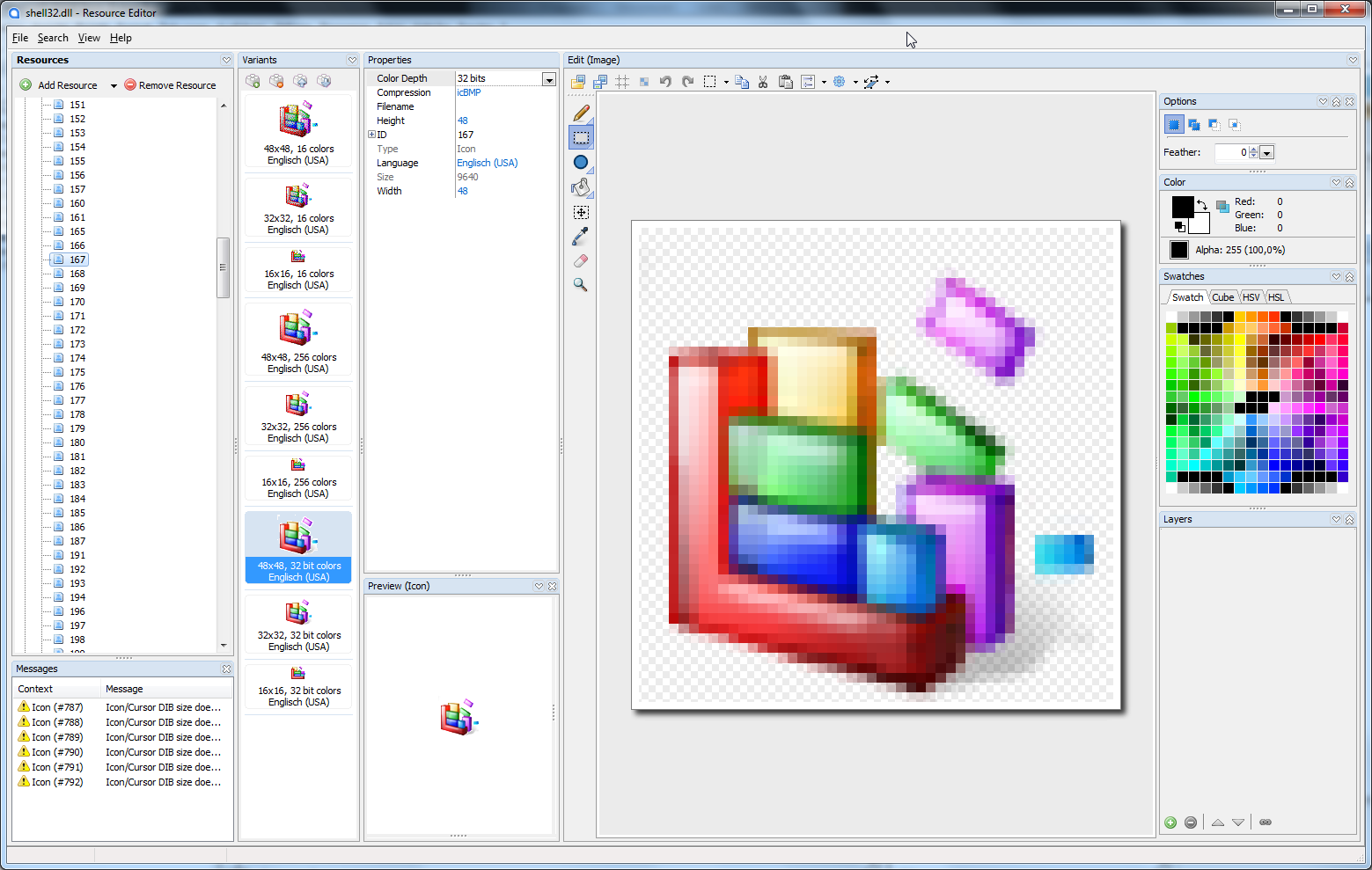
Here we see the working icon with identifier 167, but the tool does also show a resource for ID 300:
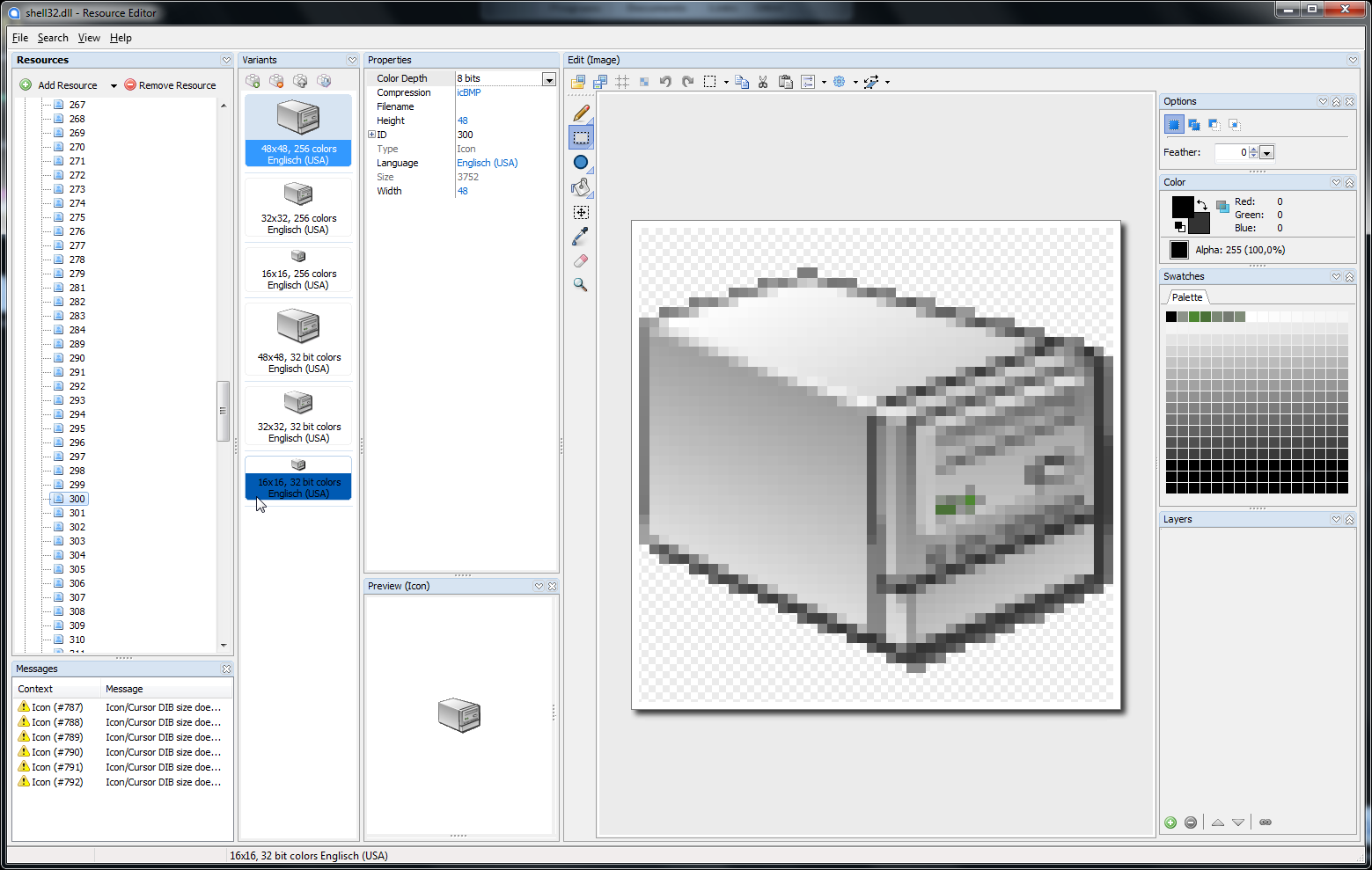
I don't understand this... Do you know the reason for this?
Icon ordinals and names are listed under Icon Group.
What is the difference between Icon and Icon Group?
Resource Hacker does show both, XN Resource Editor just Icon Group and Melanders Resource Editor Icon only.
Does this mean, that only Resource Hacker is showing all icons? - Or can both icon types be shown under one category too?
I am wondering this, because the MSDN is speaking about icon group too: "If the file is an executable file or DLL, the return value is the number of RT_GROUP_ICON resources."
I believe 1033 is the English (US) language ID.
Yes, I saw "English (USA)" mentioned for these icons in the Resoure Editor
But how can an icon be connected to a language? - They are to small to show text...
Resource Hacker FX is just a patcher for Resource Hacker v3.5.2 beta. But on the Resource Hacker site we can get version 3.6.0 only, to which the patcher is not compatible.
It also says, that Resource Hacker will not be continued or made open source. Instead it suggests to use either the open source XN Resource Editor (which fails to downlaod on that site), or Melanders Resource Editor. Since XN Resource Editor does also show the icons in folders, I choose Melander Resource Editor. It does even not need to be installed: just run the executable. It crashed directly after the very first start, but is doing its job well since then. It is a little confusing to arrange the different views in the right way, but it is way more powerful than Resource Hacker. You might to try it out. - But there is one downside: both alternatives are not as fast as Resource Hacker! For just a quick look into the resouces without editing, it is still the best. Would you mind to upload your patched executable for me?
All said, it is clean - just my anti virus (comodo) did alert maleware :|
-
Jan 6th, 2013, 11:43 AM
#10
Re: LoadImage issue #2
Originally Posted by NeedHelp!
Someone told me, to use Err.LastDllError instead of the API GetLastError in VB6, because the VB runtime is calling APIs itself, which may influence the error code returned form GetLastError.
Maybe its not very likely, but this would also mean, that after setting the error code to zero with Call SetLastError(0&), the VB runtime can create another error by calling an API before I do call my desired API from VB6. Or is this impossible, if I call SetLastError directly before my API call?
Whenever you call an API that was declared through the Declare statement, VB immediately calls the GetLastError function afterwards and stores the return value in the Err object's LastDllError property. API functions that do not return a value are not expected to fail, hence they do not set LastDllError. It's possible for VB to internally call an API that fails and thus erases the previous error code. For example, you SetLastError to 0 and then you call VB's MsgBox function (MessageBox API) which somehow fails. Afterwards, you then call another API (which succeeds) and check Err.LastDllError. The value you'll get may either be 0 (if the API set the last error code on success) or the MsgBox's last error. Therefore, you should call SetLastError just before the API whose LastDllError value you would like to test. Also, LastDllError is usually only inspected when an API function failed.
Originally Posted by NeedHelp!
Anyway... if I use Err.LastDllError, it would be nice to clear the dll error without APIs too. Unfortunatelly Err.Clear is not doing the job - these are my reproducable results from my tests:
. . .
But is it safe to do this?
SetLastError and SetLastErrorEx are the official functions for setting the last error code. Dimensioning a String calls one of the String Manipulation Functions which most likely reset the last error code when it succeeded. Interestingly, Err.Clear does seem to reset the last error code. Here are my tests:
Code:
Private Sub Main()
    Debug.Print Err.LastDllError
    SetLastError 100&
    Debug.Print Err.LastDllError
    Err.Clear
    Debug.Print GetLastError
    Debug.Print Err.LastDllError
End Sub
SetLastError and GetLastError were defined in a Type Library so as to directly call them and prevent VB from calling GetLastError again. But even if they were declared by the Declare statement, the results were still the same.
Originally Posted by NeedHelp!
Here we see the working icon with identifier 167, but the tool does also show a resource for ID 300:
I don't understand this... Do you know the reason for this?
In my system, Resource Hacker confirms that shell32.dll has an icon resource with ID 300. It looks almost the same as in your screenshot.
Originally Posted by NeedHelp!
What is the difference between Icon and Icon Group?
Resource Hacker does show both, XN Resource Editor just Icon Group and Melanders Resource Editor Icon only.
Does this mean, that only Resource Hacker is showing all icons? - Or can both icon types be shown under one category too?
I am wondering this, because the MSDN is speaking about icon group too: "If the file is an executable file or DLL, the return value is the number of RT_GROUP_ICON resources."
From Icons:
The term icon can refer to either of the following:
- A single icon image. This is a resource of type RT_ICON.
- A group of images, from which the system or an application can choose the most appropriate icon based on size and color depth. This is a resource of type RT_GROUP_ICON.
Originally Posted by NeedHelp!
But how can an icon be connected to a language? - They are to small to show text...
Well, sometimes it's useful to have different images for different locales.
Originally Posted by NeedHelp!
You might to try it out.
I will! 
Originally Posted by NeedHelp!
Would you mind to upload your patched executable for me?
Sure! Download the original installer here. This is the exe's latest scan by VirusTotal.
On Local Error Resume Next: If Not Empty Is Nothing Then Do While Null: ReDim i(True To False) As Currency: Loop: Else Debug.Assert CCur(CLng(CInt(CBool(False Imp True Xor False Eqv True)))): Stop: On Local Error GoTo 0
Declare Sub CrashVB Lib "msvbvm60" (Optional DontPassMe As Any)
-
Jan 6th, 2013, 05:00 PM
#11
Thread Starter
Lively Member
Re: LoadImage issue #2
Originally Posted by Bonnie West
Whenever you call an API that was declared through the Declare statement, VB immediately calls the GetLastError function afterwards and stores the return value in the Err object's LastDllError property. API functions that do not return a value are not expected to fail, hence they do not set LastDllError. It's possible for VB to internally call an API that fails and thus erases the previous error code. For example, you SetLastError to 0 and then you call VB's MsgBox function ( MessageBox API) which somehow fails. Afterwards, you then call another API (which succeeds) and check Err.LastDllError. The value you'll get may either be 0 (if the API set the last error code on success) or the MsgBox's last error. Therefore, you should call SetLastError just before the API whose LastDllError value you would like to test. Also, LastDllError is usually only inspected when an API function failed.
Thanks for the explaination.
SetLastError and SetLastErrorEx are the official functions for setting the last error code. Dimensioning a String calls one of the String Manipulation Functions which most likely reset the last error code when it succeeded. Interestingly, Err. Clear does seem to reset the last error code. Here are my tests:
Code:
Private Sub Main()
    Debug.Print Err.LastDllError    ' 0
    SetLastError 100&
    Debug.Print Err.LastDllError    ' 100
    Err.Clear
    Debug.Print GetLastError        ' 0
    Debug.Print Err.LastDllError    ' 0
End Sub
I tried your code and I can confirm: Err.Clear does delete the 100, Debug.Print Err.LastDllError does not.
But now compare with my screen shots (it shows always the first message box):
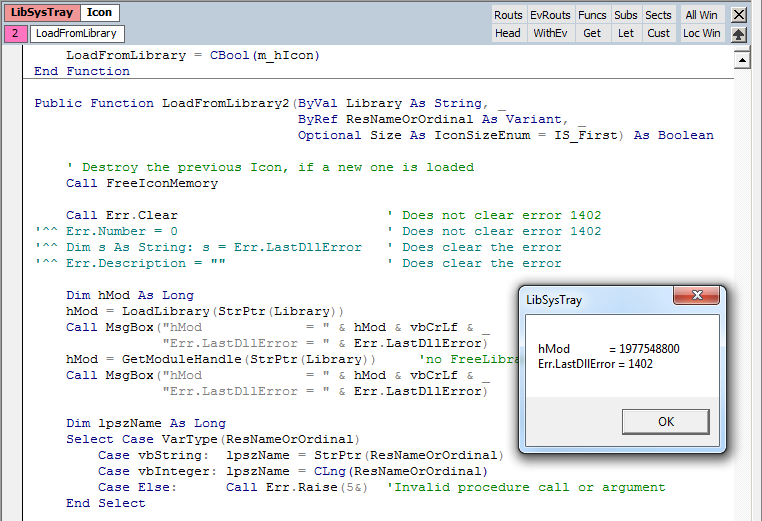

Very strange! Another thing, which is not explainable on first sight... ;(
Maybe the behavoir depends on the error code. 
But it might answer my question, if it is save to use such a line instead of SetLastError.
SetLastError and GetLastError were defined in a Type Library so as to directly call them and prevent VB from calling GetLastError again. But even if they were declared by the Declare statement, the results were still the same.
Do I have to add this Type Library additionally? - I had to declare SetLastError.
In my system, Resource Hacker confirms that shell32.dll has an icon resource with ID 300. It looks almost the same as in your screenshot.
Sorry, my bad! - Icon #130 was the one, which does not exist. I thought it was 300 and was wondering, why it could be loaded this time, even that there was no big change in the code. 
Well, sometimes it's useful to have different images for different locales.
Ok, I am convinced: flag icons for instance. - Will LoadImage automatically load the right icon, or have all icons of an icon group the same local setting always?
Ok, now I have almost everything:
- The first icon load problem occured because of a wrong LR_SHARED declaration.
- The second icon load problem was actually none: I mixed #300 with #130...
Actually all no big deals. But there was a lot new information for me from you. So thanks again!
There is just ome more question:
It does not make sence to call both: LoadLibrary and GetModuleHandle.
I suppose GetModuleHandle does only work for system libraries, which are loaded already - but the function has no clue, from what kind of libraries the user wants to extract icons.
I do also suppose, that calling LoadLibrary is quite more costly than to call GetModuleHandle.
=> Therefore I would call GetModuleHandle first - and try it with LoadLibrary, if GetModuleHandle fails. Then free the library again in case it got loaded before exit.
Would you agree with this?
-
Jan 7th, 2013, 10:27 AM
#12
Re: LoadImage issue #2
Originally Posted by NeedHelp!
But it might answer my question, if it is safe to use such a line instead of SetLastError.
I highly recommend that you use only SetLastError or SetLastErrorEx when explicitly setting the last error value. Any other means is not officially documented and probably unintended.
Originally Posted by NeedHelp!
Do I have to add this Type Library additionally? - I had to declare SetLastError.
You don't have to. I only tried to eliminate the middleman (the Declare statement) to allow calling GetLastError meaningfully. SetLastError can be safely called with the Declare statement.
Originally Posted by NeedHelp!
Will LoadImage automatically load the right icon, or have all icons of an icon group the same local setting always?
You don't have to worry about the right Language ID when using resources. Windows takes care of loading the appropriate Language ID for a resource based on the current locale.
Originally Posted by NeedHelp!
There is just ome more question:
It does not make sence to call both: LoadLibrary and GetModuleHandle.
I suppose GetModuleHandle does only work for system libraries, which are loaded already - but the function has no clue, from what kind of libraries the user wants to extract icons.
I do also suppose, that calling LoadLibrary is quite more costly than to call GetModuleHandle.
=> Therefore I would call GetModuleHandle first - and try it with LoadLibrary, if GetModuleHandle fails. Then free the library again in case it got loaded before exit.
Would you agree with this?
Trial and error is one way of finding out if your method will work. The documentation for GetModuleHandle does not mention whether LoadLibrary needs to be called for modules not yet loaded in the address space of the calling process, so I don't know if it's really needed. 
On Local Error Resume Next: If Not Empty Is Nothing Then Do While Null: ReDim i(True To False) As Currency: Loop: Else Debug.Assert CCur(CLng(CInt(CBool(False Imp True Xor False Eqv True)))): Stop: On Local Error GoTo 0
Declare Sub CrashVB Lib "msvbvm60" (Optional DontPassMe As Any)
 Posting Permissions
- You may not post new threads
- You may not post replies
- You may not post attachments
- You may not edit your posts
-
Forum Rules
|
Click Here to Expand Forum to Full Width
|



 LoadImage issue


 Reply With Quote

