|

-
Jan 24th, 2019, 02:01 PM
#1
[VB6] PNG/ICO/ANI pictures in the standard controls.
DESCRIPTION IS OUTDATED. SEE DESCRIPTION ON GITHUB.
Hi everyone.
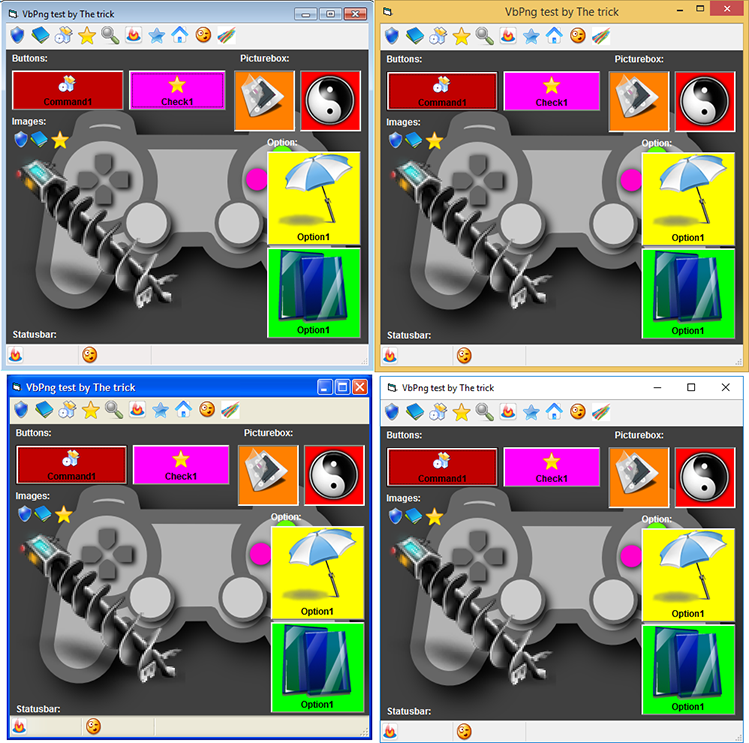
As you know, the built-in functions in Visual Basic 6.0 doesn't support the ability to work with PNG images, i.e. for example, you can't use a Png image as the Form.Picture property. I present a small library and an add-in which allow you to bypass these limitations. This library allows you to load and save Png images (with the alpha channel) by the standard functions (LoadPicture / SavePicture), and also gives the ability to use Png images (with the alpha channel) in the controls. Any control that uses standard Ole Picture objects will support Png images. In turn, if an image is displayed via IPicture::Render then the image will be drawn with the alpha channel. This library should work in all the versions of Windows since XP:
 How to use?
The library can be used as an external DLL or to be linked to an executable file (native code only). To use it as the Dll, you must call the Initialize function which returns 1 if successful. After that, you can use the library features. If you need to unload the library, then you need to call the function CanUnloadNow which tells you whether it is possible to unload the library at the moment. If the library is ready for unloading, the function will return S_OK after which you need to call Uninitialize. If the function returns S_FALSE, the library can't be unloaded because there are the active Picture objects that aren't yet unloaded and they use the library. For IDE, a special Add-in was created that automatically loads the library when the environment starts. In the compiled version, for example, you can call the Initialize function in the Initialize event or in the Main procedure, and Uninaitilze function at the end of the code:
Code:
Private Declare Function Initialize Lib "VBPng.dll" () As Long
Private Declare Sub Uninitialize Lib "VBPng.dll" ()

Private Sub Form_Initialize()

    If Initialize() = 0 Then
        MsgBox "Unable to initialize png dll", vbCritical
    End If

End Sub

Private Sub Form_Terminate()
    Uninitialize
End Sub
For static linking, you need to use a newer linker (in my examples I used the linker from Visual Studio 2010), since the original one has the bugs when using the /OPT:REF option and also you need to add this parameters in the VBCompiler section of the project file (vbp):
For EXE:
Code:
LinkSwitches= ..\Libs\msvcrt_winxp.obj ..\Libs\VBPng.lib -ENTRY:mainCRTStartup
For DLL:
Code:
LinkSwitches= ..\Libs\msvcrt_winxp.obj ..\Libs\VBPng.lib -ENTRY:VBDllMain -EXPORT:Initialize -EXPORT:Uninitialize
In the DLL, in the compiled form it is necessary to do initialization by calling the Initialize function from itself at the start.
How does it work?
The library is written in C++. The principle of the library is based on the interception of OleLoadPictureEx and OleLoadPicture functions. These functions don't support PNG images, so if a PNG file is loaded, the VbPng library attempts to load the file using GDI+. If successful, a similar StdPicture object is created and is returned by the function. For the caller it looks like it works with the original object. The object supports IPicture, IPictureDisp, IPersistStream, IConnectionPointContainer (does not support connection point returns E_NOTIMPL), IDispatch interfaces, so it can be assigned to an Object variable or, for example, stored in a PropertyBag.
The function interceptor is implemented in the CHooker class. This class uses the length disassembler (ldasm) from Ms-Rem with a slight revision. The modification is to add the OP_REL32 flag to some instructions (for example, JMP SHORT), since this flag was missing in the original one in some relative instructions. To intercept a function, the simplest method is used - splicing. In that method the JMP instruction is inserted at the beginning of the function which transfers the execution flow to the interceptor function. Since the beginning of the original function contains instructions which we overwrite, it is necessary to correctly transfer the instructions in order to be able to call the original function. When the Hook method is called the length disassembler calculates the integer number of instructions which will be overwritten by the JMP instruction (5 bytes). After that, a temporary buffer is allocated (with the permissions to execute data) into which these instructions + JMP (to the instruction following to the rewritable one) will be copied. It allows to call the original function as if there was no the interception. There is the one difficulty that we can't just copy the instructions since there are relative instructions like JMP, CALL, JNE that "jump" relative to their address. To determine the type of an instruction we use the OP_REL32 flag that indicates whether the instruction is relative or not. Another difficulty lies in the fact that there are "short" relative instructions that "jump" within 255 bytes, and when transferring the code to the buffer the distance may be increased significantly. Therefore, after determining the number of the rewritable instructions, the buffer is allocated with the size to ensure translation the instructions from the short form to long one. After that, each instruction is analyzed and if necessary the offset and the type are corrected. At the end of the buffer the JMP instruction is added with an offset to the instruction following the last overwritten one. Finally, the beginning of the intercepted function is overwritten by the unconditional JMP to the interceptor one.
CHooker objects use a heap with execution permission as the code buffer, so the code is DEP safe. The heap is automatically created when creating the first interceptor and is deleted when the last one is destroyed. The project uses 2 such objects to intercept 2 functions - OleLoadPictureEx and OleLoadPicture, with the appropriate interceptors - OleLoadPictureEx_user and OleLoadPicture_user. On systems prior to Windows 8, it was possible to intercept only the OleLoadPictureEx function that is called from OleLoadPicture, but starting with Windows 8, OleLoadPicture calls the other undocumented OleLoadPictureExt, therefore, to ensure the correct work of some controls (for example, ImageList), you need to intercept 2 of these functions. Of course, you can try to intercept OleLoadPictureExt, but this function is undocumented and it isn't the fact that in the new versions of Windows Microsoft won't change this function to another one. In the interceptors the original function is called and if the call fails our implementation is called. In order to find out if the interception has already been done (for example, a loaded DLL has already intercepted and there is no point in doing it again) the "VBPng" environment variable is used.
The basis of the library is the CPicture class which implements all the logic of the images. This class was created on the basis of the reverse-engineering of the oleaut32 library; some functions are probably not implemented accurately. This class allows you to load PNG images from a COM stream (IStream), as well as save them to it. The library keeps track of the created objects in the g_lCountOfObject global variable in order to provide the control when unloading is possible (by the CanUnloadNow function). Otherwise, there would be no way to know if the library could be unloaded or not. Accordingly, when unloading the library with active objects a crash would occur.
Image loading is performed in the LoadFromStream method. Since when GDI + loads an image from a stream it automatically sets the file pointer to the beginning you have to create a stream that contains only the PNG file data. This task is performed by the CreatePngStream method in which the primary validation of PNG chunks occurs as well. Next, using GDI +, a Bitmap object is created from the data of the temporary stream. Further, a DIB section is created and the PNG pixel data in the PixelFormat32bppPARGB format is copied into it. This allows to display the image with the alpha channel using the AlphaBlend function and you can also access the GDI-compatible HBITMAP handle (Picture.Handle). Further, if the KeepOriginalFormat property is set to true the PNG stream is saved (this makes it easy to save the PNG file without recoding).
The second important method is Render. Everything is simple, there is a preparation of the coordinates for displaying the image in HIMETRIC units and drawing using AlphaBlend. Since the get_Attributes property returns PICTURE_TRANSPARENT the user (the picture owner) himself takes care of restoring the background behind the image before displaying the image.
The SaveAsFile method saves the image to a stream. It's all the same just the opposite. It is also worth noting that if the original format was used then the image data is taken from the saved PNG stream. Otherwise, a temporary GDI + bitmap is created from the pixels of the DIB section, the CLSID of the PNG codec is extracted, and the image is saved into a temporary stream. Next, from this stream, the data is copied to the destination stream.
The next group of the methods is the implementation of the IDispatch interface. Since the data of the IPicture type is stored in the standard library stdole2.tlb, the GetTypeInfo method loads this library and retrieves the required type interface via ITypeLib::GetTypeInfoOfGuid. The same applies to the GetIDsOfNames method, it simply translates the call to the standard ITypeInfo::GetIDsOfNames implementaion. The Invoke method is implemented directly with parameter checking.
In order to be able to statically link the library to a VB6 EXE file, it is necessary to initialize the C runtime by transfering the control to the mainCRTStartup function and then transfer the one to the ___vbaS symbol. For this purpose, the file gostartup.asm is intended which is written in FASM. For a EXE file, the following lines are executed:
Code:
_main:
call Initialize
jmp ___vbaS
The C-runtime calls the main function and it in turn initializes the VbPng library. There is a problem with the old linker because of the bug or because something else the linker discards all the VB import from the resulting file when using the -OPT:REF option. This problem is solved simply by replacing the linker with a modern one.
For a DLL, similar actions are performed, only in this case it is necessary to specify _VBDllMain as the entry point:
Code:
_VBDllMain:

push dword [esp + 12]
push dword [esp + 12]
push dword [esp + 12]

; // Init CRT
call  __DllMainCRTStartup@12

; // Init runtime
jmp ___vbaS
In this case the initialization of the runtime is first called and then the DllMain ActiveX Dll function is called.
To facilitate work in the IDE an Add-in was written that automatically loads VbPng.dll in order to make it easier to work with projects. To disable the library you just need to disable the Add-in. There is a nuance, if there are active PNG images the Add-in will be unloaded, but VbPng is not and the warning message will appear. At any time, you can enable the Add-in, find the images, delete them, and re-disable the Add-in, then the DLL will be unloaded.
Some controls, for example ListView, won't display the alpha channel because they render themselves not by the Render method but through StretchBlt, for them the premultiplied background will be black. This should be kept in mind when working with the library. IPropertyNotifySink notifications are also not supported (you can implement it if you wish). Resources in FRX files and compiled files are also stored in the PNG format so projects won't open and work without the library. For comfortable work it is recommended to install the Add-in with automatic launching when loading the IDE.
The directory also contains several examples of work:
- Test_EXE_Linked - demonstration of 32bpp PNG images in standard controls using static linking;
- Test_EXE_Dll - is the same only with the dll usage;
- Test_AXDll - ActiveX DLL library using PNG resources on the form;
- Test_SavePng - is the example of saving an image using SavePicture.
The directory also contains the PNG files that I collected a long time ago using satellite grabbing.
The module was poorly tested so bugs are possible. I will be very glad to any comments as far as possible I will correct them.
Thank you all for your attention, I hope the module will be useful to someone.
Project on GitHub.
The trick,
2019.
Last edited by The trick; Feb 3rd, 2019 at 06:58 AM.
Tags for this Thread
 Posting Permissions
- You may not post new threads
- You may not post replies
- You may not post attachments
- You may not edit your posts
-
Forum Rules
|
Click Here to Expand Forum to Full Width
|



 Reply With Quote