|

-
Mar 10th, 2026, 10:13 PM
#1
 [VB6] - WinRT Interfaces & XAML Islands TypeLibs for VB6/VBA x86 and VBA7 x64 [VB6] - WinRT Interfaces & XAML Islands TypeLibs for VB6/VBA x86 and VBA7 x64
This project has already been available for quite some time as a package on the twinBASIC server and I finally got around to exporting it as a TypeLib (both 32-bit and 64-bit) for whoever wants to use it in their VB6 and VBA projects. The TypeLibs contain extensive coverage of the most popular WinRT namespaces although they are far from complete.
The twinBASIC package contains a changelog with what is currently included:
Code:
1.0.0.5   - Preliminary public release
            Windows.ApplicationModel
            Windows.ApplicationModel.AppService
            Windows.ApplicationModel.Background
            Windows.ApplicationModel.DataTransfer
            Windows.ApplicationModel.DataTransfer.DragDrop
            Windows.Data.Json
            Windows.Data.Pdf
            Windows.Data.Xml.Dom
            Windows.Devices.Input
            Windows.Foundation
            Windows.Globalization
            Windows.Graphics.Capture
            Windows.Graphics.DirectX.Direct3D11
            Windows.Graphics.DirectX
            Windows.Graphics.Imaging
            Windows.Graphics
            Windows.Media.Ocr
            Windows.Security.Credentials.UI
            Windows.Security.Cryptography
            Windows.Storage
            Windows.Storage.Pickers
            Windows.Storage.Pickers.Provider
            Windows.Storage.Provider
            Windows.Storage.Streams
            Windows.System
            Windows.System.Threading
            Windows.UI
            Windows.UI.Core
            Windows.UI.Input
            Windows.UI.Notifications
            Windows.UI.Popups
            Windows.UI.Text
            Windows.UI.WindowManagement
            Windows.Xaml
            Windows.Xaml.Controls
            Windows.Xaml.Controls.Primitives
            Windows.Xaml.Data
            Windows.Xaml.Hosting
            Windows.Xaml.Input
            Windows.Xaml.Markup
            Windows.Xaml.Media
            Windows.Xaml.Media.Animation
            Windows.Xaml.Media.Imaging
            Windows.Xaml.Media.Media3D
            Windows.Xaml.Navigation
            Windows.Web
1.1.0.10  - Added namespaces:
            Windows.ApplicationModel.AppService
            Windows.Devices.Core
            Windows.Devices.Enumeration
            Windows.Media
            Windows.Media.Audio
            Windows.Media.Capture
            Windows.Media.Capture.Core
            Windows.Media.Capture.Frames
            Windows.Media.Casting
            Windows.Media.Core
            Windows.Media.Devices
            Windows.Media.Devices.Core
            Windows.Media.Editing
            Windows.Media.Effects
            Windows.Media.FaceAnalysis
            Windows.Media.MediaProperties
            Windows.Media.Playback
            Windows.Media.PlayTo
            Windows.Media.Protection
            Windows.Media.Streaming
            Windows.Media.Streaming.Adaptive
            Windows.Media.Transcoding
            Windows.Networking
            Windows.Networking.BackgroundTransfer
            Windows.Networking.Connectivity
            Windows.Networking.Sockets
            Windows.Security.Authentication.Web
            Windows.Security.Credentials
            Windows.Security.Cryptography.Certificates
            Windows.Security.Cryptography.Core
            Windows.System.RemoteSystems
            Windows.UI.Xaml.Documents
            Windows.Web.Http
            Windows.Web.Http.Filters
            Windows.Web.Http.Headers
1.2.0.17  - Added namespaces:
            Windows.ApplicationModel.Search
            Windows.Devices.Printers
            Windows.Graphics.Display
            Windows.Graphics.Effects
            Windows.Graphics.Printing
            Windows.UI.Composition
            Windows.UI.Composition.Effects
            Windows.UI.Xaml.Shapes
1.3.0.30  - Added namespaces:
            Windows.System.Threading.Core
            Windows.System.Profile
            Windows.UI.Xaml.Interop
            cAwait
            cBindableVector
            cPop
            mdlSubclass
1.4.0.64  - Added namespaces:
            Windows.Data.Text
            Windows.Devices.SerialCommunication
            Windows.Storage.BulkAccess
            Windows.Storage.Search
            Windows.UI.Text.Core
            Windows.UI.ViewManagement
          - Added support for ByVal UDTs as well as helper methods and properties for many UDTs:
            Color, CornerRadius, DateTime, Duration, FontWeight, GeneratorPosition, GridLength, HSTRING, KeyTime, Matrix, Matrix3D, POINTF, RepeatBehavior, RECTF, SIZEF
            UUID, Thickness, TimeSpan, WindowId
1.5.0.107 - Added namespaces:
            RoMetaDataApi (refactored mdlNamespaces to resolve runtime class names from MetaData (*.winMD files) instead of hard-coding them in a XML file)
            Windows.Data.Html
            Windows.Media.Playlists
            Windows.Media.SpeechRecognition
            Windows.Media.SpeechSynthesis
1.6.0.125 - Added namespaces:
            Windows.UI.Composition.Core
            Windows.UI.Composition.Desktop
            Windows.UI.Composition.Diagnostics
            Windows.UI.Composition.Interactions
            Windows.UI.Composition.Scenes
            Windows.Web.UI
            Windows.Web.UI.Interop
1.7.0.136 - Added namespaces:
            Windows.Devices.Bluetooth
            Windows.Devices.Bluetooth.Advertisement
            Windows.Devices.Bluetooth.Background
            Windows.Devices.Bluetooth.GenericAttributeProfile
            Windows.Devices.Bluetooth.Rfcomm
            Windows.Devices.Radio
The backbone of any VB6 project using WinRT classes is the NewObject function that instantiates an activatable WinRT class and provides access to its interfaces. On the first call it also parses the system .winmd metadata files and builds a collection of activatable classes (this process is very fast, well under 100ms) so that subsequent instantiations are pretty much instant.
Here's an example of how to instantiate the MediaPlayer runtime class:
Code:
' Sample usage:
Dim MediaPlayer As IMediaPlayer
    Set MediaPlayer = NewObject("MediaPlayer")
I'll be updating this collection with some sample projects described below showcasing the usage of these TypeLibs with various WinRT classes:
Download the WinRT Samples Collection.zip
Here are the TypeLib files:
Requirements: Windows 10 or later!
Last edited by VanGoghGaming; Jun 24th, 2026 at 02:30 AM.
Reason: Updated the samples collection
-
Mar 10th, 2026, 10:38 PM
#2
Re: [VB6] - WinRT Interfaces & XAML Islands TypeLibs for VB6/VBA x86 and VBA7 x64
How are you getting things to show up in a typelib... I know just compiling as an ActiveX DLL isn't enough.
If it becomes easy enough I might do it with WDL though the tB-only features are really piling up.
-
Mar 10th, 2026, 10:41 PM
#3
 Re: [VB6] - WinRT Interfaces & XAML Islands TypeLibs for VB6/VBA x86 and VBA7 x64 Re: [VB6] - WinRT Interfaces & XAML Islands TypeLibs for VB6/VBA x86 and VBA7 x64
Here are 3 sample projects using the WinRT TypeLib in VB6:
- Windows Hello Demo (verifying user's identity via PIN or biometrics)
This project demonstrates the usage of "Windows Hello" in WinRT to verify the identity of a user (by means of entering the user's PIN or biometrics such as fingerprint scanner or face recognition if available).
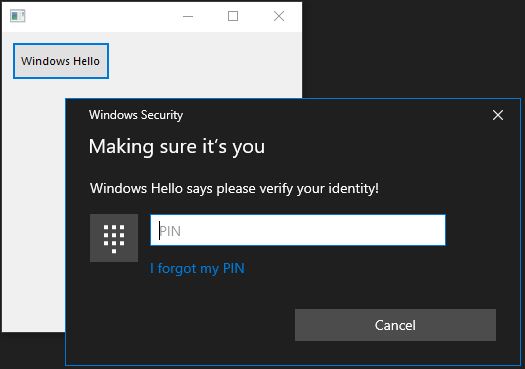
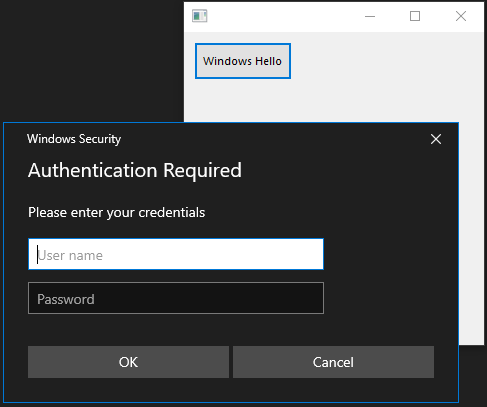
In case the user hasn't set up a PIN or biometrics (fingerprint or face recognition), the app will fall back to Username/Password verification:
- Stream Sockets SSL Demo (here we are connecting to the Gmail SMTP server and issue various SMTP commands as an example)
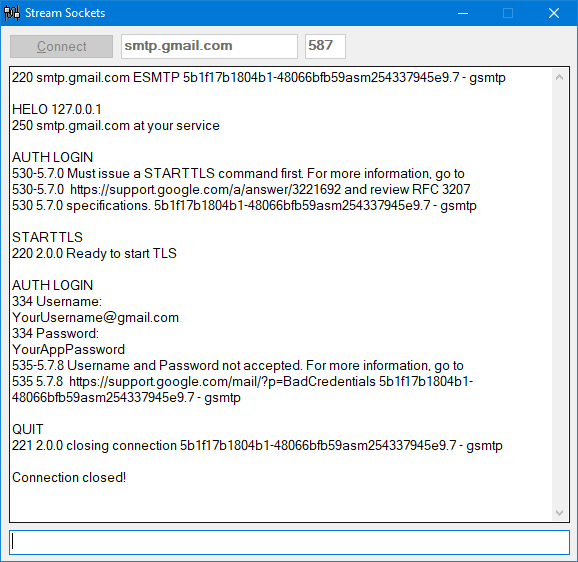
The screenshot above shows how a usual session might unfold:
- We start with the ubiquitous HELO greeting (or its dyslexic sibling EHLO).
- Then we attempt authentication with AUTH LOGIN to which Gmail says no, we need an encrypted connection for that so we comply with the STARTTLS command!
- After that the AUTH LOGIN command works fine and we are prompted for a username and password (these need to be BASE64 encoded).
- Here we enter bogus credentials but a valid username and app password (not your main Gmail password!) will work correctly!
- Next steps would be sending various MIME encoded headers composing your actual message and recipients list (not included here for brevity).
- Finish with QUIT!
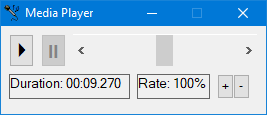
- Media Player Audio
This project shows how to use the WinRT MediaPlayer class to play audio files (MP3, FLAC, AAC, M4A, etc). It can play local files as well as files from the web.
Basic functionality includes: Play, Pause, Volume Adjustment, Playback Rate (faster/slower) as well as Duration Remaining:
These sample projects are all included in the WinRT Samples Collection.zip archive linked in the first post above.
Requirements: Windows 10 or later!
Last edited by VanGoghGaming; Mar 12th, 2026 at 06:12 PM.
-
Mar 10th, 2026, 11:06 PM
#4
 Re: [VB6] - WinRT Interfaces & XAML Islands TypeLibs for VB6/VBA x86 and VBA7 x64 Re: [VB6] - WinRT Interfaces & XAML Islands TypeLibs for VB6/VBA x86 and VBA7 x64
 Originally Posted by fafalone

How are you getting things to show up in a typelib... I know just compiling as an ActiveX DLL isn't enough.
If it becomes easy enough I might do it with WDL though the tB-only features are really piling up.
An ActiveX DLL is exactly all you need. Interface definitions are included by default. API function declarations are exported successfully with [ComExport]. Aliases, Types and Enums are exported ONLY if they are used somewhere (for example in an interface method or API function).
It is not unusual to define Aliases, Types or Enums that are not used anywhere so in order to get these exported I've added a bogus interface just for this purpose:
Code:
[Hidden] Interface DummyInterface Extends Nothing
[Restricted] Sub A(A As APPBARDATA)
[Restricted] Sub B(B As BITMAP, B As BITMAPINFO, B As BITMAPINFOHEADER)
[Restricted] Sub C(C As CLIPBOARD_FORMATS, C As COMMON_CONSTANTS, C As CorTokenType, C As CorTypeAttr, C As CREATION_DISPOSITION)
[Restricted] Sub D(D As DIALOGCOMMANDIDS_CONSTANTS, D As DIB_COLORS, D As DRAWTEXT_FLAGS)
[Restricted] Sub E(E As EDIT_MESSAGES, E As EDIT_NOTIFICATIONS, E As EDITSTYLES_FLAGS)
[Restricted] Sub F(F As FILETIME, F As FONTDESC, F As FILEATTRIBUTE_FLAGS, F As FONTWEIGHT_CONSTANTS, F As MENU_FLAGS)
[Restricted] Sub G(G As GENERALINPUT, G As GENERICACCESSRIGHTS_FLAGS)
[Restricted] Sub I(I As ICONIDS_CONSTANTS, I As INPUT_FLAGS)
[Restricted] Sub K(K As KEYBDINPUT)
[Restricted] Sub M(M As MENUITEMINFOW, M As MOUSEINPUT)
[Restricted] Sub P(P As PICTDESCBMP, P As POINTL, P As POINTSHORT, P As PLAYSOUND_FLAGS)
[Restricted] Sub R(R As RECTL, R As RECTSHORT, R As RGBQUAD, R As REGISTRY_PREDEFINED_KEYS)
[Restricted] Sub S(S As SHFILEOPSTRUCTW, S As SYSTEMTIME, S As SAFE_ARRAY_FEATURES)
[Restricted] Sub T(T As TRACKMOUSEEVENT, T As TOOLTIPICON_CONSTANTS)
[Restricted] Sub U(U As UISTATE_CONSTANTS)
[Restricted] Sub V(V As VS_FIXEDFILEINFO)
[Restricted] Sub W(W As WIN32_FILE_ATTRIBUTE_DATA, W As WINDOWPLACEMENT, W As WINTRUST_DATA, W As WINTRUST_FILE_INFO, W As WAIT_CONSTANTS, W As WINDOWACTIVATION_CONSTANTS, W As WINTRUSTDATA_CONSTANTS)
End Interface
As you can see this DummyInterface contains alphabetic methods with parameters including all types and enums that didn't fit elsewhere for the sole purpose to be exported in the TypeLib. It does the job just fine for this WinRT TypeLib since only limited Win32 coverage is needed but for your WinDevLib you may need a whole lot more dummy methods! 
-
Mar 11th, 2026, 12:31 AM
#5
Re: [VB6] - WinRT Interfaces & XAML Islands TypeLibs for VB6/VBA x86 and VBA7 x64
Might be a new feature to export interfaces... didn't in the past. I tried but got a 'can't finalize interface' error for ID2D1RenderTarget, which works fine when I use it. UDTs yeah, there's like 400 "unused" UDTs alone just for a few QueryInfo APIs like NtQuerySystemInformation lol
Oh well, back to my position that people should just use tB
-
Mar 12th, 2026, 06:50 PM
#6
Re: [VB6] - WinRT Interfaces & XAML Islands TypeLibs for VB6/VBA x86 and VBA7 x64
Here's another sample project, this time showcasing how to use a XAML Island inside a VB6 Form! This project is an Animated GIF Player, playing a list of some random animated GIFs directly from the Internet. You can easily expand this menu to include additional images (GIF or any other format) either from the Internet or from your computer:
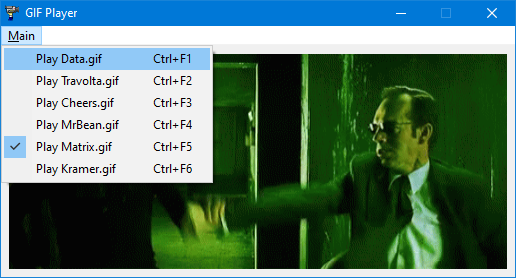
A XAML Island can be embedded in any VB6 control that has a hWnd property (including the Form itself), here we are using a vanilla PictureBox as a container for the XAML Island. As for the actual XAML controls, we are using a Grid control (for setting the background color to match the Form's color so that transparent GIFs don't play against a black background) and an Image control to display the actual GIF image (not to be confused with the classic VB6 Image control!).
You can compile and run the executable as it is but if you want to run this project from the VB6 IDE then there's an additional step that needs to be performed:
- If your VB6.EXE file is not manifested then simply copy the included VB6.EXE.manifest file in the same folder as VB6.EXE (usually: C:\Program Files (x86)\Microsoft Visual Studio\VB98). Probably requires a computer restart so that the manifest takes effect.
- If your VB6.EXE is already manifested then you need to edit its manifest (with Resource Hacker for example) and add the <maxversiontested Id="10.0.18362.0"/> attribute as shown in the included manifest file.
Download this project from the WinRT Samples Collection archive linked in the first post above!
-
Mar 13th, 2026, 07:14 AM
#7
Re: [VB6] - WinRT Interfaces & XAML Islands TypeLibs for VB6/VBA x86 and VBA7 x64
prjGIFPlayer.vbp wouldn't compile in VB6 with MAKERES.BAT (or manually) but fails on Line 4 of frmGIFPlayer.frm.
Where is LongPtr enum declration supposed to come from? I cannot find it in WinRT Interfaces x86.tlb. Is there a dependency typelib I'm missing on my machine?
cheers,
</wqw>
-
Mar 13th, 2026, 09:35 AM
#8
 Re: [VB6] - WinRT Interfaces & XAML Islands TypeLibs for VB6/VBA x86 and VBA7 x64 Re: [VB6] - WinRT Interfaces & XAML Islands TypeLibs for VB6/VBA x86 and VBA7 x64
You need to extract the whole archive not just the GIFPlayer project folder, it needs the modules from the Common folder since they are used by all included projects.
There are no other dependencies. LongPtr is present in the TypeLib but it's not an Enum:
Code:
    typedef [public]
    long LongPtr;
-
Mar 13th, 2026, 09:56 AM
#9
Re: [VB6] - WinRT Interfaces & XAML Islands TypeLibs for VB6/VBA x86 and VBA7 x64
It was old version of the TLB I had registered on my system somewhere. It's such a PITA to upgrade these. Even after registering the new one the project refused to change project reference to it. Had to remove project reference, save project and exit IDE. Then reload and add new reference to manually upgrade to the new one. All this is self-inflicted of course, should have just unzipped the sources with overwrite the second time. Aaaanyway. . . all working now (not in the IDE as my VB6 manifest is apparently incomplete and I'm just too lazy to fix it:-)).
Edit: Manifest fixed
Edit2: Need to upgrade my UMMM manifest creator to include maxversiontested if anyone is going to be using XAML islands with it.
cheers,
</wqw>
Last edited by wqweto; Mar 13th, 2026 at 10:02 AM.
-
Mar 13th, 2026, 10:55 AM
#10
Re: [VB6] - WinRT Interfaces & XAML Islands TypeLibs for VB6/VBA x86 and VBA7 x64
Good stuff! 
Usually TypeLib files are pretty painless to upgrade, just overwrite the old TLB file with the new one and you're done. There is no additional registration needed, the GUID stays the same.
-
Mar 13th, 2026, 11:40 AM
#11
Re: [VB6] - WinRT Interfaces & XAML Islands TypeLibs for VB6/VBA x86 and VBA7 x64
Originally Posted by wqweto
Edit2: Need to upgrade my UMMM manifest creator to include maxversiontested if anyone is going to be using XAML islands with it.
cheers,
</wqw>
You've got a bunch of hard-coded processorArchitecture=""X86"" in it too, shouldn't limit it to 32bit as it would be useful for tB too if you needed more than visual styles. "*" works for both 32 and 64bit; a 64bit app with x86 won't run on 64bit Windows.
-
Mar 13th, 2026, 12:30 PM
#12
Re: [VB6] - WinRT Interfaces & XAML Islands TypeLibs for VB6/VBA x86 and VBA7 x64
Originally Posted by wqweto
Edit2: Need to upgrade my UMMM manifest creator to include maxversiontested if anyone is going to be using XAML islands with it.
I did this for you in the latest UMMM source from GitHub but before I commit it, I would like to to run my approach by you for your approval/rejection:
The SupportedOS INI param will now accept a version number as one of the values, and if detected will set the maxversiontested Id attribute to that version for the compatibility->application section, e.g.:
Code:
SupportedOS vista win7 win8 1.2.3.4
In the INI will produce this in the .manifest:
Code:
    <compatibility xmlns="urn:schemas-microsoft-com:compatibility.v1">
        <application>
            <supportedOS Id="{e2011457-1546-43c5-a5fe-008deee3d3f0}" />
            <supportedOS Id="{35138b9a-5d96-4fbd-8e2d-a2440225f93a}" />
            <supportedOS Id="{4a2f28e3-53b9-4441-ba9c-d69d4a4a6e38}" />
            <maxversiontested Id="1.2.3.4" />
        </application>
    </compatibility>
It's smart enough to check that the version # is 4 sections of numbers only, and if more than one version # is passed, it will error out.
Feels a bit clunky to overload the SupportedOS INI parameter this way though, but the other option of having a second MaxVersionTested INI param would require a bit of refactoring of how the manifest is built (we'd have to store the SupportedOS and MaxVersionTested values and only build the manifest once the whole file has been processed and all of the SupportedOs/MaxVersionTested values were read). If you'd prefer this approach, let me know and I can do it. If you have an even better idea, I'll leave you to it 
-
Mar 13th, 2026, 02:05 PM
#13
Re: [VB6] - WinRT Interfaces & XAML Islands TypeLibs for VB6/VBA x86 and VBA7 x64
@wqweto - I wasn't happy with overloading the SupportedOS command with a version # value for maxversiontested, so I went ahead and added an AppCompat section cache that is used to build the appropriate manifest section after reading all SupportedOS and MaxVersionTested commands. Also went ahead and committed it to the main repo, but feel free to revert of course if you had something better in mind.
-
Mar 13th, 2026, 03:06 PM
#14
 Re: [VB6] - WinRT Interfaces & XAML Islands TypeLibs for VB6/VBA x86 and VBA7 x64 Re: [VB6] - WinRT Interfaces & XAML Islands TypeLibs for VB6/VBA x86 and VBA7 x64
Can we please leave the manifest commits and pull requests out of this thread if we're not interested in the topic at hand? Cheers jpbro!
This maxversiontested attribute is just a Microsoft nuisance the same as the PtrSafe keyword, it doesn't actually do anything other than hindering you. The "10.0.18362.0" number is suggested by Microsoft and probably marks the Windows version that first introduced the UWP controls to unpackaged desktop apps via XAML Islands. For all intents and purposes it should be treated as a constant. A lower number won't let you instantiate the DesktopWindowXamlSource object, while a higher number will restrict users with older Windows versions even though your app would run just fine on their systems in all likelihood. So just hard-code this magic number in your manifest and call it a day, there are numerous other ways to test whether a specific feature is present or not on the target computers.
Last edited by VanGoghGaming; Mar 13th, 2026 at 06:47 PM.
-
Mar 13th, 2026, 06:30 PM
#15
Re: [VB6] - WinRT Interfaces & XAML Islands TypeLibs for VB6/VBA x86 and VBA7 x64
On a more related note, here's another sample project where we are using the XAML MediaPlayerElement control to play various media files (".mp4", ".mkv", ".wmv", ".avi", ".mov", ".3gp", ".mp3", ".m4a", ".wma", ".flac", ".wav" and many others). It has built-in controls for selecting Volume, Casting to other devices, Aspect Ratio and other metadata properties that may be present in the file (such as Subtitles, Director Commentary, etc).
This screenshot looks like something you'll hear from ChatGPT or Claude in the near future! 
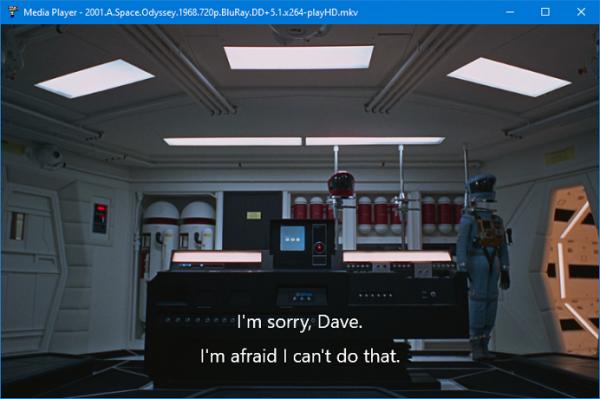
The project is also showcasing the FileOpenPicker class to show a modern interface for selecting files (double-click on the form to start). The FileOpenPicker doesn't like the IDE running elevated (as administrator) so compile this project and run the executable to see it in action. Alternatively if you are aren't running VB6 elevated then it will also work in IDE.
Download this MediaPlayerVideo project from the WinRT Samples Collection archive linked in the first post above!
-
Mar 13th, 2026, 06:37 PM
#16
Re: [VB6] - WinRT Interfaces & XAML Islands TypeLibs for VB6/VBA x86 and VBA7 x64
Sorry, thought it was related to the WinRT XAML islands stuff since the MS docs say that maxversiontested "is intended to be used by desktop applications that use XAML Islands and that are not deployed in an MSIX package.". 'Twas only trying to help spare some headaches down the road for anyone building their own XAML Islands apps using your techniques while using uMMM to compile their manifests, but I shall leave 
-
Mar 13th, 2026, 06:56 PM
#17
Re: [VB6] - WinRT Interfaces & XAML Islands TypeLibs for VB6/VBA x86 and VBA7 x64
It's fine mate don't worry about it, as I mentioned above it's just a nuisance that needs to be hard-coded in the manifest when you plan to use XAML Islands (all these sample projects already have it) and not worth dwelling on since it doesn't offer any benefits to make it editable.
-
Mar 14th, 2026, 05:03 AM
#18
Fanatic Member

Re: [VB6] - WinRT Interfaces & XAML Islands TypeLibs for VB6/VBA x86 and VBA7 x64
-
Mar 16th, 2026, 12:22 PM
#19
Re: [VB6] - WinRT Interfaces & XAML Islands TypeLibs for VB6/VBA x86 and VBA7 x64
The following sample is an upgrade to this OCR Text Recognition from a PictureBox Image project from two years ago when there was no WinRT TypeLib and DispCallFunc was king! It's actually more of a complete rewrite of this project using the modern WinRT Canvas and ScrollViewer controls instead of the classic PictureBox of yonder years. Now you can Ctrl+MouseWheel to Zoom In/Out and also scroll around the picture (both horizontally and vertically).
The bounding rectangles for recognized words have attached tooltips showing the word they encompass and also benefit from built-in antialiasing (more visible for angled text). There's also some basic preprocessing done on the image to help with better recognizing text in lower quality images. The image is enlarged 1.5x times and converted to grayscale. This does improve results although nothing groundbreaking.
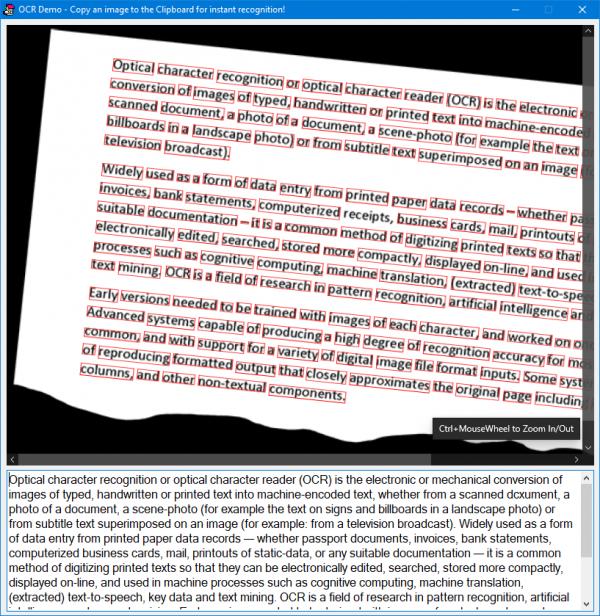
It also showcases the WinRT Clipboard object that exposes a handy event which fires whenever the clipboard contents are changed. Whenever the clipboard contains an image with recognizable text, it is automatically processed.
Another novelty worth noting is that we don't need an Image control for this. The Clipboard image is painted directly on the background of the Canvas control using an ImageBrush object. Also the Canvas control acts as a container for any number of children controls like the bounding rectangles for recognized words and as such we can assign individual tooltips for each rectangle. Much of the trigonometry required to draw angled rectangles is abstracted away by a RotateTransform object that calculates everything automatically.
Finally the ScrollViewer control provides hardware-accelerated Zoom In/Out capabilities as well as scrolling in both directions.
Download this OCR project from the WinRT Samples Collection archive linked in the first post above!
-
Mar 17th, 2026, 03:20 AM
#20
Re: [VB6] - WinRT Interfaces & XAML Islands TypeLibs for VB6/VBA x86 and VBA7 x64
Why do you need AllowUnsafeObjectPassing for the OCR sample?
Btw, cEventsSink seems quite backwards. It could raise an event when some of the handlers is invoked (instead of forwarding to yet another callback).
cheers,
</wqw>
-
Mar 17th, 2026, 09:32 AM
#21
Re: [VB6] - WinRT Interfaces & XAML Islands TypeLibs for VB6/VBA x86 and VBA7 x64
AllowUnsafeObjectPassing is needed when you use a regular class (instead of a form) for handling events or async operations callbacks. There are two events in the OCR sample (ClipboardContentChanged and PointerWheelChanged).
cEventsSink acts as a sort of aggregator for events. It puts them all in one place and assigns an "identifier" or "tag" so that you can tell which event was invoked. Each event is assigned a separate instance of cEventsSink so that you could tell them apart.
If there was only one instance of cEventsSink (declared WithEvents as you suggested) then (in some cases) you wouldn't know which event was raised since in WinRT many events share the same type. For example PointerRoutedEvents are all of type IPointerEventHandler so without identifier tags you wouldn't know if the event was a mouse down, mouse up, mouse move, etc, so I came up with the idea of aggregation (not necessarily sure whether it's the best approach but it works great so far).
-
Mar 17th, 2026, 09:50 AM
#22
Re: [VB6] - WinRT Interfaces & XAML Islands TypeLibs for VB6/VBA x86 and VBA7 x64
Originally Posted by VanGoghGaming
cEventsSink acts as a sort of aggregator for events. It puts them all in one place and assigns an "identifier" or "tag" so that you can tell which event was invoked. Each event is assigned a separate instance of cEventsSink so that you could tell them apart.
You could have multiple WithEvents instances of cEventsSink.
It's unusual to have objects ending up in ROT. Apparently there is some cross-process shenanigans going on with WinRT or just multi-threading in the same process, not sure.
cheers,
</wqw>
-
Mar 17th, 2026, 10:45 AM
#23
Re: [VB6] - WinRT Interfaces & XAML Islands TypeLibs for VB6/VBA x86 and VBA7 x64
Well yeah, you could have multiple WithEvents instances of cEventsSink but I guess it's a matter of preference, I'd rather have them all aggregated in one place than scattered all over. Either way you'd still need AllowUnsafeObjectPassing unless you use a form instead of a class.
There are no shenanigans, it's all one process but the XAML Framework does run in separate threads. In fact, when you instantiate the DesktopWindowXamlSource object it automatically calls the WindowsXamlManager.InitializeForCurrentThread method for you.
For example if you try to use a XAML object before initializing the XAML Framework on the current thread you get a runtime error 0x8001010E: "The application called an interface that was marshalled for a different thread". Try this before the call to Set m_DesktopWindowXamlSource = NewObject("DesktopWindowXamlSource"):
Code:
SolidColorBrushFactory.CreateInstanceWithColor 0
Last edited by VanGoghGaming; Mar 17th, 2026 at 10:51 AM.
-
Mar 17th, 2026, 11:12 AM
#24
Re: [VB6] - WinRT Interfaces & XAML Islands TypeLibs for VB6/VBA x86 and VBA7 x64
I just tried setting AllowUnsafeObjectPassing = False and it works just fine in this case. I guess I was overly cautious setting it to True by default, there are definitely situations when it doesn't work without it.
-
Mar 17th, 2026, 01:51 PM
#25
Re: [VB6] - WinRT Interfaces & XAML Islands TypeLibs for VB6/VBA x86 and VBA7 x64
I have just completed a more in-depth analysis of this issue. The cOCR class in this project uses a total of five AsyncOperations and all of them are handled inline by the included cAwait class.
I have rewritten the cOCR class to completely eliminate using the cAwait class and handle all AsyncOperations via callbacks using a MachineStates solution (fancy name for what it does but this is the recommended "by the book" approach)!
Here's the MachineStates solution: OCR_MachineStates.zip (this project definitely needs the AllowUnsafeObjectPassing setting, it won't work without it)
Now comparing both solutions side-by-side I'd say the cAwait approach is definitely more elegant but there are pros and cons to each of them. What is your opinion vis-a-vis this conundrum?
-
Mar 18th, 2026, 02:34 AM
#26
Re: [VB6] - WinRT Interfaces & XAML Islands TypeLibs for VB6/VBA x86 and VBA7 x64
In MachineState impl you can get away with this simple style of continuations only because you can distinguish complete handlers on their interface. The moment you have to implement two continuations on IAsyncOperationCompletedHandlerIBitmapDecoder for instance you have to implement logic depending on current state i.e. if the callback is reached/invoked on step 2 or on step 15 and so forth other complications.
Keeping these gory details to the compiler is the sane thing to expect so lambdas and capturing context is badly needed for these to feel seamless. Async/await baked into the language would help too.
cheers,
</wqw>
-
Mar 18th, 2026, 04:52 PM
#27
Re: [VB6] - WinRT Interfaces & XAML Islands TypeLibs for VB6/VBA x86 and VBA7 x64
Well, there's not much chance of VB6 (or tB for that matter) getting any of these features any time soon so for the time being we have to get by with what we have. Not a very long time ago this machine states approach was the "de facto" standard when it came to async operations. It's true that the logic flow can get complicated in certain scenarios leading to the so called "callback hell", probably that's what prompted the invention of the Await syntax in .NET.
In the meantime VB6 keeps marching on, if callbacks are getting a little too hairy there's always the cAwait option to smooth things over, there's no reason you can't mix and match to your heart's content!
-
Mar 29th, 2026, 04:29 AM
#28
-
Apr 1st, 2026, 08:18 AM
#29
Re: [VB6] - WinRT Interfaces & XAML Islands TypeLibs for VB6/VBA x86 and VBA7 x64
@VanGoghGaming I took the liberty of using your WinRT Interfaces x86.tlb to write a MediaTranscoder (Windows.Media.Transcoding) for a user from another forum. He wants to convert an MP4 file with an H.264 video stream and AAC audio stream to an MP4 file with an H.264 video stream and MP3 (mpga) audio stream. The conversion works for me, but not for the user. He gets an error in mdlHelpers: InitNameSpaces: Automation error at the line Set m_RuntimeClasses = TempObject: ResolveNamespaces CreateObject("CLRMetaData.CorMetaDataDispenser.2"). You yourself wrote: "On the first call it also parses the system .winmd metadata files and builds a collection of activatable classes." My question is, therefore, does the user also need to install the Win11 SDK because of the winmd?
Otherwise: Very good work regarding the TLB and your examples. A few interfaces/classes from Windows.Media.MediaProperties are still missing, but these will surely be included in a future version of your TLB.
-
Apr 1st, 2026, 04:29 PM
#30
-
Apr 2nd, 2026, 02:21 AM
#31
Re: [VB6] - WinRT Interfaces & XAML Islands TypeLibs for VB6/VBA x86 and VBA7 x64
Hi. I've forwarded the request so the user can download mdlHelpers.bas again and replace it in my project. Let's see if that fixes the problem.
For example, the following classes/interfaces are missing from the Windows.Media.MediaProperties namespace: Av1ProfileIds, HevcProfileIds, and Vp9ProfileIds. These classes aren't important for my project. I just noticed that a few classes are missing.
-
Apr 2nd, 2026, 05:39 AM
#32
Re: [VB6] - WinRT Interfaces & XAML Islands TypeLibs for VB6/VBA x86 and VBA7 x64
He also needs to download the TypeLib again, it contains the MetaDataGetDispenser API declaration that was added.
Yeah, those ProfileIds classes are not present in my SDK, they were added in newer versions of Windows 11, guess I need to download a new SDK then.
-
Apr 2nd, 2026, 06:20 AM
#33
Re: [VB6] - WinRT Interfaces & XAML Islands TypeLibs for VB6/VBA x86 and VBA7 x64
Positive feedback. After replacing the TLB and the files from the "WinRT Samples Collection\Common", my example now works for the user.
-
Apr 6th, 2026, 12:51 AM
#34
Re: [VB6] - WinRT Interfaces & XAML Islands TypeLibs for VB6/VBA x86 and VBA7 x64
Here's a small demo showcasing the use of Composition in VB6. There's no XAML involved here, it can be used directly on a Form thus enhancing your current user interfaces with various visual elements all hardware accelerated and there are lots of cool things you can do with them. This is an example of a cube spinning on two of its axis while the scene contains a dim AmbientLight and a bright PointLight slightly above, shining on the cube.
Also if the classic CommandButton controls are too flat for your taste you can easily add a DropShadow to them and animate it on MouseDown/MouseUp to create a realistic Press/Release effect:
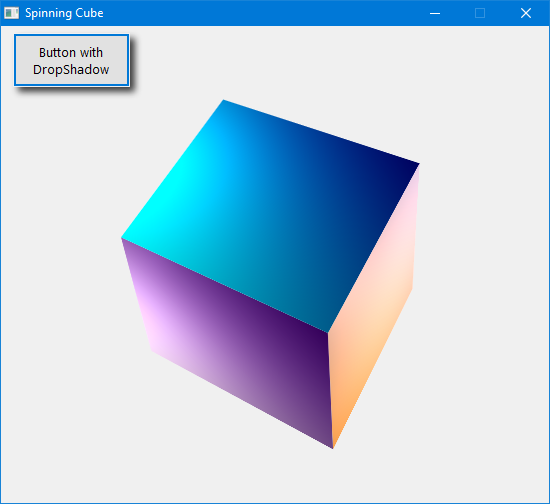
Download this Composition Demo project from the WinRT Samples Collection archive linked in the first post above (also requires re-downloading the TypeLib since it contains the new CompositorDesktopInterop interfaces that were added in the latest iteration)!
-
Apr 6th, 2026, 04:39 AM
#35
Lively Member
Re: [VB6] - WinRT Interfaces & XAML Islands TypeLibs for VB6/VBA x86 and VBA7 x64
Hi
I can't run PDF Viewer project, because I get the error User-defined type not defined in m_PdfListView As IItemsControl
-
Apr 6th, 2026, 05:00 AM
#36
Re: [VB6] - WinRT Interfaces & XAML Islands TypeLibs for VB6/VBA x86 and VBA7 x64
Pretty sure that's not the right error as IItemsControl is very much defined in the TypeLib (you can verify in the Object Browser (press F2)). You cannot run this project in the VB6 IDE unless you have the correct manifest as explained in post #6 above (read the instructions).
For a quick fix compile the EXE and run that to verify it works. Also open the Project->References menu in IDE and check nothing is missing there.
-
Apr 6th, 2026, 10:49 AM
#37
Fanatic Member
Re: [VB6] - WinRT Interfaces & XAML Islands TypeLibs for VB6/VBA x86 and VBA7 x64
Great work VanGogh.
All examples work perfectly in windows 11.
Originally Posted by Nanni
Hi
I can't run PDF Viewer project, because I get the error User-defined type not defined in m_PdfListView As IItemsControl
Check the references, I had an old tlb that caused conflict.
greetings
-
Apr 7th, 2026, 12:15 PM
#38
Lively Member
Re: [VB6] - WinRT Interfaces & XAML Islands TypeLibs for VB6/VBA x86 and VBA7 x64
Originally Posted by yokesee
Great work VanGogh.
All examples work perfectly in windows 11.
Check the references, I had an old tlb that caused conflict.
greetings
Thanks, resolved.Wrong typelib references.
-
Apr 10th, 2026, 09:39 AM
#39
Re: [VB6] - WinRT Interfaces & XAML Islands TypeLibs for VB6/VBA x86 and VBA7 x64
In Windows 11, right-clicking a file in Explorer brings up the "Share with..." or "Share" menu item in the context menu. This cannot be accessed via IContextMenu::InvokeCommand (Verb Windows.ModernShare) -> Error 0x80070578 (ERROR_INVALID_WINDOW_HANDLE). I'm now trying to access the dialog using your TLB via IDataTransferManager. Your TLB is missing the IDataTransferManagerInterop interface. I added it myself using a QueryInterface and then used DispCallFunc to call the functions. So far, so good, and I can display the dialog. Using IDataTransferManager::AddDataRequested adds a corresponding event where an IDataPackage needs to be populated. This is all covered in the Microsoft documentation. What I'm having trouble with is passing an IIterable_IStorageItem to IDataPackage.SetStorageItems or IDataPackage.SetStorageItemsReadOnly. I need a new and empty IVector_IStorageItem that implements IIterable_IStorageItem, to which I can then add files or folders. For example, using IStorageFolder2.TryGetItemAsync. My question is: How do I create a new and empty IVector_IStorageItem using your TLB?
If this isn't possible, I'll probably use IFolderLauncherOptions.ItemsToSelect to create a new and empty IVector_IStorageItem.
-
Apr 10th, 2026, 02:49 PM
#40
Re: [VB6] - WinRT Interfaces & XAML Islands TypeLibs for VB6/VBA x86 and VBA7 x64
As it turns out, IDataTransferManagerInterop is a recent addition to the twinBASIC package but looks like I forgot to copy it to the VB6 TypeLib as well. This is the ShareUI twinBASIC project where I used this interface:
ShareUI.zip
You cannot create an IVector of anything in VB6 or twinBASIC since WinRT does not have a built-in instantiation class for vectors like it has for maps so your best bet would be to find an already existing object that does it for you like FolderLauncherOptions in this case as you've aptly deduced yourself. Other language projections have built-in mechanisms for instantiating vectors (like New List<T> in C# or single_threaded_vector in C++) but in VB6 you'd have to go with the nuclear option of implementing it yourself in a BAS module.
Also please feel free to post your creations in this thread as well instead of exclusively on the German forum!
Last edited by VanGoghGaming; Apr 11th, 2026 at 10:27 AM.
 Posting Permissions
- You may not post new threads
- You may not post replies
- You may not post attachments
- You may not edit your posts
-
Forum Rules
|
Click Here to Expand Forum to Full Width
|



 Reply With Quote
