|

-
Mar 10th, 2025, 06:03 AM
#41
Re: VB6 - RichEdit and MsftEdit lightweight Unicode Textbox (only code, no OCX requir
Massively configurable keyboard shortcuts, collapsing sections, custom regions, advanced info popup, multiple modules per file, Unicode, CurrentProcedureName etc vars, inline code block hints, sticky scroll, ability to manage all resource types and edit the manifest (+auto-generate them), visual menu editor on the designer, tab order visible by holding control, anchors and docking saving huge amounts of size/position code, defining interfaces/coclasses in the ide...
I know there's some bugs with intellisense but there's just no way to call the vb6 ide miles ahead when it lacks all those features... better syntax highlighting isn't trivial either but those are all big improvements and even the expensive codesmart addin won't get you half of that.
Have you tried the intellisense option to behave more like vb6? Or adjusting it in the keyboard shortcut manager?
autoindent for paste definitely needs some work too. and yeah the bugs with these are a little annoying, but on the balance it's way, way better than vb6 because of those new features. once you get in the habit of using them it's outright painful to work in vb6, even if its intellisense works better for now.
Happy to take a look at your project, I'll see if I can narrow the problem down a bit so it gets fixed faster.
-
Apr 15th, 2025, 12:10 AM
#42
Re: VB6 - RichEdit and MsftEdit lightweight Unicode Textbox (only code, no OCX requir
rivate Sub Class_Initialize()
m_dwStyle = ES_NOOLEDRAGDROP Or ES_WANTRETURN Or ES_AUTOHSCROLL Or ES_AUTOVSCROLL _
Or ES_MULTILINE Or ES_NOHIDESEL Or ES_SUNKEN Or WS_CHILD Or WS_VISIBLE Or WS_VSCROLL Or WS_HSCROLL
how to set this?
Case vbSBNone
dwStyle = dwStyle Or ES_AUTOVSCROLL
Case vbHorizontal
dwStyle = dwStyle Or WS_HSCROLL Or ES_AUTOVSCROLL Or ES_AUTOHSCROLL
Case vbVertical
dwStyle = dwStyle Or WS_VSCROLL Or ES_AUTOVSCROLL
Case vbBoth
dwStyle = dwStyle Or WS_HSCROLL Or WS_VSCROLL Or ES_AUTOVSCROLL Or ES_AUTOHSCROLL
End Select
can't use
-
Jun 24th, 2025, 01:17 PM
#43
New Member

Re: VB6 - RichEdit and MsftEdit lightweight Unicode Textbox (only code, no OCX requir
Anything intrinsic that would preclude RichEdit from operating with/in VBA?
-
Jun 24th, 2025, 01:33 PM
#44
Re: VB6 - RichEdit and MsftEdit lightweight Unicode Textbox (only code, no OCX requir
It should work fine but you need to modify the code as the "CreateRichEdit" method takes the parent form as a parameter and you don't have forms in VBA.
-
Jun 24th, 2025, 01:38 PM
#45
New Member
Re: VB6 - RichEdit and MsftEdit lightweight Unicode Textbox (only code, no OCX requir
Anything intrinsic that would preclude RichEdit from operating with/in VBA?
-
Jun 24th, 2025, 01:41 PM
#46
Re: VB6 - RichEdit and MsftEdit lightweight Unicode Textbox (only code, no OCX requir
Most people use 64bit Office now; this would only work in 32bit without substantial updates.
RichEdit in general works but you'd need to update all the API calls and build a 64bit typelib, which might be difficult.
Last edited by fafalone; Jun 24th, 2025 at 01:45 PM.
-
Jun 24th, 2025, 01:54 PM
#47
 Re: VB6 - RichEdit and MsftEdit lightweight Unicode Textbox (only code, no OCX requir Re: VB6 - RichEdit and MsftEdit lightweight Unicode Textbox (only code, no OCX requir
That's true, it was made with no accountability for 64-bit whatsoever! 
-
Jun 24th, 2025, 03:00 PM
#48
Re: VB6 - RichEdit and MsftEdit lightweight Unicode Textbox (only code, no OCX requir
There's some bug with this in tB... Keep getting no such interface for isubclass, but I can't replicate in a minimal reproduction
-
Jun 24th, 2025, 04:04 PM
#49
 Re: VB6 - RichEdit and MsftEdit lightweight Unicode Textbox (only code, no OCX requir Re: VB6 - RichEdit and MsftEdit lightweight Unicode Textbox (only code, no OCX requir
Did you add ISubclass.cls to the project? Guess you can declare it directly as an interface in tB.
-
Jun 24th, 2025, 06:18 PM
#50
Re: VB6 - RichEdit and MsftEdit lightweight Unicode Textbox (only code, no OCX requir
Well I made a working vb6 test first.
ISubclass.cls:
Code:
VERSION 1.0 CLASS
BEGIN
  MultiUse = -1  'True
  Persistable = 0  'NotPersistable
  DataBindingBehavior = 0  'vbNone
  DataSourceBehavior  = 0  'vbNone
  MTSTransactionMode  = 0  'NotAnMTSObject
END
Attribute VB_Name = "ISubclass"
Attribute VB_GlobalNameSpace = False
Attribute VB_Creatable = True
Attribute VB_PredeclaredId = False
Attribute VB_Exposed = False
Option Explicit

Public Function WndProc(ByVal hWnd As Long, ByVal uMsg As Long, ByVal wParam As Long, ByVal lParam As Long, ByVal dwRefData As Long) As Long

End Function
Module1.bas:
Code:
Option Explicit
Public Declare Sub GetMem2 Lib "msvbvm60" (Ptr As Any, RetVal As Integer)

Public Function SubclassWnd(hWnd As Long, vSubclass As Variant, Optional dwRefData As Long, Optional bUpdateRefData As Boolean) As Boolean
Dim uIdSubclass As Long, Subclass As ISubclass, lOldRefData As Long, wVarType As Integer
    GetMem2 vSubclass, wVarType
    Select Case True
        Case (wVarType And vbObject) = vbObject
            Set Subclass = vSubclass 'twinBASIC errors here in the real project; callstack is as here
            Debug.Print Subclass Is Nothing
    End Select
End Function
Class1.cls:
Code:
Option Explicit
Implements ISubclass
Public Sub CreateRE()
SubclassWnd 0, Me
End Sub

Private Function ISubclass_WndProc(ByVal hWnd As Long, ByVal uMsg As Long, ByVal wParam As Long, ByVal lParam As Long, ByVal dwRefData As Long) As Long

End Function
Form1.frm:
Code:
Option Explicit

Private cTest As Class1


Private Sub Form_Load()
Set cTest = New Class1
cTest.CreateRE
End Sub
-
Jun 24th, 2025, 06:59 PM
#51
 Re: VB6 - RichEdit and MsftEdit lightweight Unicode Textbox (only code, no OCX requir Re: VB6 - RichEdit and MsftEdit lightweight Unicode Textbox (only code, no OCX requir
Ugh, I don't know why that fails in tB. That tomfoolery with variants was part of my early testing with subclassing. I've long since scrapped it in favor of this drop-in module that can be used "as-is" in any project:
mdlSC - It has the advantage that while in IDE it can delegate subclassing to an ActiveX DLL (to prevent crashes) using that optional parameter:
Code:
Option Explicit

Private Declare Function DefSubclassProc Lib "comctl32" Alias "#413" (ByVal hWnd As LongPtr, ByVal uMsg As Long, ByVal wParam As LongPtr, ByVal lParam As LongPtr) As LongPtr
Private Declare Function GetWindowSubclass Lib "comctl32" Alias "#411" (ByVal hWnd As LongPtr, ByVal pfnSubclass As LongPtr, ByVal uIdSubclass As LongPtr, ByVal pdwRefData As LongPtr) As BOOL
Private Declare Function RemoveWindowSubclass Lib "comctl32" Alias "#412" (ByVal hWnd As LongPtr, ByVal pfnSubclass As LongPtr, ByVal uIdSubclass As LongPtr) As BOOL
Private Declare Function SetWindowSubclass Lib "comctl32" Alias "#410" (ByVal hWnd As LongPtr, ByVal pfnSubclass As LongPtr, ByVal uIdSubclass As LongPtr, ByVal dwRefData As LongPtr) As BOOL

Public Function GetSubclassPointer(ObjectToSubclass As IUnknown) As LongPtr
Dim Subclass As ISubclass
    If TypeOf ObjectToSubclass Is ISubclass Then Set Subclass = ObjectToSubclass: GetSubclassPointer = ObjPtr(Subclass)
End Function

Public Function IsWndSubclassed(hWnd As LongPtr, uIdSubclass As LongPtr, Optional dwRefData As LongPtr) As Boolean
    IsWndSubclassed = GetWindowSubclass(hWnd, AddressOf WndProc, uIdSubclass, dwRefData)
End Function

Public Function SubclassWnd(hWnd As LongPtr, uIdSubclass As LongPtr, Optional dwRefData As LongPtr, Optional bUpdateRefData As Boolean, Optional Subclass As Object) As Boolean
    If Subclass Is Nothing Then
        Dim lOldRefData As LongPtr
        If Not IsWndSubclassed(hWnd, uIdSubclass, lOldRefData) Then
            SubclassWnd = SetWindowSubclass(hWnd, AddressOf WndProc, uIdSubclass, dwRefData)
        Else
            If bUpdateRefData Then If lOldRefData <> dwRefData Then SubclassWnd = SetWindowSubclass(hWnd, AddressOf WndProc, uIdSubclass, dwRefData)
        End If
    Else
        SubclassWnd = Subclass.SubclassWnd(hWnd, dwRefData, bUpdateRefData)
    End If
End Function

Public Function UnSubclassWnd(hWnd As LongPtr, uIdSubclass As LongPtr, Optional Subclass As Object) As Boolean
    If Subclass Is Nothing Then
        If IsWndSubclassed(hWnd, uIdSubclass) Then UnSubclassWnd = RemoveWindowSubclass(hWnd, AddressOf WndProc, uIdSubclass)
    Else
        UnSubclassWnd = Subclass.UnSubclassWnd(hWnd)
    End If
End Function

Private Function WndProc(ByVal hWnd As LongPtr, ByVal uMsg As Long, ByVal wParam As LongPtr, ByVal lParam As LongPtr, ByVal Subclass As ISubclass, ByVal dwRefData As LongPtr) As LongPtr
Dim bDiscardMessage As Boolean
    Select Case uMsg
        Case WM_NCDESTROY ' Remove subclassing as the window is about to be destroyed
            UnSubclassWnd hWnd, ObjPtr(Subclass)
        Case Else
            Subclass.MessageReceived hWnd, uMsg, wParam, lParam, dwRefData, bDiscardMessage, WndProc ' bDiscardMessage is passed ByRef so it can be toggled as required by each local Subclass_WndProc
    End Select
    If Not bDiscardMessage Then WndProc = DefSubclassProc(hWnd, uMsg, wParam, lParam) ' Choose whether to pass along this message or discard it
End Function
ISubclass was moved to a TypeLib:
Code:
Interface ISubclass Extends IUnknown
    Sub MessageReceived(hWnd As LongPtr, uMsg As Long, wParam As LongPtr, lParam As LongPtr, dwefData As LongPtr, bDiscardMessage As Boolean, ReturnValue As LongPtr)
End Interface
Usage in a form or class:
Code:
#If bInIDE Then
    Private WithEvents ISubclass As prjSafeSubclassing.cSC
#Else
    Implements ISubclass
#End If

SubclassWnd hWnd, GetSubclassPointer(Me), , , ISubclass
I was meaning to update this project at one time or another but at the moment I'm caught up with WinRT.
Last edited by VanGoghGaming; Jun 24th, 2025 at 07:27 PM.
-
Jun 25th, 2025, 08:25 AM
#52
Re: VB6 - RichEdit and MsftEdit lightweight Unicode Textbox (only code, no OCX requir
 Originally Posted by VanGoghGaming

but at the moment I'm caught up with WinRT.
 
-
Jun 25th, 2025, 04:28 PM
#53
Re: VB6 - RichEdit and MsftEdit lightweight Unicode Textbox (only code, no OCX requir
The original is working in tB now.
-
Jan 13th, 2026, 12:49 AM
#54
Fanatic Member
Re: VB6 - RichEdit and MsftEdit lightweight Unicode Textbox (only code, no OCX requir
How can I insert a table in RTF and fill it with data? Thank you.
-
Jan 13th, 2026, 10:54 PM
#55
Fanatic Member
Re: VB6 - RichEdit and MsftEdit lightweight Unicode Textbox (only code, no OCX requir
Originally Posted by VanGoghGaming
This is my attempt to implement a lightweight wrapper class for the RichEdit control (riched20.dll as well as its newer version msftedit.dll) which has Unicode support, RTF capabilities (Rich Text Format) and comes by default with any version of Windows (only tested in Win10 though). I have tried to include most of the usual properties, methods and events of a regular VB6 textbox (some are left out, there's certainly room for improvement here) as well as new ones specific to the RichEdit control:
Properties:
- hWnd (read-only)
- Left
- Top
- Width
- ScaleWidth (read-only)
- Height
- ScaleHeight (read-only)
- AutoDetectURL (various forms of URLs are detected automatically when typed in the RichEdit textbox after this property has been enabled)
- BackColor
- Container
- Enabled
- Font
- ForeColor
- Locked
- MaxLength
- MultiLine (default is "True", needs to be set to "False" BEFORE the RichEdit control is created if you wish the RichEdit control to be in Single Line mode)
- PasswordChar
- PlaceholderText (MSFTEDIT only - the RichEdit control can display a grayed-out placeholder text when empty to provide cues for the user about its intended purpose)
- PlainTextMode (default is "False" meaning the RichEdit control will be in full RTF mode)
- SelLength
- SelProtect (used to protect a range of text against accidental editing)
- SelStart
- SelText
- SpellChecking (MSFTEDIT only - enable or disable spell checking (misspelled words will be underlined with red squiggly lines))
- TabIndex
- Tag
- Text (default property for the RichEdit control)
- TextRTF (loads or saves the RichEdit contents as a RTF file (byte array), optionally includes the whole contents or only the current selection)
- Visible
Methods:
- CreateRichEdit - creates and places the RichEdit control on the parent form at the specified position (optional MultiLine/SingleLine and PlainText/RTFText)
- GetCurrentLineInfo - retrieves useful information about the current position in the MultiLine RichEdit control (current line, curent char position, line length, is caret at beginning or end of line, paragraph alignment and indentation)
- GetSpellingSuggestions - provides a list of spelling suggestions for the selected word and optionally populate the context menu with them in order to replace the current selection
- GetTextFromRange - retrieves a chunk of text of a specified length from the specified position
- Find - takes advantage of the Find capabilities of the RichEdit control (search forward, backward, case sensitive, whole word), the demo project also shows how to use the Find/Replace dialog to manage searches
- InsertImage - Inserts an image at the current position (the image parameter can be a Picture object or a File name). If the image parameter is a Picture object then it can be optionally converted to another format (PNG, JPG, etc). Images loaded from files are left "as is"
- Move - for later repositioning of the RichEdit control after it has been created on a Form
- PrintRichEdit - prints the contents of the RichEdit control to the default printer (optionally include a FileName if the default printer is "Microsoft Save to PDF")
- SetFocusRichEdit - Sets the focus to the RichEdit control
- SetMargins - Sets horizontal and/or vertical margins (in Pixels) inside the RichEdit control
- SetParagraphAttributes - Set the alignment (Left, Center, Right, Justify) and/or indentation of the current paragraph
- SetSelectionColor - changes the background and/or text color of a single word or selected text
- SetSelectionColorDialog - same as above, only it displays the "ShowColor" dialog for selecting the color
- SetSelectionFontAttributes - changes the font attributes of the current selection (font name, size, bold, italic, underline, strikethrough), MSFTEDIT only -> can change underline styles and colors
- SetSelectionFontDialog - same as above, only it displays the "ChooseFont" dialog for selecting the font attributes
- SetSelectionHyperlink - MSFTEDIT only, turns the selection into a Hyperlink (also prompts for the destination URL)
Events:
- Change
- ChangeProtectedText - occurs when an attempt is made to edit a range of protected text (can choose to allow or deny the change)
- KeyDown
- KeyPress
- GotFocus
- LostFocus
- Click
- LinkClick - occurs when the user clicks on a Hyperlink
- SelectionChange - occurs when the user selects some text
The attached sample project contains a regular textbox (for comparison), a multi-line RichEdit and a single-line RichEdit (the Chinese text in the screenshot below is only for testing purposes to showcase the Unicode capabilities of the Rich Edit control):
Attachment 187176
The main form loads a text file (for testing purposes and places it in a multi-line RichEdit. Selecting some text from the multi-line RichEdit places it in the single-line RichEdit.
Code:
Private Sub richTest1_SelectionChange(SelText As String)
    richTest2 = SelText
End Sub
The demo project also shows how to print the contents of the MultiLine Rich Edit (works with the "Microsoft Save to PDF" printer as well), save the contents as RTF to be used in other word processors (such as WordPad), set paragraph indentation and alignment (Left, Center, Right and Justify) and insert an image:
Save as RTF:
Attachment 187177
Code:
Private Sub cmdPrint_Click()
    richTest1.PrintRichEdit
End Sub

Private Sub cmdSaveRTF_Click()
Dim sFileName As String
    sFileName = AppPathW(, , False) & "RichEdit.rtf"
    WriteFile sFileName, richTest1.TextRTF
    MsgBoxW "Rich Edit has been saved as RTF to: " & sFileName, vbOKOnly Or vbInformation
End Sub
Print as PDF:
Attachment 187178
The main form also contains a context menu (PopupMenu) which responds independently to whichever RichEdit control currently has the focus and provides standard functionality such as Undo, Redo, Cut, Copy, Paste, Delete and Select All. Although the PopupMenu needs to be created on the main form, its functionality is contained inside the RichEdit class so that it can work independently with multiple RichEdit controls. In the latest update I have added "Find and Replace" functionality to the PopupMenu as well as Font effects (bold, italic, underline, strikethrough, shadow, capital letters, small capital letters, text color, text background color), protect a range of text and insert a hyperlink with a friendly URL name. The last item in the PopupMenu is a "Spelling Suggestions" list for the currently selected word:
Attachment 187216
There are many API functions, types and constants used in this project. In order to avoid explicitly declaring all of them, I have used Bruce McKinney's Windows API type library (included in the sample project, downloaded from https://classicvb.net/hardweb/mckinney2a.htm). This is entirely optional but it certainly saves a lot of time copy-pasting declarations.
Sample RichEdit Project: Attachment 188308 (Updated)
InsertImage - Inserts an image at the current position (the image parameter can be a Picture object or a File name). If the image parameter is a Picture object then it can be optionally converted to another format (PNG, JPG, etc). Images loaded from files are left "as is"
I WANT USEDE THIS INSET IMAGE FUNCTION.BUT IN MY WIN7 SYSETE,UNSUCCESSFUL?THANKS SIR
-
Jan 14th, 2026, 02:19 PM
#56
Re: VB6 - RichEdit and MsftEdit lightweight Unicode Textbox (only code, no OCX requir
The problem is it uses EM_INSERTIMAGE which is only available on Windows 8+.
For 7 you'd need to use the older, and unfortunately much more complicated, method involving the RichEdit COM interfaces.
Code:
    Private pRichEditOle As IRichEditOle
    Private lpObject As IOleObject
    Private lpStorage As IStorage
    Private lpClientSite As IOleClientSite


SendMessage(hRE, EM_GETOLEINTERFACE, 0, pRichEditOle)

    Private Sub RichEdInsertImgOld(sFile As String, cx As Long, cy As Long)
        Dim lpLockBytes As ILockBytes
        Dim render As OLERENDER = OLERENDER_DRAW
        Dim cfFormat As Integer
        Dim tFmtEtc As FORMATETC
        Dim sc As Long
        Dim cls As UUID

        sc = CreateILockBytesOnHGlobal(0, CTRUE, lpLockBytes)
        If sc <> S_OK Then
            Debug.Print "Error creating lockbytes"
            Exit Sub
        End If
        sc = StgCreateDocfileOnILockBytes(lpLockBytes, STGM_SHARE_EXCLUSIVE Or STGM_CREATE Or STGM_READWRITE, 0, lpStorage)
        If sc <> S_OK Then
            Debug.Print "Error creating lpStorage"
            Set lpLockBytes = Nothing
            Exit Sub
        End If
        tFmtEtc.dwAspect = DVASPECT_CONTENT
        tFmtEtc.lIndex = -1
        tFmtEtc.tymed = TYMED_NULL

        Set lpClientSite = pRichEditOle.GetClientSite()

        sc = OleCreateFromFile(cls, sFile, IID_IOleObject, OLERENDER_DRAW, tFmtEtc, lpClientSite, lpStorage, lpObject)

        If lpObject IsNot Nothing Then
            OleSetContainedObject lpObject, CTRUE
            Dim reobj As REOBJECT
            Dim cid As UUID
            lpObject.GetUserClassID(cid)

            reobj.cbStruct = LenB(Of REOBJECT)
            reobj.clsid = cid
            reobj.cp = REO_CP_SELECTION
            reobj.dvaspect = DVASPECT_CONTENT
            reobj.dwFlags = REO_RESIZABLE Or REO_BELOWBASELINE
            reobj.dwUser = 0
            Set reobj.poleobj = lpObject
            Set reobj.polesite = lpClientSite
            Set reobj.pstg = lpStorage

            pRichEditOle.InsertObject(reobj)

            Set lpObject = Nothing
            Set lpStorage = Nothing
            Set lpClientSite = Nothing
        End If
    End Sub
Not sure if the TLB it's currently using has the coverage for that, might need oleexp.tlb.
Code might need minor adjustments to back-port from tB to VB6 and WinDevLib to oleexp.tlb.
-
Jan 14th, 2026, 08:21 PM
#57
Fanatic Member
Re: VB6 - RichEdit and MsftEdit lightweight Unicode Textbox (only code, no OCX requir
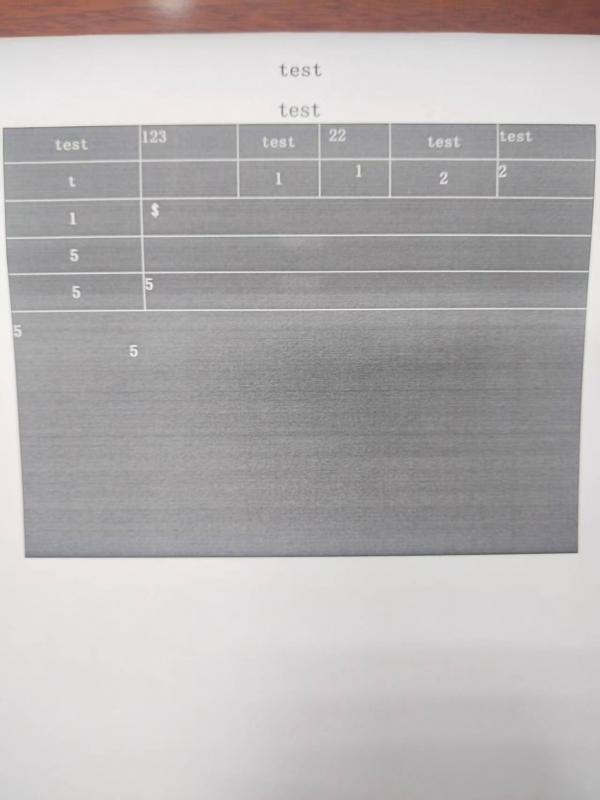
i used i win10 work ok.but Why did the printed text turn into white letters on a black background?
I converted the table in Word to RTF format and then filled it out.
I opened the RTF file and printed it directly, the background is not black.
sets.zip
Last edited by xxdoc123; Jan 15th, 2026 at 06:46 PM.
-
Jan 24th, 2026, 10:47 PM
#58
Fanatic Member
Re: VB6 - RichEdit and MsftEdit lightweight Unicode Textbox (only code, no OCX requir
I once thought about replacing the RTB control with the system control, but loading this template RTF document with the system control would cause confusion in the table position. If this class is used, there is no such problem. I don't know if there is any expert guidance available.My current method is to use this class to load TRF documents and print them using the shell system's writing board to avoid black background tablesMay I ask if there are any experts who can provide guidance? Or can I use the bsprinter control to print documents in this class?
-
Jan 25th, 2026, 12:42 AM
#59
Re: VB6 - RichEdit and MsftEdit lightweight Unicode Textbox (only code, no OCX requir
This class uses the system control so not sure what you mean... there are two or three system richedit controls though. The old riched20, msftedit, and on Win11 the new riched20.
-
Jan 25th, 2026, 11:39 AM
#60
Re: VB6 - RichEdit and MsftEdit lightweight Unicode Textbox (only code, no OCX requir
Currently the "PrintRichEdit" method is an exact VB6 translation of the C++ code from this MSDN example: How to Print the Contents of Rich Edit Controls so I don't know what to fix if tables are printed with black background...
-
Jan 25th, 2026, 11:38 PM
#61
Fanatic Member
Re: VB6 - RichEdit and MsftEdit lightweight Unicode Textbox (only code, no OCX requir
Originally Posted by fafalone
This class uses the system control so not sure what you mean... there are two or three system richedit controls though. The old riched20, msftedit, and on Win11 the new riched20.
how can used new riched20?
-
Jan 25th, 2026, 11:39 PM
#62
Fanatic Member
Re: VB6 - RichEdit and MsftEdit lightweight Unicode Textbox (only code, no OCX requir
Originally Posted by VanGoghGaming
I asked the AI but didn't find the correct solution. I am using an HP printer.
-
Jan 25th, 2026, 11:51 PM
#63
Fanatic Member
Re: VB6 - RichEdit and MsftEdit lightweight Unicode Textbox (only code, no OCX requir
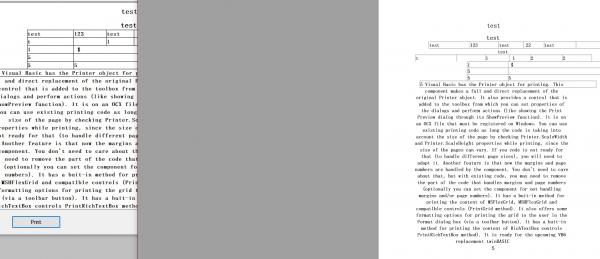
Object={3B7C8863-D78F-101B-B9B5-04021C009402}#1.2#0; Richtx32.ocx
This calls the system's built-in RTB control, allowing the image to show the problem more intuitively.
-
Jan 26th, 2026, 01:51 AM
#64
Fanatic Member
Re: VB6 - RichEdit and MsftEdit lightweight Unicode Textbox (only code, no OCX requir
Originally Posted by VanGoghGaming
I used that set.rtf document, and printing results in a black background. If I use the RTB control wrapped with Krool, RTB.selprint printer.hdc there’s no problem.
-
Jan 26th, 2026, 02:16 AM
#65
Re: VB6 - RichEdit and MsftEdit lightweight Unicode Textbox (only code, no OCX requir
Spell checking doesn't work for OFFICERICHEDIT60W... any ideas besides full manual implementation?
-
Jan 26th, 2026, 08:21 PM
#66
Re: VB6 - RichEdit and MsftEdit lightweight Unicode Textbox (only code, no OCX requir
I don't have Office installed but if the control doesn't support the Windows specific IMF_SPELLCHECKING flag (Input Method Framework) for EM_SETLANGOPTIONS then it probably has some other undocumented messages or interfaces that it uses internally because it definitely has spell checking support but Microsoft hasn't published a way to access it outside Word documents (where you could simply use ActiveDocument.SpellingChecked).
Last edited by VanGoghGaming; Jan 26th, 2026 at 08:25 PM.
-
Jan 26th, 2026, 11:41 PM
#67
Fanatic Member
Re: VB6 - RichEdit and MsftEdit lightweight Unicode Textbox (only code, no OCX requir
Hello, expert. Is it possible to implement the selprint functionality wrapped by Krool in the RichTextBox class module? Or could you explain the differences in principle between yours and his printing module? His selprint module prints without the black background.
Thank you for your reply
-
Feb 1st, 2026, 06:47 PM
#68
Fanatic Member
Re: VB6 - RichEdit and MsftEdit lightweight Unicode Textbox (only code, no OCX requir
Originally Posted by VanGoghGaming
I don't have Office installed but if the control doesn't support the Windows specific IMF_SPELLCHECKING flag (Input Method Framework) for EM_SETLANGOPTIONS then it probably has some other undocumented messages or interfaces that it uses internally because it definitely has spell checking support but Microsoft hasn't published a way to access it outside Word documents (where you could simply use ActiveDocument.SpellingChecked).
Sir, why can I use the selprint function wrapped with krool normally, but your print function has problems? I asked AI, but none could solve this issue. Could you please tell me?
-
Feb 22nd, 2026, 08:10 AM
#69
Fanatic Member
Re: VB6 - RichEdit and MsftEdit lightweight Unicode Textbox (only code, no OCX requir
Originally Posted by xxdoc123
i used i win10 work ok.but Why did the printed text turn into white letters on a black background?
I converted the table in Word to RTF format and then filled it out.
I opened the RTF file and printed it directly, the background is not black.
sets.zip
NOW FIXED
Code:
Friend Function PrintRichEdit(Optional sFileName As String, _
                              Optional lPDFHorizontalMargin As Long = 50, _
                              Optional lPDFVerticalMargin As Long = 50) As Boolean
    Dim di As DOCINFO, pd As TPRINTDLG, fr As FORMATRANGE
    Dim hDC As Long, cxPhysOffset As Long, cyPhysOffset As Long
    Dim cxPhysWidth As Long, cxPhysHeight As Long
    Dim cpMin As Long, bSuccess As Boolean
    Dim nLogPixelsX As Long, nLogPixelsY As Long

    ' ???1???????
    Dim savedSel As CHARRANGE
    SendMessageVal m_hWndRichEdit, EM_EXGETSEL, 0&, VarPtr(savedSel)

    pd.lStructSize = Len(pd): pd.Flags = PD_RETURNDC Or PD_RETURNDEFAULT
    If PrintDlg(pd) Then hDC = pd.hDC Else Exit Function

    di.cbSize = LenB(di)
    If Len(sFileName) Then di.lpszOutput = StrPtr(sFileName)

    nLogPixelsX = GetDeviceCaps(hDC, LOGPIXELSX)
    nLogPixelsY = GetDeviceCaps(hDC, LOGPIXELSY)

    cxPhysOffset = CLng(GetDeviceCaps(hDC, PHYSICALOFFSETX) * 1440 / nLogPixelsX)
    cyPhysOffset = CLng(GetDeviceCaps(hDC, PHYSICALOFFSETY) * 1440 / nLogPixelsY)
    cxPhysWidth = CLng(GetDeviceCaps(hDC, PHYSICALWIDTH) * 1440 / nLogPixelsX)
    cxPhysHeight = CLng(GetDeviceCaps(hDC, PHYSICALHEIGHT) * 1440 / nLogPixelsY)

    If cxPhysOffset = 0 Then cxPhysOffset = m_ParentForm.ScaleX(lPDFHorizontalMargin, vbPixels, vbTwips)
    If cyPhysOffset = 0 Then cyPhysOffset = m_ParentForm.ScaleY(lPDFVerticalMargin, vbPixels, vbTwips)

    With fr
        .hDC = hDC: .hdcTarget = hDC
        .rcPage.Top = 0: .rcPage.Left = 0
        .rcPage.Right = cxPhysWidth
        .rcPage.Bottom = cxPhysHeight

        .rc.Left = cxPhysOffset
        .rc.Right = cxPhysWidth - cxPhysOffset
        .rc.Top = cyPhysOffset
        .rc.Bottom = cxPhysHeight - cyPhysOffset

        ' ???2?????????
        SendMessageVal m_hWndRichEdit, EM_SETSEL, 0&, -1&
        SendMessageVal m_hWndRichEdit, EM_EXGETSEL, 0&, VarPtr(.chrg)

        ' ???3????????????????
        SendMessageVal m_hWndRichEdit, EM_SETSEL, -1&, -1&

        If StartDoc(hDC, di) Then
            bSuccess = True
            Do While (.chrg.cpMin < .chrg.cpMax) And bSuccess
                bSuccess = StartPage(hDC) > 0
                If Not bSuccess Then Exit Do

                cpMin = SendMessageVal(m_hWndRichEdit, EM_FORMATRANGE, 1&, VarPtr(fr))
                If cpMin <= .chrg.cpMin Then
                    bSuccess = False: Exit Do
                End If

                .chrg.cpMin = cpMin
                bSuccess = EndPage(hDC) > 0
            Loop
        End If
    End With

    SendMessageVal m_hWndRichEdit, EM_FORMATRANGE, 0&, 0&

    ' ???4???????
    SendMessageVal m_hWndRichEdit, EM_EXSETSEL, 0&, VarPtr(savedSel)

    If bSuccess Then EndDoc hDC Else AbortDoc hDC
    PrintRichEdit = bSuccess
End Function
 Posting Permissions
- You may not post new threads
- You may not post replies
- You may not post attachments
- You may not edit your posts
-
Forum Rules
|
Click Here to Expand Forum to Full Width
|



 Reply With Quote
