|

-
Nov 26th, 2025, 02:06 AM
#1
Thread Starter
Addicted Member

Windows 11 DAO acces to old SQL Server 2005/2008 database
I maintain an application that I developed over 20 years ago.
The application uses DAO to access databases on two old servers running SQLServer2005 and SQLServer2008.
It is installed on nearly 50 computers with operating systems ranging from WinXP to Win10 and runs smoothly.
The program uses DAO and ODBC DSN-less connection strings to access data using DRIVER={SQL Server}.
The last driver that worked in Windows 10 and with SQL Server 2005/2008 was sqlsrv32.dll version v.10.0.19041.6456.
After PCs started updating to Windows 11, it no longer works.
On Windows 11, Microsoft ships a newer sqlsrv32.dll (now v.10.0.26100.3624) that has hardened TLS/SSL behavior, which breaks connectivity to SQL 2005.
I thought about manually registering the old driver alongside the new one in ODBC.
What I've done so far in Win11:
1. Activate TLS 1.0 (SQL Server 2005 speak TLS 1.0 only, SQL Server 2008–2012 TLS 1.0 / 1.1 / partial 1.2)
2. The old driver after update is in "C:\Windows.old\Windows\SysWOW64\sqlsrv32.dll", so i create a new entry in registry with a new name {SQL Server (Legacy)} and that location:
Code:
Windows Registry Editor Version 5.00

[HKEY_LOCAL_MACHINE\SOFTWARE\WOW6432Node\ODBC\ODBCINST.INI\SQL Server (Legacy)]
"Driver"="C:\\Windows.old\\Windows\\SysWOW64\\sqlsrv32.dll"
"Setup"="C:\\Windows.old\\Windows\\SysWOW64\\sqlsrv32.dll"
"ResourceFile"="C:\\Windows.old\\Windows\\SysWOW64\\sqlsrv32.rll"
"UsageCount"=dword:00000001
"DriverODBCVer"="02.50"
"APILevel"="2"
"ConnectFunctions"="YYY"
"SQLLevel"="1"
"FileUsage"="0"
"CPTimeout"="60"

[HKEY_LOCAL_MACHINE\SOFTWARE\WOW6432Node\ODBC\ODBCINST.INI\ODBC Drivers]
"SQL Server (Legacy)"="Installed"
3.Reboot
4. Open C:\Windows\SysWOW64\odbcad32.exe -> Drivers tab -> confirm “SQL Server (Legacy)” -> appears
... but when i try to create a DSN using [SQL Server (Legacy)] ... fail.
I also try the same (manual extract and register) with driver {SQL Server Native Client 11.0}, because 32bit version not install on Win11.
Driver appear in Drivers tab -> “SQL Server Native Client 11.0” but create a DSN fot test faile also.
Code:
Windows Registry Editor Version 5.00

[HKEY_LOCAL_MACHINE\SOFTWARE\WOW6432Node\ODBC\ODBCINST.INI\SQL Server Native Client 11.0]
"Driver"="C:\\Windows\\SysWOW64\\sqlncli11.dll"
"Setup"="C:\\Windows\\SysWOW64\\sqlncli11.dll"
"ResourceFile"="C:\\Windows\\SysWOW64\\sqlncli11.rll"
"DriverODBCVer"="03.80"
"APILevel"="2"
"ConnectFunctions"="YYY"
"SQLLevel"="1"
"FileUsage"="0"
"CPTimeout"="60"
"UsageCount"=dword:00000001

[HKEY_LOCAL_MACHINE\SOFTWARE\WOW6432Node\ODBC\ODBCINST.INI\ODBC Drivers]
"SQL Server Native Client 11.0"="Installed"

I cannot update SQLServer because they are used in an industrial automation project and the app has become too complex over time.
Any suggestion please!
Last edited by cliv; Nov 26th, 2025 at 02:31 AM.
-
Nov 27th, 2025, 06:15 AM
#2
Re: Windows 11 DAO acces to old SQL Server 2005/2008 database
I don't know if this will help but I use ODBC Driver 17 for SQL Server (MSODBCSQL17.dll) with DAO DSN-less, this works on both Windows 10 and 11. But I am using newer releases of SQL Server than you are.
Have you tried using MS Access on Windows 11 to connect to SQL Server to see what drivers work with your older databases? (start with a DSN connection until you determine what works).
VB6 programming and twinBASIC programming
-
Nov 27th, 2025, 06:29 AM
#3
Thread Starter
Addicted Member
Re: Windows 11 DAO acces to old SQL Server 2005/2008 database
 Originally Posted by VB6 Programming

I am using newer releases of SQL Server than you are.
Yes this is the problem SQL Server 2005 / 2008 (RTM) -> only support SSL 3.0 / TLS 1.0 and SQL Server 2008 R2 -> still limited to TLS 1.0, and Windows 11 clients -> only allow TLS 1.2/1.3 ciphers (AES?GCM, AES?CBC with SHA256/384). Legacy 3DES is blocked (TLS_RSA_WITH_3DES_EDE_CBC_SHA is disable).
So my approach was wrong, i aneed a Stunnel TLS proxy on server (stunnel listens on 1433, terminates TLS 1.2/1.3, and forwards to SQL Server’s legacy port)...
-
Nov 27th, 2025, 08:23 AM
#4
Re: Windows 11 DAO acces to old SQL Server 2005/2008 database
Is there a chance that you could implement replication of the required data to a new server running a newer version of SQL Server?
edit: also, sweet looking app!
-
Nov 27th, 2025, 08:46 AM
#5
Re: Windows 11 DAO acces to old SQL Server 2005/2008 database
And people laugh at me, when i say, i absolutely despise Microsoft.....
Throw the SQL-Server into a Bin,
grab the current PostGres Server, https://www.postgresql.org/download/
grab the ODBC-Drivers 32 Bit for PostGres, https://www.postgresql.org/ftp/odbc/...EL-17_00_0007/
migrate the Data, https://dbeaver.io/
adjust SQL-Statements.
Done!
Last edited by Zvoni; Tomorrow at 31:69 PM.
----------------------------------------------------------------------------------------
One System to rule them all, One Code to find them,
One IDE to bring them all, and to the Framework bind them,
in the Land of Redmond, where the Windows lie
---------------------------------------------------------------------------------
People call me crazy because i'm jumping out of perfectly fine airplanes.
---------------------------------------------------------------------------------
Code is like a joke: If you have to explain it, it's bad
-
Nov 28th, 2025, 03:11 AM
#6
Thread Starter
Addicted Member
Re: Windows 11 DAO/ADO acces to old SQL Server 2005/2008 database
Originally Posted by VB6 Programming
I don't know if this will help but I use ODBC Driver 17 for SQL Server (MSODBCSQL17.dll) with DAO DSN-less, this works on both Windows 10 and 11.
How do you install Microsoft ODBC Driver 17 for SQL Server (x86) on Win11. I have computer with Win11 update from Win10 and refuze to run installer x86, only x64?
Originally Posted by Zvoni
grab the current PostGres Server
i already told, I cannot change SQLServer with PostGres/MySql/... or update version of SQLServer because they are used in an industrial automation project.
I'm just looking for an option to use DAO or ADO in an vb6 app from Win11x64 for interogate SQLServer2005
Last edited by cliv; Nov 28th, 2025 at 03:31 AM.
-
Nov 28th, 2025, 04:18 AM
#7
Re: Windows 11 DAO acces to old SQL Server 2005/2008 database
Originally Posted by cliv
Yes this is the problem SQL Server 2005 / 2008 (RTM) -> only support SSL 3.0 / TLS 1.0 and SQL Server 2008 R2 -> still limited to TLS 1.0, and Windows 11 clients -> only allow TLS 1.2/1.3 ciphers (AES?GCM, AES?CBC with SHA256/384). Legacy 3DES is blocked (TLS_RSA_WITH_3DES_EDE_CBC_SHA is disable).
So my approach was wrong, i aneed a Stunnel TLS proxy on server (stunnel listens on 1433, terminates TLS 1.2/1.3, and forwards to SQL Server’s legacy port)...
This should work with Stunnel, just ask an LLM for sample configuration like this
Code:
; Stunnel Configuration File for Multiple SQL Server Instances running on Windows

; Global options (applies to all services)

; !!! IMPORTANT: Replace these paths with the actual location of your files !!!
; Use forward slashes or escaped backslashes in paths.
cert = C:\Program Files (x86)\stunnel\config\combined_certificate.pem
key = C:\Program Files (x86)\stunnel\config\private_key.pem

; Some basic security and logging settings
client = no                                     ; Stunnel runs in server mode
syslog = yes                                    ; Use Windows Event Log for logging
output = stunnel.log                            ; Log file location relative to Stunnel's working directory

debug = 4                                       ; Log level (4 is a good default for info/warnings)
foreground = no                                 ; Run as a background service

; =============================================
; Service Definitions
; =============================================

; Proxy for SQL Server Instance on Port 1433
[SQL2025_Secure]
accept = 0.0.0.0:1433                           ; Listen on external interface port 1433 for secure traffic
connect = 127.0.0.1:1433                        ; Forward decrypted traffic to local service on 1433

; Proxy for SQL Server Instance on Port 1434
[SQL2028_Secure]
accept = 0.0.0.0:1434                           ; Listen on external interface port 1434 for secure traffic
connect = 127.0.0.1:1434                        ; Forward decrypted traffic to local service on 1434
You don't need a real TLS certificates because you can use Encrypt=Yes;TrustServerCertificate=Yes in ODBC connect string to trust any self-signed certificate.
Also in ODBC string you have to specify target instance port explicitly with Server=my_server_address,1433 i.e. might not work with my_server_address:1433.
cheers,
</wqw>
Last edited by wqweto; Nov 28th, 2025 at 04:22 AM.
-
Nov 28th, 2025, 04:59 AM
#8
Re: Windows 11 DAO/ADO acces to old SQL Server 2005/2008 database
Originally Posted by cliv
How do you install Microsoft ODBC Driver 17 for SQL Server (x86) on Win11. I have computer with Win11 update from Win10 and refuze to run installer x86, only x64?
You should be able to install Driver 17 32 bit on Windows 11 - msodbcsql.msi 32 bit version.
Use the usual options - Run as Administrator, maybe switch off UAC
---
There is now a release 18. This should work too, but I've only tried it once myself (it seemed to work fine).
In release 18 I think the X64 installer installs both 32 bit and 64 bit versions.
https://learn.microsoft.com/en-us/sq...l-server-ver17
VB6 programming and twinBASIC programming
-
Nov 28th, 2025, 05:24 AM
#9
Thread Starter
Addicted Member
Re: Windows 11 DAO acces to old SQL Server 2005/2008 database
Originally Posted by wqweto
This should work Stunnel</wqw>
I played around with stunel, but it seems difficult to install and configure on the server and on each client.
Originally Posted by wqweto
You don't need a real TLS certificates because you can use Encrypt=Yes;TrustServerCertificate=Yes in ODBC connect string to trust any self-signed certificate.
Also in ODBC string you have to specify target instance port explicitly with Server=my_server_address,1433 i.e. might not work with my_server_address:1433</wqw>
This is connection string i already use (with everything you suggested and Network Library=DBMSSOCN to force TCP/IP):
Code:
    'ADO
    cn.ConnectionString = "Driver={SQL Server};" & _
                            "Server=SERVERTERMO,1433;" & _
                            "Database=TermEX;" & _
                            "Uid=xx;" & _
                            "Pwd=xx;" & _
                            "Encrypt=Yes;" & _
                            "TrustServerCertificate=Yes;" & _
                            "Network Library=DBMSSOCN;"
Code:
    'DAO
    Set DB = OpenDatabase("", False, False, _
                    "ODBC;Driver={SQL Server};" & _
                    "Server=servertermo,1433;" & _
                    "Database=TermEX;" & _
                    "Uid=xx;" & _
                    "Pwd=xx;" & _
                    "TrustServerCertificate=Yes;" & _
                    "Network=DBMSSOCN;")
Last edited by cliv; Nov 28th, 2025 at 05:49 AM.
-
Nov 28th, 2025, 05:29 AM
#10
Thread Starter
Addicted Member
Re: Windows 11 DAO/ADO acces to old SQL Server 2005/2008 database
Originally Posted by VB6 Programming
In release 18 I think the X64 installer installs both 32 bit and 64 bit versions.[/URL]
Microsoft have a note but i don't see:
Note: Use the x86 installer for 32-bit machines, or the x64 installer to install both 64-bit and 32-bit drivers on a 64-bit machine.
I try this now.
..fail using {ODBC Driver 17 for SQL Server} for SQLServer2005/2008 using DAO and also for ADO
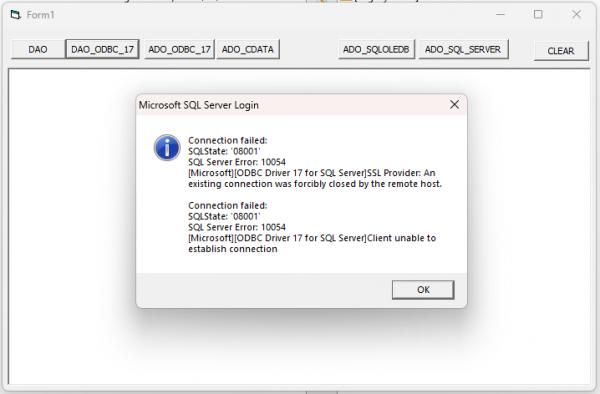 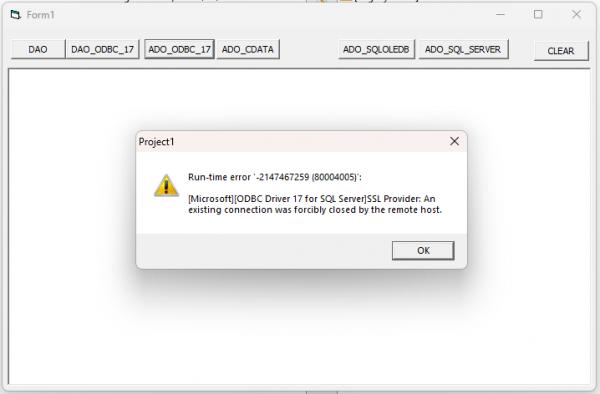
I also try cData ODBC. Work well with both server using ADO but not handle with Dynamic SQL
Last edited by cliv; Nov 28th, 2025 at 05:50 AM.
-
Nov 28th, 2025, 06:33 AM
#11
Re: Windows 11 DAO acces to old SQL Server 2005/2008 database
> I played around with stunel, but it seems difficult to install and configure on the server and on each client.
You don't install/configure anything on the clients, that's the point -- being able to solve the problem with server reconfig only.
cheers,
</wqw>
-
Nov 28th, 2025, 06:42 AM
#12
Thread Starter
Addicted Member
Re: Windows 11 DAO acces to old SQL Server 2005/2008 database
Originally Posted by wqweto
This should work with Stunnel, just ask an LLM for sample configuration like this</wqw>
Originally Posted by wqweto
> You don't install/configure anything on the clients, that's the point -- being able to solve the problem with server reconfig only.
cheers,
</wqw>
... so you say i only need to install on server? ...
... i use LLM to give me a sample(test in Sandbox) but I understand that stunnel it must be installed on the server and on each client.
Last edited by cliv; Nov 28th, 2025 at 07:00 AM.
-
Nov 28th, 2025, 06:49 AM
#13
Re: Windows 11 DAO/ADO acces to old SQL Server 2005/2008 database
Originally Posted by cliv
Microsoft have a note but i don't see:
Note: Use the x86 installer for 32-bit machines, or the x64 installer to install both 64-bit and 32-bit drivers on a 64-bit machine.
I try this now.
The X64 installer installs both 32bit and 64 bit, but only with release 18 (odbc driver 18 for SQL Server)
VB6 programming and twinBASIC programming
-
Nov 28th, 2025, 06:53 AM
#14
Thread Starter
Addicted Member
Re: Windows 11 DAO/ADO acces to old SQL Server 2005/2008 database
Originally Posted by VB6 Programming
The X64 installer installs both 32bit and 64 bit, but only with release 18 (odbc driver 18 for SQL Server)
...and with release 17, I said in a previous post that I already installed it and it doesn't work (tested with DAO and ADO - see image error)
Last edited by cliv; Nov 28th, 2025 at 07:01 AM.
-
Nov 28th, 2025, 08:01 AM
#15
Re: Windows 11 DAO acces to old SQL Server 2005/2008 database
Originally Posted by cliv
... so you say i only need to install on server? ...
... i use LLM to give me a sample(test in Sandbox) but I understand that stunnel it must be installed on the server and on each client.
Don't need to install it on the client -- ODBC already does the TLS encryption.
Unfortunately I just tried and I cannot make it work with sql2008 R2 here. In SQL Server Configuration Manager on Protocols for MSSQL first enabled Force Encryption. Then configured stunnel service like this
Code:
[SQL2028_Secure]
accept = 1435
connect = 3585
cert = stunnel.pem
sslVersionMin = TLSv1.2
sslVersionMax = TLSv1.2
client = yes
. . . where port 1435 is the new TLS 1.3 endpoint and port 3585 is the original SQL Server port. The data is forwarded to SQL Server using TLS 1.2 encryption i.e. in client mode (non-client mode is always unencrypted).
For connect string in SSMS I'm using Data Source=MyServer,1435;Integrated Security=True;Persist Security Info=False;Pooling=False;MultipleActiveResultSets=False;Encrypt=True;TrustServerCertificate=True;App lication Name="SQL Server Management Studio";Command Timeout=0 but the data forward is stalling for some reason and the connection times out.
I can see stunnel is trying to connect to SQL Server but there is no reply from the service
Code:
2025.11.28 14:53:11 LOG7[19]: Service [SQL2028_Secure] started
2025.11.28 14:53:11 LOG7[19]: Setting local socket options (FD=1224)
2025.11.28 14:53:11 LOG7[19]: Option TCP_NODELAY set on local socket
2025.11.28 14:53:11 LOG5[19]: Service [SQL2028_Secure] accepted connection from 172.17.17.104:60417
2025.11.28 14:53:11 LOG6[19]: s_connect: connecting 127.0.0.1:3585
2025.11.28 14:53:11 LOG7[19]: s_connect: s_poll_wait 127.0.0.1:3585: waiting 10 seconds
2025.11.28 14:53:11 LOG7[19]: FD=932 ifds=rwx ofds=---
2025.11.28 14:53:11 LOG5[19]: s_connect: connected 127.0.0.1:3585
2025.11.28 14:53:11 LOG5[19]: Service [SQL2028_Secure] connected remote server from 127.0.0.1:61437
cheers,
</wqw>
p.s. Not sure why LLM used configuration name SQL2028_Secure for the sql version -- should be 2008
-
Nov 28th, 2025, 08:30 AM
#16
Thread Starter
Addicted Member
Re: Windows 11 DAO acces to old SQL Server 2005/2008 database
I also try to use IIS Crypto from Nartac to enable/disable protocols, ciphers, hashes and key on windows 11. I test, nothing change...but maybe I didn't change everything.
https://www.nartac.com/Products/IISCrypto
Maybe someone figure what is need to enable, it's beyond me and every AI used say something else.

Last edited by cliv; Nov 28th, 2025 at 08:40 AM.
-
Nov 28th, 2025, 09:01 AM
#17
Re: Windows 11 DAO acces to old SQL Server 2005/2008 database
If you don't get anywhere with wqweto's suggestions (I think they should work) here are some more things to try:
1. Can you set up any DSN connection to the old SQL Server databases? Try any SQL drivers you have, 32 bit or 64 bit. Try both 32 bit and 64 bit versions of ODBC Data Source Administrator.
2. See if you can setup a Linked Table in MS Access on Windows 11. If you found a working SQL driver in (1) above, use that. (otherwise try any SQL drivers you have, 32 bit or 64 bit).
Driver 17 probably has a better chance of working than the default sqlsrv32.dll driver (it is more configurable).
The old SQL Server Native Client 11.0 ODBC driver (I think that's the one you were using) should also be more configurable.
If nothing works, then you probably need to look at updating the Cipher Suite with the TLS Ciphers removed in Windows 11.
VB6 programming and twinBASIC programming
-
Nov 28th, 2025, 09:09 AM
#18
Re: Windows 11 DAO acces to old SQL Server 2005/2008 database
After some research it turns out that new TDS 8 using Encryption=Strict supports TLS encryption on first packet i.e. traffic is completely encrypted. This protocol version unfortunately is not supported by sql2008
Earlier versions of TDS (7.x and below) send an initial PRELOGIN packet which begins with an unencrypted portion and then start TLS handshake in the middle of the packet e.g. such payload is illustrated in the link above and looks like this
Code:
 0x 12 01 00 4e 00 00 00 00// Packet Header
 0x 16 03 01 00 &// SSL payload
. . . so for this use-case stunnel has protocol option which can be used with similar STARTLS strategies on SMTP, LDAP or other delay start (legacy) TLS protocols.
Unfortunately stunnel has no implementation of such "middleware" for TDS protocol so it cannot implement TDS 7.x endpoint with delay start TLS and it cannot communicate with TDS 7.x backend as a client using delay start TLS. This can be implemented in the protocol.c source but needs testing and the author does not look very accepting to external contributions.
The only possible way is for stunnel to implement TDS 8 endpoint (which is completely end-to-end TLS encrypted) and forward unencrypted plaintext to a TDS 8 backend but sql2008 does not speak TDS 8 even if data is unencrypted so this fails too but for a different reason.
cheers,
</wqw>
-
Nov 28th, 2025, 10:12 AM
#19
Re: Windows 11 DAO acces to old SQL Server 2005/2008 database
Originally Posted by cliv
I also try the same (manual extract and register) with driver {SQL Server Native Client 11.0}, because 32bit version not install on Win11.
Btw, the 64-bit sqlncli.msi setup of SNAC (choose the bigger file in size) *does* include both versions of the driver.
Try running msiexec /a "sqlncli.msi" /qb TARGETDIR="D:\TEMP\SNAC" and notice there is sqlncli11.dll both in D:\TEMP\SNAC\Windows\System32 D:\TEMP\SNAC\Windows\SysWOW64 which are respectively x64 and x86 versions of the driver DLL.
No need to bastardise your ODBC configuration by manually editing registry and what not. Just try using DSN-less connect strings with something like SQL Server Native Client 11.0 for driver name.
cheers,
</wqw>
Last edited by wqweto; Nov 28th, 2025 at 10:20 AM.
-
Nov 28th, 2025, 10:13 AM
#20
Re: Windows 11 DAO acces to old SQL Server 2005/2008 database
Originally Posted by wqweto
After some research it turns out that new TDS 8 using Encryption=Strict supports TLS encryption on first packet i.e. traffic is completely encrypted. This protocol version unfortunately is not supported by sql2008
wqweto, correct me if I'm wrong but re-enabling the legacy TLS 1.0/1.1 protocols on Windows 11 should get around this.
cliv, You say you can't upgrade your SQL Server so the other answer is to remain on Windows 10
VB6 programming and twinBASIC programming
-
Nov 28th, 2025, 10:19 AM
#21
Re: Windows 11 DAO acces to old SQL Server 2005/2008 database
Originally Posted by VB6 Programming
wqweto, correct me if I'm wrong but re-enabling the legacy TLS 1.0/1.1 protocols on Windows 11 should get around this.
cliv, You say you can't upgrade your SQL Server so the other answer is to remain on Windows 10
Yes, this is worth testing. OP just might try running IISCrypto on Win11 (client machines) and enable TLS 1.0 and 1.1 in Client Protocols section only. No need to fiddle with ciphers, hashes and KEX.
cheers,
</wqw>
-
Nov 28th, 2025, 11:39 AM
#22
Thread Starter
Addicted Member
Re: Windows 11 DAO acces to old SQL Server 2005/2008 database
Originally Posted by cliv
I also try to use IIS Crypto from Nartac to enable/disable protocols
...I say I already try to use IIS Crypto from Nartac to enable/disable protocols....but it may be necessary to activate other parameters as well
Last edited by cliv; Nov 28th, 2025 at 12:03 PM.
-
Nov 28th, 2025, 11:44 AM
#23
Thread Starter
Addicted Member
Re: Windows 11 DAO acces to old SQL Server 2005/2008 database
Originally Posted by VB6 Programming
Can you set up any DSN connection to the old SQL Server databases? Try any SQL drivers you have, 32 bit or 64 bit. Try both 32 bit and 64 bit versions of ODBC Data Source Administrator
In first post is a picture with error from ODBC Administrator when I try to create a DSN connection.
Last edited by cliv; Nov 28th, 2025 at 12:04 PM.
-
Nov 28th, 2025, 11:57 AM
#24
Thread Starter
Addicted Member
Re: Windows 11 DAO acces to old SQL Server 2005/2008 database
Originally Posted by wqweto
...this I need to test.
As I say I extract using msiexec /a "sqlncli.msi" /qb TARGETDIR="D:\TEMP" from an old version and manual register, because I think initially the problem is in driver version like {SQL Server} driver. Initial version sqlsrv32.dll version v.10.0.19041.6456 work in win11 but then after an update Microsoft has given up suport from old servers. A solution, I think, is to replace dll in safe mode but after every windows driver update need to put back I am not sure that is sufficient.
And by the way, thank you wqweto and VB6 Programming for your suggestions and contributions.
Last edited by cliv; Nov 28th, 2025 at 12:01 PM.
 Posting Permissions
- You may not post new threads
- You may not post replies
- You may not post attachments
- You may not edit your posts
-
Forum Rules
|
Click Here to Expand Forum to Full Width
|



 Reply With Quote

