|

-
Nov 27th, 2025, 06:15 AM
#1
Re: Windows 11 DAO acces to old SQL Server 2005/2008 database
I don't know if this will help but I use ODBC Driver 17 for SQL Server (MSODBCSQL17.dll) with DAO DSN-less, this works on both Windows 10 and 11. But I am using newer releases of SQL Server than you are.
Have you tried using MS Access on Windows 11 to connect to SQL Server to see what drivers work with your older databases? (start with a DSN connection until you determine what works).
VB6 programming and twinBASIC programming
-
Nov 27th, 2025, 06:29 AM
#2
Thread Starter
Addicted Member

Re: Windows 11 DAO acces to old SQL Server 2005/2008 database
 Originally Posted by VB6 Programming

I am using newer releases of SQL Server than you are.
Yes this is the problem SQL Server 2005 / 2008 (RTM) -> only support SSL 3.0 / TLS 1.0 and SQL Server 2008 R2 -> still limited to TLS 1.0, and Windows 11 clients -> only allow TLS 1.2/1.3 ciphers (AES?GCM, AES?CBC with SHA256/384). Legacy 3DES is blocked (TLS_RSA_WITH_3DES_EDE_CBC_SHA is disable).
So my approach was wrong, i aneed a Stunnel TLS proxy on server (stunnel listens on 1433, terminates TLS 1.2/1.3, and forwards to SQL Server’s legacy port)...
-
Nov 28th, 2025, 04:18 AM
#3
Re: Windows 11 DAO acces to old SQL Server 2005/2008 database
Originally Posted by cliv
Yes this is the problem SQL Server 2005 / 2008 (RTM) -> only support SSL 3.0 / TLS 1.0 and SQL Server 2008 R2 -> still limited to TLS 1.0, and Windows 11 clients -> only allow TLS 1.2/1.3 ciphers (AES?GCM, AES?CBC with SHA256/384). Legacy 3DES is blocked (TLS_RSA_WITH_3DES_EDE_CBC_SHA is disable).
So my approach was wrong, i aneed a Stunnel TLS proxy on server (stunnel listens on 1433, terminates TLS 1.2/1.3, and forwards to SQL Server’s legacy port)...
This should work with Stunnel, just ask an LLM for sample configuration like this
Code:
; Stunnel Configuration File for Multiple SQL Server Instances running on Windows

; Global options (applies to all services)

; !!! IMPORTANT: Replace these paths with the actual location of your files !!!
; Use forward slashes or escaped backslashes in paths.
cert = C:\Program Files (x86)\stunnel\config\combined_certificate.pem
key = C:\Program Files (x86)\stunnel\config\private_key.pem

; Some basic security and logging settings
client = no                                     ; Stunnel runs in server mode
syslog = yes                                    ; Use Windows Event Log for logging
output = stunnel.log                            ; Log file location relative to Stunnel's working directory

debug = 4                                       ; Log level (4 is a good default for info/warnings)
foreground = no                                 ; Run as a background service

; =============================================
; Service Definitions
; =============================================

; Proxy for SQL Server Instance on Port 1433
[SQL2025_Secure]
accept = 0.0.0.0:1433                           ; Listen on external interface port 1433 for secure traffic
connect = 127.0.0.1:1433                        ; Forward decrypted traffic to local service on 1433

; Proxy for SQL Server Instance on Port 1434
[SQL2028_Secure]
accept = 0.0.0.0:1434                           ; Listen on external interface port 1434 for secure traffic
connect = 127.0.0.1:1434                        ; Forward decrypted traffic to local service on 1434
You don't need a real TLS certificates because you can use Encrypt=Yes;TrustServerCertificate=Yes in ODBC connect string to trust any self-signed certificate.
Also in ODBC string you have to specify target instance port explicitly with Server=my_server_address,1433 i.e. might not work with my_server_address:1433.
cheers,
</wqw>
Last edited by wqweto; Nov 28th, 2025 at 04:22 AM.
-
Nov 28th, 2025, 05:24 AM
#4
Thread Starter
Addicted Member
Re: Windows 11 DAO acces to old SQL Server 2005/2008 database
Originally Posted by wqweto
This should work Stunnel</wqw>
I played around with stunel, but it seems difficult to install and configure on the server and on each client.
Originally Posted by wqweto
You don't need a real TLS certificates because you can use Encrypt=Yes;TrustServerCertificate=Yes in ODBC connect string to trust any self-signed certificate.
Also in ODBC string you have to specify target instance port explicitly with Server=my_server_address,1433 i.e. might not work with my_server_address:1433</wqw>
This is connection string i already use (with everything you suggested and Network Library=DBMSSOCN to force TCP/IP):
Code:
    'ADO
    cn.ConnectionString = "Driver={SQL Server};" & _
                            "Server=SERVERTERMO,1433;" & _
                            "Database=TermEX;" & _
                            "Uid=xx;" & _
                            "Pwd=xx;" & _
                            "Encrypt=Yes;" & _
                            "TrustServerCertificate=Yes;" & _
                            "Network Library=DBMSSOCN;"
Code:
    'DAO
    Set DB = OpenDatabase("", False, False, _
                    "ODBC;Driver={SQL Server};" & _
                    "Server=servertermo,1433;" & _
                    "Database=TermEX;" & _
                    "Uid=xx;" & _
                    "Pwd=xx;" & _
                    "TrustServerCertificate=Yes;" & _
                    "Network=DBMSSOCN;")
Last edited by cliv; Nov 28th, 2025 at 05:49 AM.
-
Nov 28th, 2025, 03:11 AM
#5
Thread Starter
Addicted Member
Re: Windows 11 DAO/ADO acces to old SQL Server 2005/2008 database
Originally Posted by VB6 Programming
I don't know if this will help but I use ODBC Driver 17 for SQL Server (MSODBCSQL17.dll) with DAO DSN-less, this works on both Windows 10 and 11.
How do you install Microsoft ODBC Driver 17 for SQL Server (x86) on Win11. I have computer with Win11 update from Win10 and refuze to run installer x86, only x64?
Originally Posted by Zvoni
grab the current PostGres Server
i already told, I cannot change SQLServer with PostGres/MySql/... or update version of SQLServer because they are used in an industrial automation project.
I'm just looking for an option to use DAO or ADO in an vb6 app from Win11x64 for interogate SQLServer2005
Last edited by cliv; Nov 28th, 2025 at 03:31 AM.
-
Nov 28th, 2025, 04:59 AM
#6
Re: Windows 11 DAO/ADO acces to old SQL Server 2005/2008 database
Originally Posted by cliv
How do you install Microsoft ODBC Driver 17 for SQL Server (x86) on Win11. I have computer with Win11 update from Win10 and refuze to run installer x86, only x64?
You should be able to install Driver 17 32 bit on Windows 11 - msodbcsql.msi 32 bit version.
Use the usual options - Run as Administrator, maybe switch off UAC
---
There is now a release 18. This should work too, but I've only tried it once myself (it seemed to work fine).
In release 18 I think the X64 installer installs both 32 bit and 64 bit versions.
https://learn.microsoft.com/en-us/sq...l-server-ver17
VB6 programming and twinBASIC programming
-
Nov 28th, 2025, 05:29 AM
#7
Thread Starter
Addicted Member
Re: Windows 11 DAO/ADO acces to old SQL Server 2005/2008 database
Originally Posted by VB6 Programming
In release 18 I think the X64 installer installs both 32 bit and 64 bit versions.[/URL]
Microsoft have a note but i don't see:
Note: Use the x86 installer for 32-bit machines, or the x64 installer to install both 64-bit and 32-bit drivers on a 64-bit machine.
I try this now.
..fail using {ODBC Driver 17 for SQL Server} for SQLServer2005/2008 using DAO and also for ADO
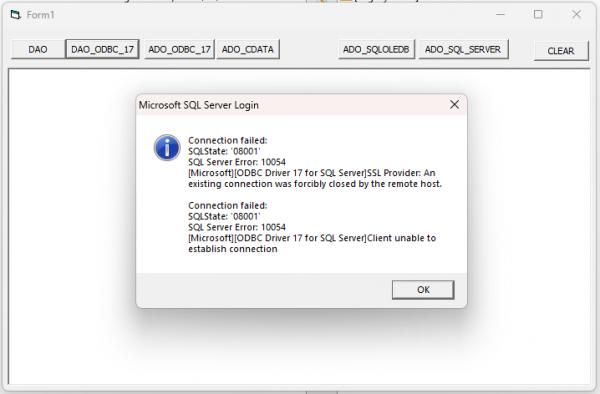 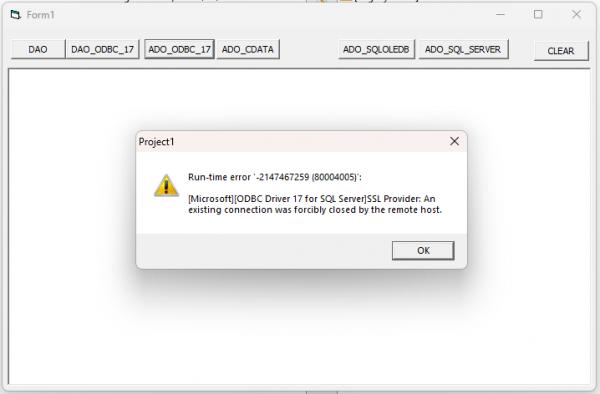
I also try cData ODBC. Work well with both server using ADO but not handle with Dynamic SQL
Last edited by cliv; Nov 28th, 2025 at 05:50 AM.
-
Nov 28th, 2025, 06:49 AM
#8
Re: Windows 11 DAO/ADO acces to old SQL Server 2005/2008 database
Originally Posted by cliv
Microsoft have a note but i don't see:
Note: Use the x86 installer for 32-bit machines, or the x64 installer to install both 64-bit and 32-bit drivers on a 64-bit machine.
I try this now.
The X64 installer installs both 32bit and 64 bit, but only with release 18 (odbc driver 18 for SQL Server)
VB6 programming and twinBASIC programming
-
Nov 28th, 2025, 06:53 AM
#9
Thread Starter
Addicted Member
Re: Windows 11 DAO/ADO acces to old SQL Server 2005/2008 database
Originally Posted by VB6 Programming
The X64 installer installs both 32bit and 64 bit, but only with release 18 (odbc driver 18 for SQL Server)
...and with release 17, I said in a previous post that I already installed it and it doesn't work (tested with DAO and ADO - see image error)
Last edited by cliv; Nov 28th, 2025 at 07:01 AM.
 Posting Permissions
- You may not post new threads
- You may not post replies
- You may not post attachments
- You may not edit your posts
-
Forum Rules
|
Click Here to Expand Forum to Full Width
|



 Reply With Quote
