|

-
May 15th, 2025, 11:26 PM
#1161
Member

Re: Getting the ball rolling. Which VB6 projects are you working on?
https://imgur.com/kk3RH6g
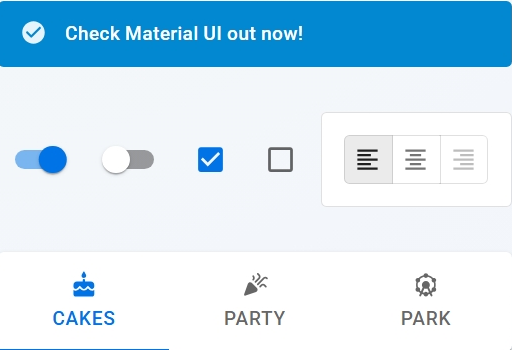
I would love to have controls that look like this in my upcoming project as they would would be a good fit style wise.
-
May 16th, 2025, 02:42 AM
#1162
Re: Getting the ball rolling. Which VB6 projects are you working on?
Place the link in an image wrapper using the Insert Image tool.
Time for your own thread I feel, come back to this one when you have made progress and have something to show.
Last edited by yereverluvinuncleber; May 16th, 2025 at 02:49 AM.
https://github.com/yereverluvinunclebert
Skillset: VMS,DOS,Windows Sysadmin from 1985, fault-tolerance, VaxCluster, Alpha,Sparc. DCL,QB,VBDOS- VB6,.NET, PHP,NODE.JS, Graphic Design, Project Manager, CMS, Quad Electronics. classic cars & m'bikes. Artist in water & oils. Historian.
By the power invested in me, all the threads I start are battle free zones - no arguing about the benefits of VB6 over .NET here please. Happiness must reign.
-
May 23rd, 2025, 07:11 AM
#1163
Re: Getting the ball rolling. Which VB6 projects are you working on?
It is sunny here and sky is blue and that always cheers me up.
I am taking a detour from bug-fixing my dock, thinking about improving my CPU gauge to give it support for multi-core cpu display. I have just taken some code from this codebank submission: https://www.vbforums.com/showthread....83#post3813483 by Edgemeal.

At the moment I have just incorporated his simple form and his per-cpu code module and later in I will convert it to PNGs probably using my mercury/alcohol displays.

I'm thinking about how to display CPU usage on a per Process basis just for a single process. I need a method of displaying processes similar to a simple version of task manager's process list (does such a thing exist using Vb6 already?) then allowing the user to select a specific process and display the cpu usage per processID or threadID.
Last edited by yereverluvinuncleber; May 23rd, 2025 at 07:21 AM.
https://github.com/yereverluvinunclebert
Skillset: VMS,DOS,Windows Sysadmin from 1985, fault-tolerance, VaxCluster, Alpha,Sparc. DCL,QB,VBDOS- VB6,.NET, PHP,NODE.JS, Graphic Design, Project Manager, CMS, Quad Electronics. classic cars & m'bikes. Artist in water & oils. Historian.
By the power invested in me, all the threads I start are battle free zones - no arguing about the benefits of VB6 over .NET here please. Happiness must reign.
-
May 23rd, 2025, 07:40 AM
#1164
Re: Getting the ball rolling. Which VB6 projects are you working on?
so a summary:
updated my direct2d-class to fetch what directx11.x version to use.
before I just used 11.0, now it can switch to 11.1,11.2 and 11.3, 11.0 is still used as a legacy mode.
11.0 use D2D1CreateFactory while the other use D3D11CreateDevice/CreateDXGIFactory
so in a way we are "closer" to directx11/D3D11 and together with the Direct2D functions I can also use a bit of D3D11 as well.
this messed up my screenshot-function. I can't fetch the bitmap from the DC.
and I didn't manage to get it using Direct2D and D3D11 as well. the solution (for now) is a Directx9 method.
another update is
On x GoTo instead of Select Case
this is as close we get to Jump Tables, that was my initial search for an optimization for my gameloop.
my "select case" got quite big, with 40+ cases. and I wanted something better. many thx to Wayne in TB discord channel for the suggestion.
Last edited by baka; May 23rd, 2025 at 07:48 AM.
-
May 23rd, 2025, 07:43 AM
#1165
Re: Getting the ball rolling. Which VB6 projects are you working on?
 Originally Posted by baka

another update is
On x GoTo instead of Select Case
this is as close we get to Jump Tables, that was my initial search for an optimization for my gameloop.
my "select case" got quite big, with 40+ cases. and I wanted something better. maybe thx to Wayne in TB discord channel for the suggestion.
What kind of improvement did you see from this? I have a "mother" of a method with a huge Select Case block and I'm curious if it would be worth the effort to try On x Goto with it.
-
May 23rd, 2025, 07:55 AM
#1166
Re: Getting the ball rolling. Which VB6 projects are you working on?
I didn't clock it. so I don't know if theres any speed improvements.
since its in a loop it will be called 60-144+ (or whatever monitor hz u got) every second, every microseconds counts. at least for old computers.
I don't think I would use On x Goto in TB, but VB6 is old and I believe it helps a bit. select case do comparison operations while on x goto is jump to index. so its faster. less overheads.
I don't think it will matter much. but I enjoyed updated it because its a new feature for me.
-
May 23rd, 2025, 07:59 AM
#1167
Re: Getting the ball rolling. Which VB6 projects are you working on?
Originally Posted by baka
so a summary:
updated my direct2d-class to fetch what directx11.x version to use.
before I just used 11.0, now it can switch to 11.1,11.2 and 11.3, 11.0 is still used as a legacy mode.
11.0 use D2D1CreateFactory while the other use D3D11CreateDevice/CreateDXGIFactory
so in a way we are "closer" to directx11/D3D11 and together with the Direct2D functions I can also use a bit of D3D11 as well.
this messed up my screenshot-function. I can't fetch the bitmap from the DC.
and I didn't manage to get it using Direct2D and D3D11 as well. the solution (for now) is a Directx9 method.
another update is
On x GoTo instead of Select Case
this is as close we get to Jump Tables, that was my initial search for an optimization for my gameloop.
my "select case" got quite big, with 40+ cases. and I wanted something better. many thx to Wayne in TB discord channel for the suggestion.
Somewhat related, I'm making a new media player control that uses IMFMediaEngine with a DXGI/Direct3D 11 hardware-backed swapchain renderer, which alpha blends GDI-drawn subtitles on top.
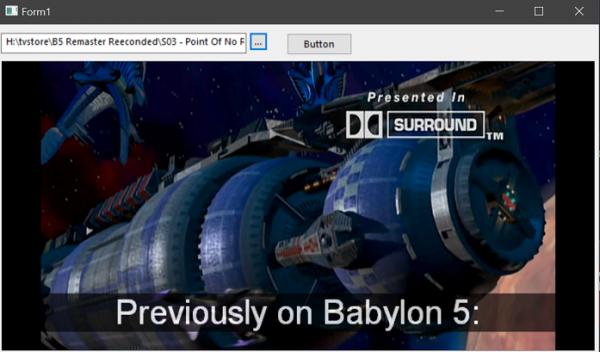
Core functionality is working (after a long and difficult journey of finally figuring out how to use IMFTimedText to get embedded subtitles), I'm just adding all the basic functionality my ucSimplePlayer had and some extras.
It's also multithreading ready; COM is initialized as MTA, ID3D11Multithread and IDXGIManager.LockDevice are used, and sensitive operations are protected by critical sections. (Yes obviously this will be tB only; there's still ucSimplePlayer for those wanting a VB6 .ctl solution).
Last edited by fafalone; May 23rd, 2025 at 08:06 AM.
-
May 23rd, 2025, 08:20 AM
#1168
Re: Getting the ball rolling. Which VB6 projects are you working on?
Originally Posted by baka
I didn't clock it. so I don't know if theres any speed improvements.
since its in a loop it will be called 60-144+ (or whatever monitor hz u got) every second, every microseconds counts. at least for old computers.
I don't think I would use On x Goto in TB, but VB6 is old and I believe it helps a bit. select case do comparison operations while on x goto is jump to index. so its faster. less overheads.
I don't think it will matter much. but I enjoyed updated it because its a new feature for me.
Thanks, I'll give it a try if I get bored this weekend. If I get around to it, I'll time it and post the results.
-
May 23rd, 2025, 07:07 PM
#1169
Re: Getting the ball rolling. Which VB6 projects are you working on?
Originally Posted by jpbro
Thanks, I'll give it a try if I get bored this weekend. If I get around to it, I'll time it and post the results.
Wow, unless I've done something stupid, I get >10x improvement using a On X Goto/JumpTable approach vs. Select Case
Code:
Sub Test(Optional PrintToForm As Form)
Const c_MaxTestLoops = 100000
Dim ii As Long
Dim jj As Long
Dim s As Currency
Dim y() As Currency
Randomize
ReDim y(200)
For ii = 0 To 200
y(ii) = Int(Rnd * 201)
Next
New_c.Timing True
For jj = 1 To c_MaxTestLoops
For ii = LBound(y) To UBound(y)
Select Case y(ii)
Case 0
s = s + y(ii)
Case 1
s = s + y(ii)
Case 2
s = s + y(ii)
Case 3
s = s + y(ii)
Case 4
s = s + y(ii)
Case 5
s = s + y(ii)
Case 6
s = s + y(ii)
Case 7
s = s + y(ii)
Case 8
s = s + y(ii)
Case 9
s = s + y(ii)
Case 10
s = s + y(ii)
Case 11
s = s + y(ii)
Case 12
s = s + y(ii)
Case 13
s = s + y(ii)
Case 14
s = s + y(ii)
Case 15
s = s + y(ii)
Case 16
s = s + y(ii)
Case 17
s = s + y(ii)
Case 18
s = s + y(ii)
Case 19
s = s + y(ii)
Case 20
s = s + y(ii)
Case 21
s = s + y(ii)
Case 22
s = s + y(ii)
Case 23
s = s + y(ii)
Case 24
s = s + y(ii)
Case 25
s = s + y(ii)
Case 26
s = s + y(ii)
Case 27
s = s + y(ii)
Case 28
s = s + y(ii)
Case 29
s = s + y(ii)
Case 30
s = s + y(ii)
Case 31
s = s + y(ii)
Case 32
s = s + y(ii)
Case 33
s = s + y(ii)
Case 34
s = s + y(ii)
Case 35
s = s + y(ii)
Case 36
s = s + y(ii)
Case 37
s = s + y(ii)
Case 38
s = s + y(ii)
Case 39
s = s + y(ii)
Case 40
s = s + y(ii)
Case 41
s = s + y(ii)
Case 42
s = s + y(ii)
Case 43
s = s + y(ii)
Case 44
s = s + y(ii)
Case 45
s = s + y(ii)
Case 46
s = s + y(ii)
Case 47
s = s + y(ii)
Case 48
s = s + y(ii)
Case 49
s = s + y(ii)
Case 50
s = s + y(ii)
Case 51
s = s + y(ii)
Case 52
s = s + y(ii)
Case 53
s = s + y(ii)
Case 54
s = s + y(ii)
Case 55
s = s + y(ii)
Case 56
s = s + y(ii)
Case 57
s = s + y(ii)
Case 58
s = s + y(ii)
Case 59
s = s + y(ii)
Case 60
s = s + y(ii)
Case 61
s = s + y(ii)
Case 62
s = s + y(ii)
Case 63
s = s + y(ii)
Case 64
s = s + y(ii)
Case 65
s = s + y(ii)
Case 66
s = s + y(ii)
Case 67
s = s + y(ii)
Case 68
s = s + y(ii)
Case 69
s = s + y(ii)
Case 70
s = s + y(ii)
Case 71
s = s + y(ii)
Case 72
s = s + y(ii)
Case 73
s = s + y(ii)
Case 74
s = s + y(ii)
Case 75
s = s + y(ii)
Case 76
s = s + y(ii)
Case 77
s = s + y(ii)
Case 78
s = s + y(ii)
Case 79
s = s + y(ii)
Case 80
s = s + y(ii)
Case 81
s = s + y(ii)
Case 82
s = s + y(ii)
Case 83
s = s + y(ii)
Case 84
s = s + y(ii)
Case 85
s = s + y(ii)
Case 86
s = s + y(ii)
Case 87
s = s + y(ii)
Case 88
s = s + y(ii)
Case 89
s = s + y(ii)
Case 90
s = s + y(ii)
Case 91
s = s + y(ii)
Case 92
s = s + y(ii)
Case 93
s = s + y(ii)
Case 94
s = s + y(ii)
Case 95
s = s + y(ii)
Case 96
s = s + y(ii)
Case 97
s = s + y(ii)
Case 98
s = s + y(ii)
Case 99
s = s + y(ii)
Case 100
s = s + y(ii)
Case 101
s = s + y(ii)
Case 102
s = s + y(ii)
Case 103
s = s + y(ii)
Case 104
s = s + y(ii)
Case 105
s = s + y(ii)
Case 106
s = s + y(ii)
Case 107
s = s + y(ii)
Case 108
s = s + y(ii)
Case 109
s = s + y(ii)
Case 110
s = s + y(ii)
Case 111
s = s + y(ii)
Case 112
s = s + y(ii)
Case 113
s = s + y(ii)
Case 114
s = s + y(ii)
Case 115
s = s + y(ii)
Case 116
s = s + y(ii)
Case 117
s = s + y(ii)
Case 118
s = s + y(ii)
Case 119
s = s + y(ii)
Case 120
s = s + y(ii)
Case 121
s = s + y(ii)
Case 122
s = s + y(ii)
Case 123
s = s + y(ii)
Case 124
s = s + y(ii)
Case 125
s = s + y(ii)
Case 126
s = s + y(ii)
Case 127
s = s + y(ii)
Case 128
s = s + y(ii)
Case 129
s = s + y(ii)
Case 130
s = s + y(ii)
Case 131
s = s + y(ii)
Case 132
s = s + y(ii)
Case 133
s = s + y(ii)
Case 134
s = s + y(ii)
Case 135
s = s + y(ii)
Case 136
s = s + y(ii)
Case 137
s = s + y(ii)
Case 138
s = s + y(ii)
Case 139
s = s + y(ii)
Case 140
s = s + y(ii)
Case 141
s = s + y(ii)
Case 142
s = s + y(ii)
Case 143
s = s + y(ii)
Case 144
s = s + y(ii)
Case 145
s = s + y(ii)
Case 146
s = s + y(ii)
Case 147
s = s + y(ii)
Case 148
s = s + y(ii)
Case 149
s = s + y(ii)
Case 150
s = s + y(ii)
Case 151
s = s + y(ii)
Case 152
s = s + y(ii)
Case 153
s = s + y(ii)
Case 154
s = s + y(ii)
Case 155
s = s + y(ii)
Case 156
s = s + y(ii)
Case 157
s = s + y(ii)
Case 158
s = s + y(ii)
Case 159
s = s + y(ii)
Case 160
s = s + y(ii)
Case 161
s = s + y(ii)
Case 162
s = s + y(ii)
Case 163
s = s + y(ii)
Case 164
s = s + y(ii)
Case 165
s = s + y(ii)
Case 166
s = s + y(ii)
Case 167
s = s + y(ii)
Case 168
s = s + y(ii)
Case 169
s = s + y(ii)
Case 170
s = s + y(ii)
Case 171
s = s + y(ii)
Case 172
s = s + y(ii)
Case 173
s = s + y(ii)
Case 174
s = s + y(ii)
Case 175
s = s + y(ii)
Case 176
s = s + y(ii)
Case 177
s = s + y(ii)
Case 178
s = s + y(ii)
Case 179
s = s + y(ii)
Case 180
s = s + y(ii)
Case 181
s = s + y(ii)
Case 182
s = s + y(ii)
Case 183
s = s + y(ii)
Case 184
s = s + y(ii)
Case 185
s = s + y(ii)
Case 186
s = s + y(ii)
Case 187
s = s + y(ii)
Case 188
s = s + y(ii)
Case 189
s = s + y(ii)
Case 190
s = s + y(ii)
Case 191
s = s + y(ii)
Case 192
s = s + y(ii)
Case 193
s = s + y(ii)
Case 194
s = s + y(ii)
Case 195
s = s + y(ii)
Case 196
s = s + y(ii)
Case 197
s = s + y(ii)
Case 198
s = s + y(ii)
Case 199
s = s + y(ii)
Case 200
s = s + y(ii)
End Select
Next
Next
If PrintToForm Is Nothing Then
Debug.Print "S: " & s
Debug.Print "Select..Case Timing: " & New_c.Timing
Else
PrintToForm.Print "S: " & s
PrintToForm.Print "Select..Case Timing: " & New_c.Timing
End If
s = 0
New_c.Timing True
For jj = 1 To c_MaxTestLoops
For ii = LBound(y) To UBound(y)
On y(ii) GoTo lbl0, lbl1, lbl2, lbl3, lbl4, lbl5, lbl6, lbl7, lbl8, lbl9, lbl10, _
lbl11, lbl12, lbl13, lbl14, lbl15, lbl16, lbl17, lbl18, lbl19, lbl20, _
lbl21, lbl22, lbl23, lbl24, lbl25, lbl26, lbl27, lbl28, lbl29, lbl30, _
lbl31, lbl32, lbl33, lbl34, lbl35, lbl36, lbl37, lbl38, lbl39, lbl40, _
lbl41, lbl42, lbl43, lbl44, lbl45, lbl46, lbl47, lbl48, lbl49, lbl50, _
lbl51, lbl52, lbl53, lbl54, lbl55, lbl56, lbl57, lbl58, lbl59, lbl60, _
lbl61, lbl62, lbl63, lbl64, lbl65, lbl66, lbl67, lbl68, lbl69, lbl70, _
lbl71, lbl72, lbl73, lbl74, lbl75, lbl76, lbl77, lbl78, lbl79, lbl80, _
lbl81, lbl82, lbl83, lbl84, lbl85, lbl86, lbl87, lbl88, lbl89, lbl90, _
lbl91, lbl92, lbl93, lbl94, lbl95, lbl96, lbl97, lbl98, lbl99, lbl100, _
lbl101, lbl102, lbl103, lbl104, lbl105, lbl106, lbl107, lbl108, lbl109, lbl110, _
lbl111, lbl112, lbl113, lbl114, lbl115, lbl116, lbl117, lbl118, lbl119, lbl120, _
lbl121, lbl122, lbl123, lbl124, lbl125, lbl126, lbl127, lbl128, lbl129, lbl130, _
lbl131, lbl132, lbl133, lbl134, lbl135, lbl136, lbl137, lbl138, lbl139, lbl140, _
lbl141, lbl142, lbl143, lbl144, lbl145, lbl146, lbl147, lbl148, lbl149, lbl150, _
lbl151, lbl152, lbl153, lbl154, lbl155, lbl156, lbl157, lbl158, lbl159, lbl160, _
lbl161, lbl162, lbl163, lbl164, lbl165, lbl166, lbl167, lbl168, lbl169, lbl170, _
lbl171, lbl172, lbl173, lbl174, lbl175, lbl176, lbl177, lbl178, lbl179, lbl180, _
lbl181, lbl182, lbl183, lbl184, lbl185, lbl186, lbl187, lbl188, lbl189, lbl190, _
lbl191, lbl192, lbl193, lbl194, lbl195, lbl196, lbl197, lbl198, lbl199, lbl200
lbl0: s = s + y(ii): GoTo Done
lbl1: s = s + y(ii): GoTo Done
lbl2: s = s + y(ii): GoTo Done
lbl3: s = s + y(ii): GoTo Done
lbl4: s = s + y(ii): GoTo Done
lbl5: s = s + y(ii): GoTo Done
lbl6: s = s + y(ii): GoTo Done
lbl7: s = s + y(ii): GoTo Done
lbl8: s = s + y(ii): GoTo Done
lbl9: s = s + y(ii): GoTo Done
lbl10: s = s + y(ii): GoTo Done
lbl11: s = s + y(ii): GoTo Done
lbl12: s = s + y(ii): GoTo Done
lbl13: s = s + y(ii): GoTo Done
lbl14: s = s + y(ii): GoTo Done
lbl15: s = s + y(ii): GoTo Done
lbl16: s = s + y(ii): GoTo Done
lbl17: s = s + y(ii): GoTo Done
lbl18: s = s + y(ii): GoTo Done
lbl19: s = s + y(ii): GoTo Done
lbl20: s = s + y(ii): GoTo Done
lbl21: s = s + y(ii): GoTo Done
lbl22: s = s + y(ii): GoTo Done
lbl23: s = s + y(ii): GoTo Done
lbl24: s = s + y(ii): GoTo Done
lbl25: s = s + y(ii): GoTo Done
lbl26: s = s + y(ii): GoTo Done
lbl27: s = s + y(ii): GoTo Done
lbl28: s = s + y(ii): GoTo Done
lbl29: s = s + y(ii): GoTo Done
lbl30: s = s + y(ii): GoTo Done
lbl31: s = s + y(ii): GoTo Done
lbl32: s = s + y(ii): GoTo Done
lbl33: s = s + y(ii): GoTo Done
lbl34: s = s + y(ii): GoTo Done
lbl35: s = s + y(ii): GoTo Done
lbl36: s = s + y(ii): GoTo Done
lbl37: s = s + y(ii): GoTo Done
lbl38: s = s + y(ii): GoTo Done
lbl39: s = s + y(ii): GoTo Done
lbl40: s = s + y(ii): GoTo Done
lbl41: s = s + y(ii): GoTo Done
lbl42: s = s + y(ii): GoTo Done
lbl43: s = s + y(ii): GoTo Done
lbl44: s = s + y(ii): GoTo Done
lbl45: s = s + y(ii): GoTo Done
lbl46: s = s + y(ii): GoTo Done
lbl47: s = s + y(ii): GoTo Done
lbl48: s = s + y(ii): GoTo Done
lbl49: s = s + y(ii): GoTo Done
lbl50: s = s + y(ii): GoTo Done
lbl51: s = s + y(ii): GoTo Done
lbl52: s = s + y(ii): GoTo Done
lbl53: s = s + y(ii): GoTo Done
lbl54: s = s + y(ii): GoTo Done
lbl55: s = s + y(ii): GoTo Done
lbl56: s = s + y(ii): GoTo Done
lbl57: s = s + y(ii): GoTo Done
lbl58: s = s + y(ii): GoTo Done
lbl59: s = s + y(ii): GoTo Done
lbl60: s = s + y(ii): GoTo Done
lbl61: s = s + y(ii): GoTo Done
lbl62: s = s + y(ii): GoTo Done
lbl63: s = s + y(ii): GoTo Done
lbl64: s = s + y(ii): GoTo Done
lbl65: s = s + y(ii): GoTo Done
lbl66: s = s + y(ii): GoTo Done
lbl67: s = s + y(ii): GoTo Done
lbl68: s = s + y(ii): GoTo Done
lbl69: s = s + y(ii): GoTo Done
lbl70: s = s + y(ii): GoTo Done
lbl71: s = s + y(ii): GoTo Done
lbl72: s = s + y(ii): GoTo Done
lbl73: s = s + y(ii): GoTo Done
lbl74: s = s + y(ii): GoTo Done
lbl75: s = s + y(ii): GoTo Done
lbl76: s = s + y(ii): GoTo Done
lbl77: s = s + y(ii): GoTo Done
lbl78: s = s + y(ii): GoTo Done
lbl79: s = s + y(ii): GoTo Done
lbl80: s = s + y(ii): GoTo Done
lbl81: s = s + y(ii): GoTo Done
lbl82: s = s + y(ii): GoTo Done
lbl83: s = s + y(ii): GoTo Done
lbl84: s = s + y(ii): GoTo Done
lbl85: s = s + y(ii): GoTo Done
lbl86: s = s + y(ii): GoTo Done
lbl87: s = s + y(ii): GoTo Done
lbl88: s = s + y(ii): GoTo Done
lbl89: s = s + y(ii): GoTo Done
lbl90: s = s + y(ii): GoTo Done
lbl91: s = s + y(ii): GoTo Done
lbl92: s = s + y(ii): GoTo Done
lbl93: s = s + y(ii): GoTo Done
lbl94: s = s + y(ii): GoTo Done
lbl95: s = s + y(ii): GoTo Done
lbl96: s = s + y(ii): GoTo Done
lbl97: s = s + y(ii): GoTo Done
lbl98: s = s + y(ii): GoTo Done
lbl99: s = s + y(ii): GoTo Done
lbl100: s = s + y(ii): GoTo Done
lbl101: s = s + y(ii): GoTo Done
lbl102: s = s + y(ii): GoTo Done
lbl103: s = s + y(ii): GoTo Done
lbl104: s = s + y(ii): GoTo Done
lbl105: s = s + y(ii): GoTo Done
lbl106: s = s + y(ii): GoTo Done
lbl107: s = s + y(ii): GoTo Done
lbl108: s = s + y(ii): GoTo Done
lbl109: s = s + y(ii): GoTo Done
lbl110: s = s + y(ii): GoTo Done
lbl111: s = s + y(ii): GoTo Done
lbl112: s = s + y(ii): GoTo Done
lbl113: s = s + y(ii): GoTo Done
lbl114: s = s + y(ii): GoTo Done
lbl115: s = s + y(ii): GoTo Done
lbl116: s = s + y(ii): GoTo Done
lbl117: s = s + y(ii): GoTo Done
lbl118: s = s + y(ii): GoTo Done
lbl119: s = s + y(ii): GoTo Done
lbl120: s = s + y(ii): GoTo Done
lbl121: s = s + y(ii): GoTo Done
lbl122: s = s + y(ii): GoTo Done
lbl123: s = s + y(ii): GoTo Done
lbl124: s = s + y(ii): GoTo Done
lbl125: s = s + y(ii): GoTo Done
lbl126: s = s + y(ii): GoTo Done
lbl127: s = s + y(ii): GoTo Done
lbl128: s = s + y(ii): GoTo Done
lbl129: s = s + y(ii): GoTo Done
lbl130: s = s + y(ii): GoTo Done
lbl131: s = s + y(ii): GoTo Done
lbl132: s = s + y(ii): GoTo Done
lbl133: s = s + y(ii): GoTo Done
lbl134: s = s + y(ii): GoTo Done
lbl135: s = s + y(ii): GoTo Done
lbl136: s = s + y(ii): GoTo Done
lbl137: s = s + y(ii): GoTo Done
lbl138: s = s + y(ii): GoTo Done
lbl139: s = s + y(ii): GoTo Done
lbl140: s = s + y(ii): GoTo Done
lbl141: s = s + y(ii): GoTo Done
lbl142: s = s + y(ii): GoTo Done
lbl143: s = s + y(ii): GoTo Done
lbl144: s = s + y(ii): GoTo Done
lbl145: s = s + y(ii): GoTo Done
lbl146: s = s + y(ii): GoTo Done
lbl147: s = s + y(ii): GoTo Done
lbl148: s = s + y(ii): GoTo Done
lbl149: s = s + y(ii): GoTo Done
lbl150: s = s + y(ii): GoTo Done
lbl151: s = s + y(ii): GoTo Done
lbl152: s = s + y(ii): GoTo Done
lbl153: s = s + y(ii): GoTo Done
lbl154: s = s + y(ii): GoTo Done
lbl155: s = s + y(ii): GoTo Done
lbl156: s = s + y(ii): GoTo Done
lbl157: s = s + y(ii): GoTo Done
lbl158: s = s + y(ii): GoTo Done
lbl159: s = s + y(ii): GoTo Done
lbl160: s = s + y(ii): GoTo Done
lbl161: s = s + y(ii): GoTo Done
lbl162: s = s + y(ii): GoTo Done
lbl163: s = s + y(ii): GoTo Done
lbl164: s = s + y(ii): GoTo Done
lbl165: s = s + y(ii): GoTo Done
lbl166: s = s + y(ii): GoTo Done
lbl167: s = s + y(ii): GoTo Done
lbl168: s = s + y(ii): GoTo Done
lbl169: s = s + y(ii): GoTo Done
lbl170: s = s + y(ii): GoTo Done
lbl171: s = s + y(ii): GoTo Done
lbl172: s = s + y(ii): GoTo Done
lbl173: s = s + y(ii): GoTo Done
lbl174: s = s + y(ii): GoTo Done
lbl175: s = s + y(ii): GoTo Done
lbl176: s = s + y(ii): GoTo Done
lbl177: s = s + y(ii): GoTo Done
lbl178: s = s + y(ii): GoTo Done
lbl179: s = s + y(ii): GoTo Done
lbl180: s = s + y(ii): GoTo Done
lbl181: s = s + y(ii): GoTo Done
lbl182: s = s + y(ii): GoTo Done
lbl183: s = s + y(ii): GoTo Done
lbl184: s = s + y(ii): GoTo Done
lbl185: s = s + y(ii): GoTo Done
lbl186: s = s + y(ii): GoTo Done
lbl187: s = s + y(ii): GoTo Done
lbl188: s = s + y(ii): GoTo Done
lbl189: s = s + y(ii): GoTo Done
lbl190: s = s + y(ii): GoTo Done
lbl191: s = s + y(ii): GoTo Done
lbl192: s = s + y(ii): GoTo Done
lbl193: s = s + y(ii): GoTo Done
lbl194: s = s + y(ii): GoTo Done
lbl195: s = s + y(ii): GoTo Done
lbl196: s = s + y(ii): GoTo Done
lbl197: s = s + y(ii): GoTo Done
lbl198: s = s + y(ii): GoTo Done
lbl199: s = s + y(ii): GoTo Done
lbl200: s = s + y(ii): GoTo Done
Done:
Next
Next
If PrintToForm Is Nothing Then
Debug.Print "S: " & s
Debug.Print "Select..Case Timing: " & New_c.Timing
Else
PrintToForm.Print "S: " & s
PrintToForm.Print "Select..Case Timing: " & New_c.Timing
End If
End Sub
-
May 23rd, 2025, 07:57 PM
#1170
 Re: Getting the ball rolling. Which VB6 projects are you working on? Re: Getting the ball rolling. Which VB6 projects are you working on?
Originally Posted by jpbro
Wow, unless I've done something stupid, I get >10x improvement using a On X Goto/JumpTable approach vs. Select Case
Running in IDE is often misleading. 
Compiled code yields a rather underwhelming 1.8x performance boost in favor of the dreaded GoTo!
Just for kicks, the same results can be obtained with GoSub/Return and line numbers instead of labels:
Code:
    s = 0: StartTiming
    For jj = 1 To c_MaxTestLoops
       For ii = LBound(y) To UBound(y)
          On y(ii) GoSub 0, 1, 2, 3, 4, 5, 6, 7, 8, 9, 10, 11, 12, 13, 14, 15, 16, 17, 18, 19, 20, _
             21, 22, 23, 24, 25, 26, 27, 28, 29, 30, 31, 32, 33, 34, 35, 36, 37, 38, 39, 40, _
             41, 42, 43, 44, 45, 46, 47, 48, 49, 50, 51, 52, 53, 54, 55, 56, 57, 58, 59, 60, _
             61, 62, 63, 64, 65, 66, 67, 68, 69, 70, 71, 72, 73, 74, 75, 76, 77, 78, 79, 80, _
             81, 82, 83, 84, 85, 86, 87, 88, 89, 90, 91, 92, 93, 94, 95, 96, 97, 98, 99, 100, _
             101, 102, 103, 104, 105, 106, 107, 108, 109, 110, 111, 112, 113, 114, 115, 116, 117, 118, 119, 120, _
             121, 122, 123, 124, 125, 126, 127, 128, 129, 130, 131, 132, 133, 134, 135, 136, 137, 138, 139, 140, _
             141, 142, 143, 144, 145, 146, 147, 148, 149, 150, 151, 152, 153, 154, 155, 156, 157, 158, 159, 160, _
             161, 162, 163, 164, 165, 166, 167, 168, 169, 170, 171, 172, 173, 174, 175, 176, 177, 178, 179, 180, _
             181, 182, 183, 184, 185, 186, 187, 188, 189, 190, 191, 192, 193, 194, 195, 196, 197, 198, 199, 200
       Next ii
    Next jj
    Print "S: " & s
    Print "GoTo Timing: " & Elapsed
    Exit Sub
0          s = s + y(ii): Return
1          s = s + y(ii): Return
2          s = s + y(ii): Return
3          s = s + y(ii): Return
4          s = s + y(ii): Return
5          s = s + y(ii): Return
6          s = s + y(ii): Return
7          s = s + y(ii): Return
8          s = s + y(ii): Return
9          s = s + y(ii): Return
10          s = s + y(ii): Return
11          s = s + y(ii): Return
12          s = s + y(ii): Return
13          s = s + y(ii): Return
14          s = s + y(ii): Return
15          s = s + y(ii): Return
16          s = s + y(ii): Return
17          s = s + y(ii): Return
18          s = s + y(ii): Return
19          s = s + y(ii): Return
20          s = s + y(ii): Return
21          s = s + y(ii): Return
22          s = s + y(ii): Return
23          s = s + y(ii): Return
24          s = s + y(ii): Return
25          s = s + y(ii): Return
26          s = s + y(ii): Return
27          s = s + y(ii): Return
28          s = s + y(ii): Return
29          s = s + y(ii): Return
30          s = s + y(ii): Return
31          s = s + y(ii): Return
32          s = s + y(ii): Return
33          s = s + y(ii): Return
34          s = s + y(ii): Return
35          s = s + y(ii): Return
36          s = s + y(ii): Return
37          s = s + y(ii): Return
38          s = s + y(ii): Return
39          s = s + y(ii): Return
40          s = s + y(ii): Return
41          s = s + y(ii): Return
42          s = s + y(ii): Return
43          s = s + y(ii): Return
44          s = s + y(ii): Return
45          s = s + y(ii): Return
46          s = s + y(ii): Return
47          s = s + y(ii): Return
48          s = s + y(ii): Return
49          s = s + y(ii): Return
50          s = s + y(ii): Return
51          s = s + y(ii): Return
52          s = s + y(ii): Return
53          s = s + y(ii): Return
54          s = s + y(ii): Return
55          s = s + y(ii): Return
56          s = s + y(ii): Return
57          s = s + y(ii): Return
58          s = s + y(ii): Return
59          s = s + y(ii): Return
60          s = s + y(ii): Return
61          s = s + y(ii): Return
62          s = s + y(ii): Return
63          s = s + y(ii): Return
64          s = s + y(ii): Return
65          s = s + y(ii): Return
66          s = s + y(ii): Return
67          s = s + y(ii): Return
68          s = s + y(ii): Return
69          s = s + y(ii): Return
70          s = s + y(ii): Return
71          s = s + y(ii): Return
72          s = s + y(ii): Return
73          s = s + y(ii): Return
74          s = s + y(ii): Return
75          s = s + y(ii): Return
76          s = s + y(ii): Return
77          s = s + y(ii): Return
78          s = s + y(ii): Return
79          s = s + y(ii): Return
80          s = s + y(ii): Return
81          s = s + y(ii): Return
82          s = s + y(ii): Return
83          s = s + y(ii): Return
84          s = s + y(ii): Return
85          s = s + y(ii): Return
86          s = s + y(ii): Return
87          s = s + y(ii): Return
88          s = s + y(ii): Return
89          s = s + y(ii): Return
90          s = s + y(ii): Return
91          s = s + y(ii): Return
92          s = s + y(ii): Return
93          s = s + y(ii): Return
94          s = s + y(ii): Return
95          s = s + y(ii): Return
96          s = s + y(ii): Return
97          s = s + y(ii): Return
98          s = s + y(ii): Return
99          s = s + y(ii): Return
100          s = s + y(ii): Return
101          s = s + y(ii): Return
102          s = s + y(ii): Return
103          s = s + y(ii): Return
104          s = s + y(ii): Return
105          s = s + y(ii): Return
106          s = s + y(ii): Return
107          s = s + y(ii): Return
108          s = s + y(ii): Return
109          s = s + y(ii): Return
110          s = s + y(ii): Return
111          s = s + y(ii): Return
112          s = s + y(ii): Return
113          s = s + y(ii): Return
114          s = s + y(ii): Return
115          s = s + y(ii): Return
116          s = s + y(ii): Return
117          s = s + y(ii): Return
118          s = s + y(ii): Return
119          s = s + y(ii): Return
120          s = s + y(ii): Return
121          s = s + y(ii): Return
122          s = s + y(ii): Return
123          s = s + y(ii): Return
124          s = s + y(ii): Return
125          s = s + y(ii): Return
126          s = s + y(ii): Return
127          s = s + y(ii): Return
128          s = s + y(ii): Return
129          s = s + y(ii): Return
130          s = s + y(ii): Return
131          s = s + y(ii): Return
132          s = s + y(ii): Return
133          s = s + y(ii): Return
134          s = s + y(ii): Return
135          s = s + y(ii): Return
136          s = s + y(ii): Return
137          s = s + y(ii): Return
138          s = s + y(ii): Return
139          s = s + y(ii): Return
140          s = s + y(ii): Return
141          s = s + y(ii): Return
142          s = s + y(ii): Return
143          s = s + y(ii): Return
144          s = s + y(ii): Return
145          s = s + y(ii): Return
146          s = s + y(ii): Return
147          s = s + y(ii): Return
148          s = s + y(ii): Return
149          s = s + y(ii): Return
150          s = s + y(ii): Return
151          s = s + y(ii): Return
152          s = s + y(ii): Return
153          s = s + y(ii): Return
154          s = s + y(ii): Return
155          s = s + y(ii): Return
156          s = s + y(ii): Return
157          s = s + y(ii): Return
158          s = s + y(ii): Return
159          s = s + y(ii): Return
160          s = s + y(ii): Return
161          s = s + y(ii): Return
162          s = s + y(ii): Return
163          s = s + y(ii): Return
164          s = s + y(ii): Return
165          s = s + y(ii): Return
166          s = s + y(ii): Return
167          s = s + y(ii): Return
168          s = s + y(ii): Return
169          s = s + y(ii): Return
170          s = s + y(ii): Return
171          s = s + y(ii): Return
172          s = s + y(ii): Return
173          s = s + y(ii): Return
174          s = s + y(ii): Return
175          s = s + y(ii): Return
176          s = s + y(ii): Return
177          s = s + y(ii): Return
178          s = s + y(ii): Return
179          s = s + y(ii): Return
180          s = s + y(ii): Return
181          s = s + y(ii): Return
182          s = s + y(ii): Return
183          s = s + y(ii): Return
184          s = s + y(ii): Return
185          s = s + y(ii): Return
186          s = s + y(ii): Return
187          s = s + y(ii): Return
188          s = s + y(ii): Return
189          s = s + y(ii): Return
190          s = s + y(ii): Return
191          s = s + y(ii): Return
192          s = s + y(ii): Return
193          s = s + y(ii): Return
194          s = s + y(ii): Return
195          s = s + y(ii): Return
196          s = s + y(ii): Return
197          s = s + y(ii): Return
198          s = s + y(ii): Return
199          s = s + y(ii): Return
200          s = s + y(ii): Return
Last edited by VanGoghGaming; May 23rd, 2025 at 08:01 PM.
-
May 23rd, 2025, 08:13 PM
#1171
Re: Getting the ball rolling. Which VB6 projects are you working on?
Originally Posted by VanGoghGaming
Running in IDE is often misleading.
No doubt! Which is why I tried it compiled originally (and double-checked just now), and I'm seeing >10x:
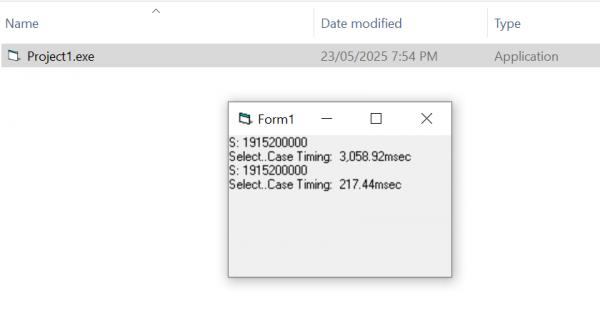
What numbers are you seeing compiled?
(I'll try your code in a minute)
-
May 23rd, 2025, 08:18 PM
#1172
 Re: Getting the ball rolling. Which VB6 projects are you working on? Re: Getting the ball rolling. Which VB6 projects are you working on?
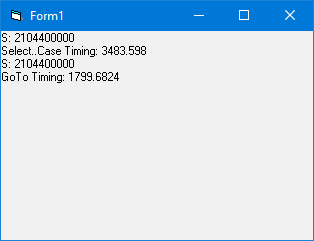
Very strange. The only difference is that I don't have that RC6 timing routine so I used mine instead:
Code:
Private Declare Function QueryPerformanceCounter Lib "kernel32" (PerformanceCount As Currency) As Long
Private Declare Function QueryPerformanceFrequency Lib "kernel32" (Frequency As Currency) As Long

Private qpcFrequency As Currency, qpcStart As Currency

Private Function Elapsed() As Currency
    QueryPerformanceCounter Elapsed
    Elapsed = (Elapsed - qpcStart) * 1000 / qpcFrequency
End Function

Private Sub StartTiming()
    If qpcFrequency = 0 Then QueryPerformanceFrequency qpcFrequency
    QueryPerformanceCounter qpcStart
End Sub
-
May 23rd, 2025, 08:29 PM
#1173
Re: Getting the ball rolling. Which VB6 projects are you working on?
Hmmm, I moved y() to the module level so that I could test your Goto/Gosub approach and my pseudo-Jump Table timings aren't quite as good as before (still not bad), but regardless they are still >4x the Goto/Gosub approach:
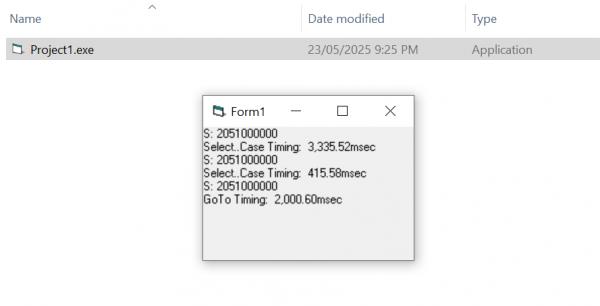
Getting off topic here, sorry @uncleber
-
May 23rd, 2025, 08:31 PM
#1174
Re: Getting the ball rolling. Which VB6 projects are you working on?
Originally Posted by VanGoghGaming
Very strange. The only difference is that I don't have that RC6 timing routine so I used mine instead:
I'll try your timer in a minute - also, just realized that I did not enable any compiler optimization options, did you?
-
May 23rd, 2025, 08:43 PM
#1175
Re: Getting the ball rolling. Which VB6 projects are you working on?
Here's what I get compiled with all the usual optimizations enabled and using your timer (no RC6):
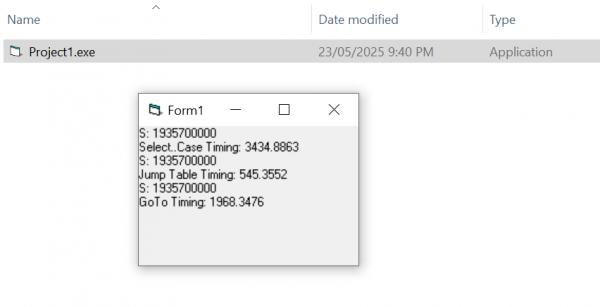
-
May 23rd, 2025, 08:46 PM
#1176
Re: Getting the ball rolling. Which VB6 projects are you working on?
I tried with and without compiler optimizations, there's hardly any difference in this case. What does seem to make a difference is labels inside the "For Loop" vs outside it.
-
May 23rd, 2025, 08:52 PM
#1177
Re: Getting the ball rolling. Which VB6 projects are you working on?
So I did do something stupid with my debug message (Copy & paste issue) - I was writing "Select..Case Timing" 2x instead of Select..Case timing and JumpTable timing (sorry for the confusion!!).
Looking at the numbers with that knowledge, it would appear that Goto/Gosub is about 2x faster than Select..Case and Pseudo-JumpTable is about 4x faster than Goto/Gosub.
Full project: SelectJumpGotoTest.zip
Are you seeing similar values?
-
May 23rd, 2025, 08:56 PM
#1178
Re: Getting the ball rolling. Which VB6 projects are you working on?
Yeah, no worries, it was clear from the beginning. Also it's Select Case vs GoTo vs GoSub/Return.
I think for proper testing, each variant should be moved inside a separate procedure and then you call that procedure in a loop.
-
May 23rd, 2025, 09:15 PM
#1179
Re: Getting the ball rolling. Which VB6 projects are you working on?
Originally Posted by VanGoghGaming
Yeah, no worries, it was clear from the beginning. Also it's Select Case vs GoTo vs GoSub/Return.
I think for proper testing, each variant should be moved inside a separate procedure and then you call that procedure in a loop.
Clearly my brain is mush right now (especially re: naming), but moving to 3 separate procedures didn't affect things much:
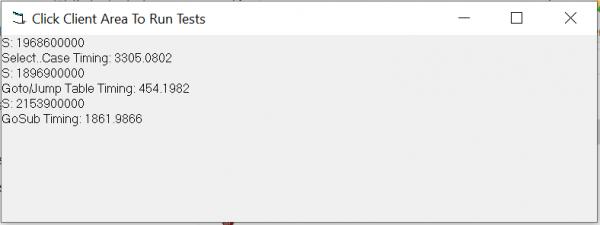
Code: SelectJumpGotoTest2.zip
Anyway, that's it for me for tonight, been packing/moving all week and I'm knackered!
-
May 24th, 2025, 03:15 AM
#1180
Re: Getting the ball rolling. Which VB6 projects are you working on?
test: in IDE: (my CPU: AMD Ryzen 5 7600X)
S: 1992000000
Select..Case Timing: 7877,0555
S: 2021800000
Goto/Jump Table Timing: 518,7416
S: 1934000000
GoTo Timing: 507,7168
compiled (using my default optimization: fast + all adv except for allow unrounded)
S: 2040400000
Select..Case Timing: 1964,0917
S: 2219900000
Goto/Jump Table Timing: 375,4937
S: 1979300000
GoTo Timing: 1260,602
-
also, remember that "0" it will skip the check so example:
x = 0
On x Goto 100, 200, 300
we get here
100:
200:
300:
that way u have 1 free to use.
if you ignore that, it means both 0 and 1 will use 100:
-------
lets say I use 100 calls a second. and I play for 10 hours. it means 100x60x60x10=3600000 calls
I replaced the for ii with a "random" value, ii = Int(Rnd * 200) + 1 this will be more of what will happen when I play.
testing the code (compiled)
Select..Case Timing: 142,7271
Goto/Jump Table Timing: 101,94
GoTo Timing: 289,3994
now we see that the difference is not much.
the GoSub is worse, since theres more overhead (Sub+return)
so GoTo Done is much faster here. still its a bit of overhead, as u call "goto" twice.
for select case it go fast if the value is found first.
so if I know that value 50-60 are used for the most time, I better place case 50-60 at the beginning of the select case.
if I optimize it that way I don't think On x Goto will give me much.
but if its all random, u can gain a lot.
more testing, lets say we only get the value "1":
Select..Case Timing: 1,3962
Goto/Jump Table Timing: 4,6847
GoTo Timing: 144,8298
and if we only get value "200":
Select..Case Timing: 1,3742
Goto/Jump Table Timing: 5,5638
GoTo Timing: 142,0564
and if the value is increasing by 1 (so in a loop of 1 to 200)
Select..Case Timing: 20,1017
Goto/Jump Table Timing: 8,0157
GoTo Timing: 187,0204
conclusion:
it seems that select case has some "memory" if the value is the same it remember it and call the correct case almost immediately.
it seems that Goto also has a memory, but since theres more overhead (2 goto/return) it takes more time to do. so in a way, select case is both a condition and jumptable all in one. can be slow but also fast.
GoSub is doing very poorly.
Last edited by baka; May 24th, 2025 at 04:04 AM.
-
May 25th, 2025, 06:41 AM
#1181
Lively Member
Re: Getting the ball rolling. Which VB6 projects are you working on?
I'm working on a UI manager and set of controls. Using the fantastic oleexp for Direct2D.
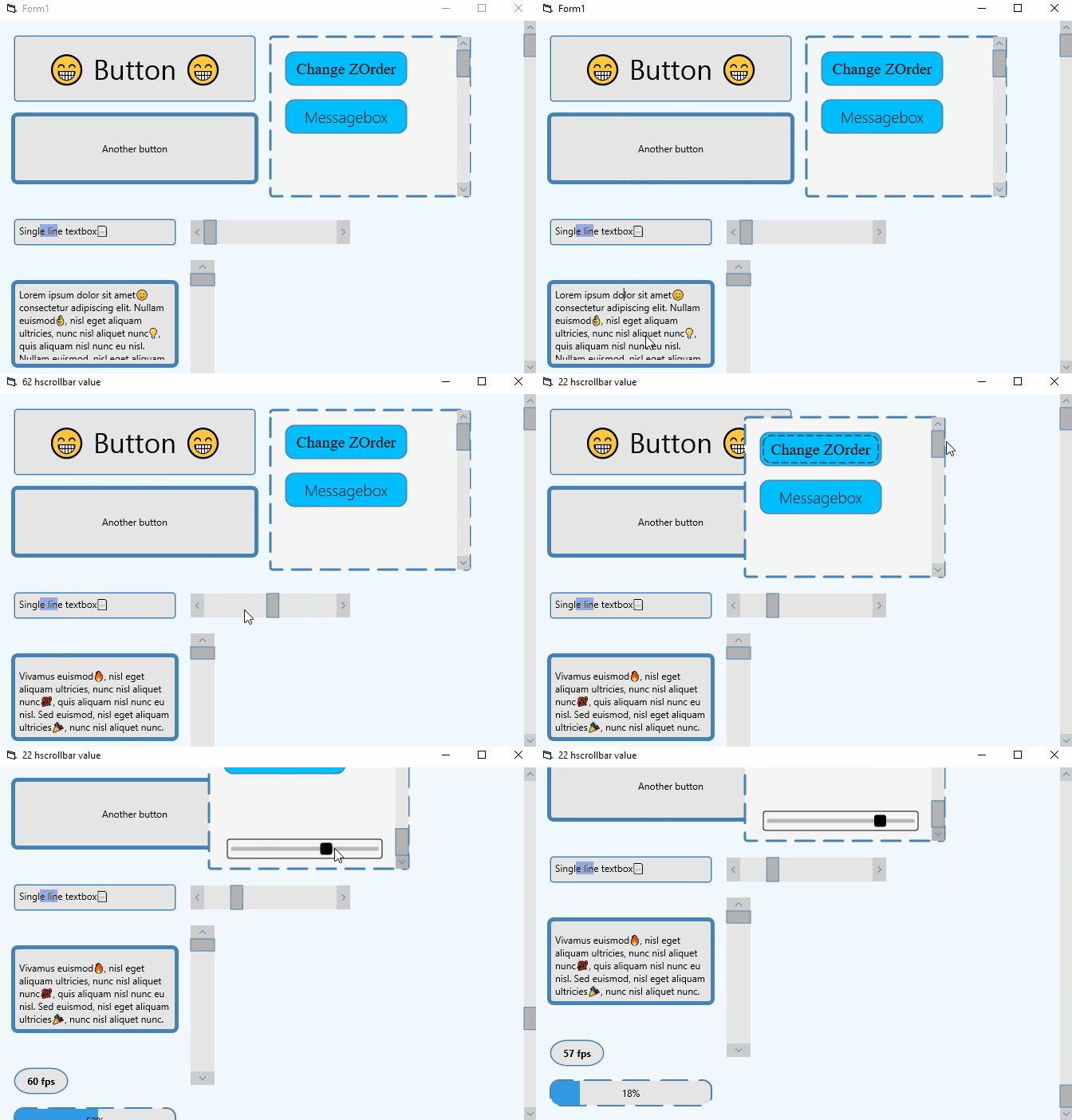
Originally started this project as I'm using Direct2D for a little game I'm making. I needed a good UI library and couldn't find anything else suitable.
There's definitely more than a few bugs. Still need to do option/checkboxes, listbox, dropdowns, menus, asset loader. Maybe themes and audio too.
Hopefully will open source it when it's a bit more complete and bug free.
@baka - you're creating a game with Direct2D. Curious what you have done for UI?
-
May 25th, 2025, 06:49 AM
#1182
Re: Getting the ball rolling. Which VB6 projects are you working on?
Originally Posted by bahbahbah
I'm working on a UI manager and set of controls. Using the fantastic oleexp for Direct2D.
Really rather good. Keep us posted here please. When you decide to release it, let us know here first!
https://github.com/yereverluvinunclebert
Skillset: VMS,DOS,Windows Sysadmin from 1985, fault-tolerance, VaxCluster, Alpha,Sparc. DCL,QB,VBDOS- VB6,.NET, PHP,NODE.JS, Graphic Design, Project Manager, CMS, Quad Electronics. classic cars & m'bikes. Artist in water & oils. Historian.
By the power invested in me, all the threads I start are battle free zones - no arguing about the benefits of VB6 over .NET here please. Happiness must reign.
-
May 25th, 2025, 08:59 AM
#1183
Fanatic Member
Re: Getting the ball rolling. Which VB6 projects are you working on?
Originally Posted by bahbahbah
I'm working on a UI manager and set of controls. Using the fantastic oleexp for Direct2D.
Originally started this project as I'm using Direct2D for a little game I'm making. I needed a good UI library and couldn't find anything else suitable.
There's definitely more than a few bugs. Still need to do option/checkboxes, listbox, dropdowns, menus, asset loader. Maybe themes and audio too.
Hopefully will open source it when it's a bit more complete and bug free.
@baka - you're creating a game with Direct2D. Curious what you have done for UI?
wooooo very good job.
-
May 25th, 2025, 09:13 AM
#1184
Re: Getting the ball rolling. Which VB6 projects are you working on?
the UI is integrated into the gameloop. so its not a separated thing.
the gameloop is using PeekMessage to fetch the mouse/keyboard. I have a "keyup/keydown" functions that are called from the peekmessage function.
the gameloop has a "UI" property that is changed depending what u do. we have the main map window, inventory, bestiary, library etc. so each "UI" has its own module.
mostly is static pictures, but theres a couple of interactive stuff, like buttons, input-text, scrollbars.
the game has a "editor-mode", that part contain more interactive stuff, to add npc/rectangles on the map, to resize/move them around, place foothold, write quest-text and narrative.
the most common thing is buttons. but its all hardcoded, part of the module. theres game-data that stores stuff, but its limited to what the game need.
everything is created for a purpose, not to be standalone. surely something can be reused but most stuff is made for the game.
just example of the gameloop (basically, but of course I have more stuff, just to show)
Code:
Do
Engine.Cls
Select Case UI
Case 1: Opt1Non: inv_Render
End Select
Engine.Rendering
DoPeek
Loop
and just to show what inv_Render has:
Code:
Mouse = -1
Engine.shadow
Engine.Render 7, 70, 47, 0, 0, 660, 505
WriteText 17, "CHARACTER INVENTORY", 347, 55
so, inv_Render is the "inventory"
-
May 25th, 2025, 10:38 AM
#1185
Re: Getting the ball rolling. Which VB6 projects are you working on?
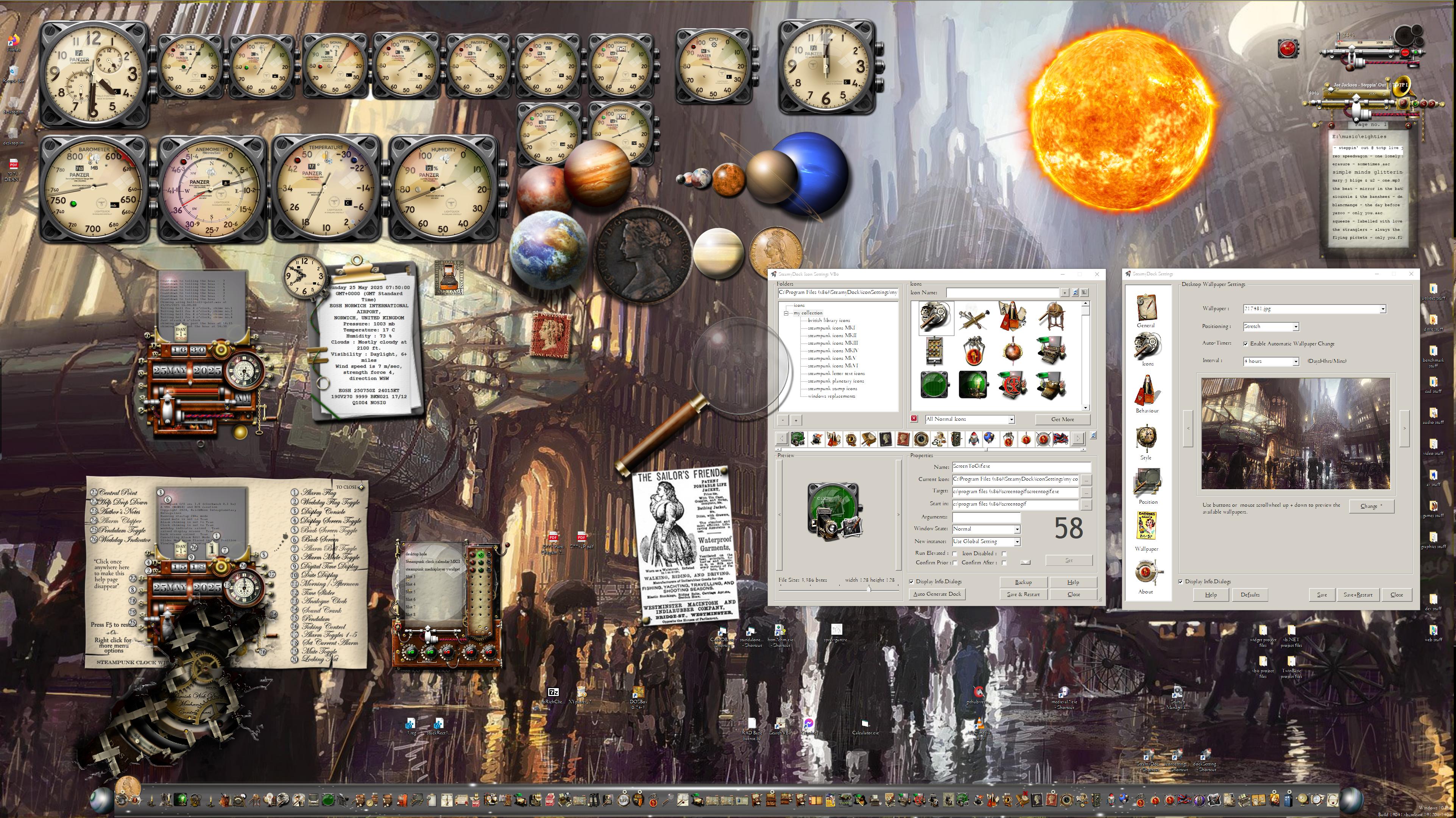
I have completed the automatic resizing of my dock utilities, they now restart at the previous size and all controls size accordingly. At the moment I am saving the original position of all controls at start up and storing them in an array. Thinking about how I will convert that using TwinBasic as it has anchor points built-in for all controls. Should make the whole process a lot easier - and quicker too.
Last edited by yereverluvinuncleber; May 25th, 2025 at 10:42 AM.
https://github.com/yereverluvinunclebert
Skillset: VMS,DOS,Windows Sysadmin from 1985, fault-tolerance, VaxCluster, Alpha,Sparc. DCL,QB,VBDOS- VB6,.NET, PHP,NODE.JS, Graphic Design, Project Manager, CMS, Quad Electronics. classic cars & m'bikes. Artist in water & oils. Historian.
By the power invested in me, all the threads I start are battle free zones - no arguing about the benefits of VB6 over .NET here please. Happiness must reign.
-
May 25th, 2025, 12:04 PM
#1186
Re: Getting the ball rolling. Which VB6 projects are you working on?
Someone asked me about thumbnails in the position bar of a video player... my next UC will come with a Thumbnail Server for this that runs in a separate thread to generate thumbnails in the background.
Haven't got to testing yet but this concept seems sound right:
1) CreateServer launches the threadproc
2) The threadproc initializes GDIP, creates a window to receive SendMessage/PostMessage calls, and enters a message loop for it.
3) There's functions to set the source (synchronous) then start the thumnail generation (async via PostMessage)
4) There's a function you can call in a doevents loop or on a timer to check if the thumbnail is ready, and when it is,
5) There's a function to copy the threads bitmap to a new hbitmap the thread won't otherwise touch, this inside a critical section as is the image generation.
Critical sections also guard access to any variable accessed by both threads like the 'is ready' flag.
Code is 95% written, then have to test.
New media player control will be the best the VBx language has seen, some parts of it of course standing on the shoulders of giants like -Franky- and his Media Foundation work, the SDK samples, and a very hard to find but amazing WinUI3 media engine (the only extant example of reading embedded subtitles with MF, which apparently AIs never trained on because 4 different ones all gave repeated wrong answers on how to do it) 
Last edited by fafalone; May 25th, 2025 at 12:08 PM.
-
May 25th, 2025, 02:30 PM
#1187
Re: Getting the ball rolling. Which VB6 projects are you working on?
and they do it so confidently...
https://github.com/yereverluvinunclebert
Skillset: VMS,DOS,Windows Sysadmin from 1985, fault-tolerance, VaxCluster, Alpha,Sparc. DCL,QB,VBDOS- VB6,.NET, PHP,NODE.JS, Graphic Design, Project Manager, CMS, Quad Electronics. classic cars & m'bikes. Artist in water & oils. Historian.
By the power invested in me, all the threads I start are battle free zones - no arguing about the benefits of VB6 over .NET here please. Happiness must reign.
-
May 25th, 2025, 03:11 PM
#1188
Re: Getting the ball rolling. Which VB6 projects are you working on?
Originally Posted by fafalone
Someone asked me about thumbnails in the position bar of a video player... my next UC will come with a Thumbnail Server for this that runs in a separate thread to generate thumbnails in the background.
Haven't got to testing yet but this concept seems sound right:
1) CreateServer launches the threadproc
2) The threadproc initializes GDIP, creates a window to receive SendMessage/PostMessage calls, and enters a message loop for it.
3) There's functions to set the source (synchronous) then start the thumnail generation (async via PostMessage)
4) There's a function you can call in a doevents loop or on a timer to check if the thumbnail is ready, and when it is,
5) There's a function to copy the threads bitmap to a new hbitmap the thread won't otherwise touch, this inside a critical section as is the image generation.
Critical sections also guard access to any variable accessed by both threads like the 'is ready' flag.
Code is 95% written, then have to test.
New media player control will be the best the VBx language has seen, some parts of it of course standing on the shoulders of giants like -Franky- and his Media Foundation work, the SDK samples, and a very hard to find but amazing WinUI3 media engine (the only extant example of reading embedded subtitles with MF, which apparently AIs never trained on because 4 different ones all gave repeated wrong answers on how to do it)
If instead of a new thread you would launch your EXE as a separate process then the code would be compatible with VB6 as well. Also it would simplify the communication as it would eliminate the need for critical sections and message loops (you'd send and receive data with regular function calls via COM (RegisterActiveObject/GetActiveObject)).
-
May 25th, 2025, 06:50 PM
#1189
Re: Getting the ball rolling. Which VB6 projects are you working on?
Doesn't really sound simpler. It's just a single additional thread. And it's working now. Biggest issue was I mixed up width and height when retrieving it from a packed LongLong.
In other news, I could offer you some guidance on how to make your recent projects compatible with VB2 
Or if you want to port it. Wasn't planning on it since the app was already MTA with ID3D10Multithread called. There will be an OCX build that I'll make sure works in VB6.
Last edited by fafalone; May 25th, 2025 at 06:58 PM.
-
May 26th, 2025, 01:45 AM
#1190
Re: Getting the ball rolling. Which VB6 projects are you working on?
Im thinking that the thumbnails should take minimal resources to create.
what u need is the bitmap in the swapchain and use a simple interpolation, like linear.
to create a separate thread is not needed nowadays, computers are much faster and can handle that easily.
also, directx has its own multithread, so let directx handle it.
-
May 26th, 2025, 02:04 AM
#1191
Re: Getting the ball rolling. Which VB6 projects are you working on?
80GB 4K movies are not so trivial; I can't see everyone having a computer so fast that playback would remain smooth if two entirely different pipelines were processing the file on the same thread, especially without an SSD.
I googled around for a way to get an arbitrary frame from the main player setup, but it doesn't seem possible without setting the position for the regular playback as well. At least not with the higher level IMFMediaEngine[Ex] players. Again this isn't just a regular thumbnails thing; it's for a preview that pops up when you move your mouse along the seek bar while the video plays in background.
-
May 26th, 2025, 03:38 AM
#1192
Re: Getting the ball rolling. Which VB6 projects are you working on?
hm. yeah. 4k could strain the computer. and if u don't have key-frames u can "jump to", instead u use precise time, it require loading, seeking and rendering+resizing all in one.
can u use DWM (Desktop Window Manager)? like DwmRegisterThumbnail?
like u create an invisible form that u use just for this and make use of DWM?
-
May 26th, 2025, 04:52 AM
#1193
Re: Getting the ball rolling. Which VB6 projects are you working on?
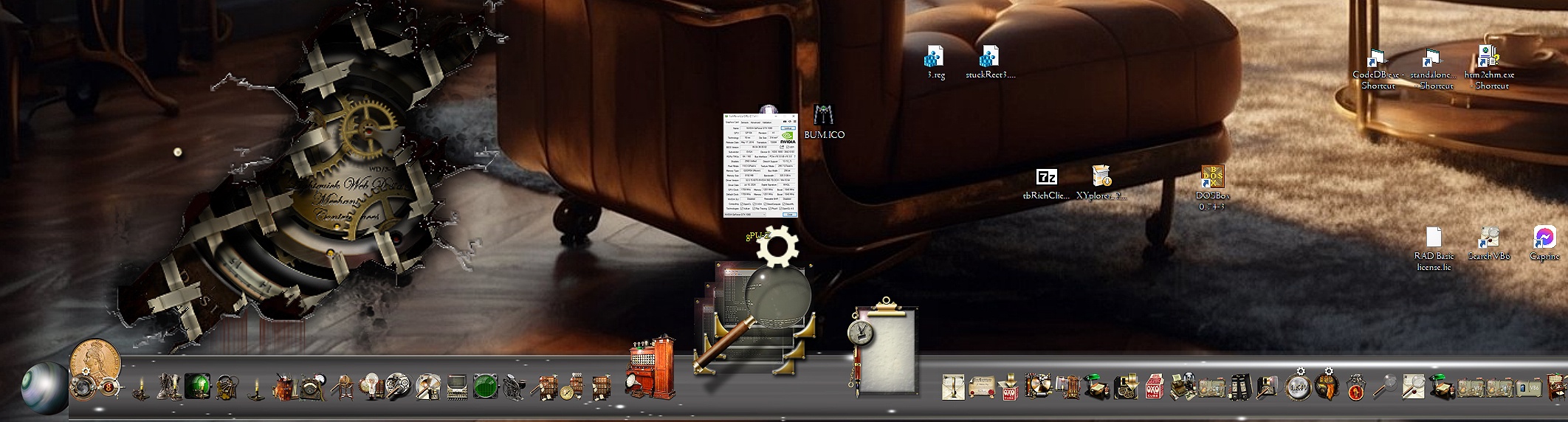
You've just made me think of adding thumbnail snapshots of target process windows to my dock - so I have opened a new thread about that here: https://www.vbforums.com/showthread....dow-thumbnails
As an idea it doesn't strike me a being too difficult and though there will be a cpu overhead it might not be too great especially if they are just snapshots, I could probably create a little cache of recently generated images in a collection, just thinking...
This is a mock up of what I might try to achieve.
Last edited by yereverluvinuncleber; May 26th, 2025 at 08:14 AM.
Reason: added URL link to test if Clodflare removes it again
https://github.com/yereverluvinunclebert
Skillset: VMS,DOS,Windows Sysadmin from 1985, fault-tolerance, VaxCluster, Alpha,Sparc. DCL,QB,VBDOS- VB6,.NET, PHP,NODE.JS, Graphic Design, Project Manager, CMS, Quad Electronics. classic cars & m'bikes. Artist in water & oils. Historian.
By the power invested in me, all the threads I start are battle free zones - no arguing about the benefits of VB6 over .NET here please. Happiness must reign.
-
May 26th, 2025, 08:49 AM
#1194
Re: Getting the ball rolling. Which VB6 projects are you working on?
Originally Posted by baka
hm. yeah. 4k could strain the computer. and if u don't have key-frames u can "jump to", instead u use precise time, it require loading, seeking and rendering+resizing all in one.
can u use DWM (Desktop Window Manager)? like DwmRegisterThumbnail?
like u create an invisible form that u use just for this and make use of DWM?
Setting up another whole player and window seems a lot more intensive than the way I'm doing it now (reusing most of the code from -Franky-'s VBC_MF_GDI+_VideoThumbnails project, which I had previously ported to tB/WDL/x64.
-
May 26th, 2025, 09:16 AM
#1195
Re: Getting the ball rolling. Which VB6 projects are you working on?
yeah. i was just thinking that GDI+ is CPU based and very slow.
since u want to create a new thread I think its best to just open the media and have it in pause mode. the only thing u need is a seek-method and a enable/disable boolean.
-
May 27th, 2025, 04:04 PM
#1196
Fanatic Member

Re: Getting the ball rolling. Which VB6 projects are you working on?
Originally Posted by jpbro
No doubt! Which is why I tried it compiled originally (and double-checked just now), and I'm seeing >10x:
What numbers are you seeing compiled?
(I'll try your code in a minute)
IDE runs only as P-Code. Compiled executables can be native(most of us prefer)

got nuthin' to do but to make a new project, hype, then give up
Check out all my cool stuff btw
VB: EveryDiscord, a Discord client made fully in VB6 | MSPaint Modifier, a VB6-based MSPaint hooking engine, experimental | OpenIM, a fully VB6 instant messaging service based on TCP/IP connections | Kadooki (Overall the AltWWW project), the WWW re-imagined by me with continuations of HTML3.2's parts. | ClaFeed, A little feed algorithm I have been developing for a Twitter-style system. | CfmOS PC, my project CfmOS ported to VB6 in order to prototype faster, often lags on updates though!
C: LegacyResource, a little ResHacker ripoff | CfmOS, A mobile OS designed to mimic AOSP (Stock Android) on an ESP32-S3, featuring a full bytecode architecture
-
May 31st, 2025, 08:39 PM
#1197
Lively Member
Re: Getting the ball rolling. Which VB6 projects are you working on?
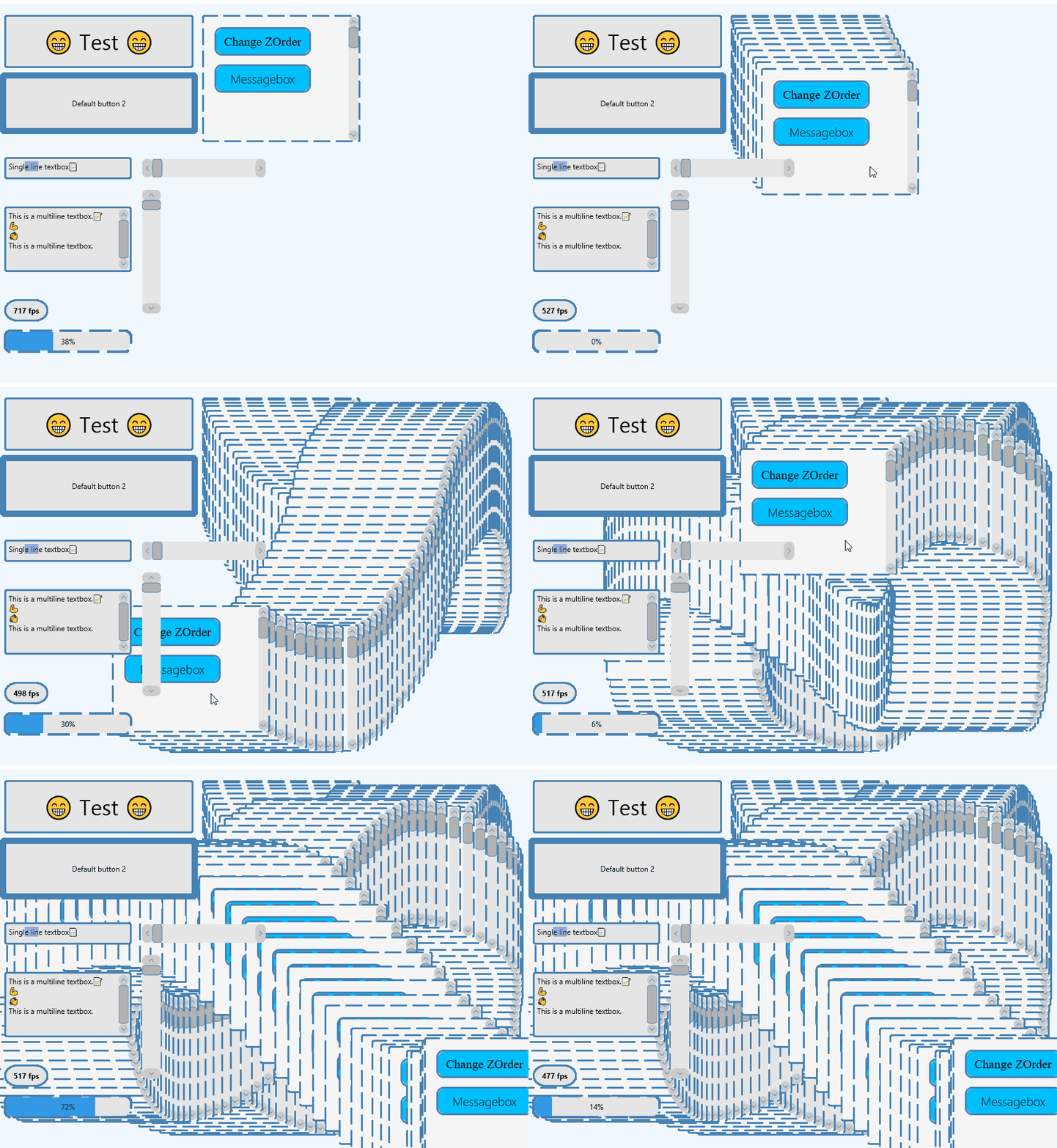
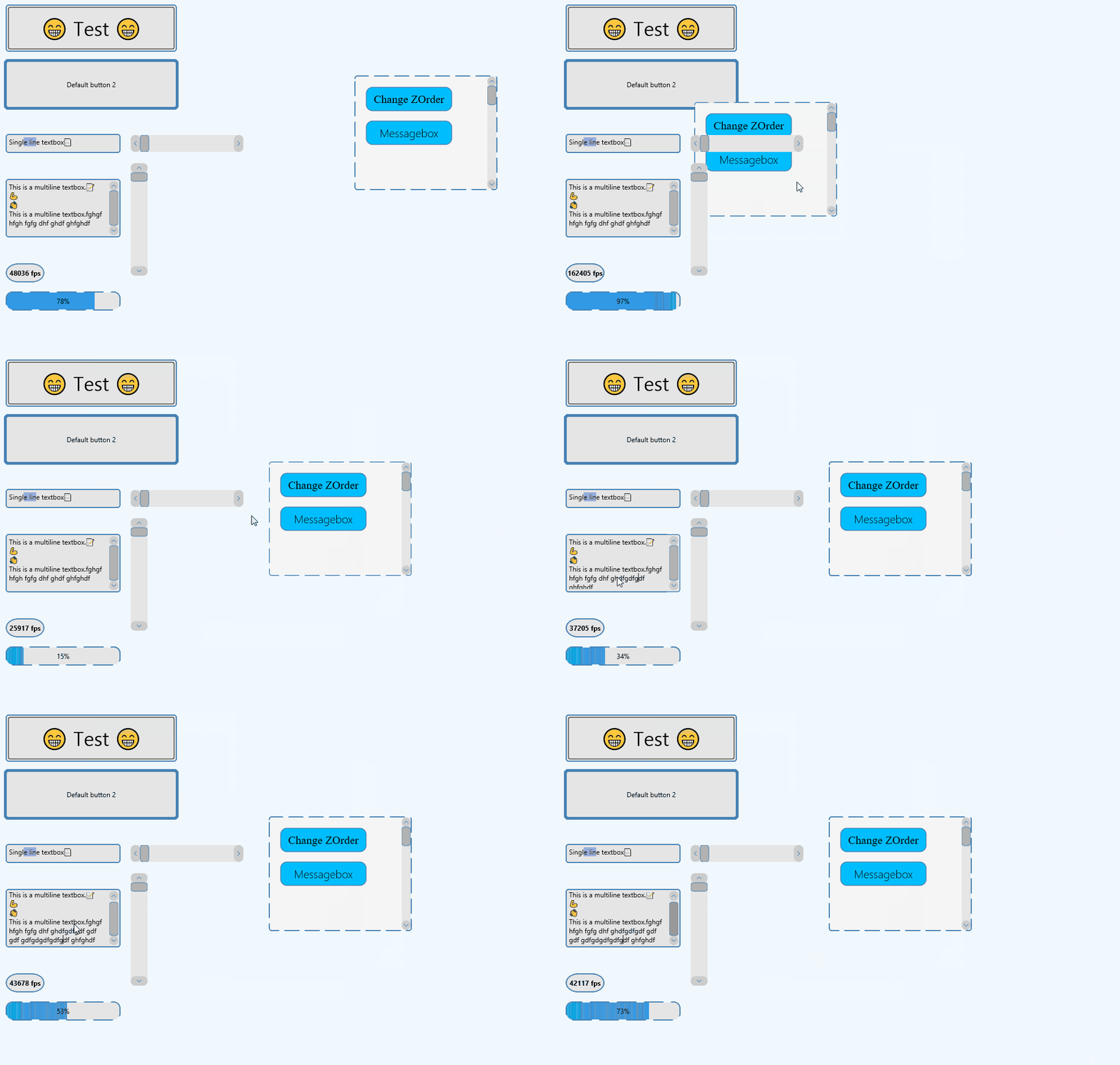
I've added invalidation to my UI manager which has really made it rocket. Before, every control got rendered and I was getting about 300-500fps on my laptop (1300+ on my desktop), which doesn't leave much room for logic and non-ui stuff in my game. With invalidation, we only render controls that have changed (mouse hover, typing in a textbox, etc). We also do a full redraw every second in case of any artifacts. So all that processing every control every frame is gone - we pretty much do nothing and can call Render 50000+ times per second.
The big slowdown now is polling for input. I need to look into either subclassing or DirectInput. Probably the latter.
I had some flashbacks to W9x when adding the invalidation:
All better now:
-
Jun 1st, 2025, 05:03 AM
#1198
Re: Getting the ball rolling. Which VB6 projects are you working on?
Love to try your stuff when it is done.
https://github.com/yereverluvinunclebert
Skillset: VMS,DOS,Windows Sysadmin from 1985, fault-tolerance, VaxCluster, Alpha,Sparc. DCL,QB,VBDOS- VB6,.NET, PHP,NODE.JS, Graphic Design, Project Manager, CMS, Quad Electronics. classic cars & m'bikes. Artist in water & oils. Historian.
By the power invested in me, all the threads I start are battle free zones - no arguing about the benefits of VB6 over .NET here please. Happiness must reign.
-
Jun 1st, 2025, 05:07 AM
#1199
Re: Getting the ball rolling. Which VB6 projects are you working on?
I'm just trialling various designs for my individual CPU core percentage indicators.
It doesn't matter if the design works or not as I will eventually settle on one that takes my fancy - and any failed design I create will often end up used as a component for something else a little while later.
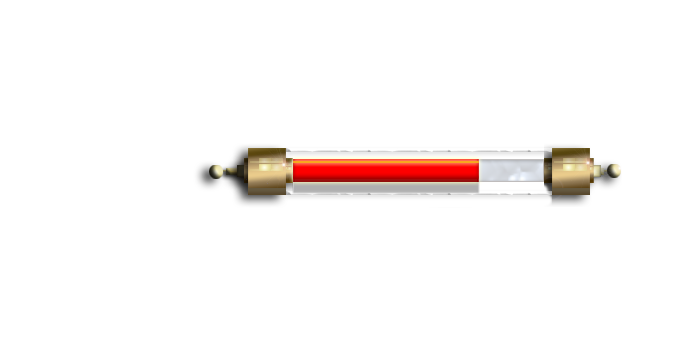
I am not a 100% happy with this one.
https://github.com/yereverluvinunclebert
Skillset: VMS,DOS,Windows Sysadmin from 1985, fault-tolerance, VaxCluster, Alpha,Sparc. DCL,QB,VBDOS- VB6,.NET, PHP,NODE.JS, Graphic Design, Project Manager, CMS, Quad Electronics. classic cars & m'bikes. Artist in water & oils. Historian.
By the power invested in me, all the threads I start are battle free zones - no arguing about the benefits of VB6 over .NET here please. Happiness must reign.
-
Jun 4th, 2025, 06:02 PM
#1200
Re: Getting the ball rolling. Which VB6 projects are you working on?
Adding a pictorial weather gauge to the VB6 version of my Panzer Weather widget.
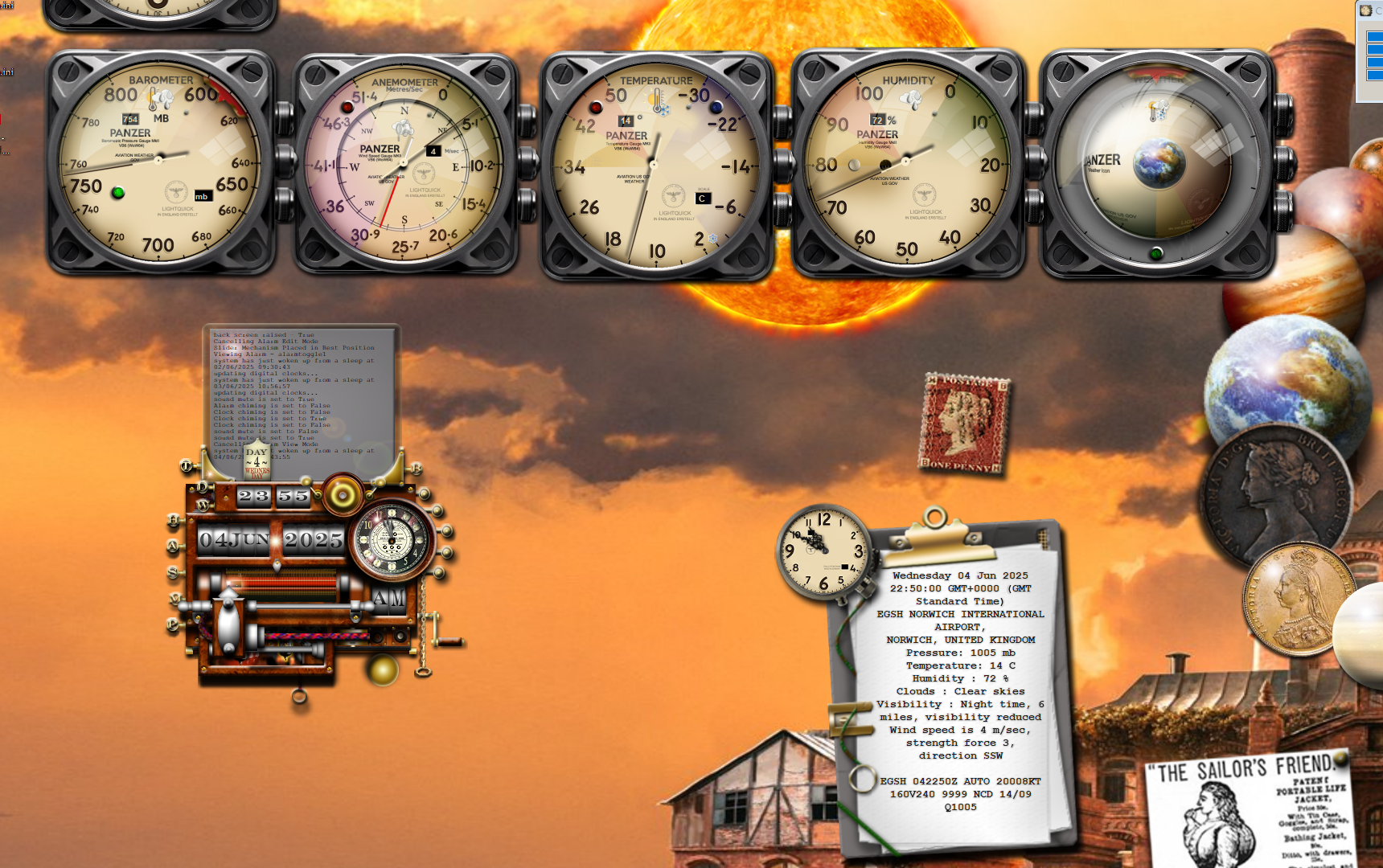
It is the far right gauge that I have just added, now refining the weather displayed as per my Yahoo widget of the same name.
https://github.com/yereverluvinunclebert
Skillset: VMS,DOS,Windows Sysadmin from 1985, fault-tolerance, VaxCluster, Alpha,Sparc. DCL,QB,VBDOS- VB6,.NET, PHP,NODE.JS, Graphic Design, Project Manager, CMS, Quad Electronics. classic cars & m'bikes. Artist in water & oils. Historian.
By the power invested in me, all the threads I start are battle free zones - no arguing about the benefits of VB6 over .NET here please. Happiness must reign.
 Posting Permissions
- You may not post new threads
- You may not post replies
- You may not post attachments
- You may not edit your posts
-
Forum Rules
|
Click Here to Expand Forum to Full Width
|



 Reply With Quote

