|

-
Apr 18th, 2025, 11:27 AM
#1
Thread Starter
Fanatic Member

Image crop with GDI+
I have successfully create an app that can convert an image file type and/or resize.
I am looking at adding crop functionallity.
I use GDI + and know how to crop with this.
What i am looking for is a Form with Picture box and then being able to select an area.
the selected area will remain normal colour and the unselected will be slightly greyed out.
'I have already found the above.
I also would like to have the option that once i unclick my left mouse button that the selection remains and then be able to grab any side of the selection rectangle to move in or out to change the selection. (Not a major need but nice to have)
Is there anything already made that does this.
So the bit i need help with is if the image would be 3000x3000 but the picture box will be a lot smaller to be able to view the image.
how would i know the exact coordintes from the picturebox to select from the original imagefile at the correct crop sizes etc.
I have seen quite a few selection codes that do what i need but they only save the picture box selection. this means the cropped image is of the picture box.
I would like to select part of an image from a picture box and get the real co ordinates of the file.

tks
Last edited by k_zeon; Apr 19th, 2025 at 11:37 AM.
-
Apr 18th, 2025, 05:04 PM
#2
Re: Image crop
Reasonably easy to do in RC6 & Cairo (if you're willing to use it) because it can do a lot of the math for you converting between device and image coordinates.
Here's a quick example project I made (comments by Gemini, edited by me). I'm sure Olaf could do it even more efficiently if he happens by and has time to provide an even tighter sample (there is a cControlPoint class in RC6 that I haven't had a chance to try yet that might make it possible to remove all the HitTest a Resize Handle stuff in my demo)
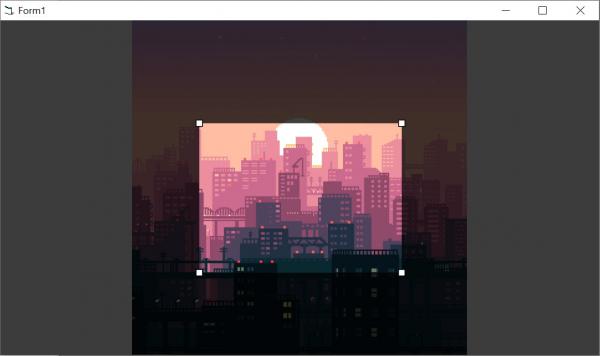
SOURCE CODE: ImageSel.zip
Last edited by jpbro; Apr 18th, 2025 at 05:20 PM.
-
Apr 18th, 2025, 05:08 PM
#3
Re: Image crop
But you can also just do the math yourself by finding the scaling factor that will fit the full image to the window rectangle, and then for any given window X/Y coordinate, divide by the scale factor to get original image coordinates.
-
Apr 18th, 2025, 05:58 PM
#4
Thread Starter
Fanatic Member
Re: Image crop
 Originally Posted by jpbro

Reasonably easy to do in RC6 & Cairo (if you're willing to use it) because it can do a lot of the math for you converting between device and image coordinates.
Here's a quick example project I made (comments by Gemini, edited by me). I'm sure Olaf could do it even more efficiently if he happens by and has time to provide an even tighter sample (there is a cControlPoint class in RC6 that I haven't had a chance to try yet that might make it possible to remove all the HitTest a Resize Handle stuff in my demo)
SOURCE CODE: ImageSel.zip
that looks like its what i am after. would it be poss to have 4 textboxes that hold the 4 coordinates of the actual image.
I have move from the Form to a picture box and would like to have Top Left , Top Right , Bottom Left ,Bottom right so
that i can have a button to pass these cords to my main app.
tks for helping
-
Apr 18th, 2025, 06:12 PM
#5
Re: Image crop
Originally Posted by k_zeon
that looks like its what i am after. would it be poss to have 4 textboxes that hold the 4 coordinates of the actual image.
100% possible, once you've added a picture box and changed the code to use the PB instead of the Form (by changing all "Form_" methods and "Me." references to PictureBox1), you can add any other controls you like to the Form.
The selection rectangle Left/Top/Right/Bottom values are all stored in the mt_SelRect UDT variable in Image coordinates, so you would simply need to update the appropriate UDT element values when the value in a TextBox changes.
Originally Posted by k_zeon
Top Left , Top Right , Bottom Left ,Bottom right so
I think 4 TextBoxes (Left, Right, Top, Bottom) would make more sense for a selection rectangle, but if you really want to allow users to set X & Y values for each rectangle corner point, remember that you have to update your UI for changes in one TB to reflect in another TB. For example, if the user changes the X value in the Top Left XY pair of textboxes, then the X value will have to be updated in the Bottom Left pair of boxes as well (as each X/Y value is being shown 2x - otherwise you're defined points may be a quadrilateral that is potentially non-rectangular).
-
Apr 18th, 2025, 07:13 PM
#6
Thread Starter
Fanatic Member
Re: Image crop
Originally Posted by jpbro
100% possible, once you've added a picture box and changed the code to use the PB instead of the Form (by changing all "Form_" methods and "Me." references to PictureBox1), you can add any other controls you like to the Form.
The selection rectangle Left/Top/Right/Bottom values are all stored in the mt_SelRect UDT variable in Image coordinates, so you would simply need to update the appropriate UDT element values when the value in a TextBox changes.
I think 4 TextBoxes (Left, Right, Top, Bottom) would make more sense for a selection rectangle, but if you really want to allow users to set X & Y values for each rectangle corner point, remember that you have to update your UI for changes in one TB to reflect in another TB. For example, if the user changes the X value in the Top Left XY pair of textboxes, then the X value will have to be updated in the Bottom Left pair of boxes as well (as each X/Y value is being shown 2x - otherwise you're defined points may be a quadrilateral that is potentially non-rectangular).
so i got the Left, Right, Top, Bottom into text boxes, now i have the crop numbers to pass to the GDI+ crop function. will have a go tomo to see if it all work.
tks for your help
-
Apr 18th, 2025, 09:54 PM
#7
Re: Image crop
If you're using the code I provide to set the crop rect, there's no need to involve GDI+ at all. Stay with RC6/Cairo and use the CropSurface method to get a new surface at the required coords and save it to disk. Something like:
Code:
mo_SrfOrig.CropSurface(mt_SelRect.Left, _
                                    mt_SelRect.Top, _
                                    mt_SelRect.Right - mt_SelRect.Left, _
                                    mt_SelRect.Bottom - mt_SelRect.Top).WriteContentToJpgFile App.Path & "\cropped.jpg"
-
Apr 19th, 2025, 05:03 AM
#8
Thread Starter
Fanatic Member
Re: Image crop
Originally Posted by jpbro
If you're using the code I provide to set the crop rect, there's no need to involve GDI+ at all. Stay with RC6/Cairo and use the CropSurface method to get a new surface at the required coords and save it to disk. Something like:
Code:
mo_SrfOrig.CropSurface(mt_SelRect.Left, _
                                    mt_SelRect.Top, _
                                    mt_SelRect.Right - mt_SelRect.Left, _
                                    mt_SelRect.Bottom - mt_SelRect.Top).WriteContentToJpgFile App.Path & "\cropped.jpg"
tks. I already have a working model using GDI+ to save and view images and works well.
What i am looking to do is have a list of images. then i can right click each one and the crop form appears. I select the portion i want from Left image. On right i have the cropped image from the original file
showing. if i am happy then click ok. the coordinates are then saved for processing.
Once i am ready, i can process all files and either resize the whole image if not cropped or if an image is cropped resize the cropped image.
but its always worth knowing another method.
are there other save as methods like WriteContentToJpgFile, can it save to PNG, Tif,Gif,BMP etc or is it just that one
Just tried .WriteContentToGifFile , .WriteContentToBmpFile , .WriteContentToTifFile but these dont work.
tks
Last edited by k_zeon; Apr 19th, 2025 at 05:08 AM.
-
Apr 19th, 2025, 05:32 AM
#9
Re: Image crop
----
we can do it in many ways.
if I would try to attempt this, I would just use the same methods we use when we resize a form.
so u can change the pointer-icon, use 2-5 pixels for the borders where u draw those lines and dot.
should not be that hard to code.
if size is too big, just remember the ratio.
the picture inside the form u keep rendering using GdiplusDrawImage every time u trigger a resize.
Last edited by baka; Apr 19th, 2025 at 05:40 AM.
-
Apr 19th, 2025, 07:34 AM
#10
Re: Image crop
Originally Posted by k_zeon
are there other save as methods like WriteContentToJpgFile, can it save to PNG, Tif,Gif,BMP etc or is it just that one
Just tried .WriteContentToGifFile , .WriteContentToBmpFile , .WriteContentToTifFile but these dont work.
If Intellisense isn't working in your IDE, I recommend trying to get that fixed - programming without it can be pretty painful (especially with a new library). With Intellisense working & enabled you will see the following .WriteContent* methods:
- WriteContentToJpgByteArray
- WriteContentToJpgFile
- WriteContentToPdfByteArray
- WriteContentToPdfFile
- WriteContentToPngByteArray
- WriteContentToPngFile
- WriteContentToSvgByteArray
- WriteContentToSvgFile
The only conspicuously missing common Windows image format is BMP, but there is also a Picture property that returns an StdPicture so you can use the built-in VB6 SavePicture method to save a BMP file from a Cairo surface. For all other formats, you would need to use a different library to process the raw data (possibly via BindToArray/BindToArrayLong methods)
-
Apr 19th, 2025, 09:00 AM
#11
Thread Starter
Fanatic Member
Re: Image crop
so i am trying to crop using GDI+ but keep getting a Bad calling convention. can anyone help
Code:
Option Explicit

' === GDI+ Declarations ===
Private Declare Function GdiplusStartup Lib "gdiplus" (token As Long, inputbuf As Any, ByVal outputbuf As Long) As Long
Private Declare Function GdiplusShutdown Lib "gdiplus" (ByVal token As Long) As Long
Private Declare Function GdipCreateBitmapFromFile Lib "gdiplus" (ByVal filename As Long, bitmap As Long) As Long
Private Declare Function GdipCreateBitmapFromScan0 Lib "gdiplus" (ByVal Width As Long, ByVal Height As Long, ByVal stride As Long, ByVal PixelFormat As Long, scan0 As Any, bitmap As Long) As Long
Private Declare Function GdipGetImageGraphicsContext Lib "gdiplus" (ByVal image As Long, graphics As Long) As Long
Private Declare Function GdipDisposeImage Lib "gdiplus" (ByVal image As Long) As Long
Private Declare Function GdipDrawImageRectRect Lib "gdiplus.dll" Alias "GdipDrawImageRectRect" ( _
    ByVal graphics As Long, _
    ByVal image As Long, _
    ByVal dstX As Single, _
    ByVal dstY As Single, _
    ByVal dstWidth As Single, _
    ByVal dstHeight As Single, _
    ByVal srcX As Single, _
    ByVal srcY As Single, _
    ByVal srcWidth As Single, _
    ByVal srcHeight As Single, _
    ByVal srcUnit As Long) As Long

Private Declare Function GdipSaveImageToFile Lib "gdiplus" (ByVal image As Long, ByVal filename As Long, clsidEncoder As GUID, encoderParams As Any) As Long

Private Declare Function CLSIDFromString Lib "ole32" (ByVal lpsz As Long, pclsid As GUID) As Long

Private Declare Function CreateCompatibleDC Lib "gdi32.dll" (ByVal hdc As Long) As Long
Private Declare Function CreateCompatibleBitmap Lib "gdi32.dll" (ByVal hdc As Long, ByVal nWidth As Long, ByVal nHeight As Long) As Long
Private Declare Function SelectObject Lib "gdi32.dll" (ByVal hdc As Long, ByVal hObject As Long) As Long
Private Declare Function DeleteDC Lib "gdi32.dll" (ByVal hdc As Long) As Long

' === Constants ===
Private Const PixelFormat32bppARGB = &H26200A
Private Const UnitPixel = 2

' === Types ===
Private Type GUID
    Data1 As Long
    Data2 As Integer
    Data3 As Integer
    Data4(0 To 7) As Byte
End Type

' === GDI+ Startup Input Type ===
Private Type GdiplusStartupInput
    GdiplusVersion As Long
    DebugEventCallback As Long
    SuppressBackgroundThread As Long
    SuppressExternalCodecs As Long
End Type

' === Public Crop Function ===
Public Sub CropAndSaveImage(sSource As String, sDest As String, x As Long, y As Long, w As Long, h As Long)
    Dim status As Long
    Dim srcBmp As Long
    Dim croppedBmp As Long
    Dim hGraphics As Long
    Dim token As Long
    Dim input As GdiplusStartupInput
    input.GdiplusVersion = 1

    ' Initialize GDI+
    status = GdiplusStartup(token, input, 0)
    If status <> 0 Then
        MsgBox "GDI+ failed to start"
        Exit Sub
    End If

    ' Load the source image
    status = GdipCreateBitmapFromFile(StrPtr(sSource), srcBmp)
    If status <> 0 Then
        MsgBox "Failed to load image."
        GdiplusShutdown token
        Exit Sub
    End If

    ' Create a new bitmap for the cropped image
    status = GdipCreateBitmapFromScan0(w, h, 0, PixelFormat32bppARGB, ByVal 0&, croppedBmp)
    If status <> 0 Then
        MsgBox "Failed to create cropped image."
        GdipDisposeImage srcBmp
        GdiplusShutdown token
        Exit Sub
    End If

    ' Get the graphics context for the cropped bitmap
    status = GdipGetImageGraphicsContext(croppedBmp, hGraphics)
    If status <> 0 Then
        MsgBox "Failed to get graphics context."
        GdipDisposeImage srcBmp
        GdipDisposeImage croppedBmp
        GdiplusShutdown token
        Exit Sub
    End If

    ' Draw the image onto the new bitmap (cropped region)
    status = GdipDrawImageRectRect(hGraphics, srcBmp, _
        CSng(0), CSng(0), CSng(w), CSng(h), _
        CSng(x), CSng(y), CSng(w), CSng(h), _
        UnitPixel)
    If status <> 0 Then
        MsgBox "Failed to draw image."
        GdipDisposeImage srcBmp
        GdipDisposeImage croppedBmp
        GdiplusShutdown token
        Exit Sub
    End If

    ' Save the cropped image as a new file
    Dim pngClsid As GUID
    Dim sCLSID As String
    sCLSID = "{557CF406-1A04-11D3-9A73-0000F81EF32E}" ' PNG encoder CLSID
    If CLSIDFromString(StrPtr(sCLSID), pngClsid) <> 0 Then
        MsgBox "Failed to get PNG encoder CLSID."
        GdipDisposeImage srcBmp
        GdipDisposeImage croppedBmp
        GdiplusShutdown token
        Exit Sub
    End If

    status = GdipSaveImageToFile(croppedBmp, StrPtr(sDest), pngClsid, ByVal 0&)
    If status <> 0 Then
        MsgBox "Failed to save cropped image."
        GdipDisposeImage srcBmp
        GdipDisposeImage croppedBmp
        GdiplusShutdown token
        Exit Sub
    End If

    ' Success
    MsgBox "Image cropped and saved successfully!"

    ' Cleanup
    GdipDisposeImage srcBmp
    GdipDisposeImage croppedBmp
    GdiplusShutdown token
End Sub
-
Apr 19th, 2025, 11:10 AM
#12
Re: Image crop
Originally Posted by k_zeon
so i am trying to crop using GDI+ but keep getting a Bad calling convention. can anyone help
Code:
Option Explicit

' === GDI+ Declarations ===
Private Declare Function GdiplusStartup Lib "gdiplus" (token As Long, inputbuf As Any, ByVal outputbuf As Long) As Long
Private Declare Function GdiplusShutdown Lib "gdiplus" (ByVal token As Long) As Long
Private Declare Function GdipCreateBitmapFromFile Lib "gdiplus" (ByVal filename As Long, bitmap As Long) As Long
Private Declare Function GdipCreateBitmapFromScan0 Lib "gdiplus" (ByVal Width As Long, ByVal Height As Long, ByVal stride As Long, ByVal PixelFormat As Long, scan0 As Any, bitmap As Long) As Long
Private Declare Function GdipGetImageGraphicsContext Lib "gdiplus" (ByVal image As Long, graphics As Long) As Long
Private Declare Function GdipDisposeImage Lib "gdiplus" (ByVal image As Long) As Long
Private Declare Function GdipDrawImageRectRect Lib "gdiplus.dll" Alias "GdipDrawImageRectRect" ( _
    ByVal graphics As Long, _
    ByVal image As Long, _
    ByVal dstX As Single, _
    ByVal dstY As Single, _
    ByVal dstWidth As Single, _
    ByVal dstHeight As Single, _
    ByVal srcX As Single, _
    ByVal srcY As Single, _
    ByVal srcWidth As Single, _
    ByVal srcHeight As Single, _
    ByVal srcUnit As Long) As Long

Private Declare Function GdipSaveImageToFile Lib "gdiplus" (ByVal image As Long, ByVal filename As Long, clsidEncoder As GUID, encoderParams As Any) As Long

Private Declare Function CLSIDFromString Lib "ole32" (ByVal lpsz As Long, pclsid As GUID) As Long

Private Declare Function CreateCompatibleDC Lib "gdi32.dll" (ByVal hdc As Long) As Long
Private Declare Function CreateCompatibleBitmap Lib "gdi32.dll" (ByVal hdc As Long, ByVal nWidth As Long, ByVal nHeight As Long) As Long
Private Declare Function SelectObject Lib "gdi32.dll" (ByVal hdc As Long, ByVal hObject As Long) As Long
Private Declare Function DeleteDC Lib "gdi32.dll" (ByVal hdc As Long) As Long

' === Constants ===
Private Const PixelFormat32bppARGB = &H26200A
Private Const UnitPixel = 2

' === Types ===
Private Type GUID
    Data1 As Long
    Data2 As Integer
    Data3 As Integer
    Data4(0 To 7) As Byte
End Type

' === GDI+ Startup Input Type ===
Private Type GdiplusStartupInput
    GdiplusVersion As Long
    DebugEventCallback As Long
    SuppressBackgroundThread As Long
    SuppressExternalCodecs As Long
End Type

' === Public Crop Function ===
Public Sub CropAndSaveImage(sSource As String, sDest As String, x As Long, y As Long, w As Long, h As Long)
    Dim status As Long
    Dim srcBmp As Long
    Dim croppedBmp As Long
    Dim hGraphics As Long
    Dim token As Long
    Dim input As GdiplusStartupInput
    input.GdiplusVersion = 1

    ' Initialize GDI+
    status = GdiplusStartup(token, input, 0)
    If status <> 0 Then
        MsgBox "GDI+ failed to start"
        Exit Sub
    End If

    ' Load the source image
    status = GdipCreateBitmapFromFile(StrPtr(sSource), srcBmp)
    If status <> 0 Then
        MsgBox "Failed to load image."
        GdiplusShutdown token
        Exit Sub
    End If

    ' Create a new bitmap for the cropped image
    status = GdipCreateBitmapFromScan0(w, h, 0, PixelFormat32bppARGB, ByVal 0&, croppedBmp)
    If status <> 0 Then
        MsgBox "Failed to create cropped image."
        GdipDisposeImage srcBmp
        GdiplusShutdown token
        Exit Sub
    End If

    ' Get the graphics context for the cropped bitmap
    status = GdipGetImageGraphicsContext(croppedBmp, hGraphics)
    If status <> 0 Then
        MsgBox "Failed to get graphics context."
        GdipDisposeImage srcBmp
        GdipDisposeImage croppedBmp
        GdiplusShutdown token
        Exit Sub
    End If

    ' Draw the image onto the new bitmap (cropped region)
    status = GdipDrawImageRectRect(hGraphics, srcBmp, _
        CSng(0), CSng(0), CSng(w), CSng(h), _
        CSng(x), CSng(y), CSng(w), CSng(h), _
        UnitPixel)
    If status <> 0 Then
        MsgBox "Failed to draw image."
        GdipDisposeImage srcBmp
        GdipDisposeImage croppedBmp
        GdiplusShutdown token
        Exit Sub
    End If

    ' Save the cropped image as a new file
    Dim pngClsid As GUID
    Dim sCLSID As String
    sCLSID = "{557CF406-1A04-11D3-9A73-0000F81EF32E}" ' PNG encoder CLSID
    If CLSIDFromString(StrPtr(sCLSID), pngClsid) <> 0 Then
        MsgBox "Failed to get PNG encoder CLSID."
        GdipDisposeImage srcBmp
        GdipDisposeImage croppedBmp
        GdiplusShutdown token
        Exit Sub
    End If

    status = GdipSaveImageToFile(croppedBmp, StrPtr(sDest), pngClsid, ByVal 0&)
    If status <> 0 Then
        MsgBox "Failed to save cropped image."
        GdipDisposeImage srcBmp
        GdipDisposeImage croppedBmp
        GdiplusShutdown token
        Exit Sub
    End If

    ' Success
    MsgBox "Image cropped and saved successfully!"

    ' Cleanup
    GdipDisposeImage srcBmp
    GdipDisposeImage croppedBmp
    GdiplusShutdown token
End Sub
How do you get that to run at all with a variable named as a reserved keyword (input)?
-
Apr 19th, 2025, 11:21 AM
#13
Re: Image crop
Final RC6 demo updated with the following:
- Basic UI that let's users set the crop rectangle values in TextBoxes.
- Basic UI that let's users load/save images via buttons.
- Moved to a Class that you can hook to any PictureBox (allowing you to implement any UI around it that you like).
- Improved performance dramatically by changing base image rendering to use CAIRO_FILTER_FAST instead of CAIRO_FILTER_GOOD. Negligible degradation in quality for the massive performance boost IMO, but feel free to adjust to your own preferences).
- Mouse over crop rect or crop rect resize handles now changes the mouse pointer for better Ux.
- Few other minor improvements/fixes.
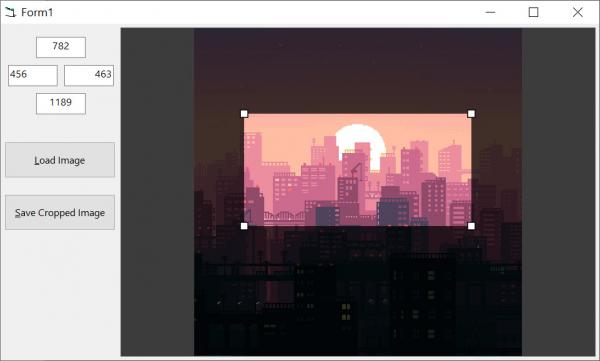
Approximately 530 lines all-in for the main class+demo UI (just under 500 for the main class), and I wasn't particularly trying to be concise. Even better than LOC measure is that it only took ~4 hours to go from first thought to completed project...still hard (impossible?) to beat VB6+RC6 RAD for desktop apps, even in 2025!
Anyway, this is likely the last update for this demo as I think it provides enough to serve as a basis for any real-world projects that anyone might want to extend from it (or simply to use as reference/learning material).
Enjoy!
Source Code: ImageSel3.zip
Last edited by jpbro; Apr 19th, 2025 at 11:45 AM.
-
Apr 19th, 2025, 11:23 AM
#14
Thread Starter
Fanatic Member
Re: Image crop
Originally Posted by jpbro
How do you get that to run at all with a variable named as a reserved keyword (input)?
sorry , is did add s on to Input and Token. this was generated by CHatGPT as i could not find and GDI+ code to crop an imagefile
I found Picturebox Crops code but no good for my use. I alreay have the cordinates to crop. i just need to supply FileIn, FileOut, X,Y,W,H to a GDI+ routine.
the above does not work.
-
Apr 19th, 2025, 11:30 AM
#15
Thread Starter
Fanatic Member
Re: Image crop
Originally Posted by jpbro
Final RC6 demo updated with the following:
- Basic UI that let's users set the crop rectangle values in TextBoxes.
- Basic UI that let's users load/save images via buttons.
- Moved to a Class that you can hook to any PictureBox (allowing you to implement any UI around it that you like).
- Improved performance dramatically by changing base image rendering to use CAIRO_FILTER_FAST instead of CAIRO_FILTER_GOOD. Negligible degradation in quality for the massive performance boost IMO, but feel free to adjust to your own preferences).
- Mouse over crop rect or crop rect resize handles now changes the mouse pointer for better Ux.
- Few other minor improvements/fixes.
Approximately 500 lines all-in for the main class+demo UI, and I wasn't particularly trying to be concise.
This is likely the last update for this demo as I think it provides enough to serve as a basis for any real-world projects that anyone might want to extend from it (or simply to use as reference/learning material).
Enjoy!
Source Code: ImageSel3.zip
thanks for your example. I do Use RC6 but really wanted to find a way with GDI+ to crop an image.
As i said , i have an app that i can already save a file change the FileType and resize , I just wanted to add Crop as well.
You example is Excellet that i can crop the image and get the coordinates, but i would like to pass those cordinates to a GDI+ routine.
thanks for your examples. much appreciated
-
Apr 19th, 2025, 11:31 AM
#16
Re: Image crop
Originally Posted by k_zeon
sorry , is did add s on to Input and Token. this was generated by CHatGPT as i could not find and GDI+ code to crop an imagefile
Gotcha, no problem. Unfortunately I can't help with the GDI+ stuff, I've barely touched it. Hopefully some GDI+ers around here can help, I just dropped a final demo project for anyone that happens by and would prefer to use an RC6/Cairo approach.
Good luck!
-
Apr 19th, 2025, 01:44 PM
#17
Re: Image crop with GDI+
Google Gemini coughed up the following hairball that after a bit of massaging I was able to get to work.
I barely tested it after getting it running and I CANNOT vouch for the code at all. If you're going to use it for any real-world purpose I highly recommend working through it to try to understand what it is doing first, then clean it up/do it right (I have not tried to understand the code at all, and reiterate that I DO NOT recommend it for any use other than study/proof-of-concept).
GDIPCrop.zip
-
Apr 19th, 2025, 02:23 PM
#18
Thread Starter
Fanatic Member
Re: Image crop with GDI+
Originally Posted by jpbro
Google Gemini coughed up the following hairball that after a bit of massaging I was able to get to work.
I barely tested it after getting it running and I CANNOT vouch for the code at all. If you're going to use it for any real-world purpose I highly recommend working through it to try to understand what it is doing first, then clean it up/do it right (I have not tried to understand the code at all, and reiterate that I DO NOT recommend it for any use other than study/proof-of-concept).
GDIPCrop.zip
tks will take a look
-
Apr 20th, 2025, 01:09 PM
#19
Re: Image crop with GDI+
I know you've settled on GDI+, but FWIW I've posted a final demo project RC6 approach to the problem here in case its of interest to anyone happening by in the future:
https://www.vbforums.com/showthread....73#post5675573
This version includes a few minor fixes/improvements and I've added the ability to set a "soft" maximum file length for exported images (which is useful for thing like forum uploads and email attachments).
Last edited by jpbro; Apr 20th, 2025 at 03:26 PM.
-
Apr 20th, 2025, 01:29 PM
#20
Thread Starter
Fanatic Member
Re: Image crop with GDI+
OK. tks.
so the below function i have at the moment that can save as jpg,png,bmp,tif,gif which is ok for me.
I can select a file and save the file at a reduced size. All working ok so far
Now what i was wanting to do was load an image into lBitmap like it does already
then cropped the lBitmap directly.
Now pass the cropped lBitmap to the resize function and save.
that way i can save some files NOT Cropped at 700x700 (maintaing aspect ratio)
and also saving the cropped imageg at 700x700 as well
In the function below
Code:
Public Function GDI_CovertResize(ByVal sFile As String, _
                                 ByVal lWidth As Long, _
                                 ByVal lHeight As Long, _
                                 ByVal sSaveAsFile As String, _
                                 Optional lJPGQuality As Long = 100)
    On Error GoTo Error_Handler
    Dim GDIpStartupInput As GdiplusStartupInput
    Dim GDIStatus As status
    Dim lThumb As Long
    Dim tEncoder As GUID
    Dim tParams As EncoderParameters
    Dim bParams As Boolean
    Dim sExt As String

    'Start GDI
    '-------------------------------------------------------------------------------------
    If bGDIpInitialized = False Then
        GDIpStartupInput.GdiplusVersion = 1
        GDIStatus = GdiplusStartup(lGDIpsToken, GDIpStartupInput, ByVal 0)
        If GDIStatus <> status.OK Then
            MsgBox "Unable to start the GDI+ API" & vbCrLf & vbCrLf & GDIErrorToString(GDIStatus), vbCritical Or vbOKOnly, "Operation Aborted"
            GoTo Error_Handler_Exit
        Else
            bGDIpInitialized = True
        End If
    End If

    'Load our Image to work with
    '-------------------------------------------------------------------------------------
    'In case we already have something in memory let's dispose of it properly
    If lBitmap <> 0 Then
        GDIStatus = GdipDisposeImage(lBitmap)
        If GDIStatus <> status.OK Then
            MsgBox "Unable to dispose of the current image in memory" & vbCrLf & vbCrLf & GDIErrorToString(GDIStatus), vbCritical Or vbOKOnly, "Operation Aborted"
            GoTo Error_Handler_Exit
        End If
    End If
    'Now let's proceed with loading the actual image we want to work with
    GDIStatus = GdipCreateBitmapFromFile(StrPtr(sFile), lBitmap)
    If GDIStatus <> status.OK Then
        MsgBox "Unable to load the specified image" & vbCrLf & vbCrLf & GDIErrorToString(GDIStatus), vbCritical Or vbOKOnly, "Operation Aborted"
        GoTo Error_Handler_Exit
    End If

  'Work with the image

    Dim newWidth As Long, newHeight As Long
    Dim Width As Long, Height As Long
    GdipGetImageWidth lBitmap, Width
    GdipGetImageHeight lBitmap, Height
    'Debug.Print "Width: " & width & vbCrLf & "Height: " & height


    ''''''''''''''''''''''''''''''''''''''''''''''''''''''''''''''''''''''''''''''''''''''''''''''''''''''''''''''''''''''''''''''''''''''''''''''''''


    Dim cropW As Long
    Dim cropH As Long
    Dim cropX As Long
    Dim cropY As Long

    cropX = 100  ' just for testing
    cropY = 100
    cropW = 500
    cropH = 500

    Dim graphics As Long
    GdipCreateFromHDC Form1.hdc, graphics

    GDIStatus = GdipDrawImageRectRectI(graphics, lBitmap, cropX, cropY, cropW, cropH, 0, 0, Width, Height, 2, 0, 0, 0)

    GdipDeleteGraphics graphics


'  need a bit of code here to put the new cropped image into lBitmap

'  so that lBitmap contains the new cropped image


    ''''''''''''''''''''''''''''''''''''''''''''''''''''''''''''''''''''''''''''''''''''''''''''''''''''''''''''''''''''''''''''''''''''''''''''''''''


    ' Aspect ratio calc
    If lWidth > 0 Then
        newWidth = lWidth
        newHeight = CLng(Height * (lWidth / Width))
        lWidth = newWidth
        lHeight = newHeight
    ElseIf lHeight > 0 Then
        newHeight = lHeight
        newWidth = CLng(Width * (lHeight / Height))
        lWidth = newWidth
        lHeight = newHeight
    Else
        ' GoTo Error_Handler_Exit

        lWidth = Width
        lHeight = Height
    End If


    '-------------------------------------------------------------------------------------
    If lBitmap Then
        If lWidth = 0 Or lHeight = 0 Then
            'Conversion only
            GDIStatus = status.OK
        Else
            'Resize
            GDIStatus = GdipGetImageThumbnail(lBitmap, lWidth, lHeight, lThumb, 0, 0)

        End If
        If GDIStatus <> status.OK Then
            MsgBox "Unable to generate a thumbnail image." & vbCrLf & vbCrLf & GDIErrorToString(GDIStatus), vbCritical Or vbOKOnly, "Operation Aborted"
            GoTo Error_Handler_Exit
        Else
            'Save the changes
            sExt = Mid(sSaveAsFile, InStrRev(sSaveAsFile, ".") + 1)
            Select Case sExt
            Case "bmp", "dib"
                CLSIDFromString StrPtr(ImageCodecBMP), tEncoder
            Case "gif"
                CLSIDFromString StrPtr(ImageCodecGIF), tEncoder
            Case "jpg", "jpeg", "jpe", "jfif"
                CLSIDFromString StrPtr(ImageCodecJPG), tEncoder

                If lJPGQuality > 100 Then lJPGQuality = 100
                If lJPGQuality < 1 Then lJPGQuality = 1
                With tParams
                    .Count = 1
                    .Parameter(0).NumberOfValues = 1
                    .Parameter(0).Type = EncoderParameterValueTypeLong
                    .Parameter(0).Value = VarPtr(lJPGQuality)
                    CLSIDFromString StrPtr(EncoderQuality), .Parameter(0).GUID
                End With
                bParams = True
            Case "png"
                CLSIDFromString StrPtr(ImageCodecPNG), tEncoder
            Case "tif", "tiff"
                CLSIDFromString StrPtr(ImageCodecTIF), tEncoder

                With tParams
                    .Count = 1
                    .Parameter(0).NumberOfValues = 1
                    .Parameter(0).Type = EncoderParameterValueTypeLong
                    .Parameter(0).Value = VarPtr(TiffCompressionNone)
                    CLSIDFromString StrPtr(EncoderCompression), .Parameter(0).GUID
                End With
                bParams = True
            Case Else
                Exit Function
            End Select

            If bParams Then
                If lWidth = 0 Or lHeight = 0 Then
                    'Simple conversion
                    GDIStatus = GdipSaveImageToFile(lBitmap, StrPtr(sSaveAsFile), tEncoder, ByVal tParams)
                Else
                    'Resize and possible conversion
                    GDIStatus = GdipSaveImageToFile(lThumb, StrPtr(sSaveAsFile), tEncoder, ByVal tParams)
                End If
            Else
                If lWidth = 0 Or lHeight = 0 Then
                    GDIStatus = GdipSaveImageToFile(lBitmap, StrPtr(sSaveAsFile), tEncoder, ByVal 0)
                Else
                    GDIStatus = GdipSaveImageToFile(lThumb, StrPtr(sSaveAsFile), tEncoder, ByVal 0)
                End If
            End If
            If GDIStatus <> status.OK Then
                MsgBox "Unable to save the image." & vbCrLf & vbCrLf & GDIErrorToString(GDIStatus), vbCritical Or vbOKOnly, "Operation Aborted"
                GoTo Error_Handler_Exit
            End If
        End If
    End If

Error_Handler_Exit:
    On Error Resume Next
    'Shutdown GDI


    '-------------------------------------------------------------------------------------
    If bGDIpInitialized = True Then
        If lBitmap <> 0 Then
            GDIStatus = GdipDisposeImage(lBitmap)
            If GDIStatus <> status.OK Then
                MsgBox "Unable to dispose of the processed image" & vbCrLf & vbCrLf & GDIErrorToString(GDIStatus), vbCritical Or vbOKOnly, "Operation Aborted"
                Exit Function
            Else
                lBitmap = 0
            End If
        End If
        If lThumb <> 0 Then
            GDIStatus = GdipDisposeImage(lThumb)
            If GDIStatus <> status.OK Then
                MsgBox "Unable to dispose of the thumbnail image" & vbCrLf & vbCrLf & GDIErrorToString(GDIStatus), vbCritical Or vbOKOnly, "Operation Aborted"
                Exit Function
            Else
                lThumb = 0
            End If
        End If
        GDIStatus = GdiplusShutdown(lGDIpsToken)
        If GDIStatus <> status.OK Then
            ' MsgBox "Unable to shutdown the GDI+ API" & vbCrLf & vbCrLf & GDIErrorToString(GDIStatus), vbCritical Or vbOKOnly, "Operation Aborted"
            Exit Function
        Else
            bGDIpInitialized = False
        End If
    End If
    Exit Function

Error_Handler:
    MsgBox "The following error has occurred" & vbCrLf & vbCrLf & _
           "Error Number: " & Err.Number & vbCrLf & _
           "Error Source: GDI_CovertResize" & vbCrLf & _
           "Error Description: " & Err.Description & _
           Switch(Erl = 0, "", Erl <> 0, vbCrLf & "Line No: " & Erl) _
         , vbOKOnly + vbCritical, "An Error has Occurred!"
    Resume Error_Handler_Exit
End Function
Last edited by k_zeon; Apr 20th, 2025 at 02:04 PM.
 Posting Permissions
- You may not post new threads
- You may not post replies
- You may not post attachments
- You may not edit your posts
-
Forum Rules
|
Click Here to Expand Forum to Full Width
|



 Reply With Quote