|

-
Mar 13th, 2023, 01:42 PM
#1
 VB6 - Unicode Captions for all intrinsic controls (yes, LABEL too!) - no OCX required VB6 - Unicode Captions for all intrinsic controls (yes, LABEL too!) - no OCX required
When developing international applications there is often a need to display user interface elements in foreign languages. I've put together a small "cCapW" class that can handle Unicode captions for all intrinsic controls (Form, CommandButton, CheckBox, OptionButton, Frame and Label). The class only has one property which is also marked as "Default" to keep the syntax as short as possible. It is also "Predeclared" so it can be used "as is" without declaring new instances:
Code:
' For example instead of using:
cmdButton.Caption = "Some ANSI Text"
' Now we can use:
cCapW(cmdButton) = "????? ???¢??? ????"
Here's a screenshot of the demo program showing Unicode captions in action (clicking on each element will randomly change its caption from a selection of strings loaded from a file):
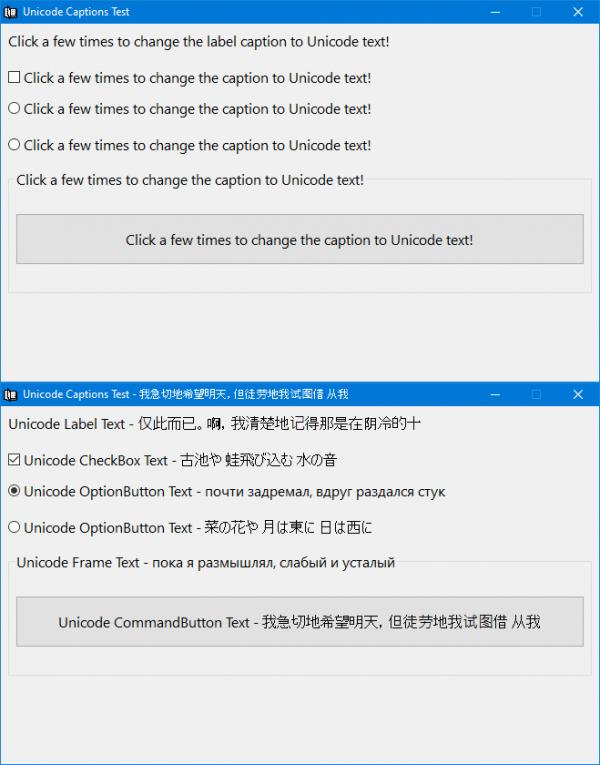
While for most controls the solution can be as easy as subclassing their hWnd and handling WM_GETTEXT and WM_SETTEXT messages, the Label control proved to be a little tricky as it doesn't have a hWnd at all. It turns out the Label is using the "TextOutA" GDI function to draw text directly on the device context of its container window (which is usually a form). In this case the solution was to change the ANSI version of the "TextOutA" GDI function and point it to our own custom "HookedTextOut" function that ends up calling the Unicode-capable "DrawTextW" function to format and draw the actual text.
The "Caption" property of a label is only capable of holding ANSI text so all Unicode captions are first encoded to Base64 and then decoded on the fly by our "HookedTextOut" function when they need to be rendered on the screen. Another problem that needed addressing was that the form is being repainted multiple times (when moved around, when covered by other windows, when minimized and restored, etc). On every such repainting event the form is using "TextOutA" to write all Label captions at once so we needed to identify which caption was already encoded to Base64 and which was not because a form can contain both ANSI and Unicode labels at the same time depending on user needs.
Finally, the "TextOutA" function is not capable of formatted output on its own (for example it cannot draw multiple lines of text at once). Internally, the Label control has additional code that can format the caption text and call "TextOutA" multiple times in order to draw multi-line captions or captions that wrap around at the edge. The latest version of this project addresses this problem and can now draw multi-line Unicode captions with proper alignment (Left, Right or Center). The obvious limitation of this approach is that it won't work with the "AutoSize" property of a Label control.
cCapW.cls
Code:
Option Explicit

Implements ISubclass

Private Const sTextOutA As String = "TextOutA", GDI32_DLL As String = "gdi32", WM_SETTEXT As Long = &HC, WM_GETTEXT As Long = &HD, WM_GETTEXTLENGTH As Long = &HE

Private Declare Function DefWindowProcW Lib "user32" (ByVal hWnd As Long, ByVal wMsg As Long, ByVal wParam As Long, ByVal lParam As Long) As Long
Private Declare Function ReadProcessMemory Lib "kernel32" (ByVal hProcess As Long, lpBaseAddress As Any, lpBuffer As Any, ByVal nSize As Long, lpNumberOfBytesWritten As Long) As Long
Private Declare Function WriteProcessMemory Lib "kernel32" (ByVal hProcess As Long, lpBaseAddress As Any, lpBuffer As Any, ByVal nSize As Long, lpNumberOfBytesWritten As Long) As Long
Private Declare Function GetModuleHandleW Lib "kernel32" (ByVal lpModuleName As Long) As Long
Private Declare Function GetProcAddress Lib "kernel32" (ByVal hModule As Long, ByVal lpProcName As String) As Long

Private lOriginalProcAddress As Long, byteOriginalAddress(0 To 5) As Byte

Public Property Get CaptionW(objControl As Object) As String
Dim lTextLen As Long, baCaption() As Byte
    With objControl
        If TypeOf objControl Is Label Then ' Labels are a special case since they don't have a hWnd
            If lOriginalProcAddress = 0 Then HookTextOut ' Hook the "TextOutA" function if it hasn't been done already
            CaptionW = .Caption
            If AscB(CaptionW) = 11 Then ' A "VerticalTab (ASCII 11)" character is used to mark this label caption as Base64 encoded
                If Base64Decode(Mid$(CaptionW, InStr(2, CaptionW, vbVerticalTab) + 1), baCaption) Then CaptionW = baCaption ' Retrieve the Base64 encoded caption following the "VerticalTab" character
            End If
        Else ' Everything else can easily handle Unicode via a simple WM_GETTEXT message
            lTextLen = DefWindowProcW(.hWnd, WM_GETTEXTLENGTH, 0&, 0&)  ' Get the caption length
            CaptionW = String$(lTextLen, vbNullChar) ' Allocate memory for the caption
            DefWindowProcW .hWnd, WM_GETTEXT, lTextLen + 1, StrPtr(CaptionW) ' Get the caption text
        End If
    End With
End Property

Public Property Let CaptionW(objControl As Object, sCaption As String)
Dim lTextLen As Long, sBase64Caption As String
    With objControl
        If TypeOf objControl Is Label Then ' Labels are a special case since they don't have a hWnd
            If lOriginalProcAddress = 0 Then HookTextOut ' Hook the "TextOutA" function if it hasn't been done already
            If Base64Encode(sCaption, sBase64Caption) Then .Caption = vbVerticalTab & ObjPtr(objControl) & vbVerticalTab & sBase64Caption Else .Caption = sCaption ' A "VerticalTab (ASCII 11)" character is used to mark this label caption as Base64 encoded
        Else ' Everything else can easily handle Unicode via a simple WM_SETTEXT message
            SubclassWnd .hWnd, Me ' Subclass this hWnd if it hasn't already been subclassed.
            DefWindowProcW .hWnd, WM_SETTEXT, 0&, StrPtr(sCaption) ' Set the new caption
        End If
        .Refresh ' Force the control to be redrawn to show the new caption immediately
    End With
End Property

Private Sub HookTextOut()
Dim bytePatch(0 To 5) As Byte
    If lOriginalProcAddress = 0 Then
        lOriginalProcAddress = GetProcAddress(GetModuleHandleW(StrPtr(GDI32_DLL)), sTextOutA) ' Get the entry point address of the ANSI TextOutA function from gdi32.dll
        If ReadProcessMemory(-1, ByVal lOriginalProcAddress, byteOriginalAddress(0), 6, ByVal 0&) Then ' Save it to be restored on exit
            Debug.Print "Saved original TextOutA address"
        End If
        bytePatch(0) = &H68 ' push
        PutMem4 bytePatch(1), AddressOf HookedTextOut ' Get the address of our replacement HookedTextOut function
        bytePatch(5) = &HC3 ' ret
        If WriteProcessMemory(-1, ByVal lOriginalProcAddress, bytePatch(0), 6, ByVal 0&) Then ' Apply patch, all calls to TextOutA will execute our HookedTextOut function now
            Debug.Print "Hooked TextOutA address"
        End If
    End If
End Sub

Private Sub Class_Terminate()
    If lOriginalProcAddress Then
        If WriteProcessMemory(-1, ByVal lOriginalProcAddress, byteOriginalAddress(0), 6, ByVal 0&) Then ' Restore the address of the original TextOutA function (only useful in IDE)
            Debug.Print "Restored original TextOutA address"
        End If
    End If
End Sub

Private Function ISubclass_WndProc(ByVal hWnd As Long, ByVal uMsg As Long, ByVal wParam As Long, ByVal lParam As Long, ByVal dwRefData As Long) As Long
Dim bDiscardMessage As Boolean
    Select Case uMsg
        Case WM_GETTEXT ' Force this message to be processed by the Unicode version of the window procedure (DefWindowProcW) and then discard it
            ISubclass_WndProc = DefWindowProcW(hWnd, uMsg, wParam, lParam): bDiscardMessage = True
    End Select
    If Not bDiscardMessage Then ISubclass_WndProc = DefSubclassProc(hWnd, uMsg, wParam, lParam)
End Function
The "HookedTextOut" function takes care of rendering Unicode captions for the correct labels:
mdlCapW.bas
Code:
Option Explicit

Private Type RECT
    Left As Long
    Top As Long
    Right As Long
    Bottom As Long
End Type

Private Const WM_NCDESTROY As Long = &H82, CRYPT_STRING_BASE64 As Long = 1, CRYPT_STRING_NOCRLF As Long = &H40000000, DT_CALCRECT As Long = &H400, DT_LEFT As Long = 0, DT_CENTER As Long = 1, _
              DT_RIGHT As Long = 2, DT_WORDBREAK As Long = &H10, DT_NOCLIP As Long = &H100, DT_EDITCONTROL As Long = &H2000

Private Declare Function SetWindowSubclass Lib "comctl32" Alias "#410" (ByVal hWnd As Long, ByVal pfnSubclass As Long, ByVal uIdSubclass As Long, ByVal dwRefData As Long) As Long
Private Declare Function GetWindowSubclass Lib "comctl32" Alias "#411" (ByVal hWnd As Long, ByVal pfnSubclass As Long, ByVal uIdSubclass As Long, pdwRefData As Long) As Long
Private Declare Function RemoveWindowSubclass Lib "comctl32" Alias "#412" (ByVal hWnd As Long, ByVal pfnSubclass As Long, ByVal uIdSubclass As Long) As Long
Public Declare Function DefSubclassProc Lib "comctl32" Alias "#413" (ByVal hWnd As Long, ByVal uMsg As Long, ByVal wParam As Long, ByVal lParam As Long) As Long
Private Declare Function CryptBinaryToStringW Lib "crypt32" (ByVal pbBinary As Long, ByVal cbBinary As Long, ByVal dwFlags As Long, ByVal pszString As Long, pcchString As Long) As Long
Private Declare Function CryptStringToBinaryW Lib "crypt32" (ByVal pszString As Long, ByVal cchString As Long, ByVal dwFlags As Long, ByVal pbBinary As Long, pcbBinary As Long, pdwSkip As Long, pdwFlags As Long) As Long
Private Declare Function lstrlenA Lib "kernel32" (ByVal lpString As Long) As Long
Public Declare Sub GetMem1 Lib "msvbvm60" (Ptr As Any, RetVal As Byte)
Public Declare Sub PutMem4 Lib "msvbvm60" (Ptr As Any, ByVal NewVal As Long)
Private Declare Function vbaObjSet Lib "msvbvm60" Alias "__vbaObjSet" (ByVal dstObject As Long, ByVal srcObject As Long) As Long
Private Declare Function SysAllocStringByteLen Lib "oleaut32" (ByVal pSZ As Long, ByVal Length As Long) As Long
Private Declare Function DrawTextA Lib "user32" (ByVal hDC As Long, ByVal lpStr As Long, ByVal nCount As Long, ByVal lpRect As Long, ByVal wFormat As Long) As Long
Private Declare Function DrawTextW Lib "user32" (ByVal hDC As Long, ByVal lpStr As Long, ByVal nCount As Long, ByVal lpRect As Long, ByVal wFormat As Long) As Long
Private Declare Function GetProp Lib "user32" Alias "GetPropA" (ByVal hWnd As Long, ByVal lpString As String) As Long
Private Declare Function RemoveProp Lib "user32" Alias "RemovePropA" (ByVal hWnd As Long, ByVal lpString As String) As Long
Private Declare Function SetProp Lib "user32" Alias "SetPropA" (ByVal hWnd As Long, ByVal lpString As String, ByVal hData As Long) As Long

Private Function GetContainerScaleMode(objContainer As Object) As ScaleModeConstants
On Error GoTo ScaleModeTwips
    GetContainerScaleMode = objContainer.ScaleMode: Exit Function
ScaleModeTwips:
    GetContainerScaleMode = vbTwips: Err.Clear
End Function

Private Function PtrToStr(lpString As Long) As String
Dim lLen As Long
    lLen = lstrlenA(lpString): If lLen Then PutMem4 PtrToStr, SysAllocStringByteLen(lpString, lLen)
End Function

Public Function HookedTextOut(ByVal hDC As Long, ByVal X As Long, ByVal Y As Long, ByVal lpString As Long, ByVal nCount As Long) As Long
Dim baCaption() As Byte, byteVTab As Byte, sCaption As String, lTextLen As Long, rcLabel As RECT, objLabel As Label, LabelScaleMode As ScaleModeConstants, lLabelAlignment As Long
    If nCount > 0 Then
        GetMem1 ByVal lpString, byteVTab
        If byteVTab = 11 Then ' A "VerticalTab (ASCII 11)" character is used to mark this Label caption as Base64 encoded
            vbaObjSet VarPtr(objLabel), Val(PtrToStr(lpString + 1)) ' Get a weak reference to this Label object whose pointer address was previously saved in its caption
            With objLabel
                sCaption = Mid$(.Caption, InStr(2, .Caption, vbVerticalTab) + 1) ' Retrieve the actual Base64 encoded caption following the VerticalTab delimiter
                LabelScaleMode = GetContainerScaleMode(.Container) ' We need to know the ScaleMode of this Label borrowed from its Container object
                rcLabel.Left = .Parent.ScaleX(.Left, LabelScaleMode, vbPixels) + .BorderStyle ' Calculate the size of the drawing rectangle (in pixels) for this Label
                rcLabel.Top = .Parent.ScaleY(.Top, LabelScaleMode, vbPixels) + .BorderStyle
                rcLabel.Right = rcLabel.Left + .Parent.ScaleX(.Width, LabelScaleMode, vbPixels) - .BorderStyle * 2
                rcLabel.Bottom = rcLabel.Top + .Parent.ScaleY(.Height, LabelScaleMode, vbPixels) - .BorderStyle * 2
                Select Case .Alignment ' Get the alignment of the Label
                    Case vbLeftJustify: lLabelAlignment = DT_LEFT
                    Case vbCenter: lLabelAlignment = DT_CENTER
                    Case vbRightJustify: lLabelAlignment = DT_RIGHT
                End Select
            End With
            PutMem4 objLabel, 0& ' Destroy the weak reference previously acquired
            lTextLen = Base64Decode(sCaption, baCaption) ' Decode the actual caption from Base64
            If lTextLen Then HookedTextOut = DrawTextW(hDC, VarPtr(baCaption(0)), lTextLen \ 2, VarPtr(rcLabel), DT_EDITCONTROL Or DT_WORDBREAK Or lLabelAlignment) ' Draw the Label's caption in the previously calculated rectangle
        Else ' This Caption hasn't been encoded to Base64 yet so just render it in ANSI form
            rcLabel.Left = X: rcLabel.Top = Y ' Initialize the upper-left corner of the drawing rectangle
            HookedTextOut = DrawTextA(hDC, lpString, nCount, VarPtr(rcLabel), DT_NOCLIP) ' Draw the actual caption
        End If
    End If
End Function

Public Function Base64Decode(sInputData As String, baOutputData() As Byte) As Long
Dim lDataLen As Long, lOutLen As Long
    lDataLen = Len(sInputData)
    If lDataLen Then
        If CryptStringToBinaryW(StrPtr(sInputData), lDataLen, CRYPT_STRING_BASE64, 0&, lOutLen, 0&, 0&) Then
            ReDim baOutputData(0 To lOutLen - 1)
            If CryptStringToBinaryW(StrPtr(sInputData), lDataLen, CRYPT_STRING_BASE64, VarPtr(baOutputData(0)), lOutLen, 0&, 0&) Then Base64Decode = lOutLen
        End If
    End If
End Function

Public Function Base64Encode(sInputData As String, sOutputData As String) As Long
Dim lDataLen As Long, lOutLen As Long
    lDataLen = Len(sInputData)
    If lDataLen Then
        If CryptBinaryToStringW(StrPtr(sInputData), lDataLen * 2, CRYPT_STRING_BASE64 Or CRYPT_STRING_NOCRLF, 0&, lOutLen) Then
            sOutputData = String$(lOutLen - 1, vbNullChar)
            If CryptBinaryToStringW(StrPtr(sInputData), lDataLen * 2, CRYPT_STRING_BASE64 Or CRYPT_STRING_NOCRLF, StrPtr(sOutputData), lOutLen) Then Base64Encode = lOutLen
        End If
    End If
End Function

Public Sub SubclassWnd(hWnd As Long, Subclass As ISubclass, Optional dwRefData As Long)
Dim uIdSubclass As Long
    uIdSubclass = ObjPtr(Subclass)
    If Not IsWndSubclassed(hWnd, uIdSubclass) Then
        SetProp hWnd, hWnd, uIdSubclass: SetWindowSubclass hWnd, AddressOf WndProc, uIdSubclass, dwRefData
    End If
End Sub

Private Sub UnSubclassWnd(hWnd As Long, Optional Subclass As ISubclass)
Dim uIdSubclass As Long
    If Subclass Is Nothing Then uIdSubclass = GetProp(hWnd, hWnd) Else uIdSubclass = ObjPtr(Subclass)
    If IsWndSubclassed(hWnd, uIdSubclass) Then
        RemoveProp hWnd, hWnd: RemoveWindowSubclass hWnd, AddressOf WndProc, uIdSubclass
    End If
End Sub

Private Function IsWndSubclassed(hWnd As Long, uIdSubclass As Long, Optional dwRefData As Long) As Boolean
    IsWndSubclassed = GetWindowSubclass(hWnd, AddressOf WndProc, uIdSubclass, dwRefData)
End Function

Private Function WndProc(ByVal hWnd As Long, ByVal uMsg As Long, ByVal wParam As Long, ByVal lParam As Long, ByVal Subclass As ISubclass, ByVal dwRefData As Long) As Long
Dim i As Long
    Select Case uMsg
        Case WM_NCDESTROY
            UnSubclassWnd hWnd, Subclass
            WndProc = DefSubclassProc(hWnd, uMsg, wParam, lParam)
        Case Else
            WndProc = Subclass.WndProc(hWnd, uMsg, wParam, lParam, dwRefData)
    End Select
End Function
That's all there is to it. Here's a small demo program showing the Unicode captions in action (clicking on each element will randomly change its caption from a selection of strings loaded from a file):
UnicodeCaptions.zip (Updated)
Last edited by VanGoghGaming; Feb 19th, 2026 at 08:35 AM.
Reason: Bug fix
-
Mar 13th, 2023, 03:03 PM
#2
Fanatic Member

Re: VB6 - Unicode Captions for all intrinsic controls (yes, LABEL too!) - no OCX requ
-
Mar 13th, 2023, 06:06 PM
#3
Re: VB6 - Unicode Captions for all intrinsic controls (yes, LABEL too!) - no OCX requ
Your work is very great, applaud. Give VB6 life, help it more perfect and easier to use.
-
Mar 13th, 2023, 07:03 PM
#4
Re: VB6 - Unicode Captions for all intrinsic controls (yes, LABEL too!) - no OCX requ
 Originally Posted by VanGoghGaming

the Label control proved to be a little tricky as it doesn't have a hWnd at all.
The Label control belongs to a class of controls called windowless controls. The Image control is another example of a windowless control. They don't have window handles which necessitates the parent handling it's window functionality like drawing and responding to messages. Note that this is a VB6 specific thing and not a Windows thing.
-
Mar 15th, 2023, 09:33 AM
#5
 Re: VB6 - Unicode Captions for all intrinsic controls (yes, LABEL too!) - no OCX requ Re: VB6 - Unicode Captions for all intrinsic controls (yes, LABEL too!) - no OCX requ
Yeah I've already seen that article before, did quite a bit of reading on these troublesome windowless controls. I had to rewrite the hooked function for "TextOutA" (already edited the initial post with the new code) and use Base64 encoded captions for all Unicode text while regular ANSI captions remain unencoded.
Last edited by VanGoghGaming; Aug 25th, 2023 at 07:16 PM.
-
Mar 19th, 2023, 06:56 PM
#6
Addicted Member
Re: VB6 - Unicode Captions for all intrinsic controls (yes, LABEL too!) - no OCX requ
Originally Posted by VanGoghGaming
...I had to rewrite the hooked function for "TextOutA" (already edited the initial post with the new code) and use a Dictionary object to store Unicode captions based on a key which consists of the label's position (Left and Top coordinates) as well as its container window's hWnd...
Truly excellent work. Actually, it's quite amazing. It's a major reason I was moving to TwinBasic. Users should be able to select their own language file in any program.
I had to quick fix Form_Load()
ReadFile "Haiku.txt", sHaikus
to
ReadFile App.Path & "\Haiku.txt", sHaikus
Maybe update that in the zip.
Thanks for all the time you spent on this!
-
Mar 19th, 2023, 08:39 PM
#7
Re: VB6 - Unicode Captions for all intrinsic controls (yes, LABEL too!) - no OCX requ
It already looks in the current folder if you start the project by double clicking the .vbp file or compile it into an EXE, no need for "App.Path". I'm glad you like it though, cheers! 
-
Mar 20th, 2023, 05:18 AM
#8
Addicted Member

Re: VB6 - Unicode Captions for all intrinsic controls (yes, LABEL too!) - no OCX requ
-
Mar 20th, 2023, 12:34 PM
#9
 Re: VB6 - Unicode Captions for all intrinsic controls (yes, LABEL too!) - no OCX requ Re: VB6 - Unicode Captions for all intrinsic controls (yes, LABEL too!) - no OCX requ
This update fixes a bug where Label captions encoded to Base64 were not correctly distinguished from regular unencoded ANSI captions.
Last edited by VanGoghGaming; Oct 16th, 2023 at 11:24 AM.
-
Aug 25th, 2023, 07:26 PM
#10
 Re: VB6 - Unicode Captions for all intrinsic controls (yes, LABEL too!) - no OCX requ Re: VB6 - Unicode Captions for all intrinsic controls (yes, LABEL too!) - no OCX requ
This latest update addresses the problem with Labels containing multiple lines of text and can now draw multi-line Unicode captions as long as the lines are separated by NewLine characters (vbCrLf). The obvious limitation of this approach is that it won't work with the "AutoSize" and "WordWrap" properties of a Label control and all captions will be left-aligned:

As usual you can download this latest update from the first post above.
Last edited by VanGoghGaming; Oct 16th, 2023 at 11:24 AM.
-
Aug 27th, 2023, 04:28 PM
#11
Hyperactive Member
Re: VB6 - Unicode Captions for all intrinsic controls (yes, LABEL too!) - no OCX requ
Do I understand correcltly that this is targeted at being able to use Unicode texts with the standard common controls?
Supporting Unicode texts independent from the language your Windows version is running in was the key reason for me to switch to Krool's common controls replacement. It offers a simple option to include the controls by using an OCX, or a "more advanced / flexible way" by including all source code for the controls in your application code. Works like a charm!
Showing a user interface in e.g. Thai, Russian or Korean on an English Windows PC is no problem at all.
-
Aug 27th, 2023, 04:49 PM
#12
Re: VB6 - Unicode Captions for all intrinsic controls (yes, LABEL too!) - no OCX requ
Yes mate, read the description and download the demo project to see it in action. This works for those standard controls that have a "Caption" property (Form, CommandButton, CheckBox, OptionButton, Frame and Label). It's very lightweight and a lot more convenient than including whole new controls instead of these standard ones.
I also have lightweight Unicode replacements for the InputBox and RichEdit TextBox.
However, if you need more complicated Unicode controls in your applications like the TreeView or FlexGrid then you should browse Krool's Shop! 
-
Aug 27th, 2023, 05:18 PM
#13
Hyperactive Member
Re: VB6 - Unicode Captions for all intrinsic controls (yes, LABEL too!) - no OCX requ
Originally Posted by VanGoghGaming
Yes mate, read the description and download the demo project to see it in action. This works for those standard controls that have a "Caption" property (Form, CommandButton, CheckBox, OptionButton, Frame and Label). It's very lightweight and a lot more convenient than including whole new controls instead of these standard ones.
I also have lightweight Unicode replacements for the InputBox and RichEdit TextBox.
However, if you need more complicated Unicode controls in your applications like the TreeView or FlexGrid then you should browse Krool's Shop!
I guess posting messages close to midnight after a busy weekend is not a good thing... Was too quick for my own good, and hit Post before "... instrinsic controls ..." hit the correct brain node, and I realized I was in Code Bank... 
As I needed TreeViews, ListViews, FlexGrids and then some more, I indeed started using Krool's set, but your solution looks definitely helpful if those are not needed.
-
Aug 27th, 2023, 05:37 PM
#14
Re: VB6 - Unicode Captions for all intrinsic controls (yes, LABEL too!) - no OCX requ
Well, there's also the matter of how many external OCX-es you want to distribute along with your application and pollute the users' registry with 20-years old technology, unless absolutely necessary of course!
Last edited by VanGoghGaming; Aug 27th, 2023 at 06:04 PM.
-
Aug 31st, 2023, 04:26 AM
#15
New Member
Re: VB6 - Unicode Captions for all intrinsic controls (yes, LABEL too!) - no OCX requ
Really nice, but I can't seem to get this working with the LabelPlus control, any ideas how?
https://www.vbforums.com/showthread....3707-LabelPlus
-
Sep 2nd, 2023, 01:32 AM
#16
Re: VB6 - Unicode Captions for all intrinsic controls (yes, LABEL too!) - no OCX requ
This works only for the standard controls mate. Also as far as I see, that LabelPlus control already supports Unicode on its own.
Last edited by VanGoghGaming; Oct 13th, 2023 at 10:31 AM.
-
Sep 2nd, 2023, 10:09 PM
#17
Addicted Member
Re: VB6 - Unicode Captions for all intrinsic controls (yes, LABEL too!) - no OCX requ
Originally Posted by VanGoghGaming
This works only for the standard controls mate. Also as far as I see, that LabelPlus control already supports Unicode on its own.
That's a generous response. You are a true hero. Cheers
-
Dec 13th, 2023, 01:53 AM
#18
-
Mar 7th, 2025, 01:51 PM
#19
Re: VB6 - Unicode Captions for all intrinsic controls (yes, LABEL too!) - no OCX requ
You know? I'm wondering why, in your "Let CaptionW" procedure, you didn't just do the subclass, set the caption, and then undo the subclass. Done that way, the IDE would be completely protected.
Upon further study, I see that you're doing the subclassing in the "Let", but really only using it in the "Get". Still wondering if there's a way to do this and avoid long-term subclassing altogether.
Last edited by Elroy; Mar 7th, 2025 at 01:59 PM.
Any software I post in these forums written by me is provided "AS IS" without warranty of any kind, expressed or implied, and permission is hereby granted, free of charge and without restriction, to any person obtaining a copy. To all, peace and happiness.
-
Mar 7th, 2025, 02:33 PM
#20
Re: VB6 - Unicode Captions for all intrinsic controls (yes, LABEL too!) - no OCX requ
Wow, another project I haven't looked at in a long time. Let's see, the whole purpose of subclassing here is just to process the WM_GETTEXT message and then discard it so that VB6 can't mess with it. You can't just undo the subclass after setting the caption since WM_GETTEXT is kind of an "ongoing deal" outside your control (it might be requested at various times such as form activation, minimize/restore, basically any operation that requires a repaint of the form) so it needs to be handled at all times.
I have long since switched to the ActiveX DLL method of subclassing which, in my opinion, is the most elegant way to be completely IDE safe (short of an ASM thunk of course). The ActiveX DLL is only needed during development and it's automatically bypassed in the EXE via a conditional compilation directive (#If bInIDE Then #Else #EndIf) so that no modifications are needed between development and production code. I've just been too lazy to update all my projects here that still use the old-style method of subclassing.
-
Mar 7th, 2025, 07:20 PM
#21
Re: VB6 - Unicode Captions for all intrinsic controls (yes, LABEL too!) - no OCX requ
Just in case you're curious how the above model actually works, I have attached here my prjSafeSubclassing ActiveX DLL project:
SafeSubclassing.zip
Then you'd just need to add these two drop-in BAS and CLS modules in any of your projects:
mdlSC.bas
Code:
Option Explicit

Private Const WM_NCDESTROY As Long = &H82

Private Declare Function DefSubclassProc Lib "comctl32" Alias "#413" (ByVal hWnd As Long, ByVal uMsg As Long, ByVal wParam As Long, ByVal lParam As Long) As Long
Private Declare Function GetWindowSubclass Lib "comctl32" Alias "#411" (ByVal hWnd As Long, ByVal pfnSubclass As Long, ByVal uIdSubclass As Long, pdwRefData As Long) As Long
Private Declare Function RemoveWindowSubclass Lib "comctl32" Alias "#412" (ByVal hWnd As Long, ByVal pfnSubclass As Long, ByVal uIdSubclass As Long) As Long
Private Declare Function SetWindowSubclass Lib "comctl32" Alias "#410" (ByVal hWnd As Long, ByVal pfnSubclass As Long, ByVal uIdSubclass As Long, ByVal dwRefData As Long) As Long

Public Function GetSubclassPointer(ObjectToSubclass As IUnknown) As Long
Dim Subclass As ISubclass
    If TypeOf ObjectToSubclass Is ISubclass Then Set Subclass = ObjectToSubclass: GetSubclassPointer = ObjPtr(Subclass)
End Function

Public Function IsWndSubclassed(hWnd As Long, uIdSubclass As Long, Optional dwRefData As Long) As Boolean
    IsWndSubclassed = GetWindowSubclass(hWnd, AddressOf WndProc, uIdSubclass, dwRefData)
End Function

Public Function SubclassWnd(hWnd As Long, uIdSubclass As Long, Optional dwRefData As Long, Optional bUpdateRefData As Boolean, Optional Subclass As Object) As Boolean
    If Subclass Is Nothing Then
        Dim lOldRefData As Long
        If Not IsWndSubclassed(hWnd, uIdSubclass, lOldRefData) Then
            SubclassWnd = SetWindowSubclass(hWnd, AddressOf WndProc, uIdSubclass, dwRefData)
        Else
            If bUpdateRefData Then If lOldRefData <> dwRefData Then SubclassWnd = SetWindowSubclass(hWnd, AddressOf WndProc, uIdSubclass, dwRefData)
        End If
    Else
        SubclassWnd = Subclass.SubclassWnd(hWnd, dwRefData, bUpdateRefData)
    End If
End Function

Public Function UnSubclassWnd(hWnd As Long, uIdSubclass As Long, Optional Subclass As Object) As Boolean
    If Subclass Is Nothing Then
        If IsWndSubclassed(hWnd, uIdSubclass) Then UnSubclassWnd = RemoveWindowSubclass(hWnd, AddressOf WndProc, uIdSubclass)
    Else
        UnSubclassWnd = Subclass.UnSubclassWnd(hWnd)
    End If
End Function

Private Function WndProc(ByVal hWnd As Long, ByVal uMsg As Long, ByVal wParam As Long, ByVal lParam As Long, ByVal Subclass As ISubclass, ByVal dwRefData As Long) As Long
Dim bDiscardMessage As Boolean
    Select Case uMsg
        Case WM_NCDESTROY ' Remove subclassing as the window is about to be destroyed
            UnSubclassWnd hWnd, ObjPtr(Subclass)
        Case Else
            Subclass.MessageReceived hWnd, uMsg, wParam, lParam, dwRefData, bDiscardMessage, WndProc ' bDiscardMessage is passed ByRef so it can be toggled as required by each local Subclass_WndProc
    End Select
    If Not bDiscardMessage Then WndProc = DefSubclassProc(hWnd, uMsg, wParam, lParam) ' Choose whether to pass along this message or discard it
End Function
ISubclass.cls
Code:
Option Explicit

Public Sub MessageReceived(ByVal hWnd As Long, ByVal uMsg As Long, ByVal wParam As Long, ByVal lParam As Long, ByVal dwRefData As Long, bDiscardMessage As Boolean, lReturnValue As Long)

End Sub
This is how you would use this model in a real-world scenario, for example subclassing a form:
Form1.frm
Code:
Option Explicit

#If bInIDE Then
    Private WithEvents ISubclass As prjSafeSubclassing.cSC
#Else
    Implements ISubclass
#End If

Private Sub Form_Load()
    #If bInIDE Then
        Set ISubclass = New prjSafeSubclassing.cSC
    #End If
    SubclassWnd hWnd, GetSubclassPointer(Me), , , ISubclass ' Uses the ActiveX DLL in IDE and the ISubclass interface when compiled
End Sub

Private Sub ISubclass_MessageReceived(ByVal hWnd As Long, ByVal uMsg As Long, ByVal wParam As Long, ByVal lParam As Long, ByVal dwRefData As Long, bDiscardMessage As Boolean, lReturnValue As Long)
    Select Case uMsg
        Case WM_WHATEVER
            ' ...
    End Select
End Sub
The cool trick above is using the same name (ISubclass) for both a "WithEvents" object in IDE and an ISubclass interface when compiled. This way our subclassed procedure will always be called "ISubclass_MessageReceived" regardless of how we run the project (IDE vs EXE).
The main advantages of using a "WithEvents" object in IDE include the ability to click the "Stop" or "End" buttons safely at any time as well as being able to step-by-step debug the subclassed procedure the same as you would debug any VB6 event procedure (Form_Click for example).
-
Mar 8th, 2025, 11:17 AM
#22
Re: VB6 - Unicode Captions for all intrinsic controls (yes, LABEL too!) - no OCX requ
Yeah, I "get" it. Thanks for taking a look. My question was more out of curiousity than anything else. If/when sticking to the intrinsic VB6 controls (and their methods), your approach is just a quite elegant way to get Unicode done.
Any software I post in these forums written by me is provided "AS IS" without warranty of any kind, expressed or implied, and permission is hereby granted, free of charge and without restriction, to any person obtaining a copy. To all, peace and happiness.
-
Mar 8th, 2025, 11:57 AM
#23
Re: VB6 - Unicode Captions for all intrinsic controls (yes, LABEL too!) - no OCX requ
Originally Posted by Elroy
Yeah, I "get" it. Thanks for taking a look. My question was more out of curiousity than anything else. If/when sticking to the intrinsic VB6 controls (and their methods), your approach is just a quite elegant way to get Unicode done.
Only for UI texts. Clipboard operations (cut/copy/paste) are still ANSI only for instance.
It is a useful approach nontheless.
cheers,
</wqw>
-
Mar 8th, 2025, 01:00 PM
#24
Re: VB6 - Unicode Captions for all intrinsic controls (yes, LABEL too!) - no OCX requ
Yeah this approach is targeted especially for those controls which expose a "Caption" property: Form, CommandButton, OptionButton, CheckBox and Frame. Label is also supported via a dirty trick with Base64 encoding.
Curiously though, a regular TextBox will also work with Unicode via the Clipboard by sending WM_COPY and WM_PASTE messages.
-
Feb 19th, 2026, 05:22 AM
#25
Hyperactive Member
Re: VB6 - Unicode Captions for all intrinsic controls (yes, LABEL too!) - no OCX requ
There is a bug when trying to get Label Caption which is an empty string. Cost me a customer!
-
Feb 19th, 2026, 06:54 AM
#26
-
Feb 19th, 2026, 08:13 AM
#27
Hyperactive Member
Re: VB6 - Unicode Captions for all intrinsic controls (yes, LABEL too!) - no OCX requ
No, it was the AscB on an empty string that had crashed my app. You should fix it, before something IMPORTANT will crash...
-
Feb 19th, 2026, 08:21 AM
#28
Re: VB6 - Unicode Captions for all intrinsic controls (yes, LABEL too!) - no OCX requ
Originally Posted by Dry Bone
You should fix it, before something IMPORTANT will crash...
Sarcasm or entitlement? The joking mood did not conduct too well through the interwebs.
And JFYI: OP is not a software "supplier" and so he owes you nothing like bugfixes and/or support but in any case for this "product" you can ask your money back anytime and you will get exactly 100% of nothing. . .
cheers,
</wqw>
-
Feb 19th, 2026, 08:36 AM
#29
Hyperactive Member
Re: VB6 - Unicode Captions for all intrinsic controls (yes, LABEL too!) - no OCX requ
Originally Posted by wqweto
Sarcasm or entitlement?
Actually, none! Genuine care for future users of this class. For me, it is too late anyway, and as a developer myself I know that for every edge case you fix another will pop up, so I hold no blame. Why all this hostility?
-
Feb 19th, 2026, 08:43 AM
#30
-
Feb 19th, 2026, 09:43 AM
#31
Re: VB6 - Unicode Captions for all intrinsic controls (yes, LABEL too!) - no OCX requ
Originally Posted by Dry Bone
Actually, none! Genuine care for future users of this class. For me, it is too late anyway, and as a developer myself I know that for every edge case you fix another will pop up, so I hold no blame. Why all this hostility?
Hostility? No, it's just basic INFORMATION that might be useful to you and future users of anything open source.
You and future users are not entitled to any support (incl. bugfixes) just because you happen to use open source code in production because there is no software VENDOR in this exchange.
cheers,
</wqw>
-
Feb 19th, 2026, 10:38 AM
#32
Hyperactive Member
Re: VB6 - Unicode Captions for all intrinsic controls (yes, LABEL too!) - no OCX requ
I am entitled to request, he is entitled to ignore, you are entitled to get grumpy
-
Feb 19th, 2026, 12:15 PM
#33
Re: VB6 - Unicode Captions for all intrinsic controls (yes, LABEL too!) - no OCX requ
Grumpy? I tought it cost *you* a customer.
Why mention it if you're not grumpy?
cheers,
</wqw>
-
Feb 20th, 2026, 12:08 AM
#34
Re: VB6 - Unicode Captions for all intrinsic controls (yes, LABEL too!) - no OCX requ
Originally Posted by Dry Bone
Why all this hostility?
Don't mind it; the vast majority of people here are very friendly. It's just that many people's first language isn't English, so people often can't tell the difference between a joke and sarcasm, which leads to misunderstandings piling up, and some individuals end up becoming hostile.
Of course, many times it's just that the translator can't tell the difference between a joke and sarcasm.
 Posting Permissions
- You may not post new threads
- You may not post replies
- You may not post attachments
- You may not edit your posts
-
Forum Rules
|
Click Here to Expand Forum to Full Width
|



 Reply With Quote
 Re: VB6 - Unicode Captions for all intrinsic controls (yes, LABEL too!) - no OCX requ


