|

-
Feb 18th, 2025, 07:13 AM
#41
Fanatic Member


Re: [VB6/Win7+] Using the Windows UI Ribbon Framework
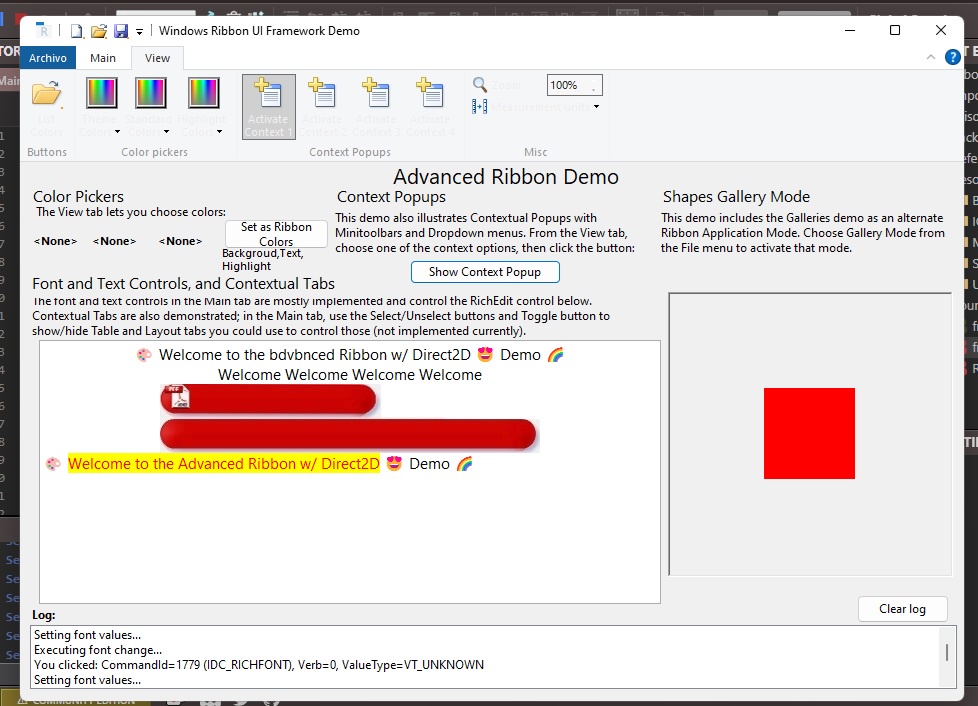
Great job! Everything looks fine. But why did you put a picturebox with a red square inside? To watch how the graphics are buggy? Yes, it is buggy.
-
Feb 18th, 2025, 09:19 AM
#42
Re: [VB6/Win7+] Using the Windows UI Ribbon Framework
 Originally Posted by HackerVlad

Great job! Everything looks fine. But why did you put a picturebox with a red square inside? To watch how the graphics are buggy? Yes, it is buggy.
The red square is for Galleries Mode (visible in the 2nd resize animation), you can switch the ribbon into it from the File menu. From the tab that brings up, you can adjust the shape, color, size, border style/size and change layout to 2x2 or 3x3.
And how are the graphics buggy? Did you change the Form.HasDC property? The only graphics bug I'm aware of now is a tB bug with minimize/restore. Is it the same glitching I thought you said HasDC=False fixed on Win7 too?
-
Feb 18th, 2025, 10:28 AM
#43
Fanatic Member
Re: [VB6/Win7+] Using the Windows UI Ribbon Framework
Originally Posted by fafalone
The red square is for Galleries Mode (visible in the 2nd resize animation), you can switch the ribbon into it from the File menu. From the tab that brings up, you can adjust the shape, color, size, border style/size and change layout to 2x2 or 3x3.
And how are the graphics buggy? Did you change the Form.HasDC property? The only graphics bug I'm aware of now is a tB bug with minimize/restore. Is it the same glitching I thought you said HasDC=False fixed on Win7 too?
I didn't change anything. I just compiled the EXE. I launched it and saw that the picturebox starts to glitch when it climbs to the location of the application ribbon when resizing the form to almost the smallest size.
-
Feb 18th, 2025, 10:49 AM
#44
Re: [VB6/Win7+] Using the Windows UI Ribbon Framework
If it's only when parts of it start going out of view I guess that's ok since it's really only allowed to resize smaller than startup to show the new ribbon resize features... maybe changing HasDC to False on the PictureBox too would help?
But one more question if you don't mind; are you using the RichEdit DLLs that come with it (the download has a riched20.dll and mtpls.dll in the build folders), and if so are color emojis working (are they in color like the picture or just black and white like the plain text)? Looks like that might not work on Windows 7; it's crashing on my VM. But that might be because Direct2D acceleration is broken in general (why Aero can't be enabled on the VM) so I'm hoping it's just that.
If you're not sure whether it's loading, the difference would be visible in the startup text, it either says "Welcome to the Advanced Ribbon w/ Direct2D Demo" with several emojis or "Welcome to the Advanced Ribbon Demo".
-
Feb 18th, 2025, 11:04 AM
#45
Fanatic Member
Re: [VB6/Win7+] Using the Windows UI Ribbon Framework
Originally Posted by fafalone
If it's only when parts of it start going out of view I guess that's ok since it's really only allowed to resize smaller than startup to show the new ribbon resize features... maybe changing HasDC to False on the PictureBox too would help
Yes, it helped to solve the problem! I set HasDC to False and the graphics stopped glitching!
-
Feb 18th, 2025, 11:09 AM
#46
Fanatic Member
Re: [VB6/Win7+] Using the Windows UI Ribbon Framework
Originally Posted by fafalone
But one more question if you don't mind; are you using the RichEdit DLLs that come with it (the download has a riched20.dll and mtpls.dll in the build folders), and if so are color emojis working (are they in color like the picture or just black and white like the plain text)? Looks like that might not work on Windows 7
Yes, I use your DLL files. Emojis are black and white, unfortunately. They will probably be colored only in Windows 10(
-
Feb 18th, 2025, 11:15 AM
#47
Fanatic Member
Re: [VB6/Win7+] Using the Windows UI Ribbon Framework
But there is another graphical glitch. If you insert an image into a text field. Then it starts to fade when scrolling the text field.
There are a lot of glitches with the display of images inside the text field. Small pictures are immediately visible, while large pictures don't even appear immediately when pasted. Take a look for yourself, experiment and you will understand everything.
Last edited by HackerVlad; Feb 18th, 2025 at 11:20 AM.
-
Feb 18th, 2025, 12:16 PM
#48
Fanatic Member
Re: [VB6/Win7+] Using the Windows UI Ribbon Framework
Very good work Fafalone.
I have some visual problems.
At first the letter looked fine but I don't know if I pressed a button that I shouldn't have and it looks like this.
https://imgur.com/a/exmNn67
Greetings
-
Feb 18th, 2025, 04:39 PM
#49
Re: [VB6/Win7+] Using the Windows UI Ribbon Framework
Originally Posted by HackerVlad
Yes, it helped to solve the problem! I set HasDC to False and the graphics stopped glitching!
Wonderful, will include change in next update. Thanks.
Originally Posted by HackerVlad
Yes, I use your DLL files. Emojis are black and white, unfortunately. They will probably be colored only in Windows 10(
Windows 8.1+
Originally Posted by HackerVlad
But there is another graphical glitch. If you insert an image into a text field. Then it starts to fade when scrolling the text field.
There are a lot of glitches with the display of images inside the text field. Small pictures are immediately visible, while large pictures don't even appear immediately when pasted. Take a look for yourself, experiment and you will understand everything.
This is more on the RichEdit... all my control does is paste it in on Win7. The small size is a factor.
-
Feb 18th, 2025, 05:04 PM
#50
Re: [VB6/Win7+] Using the Windows UI Ribbon Framework
Originally Posted by yokesee
Very good work Fafalone.
I have some visual problems.
At first the letter looked fine but I don't know if I pressed a button that I shouldn't have and it looks like this.
https://imgur.com/a/exmNn67
Greetings
You hit the "Set as Ribbon Colors" button that assigns the color picker values to the ribbon (you hadn't picked any in the pic so it would all be 0 or the picture box default)... I think due to themes, the colors set don't match up right anyway.
If it's staying like that even after restarting the program delete the ribbon.cfg file.. the demo creates it in App.Path to save/load the ribbon state; haven't checked if that includes colors.
Edit: Next update will have a check to make sure you've picked a color before setting it.
Last edited by fafalone; Feb 18th, 2025 at 10:07 PM.
Tags for this Thread
 Posting Permissions
- You may not post new threads
- You may not post replies
- You may not post attachments
- You may not edit your posts
-
Forum Rules
|
Click Here to Expand Forum to Full Width
|



 Reply With Quote
