|

-
Feb 11th, 2025, 10:31 PM
#1
Thread Starter
Lively Member

On MSChart scatter plot, I want solid lines instead of dashed
With an MSChart scatter plot:
Q1 How can I get solid lines instead of dotted lines?
Q2 How can I do that from code so that I can make multiple lines all the same style.
-
Feb 12th, 2025, 10:31 AM
#2
Re: On MSChart scatter plot, I want solid lines instead of dashed
Admittedly a bit beside the point ... but I've never once used MSChart. Anytime I want to do some charting/graphing, I invariably automate Excel (from VB6), and do it that way. In Excel, it's sooo easy to fire it up, record a macro, do what you want, and then look at the VBA code on how it did it ... and it's typically easy to adjust that code and slip it into VB6 (and use for automation).
Anyway, I just thought I'd share my approach to these kinds of things. Also, done with automation, you've got the option of easily saving your work into an XLS (or XLSX) file (even doing that from VB6 code).
Any software I post in these forums written by me is provided "AS IS" without warranty of any kind, expressed or implied, and permission is hereby granted, free of charge and without restriction, to any person obtaining a copy. To all, peace and happiness.
-
Feb 12th, 2025, 03:42 PM
#3
Thread Starter
Lively Member
Re: On MSChart scatter plot, I want solid lines instead of dashed
I used my Excel 16 to generate this macro code and placed it in the VB6 form module frmDRchart that contains the MSChart1 control.
Sub Macro1()
' With ActiveSheet.Shapes("Chart 1").Line
With mschart1.Shapes("Chart 1").Line
.Visible = msoTrue
.DashStyle = msoLineSolid
End With
End Sub
I changed the target from ActiveSheet to MSChart1. At ".Shapes." the VB6 compiler generates the error: "Method or data member not found."
Last edited by StanH; Feb 12th, 2025 at 03:46 PM.
-
Feb 12th, 2025, 05:16 PM
#4
Re: On MSChart scatter plot, I want solid lines instead of dashed
The MSChart control is not the same as the built in chart of Excel
Check this thread
https://www.vbforums.com/showthread....Y-Scatter-Demo
-
Feb 12th, 2025, 07:34 PM
#5
Re: On MSChart scatter plot, I want solid lines instead of dashed
 Originally Posted by StanH

I used my Excel 16 to generate this macro code and placed it in the VB6 form module frmDRchart that contains the MSChart1 control.
Sub Macro1()
' With ActiveSheet.Shapes("Chart 1").Line
With mschart1.Shapes("Chart 1").Line
.Visible = msoTrue
.DashStyle = msoLineSolid
End With
End Sub
I changed the target from ActiveSheet to MSChart1. At ".Shapes." the VB6 compiler generates the error: "Method or data member not found."
And Stan, I wasn't suggesting using Excel's macro recorder to get code for MSChart. I've got no idea if that'll work.
Any software I post in these forums written by me is provided "AS IS" without warranty of any kind, expressed or implied, and permission is hereby granted, free of charge and without restriction, to any person obtaining a copy. To all, peace and happiness.
-
Feb 13th, 2025, 12:17 PM
#6
Thread Starter
Lively Member
Re: On MSChart scatter plot, I want solid lines instead of dashed
I wonder if there is an alternative to the MSChart control for VB6?
-
Feb 13th, 2025, 12:54 PM
#7
Re: On MSChart scatter plot, I want solid lines instead of dashed
Originally Posted by StanH
I wonder if there is an alternative to the MSChart control for VB6?
PictureBox
Any software I post in these forums written by me is provided "AS IS" without warranty of any kind, expressed or implied, and permission is hereby granted, free of charge and without restriction, to any person obtaining a copy. To all, peace and happiness.
-
Feb 13th, 2025, 01:44 PM
#8
Thread Starter
Lively Member
Re: On MSChart scatter plot, I want solid lines instead of dashed
Originally Posted by Elroy
PictureBox
I don't know how to create a xy scatter plot from x,y numbers with a PictureBox control.
-
Feb 13th, 2025, 06:11 PM
#9
Re: On MSChart scatter plot, I want solid lines instead of dashed
The link to the thread I posted is about a scatter plot
-
Feb 14th, 2025, 10:52 AM
#10
Re: On MSChart scatter plot, I want solid lines instead of dashed
Originally Posted by StanH
I don't know how to create a xy scatter plot from x,y numbers with a PictureBox control.
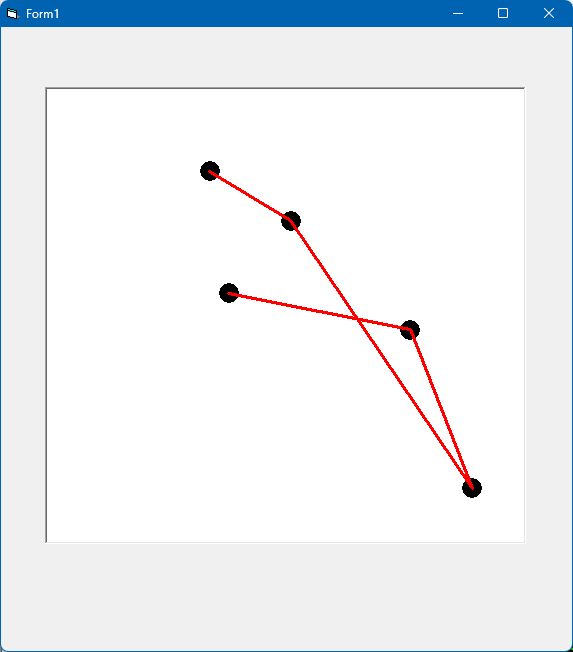
Just for grins.
Start a new Form1 project. Throw a PictureBox on it, and rename it to "pic".
Add this code and run it:
Code:
Option Explicit

Dim Data(1 To 5, 1 To 2) As Single

Private Sub Form_Load()
    '
    ' Just create some sample data.
    Data(1, 1) = 3.4: Data(1, 2) = 8.2
    Data(2, 1) = 5.1: Data(2, 2) = 7.1
    Data(3, 1) = 8.9: Data(3, 2) = 1.2
    Data(4, 1) = 7.6: Data(4, 2) = 4.7
    Data(5, 1) = 3.8: Data(5, 2) = 5.5
    '
    ' Setup our "pic" PictureBox, with some appropriate scaling for this data.
    pic.BackColor = vbWhite
    pic.AutoRedraw = True
    pic.ScaleWidth = 10
    pic.ScaleLeft = 0
    pic.ScaleHeight = -10   ' We specify negative to flip the vertical axis to be more in line with graphing.
    pic.ScaleTop = 10
    '
    ' Now plot it as a scatter plot.
    pic.FillStyle = vbFSSolid       ' Make sure we fill our circles.
    pic.FillColor = vbBlack         ' Fill with black color.
    Dim i As Long
    For i = LBound(Data, 1) To UBound(Data, 1)
        pic.Circle (Data(i, 1), Data(i, 2)), 0.2, vbBlack   ' Draw black dot.
    Next
    '
    ' Now, do we want to connect these with a line?  Ok.
    pic.DrawStyle = vbSolid         ' Specify that solid lines are to be used.
    pic.DrawWidth = 3               ' Draw a nice thickness line.
    For i = LBound(Data, 1) + 1 To UBound(Data, 1)
        pic.Line (Data(i - 1, 1), Data(i - 1, 2))-(Data(i, 1), Data(i, 2)), vbRed   ' Draw red lines between dots.
    Next
End Sub
Any software I post in these forums written by me is provided "AS IS" without warranty of any kind, expressed or implied, and permission is hereby granted, free of charge and without restriction, to any person obtaining a copy. To all, peace and happiness.
-
Feb 14th, 2025, 11:22 AM
#11
Re: On MSChart scatter plot, I want solid lines instead of dashed
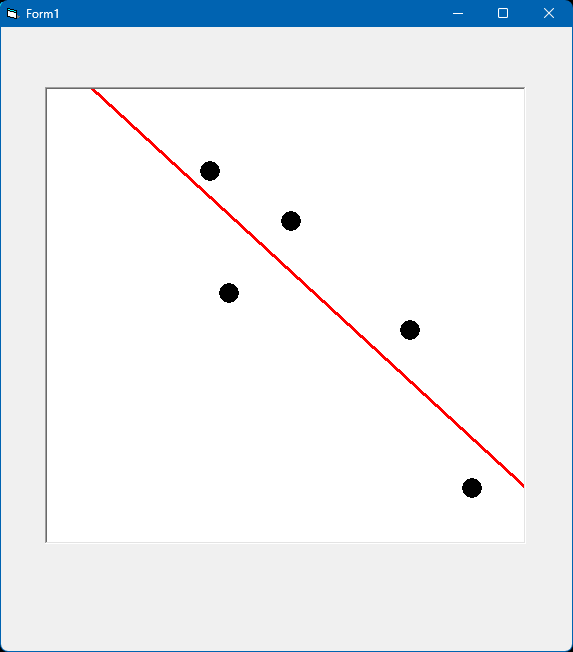
For more grins, let's plot the scatterplot and then calculate their linear "best fit" line, and plot that line instead.
Again, Form1 with a PictureBox named pic on it.
Code:
Option Explicit

Dim Data(1 To 5, 1 To 2) As Single

Private Sub Form_Load()
    '
    ' Just create some sample data.
    Data(1, 1) = 3.4: Data(1, 2) = 8.2
    Data(2, 1) = 5.1: Data(2, 2) = 7.1
    Data(3, 1) = 8.9: Data(3, 2) = 1.2
    Data(4, 1) = 7.6: Data(4, 2) = 4.7
    Data(5, 1) = 3.8: Data(5, 2) = 5.5
    '
    ' Setup our "pic" PictureBox, with some appropriate scaling for this data.
    pic.BackColor = vbWhite
    pic.AutoRedraw = True
    pic.ScaleWidth = 10
    pic.ScaleLeft = 0
    pic.ScaleHeight = -10   ' We specify negative to flip the vertical axis to be more in line with graphing.
    pic.ScaleTop = 10
    '
    ' Now plot it as a scatter plot.
    pic.FillStyle = vbFSSolid       ' Make sure we fill our circles.
    pic.FillColor = vbBlack         ' Fill with black color.
    Dim i As Long
    For i = LBound(Data, 1) To UBound(Data, 1)
        pic.Circle (Data(i, 1), Data(i, 2)), 0.2, vbBlack   ' Draw black dot.
    Next
    '
    ' Now, do we want to connect these with a line?  Ok.
    'pic.DrawStyle = vbSolid         ' Specify that solid lines are to be used.
    'pic.DrawWidth = 3               ' Draw a nice thickness line.
    'For i = LBound(Data, 1) + 1 To UBound(Data, 1)
    '    pic.Line (Data(i - 1, 1), Data(i - 1, 2))-(Data(i, 1), Data(i, 2)), vbRed   ' Draw red lines between dots.
    'Next
    '
    ' Let's calculate a best-fit linear regression line, and plot it instead.
    Dim m As Single
    Dim b As Single
    Dim xLo As Single
    Dim yLo As Single
    Dim xHi As Single
    Dim yHi As Single
    '
    LinearRegression Data(), m, b
    xLo = pic.ScaleLeft
    yLo = m * xLo + b
    xHi = pic.ScaleWidth - pic.ScaleLeft
    yHi = m * xHi + b
    '
    pic.DrawStyle = vbSolid
    pic.DrawWidth = 3
    pic.Line (xLo, yLo)-(xHi, yHi), vbRed   ' Draw red lines for scatter plot "best fit".
End Sub

Private Sub LinearRegression(Data() As Single, mOut As Single, bOut As Single)
    Dim sumX As Single
    Dim sumY As Single
    Dim sumXY As Single
    Dim sumX2 As Single
    Dim i As Long
    Dim n As Long
    '
    ' Calculate some stuff.
    For i = LBound(Data, 1) To UBound(Data, 1)
        sumX = sumX + Data(i, 1)
        sumY = sumY + Data(i, 2)
        sumXY = sumXY + Data(i, 1) * Data(i, 2)
        sumX2 = sumX2 + Data(i, 1) * Data(i, 1)
    Next i
    n = UBound(Data, 1) - LBound(Data, 1) + 1
    '
    ' Calculate slope (m) and intercept (b), and return.
    mOut = (n * sumXY - sumX * sumY) / (n * sumX2 - sumX * sumX)
    bOut = (sumY - mOut * sumX) / n
End Sub
Last edited by Elroy; Feb 14th, 2025 at 11:43 AM.
Any software I post in these forums written by me is provided "AS IS" without warranty of any kind, expressed or implied, and permission is hereby granted, free of charge and without restriction, to any person obtaining a copy. To all, peace and happiness.
Tags for this Thread
 Posting Permissions
- You may not post new threads
- You may not post replies
- You may not post attachments
- You may not edit your posts
-
Forum Rules
|
Click Here to Expand Forum to Full Width
|



 Reply With Quote


