|

-
Jan 11th, 2025, 08:51 PM
#961
Re: Getting the ball rolling. Which VB6 projects are you working on?
 Originally Posted by fafalone

No but the RichEdit control doesn't require the ribbon. I just used the ribbon project out of convenience since it had a RichEdit with so many options already set up. All the RichEdit control really needs is a few lines to call LoadLibrary and CreateWindowEx; you don't need additional controls at all let alone the fancy ribbon ones. I don't think the XAML version includes a whole text editor UI for setting fonts/alignment/etc either, just some wrappers to simplify the API calls a bit.
I'm going to play around a little with windowless richedit... just see if I can get the bare minimum functionality working then go from there.
Looking forward to your new work. If Bill Gates is still the chairman. You will be the mvp best expert.
-
Jan 11th, 2025, 09:09 PM
#962
 Re: Getting the ball rolling. Which VB6 projects are you working on? Re: Getting the ball rolling. Which VB6 projects are you working on?
Originally Posted by fafalone
No but the RichEdit control doesn't require the ribbon. I just used the ribbon project out of convenience since it had a RichEdit with so many options already set up. All the RichEdit control really needs is a few lines to call LoadLibrary and CreateWindowEx; you don't need additional controls at all let alone the fancy ribbon ones. I don't think the XAML version includes a whole text editor UI for setting fonts/alignment/etc either, just some wrappers to simplify the API calls a bit.
I'm going to play around a little with windowless richedit... just see if I can get the bare minimum functionality working then go from there.
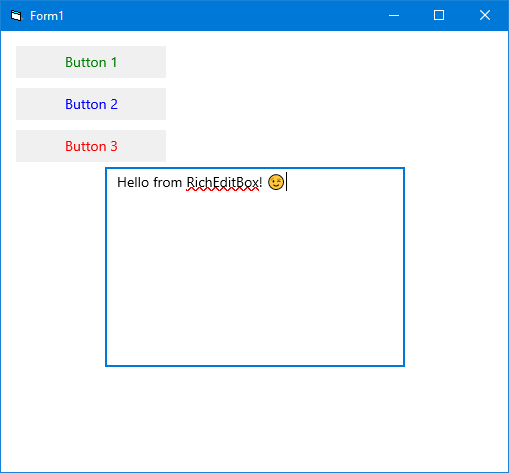
Just out of curiosity I've modified Franky's "XamlHosting2" example to include a RichEditBox. Apparently all you need as barebones is:
Code:
            Dim xaml As String
            xaml = "<Grid xmlns='http://schemas.microsoft.com/winfx/2006/xaml/presentation' " & _
                   "xmlns:x='http://schemas.microsoft.com/winfx/2006/xaml' Background='White'>" & _
                        "<StackPanel x:Name='LayoutRoot' Margin='10'>" & _
                            "<Button x:Name='btn1' Content='Button 1' Margin='5' Width='150' HorizontalAlignment='Left' Background='#F0F0F0' Foreground='Green'/>" & _
                            "<Button x:Name='btn2' Content='Button 2' Margin='5' Width='150' HorizontalAlignment='Left' Background='#F0F0F0' Foreground='Blue'/>" & _
                            "<Button x:Name='btn3' Content='Button 3' Margin='5' Width='150' HorizontalAlignment='Left' Background='#F0F0F0' Foreground='Red'/>" & _
                            "<RichEditBox Width='300' Height='200'/>" & _
                        "</StackPanel>" & _
                    "</Grid>"
That's it, no "LoadLibrary" or "CreateWindowEx" required, in fact the RichEditBox comes fully featured with Spellchecking and Color Emojis already enabled and a modern context menu to boot. Of course there are a lot more properties, methods and events to implement if you want to make something nice out of it.
-
Jan 11th, 2025, 10:03 PM
#963
Re: Getting the ball rolling. Which VB6 projects are you working on?
Sorry for being lazy and not researching it myself, but does the XAMLIsland RTB support the EM_* messages, especially EM_FORMATRANGE? Or is it a completely different beast?
-
Jan 11th, 2025, 10:18 PM
#964
Re: Getting the ball rolling. Which VB6 projects are you working on?
As far as I've seen there are no "EM_*" messages at all. The paradigm has been abstracted entirely to an object oriented model but all the old-school message-based functionality is still there encapsulated in ready-to-use interfaces such as "ITextSelection" or "ITextParagraphFormat" (and many others I'm sure) so it would take a while to absorb this new information but it should be well worth it in the end especially since all these interfaces could be easily written in tB.
-
Jan 11th, 2025, 10:36 PM
#965
Re: Getting the ball rolling. Which VB6 projects are you working on?
Originally Posted by VanGoghGaming
As far as I've seen there are no "EM_*" messages at all. The paradigm has been abstracted entirely to an object oriented model but all the old-school message-based functionality is still there encapsulated in ready-to-use interfaces such as "ITextSelection" or "ITextParagraphFormat" (and many others I'm sure) so it would take a while to absorb this new information but it should be well worth it in the end especially since all these interfaces could be easily written in tB.
Thanks for the info. Sounds like it might use the same TOM interfaces as the existing RTB? Not sure because TOM has ITextPara and ITextPara2 but not ITextParagraphFormat, so maybe they use different object models. The thing I would be most interested in knowing is if it support something similar to EM_FORMATRANGE to measure the height of a subset of the RTF document based on a character range. I use that extensively to simulate linked text areas within a larger document to support overflowing RTF text from one page to another within different regions of the pages.
For example, on page 1 I have a "virtual" box at
Code:
X1: 100
Y1: 100
X2: 500
Y2: 5000
On page 2 I have a "virtual" box at
Code:
X1: 250
Y1: 500
X2: 650
Y2: 5000
When the user types, I calculate the text height/caret position to see if everything should fit/display on page 1, and if not I bump to page 2 and adjust the top line of the RTB to the first line of page 2 - similar to a viewport for a large image. I'd be interested to know if this kind of behaviour would be possible with the XAML Island RTB (or even the Office D2D RTB)? Anyway, I'll have to do some more research.
-
Jan 11th, 2025, 10:49 PM
#966
 Re: Getting the ball rolling. Which VB6 projects are you working on? Re: Getting the ball rolling. Which VB6 projects are you working on?
It has been my experience that these new WinRT interfaces include all the existing functionality and often times adding new features rather than removing existing ones. I haven't used "EM_FORMATRANGE" myself but it looks like the ITextRange.GetRect method might provide a similar functionality of measuring text. All you need is the patience for proper research.
On the bright side, I don't have any Office installed on this Win10 machine and the RichEditBox is working just fine!
-
Jan 11th, 2025, 10:56 PM
#967
Re: Getting the ball rolling. Which VB6 projects are you working on?
Originally Posted by VanGoghGaming
It has been my experience that these new WinRT interfaces include all the existing functionality and often times adding new features rather than removing existing ones. I haven't used "EM_FORMATRANGE" myself but it looks like the ITextRange.GetRect method might provide a similar functionality of measuring text. All you need is the patience for proper research.
Lovely, thanks for your time/help...I'll dig a bit deeper as time permits. My main reason to look for a new RTB has been to find one that is DPI agnostic in that line-breaks will always happen at the same character position regardless of host DPI. The D2D based RTBs apparently behave like this, but I haven't bothered to experiment with the Office RTB since most of my users have 64-bit Office installed. I've been waiting for tB's bit-mismatched host process to give it a serious try, but that is still a ways off according to the roadmap. But if I can get the XAML island RTB to work in 32-bit VB6, then I will start hammering away at it.
-
Jan 11th, 2025, 11:02 PM
#968
Re: Getting the ball rolling. Which VB6 projects are you working on?
Yeah all these XAML controls are fully DPI aware, they scale automatically. The way I've been working with WinRT interfaces so far is write the definitions in a tB ActiveX DLL and reference that in VB6 so I can call the methods directly without any "DispCallFunc" tomfoolery! Of course, the DLL is only needed during development, doesn't need to be distributed. It's like a breath of fresh air to be sure! 
Maybe you've seen my OCR example in the tB CodeBank forum to get a glimpse of what I'm talking about.
-
Jan 11th, 2025, 11:18 PM
#969
Re: Getting the ball rolling. Which VB6 projects are you working on?
Originally Posted by VanGoghGaming
Yeah all these XAML controls are fully DPI aware, they scale automatically. The way I've been working with WinRT interfaces so far is write the definitions in a tB ActiveX DLL and reference that in VB6 so I can call the methods directly without any "DispCallFunc" tomfoolery! Of course, the DLL is only needed during development, doesn't need to be distributed. It's like a breath of fresh air to be sure!
Maybe you've seen my OCR example in the tB CodeBank forum to get a glimpse of what I'm talking about.
Yes, I saw your OCR project, but I haven't had a chance to play with it yet...looks really good though! Unfortunately I still have a few high priority things over the next few weeks, but I look forward to digging into it and the XAML island stuff a bit soon.
-
Jan 12th, 2025, 12:14 AM
#970
Re: Getting the ball rolling. Which VB6 projects are you working on?
Originally Posted by VanGoghGaming
Just out of curiosity I've modified Franky's "XamlHosting2" example to include a RichEditBox. Apparently all you need as barebones is:
Code:
            Dim xaml As String
            xaml = "<Grid xmlns='http://schemas.microsoft.com/winfx/2006/xaml/presentation' " & _
                   "xmlns:x='http://schemas.microsoft.com/winfx/2006/xaml' Background='White'>" & _
                        "<StackPanel x:Name='LayoutRoot' Margin='10'>" & _
                            "<Button x:Name='btn1' Content='Button 1' Margin='5' Width='150' HorizontalAlignment='Left' Background='#F0F0F0' Foreground='Green'/>" & _
                            "<Button x:Name='btn2' Content='Button 2' Margin='5' Width='150' HorizontalAlignment='Left' Background='#F0F0F0' Foreground='Blue'/>" & _
                            "<Button x:Name='btn3' Content='Button 3' Margin='5' Width='150' HorizontalAlignment='Left' Background='#F0F0F0' Foreground='Red'/>" & _
                            "<RichEditBox Width='300' Height='200'/>" & _
                        "</StackPanel>" & _
                    "</Grid>"
That's it, no "LoadLibrary" or "CreateWindowEx" required, in fact the RichEditBox comes fully featured with Spellchecking and Color Emojis already enabled and a modern context menu to boot. Of course there are a lot more properties, methods and events to implement if you want to make something nice out of it.
I mean if you're excluding preexisting code it took fewer lines to upgrade my ribbon project 
As I understand it, implementing event handlers for XAML was giving -Franky- some trouble; was that resolved?
-
Jan 12th, 2025, 12:26 AM
#971
Re: Getting the ball rolling. Which VB6 projects are you working on?
The only trouble (if you can even call it that) is that with the classical VB6-DispCallFunc approach you need to create a lightweight object in a BAS module for the event delegate object. That is no longer the case with tB interfaces where you can just use "Implements" with the event interface and presto, Bob's yer uncle (or Bert seeing that we've highjacked his thread)!
Last edited by VanGoghGaming; Jan 12th, 2025 at 12:50 AM.
-
Jan 12th, 2025, 03:35 AM
#972
Re: Getting the ball rolling. Which VB6 projects are you working on?
Originally Posted by VanGoghGaming
Is this "Windows App SDK" different than the XAML islands you were working on before? Do you have a download link for this project? Probably it would be easier to write the interface definitions in tB and then using them in VB6 rather than relying solely on DispCallFunc which is much more clunky and error-prone...
There is currently no download for my "Windows App SDK" test project. I have only been working on the project for 4 weeks, when I find the time, and I haven't gotten to the XAML controls (WinUI3) yet. I know that the interfaces are easier to write in TB than in VB6, where I use DispCallFunc. On the other hand, I already have so many VB6 classes for WinRT, XAML Islands, etc. that I can use them for the App SDK and don't have to write everything again for TB.
-
Jan 12th, 2025, 03:50 AM
#973
Re: Getting the ball rolling. Which VB6 projects are you working on?
@VanGoghGaming You may understand my ventures in terms of WinRT, WinUI2 / WinUI3, App SDK, XAML Islands, etc. At some point you will not be able to avoid these technologies if you want to develop modern programs. The beginning is always difficult and at first glance looks very complicated and complex. The more you deal with the topic, the easier it becomes and then it doesn't look so complicated anymore.
Last edited by -Franky-; Jan 12th, 2025 at 04:07 AM.
-
Jan 12th, 2025, 04:27 AM
#974
Re: Getting the ball rolling. Which VB6 projects are you working on?
Originally Posted by fafalone
Copying two dlls is far less of an issue than the massive complexity of XAML islands.
The question would be, can this riched20.dll from Office be distributed with your own program if you don't have Office installed?
-
Jan 12th, 2025, 04:32 AM
#975
Re: Getting the ball rolling. Which VB6 projects are you working on?
Preaching to the choir brotha, I'm already sold! It looks like fafalone might still be on the fence though! 
To be honest it does seem like you have an extensive .NET experience so it all comes more natural to you when translating these new technologies to VB6. For example I had no idea what were those "Grid" and "StackPanel" objects. I have now read more about them.
-
Jan 12th, 2025, 04:54 AM
#976
Re: Getting the ball rolling. Which VB6 projects are you working on?
Originally Posted by VanGoghGaming
To be honest it does seem like you have an extensive .NET experience so it all comes more natural to you when translating these new technologies to VB6. For example I had no idea what were those "Grid" and "StackPanel" objects. I have now read more about them.
I have a little experience with .NET and XAML. I'm more at home in VB in .NET. But for the XAML Islands I actually looked at the XAML in .NET to understand it better.
-
Jan 12th, 2025, 04:57 AM
#977
Re: Getting the ball rolling. Which VB6 projects are you working on?
Originally Posted by -Franky-
The question would be, can this riched20.dll from Office be distributed with your own program if you don't have Office installed?
It's an interesting question given that on Windows 11 the built in Notepad uses the new RichEditD2D pathway too so it might be included without Office. Probably technically no, but not something I'd be worried about unless it was commercial software from a large company. Certainly with them allowing MAS on GitHub I'm not worried about posting them with my demo apps there.
-
Jan 12th, 2025, 05:05 AM
#978
Re: Getting the ball rolling. Which VB6 projects are you working on?
Originally Posted by -Franky-
@VanGoghGaming You may understand my ventures in terms of WinRT, WinUI2 / WinUI3, App SDK, XAML Islands, etc. At some point you will not be able to avoid these technologies if you want to develop modern programs. The beginning is always difficult and at first glance looks very complicated and complex. The more you deal with the topic, the easier it becomes and then it doesn't look so complicated anymore.
Look how many technologies you just listed. Microsoft is creating and abandoning them so fast I'd bet on plain old basic Win32 API based UIs outlasting all of them.
-
Jan 12th, 2025, 05:52 AM
#979
Re: Getting the ball rolling. Which VB6 projects are you working on?
Originally Posted by fafalone
Look how many technologies you just listed. Microsoft is creating and abandoning them so fast I'd bet on plain old basic Win32 API based UIs outlasting all of them.
I agree with you completely. Technologies come and are discarded quite quickly at Microsoft. Of course, we still have the basis of the usual APIs and interfaces. But it seems to me that Microsoft is using the new technologies to focus on interfaces that contain the IInspectable interface. This is also the case with the interfaces of the App SDK. Of course, everything that has to do with the title bar could also be achieved with dwm.dll, themes.dll and Direct2D etc. The effort compared to the App SDK would be much higher. I'm also observing that more and more apps and the OS itself from Microsoft are using and using the new technologies. I assume that these technologies will not be abandoned so quickly.
-
Jan 12th, 2025, 06:12 AM
#980
Re: Getting the ball rolling. Which VB6 projects are you working on?
Can we get this thread back on track chaps, please post images and progress on what you are up to at the mo', otherwise we are taking Xiaos's lead in prattling on about almost anything. A photo required please to make up for your rather long deviation.
https://github.com/yereverluvinunclebert
Skillset: VMS,DOS,Windows Sysadmin from 1985, fault-tolerance, VaxCluster, Alpha,Sparc. DCL,QB,VBDOS- VB6,.NET, PHP,NODE.JS, Graphic Design, Project Manager, CMS, Quad Electronics. classic cars & m'bikes. Artist in water & oils. Historian.
By the power invested in me, all the threads I start are battle free zones - no arguing about the benefits of VB6 over .NET here please. Happiness must reign.
-
Jan 12th, 2025, 07:10 AM
#981
Re: Getting the ball rolling. Which VB6 projects are you working on?
Originally Posted by -Franky-
My latest VBC project deals with the possibilities of the "Windows App SDK". As you can see in the picture, starting with Win11 you can even change the colors of the title bar and buttons. If you set AppWindowTitleBar.ExtendsContentIntoTitleBar = True, you can completely customize the title bar if you want. -> https://learn.microsoft.com/en-us/wi...elop/title-bar The dialog window was only created using the "Windows App SDK". As you can also see in the picture, quite a few classes and modules have already been put together for it. Let's see how far I get.
We can't see the content of your picture clearly. If you take a screenshot of the list of classes individually, it can be clearly displayed in vbForums. In other words, if the width of the image is not large, the image can be displayed clearly.
That's why I carefully adjust the width of my image every time to make it as clear as possible on vbForums.
-
Jan 12th, 2025, 03:33 PM
#982
Re: Getting the ball rolling. Which VB6 projects are you working on?
Originally Posted by VanGoghGaming
For example I had no idea what were those "Grid" and "StackPanel" objects. I have now read more about them.
These are standard objects in .Net's WPF used to control the layout of the UI. Anyone who used WPF would have been using Grids and StackPanels extensively.
-
Jan 12th, 2025, 08:28 PM
#983
Re: Getting the ball rolling. Which VB6 projects are you working on?
Originally Posted by jpbro
When the user types, I calculate the text height/caret position to see if everything should fit/display on page 1, and if not I bump to page 2 and adjust the top line of the RTB to the first line of page 2 - similar to a viewport for a large image. I'd be interested to know if this kind of behaviour would be possible with the XAML Island RTB (or even the Office D2D RTB)? Anyway, I'll have to do some more research.
Your approach is cool. I've even thought about doing the same thing, with a slightly different touch. But when it came to removing text from one line to the next page, using EM_FORMATRANGE I had a similar idea. But then I saw a method of drawing a line inside the RTB (to separate the pages), so I abandoned the style of doing it like you did.
-
Jan 13th, 2025, 07:21 AM
#984
Re: Getting the ball rolling. Which VB6 projects are you working on?
Originally Posted by jpbro
Thanks for the info. Sounds like it might use the same TOM interfaces as the existing RTB? Not sure because TOM has ITextPara and ITextPara2 but not ITextParagraphFormat, so maybe they use different object models. The thing I would be most interested in knowing is if it support something similar to EM_FORMATRANGE to measure the height of a subset of the RTF document based on a character range. I use that extensively to simulate linked text areas within a larger document to support overflowing RTF text from one page to another within different regions of the pages.
For example, on page 1 I have a "virtual" box at
Code:
X1: 100
Y1: 100
X2: 500
Y2: 5000
On page 2 I have a "virtual" box at
Code:
X1: 250
Y1: 500
X2: 650
Y2: 5000
When the user types, I calculate the text height/caret position to see if everything should fit/display on page 1, and if not I bump to page 2 and adjust the top line of the RTB to the first line of page 2 - similar to a viewport for a large image. I'd be interested to know if this kind of behaviour would be possible with the XAML Island RTB (or even the Office D2D RTB)? Anyway, I'll have to do some more research.
They should both support it. I know the Office control has been responding normally to all the EM messages and types. It's a regular windowed RichEdit just with a different renderer. the XAML one uses a windowless richedit, where supported features are highly implementation specific. since it won't have its own independent hwnd whatever one is hosting it may or may not forward old style messages to the underlying ITextServices object, though you might be able to get a pointer for that... probably wouldn't work well with the bolted on crap though.
-
Jan 13th, 2025, 07:38 AM
#985
Re: Getting the ball rolling. Which VB6 projects are you working on?
Come on chaps, time to make your own thread.
https://github.com/yereverluvinunclebert
Skillset: VMS,DOS,Windows Sysadmin from 1985, fault-tolerance, VaxCluster, Alpha,Sparc. DCL,QB,VBDOS- VB6,.NET, PHP,NODE.JS, Graphic Design, Project Manager, CMS, Quad Electronics. classic cars & m'bikes. Artist in water & oils. Historian.
By the power invested in me, all the threads I start are battle free zones - no arguing about the benefits of VB6 over .NET here please. Happiness must reign.
-
Jan 13th, 2025, 08:31 AM
#986
Re: Getting the ball rolling. Which VB6 projects are you working on?
I don't think it's reasonable to demand people not be asked questions and be allowed to answer regarding projects that they share they're working on.
Completely off topic? Of course. But we're talking about projects we're working on.
If this is a problem I'll refrain from sharing any future WIP in this thread, so it's not a risk for questions about it.
-
Jan 13th, 2025, 03:56 PM
#987
Re: Getting the ball rolling. Which VB6 projects are you working on?
We just want to see pictures and see what you are working on, I recommend that you can open a more in-depth thread of your own that deals with your own particular issues and the responses to that. It is only when it goes too off track for post after post that I suggest opening another.
https://github.com/yereverluvinunclebert
Skillset: VMS,DOS,Windows Sysadmin from 1985, fault-tolerance, VaxCluster, Alpha,Sparc. DCL,QB,VBDOS- VB6,.NET, PHP,NODE.JS, Graphic Design, Project Manager, CMS, Quad Electronics. classic cars & m'bikes. Artist in water & oils. Historian.
By the power invested in me, all the threads I start are battle free zones - no arguing about the benefits of VB6 over .NET here please. Happiness must reign.
-
Jan 13th, 2025, 07:54 PM
#988
Hyperactive Member

Re: Getting the ball rolling. Which VB6 projects are you working on?
Totally unrelated: Geez I can't believe that its been almost 4 years since you started this thread!. Seems like just yesterday  . .
-
Jan 14th, 2025, 04:39 AM
#989
Re: Getting the ball rolling. Which VB6 projects are you working on?
Originally Posted by fafalone
As I understand it, implementing event handlers for XAML was giving -Franky- some trouble; was that resolved?
I've been playing around with it some more, writing the various XAML interfaces in tB (there were quite a few even for the bare minimum required) and implementing proper events. It seems this XAML code is pretty flexible, you can even apply various gradients to all buttons as well as the StackPanel that's hosting them.
Here's an example with three buttons, each with a different ClickMode (Hover, Press and Release). Apparently in XAML you can choose a ClickMode for your buttons to choose when they fire their Click event.
Form1.frm
Code:
Option Explicit

Implements IRoutedEventHandler

Private Const SWP_SHOWWINDOW As Long = &H40, SWP_NOMOVE As Long = 2

Private Declare Function SetWindowPos Lib "user32" (ByVal hWnd As LongPtr, ByVal hWndInsertAfter As LongPtr, ByVal X As Long, ByVal Y As Long, ByVal cx As Long, ByVal cy As Long, ByVal uFlags As Long) As Long

Private DesktopWindowXamlSource As IDesktopWindowXamlSource, Buttons(0 To 2) As IButtonBase, EventRegistrationTokens(0 To 2) As Currency

Private Sub Form_Load()
Dim XamlReaderStatics As IXamlReaderStatics, i As Long, XamlString As String
    Set DesktopWindowXamlSource = NewObject(eWindowsUIXamlHostingDesktopWindowXamlSource)
    With AsIDesktopWindowXamlSourceNative(DesktopWindowXamlSource)
        If .AttachToWindow(hWnd) = S_OK Then
            SetWindowPos .WindowHandle, 0, 0, 0, ScaleX(ScaleWidth, ScaleMode, vbPixels), ScaleY(ScaleHeight, ScaleMode, vbPixels), SWP_SHOWWINDOW Or SWP_NOMOVE
            XamlString = Clipboard.GetText
            Set XamlReaderStatics = NewObject(eWindowsUIXamlMarkupXamlReader, eIXamlReaderStatics)
            Set DesktopWindowXamlSource.Content = XamlReaderStatics.Load(NewStringRef(XamlString))
            With AsIFrameWorkElement(DesktopWindowXamlSource.Content)
                For i = LBound(Buttons) To UBound(Buttons)
                    With AsIButtonBase(.FindName(NewStringRef("Button" & i)))
                        .AddClick Me, EventRegistrationTokens(i)
                    End With
                Next i
            End With
        End If
    End With
End Sub

Private Function AsIButtonBase(Inspectable As IInspectable) As IButtonBase
    Set AsIButtonBase = Inspectable
End Function

Private Function AsIDesktopWindowXamlSourceNative(Inspectable As IInspectable) As IDesktopWindowXamlSourceNative
    Set AsIDesktopWindowXamlSourceNative = Inspectable
End Function

Private Function AsIFrameWorkElement(Inspectable As IInspectable) As IFrameworkElement
    Set AsIFrameWorkElement = Inspectable
End Function

Private Sub Form_Unload(Cancel As Integer)
    Dispose DesktopWindowXamlSource: Dispose WindowsXamlManager
End Sub

Private Sub IRoutedEventHandler_Invoke(ByVal Sender As IInspectable, ByVal Args As IRoutedEventArgs)
    With AsIFrameWorkElement(Sender)
        Select Case CInt(Right$(NewString(.Name).GetString, 1))
            Case 0: Caption = "Hover over Button0"
            Case 1: Caption = "Press on Button1"
            Case 2: Caption = "Click on Button2"
        End Select
    End With
End Sub
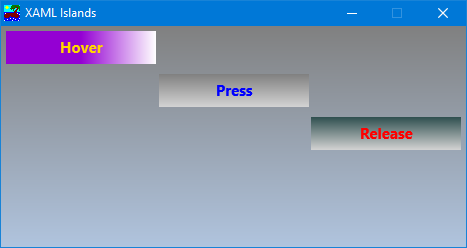
I've been editing the XAML code separately in "XAML Studio" to see real time changes before loading it in the program:
Code:
<Grid xmlns="http://schemas.microsoft.com/winfx/2006/xaml/presentation" xmlns:x="http://schemas.microsoft.com/winfx/2006/xaml">
  <StackPanel x:Name="LayoutRoot" Orientation="Vertical">
    <StackPanel.Background>
       <LinearGradientBrush StartPoint="0,0" EndPoint="0,1">
         <GradientStop Color="Gray" Offset="0"/>
         <GradientStop Color="LightSteelBlue" Offset="1"/>
       </LinearGradientBrush>
    </StackPanel.Background>
    <Button x:Name="Button0" Content="Hover" ClickMode="Hover" Margin="5" Width="150" HorizontalAlignment="Left" Foreground="Gold" FontSize="15" FontWeight="Bold">
      <Button.Background>
         <LinearGradientBrush StartPoint="0,0" EndPoint="1,0">
           <GradientStop Color="DarkViolet" Offset="0.5"/>
           <GradientStop Color="White" Offset="1"/>
         </LinearGradientBrush>
      </Button.Background>
    </Button>
    <Button x:Name="Button1" Content="Press" ClickMode="Press" Margin="5" Width="150" HorizontalAlignment="Center" Foreground="Blue" FontSize="15" FontWeight="Bold">
      <Button.Background>
         <LinearGradientBrush StartPoint="0,0" EndPoint="0,1">
           <GradientStop Color="Gray" Offset="0"/>
           <GradientStop Color="LightGray" Offset="1"/>
         </LinearGradientBrush>
      </Button.Background>
    </Button>
    <Button x:Name="Button2" Content="Release" ClickMode="Release" Margin="5" Width="150" HorizontalAlignment="Right" Foreground="Red" FontSize="15" FontWeight="Bold">
       <Button.Background>
         <LinearGradientBrush StartPoint="0,0" EndPoint="0,1">
           <GradientStop Color="DarkSlateGray" Offset="0"/>
           <GradientStop Color="LightGray" Offset="1"/>
         </LinearGradientBrush>
      </Button.Background>
    </Button>
  </StackPanel>
</Grid>
So far I've been testing it in VB6 and it works great. I'll import it later in tB as well to see how it performs there.
-
Jan 14th, 2025, 05:01 AM
#990
Re: Getting the ball rolling. Which VB6 projects are you working on?
Yes! Pictures and Examples!
Van, where do you see your XAML islands work taking you? If you could some it up in one paragraph, what benefit would it provide to the average VB6-er? How would you expect it to be used and to what end?
https://github.com/yereverluvinunclebert
Skillset: VMS,DOS,Windows Sysadmin from 1985, fault-tolerance, VaxCluster, Alpha,Sparc. DCL,QB,VBDOS- VB6,.NET, PHP,NODE.JS, Graphic Design, Project Manager, CMS, Quad Electronics. classic cars & m'bikes. Artist in water & oils. Historian.
By the power invested in me, all the threads I start are battle free zones - no arguing about the benefits of VB6 over .NET here please. Happiness must reign.
-
Jan 14th, 2025, 05:08 AM
#991
Re: Getting the ball rolling. Which VB6 projects are you working on?
Originally Posted by SomeYguy
Totally unrelated: Geez I can't believe that its been almost 4 years since you started this thread!. Seems like just yesterday .
Time flies! and it should provide some perspective on how long it takes to accomplish a project or two...
I was reading some old TwinBasic bumph on the optimistic expected timescales re: the TwinBasic IDE/language. I saw that one year was the expected period before we had something in our hands, here we are in 2025 and Wayne is getting close but like all projects, timescales tend to balloon! (no complaints, just an observation).
Your observation on time draws me to another recent post here about newer Microsoft technologies and which we might possibly adopt. I am learning here and I think I'm making good progress but my projects are ever going forward but ever so slow...
It has taken me six months to convert my steampunk clock/calendar from javascript to VB6/RC6.
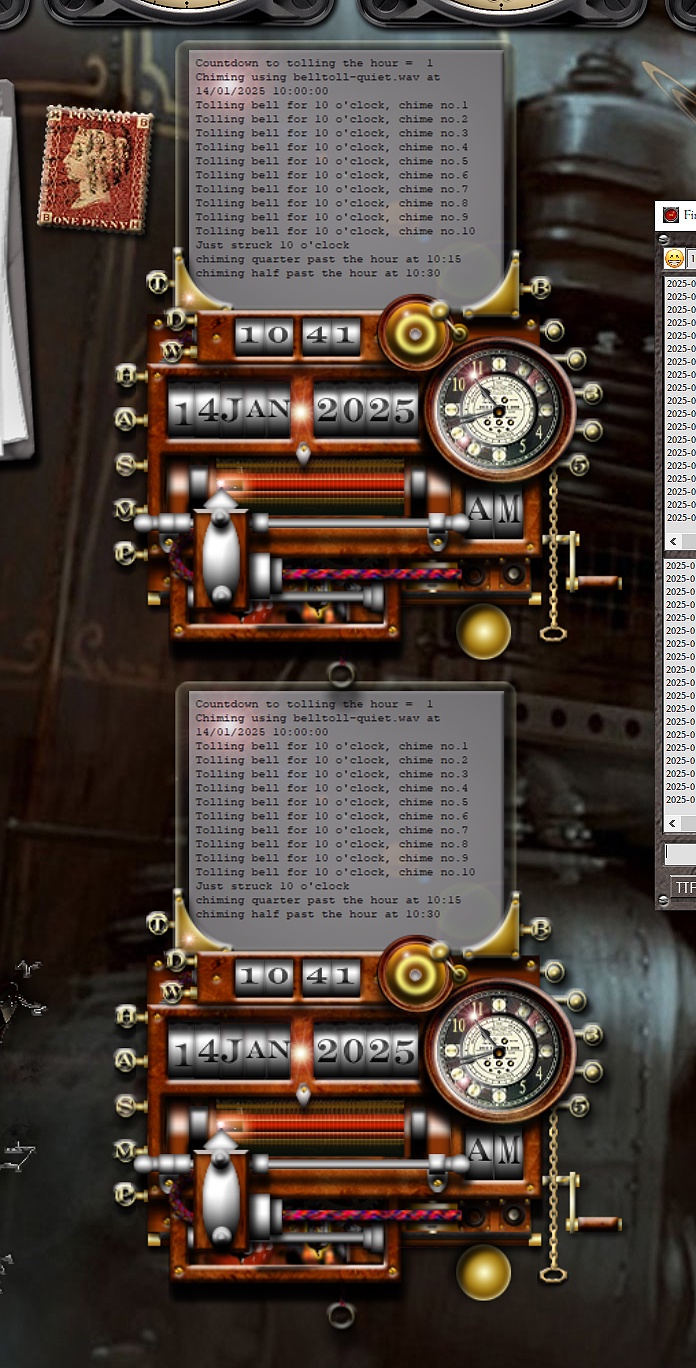
In my defence, in the same time period I have moved house (twice), been through at least one new personal crises and solved at least three old ones! Upgrading the house, three new cats - and all the rest. I've also converted the clock to TwinBasic.
Last edited by yereverluvinuncleber; Jan 14th, 2025 at 05:47 AM.
https://github.com/yereverluvinunclebert
Skillset: VMS,DOS,Windows Sysadmin from 1985, fault-tolerance, VaxCluster, Alpha,Sparc. DCL,QB,VBDOS- VB6,.NET, PHP,NODE.JS, Graphic Design, Project Manager, CMS, Quad Electronics. classic cars & m'bikes. Artist in water & oils. Historian.
By the power invested in me, all the threads I start are battle free zones - no arguing about the benefits of VB6 over .NET here please. Happiness must reign.
-
Jan 14th, 2025, 05:25 AM
#992
Re: Getting the ball rolling. Which VB6 projects are you working on?
I don't know if I'm willing to sink massive amounts of time into this but besides the glaring benefit of breathing new life into VB6, sky's the limit no? Even this simple button control blows the original VB6 CommandButton out of the water. There are tons of XAML controls (https://learn.microsoft.com/en-us/do...orkdesktop-4.8) all Unicode-enabled, DPI-aware and already included with Windows, just ready to plug and play. This is the bleeding edge, you can't get a more modern UI than this.
You lose the ability to drag and drop controls like you do in the VB6 IDE, all design is done in XAML code. Probably it would help if I installed some version of Visual Studio .NET, I presume its XAML editor should be a lot better than this free "XAML Studio" from the Microsoft Store.
-
Jan 14th, 2025, 05:34 AM
#993
Re: Getting the ball rolling. Which VB6 projects are you working on?
That is the problem with all projects that extend VB6 towards more modern graphical frameworks, you love the final product but getting there is hard work. We are so used to the RAD nature of the integrated graphical framework that VB6 provides by default that the struggle to implement any another is a real pain by comparison.
My opinion of this XAML direction, is that it needs such a designer. What I mean by that is something that is designed to operate with VB6.
Using Olaf's RichClient to create a graphical UI was painful until he created his simple PSD parser. For me, being very familiar with Photoshop, it is a breeze - but, the absence of a working Forms designer holds it back.
In my recent RC6 creations I use a mix of VB6 forms, VB6 menus and RC graphics, I can't migrate forms and menus fully to RC6 because of the lack of a designer. It is too painful organising the position of every component in code.
Could this be what Olaf is currently working on? He has been very, very quiet for the last few months, Olaf, can we hear from you and find out what you are working on?
Last edited by yereverluvinuncleber; Jan 14th, 2025 at 05:40 AM.
https://github.com/yereverluvinunclebert
Skillset: VMS,DOS,Windows Sysadmin from 1985, fault-tolerance, VaxCluster, Alpha,Sparc. DCL,QB,VBDOS- VB6,.NET, PHP,NODE.JS, Graphic Design, Project Manager, CMS, Quad Electronics. classic cars & m'bikes. Artist in water & oils. Historian.
By the power invested in me, all the threads I start are battle free zones - no arguing about the benefits of VB6 over .NET here please. Happiness must reign.
-
Jan 14th, 2025, 05:36 AM
#994
Re: Getting the ball rolling. Which VB6 projects are you working on?
Originally Posted by SomeYguy
Totally unrelated: Geez I can't believe that its been almost 4 years since you started this thread!. Seems like just yesterday .
Your comment caused me to look back over this thread, there is some really interesting programs being worked upon demonstrated here. Perhaps we should open our own webshop and start selling/offering only VB6-derived products...
https://github.com/yereverluvinunclebert
Skillset: VMS,DOS,Windows Sysadmin from 1985, fault-tolerance, VaxCluster, Alpha,Sparc. DCL,QB,VBDOS- VB6,.NET, PHP,NODE.JS, Graphic Design, Project Manager, CMS, Quad Electronics. classic cars & m'bikes. Artist in water & oils. Historian.
By the power invested in me, all the threads I start are battle free zones - no arguing about the benefits of VB6 over .NET here please. Happiness must reign.
-
Jan 14th, 2025, 05:54 AM
#995
 Re: Getting the ball rolling. Which VB6 projects are you working on? Re: Getting the ball rolling. Which VB6 projects are you working on?
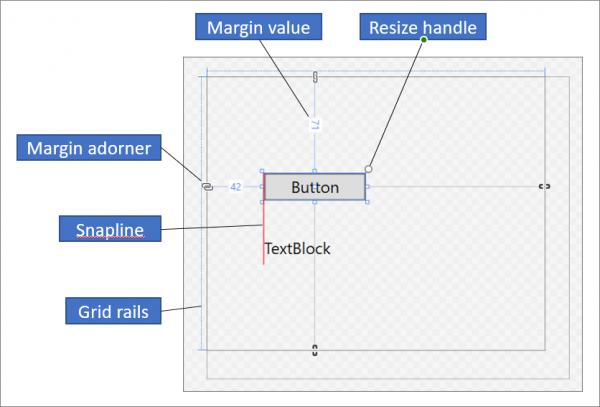
There is already a very capable visual XAML Designer included in Visual Studio .NET so this isn't a problem. Copilot says:
Key Features:
- Drag and Drop: You can drag controls from the Toolbox and drop them onto the design surface.
- Properties Window: Allows you to set properties for the selected control, such as size, color, and layout.
- Split View: You can view the design surface and the XAML code side by side. Changes made in the designer are reflected in the XAML code, and vice versa.
- IntelliSense: Provides code completion and suggestions while editing XAML code.
The real issue is that people already using .NET to create the UI would be crazy to go back and use it in VB6! (well except Franky of course)
-
Jan 14th, 2025, 06:06 AM
#996
Re: Getting the ball rolling. Which VB6 projects are you working on?
Originally Posted by VanGoghGaming
I don't know if I'm willing to sink massive amounts of time into this but besides the glaring benefit of breathing new life into VB6, sky's the limit no? Even this simple button control blows the original VB6 CommandButton out of the water. There are tons of XAML controls ( https://learn.microsoft.com/en-us/do...orkdesktop-4.8) all Unicode-enabled, DPI-aware and already included with Windows, just ready to plug and play. This is the bleeding edge, you can't get a more modern UI than this.
You lose the ability to drag and drop controls like you do in the VB6 IDE, all design is done in XAML code. Probably it would help if I installed some version of Visual Studio .NET, I presume its XAML editor should be a lot better than this free "XAML Studio" from the Microsoft Store.
It's not like there's no fancy CommandButton controls for VB6, and just about everything on that control list has perfectly nice VB6 controls with near identical functionality. The CodeBank and other VB6 sites are full of ones just as good if not even better than the XAML controls in most cases, also supporting Unicode and DPI-awareness (though system automatic DPI management has long since become good enough it's rarely worth the effort to manage it yourself even if all your controls support that). Then just look at the UIs in VB6 projects like PhotoDemon and XYPlorer. RTB was one of the exceptions... but the new Office one is a pretty good remedy and I've started work on a windowless RTB not needing those.
XAML is the "bleeding edge" today, after a long line of other "bleeding edge" UI control sets pumped out then dropped by Microsoft. It won't be long before the next one supplants XAML. And the dramatic decrease in UI quality from Windows 7 through 11 doesn't make me eager to embrace Microsoft's latest fad. Tried and true basic Win32 UIs with only some minor updates are almost always more functional, look better, and are easier to use.
It's unfortunate the great VB6 controls are scattered about instead of in one centralized package for when there is a legit need for more sophisticated controls... hopefully now that we have a real successor tB's Package Manager can remedy that to some extent. I've also been working on drop in replacements for the unsupportable self-subclass hacks a lot of them use. Then there will also at some point be a new modern UI framework to support cross platform apps.
-
Jan 14th, 2025, 06:18 AM
#997
Re: Getting the ball rolling. Which VB6 projects are you working on?
I really don't see where this adversity comes from. The Button control doesn't count since it's way too simple compared to others. Why would you want third-party controls when you can have all of them already included with the operating system? And didn't the XYPlorer guy say he designed his UI using PictureBoxes and GDI? I mean, that's entirely on another level.
The object-oriented nature of WinRT event handlers completely takes subclassing and thunks out of the equation. Surely you can appreciate that, no?
-
Jan 14th, 2025, 06:20 AM
#998
Re: Getting the ball rolling. Which VB6 projects are you working on?
Originally Posted by VanGoghGaming
The real issue is that people already using .NET to create the UI would be crazy to go back and use it in VB6! (well except Franky of course)
I've already uploaded some images here, including ZIP files, which is possible with XAML Islands. Images of these can be found here: https://www.vbforums.com/showthread....=1#post5623743 The images are also quite small, but you can see in one of the images that the button can even be tilted and rotated. Rounded corners, for example for a button or text box, are no problem in XAML.
@VanGoghGaming People shouldn't switch back from .NET to VB6. I just wanted to show that XAML also works in VB6, and therefore also in TwinBasic. What is ultimately missing is a corresponding XAML designer for VB6 or for TwinBasic that creates the XAML string. Alternatively, you can create corresponding XAML controls via the XAML interfaces instead of a XAML string.
-
Jan 14th, 2025, 06:22 AM
#999
Re: Getting the ball rolling. Which VB6 projects are you working on?
I completely agree with Faf. The scattering of effort and the lack of direction/focus has always sabotaged VB6's efforts to be taken more seriously. It 'can' do everything but all that knowledge has to be gathered in bit by bit by each and every individual programmer, whereas it is all in one place under the bigger frameworks that wrap everything under the .NET umbrella.
In VB6 once you eventually find your own personal toolkit you can do some amazing stuff, I think we've all proven that here on this thread, ie. such an amazing group of apps demonstrated here.
It does take someone like Wayne and his direction/capability to bring it all together.
Then there will also at some point be a new modern UI framework to support cross platform apps.
Who'd have thought that, just four or five years ago?
https://github.com/yereverluvinunclebert
Skillset: VMS,DOS,Windows Sysadmin from 1985, fault-tolerance, VaxCluster, Alpha,Sparc. DCL,QB,VBDOS- VB6,.NET, PHP,NODE.JS, Graphic Design, Project Manager, CMS, Quad Electronics. classic cars & m'bikes. Artist in water & oils. Historian.
By the power invested in me, all the threads I start are battle free zones - no arguing about the benefits of VB6 over .NET here please. Happiness must reign.
-
Jan 14th, 2025, 06:26 AM
#1000
Re: Getting the ball rolling. Which VB6 projects are you working on?
Originally Posted by -Franky-
I've already uploaded some images here, including ZIP files, which is possible with XAML Islands. Images of these can be found here: https://www.vbforums.com/showthread....=1#post5623743 The images are also quite small, but you can see in one of the images that the button can even be tilted and rotated. Rounded corners, for example for a button or text box, are no problem in XAML.
I don't see any ZIP files there, I would really like to take a look at your XAML code for those controls, you obviously have so much more experience...
 Posting Permissions
- You may not post new threads
- You may not post replies
- You may not post attachments
- You may not edit your posts
-
Forum Rules
|
Click Here to Expand Forum to Full Width
|



 Reply With Quote


