
Originally Posted by
fafalone

No but the RichEdit control doesn't require the ribbon. I just used the ribbon project out of convenience since it had a RichEdit with so many options already set up. All the RichEdit control really needs is a few lines to call LoadLibrary and CreateWindowEx; you don't need additional controls at all let alone the fancy ribbon ones. I don't think the XAML version includes a whole text editor UI for setting fonts/alignment/etc either, just some wrappers to simplify the API calls a bit.
I'm going to play around a little with windowless richedit... just see if I can get the bare minimum functionality working then go from there.
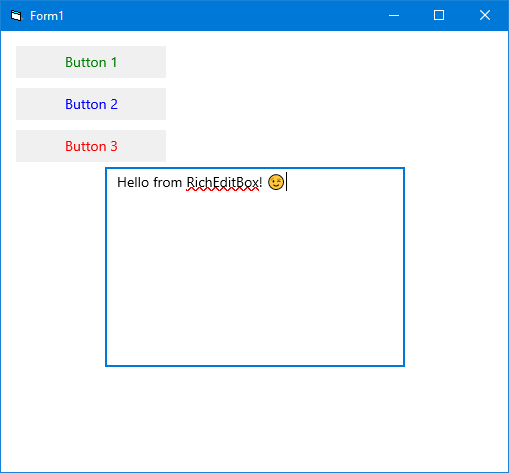
Just out of curiosity I've modified Franky's "XamlHosting2" example to include a RichEditBox. Apparently all you need as barebones is:
Code:
            Dim xaml As String
            xaml = "<Grid xmlns='http://schemas.microsoft.com/winfx/2006/xaml/presentation' " & _
                   "xmlns:x='http://schemas.microsoft.com/winfx/2006/xaml' Background='White'>" & _
                        "<StackPanel x:Name='LayoutRoot' Margin='10'>" & _
                            "<Button x:Name='btn1' Content='Button 1' Margin='5' Width='150' HorizontalAlignment='Left' Background='#F0F0F0' Foreground='Green'/>" & _
                            "<Button x:Name='btn2' Content='Button 2' Margin='5' Width='150' HorizontalAlignment='Left' Background='#F0F0F0' Foreground='Blue'/>" & _
                            "<Button x:Name='btn3' Content='Button 3' Margin='5' Width='150' HorizontalAlignment='Left' Background='#F0F0F0' Foreground='Red'/>" & _
                            "<RichEditBox Width='300' Height='200'/>" & _
                        "</StackPanel>" & _
                    "</Grid>"
That's it, no "LoadLibrary" or "CreateWindowEx" required, in fact the RichEditBox comes fully featured with Spellchecking and Color Emojis already enabled and a modern context menu to boot. Of course there are a lot more properties, methods and events to implement if you want to make something nice out of it.



 Re: Getting the ball rolling. Which VB6 projects are you working on?

 Reply With Quote