|

-
Jul 9th, 2023, 01:19 PM
#1041
Addicted Member

Re: VBFlexGrid Control (Replacement of the MSFlexGrid control)
Hi again.
Where an how is the best way to validate an input?
I mean, i want a cell / col that only allows numbers.
following your example, i used:
Code:
Private Sub Gr1_EditSetupStyle(dwStyle As Long, dwExStyle As Long)

Const ES_NUMBER As Long = &H2000
   Select Case Gr1.EditCol
      Case 3      'solo numeros
        dwStyle = dwStyle Or ES_NUMBER
    End Select

End Sub
But with this, i can't enter decimals ('.' or ',')
Maybe I must check all the keypress at cell ?, is there another Constant that allows numbers and decimals ?
Thanks!
Edit:
Solved this way (I accept better ways to do it xD):
Code:
Private Sub Gr1_EditKeyPress(KeyChar As Integer)

If InStr("all the keys of the columns i want to check", Gr1.ColKey(Gr1.EditCol)) >= 1 Then
    If Not (KeyChar >= vbKeyA And KeyChar <= vbKeyZ) And Not (KeyChar >= 97 And KeyChar <= 122) Then
        Else
            KeyChar = 0
    End If
End If

End Sub
Last edited by Calcu; Jul 9th, 2023 at 03:25 PM.
-
Jul 9th, 2023, 03:25 PM
#1042
Hyperactive Member
 Re: VBFlexGrid Control (Replacement of the MSFlexGrid control) Re: VBFlexGrid Control (Replacement of the MSFlexGrid control)
 Originally Posted by Calcu

Where an how is the best way to validate an input?
Try this one. The only problem is you can't use the Backspace to delete something.
Code:
Private Type LIMITINPUTSTRUCT
   cbSize     As Long
   dwMask     As Long
   dwFlags    As Long
   hInst      As Long
   pszFilter  As Long
   pszTitle   As Long
   pszMessage As Long
   hIcon      As Long
   hwndNotify As Long
   iTimeout   As Long
   cxTipWidth As Long
End Type

' Read more about the SHLimitInputEditWithFlags function here:
' https://www.vbforums.com/showthread.php?895398-VB6-Undocumented-API-SHLimitInputEditWithFlags-Easy-input-filtering
Private Declare Function SHLimitInputEditWithFlags _
               Lib "shell32" _
               Alias "#754" (ByVal hWndEdit As Long, _
                             Limits As LIMITINPUTSTRUCT) As Long

Private Sub Gr1_EditSetupWindow(BackColor As stdole.OLE_COLOR, _
                                ForeColor As stdole.OLE_COLOR)
   ' the hWndEdit is already created in this event
   Select Case Gr1.EditCol
   Case 3      'solo numeros
      If Not LimitInput("0123456789,.", Gr1.hWndEdit) Then Debug.Print "Something went wrong"
   End Select
End Sub

Private Sub Gr1_ValidateEdit(Cancel As Boolean)
   If Not IsNumeric(Gr1.EditText) Then
      Cancel = True
      MsgBox "Only numeric values are allowed"
   End If
End Sub

'-----------------------------------------------------------------------------
' Function LimitInput
' Descr     : Limits user input using string filter. Returns False on fault
' Args      : sFilter (String) - the string of allowed acaracters
'             hWndEdit (Long)  - Gr1.hWndEdit
'-----------------------------------------------------------------------------
Private Function LimitInput(ByRef sFilter As String, _
                            ByVal hWndEdit As Long) As Boolean
   Const TITLE = "Bad character"
   Const MESSAGE = "This character is not allowed"
   Static FLTR As String

   Dim hr      As Long
   Dim lerr    As Long
   Dim Limits  As LIMITINPUTSTRUCT

   FLTR = sFilter
   With Limits
      .cbSize = Len(Limits)
      .dwMask = 379     '= LIM_FILTER + LIM_FLAGS + LIM_HINST + LIM_ICON + LIM_MESSAGE + LIM_TIMEOUT + LIM_TITLE
      .hInst = App.hInstance
      .dwFlags = 4096   '= LIF_KEEPCLIPBOARD + LIF_PASTESTOP
      .pszTitle = StrPtr(TITLE)
      .pszMessage = StrPtr(MESSAGE)
      .hIcon = 2        '= TTI_WARNING
      .iTimeout = 10000
      .dwFlags = .dwFlags Or &H200 ' LIF_HIDETIPONVALID
      If LenB(FLTR) Then
         .pszFilter = StrPtr(FLTR)
         .dwFlags = .dwFlags And Not &H2 ' LIF_CATEGORYFILTER
      Else
         .dwFlags = .dwFlags Or &H2      ' LIF_CATEGORYFILTER
         .pszFilter = 32                 ' LICF_CNTRL
      End If
   End With

   hr = SHLimitInputEditWithFlags(hWndEdit, Limits)
   lerr = Err.LastDllError
   LimitInput = Not (CBool(lerr) Or CBool(hr))
End Function
-
Jul 9th, 2023, 03:58 PM
#1043
Re: VBFlexGrid Control (Replacement of the MSFlexGrid control)
Update released.
The sources for the VBFlexGrid control are now x64 aware. Which means it can be imported into twinBASIC "as-is" and run under the x64 compiler.
-
Jul 12th, 2023, 12:39 PM
#1044
Hyperactive Member
Re: VBFlexGrid Control (Replacement of the MSFlexGrid control)
Originally Posted by Krool
That's intended to be like this. If .ComboMode is <> FlexComboModeNone then .ComboItems will be taken.
If else .ColComboMode is <> FlexComboModeNone then .ColComboItems will be taken.
The same logic. Inconvenient for me.
ColResizable and RowResizable are restrictive only properties. I mean:
- you can AllowUserResizing for all Cols(or Rows) except those for which ColResizable=False (or RowResizable=False);
- but you can not DisallowUserResizing for all Cols(or Rows) except those for which ColResizable=True (or RowResizable=True)
Last edited by Nouyana; Jul 12th, 2023 at 12:47 PM.
-
Jul 14th, 2023, 10:14 AM
#1045
Hyperactive Member
 Re: VBFlexGrid Control (Replacement of the MSFlexGrid control) Re: VBFlexGrid Control (Replacement of the MSFlexGrid control)
Speed test. 10 000 rows.
VBFlexGrid1_Compare = 3199 ms (BubbleSort)  FIXED. Update 1.6.24 released FIXED. Update 1.6.24 released
MSHFlexGrid1_Compare = 61 ms 
VBFlexGrid1_CompareText = 10 ms. Brilliant! 
Code:
Private Sub MSHFlexGrid1_Compare(ByVal Row1 As Long, _
                                 ByVal Row2 As Long, _
                                 Cmp As Integer)
   Dim Text1 As String
   Dim Text2 As String
   With MSHFlexGrid1
      Text1 = .TextMatrix(Row1, .Col)
      Text2 = .TextMatrix(Row2, .Col)
   End With

   Dim Lng1 As Long: Lng1 = CLng(Right$(Text1, Len(Text1) - 5&))
   Dim Lng2 As Long: Lng2 = CLng(Right$(Text2, Len(Text2) - 5&))
   Cmp = Sgn(Lng2 - Lng1)
End Sub

Private Sub VBFlexGrid1_Compare(ByVal Row1 As Long, _
                                ByVal Row2 As Long, _
                                ByVal Col As Long, _
                                Cmp As Long)
   Dim Text1 As String
   Dim Text2 As String
   With VBFlexGrid1
      Text1 = .TextMatrix(Row1, Col)
      Text2 = .TextMatrix(Row2, Col)
   End With

   Dim Lng1 As Long: Lng1 = CLng(Right$(Text1, Len(Text1) - 5&))
   Dim Lng2 As Long: Lng2 = CLng(Right$(Text2, Len(Text2) - 5&))
   Cmp = Sgn(Lng2 - Lng1)
End Sub

Private Sub VBFlexGrid1_CompareText(ByVal Text1 As String, _
                                    ByVal Text2 As String, _
                                    ByVal Col As Long, _
                                    Cmp As Long)
   Dim Lng1 As Long: Lng1 = CLng(Right$(Text1, Len(Text1) - 5&))
   Dim Lng2 As Long: Lng2 = CLng(Right$(Text2, Len(Text2) - 5&))
   Cmp = Sgn(Lng2 - Lng1)
End Sub
Last edited by Nouyana; Jul 15th, 2023 at 07:05 AM.
Reason: Issue is fixed
-
Jul 15th, 2023, 05:00 AM
#1046
Re: VBFlexGrid Control (Replacement of the MSFlexGrid control)
Originally Posted by Nouyana
Speed test. 10 000 rows.
VBFlexGrid1_Compare = 3199 ms (BubbleSort)
MSHFlexGrid1_Compare = 61 ms
VBFlexGrid1_CompareText = 10 ms. Brilliant!
Code:
Private Sub MSHFlexGrid1_Compare(ByVal Row1 As Long, _
                                 ByVal Row2 As Long, _
                                 Cmp As Integer)
   Dim Text1 As String
   Dim Text2 As String
   With MSHFlexGrid1
      Text1 = .TextMatrix(Row1, .Col)
      Text2 = .TextMatrix(Row2, .Col)
   End With

   Dim Lng1 As Long: Lng1 = CLng(Right$(Text1, Len(Text1) - 5&))
   Dim Lng2 As Long: Lng2 = CLng(Right$(Text2, Len(Text2) - 5&))
   Cmp = Sgn(Lng2 - Lng1)
End Sub

Private Sub VBFlexGrid1_Compare(ByVal Row1 As Long, _
                                ByVal Row2 As Long, _
                                ByVal Col As Long, _
                                Cmp As Long)
   Dim Text1 As String
   Dim Text2 As String
   With VBFlexGrid1
      Text1 = .TextMatrix(Row1, Col)
      Text2 = .TextMatrix(Row2, Col)
   End With

   Dim Lng1 As Long: Lng1 = CLng(Right$(Text1, Len(Text1) - 5&))
   Dim Lng2 As Long: Lng2 = CLng(Right$(Text2, Len(Text2) - 5&))
   Cmp = Sgn(Lng2 - Lng1)
End Sub

Private Sub VBFlexGrid1_CompareText(ByVal Text1 As String, _
                                    ByVal Text2 As String, _
                                    ByVal Col As Long, _
                                    Cmp As Long)
   Dim Lng1 As Long: Lng1 = CLng(Right$(Text1, Len(Text1) - 5&))
   Dim Lng2 As Long: Lng2 = CLng(Right$(Text2, Len(Text2) - 5&))
   Cmp = Sgn(Lng2 - Lng1)
End Sub
Update released.
VBFlexGrid1_Compare now uses a indirect MergeSort instead of BubbleSort. The indirect MergeSort is a bit slower than the normal one.
So I expect that VBFlexGrid1_Compare is now very fast compared to before but slower than VBFlexGrid1_CompareText.
-
Jul 15th, 2023, 07:11 AM
#1047
Hyperactive Member
Re: VBFlexGrid Control (Replacement of the MSFlexGrid control)
Originally Posted by Krool
Update released.
VBFlexGrid1_Compare now uses a indirect MergeSort instead of BubbleSort. The indirect MergeSort is a bit slower than the normal one.
Yahoo! 
VBFlexGrid1_Compare = 34 ms
Originally Posted by Krool
So I expect that VBFlexGrid1_Compare is now very fast compared to before but slower than VBFlexGrid1_CompareText.
Yes, but we can sort using colors or other cell formats!
Thank you, Krool!
-
Jul 15th, 2023, 09:43 AM
#1048
Re: VBFlexGrid Control (Replacement of the MSFlexGrid control)
Originally Posted by Nouyana
The same logic. Inconvenient for me.
ColResizable and RowResizable are restrictive only properties. I mean:
- you can AllowUserResizing for all Cols(or Rows) except those for which ColResizable=False (or RowResizable=False);
- but you can not DisallowUserResizing for all Cols(or Rows) except those for which ColResizable=True (or RowResizable=True)
I don't like inversing properties and I think that is not a common practice. IMO that would confuse more.
If you want just 1 col to be resizable then turn AllowUserResizing on and set ColResizable to False except that 1 column.
-
Jul 15th, 2023, 11:33 AM
#1049
Hyperactive Member
 Re: VBFlexGrid Control (Replacement of the MSFlexGrid control) Re: VBFlexGrid Control (Replacement of the MSFlexGrid control)
Originally Posted by Krool
I don't like inversing properties and I think that is not a common practice. IMO that would confuse more.
I consider it not as "inversing", but as default value and exceptions. All your formatting properties are done in this way: there is a default value for the column and exceptions for individual cells.
Originally Posted by Krool
If you want just 1 col to be resizable then turn AllowUserResizing on and set ColResizable to False except that 1 column.
For me, this problem is more about working with rows rather than columns. Let's imagine, that the user should only change the height of frozen rows. In order to implement this, you will have to go through all the rows of the table and set the RowResizable=False. You should keep this property in mind every time you add new rows. Now imagine that at some point you want to allow user to change the height of the rows.
Let's complicate things a bit and remember that you have the FlexDataSource property. What happens to the amount of memory consumed in this case?
Last edited by Nouyana; Jul 15th, 2023 at 02:02 PM.
-
Jul 15th, 2023, 03:34 PM
#1050
Hyperactive Member
Re: VBFlexGrid Control (Replacement of the MSFlexGrid control)
Originally Posted by Krool
I don't like inversing properties and I think that is not a common practice. IMO that would confuse more.
Oh, I understand. Sorry. I didn't mean to add new DisallowUserResizing property. I meant: "you can't use the AllowUserResizing=False for all Cols(or Rows) except those for which ColResizable=True (or RowResizable=True)"
-
Jul 16th, 2023, 01:31 PM
#1051
Hyperactive Member
Re: VBFlexGrid Control (Replacement of the MSFlexGrid control)
What do we need the RowsPerPage and ColsPerPage properties for? I assume that they are useful to determine the number of scrollable rows and columns when miving right or down. But what about moving up and left?
Krool, can you add an optional "Direction" parameter to the RowsPerPage and ColsPerPage properties? I assume it should have the enum of three constants:
- PreviousPage
- CurrentPage (default)
- NextPage
-
Jul 17th, 2023, 10:05 AM
#1052
Hyperactive Member
 Re: VBFlexGrid Control (Replacement of the MSFlexGrid control) Re: VBFlexGrid Control (Replacement of the MSFlexGrid control)
Is there any difference between "RowHidden = False" and "RowHeight = -1"?
-
Jul 17th, 2023, 11:26 AM
#1053
Junior Member
Re: VBFlexGrid Control (Replacement of the MSFlexGrid control)
Strange issue when writing the contents of a cell to SQL.
I have a grid that I've changed from MSFlexGrid to VBFlexGrid. Everything is working fine, except I'm getting 'Multiple-step OLE DB Operation failed', with updating a SQL record with the contents of the grid. The code worked fine when a MSFlexgrid. I normally get this error when trying to write too much information into a SQL field.
The grid is a simple 6 row, 3 column grid. The third column is blank, and never populated with text, but if I do
.fields("Test") = grdMain.textmatrix(2,2)
I get the error. The LEN of cell(2,2) is 0. If I hover over the field it shows as "". If I assign it to a temporary string as below I get the same error
sTmp = grdmain.textmatrix(2,2)
.fields("Test") = sTmp
This throws the same error, but sTmp shows as "" and len of 0, and if I Msgbox it, shows as a blank message.
the SQL Field 'Test' is an nvarchar(150).
Strangely the below line of code works:
.fields("Test") = IIf(grdMain.TextMatrix(2,2) = "", "", grdMain.TextMatrix(2, 2))
This implies that it knows the cell as no information, so evaluates to "", but if this is the case I should be able to write the cell straight to SQL.
Very confusing.
Any pointers would be much appreciated. By the way using version 1.5 of the grid.
Thanks
Lee.
-
Jul 17th, 2023, 02:14 PM
#1054
Hyperactive Member
Re: VBFlexGrid Control (Replacement of the MSFlexGrid control)
Originally Posted by logley
The third column is blank, and never populated with text, but if I do
.fields("Test") = grdMain.textmatrix(2,2)
I get the error. The LEN of cell(2,2) is 0. If I hover over the field it shows as "". If I assign it to a temporary string as below I get the same error
sTmp = grdmain.textmatrix(2,2)
.fields("Test") = sTmp
Probably the reason is in the vbNullString value. This code works differently on MSFlexGrid and VBFlexGrid:
Code:
With VBFlexGrid1
   .Cols = .Cols + 1
   Debug.Print StrPtr(.TextMatrix(1, .Cols - 1))
End With
Try to use this code:
Code:
sTmp = grdmain.textmatrix(2, 2)
.fields("Test") = IIf(LenB(sTmp) = 0&, "", sTmp)
-
Jul 17th, 2023, 03:17 PM
#1055
Hyperactive Member
Re: VBFlexGrid Control (Replacement of the MSFlexGrid control)
There is a bug in the ColWidthMin property.
EDITED: The answer is here.
Code:
With VBFlexGrid1
   .ColWidthMin = 500
   .ColWidth(1) = 10
   Debug.Print .ColWidth(1)  ' The result is 495, not 500
End With
Last edited by Nouyana; Jul 18th, 2023 at 08:32 AM.
Reason: Solved
-
Jul 17th, 2023, 03:30 PM
#1056
Hyperactive Member
Re: VBFlexGrid Control (Replacement of the MSFlexGrid control)
The same with RowHeightMax, RowHeightMin and ColWidthMax
EDITED: The answer is here.
Code:
With VBFlexGrid1
   .RowHeightMax = 500
   .RowHeight(1) = 600
   Debug.Print .RowHeight(1) ' The result is 495, not 500
End With
Code:
With VBFlexGrid1
   .RowHeightMin = 500
   .RowHeight(1) = 10
   Debug.Print .RowHeight(1) ' The result is 495, not 500
End With
Code:
With VBFlexGrid1
   .ColWidthMax = 500
   .ColWidth(1) = 600
   Debug.Print .ColWidth(1) ' The result is 495, not 500
End With
Last edited by Nouyana; Jul 18th, 2023 at 08:32 AM.
Reason: Solved!
-
Jul 18th, 2023, 04:35 AM
#1057
Junior Member
Re: VBFlexGrid Control (Replacement of the MSFlexGrid control)
Originally Posted by Nouyana
Probably the reason is in the vbNullString value. This code works differently on MSFlexGrid and VBFlexGrid:
Code:
With VBFlexGrid1
   .Cols = .Cols + 1
   Debug.Print StrPtr(.TextMatrix(1, .Cols - 1))
End With
Try to use this code:
Code:
sTmp = grdmain.textmatrix(2, 2)
.fields("Test") = IIf(LenB(sTmp) = 0&, "", sTmp)
Thanks, Had tried checking against "" and Empty and Nothing, but not thought to check against vbNullString.
-
Jul 18th, 2023, 05:32 AM
#1058
Addicted Member
Re: VBFlexGrid Control (Replacement of the MSFlexGrid control)
@Krool, it's possible to create Tooltips with more than 1 line ?
This:
VbGrid.ToolTipText = "Color Verde = 'Tiene Horas extras'" & vbCrLf & "Color Rojo = 'Falta Fichaje'"
doesn't work.
Thanks!
-
Jul 18th, 2023, 08:15 AM
#1059
Hyperactive Member
Re: VBFlexGrid Control (Replacement of the MSFlexGrid control)
Originally Posted by Calcu
@Krool, it's possible to create Tooltips with more than 1 line ?
https://www.vbforums.com/showthread....ass&highlight=
-
Jul 18th, 2023, 08:23 AM
#1060
Member
Re: VBFlexGrid Control (Replacement of the MSFlexGrid control)
Originally Posted by Nouyana
The same with RowHeightMax, RowHeightMin and ColWidthMax
Code:
With VBFlexGrid1
   .RowHeightMax = 500
   .RowHeight(1) = 600
   Debug.Print .RowHeight(1) ' The result is 495, not 500
End With
Code:
With VBFlexGrid1
   .RowHeightMin = 500
   .RowHeight(1) = 10
   Debug.Print .RowHeight(1) ' The result is 495, not 500
End With
Code:
With VBFlexGrid1
   .ColWidthMax = 500
   .ColWidth(1) = 600
   Debug.Print .ColWidth(1) ' The result is 495, not 500
End With
I guess the unit is twips. The unit for the given properties is pixel. A pixel is 15 twips. So if you set the property to a value other than a multiple of 15 (ratio twips/pixel) the property returns the next integer in twips. You set a height to 500 twips, that results in 33 pixel, that results in 495 twips.
greetings seniorchef
-
Jul 18th, 2023, 08:24 AM
#1061
Hyperactive Member
Re: VBFlexGrid Control (Replacement of the MSFlexGrid control)
Originally Posted by Calcu
@Krool, it's possible to create Tooltips with more than 1 line ?
Krool's answer:
https://www.vbforums.com/showthread....=1#post5610477
-
Jul 18th, 2023, 08:30 AM
#1062
Hyperactive Member
Re: VBFlexGrid Control (Replacement of the MSFlexGrid control)
Originally Posted by Seniorchef
I guess the unit is twips. The unit for the given properties is pixel. A pixel is 15 twips. So if you set the property to a value other than a multiple of 15 (ratio twips/pixel) the property returns the next integer in twips. You set a height to 500 twips, that results in 33 pixel, that results in 495 twips.
greetings seniorchef
Yes, it seems so. Thanks!
-
Jul 18th, 2023, 12:46 PM
#1063
Hyperactive Member
 Re: VBFlexGrid Control (Replacement of the MSFlexGrid control) Re: VBFlexGrid Control (Replacement of the MSFlexGrid control)
The Reason parameter in the ComboBeforeDropDown event is always FlexComboDropDownReasonInitialize. No matter if it was dropped down by mouse or keyboard or by code like the below one. By the way, what does the FlexComboDropDownReasonInitialize mean?
Code:
Private Sub Command1_Click()
   With VBFlexGrid1
      .Cell(FlexCellComboCue, .FixedRows, 1, .Rows - 1) = FlexComboCueDropDown
      .ColComboMode(1) = FlexComboModeDropDown
      .ColComboItems(1) = "Bob|Jack|Ivan"
      .Cell(FlexCellText, .FixedRows, 1, .Rows - 1) = "Bob"
      .StartEdit 1, 1
      .ComboButtonValue = FlexComboButtonValuePressed
      .EditText = "Jack"
      .CommitEdit
   End With
End Sub

Private Sub VBFlexGrid1_ComboBeforeDropDown( _
            ByVal Reason As FlexComboDropDownReasonConstants, _
                  Cancel As Boolean)
   Debug.Print "Reason: "; Reason    ' THIS ALWAYS RETURNS 1.
End Sub
-
Jul 18th, 2023, 04:05 PM
#1064
Re: VBFlexGrid Control (Replacement of the MSFlexGrid control)
Originally Posted by Nouyana
The Reason parameter in the ComboBeforeDropDown event is always FlexComboDropDownReasonInitialize. No matter if it was dropped down by mouse or keyboard or by code like the below one. By the way, what does the FlexComboDropDownReasonInitialize mean?
Code:
Private Sub Command1_Click()
   With VBFlexGrid1
      .Cell(FlexCellComboCue, .FixedRows, 1, .Rows - 1) = FlexComboCueDropDown
      .ColComboMode(1) = FlexComboModeDropDown
      .ColComboItems(1) = "Bob|Jack|Ivan"
      .Cell(FlexCellText, .FixedRows, 1, .Rows - 1) = "Bob"
      .StartEdit 1, 1
      .ComboButtonValue = FlexComboButtonValuePressed
      .EditText = "Jack"
      .CommitEdit
   End With
End Sub

Private Sub VBFlexGrid1_ComboBeforeDropDown( _
            ByVal Reason As FlexComboDropDownReasonConstants, _
                  Cancel As Boolean)
   Debug.Print "Reason: "; Reason    ' THIS ALWAYS RETURNS 1.
End Sub
FlexComboDropDownReasonInitialize is when the drop-down list (or calendar) automatically shows upon the .StartEdit.
This is the only way to suppress behavior by checking Reason for FlexComboDropDownReasonInitialize in the ComboBeforeDropDown event. This way it is possible to prevent auto drop-down.
The following scenarios for FlexComboDropDownReasonInitialize:
1. Edit reason is one of the ComboCue* reasons.
2. The combo mode is "DropDown" (not "Editable")
3. The combo mode is "Calendar" AND the edit control has ES_READONLY.
-
Jul 19th, 2023, 04:23 AM
#1065
Hyperactive Member
Re: VBFlexGrid Control (Replacement of the MSFlexGrid control)
Originally Posted by Krool
The following scenarios for FlexComboDropDownReasonInitialize:
1. Edit reason is one of the ComboCue* reasons.
2. The combo mode is "DropDown" (not "Editable")
3. The combo mode is "Calendar" AND the edit control has ES_READONLY.
The ComboBeforeDropDown event not fires when I DblClick the TextBox or press F2 (ComboMode = *Editable):
Code:
Private Sub Command1_Click()
   With VBFlexGrid1
      .Cell(FlexCellComboCue, .FixedRows, 1, .Rows - 1) = FlexComboCueDropDown
      .ColComboMode(1) = FlexComboModeEditable
      .ColComboItems(1) = "Bob|Jack|Ivan"
      .Cell(FlexCellText, .FixedRows, 1, .Rows - 1) = "Bob"
      .StartEdit 1, 1    ' Reason = 0.
      .ComboButtonValue = FlexComboButtonValuePressed
      .EditText = "Jack"
      .CommitEdit
   End With
End Sub

Private Sub VBFlexGrid1_ComboBeforeDropDown( _
            ByVal Reason As FlexComboDropDownReasonConstants, _
                  Cancel As Boolean)
   Debug.Print "Reason: "; Reason
End Sub
-
Jul 19th, 2023, 05:38 AM
#1066
Re: VBFlexGrid Control (Replacement of the MSFlexGrid control)
Originally Posted by Nouyana
The ComboBeforeDropDown event not fires when I DblClick the TextBox or press F2 ( ComboMode = *Editable):
Code:
Private Sub Command1_Click()
   With VBFlexGrid1
      .Cell(FlexCellComboCue, .FixedRows, 1, .Rows - 1) = FlexComboCueDropDown
      .ColComboMode(1) = FlexComboModeEditable
      .ColComboItems(1) = "Bob|Jack|Ivan"
      .Cell(FlexCellText, .FixedRows, 1, .Rows - 1) = "Bob"
      .StartEdit 1, 1    ' Reason = 0.
      .ComboButtonValue = FlexComboButtonValuePressed
      .EditText = "Jack"
      .CommitEdit
   End With
End Sub

Private Sub VBFlexGrid1_ComboBeforeDropDown( _
            ByVal Reason As FlexComboDropDownReasonConstants, _
                  Cancel As Boolean)
   Debug.Print "Reason: "; Reason
End Sub
Yes, that's logical because you enter edit mode but the drop-down portion will not be shown automatically. Thus no ComboBeforeDropDown event.
-
Jul 19th, 2023, 06:31 AM
#1067
Hyperactive Member
Re: VBFlexGrid Control (Replacement of the MSFlexGrid control)
Originally Posted by Krool
Yes, that's logical because you enter edit mode but the drop-down portion will not be shown automatically. Thus no ComboBeforeDropDown event.
Ok, how can I invoke *ReasonMouse and *ReasonKeyboard? [Alt]+[Down] = *ReasonInitialize (ComboMode = *Editable)
-
Jul 19th, 2023, 07:31 AM
#1068
Re: VBFlexGrid Control (Replacement of the MSFlexGrid control)
Originally Posted by Nouyana
Ok, how can I invoke *ReasonMouse and *ReasonKeyboard? [Alt]+[Down] = *ReasonInitialize (ComboMode = *Editable)
Pressing F4 to hide drop-down list. Or clicking on the combo button to close the list. Or clicking on the edit control. Then you are "initialized" and any further ComboBeforeDropDown will give you ReasonMouse or ReasonKeyboard.
-
Jul 19th, 2023, 07:37 AM
#1069
Hyperactive Member
Re: VBFlexGrid Control (Replacement of the MSFlexGrid control)
Originally Posted by Krool
FlexComboDropDownReasonInitialize is when the drop-down list (or calendar) automatically shows upon the .StartEdit
Why the StartEdit method should automatically show the drop-down list (or calendar)? Are we in too much trouble because of this? We have to track two events at once: BeforeEdit and ComboBeforeDropDown, because we should pass the FlexEditReasonComboCue* from the BeforeEdit to the ComboBeforeDropDown event. Am I right?
-
Jul 19th, 2023, 07:41 AM
#1070
Re: VBFlexGrid Control (Replacement of the MSFlexGrid control)
Originally Posted by Nouyana
Why the StartEdit method should automatically show the drop-down list (or calendar)? Are we in too much trouble because of this? We have to track two events at once: BeforeEdit and ComboBeforeDropDown, because we should pass the FlexEditReasonComboCue* from the BeforeEdit to the ComboBeforeDropDown event. Am I right?
That's standard behavior. For an Editable combo box the edit control is "priority". Because you normally just text edit, the drop-down list is a "plus".
On the other hand the mode "DropDown" the edit control is locked, thus you can only pick an item from the drop-down list. And here it is convenient to automatically drop it down.
-
Jul 19th, 2023, 07:47 AM
#1071
Hyperactive Member
Re: VBFlexGrid Control (Replacement of the MSFlexGrid control)
Originally Posted by Krool
Pressing F4 to hide drop-down list.
I should press F4 three times:
- The first one it will be *ReasonInitialize
- On the second one the drop-down list will be closed
- And only after the third time I press F4 it will cause the *ReasonKeyboard.
Originally Posted by Krool
Or clicking on the combo button to close the list.
Not "to close", but "to open it again". The same as with F4.
Originally Posted by Krool
Or clicking on the edit control.
Nothing happens.
Originally Posted by Krool
Then you are "initialized" and any further ComboBeforeDropDown will give you ReasonMouse or ReasonKeyboard.
Yes, but we usually don't work that way with ComboBoxes.
-
Jul 19th, 2023, 07:58 AM
#1072
Hyperactive Member
Re: VBFlexGrid Control (Replacement of the MSFlexGrid control)
Originally Posted by Krool
That's standard behavior. For an Editable combo box the edit control is "priority". Because you normally just text edit, the drop-down list is a "plus".
I'm talking about the StartEdit method. "Standard" ComboBox don't have this method. You are trying to "suppress" showing the drop-down list when this method is called by code. So the question is: why it should show this list? If you want, you can show it using the ComboButtonValue.
-
Jul 19th, 2023, 08:01 AM
#1073
Re: VBFlexGrid Control (Replacement of the MSFlexGrid control)
Originally Posted by Nouyana
I should press F4 three times:
- The first one it will be *ReasonInitialize
- On the second one the drop-down list will be closed
- And only after the third time I press F4 it will cause the *ReasonKeyboard.
Not "to close", but "to open it again". The same as with F4.
Nothing happens.
Yes, but we usually don't work that way with ComboBoxes.
Again.
It is necessary to have *Initialize reason in ComboBeforeDropDown. Because that's how to change behavior.
You can check .EditReason property in ComboBeforeDropDown to know if it is a Mouse or Keyboard action.
-
Jul 19th, 2023, 08:12 AM
#1074
Hyperactive Member
Re: VBFlexGrid Control (Replacement of the MSFlexGrid control)
Originally Posted by Krool
You can check .EditReason property in ComboBeforeDropDown to know if it is a Mouse or Keyboard action.
Ok, this works. I just don't understand why the ComboBeforeDropDown should have another reason. I will never use it.
-
Jul 19th, 2023, 08:14 AM
#1075
Hyperactive Member
Re: VBFlexGrid Control (Replacement of the MSFlexGrid control)
Maybe I need an example of using the *Initialize reason. The example where EditReason will not work.
-
Jul 19th, 2023, 04:00 PM
#1076
Hyperactive Member
Re: VBFlexGrid Control (Replacement of the MSFlexGrid control)
Hi,
Using the WantReturn property in combination with the LeaveEdit event I can move the focus to the next cell that the user is allowed to edit when they press the Enter key.
Is it also possible to catch the Tab-key to create the same behavior?
I thought to do this via the EditKeyPress event, but can't get it to work.
Thanks,
Erwin
-
Jul 21st, 2023, 04:25 AM
#1077
Hyperactive Member
Re: VBFlexGrid Control (Replacement of the MSFlexGrid control)
Can anyone explain me how to draw a Button? I know almost nothing about WinAPI, but I've tried:
Code:
Private Sub VBFlexGrid1_ComboButtonOwnerDraw(ByVal Row As Long, _
                                             ByVal Col As Long, _
                                             Cancel As Boolean, _
                                             ByVal CtlType As Long, _
                                             ByVal ItemAction As Long, _
                                             ByVal ItemState As Long, _
                                             ByVal hDC As Long, _
                                             ByVal Left As Long, _
                                             ByVal Top As Long, _
                                             ByVal Right As Long, _
                                             ByVal Bottom As Long)
   Dim hWndButton As Long
   hWndButton = CreateWindowEx(0&, "BUTTON", "Basic", WS_CHILD, _
                  Left, Top, Right - Left, Bottom - Top, hDC, _
                  0&, App.hInstance, ByVal 0&)
   ShowWindow hWndButton, SW_NORMAL
End Sub

Private Sub Command1_Click()
   With VBFlexGrid1
      .ComboButtonDrawMode = FlexComboButtonDrawModeOwnerDraw
      .CellComboCue = FlexComboCueButton
   End With
End Sub
-
Jul 21st, 2023, 06:05 AM
#1078
Hyperactive Member
Re: VBFlexGrid Control (Replacement of the MSFlexGrid control)
What values may have CtlType, ItemAction and ItemState params in the ComboButtonOwnerDraw event?
-
Jul 21st, 2023, 06:46 AM
#1079
Hyperactive Member
Re: VBFlexGrid Control (Replacement of the MSFlexGrid control)
Originally Posted by Nouyana
What values may have CtlType, ItemAction and ItemState params in the ComboButtonOwnerDraw event?
It seems that CtlType can be only ODT_BUTTON or ODT_COMBOBOX (depends on CellComboCue property).
And ItemAction can be only ODA_DRAWENTIRE, because it can not get a focus. Am I right?
-
Jul 22nd, 2023, 06:25 AM
#1080
Hyperactive Member
Re: VBFlexGrid Control (Replacement of the MSFlexGrid control)
@Krool
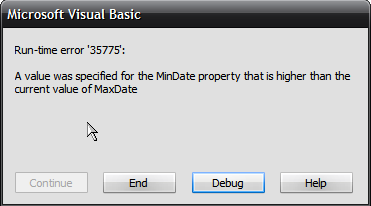
A bug in ComboCalendarMinDate/ComboCalendarMaxDate properties.
Code:
With VBFlexGrid1
   .Cell(FlexCellComboCue, .FixedRows, 1, .Rows - 1, 1) = FlexComboCueDropDown
   .ComboMode = FlexComboModeCalendar
   .ComboCalendarMaxDate = Date + 31
   .ComboCalendarMinDate = Date - 31
End With
PS.
I've written more than 160 pages of documentation. I'm moving alphabetically and I'm now only on the letter "C". You've got dozens of bugs here. Maybe I'm not a $100 to everyone's liking, but I'm doing a big job for the community. If you keep ignoring my messages, I won't bother you anymore.
 Posting Permissions
- You may not post new threads
- You may not post replies
- You may not post attachments
- You may not edit your posts
-
Forum Rules
|
Click Here to Expand Forum to Full Width
|



 Reply With Quote