|

-
Mar 9th, 2023, 08:18 AM
#1
Thread Starter
Hyperactive Member


 [RESOLVED] An Image conversion problem [RESOLVED] An Image conversion problem
I'm using a third party tooltip control called AI Control.dll and 2 questions about it.
On every control, a ToolTip1 property is added in term of "Title", "Caption" and "Image". In code view "ToolTip1.SetToolTipImage" does exist.
1) Does it mean if I change it from here, (to some sort of blue (i) information icon) it applies for every single control? Cause I want to do so.
Selecting an image through its OpenFileDialog supports *.ico/*.png/*.jpg/*.gif/*.emf/*.wmf/*.bmp files. But I want to use system built in icons. I failed in data type conversion again I suppose.
2) How can I forcefully feed system icons in it? Their larger sizes are better in case of conversion supports.
What I tried:
Code:
ToolTip1.SetToolTipImage(SystemIcons.Information)
and
Code:
ToolTip1.SetToolTipImage(SystemIcons.Information.ToBitmap)
Same error:
Argument not specified for parameter 'value' of 'Public Sub SetToolTipImage(obj As Object, value As System.Drawing.Image)'.
Thanks.
* Update:
- There is another .GetToolTipImage method but no idea what it does. They didn't provide comments and descriptions. VS only hints with types which are obj for .SetToolTipImage() argument and ctrl for .GetToolTipImage argument.
- I also failed to get MsgBox(ToolTip1.SetToolTipImage.GetType.ToString) to find out which type it requires.
Last edited by pourkascheff; Mar 9th, 2023 at 08:28 AM.
-
Mar 9th, 2023, 09:01 AM
#2
Re: An Image conversion problem
The standard ToolTip implements the IExtenderProvider interface. This custom ToolTip appears to do the same, which makes sense. The idea of that interface is that it appears to extend other controls in the designer by adding properties to them. That is smoke and mirrors though, and it's actually method of that type under the hood. If you want to see an example of implementing that interface to see how it works, check out this CodeBank thread of mine:
https://www.vbforums.com/showthread....rays-in-VB-NET
As you can see from that thread, a class that implements IExtenderProvider has a CanExtend method, so you could use that to determine what objects you can pass to SetToolTipImage. Logically though, why would it be anything other than a control? The whole point of a ToolTip is to display information about an element in a UI, i.e. a control. What else would you want a ToolTip on?
You showed the signature of SetToolTipImage yourself and so you know it has two parameters, not one, and the second is the Image object. The first is the control on which the ToolTip is to be displayed with the specified Image. You might want a ToolTip displayed on a Button with one Image, on a TextBox with a different Image and on a Label with no Image. If you do it in the designer, you set the property on each of those controls. If you do it in code, you call the method and pass each of those controls as the first argument.
-
Mar 9th, 2023, 03:38 PM
#3
Thread Starter
Hyperactive Member
Re: An Image conversion problem
Sorry, I didn't follow. I will reread your reply but still digesting it is quite a huge work...
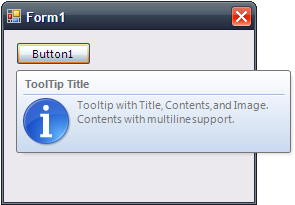
I can manually do this with a png via propertygrid of any control, manually. I assumed .SetToolTipImage() method sets an image for all programmatically.
Here's the commands list/description:

If standard ToolTip met the tooltip-title and its icon was below, next to the description with a bit larger icons, I definitely would stick to built-in controls which always make me feeling relief and ease.
Last edited by pourkascheff; Mar 9th, 2023 at 04:00 PM.
-
Mar 9th, 2023, 04:55 PM
#4
Re: An Image conversion problem
 Originally Posted by pourkascheff

Sorry, I didn't follow. I will reread your reply but still digesting it is quite a huge work...
I can manually do this with a png via propertygrid of any control, manually. I assumed .SetToolTipImage() method sets an image for all programmatically.
Here's the commands list/description:
If standard ToolTip met the tooltip-title and its icon was below, next to the description with a bit larger icons, I definitely would stick to built-in controls which always make me feeling relief and ease.
The screenshot of the intellisense tells you that the SetToolTipImage methods takes two parameters and that the image is the second parameter. This is also exactly what jmcilhinney told you in the 2nd post of this thread.
-
Mar 9th, 2023, 05:22 PM
#5
Thread Starter
Hyperactive Member
Re: An Image conversion problem
Can you try with another words about required obj? A code example would be fantastic. What does it mean by object? I've never encounter with one. (Maybe in that timezone strings to object or vice versa I remember).
-
Mar 9th, 2023, 05:28 PM
#6
Re: An Image conversion problem
Timezone strings? What is even happening in this thread?
Originally Posted by jmcilhinney
You showed the signature of SetToolTipImage yourself and so you know it has two parameters, not one, and the second is the Image object. The first is the control on which the ToolTip is to be displayed with the specified Image. You might want a ToolTip displayed on a Button with one Image, on a TextBox with a different Image and on a Label with no Image. If you do it in the designer, you set the property on each of those controls. If you do it in code, you call the method and pass each of those controls as the first argument.
I've bolded it for you. I can't come there and type the code for you. Otherwise, there's always curling.
-
Mar 10th, 2023, 08:08 AM
#7
Thread Starter
Hyperactive Member
Re: An Image conversion problem
Originally Posted by OptionBase1
Timezone strings? What is even happening in this thread?
XD It was a previous thread targeting similar object problem of mine. My bad.
Oh! Yes, it works:
Code:
    Private Sub Form3_Load(sender As Object, e As EventArgs) Handles MyBase.Load
        ToolTip1.SetToolTipImage(Button1, SystemIcons.Exclamation.ToBitmap)
    End Sub
How can I set only one image for all controls? Is there a way to call them all instead of performing a for-loop to do it for all controls? (Only controls which already has a non-empty tooltip title and caption.)
-
Mar 10th, 2023, 08:45 AM
#8
Re: An Image conversion problem
Originally Posted by pourkascheff
How can I set only one image for all controls? Is there a way to call them all instead of performing a for-loop to do it for all controls? (Only controls which already has a non-empty tooltip title and caption.)
No, you would have to use a loop with an If statement or maybe a LINQ query with a filter. The method needs to be called once for each control.
-
Mar 10th, 2023, 10:54 AM
#9
Thread Starter
Hyperactive Member
Re: An Image conversion problem
And how it could be?
For Each Control in Me.ControlCollection
ToolTip1.SetToolTipImage(Control, SystemIcons.Information.ToBitmap)
Next
?
-
Mar 10th, 2023, 09:41 PM
#10
Re: An Image conversion problem
How you get the list of controls is up to you and may depend on the specifics of your form design. If you want to do it for every control that is directly on the form and no others then you could do this:
vb.net Code:
Dim img = SystemIcons.Information.ToBitmap()
 For Each cntrl In Controls
    ToolTip1.SetToolTipImage(cntrl, img)
Next
Note that I have created one Bitmap and used it repeatedly, rather than creating a new Bitmap object for every control when they will all be the same.
If the list of controls you want to use is different then you'll have to use different means to get it. You haven't explained what you want so we can't explain how to get it.
Tags for this Thread
 Posting Permissions
- You may not post new threads
- You may not post replies
- You may not post attachments
- You may not edit your posts
-
Forum Rules
|
Click Here to Expand Forum to Full Width
|



 Reply With Quote


