|

-
Nov 17th, 2021, 09:24 AM
#3281
Re: CommonControls (Replacement of the MS common controls)
 Originally Posted by Krool

Originally Posted by Elroy
Hey Krool ... on your RichTextBox, you made the .Text property accept full Unicode. I'm wondering why you didn't do the same to the .TextRTF property?
I do sometimes use something like WordPad to generate an RTF string, and then use it in my code. I just discovered that you can't use Unicode while setting this .TextRTF property.
I don't know what you mean. The SF_RTF is ANSI always, also in WordPad.
The SF_UNICODE flag cannot be combined with SF_RTF.
Ahhh, you are correct. I didn't think it through that far. I just took a small RTF string and used ChrW to put some Unicode characters in it, and it didn't work. And, I now realize, per RTF specifications, it shouldn't have worked.
To see this, I just fired up WordPad and put some Unicode characters into a document and then saved it. All I typed in was 111[alt-1234]222 and then saved it:
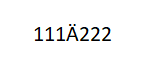
Here's the resulting RTF string:
{\rtf1\ansi\ansicpg1252\deff0\nouicompat\deflang1033{\fonttbl{\f0\fnil\fcharset0 Calibri;}{\f1\fnil\fcharset204 Calibri;}}
{\*\generator Riched20 10.0.19041}\viewkind4\uc1
\pard\sa200\sl276\slmult1\f0\fs22 111\f1\lang1049\u1234?\f0\lang1033 222\par
}
I bolded and made red the Unicode character. I now see that we must use the \u escape to get unicode characters into our RTF string.
So, it's all good.
Thanks,
Elroy
Any software I post in these forums written by me is provided "AS IS" without warranty of any kind, expressed or implied, and permission is hereby granted, free of charge and without restriction, to any person obtaining a copy. To all, peace and happiness.
-
Nov 17th, 2021, 09:57 PM
#3282
Addicted Member

Re: CommonControls (Replacement of the MS common controls)
Originally Posted by softv
Dear Krool,
I observed the following with respect to VirtualCombo.
1. In your demo, I changed the style of 'VirtualCombo1' to 0 and then ran the demo.
2. In the starting screen, I clicked the combo's chevron to see the list drop down and selected an item (say 'item6').
3. Then, I clicked the chevron again to close the list.
4. Then, I again clicked the chevron to see the list drop down.
5. What happens now is that the first 2 characters "it" get displayed (highlighted) in the typing area and 'item0' gets selected in the list.
6. If I am right, I think this happens because "VListBox1_FindVirtualItem" event gets called with SearchText as "it", when I click the chevron again (in Step 4)
I actually tried with one of my own VirtualCombos too with some words filled in it (Apple, Bag, Basket, Ball, Cat). Same thing happens. For instance, I select 'Ball' and close the list. Then, if I click the chevron again, 'Ba' appears highlighted in the typing area with 'Bag' selected in the list.
So, what to do if the above issue should not arise?
Taking this opportunity to thank you once again for all your free controls.
Kind regards.
Dear Krool,
If and when your time permits, kindly please let me know whether any solution exists for the issue above I have observed (I have provided the steps to produce it too).
The issue again, in a gist, is:
The selected item in a VirtualCombo changes to some other item upon DropDown of the list again. Not only that. The first two characters in the new(but wrong) item gets displayed in the typing area, in highlighted state. This issue happens when the style of the virtual combo is set to 0 (vbcStyleDropDownCombo).
Thanks and Kind regards.
-
Nov 19th, 2021, 09:35 PM
#3283
Hyperactive Member
Re: CommonControls (Replacement of the MS common controls)
Krool,
I used to have built-in Help for 2-3 lines for the selected control property at the bottom of the property window. Now it is gone. Do you how I can get that feature back? Thanks.
-
Nov 19th, 2021, 11:19 PM
#3284
Hyperactive Member
Re: CommonControls (Replacement of the MS common controls)
Never mind. I figured it out...
-
Nov 28th, 2021, 09:26 PM
#3285
Re: CommonControls (Replacement of the MS common controls)
Hello Krool,
I want to report something FYI:
I wanted to change some graphical style checkboxes in a program in order to show them themed, so I added your CheckBoxW from Elroy's splitted controls (BTW thanks Elroy for that work too).
I ran the program and then I found an error of "File not found".
The problem was your FileLen overwrite implementation, the file exists and is a mdb database file that is currently open, I'm not sure if in that option that I entered it is open exclusively or not, I can investigate that if you want.
The issue is that it raised the error as File not found at the line:
Code:
Err.Raise Number:=53, Description:="File not found: '" & PathName & "'"
I resolved the issue commenting out all the "(VB-Overwrite)" functions in your Common.bas since I don't need Unicode support in this program, but I wanted to report it to you in case you want to investigate and possibly fix this issue.
-
Nov 29th, 2021, 01:12 AM
#3286
Fanatic Member

 RichtTextBox file loading performance problem RichtTextBox file loading performance problem
VBCCR 1.7.35
Hi krool,
i ran into a performance problem with the RichTextBox using Win10/11 with the latest updates.
Loading a 14mb unicode txt file takes forever (i killed the app after 15 minutes).
The CPU was around 40-50% and the HD was busy with loading too.
my code to load the txt file:
Code:
rtfLog.LoadFile sLogFile, RtfLoadSaveFormatUnicodeText
any idea how to fix that problem?
Does anyone know an alternative loading method to load large unicode txt files into a RichTextBox?
Last edited by Mith; Nov 29th, 2021 at 01:19 AM.
-
Nov 29th, 2021, 01:50 AM
#3287
Fanatic Member
Re: RichtTextBox file loading performance problem
Originally Posted by Mith
Loading a 14mb unicode txt file takes forever (i killed the app after 15 minutes).
The solution for this problem was to remove the code to set the font before & after loading the text file!
Changing the font after loading a large text file and the RichTextBox-control hangs "forever"...
dunno if this can be fixed by krool or its a "feature" of the RichTextBox :|
-
Nov 29th, 2021, 05:21 AM
#3288
Re: CommonControls (Replacement of the MS common controls)
Originally Posted by Eduardo-
Hello Krool,
I want to report something FYI:
I wanted to change some graphical style checkboxes in a program in order to show them themed, so I added your CheckBoxW from Elroy's splitted controls (BTW thanks Elroy for that work too).
I ran the program and then I found an error of "File not found".
The problem was your FileLen overwrite implementation, the file exists and is a mdb database file that is currently open, I'm not sure if in that option that I entered it is open exclusively or not, I can investigate that if you want.
The issue is that it raised the error as File not found at the line:
Code:
Err.Raise Number:=53, Description:="File not found: '" & PathName & "'"
I resolved the issue commenting out all the "(VB-Overwrite)" functions in your Common.bas since I don't need Unicode support in this program, but I wanted to report it to you in case you want to investigate and possibly fix this issue.
Thanks. I used GetFileSize API which requires a hFile handle. Which is problematic for ERROR_SHARING_VIOLATION.
So, I will change soon it to below code..
Code:
Private Type WIN32_FILE_ATTRIBUTE_DATA
dwFileAttributes As Long
FTCreationTime As FILETIME
FTLastAccessTime As FILETIME
FTLastWriteTime As FILETIME
nFileSizeHigh As Long
nFileSizeLow As Long
End Type
Private Declare Function GetFileAttributesEx Lib "kernel32" Alias "GetFileAttributesExW" (ByVal lpFileName As Long, ByVal fInfoLevelId As Long, ByVal lpFileInformation As Long) As Long

' (VB-Overwrite)
Public Function FileLen(ByVal PathName As String) As Variant
Dim FAD As WIN32_FILE_ATTRIBUTE_DATA
If Left$(PathName, 2) = "\\" Then PathName = "UNC\" & Mid$(PathName, 3)
If GetFileAttributesEx(StrPtr("\\?\" & PathName), 0, VarPtr(FAD)) <> 0 Then
    FileLen = CDec(0)
    VarDecFromI8 FAD.nFileSizeLow, FAD.nFileSizeHigh, FileLen
Else
    Err.Raise Number:=53, Description:="File not found: '" & PathName & "'"
End If
End Function
-
Dec 17th, 2021, 09:16 PM
#3289
Fanatic Member
RichtextBox text color - different behavior since Windows 8/10/11
VBCCR 1.7.35
Hi krool,
i use the follwing code to set the background color to black and the text color to white before i load a text file into the RichtextBox:
Code:
rtf1.TextMode = RtfTextModeRichText
rtf1.Text = "Please wait..."
rtf1.BackColor = vbBlack
rtf1.SelStart = 0
rtf1.SelLength = Len(rtf1.Text)
rtf1.SelColor = vbWhite
rtf1.LoadFile sLogFile, RtfLoadSaveFormatUnicodeText
The code works fine using Windows 7 and the loaded text will have the correct text color: a black background with white text.
The problem comes with Windows 8/10/11: the text color of the loaded text is not white anymore; it's still black (the standard color); and now i have black text on a black background!
My questions:
1. Do you have any idea why the RichtextBox behaves different when loading a file using Win8/10/11?
2. Does anyone know a solution for Win8/10/11 to set the text color BEFORE loading a text file?
greetings Mith
PS: I already know that i can change the text color after i loaded the logfile, but this is practically impossible because it takes forever (the app hangs) to change the selected color with ".SelColor" when loading large text files (1/10/50/100mb...).
Last edited by Mith; Dec 18th, 2021 at 02:04 AM.
-
Dec 18th, 2021, 05:40 AM
#3290
Re: RichtextBox text color - different behavior since Windows 8/10/11
Originally Posted by Mith
PS: I already know that i can change the text color after i loaded the logfile, but this is practically impossible because it takes forever (the app hangs) to change the selected color with ".SelColor" when loading large text files (1/10/50/100mb...).
Whilst not an answer, how to fix the ".SelColor"-Problem... I'd say,
that a RichTextBox is not the ideal Control for a "Log-Viewer-for-large-Files".
Any virtual Grid or List-Control (heck, even a simple PictureBox) can solve the problem of:
loading, visualizing (and scrolling through) a 100MB-log with a first-load-reaction-time between 0.2-0.8 seconds
That time mostly determined by, how fast you can load that file from SSD or Disk into a ByteArray.
Olaf
-
Dec 18th, 2021, 07:04 AM
#3291
Fanatic Member
Re: RichtextBox text color - different behavior since Windows 8/10/11
Originally Posted by Schmidt
Any virtual Grid or List-Control (heck, even a simple PictureBox) can solve the problem of:
loading, visualizing (and scrolling through) a 100MB-log with a first-load-reaction-time between 0.2-0.8 seconds
Thanks for the feedback Olaf.
Do you know some vb examples for the Grid/List/PictureBox solution to view large text files?
-
Dec 18th, 2021, 02:55 PM
#3292
Re: RichtextBox text color - different behavior since Windows 8/10/11
Originally Posted by Mith
Thanks for the feedback Olaf.
Do you know some vb examples for the Grid/List/PictureBox solution to view large text files?
Below comes a small example, which is able to read a 50MB LogFile (with about 200000 Lines):
- in PCode/IDE-mode, taking 0.5sec for LineParsing + first visualization
- when native-compiled: 0.12sec for LineParsing + first visualization
- native-compiled, all ext. Options: 60millisec for LineParsing + first visualization
It is based (to stay on-topic in this thread) on Krools VListBox -
so you will need to place a VListBox1 on an otherwise empty Form:
Code:
 Option Explicit

Private Declare Function MultiByteToWideChar Lib "kernel32" (ByVal codePage As Long, ByVal dwFlags As Long, ByVal lpMultiByteStr As Long, ByVal cchMultiByte As Long, ByVal lpWideCharStr As Long, ByVal cchWideChar As Long) As Long

Private UTF8() As Byte, Offsets() As Long

Private Sub Form_Load()
  Font.Name = "Consolas": Font.Size = 10: Set VListBox1.Font = Font 'set the Render- and TextWidth-measurement-font
  UTF8 = ReadFileBytes("c:\temp\test2.txt") 'read the File-Content into a ByteArray (we assume UTF8 here)
  VListBox1.ListCount = GetLines(UTF8, Offsets) 'set the VList-Count by parsing the LineCount from the Utf8-Bytes
End Sub

Private Sub Form_Resize()
  VListBox1.Move 0, 0, ScaleWidth, ScaleHeight
End Sub

Private Sub VListBox1_GetVirtualItem(ByVal Item As Long, Text As String)
  Text = GetLine(Item)
  If VListBox1.HorizontalExtent < TextWidth(Text) Then VListBox1.HorizontalExtent = TextWidth(Text)
End Sub

Private Function GetLines(UTF8() As Byte, Offsets() As Long) As Long
  Dim OffsUB As Long: OffsUB = 1024: ReDim Offsets(OffsUB)

  Dim i As Long, j As Long, LF As Byte
  For i = 0 To UBound(UTF8)
    If UTF8(i) = 13 Or UTF8(i) = 10 Then LF = UTF8(i): Exit For
  Next
  For i = 0 To UBound(UTF8)
    If UTF8(i) = LF Then
       If j >= OffsUB Then OffsUB = 1.5 * OffsUB: ReDim Preserve Offsets(OffsUB)
       j = j + 1: Offsets(j) = i
    End If
  Next
  If UTF8(i - 1) <> 13 And UTF8(i - 1) <> 10 Then
     If j >= OffsUB Then OffsUB = 1.5 * OffsUB: ReDim Preserve Offsets(OffsUB)
     j = j + 1: Offsets(j) = i
  End If
  GetLines = j
End Function

Private Function GetLine(ByVal ZeroBasedLineIdx As Long) As String
  Dim Offs As Long: Offs = Offsets(ZeroBasedLineIdx)
            If UTF8(Offs) = 13 Then Offs = Offs + 1
            If UTF8(Offs) = 10 Then Offs = Offs + 1
  Dim BLen As Long: BLen = Offsets(ZeroBasedLineIdx + 1) - Offs

  If BLen > 0 Then 'UTF8-to-BSTR conversion, directly from the UTF8-bytearray
     GetLine = Space$(MultiByteToWideChar(65001, 0, VarPtr(UTF8(Offs)), BLen, 0, 0))
     MultiByteToWideChar 65001, 0, VarPtr(UTF8(Offs)), BLen, StrPtr(GetLine), Len(GetLine)
  End If
End Function

Private Function ReadFileBytes(FileName As String) As Byte()
  Dim FNr As Long: FNr = FreeFile
  On Error GoTo 1
  Open FileName For Binary As FNr
       ReDim ReadFileBytes(LOF(FNr) - 1)
       Get FNr, , ReadFileBytes
1 If Err Then ReadFileBytes = StrConv(Err.Description, vbFromUnicode)
  Close FNr
End Function
HTH
Olaf
-
Dec 18th, 2021, 08:47 PM
#3293
Fanatic Member
Re: RichtextBox text color - different behavior since Windows 8/10/11
Originally Posted by Schmidt
Below comes a small example, which is able to read a 50MB LogFile
That's a good start to create a text viewer for large files!
Thanks a lot for the example!
-
Dec 19th, 2021, 05:27 PM
#3294
Re: RichtextBox text color - different behavior since Windows 8/10/11
Originally Posted by Mith
That's a good start to create a text viewer for large files!
I'd think so...
Just add a little context-menu on Mouse-RightClick, which shows e.g. Options like:
> Show Line-Details...
...(a little PopupForm, showing the current Line transposed vertically, split into Timestamp and other Info-Chunks)
> Copy +- 50 Lines to ClipBoard
> Copy this +100 additional Lines to ClipBoard
> Refresh and move to last Line (re-reading the current FileContents)
and the whole thing already becomes something useful...
Olf
-
Dec 19th, 2021, 08:36 PM
#3295
Fanatic Member
Re: RichtextBox text color - different behavior since Windows 8/10/11
Originally Posted by Schmidt
Just add a little context-menu on Mouse-RightClick, which shows e.g. Options like:Olf
I still working on the basic functions.
I have completely rewritten your code to optimize everything for Unicode.
For example, i load the file content via CreateFileWide/ReadFile to support file/dirs with unicode characters in the name.
I also added a algo to determine different file encodings:
UTF8, UTF8NoBOM, UTF16LE, UTF16LEnoBOM, UTF16BE, UTF16BEnoBOM, ANSI
I also replaced the ANSI function "TextWidth" at event "VListBox1_GetVirtualItem" with API "GetTextExtentPoint32W" to get the correct text width.
With the ANSI function the scrollbar width was mostly wrong.
Next step is to implement a search function. Later i will add different context menu actions.
btw, im not sure, but maybe this is a bug of the Virtual List Control:
When i load a file and set ListCount of the control, the event VListBox1_GetVirtualItem starts populating and the property HorizontalExtent will be set but the scrollbar doesnt show up.
I need to move the mouse cursor to the invisible horizontal scrollbar to make the bar visible.
Tested with Win7 IDE and compilied exe.
Maybe i should report this to krool (or maybe he read this) ?
-
Dec 20th, 2021, 03:49 AM
#3296
Re: RichtextBox text color - different behavior since Windows 8/10/11
Originally Posted by Mith
... still working on the basic functions.
Sure, ... whilst Krool has a (unicode-capable) TextWidth-Method built-in on the ListView -
(which allows virtual mode as well BTW) - it is missing on the VirtualListBox
(where it would make sense as well, as you found out).
As for the render-problems (with the H-ScrollBar) on Win7 - I don't see them on my Win10 here...
That's something for Krool to decide (whether it is worthwhile to test and fix for this older Win-OS).
Olaf
Last edited by Schmidt; Dec 20th, 2021 at 03:56 AM.
-
Dec 20th, 2021, 04:38 AM
#3297
Fanatic Member
Re: RichtextBox text color - different behavior since Windows 8/10/11
Originally Posted by Schmidt
As for the render-problems (with the H-ScrollBar) on Win7 - I don't see them on my Win10 here...
The h-scrollbar problem has nothing to do with win7. I did another test with the compiled exe under win11 and got the same result.
The H-Scrollbar is not visible until i move the cursor over the bar or i minimize & restore the window!
No h-scrollbar after setting the HorizontalExtent property:
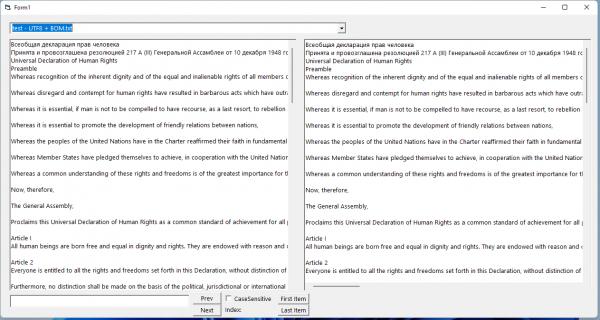
after minimize & restore:
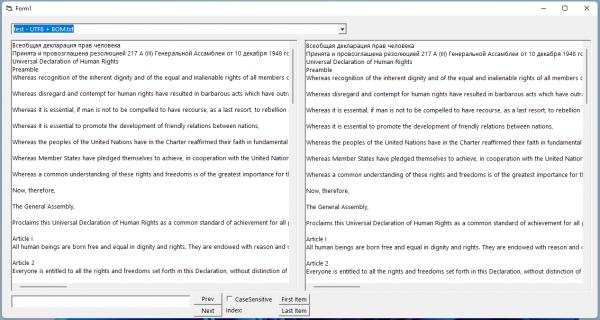
The left control is the VListBox and the right control is a RichtextBox (to compare the displayed text).
-
Dec 20th, 2021, 04:54 AM
#3298
Fanatic Member
-
Dec 20th, 2021, 05:18 AM
#3299
Re: CommonControls (Replacement of the MS common controls)
Mith did you try a VListBox1.Refresh after setting the HorizontalExtent ? If this works I may enforce an "invalidation" within the HorizontalExtent property.
-
Dec 20th, 2021, 06:14 AM
#3300
Fanatic Member
Re: CommonControls (Replacement of the MS common controls)
Originally Posted by Krool
Mith did you try a VListBox1.Refresh after setting the HorizontalExtent ? If this works I may enforce an "invalidation" within the HorizontalExtent property.
I tried that already inside the GetVirtualItem event but it leads to an infinitive loop of populating the control!
if i manually use .refresh via a command button after the populating is done the h-scrollbar gets visible.
i guess we need a new event like "After_Populating_Done" to trigger a refresh automatically.
Last edited by Mith; Dec 20th, 2021 at 06:20 AM.
-
Dec 20th, 2021, 06:53 AM
#3301
Fanatic Member
Re: CommonControls (Replacement of the MS common controls)
no need to change or add anything, i found a easy solution for the H-Scrollbar problem:
after the code:
vlbLog.ListCount = GetLineCountFromTextArray
i use this command now:
and voila the h-scrollbar appears!
...or maybe you should do this refresh automatically inside the .ListCount property to fix the scrollbar display problem?
-
Dec 20th, 2021, 06:40 PM
#3302
Addicted Member
Re: RichtextBox text color - different behavior since Windows 8/10/11
Originally Posted by Schmidt
Whilst not an answer, how to fix the ".SelColor"-Problem... I'd say,
that a RichTextBox is not the ideal Control for a "Log-Viewer-for-large-Files".
Any virtual Grid or List-Control (heck, even a simple PictureBox) can solve the problem of:
loading, visualizing (and scrolling through) a 100MB-log with a first-load-reaction-time between 0.2-0.8 seconds
That time mostly determined by, how fast you can load that file from SSD or Disk into a ByteArray.
Olaf
Thanks a TON, olaf.
I had always thought that I should try loading large text files in Krool's VBFlexGrid and try but never got time for the same, as other things got up in the priority list. So, is it possible Olaf, with VBFlexGrid too?
I have not tried your VListBox code yet. I just thought of thanking you first, promptly, after reading your solution using VListBox. Will try it soon. Thanks again.
Kind Regards.
-
Dec 20th, 2021, 06:47 PM
#3303
Addicted Member
Re: RichtextBox text color - different behavior since Windows 8/10/11
Originally Posted by Mith
I still working on the basic functions.
I have completely rewritten your code to optimize everything for Unicode.
For example, i load the file content via CreateFileWide/ReadFile to support file/dirs with unicode characters in the name.
I also added a algo to determine different file encodings:
UTF8, UTF8NoBOM, UTF16LE, UTF16LEnoBOM, UTF16BE, UTF16BEnoBOM, ANSI
I also replaced the ANSI function "TextWidth" at event "VListBox1_GetVirtualItem" with API "GetTextExtentPoint32W" to get the correct text width.
With the ANSI function the scrollbar width was mostly wrong. ... .. .
...
..
.
Dear Mith,
Thanks a lot. Interested in your rewritten code, if you can share it, please.
Esp. interested in your algo which can correctly determine "UTF8 with no BOM" too.
Kind Regards.
-
Dec 20th, 2021, 06:51 PM
#3304
Addicted Member
Re: CommonControls (Replacement of the MS common controls)
Originally Posted by softv
Dear Krool,
If and when your time permits, kindly please let me know whether any solution exists for the issue above I have observed (I have provided the steps to produce it too).
The issue again, in a gist, is:
The selected item in a VirtualCombo changes to some other item upon DropDown of the list again. Not only that. The first two characters in the new(but wrong) item gets displayed in the typing area, in highlighted state. This issue happens when the style of the virtual combo is set to 0 (vbcStyleDropDownCombo).
Thanks and Kind regards.
I am still very much looking forward for a solution for this from you, Krool. Would be much thankful to you if you can provide the same. Thanks in advance.
Kind regards.
-
Dec 20th, 2021, 10:14 PM
#3305
Hyperactive Member
Re: CommonControls (Replacement of the MS common controls)
I just updated the documentation and compile/update utility which now handles VBFLXGRDxx.OCX files up through the just-released v1.5 and VBCCRxx.OCX up through the current v1.7. It is located at the bottom of post #1 in this thread.
-
Dec 20th, 2021, 11:14 PM
#3306
Fanatic Member
Re: RichtextBox text color - different behavior since Windows 8/10/11
Originally Posted by softv
Esp. interested in your algo which can correctly determine "UTF8 with no BOM" too.
how-to-detect-utf-8-based-encoded-strings/
-
Dec 21st, 2021, 12:06 AM
#3307
Addicted Member
Re: RichtextBox text color - different behavior since Windows 8/10/11
Originally Posted by Mith
thank you so much.
kind regards.
-
Dec 21st, 2021, 12:52 AM
#3308
Fanatic Member
Re: RichtextBox text color - different behavior since Windows 8/10/11
Originally Posted by softv
thank you so much.
kind regards.
Read this too: VB6-The-case-for-UTF-8
-
Dec 21st, 2021, 03:16 AM
#3309
Re: RichtextBox text color - different behavior since Windows 8/10/11
Originally Posted by softv
I had always thought that I should try loading large text files in Krool's VBFlexGrid and try but never got time for the same, as other things got up in the priority list. So, is it possible Olaf, with VBFlexGrid too?
Sure... relatively easy to do via the IVBFlexDataSource interface, when you implement it in a little Class like the one below.
Into a Class, named cTextDataSource:
Code:
Option Explicit

Implements IVBFlexDataSource

Private Declare Function MultiByteToWideChar Lib "kernel32" (ByVal codePage As Long, ByVal dwFlags As Long, ByVal lpMultiByteStr As Long, ByVal cchMultiByte As Long, ByVal lpWideCharStr As Long, ByVal cchWideChar As Long) As Long

Private UTF8() As Byte, Offsets() As Long, LineCount As Long, LastLineIdx As Long, Line As String

Public Sub BindToTextFile(FG As VBFlexGrid, FileName As String)
  UTF8 = ReadFileBytes(FileName)
  LineCount = GetLines(UTF8, Offsets)
  LastLineIdx = -1

  Set FG.FlexDataSource = Me 'bind this Class (and set a few FG-defaults)
      FG.ColWidth(0) = 1800
      FG.ExtendLastCol = True
      FG.ScrollTrack = True
End Sub

Private Function ReadFileBytes(FileName As String) As Byte()
  Dim FNr As Long: FNr = FreeFile
  On Error GoTo 1
  Open FileName For Binary As FNr
       ReDim ReadFileBytes(LOF(FNr) - 1)
       Get FNr, , ReadFileBytes
1 If Err Then ReadFileBytes = StrConv(Err.Description, vbFromUnicode)
  Close FNr
End Function

Private Function GetLines(UTF8() As Byte, Offsets() As Long) As Long
  Dim OffsUB As Long: OffsUB = 1024: ReDim Offsets(OffsUB)

  Dim i As Long, j As Long, LF As Byte
  For i = 0 To UBound(UTF8)
    If UTF8(i) = 13 Or UTF8(i) = 10 Then LF = UTF8(i): Exit For
  Next
  For i = 0 To UBound(UTF8)
    If UTF8(i) = LF Then
       If j >= OffsUB Then OffsUB = 1.5 * OffsUB: ReDim Preserve Offsets(OffsUB)
       j = j + 1: Offsets(j) = i
    End If
  Next
  If UTF8(i - 1) <> 13 And UTF8(i - 1) <> 10 Then
     If j >= OffsUB Then OffsUB = 1.5 * OffsUB: ReDim Preserve Offsets(OffsUB)
     j = j + 1: Offsets(j) = i
  End If
  GetLines = j
End Function

Private Function GetLine(ByVal ZeroBasedLineIdx As Long) As String
  Dim Offs As Long: Offs = Offsets(ZeroBasedLineIdx)
            If UTF8(Offs) = 13 Then Offs = Offs + 1
            If UTF8(Offs) = 10 Then Offs = Offs + 1
  Dim BLen As Long: BLen = Offsets(ZeroBasedLineIdx + 1) - Offs

  If BLen > 0 Then 'UTF8-to-BSTR conversion, directly from the UTF8-bytearray
     GetLine = Space$(MultiByteToWideChar(65001, 0, VarPtr(UTF8(Offs)), BLen, 0, 0))
     MultiByteToWideChar 65001, 0, VarPtr(UTF8(Offs)), BLen, StrPtr(GetLine), Len(GetLine)
  End If
End Function

'***** Implementation of IVBFlexDataSource *****
Private Function IVBFlexDataSource_GetRecordCount() As Long
  IVBFlexDataSource_GetRecordCount = LineCount
End Function

Private Function IVBFlexDataSource_GetFieldCount() As Long
  IVBFlexDataSource_GetFieldCount = 2
End Function

Private Function IVBFlexDataSource_GetFieldName(ByVal Field As Long) As String
  Select Case Field
    Case 0: IVBFlexDataSource_GetFieldName = "TimeStamp"
    Case 1: IVBFlexDataSource_GetFieldName = "LogInfo"
  End Select
End Function

Private Function IVBFlexDataSource_GetData(ByVal Field As Long, ByVal Record As Long) As String
  If LastLineIdx <> Record Then
     LastLineIdx = Record
     Line = GetLine(Record)
  End If
  Select Case Field
    Case 0: IVBFlexDataSource_GetData = Left$(Line, 19)
    Case 1: IVBFlexDataSource_GetData = Mid$(Line, 21)
  End Select
End Function

Private Sub IVBFlexDataSource_SetData(ByVal Field As Long, ByVal Record As Long, ByVal NewData As String)
End Sub
And this into a Form for testing with one of your own Log- or TextFiles:
(the Form needs an instance of VBFlexgrid1, ... either in version 1.4. or in newest version 1.5)
Code:
Option Explicit

Const FileName = "c:\temp\test3.txt"

Private FlexDS As New cTextDataSource

Private Sub Form_Load()
    VBFlexGrid1.Font.Name = "Arial"
    FlexDS.BindToTextFile VBFlexGrid1, FileName
End Sub

Private Sub Form_Resize()
    VBFlexGrid1.Move 0, 0, ScaleWidth, ScaleHeight
End Sub
Since the FlexGrid is normally used for "Multi-Column-Data",
I've artificially created a LogFile with a leading (ISO) Timestamp per Line, to have more than one Column "to split" for the FG.
Used the RC6 for that, with the following snippet:
Code:
  With New_c.StringBuilder
    Dim i As Long, D As Double: D = Now
    For i = 1 To 100000
      D = D + 1 / 86400
      .Add Format$(D, "yyyy\-mm\-dd hh\:nn\:ss")
      .AddNL " Some loooooooooooooooooonger Log-Entry-Line " & i
    Next
    New_c.FSO.WriteByteContent FileName, .ToUTF8
  End With
HTH
Olaf
-
Dec 21st, 2021, 04:11 AM
#3310
Addicted Member
Re: RichtextBox text color - different behavior since Windows 8/10/11
Originally Posted by Schmidt
Sure... relatively easy to do via the IVBFlexDataSource interface, when you implement it in a little Class like the one below.
Into a Class, named cTextDataSource:
Code:
Option Explicit

Implements IVBFlexDataSource

Private Declare Function MultiByteToWideChar Lib "kernel32" (ByVal codePage As Long, ByVal dwFlags As Long, ByVal lpMultiByteStr As Long, ByVal cchMultiByte As Long, ByVal lpWideCharStr As Long, ByVal cchWideChar As Long) As Long

Private UTF8() As Byte, Offsets() As Long, LineCount As Long, LastLineIdx As Long, Line As String

Public Sub BindToTextFile(FG As VBFlexGrid, FileName As String)
  UTF8 = ReadFileBytes(FileName)
  LineCount = GetLines(UTF8, Offsets)
  LastLineIdx = -1

  Set FG.FlexDataSource = Me 'bind this Class (and set a few FG-defaults)
      FG.ColWidth(0) = 1800
      FG.ExtendLastCol = True
      FG.ScrollTrack = True
End Sub

Private Function ReadFileBytes(FileName As String) As Byte()
  Dim FNr As Long: FNr = FreeFile
  On Error GoTo 1
  Open FileName For Binary As FNr
       ReDim ReadFileBytes(LOF(FNr) - 1)
       Get FNr, , ReadFileBytes
1 If Err Then ReadFileBytes = StrConv(Err.Description, vbFromUnicode)
  Close FNr
End Function

Private Function GetLines(UTF8() As Byte, Offsets() As Long) As Long
  Dim OffsUB As Long: OffsUB = 1024: ReDim Offsets(OffsUB)

  Dim i As Long, j As Long, LF As Byte
  For i = 0 To UBound(UTF8)
    If UTF8(i) = 13 Or UTF8(i) = 10 Then LF = UTF8(i): Exit For
  Next
  For i = 0 To UBound(UTF8)
    If UTF8(i) = LF Then
       If j >= OffsUB Then OffsUB = 1.5 * OffsUB: ReDim Preserve Offsets(OffsUB)
       j = j + 1: Offsets(j) = i
    End If
  Next
  If UTF8(i - 1) <> 13 And UTF8(i - 1) <> 10 Then
     If j >= OffsUB Then OffsUB = 1.5 * OffsUB: ReDim Preserve Offsets(OffsUB)
     j = j + 1: Offsets(j) = i
  End If
  GetLines = j
End Function

Private Function GetLine(ByVal ZeroBasedLineIdx As Long) As String
  Dim Offs As Long: Offs = Offsets(ZeroBasedLineIdx)
            If UTF8(Offs) = 13 Then Offs = Offs + 1
            If UTF8(Offs) = 10 Then Offs = Offs + 1
  Dim BLen As Long: BLen = Offsets(ZeroBasedLineIdx + 1) - Offs

  If BLen > 0 Then 'UTF8-to-BSTR conversion, directly from the UTF8-bytearray
     GetLine = Space$(MultiByteToWideChar(65001, 0, VarPtr(UTF8(Offs)), BLen, 0, 0))
     MultiByteToWideChar 65001, 0, VarPtr(UTF8(Offs)), BLen, StrPtr(GetLine), Len(GetLine)
  End If
End Function

'***** Implementation of IVBFlexDataSource *****
Private Function IVBFlexDataSource_GetRecordCount() As Long
  IVBFlexDataSource_GetRecordCount = LineCount
End Function

Private Function IVBFlexDataSource_GetFieldCount() As Long
  IVBFlexDataSource_GetFieldCount = 2
End Function

Private Function IVBFlexDataSource_GetFieldName(ByVal Field As Long) As String
  Select Case Field
    Case 0: IVBFlexDataSource_GetFieldName = "TimeStamp"
    Case 1: IVBFlexDataSource_GetFieldName = "LogInfo"
  End Select
End Function

Private Function IVBFlexDataSource_GetData(ByVal Field As Long, ByVal Record As Long) As String
  If LastLineIdx <> Record Then
     LastLineIdx = Record
     Line = GetLine(Record)
  End If
  Select Case Field
    Case 0: IVBFlexDataSource_GetData = Left$(Line, 19)
    Case 1: IVBFlexDataSource_GetData = Mid$(Line, 21)
  End Select
End Function

Private Sub IVBFlexDataSource_SetData(ByVal Field As Long, ByVal Record As Long, ByVal NewData As String)
End Sub
And this into a Form for testing with one of your own Log- or TextFiles:
(the Form needs an instance of VBFlexgrid1, ... either in version 1.4. or in newest version 1.5)
Code:
Option Explicit

Const FileName = "c:\temp\test3.txt"

Private FlexDS As New cTextDataSource

Private Sub Form_Load()
    VBFlexGrid1.Font.Name = "Arial"
    FlexDS.BindToTextFile VBFlexGrid1, FileName
End Sub

Private Sub Form_Resize()
    VBFlexGrid1.Move 0, 0, ScaleWidth, ScaleHeight
End Sub
Since the FlexGrid is normally used for "Multi-Column-Data",
I've artificially created a LogFile with a leading (ISO) Timestamp per Line, to have more than one Column "to split" for the FG.
Used the RC6 for that, with the following snippet:
Code:
  With New_c.StringBuilder
    Dim i As Long, D As Double: D = Now
    For i = 1 To 100000
      D = D + 1 / 86400
      .Add Format$(D, "yyyy\-mm\-dd hh\:nn\:ss")
      .AddNL " Some loooooooooooooooooonger Log-Entry-Line " & i
    Next
    New_c.FSO.WriteByteContent FileName, .ToUTF8
  End With
HTH
Olaf
Only just a moment ago, I posted a query in Krool's 'VBFlexGrid Control' thread about whether we can bind a VBFlexGrid to a database table (for a different purpose though). In fact, it so happened that I mentioned about you too in that post! 
And, after posting it, I came here (to the 'Common Controls' thread) almost immediately to check for any new posts and I find yours on how to load large text files in the VBFlexGrid!!!!! What a coincidence and what a joy! Thanks a TON, Olaf. Will try it out soon in the recently released 1.5 Ocx.
In case large RichText (with all formatting - B/I/U/etc. - intact) has to be loaded and shown, then which control of Krool's will be ideal? (since VBFlexGrid or ListBox cannot show Rich Text, if I am right). Or, using PictureBox only will be the ideal one? If so, what would be the code as a startup for the same? Kindly please show me the way, since showing large RichText content also will be the case for me.
Kind regards.
Last edited by softv; Dec 21st, 2021 at 04:16 AM.
-
Dec 21st, 2021, 04:36 AM
#3311
Re: RichtextBox text color - different behavior since Windows 8/10/11
Originally Posted by softv
In case large RichText (with all formatting - B/I/U/etc. - intact) has to be loaded and shown,
then which control of Krool's will be ideal?
Ermm, the RichTextBox-Control? 
The RichTextBox-Ctl is not the right Control for "huge PlainText-Files" ...
whereas for *.rtf-files which contain extensive formatting - it simply is.
Olaf
-
Dec 21st, 2021, 12:52 PM
#3312
Re: RichtextBox text color - different behavior since Windows 8/10/11
I use this function to detect UTF8 without BOM. Just get a max of 1000 bytes from file (if less get all bytes from file)
Code:
Public Function ContainsUTF8(ByRef Source() As Byte) As Boolean
  Dim i As Long, lUBound As Long, lUBound2 As Long, lUBound3 As Long
  Dim CurByte As Byte
    lUBound = UBound(Source)
    lUBound2 = lUBound - 2
    lUBound3 = lUBound - 3
    If lUBound > 2 Then

    For i = 0 To lUBound - 1
        CurByte = Source(i)
        If (CurByte And &HE0) = &HC0 Then
        If (Source(i + 1) And &HC0) = &H80 Then
            ContainsUTF8 = True
             i = i + 1
             Else
                ContainsUTF8 = False
                Exit For
            End If
        ElseIf (CurByte And &HF0) = &HE0 Then
        ' 2 bytes
        If (Source(i + 1) And &HC0) = &H80 Then
            i = i + 1
            If i < lUBound2 Then
            If (Source(i + 1) And &HC0) = &H80 Then
                ContainsUTF8 = True
                i = i + 1
            Else
                ContainsUTF8 = False
                Exit For
            End If
                Else
                ContainsUTF8 = False
                Exit For
            End If
        Else
            ContainsUTF8 = False
            Exit For
        End If
        ElseIf (CurByte And &HF8) = &HF0 Then
        ' 2 bytes
        If (Source(i + 1) And &HC0) = &H80 Then
            i = i + 1
            If i < lUBound2 Then
               If (Source(i + 1) And &HC0) = &H80 Then
                    ContainsUTF8 = True
                    i = i + 1
                    If i < lUBound3 Then
                       If (Source(i + 1) And &HC0) = &H80 Then
                            ContainsUTF8 = True
                            i = i + 1
                        Else
                            ContainsUTF8 = False
                            Exit For
                        End If
                    Else
                        ContainsUTF8 = False
                        Exit For
                    End If
                Else
                    ContainsUTF8 = False
                    Exit For
                End If
            Else
                ContainsUTF8 = False
                Exit For
            End If
        Else
            ContainsUTF8 = False
            Exit For
        End If
      End If
    Next i
  End If
End Function
-
Dec 21st, 2021, 01:06 PM
#3313
Re: RichtextBox text color - different behavior since Windows 8/10/11
This if for UTF16, if return 1 then missing BOM is &HFEFF (LE), for 2 the missing BOM is &HFFFE (BE - BOM reading from BE is &HFEFF), else no UTF16 found.
Code:
Public Function ContainsUTF16(ByRef Source() As Byte) As Long
  Dim i As Long, lUBound As Long, lUBound2 As Long, lUBound3 As Long
  Dim CurByte As Byte, CurByte1 As Byte
  Dim CurBytes As Long, CurBytes1 As Long
    lUBound = UBound(Source)
    If lUBound > 4 Then
    CurByte = Source(0)
    CurByte1 = Source(1)
    For i = 2 To lUBound - 1 Step 2
        If CurByte1 = 0 And CurByte < 31 Then CurBytes1 = CurBytes1 + 1
        If CurByte = 0 And CurByte1 < 31 Then CurBytes = CurBytes + 1
        If Source(i) = CurByte Then
            CurBytes = CurBytes + 1
        Else
            CurByte = Source(i)
        End If
        If Source(i + 1) = CurByte1 Then
            CurBytes1 = CurBytes1 + 1
        Else
            CurByte1 = Source(i + 1)
        End If

    Next i
    End If
    If CurBytes1 = CurBytes And CurBytes1 * 3 >= lUBound Then
    ContainsUTF16 = 0
    Else
    If CurBytes1 * 3 >= lUBound Then
    ContainsUTF16 = 1
    ElseIf CurBytes * 3 >= lUBound Then
    ContainsUTF16 = 2
    Else
    ContainsUTF16 = 0
    End If
    End If
End Function
-
Dec 22nd, 2021, 10:08 AM
#3314
Addicted Member
Re: RichtextBox text color - different behavior since Windows 8/10/11
Originally Posted by Schmidt
Ermm, the RichTextBox-Control?
The RichTextBox-Ctl is not the right Control for " huge PlainText-Files" ...
whereas for *.rtf-files which contain extensive formatting - it simply is.
Olaf
you are right of course and I do use Krool's RichTextBox control only to show richtext. But then, the RichTextBox control takes (I am sure any RichTextBox control (rtb, for short) for that matter, not just Krool's) quite some time to load large .rtf files (for instance, it takes 5 seconds to load a 7.5MB rtf file in my system [with 16gb ram]). When the need is just to show the lengthy content of a .rtf file in the rtb and not anything much to do with the rtb's contents thereafter, I thought it will be great if the RichText content can load lightning fast (both from a large file and also by setting it a lengthy/long string), much similar to the plain text content (which you have written takes just 60millisec for LineParsing + first visualization, with your super code).
So, the above fast loading (as in the case of a plain text) cannot be achieved for RichText too by some/any means? That was my point of interest. If you can do that, olaf (just like you did it for plain text), nothing like it. If that cannot be done, then, is buffered loading of contents possible (as the user scrolls the rtb)? If so, will it be as seamless/same as viewing/scrolling a RichTextBox with all contents loaded fully? If so, possible for you to provide a solution for the same?
Actually, after reading your message, I thought I will re-visit that module of mine which gave me problems with RichTextBox 3 years back. The problem occurred in a specific case (of a long string) only, which took a long time to load and still further time to execute a ".SelFontCharset" on the whole text. Many a times it used to hang. I could not solve this specific case at all, after trying a lot. Finally, I just gave it up.
And, what a blessing it turned out to be, to revisit that module of mine again! Because, I could fix the problem yesterday after lots and lots of experiments. I felt overjoyed. And, all thanks to you!!! Because, but for your message, perhaps I would not have visited that module again. Well, for a problem of this kind, a veteran like you would have fixed it in a jiffy, I am sure. But, for a person like me, I needed to work it out the hard way.
On what I did to fix my problem, I will post as a reply to Mith's message so that perhaps it can help solve his problem too (regarding '.SelColor').
Always remaining in gratitude to yours and Krool's invaluable contributions to this world society.
Kind regards.
-
Dec 22nd, 2021, 10:40 AM
#3315
Addicted Member
Re: RichtextBox text color - different behavior since Windows 8/10/11
Originally Posted by Mith
VBCCR 1.7.35
Hi krool,
i use the follwing code to set the background color to black and the text color to white before i load a text file into the RichtextBox:
Code:
rtf1.TextMode = RtfTextModeRichText
rtf1.Text = "Please wait..."
rtf1.BackColor = vbBlack
rtf1.SelStart = 0
rtf1.SelLength = Len(rtf1.Text)
rtf1.SelColor = vbWhite
rtf1.LoadFile sLogFile, RtfLoadSaveFormatUnicodeText
The code works fine using Windows 7 and the loaded text will have the correct text color: a black background with white text.
The problem comes with Windows 8/10/11: the text color of the loaded text is not white anymore; it's still black (the standard color); and now i have black text on a black background!
My questions:
1. Do you have any idea why the RichtextBox behaves different when loading a file using Win8/10/11?
2. Does anyone know a solution for Win8/10/11 to set the text color BEFORE loading a text file?
greetings Mith
PS: I already know that i can change the text color after i loaded the logfile, but this is practically impossible because it takes forever (the app hangs) to change the selected color with ".SelColor" when loading large text files (1/10/50/100mb...).
Ref post: post #3314 (my reply message to Olaf)
The problem I have referred to in my abovementioned post was to do with setting a long string to a RichTextBox (rtb, for short) and thereafter immediately selecting it fully and setting its '.SelFontCharset' and '.SelFontName'.
It was taking nearly 1 minute (to sometimes even 1.5 minutes) in Windows7 (with 4gb ram), for the above process to complete. That was 3 years back. Now I have a Windows 10 system (with 16gb ram). In it, it was taking 25 seconds for the above process to complete. But, even that, it would mostly work only the first time the process took place. Other times, more often than not, it would hang, both in IDE and as an executable.
So, after lots of experiments yesterday (which continued today also), what worked finally to bring down the processing time to 5 seconds is, the following:
--
1. Setting the width and height of the rtb to 0 before starting the process (in addition to rtb.visible = false)
2. Once the process is over, setting back the height and width of the rtb to whatever it was earlier.
3. Doing the above was a real boon. Because, '.SelFontCharset' happened instantly, which was the one which used to hog the longest time in the whole process, without the above fix.
4. Now, after the above fix, the one which takes the major chunk (4 seconds) of the 5 seconds is '.SelLength'. Setting the long string (lstr, for short) to the rtb takes 1 second. '.SelLength' also happens within a second, if ScrollBars property is set to 'vbBoth' but then I need my ScrollBars to be vbVertical only. So, I could not take advantage of that.
5. Actually, I do set the font of the rtb to the same '.SelFontName' (Arial Unicode MS) at the very start itself but that does not display all the Unicode characters of lstr correctly. After setting 'rtb.text = lstr', I have to necessarily select the whole text of the rtb and set '.SelFontCharset' to 0 and '.SelFontName' to 'Arial Unicode MS' again. Then only all the characters will display correctly, as per their glyphs. Otherwise, some of the characters in some ranges would appear as boxes only. Why it happens so, I don't know. If krool can tell why and suggest a way by which the whole above process (all that processing I have to do after setting 'rtb.text = lstr') can be avoided, that would be great.
--
Note-1:
I did try out '.SelColor' too on my long text since you had difficulty with '.SelColor'. And, the result was the same, with my fix. It was instant. Otherwise (without my above fix), it was taking a considerable time (6 seconds in my system) to execute.
Note-2:
The lstr (long string) which I am referring to is 77K+ characters, half of which are spaces and the other half are multilingual characters. Basically, multilingual characters (from 'Arial Unicode MS') separated by spaces.
Note-3:
If you or somebody can come out with a way to reduce the time taken by 'rtb.text = lstr' and '.SelLength' too, that would be great. In effect, if somebody can provide a way to reduce the whole processing time itself, as such, to a millisecond, that would be great. Because, if it still takes 5 seconds in my 16gb system, I am sure the whole process would take more time in a 4gb system. Suppose it takes 30 seconds. Then, 30 seconds would be too long a time, I feel, to set an rtb with a string of 77k+ characters.
Note-4:
Yesterday I found out that introducing 'DoEvents', at some points in the above process, seemed to smoothen out the process a bit. But, today, I found out that 'rtb.Refresh' itself (in place of DoEvents) was enough to see that bit of smoothening in the process but then using 'rtb.Refresh' was causing some mild flashes in the screen. So, finally, I tried using 'rtb.ResetUndoQueue' before/after every .SelXyz setting and that looks promising for me. It is very smooth now.
I really do not know whether my fixes/findings above which worked out for me would work out for you too (in the case of your .SelColor), in a significant manner. If it does, I would be happy indeed. But, even otherwise, my fixes/findings above may be of help to somebody in this forum, now or in future, I believe. It may perhaps help krool too to come out with some enhancements (for instance, like the recent UseCrLf property) to the rtb control, in the future.
Kind regards.
-
Dec 22nd, 2021, 10:46 AM
#3316
Addicted Member
Re: RichtextBox text color - different behavior since Windows 8/10/11
Originally Posted by georgekar
I use this function to detect UTF8 without BOM. Just get a max of 1000 bytes from file (if less get all bytes from file)
Code:
Public Function ContainsUTF8(ByRef Source() As Byte) As Boolean
  Dim i As Long, lUBound As Long, lUBound2 As Long, lUBound3 As Long
  Dim CurByte As Byte
    lUBound = UBound(Source)
    lUBound2 = lUBound - 2
    lUBound3 = lUBound - 3
    If lUBound > 2 Then

    For i = 0 To lUBound - 1
        CurByte = Source(i)
        If (CurByte And &HE0) = &HC0 Then
        If (Source(i + 1) And &HC0) = &H80 Then
            ContainsUTF8 = True
             i = i + 1
             Else
                ContainsUTF8 = False
                Exit For
            End If
        ElseIf (CurByte And &HF0) = &HE0 Then
        ' 2 bytes
        If (Source(i + 1) And &HC0) = &H80 Then
            i = i + 1
            If i < lUBound2 Then
            If (Source(i + 1) And &HC0) = &H80 Then
                ContainsUTF8 = True
                i = i + 1
            Else
                ContainsUTF8 = False
                Exit For
            End If
                Else
                ContainsUTF8 = False
                Exit For
            End If
        Else
            ContainsUTF8 = False
            Exit For
        End If
        ElseIf (CurByte And &HF8) = &HF0 Then
        ' 2 bytes
        If (Source(i + 1) And &HC0) = &H80 Then
            i = i + 1
            If i < lUBound2 Then
               If (Source(i + 1) And &HC0) = &H80 Then
                    ContainsUTF8 = True
                    i = i + 1
                    If i < lUBound3 Then
                       If (Source(i + 1) And &HC0) = &H80 Then
                            ContainsUTF8 = True
                            i = i + 1
                        Else
                            ContainsUTF8 = False
                            Exit For
                        End If
                    Else
                        ContainsUTF8 = False
                        Exit For
                    End If
                Else
                    ContainsUTF8 = False
                    Exit For
                End If
            Else
                ContainsUTF8 = False
                Exit For
            End If
        Else
            ContainsUTF8 = False
            Exit For
        End If
      End If
    Next i
  End If
End Function
Thank you ever so much, for both your codes. I think when I find time to walk through your codes, I will understand them precisely (as to how they effect their intended tasks).
Kind regards.
-
Jan 4th, 2022, 10:08 PM
#3317
Re: CommonControls (Replacement of the MS common controls)
Hello Krool,
I added a ListBoxW with Style to CheckBox, but it seems that the items selected set by code have no effect:
Code:
    ListBoxW1.AddItem "AAA"
    ListBoxW1.Selected(ListBoxW1.NewIndex) = True
    ListBoxW1.AddItem "BBB"
    ListBoxW1.Selected(ListBoxW1.NewIndex) = True
    ListBoxW1.AddItem "CCC"
Edit: I just found the new property ItemChecked. Anyway, it seems to be an issue for backward compatibility with the VB.ListBox.
Last edited by Eduardo-; Jan 4th, 2022 at 10:13 PM.
-
Jan 5th, 2022, 01:31 AM
#3318
Re: CommonControls (Replacement of the MS common controls)
Originally Posted by Eduardo-
Hello Krool,
I added a ListBoxW with Style to CheckBox, but it seems that the items selected set by code have no effect:
Code:
    ListBoxW1.AddItem "AAA"
    ListBoxW1.Selected(ListBoxW1.NewIndex) = True
    ListBoxW1.AddItem "BBB"
    ListBoxW1.Selected(ListBoxW1.NewIndex) = True
    ListBoxW1.AddItem "CCC"
Edit: I just found the new property ItemChecked. Anyway, it seems to be an issue for backward compatibility with the VB.ListBox.
Yes it's a difference... The VB ListBox has no way to programmatically select items.
-
Jan 5th, 2022, 01:35 AM
#3319
Re: CommonControls (Replacement of the MS common controls)
Originally Posted by krool
yes it's a difference... The vb listbox has no way to programmatically select items.
Ok, thanks.
-
Jan 7th, 2022, 04:05 AM
#3320
Member
Re: CommonControls (Replacement of the MS common controls)
Hi
My project has used VBCCR11.OCX successfully :-) for a long time. Now I thought I would upgrade to 17.
My DTPicker controls now no longer have the ShowCalendar method. Is this intentional? I have not found anything about it in this thread.
Am I supposed to be able to programmatically show it some other way?
 Posting Permissions
- You may not post new threads
- You may not post replies
- You may not post attachments
- You may not edit your posts
-
Forum Rules
|
Click Here to Expand Forum to Full Width
|



 Reply With Quote