|

-
Oct 9th, 2021, 04:03 AM
#641
Re: VBFlexGrid Control (Replacement of the MSFlexGrid control)
 Originally Posted by softv

Dear krool,
This is in continuation of my last message (in which I have requested your clarification on .colsvisible and .rowsvisible).
And, reg. the various ComboList values, I am sorry that I am not that very clear in my understanding of them.
So, via the following cases, I am trying to understand them in the right way from you. So, kindly please help.
Case 1)
In your VBFlexGrid demo, in UserEditingForm, I have the following lines at the end of the Form_Load event.
Code:
Debug.Print VBFlexGrid1.ComboListCount
Debug.Print VBFlexGrid1.ComboListIndex
Debug.Print VBFlexGrid1.ComboList(10) & "Z"
Debug.Print VBFlexGrid1.ColComboItems(10)
The above print '0', '0', 'Z' and 'Arnold|Bob|Charlie|David|Elena|Felix|Greg|Hanna|Ivan|Jacob'
a) Why '0' got printed for . ComboListCount? Why .ComboList(10) prints empty string?
b) Even if I make the rows count as 2 for VBFlexGrid1 and select 'Ivan' (instead of the default Arnold) in both the 10th and 11th columns, then also . ComboListIndex is printed as '0' only. Why?
c) Perhaps .ComboList, .ComboListCount and .ComboListIndex carry meaning only when they are used in specific events like VBFlexGrid1_EnterEdit(), VBFlexGrid1_LeaveEdit(), etc.? If so, in which all events they carry meaning? Please let me know.
Case 2)
At the end of the VBFlexGrid1_EnterEdit() event, I have the following lines.
Code:
Debug.Print VBFlexGrid1.ComboListCount
Debug.Print VBFlexGrid1.ComboListIndex
'''''Debug.Print VBFlexGrid1.ComboList(10) & "Z"
Debug.Print VBFlexGrid1.ColComboItems(10)
And, when I double click a cell in the 10th column where 'Charlie' is present, what get printed are:
'10', '2' and 'Arnold|Bob|Charlie|David|Elena|Felix|Greg|Hanna|Ivan|Jacob'
I had to comment out the 3rd line above because it caused a run time error (Invalid procedure call or argument).
a) Why the 3rd line caused an error? Please educate me. Is it that it cannot or should not be used in certain events?
b) Where then should (or where all I can) use that line so that it will show some output?
c) What actually is .ComboList(10) supposed to show? Is it supposed to show the same output of ColComboItems(10) but without the '|' and all the 10 names displayed one after the other, in 10 lines?
Case 3)
At the end of the VBFlexGrid1_LeaveEdit() event, I have the following lines.
Code:
Debug.Print VBFlexGrid1.ComboListCount
Debug.Print VBFlexGrid1.ComboListIndex
'Debug.Print VBFlexGrid1.ComboList(10) & "A"
Debug.Print VBFlexGrid1.ColComboItems(10)
VBFlexGrid1.ComboListIndex = 9
Debug.Print "yes"; VBFlexGrid1.ComboListIndex
And, when I double click a cell in the 10th column where Charlie is present and select Charlie itself again, what get printed are:
'10', '2', 'Arnold|Bob|Charlie|David|Elena|Felix|Greg|Hanna|Ivan|Jacob' and 'yes 9'
a) I had to keep the 3rd line commented out here also since it caused the same run time error (Invalid procedure call or argument).
b) Though I changed the .ComboListIndex to 9, the selection remained at 'Charlie' only.
c) So, where and how should I use .ComboListIndex so that I can "programmatically" change/select the ComboList item in any cell in the 10th column (ComboDropDown) without having to manually double click a cell and select a particular item in the list.
Thanks a TON once again for your contribution to the world society.
Kind regards.
ColComboItems is similar to the ComboItems property, except it applies to entire columns. This is often more convenient that using the ComboItems property because you may set the ColComboItems property once for each column, whereas the ComboItems property normally needs to be set in the BeforeEdit event.
ComboListCount, ComboListIndex and ComboList(x) are properties to extract info from a once defined ColComboItems/ComboItems.
So, ComboList(x) is to extract x entry for the current column. X is not the column, that's why you had an error.
-
Oct 9th, 2021, 09:53 AM
#642
Addicted Member

Re: VBFlexGrid Control (Replacement of the MSFlexGrid control)
Dear krool,
As in the case of 'sort', is it possible to show a chevron (inside a square preferably) by the side of the cells of the column whose .ColComboMode is set to FlexComboModeDropDown (or) FlexComboModeEditable? Because, this way, a user will readily know that there is a ComboList existing in the cells of that column.
If the above is not possible, then what is the easiest way to indicate to the user by text that there is a ComboList existing in those cells? Anyway, since indication via picture is the best way, what is the easiest way to make a chevron get displayed by the side of all such ComboList cells? Draw a picture using ".Cell(FlexCellPicture)"? If so, what would be the best way to draw the chevron pictures so that they appear correctly in all resolutions, etc.? And, will it be possible to act upon click events on those chevron pictures? If not, capturing mouse click events on X,Y coordinates of those chevrons is the only way? Well, any suggestions are welcome. Thanks in advance.
Kind regards.
-
Oct 9th, 2021, 10:26 AM
#643
Addicted Member
Re: VBFlexGrid Control (Replacement of the MSFlexGrid control)
Originally Posted by Krool
ColComboItems is similar to the ComboItems property, except it applies to entire columns. This is often more convenient that using the ComboItems property because you may set the ColComboItems property once for each column, whereas the ComboItems property normally needs to be set in the BeforeEdit event.
ComboListCount, ComboListIndex and ComboList(x) are properties to extract info from a once defined ColComboItems/ComboItems.
So, ComboList(x) is to extract x entry for the current column. X is not the column, that's why you had an error.
ComboList(x). Thanks a lot, krool. Understood. I think I have understood difference between ColComboItems and ComboItems too. If there are doubts, I shall write again.
As of now, can you kindly let me know whether it is possible to programmatically change/select the ComboList item in any cell of a column whose ColComboMode is set to FlexComboModeDropDown (or FlexComboModeEditable)? If so, can you kindly give me a code sample please?
Kind regards.
Last edited by softv; Oct 9th, 2021 at 10:54 AM.
-
Oct 9th, 2021, 11:05 AM
#644
Re: VBFlexGrid Control (Replacement of the MSFlexGrid control)
Originally Posted by softv
ComboList(x). Thanks a lot, krool. Understood. I think I have understood difference between ColComboItems and ComboItems too. If there are doubts, I shall write again.
As of now, can you kindly let me know whether it is possible to programmatically change/select the ComboList item in any cell of a column whose ColComboMode is set to FlexComboModeDropDown (or FlexComboModeEditable)? If so, can you kindly give me a code sample please?
Kind regards.
Use ComboListIndex to change the selected list item.
-
Oct 9th, 2021, 12:31 PM
#645
Addicted Member
Re: VBFlexGrid Control (Replacement of the MSFlexGrid control)
Originally Posted by Krool
Use ComboListIndex to change the selected list item.
I had already tried it but did not succeed. But, after seeing your instruction, I tried again and achieved it. Thanks a TON.
However, I request you to tell me whether there is a better way to achieve it than the way I have adopted below. The code I used (in a button click) was:
Code:
  With VBFlexGrid1
    .Row = 2
    .Col = 10
    .StartEdit
    .ComboListIndex = 5
    '''''.CommitEdit
  End With
  SendKeys vbLf
The above worked like a charm, to programmatically select a list item. Thanks a TON once again.
But, I feel there must be a better alternative to 'SendKeys vbLf'.
That's why I tried VBFlexGrid1.CommitEdit, but it did not change the ComboListIndex to 5. The dropdown just closed. Kindly suggest me an alternative to 'SendKeys vbLf', if any. Thanks in advance.
Kind regards.
-
Oct 9th, 2021, 02:57 PM
#646
Re: VBFlexGrid Control (Replacement of the MSFlexGrid control)
Originally Posted by softv
I had already tried it but did not succeed. But, after seeing your instruction, I tried again and achieved it. Thanks a TON.
However, I request you to tell me whether there is a better way to achieve it than the way I have adopted below. The code I used (in a button click) was:
Code:
  With VBFlexGrid1
    .Row = 2
    .Col = 10
    .StartEdit
    .ComboListIndex = 5
    '''''.CommitEdit
  End With
  SendKeys vbLf
The above worked like a charm, to programmatically select a list item. Thanks a TON once again.
But, I feel there must be a better alternative to 'SendKeys vbLf'.
That's why I tried VBFlexGrid1.CommitEdit, but it did not change the ComboListIndex to 5. The dropdown just closed. Kindly suggest me an alternative to 'SendKeys vbLf', if any. Thanks in advance.
Kind regards.
The .ComboListIndex = 5 works as it should. What do you want to achieve, to just avoid user selection and commit list entry 5 ?
The below code will do it without SendKeys vbLf...
Code:
VBFlexGrid1.EditText = VBFlexGrid1.ComboList(5)
VBFlexGrid1.CommitEdit
-
Oct 9th, 2021, 08:42 PM
#647
Addicted Member
Re: VBFlexGrid Control (Replacement of the MSFlexGrid control)
Originally Posted by Krool
... .. .
The below code will do it without SendKeys vbLf...
Code:
VBFlexGrid1.EditText = VBFlexGrid1.ComboList(5)
VBFlexGrid1.CommitEdit
Perfect, Krool. Thank you so much. 
Kind regards.
-
Oct 9th, 2021, 08:50 PM
#648
Addicted Member
Re: VBFlexGrid Control (Replacement of the MSFlexGrid control)
Dear krool,
is it possible to freeze rows (one or more) from the bottom rows of a grid? If so, what should I do? Thanks.
As of now, just to freeze the very last row of the grid is enough for me so that when user scrolls up and down, the last row is always visible.
Kind regards.
-
Oct 10th, 2021, 12:46 AM
#649
Re: VBFlexGrid Control (Replacement of the MSFlexGrid control)
Originally Posted by softv
Dear krool,
is it possible to freeze rows (one or more) from the bottom rows of a grid? If so, what should I do? Thanks.
As of now, just to freeze the very last row of the grid is enough for me so that when user scrolls up and down, the last row is always visible.
Kind regards.
Not possible. Even Excel doesn't allow it.
What you want actually? Maybe there is an alternative..
-
Oct 10th, 2021, 01:54 AM
#650
Addicted Member
Re: VBFlexGrid Control (Replacement of the MSFlexGrid control)
Originally Posted by Krool
Not possible. Even Excel doesn't allow it.
What you want actually? Maybe there is an alternative..
Oh okay, krool. Understood.
I just wanted to show the number of records (at any point of time in the grid) in the last row of the grid itself.
Right now, I am using an alternative only. I am showing the records count in a separate control placed below the grid. If there is a better alternative, kindly let me know.
I just felt that showing the records count (which will be just .rows-1, in my grid's case) inside the grid itself in a frozen last row will be ideal. That's all.
Kind regards.
Last edited by softv; Oct 10th, 2021 at 02:25 AM.
-
Oct 10th, 2021, 05:46 AM
#651
Re: VBFlexGrid Control (Replacement of the MSFlexGrid control)
Originally Posted by softv
Dear krool,
As in the case of 'sort', is it possible to show a chevron (inside a square preferably) by the side of the cells of the column whose .ColComboMode is set to FlexComboModeDropDown (or) FlexComboModeEditable? Because, this way, a user will readily know that there is a ComboList existing in the cells of that column.
If the above is not possible, then what is the easiest way to indicate to the user by text that there is a ComboList existing in those cells? Anyway, since indication via picture is the best way, what is the easiest way to make a chevron get displayed by the side of all such ComboList cells? Draw a picture using ".Cell(FlexCellPicture)"? If so, what would be the best way to draw the chevron pictures so that they appear correctly in all resolutions, etc.? And, will it be possible to act upon click events on those chevron pictures? If not, capturing mouse click events on X,Y coordinates of those chevrons is the only way? Well, any suggestions are welcome. Thanks in advance.
Kind regards.
There is no "picture click" event.
What's the use-case you want to achieve?
-
Oct 10th, 2021, 07:23 AM
#652
Addicted Member
Re: VBFlexGrid Control (Replacement of the MSFlexGrid control)
Originally Posted by Krool
There is no "picture click" event.
What's the use-case you want to achieve?
Dear krool,
As written earlier, the use-case is for the user to readily know that a drop down list is present in the cells of a particular column. Obviously, I cannot have column names as DropDown Combo, etc. So, there should be some pictorial indication somewhere to the user so that he knows immediately on seeing the grid that there is a drop down available in the cells of a particular column. Any kind of suggestions towards achieving this (in whatever manners possible) is welcome. Thanks in advance.
Kind regards.
-
Oct 10th, 2021, 08:27 AM
#653
Re: VBFlexGrid Control (Replacement of the MSFlexGrid control)
Update released.
Originally Posted by TheLeePiper
In short, is there a way to land on a cell that has been set as a dropdown combo and have it not drop the list, just shot the text and the button. (We are hoping to use this as a container for editable fields of a variety of different types. Thanks!
The workaround with .ComboButtonValue to 'FlexComboButtonValueDisabled' is not needed anymore. There is a new event now 'ComboBeforeDropDown'.
So you can achieve the wanted behavior now easily by following code:
Code:
Private Sub VBFlexGrid1_ComboBeforeDropDown(ByVal Reason As FlexComboDropDownReasonConstants, Cancel As Boolean)
If Reason = FlexComboDropDownReasonInitialize Then Cancel = True
End Sub
-
Oct 10th, 2021, 09:45 AM
#654
Re: VBFlexGrid Control (Replacement of the MSFlexGrid control)
Originally Posted by softv
Dear krool,
As written earlier, the use-case is for the user to readily know that a drop down list is present in the cells of a particular column. Obviously, I cannot have column names as DropDown Combo, etc. So, there should be some pictorial indication somewhere to the user so that he knows immediately on seeing the grid that there is a drop down available in the cells of a particular column. Any kind of suggestions towards achieving this (in whatever manners possible) is welcome. Thanks in advance.
Kind regards.
That's an interesting question. So, a visual cue that a dropdown will appear when attempting to edit.
The not disturbing approach would be not to always show such a "chevron" but only when that cell is selected. Using the RowColChange event.
However, using a picture with right align and no overlap would be the easiest and dynamically set/clear upon RowColChange.
Difficult part is to create such a dynamic scaled picture at run-time. (Using DrawFrameControl etc.)
-
Oct 13th, 2021, 12:18 PM
#655
Junior Member
Re: VBFlexGrid Control (Replacement of the MSFlexGrid control)
Originally Posted by Krool
Yes great. Thanks
You migrate 1.4 OCX version?
Do you include bugfixes? Like yesterday fixes.
When 1.5 OCX version comes out you migrate also?
I have suspended work on the VBFlexGrid.NET for now and have pivoted to migrating the VBFlexGrid to a native ActiveX control written with C++ and ATL.
A native ActiveX control should work better with traditional ActiveX consumers like VB6, there being no interop or .NET Framework issues, while providing 64-bit compatibility for modern Office.
RD
-
Oct 18th, 2021, 03:44 PM
#656
Re: VBFlexGrid Control (Replacement of the MSFlexGrid control)
Update released.
Included the ColSortArrowAlignment property, which is either left or right (default). This way it's explicit and cleaner.
Also, there was a bug in the DoubleBuffer property when changing RightToLeft/RightToLeftLayout at run-time.

The DoubleBufferDC is initially correctly setup thanks to CreateCompatibleDC. However, when the layout changes to RTL then the DoubleBufferDC was not updated.
Now, it's set via SetLayout API to LAYOUT_RTL or 0 on WM_STYLECHANGED to fix this.
-
Oct 20th, 2021, 11:07 AM
#657
Re: VBFlexGrid Control (Replacement of the MSFlexGrid control)
I'm having the idea of including a 'ComboModeCalendar' which has as drop-down client a SysMonthCal32.
However, parsing the date to the MonthView is done with IsDate() and CDate(). If date is invalid it has then today's date as current selection in the drop-down window.
Problem is how to put back the date into text?
I'm thinking of a ComboFormat property which can be set. If empty it just passes Text = Date. Else uses Format$().
Or is it too much and discard the idea? The vsFlexGrid also does not have it.
Though I could find useful use for such a mode..
Last edited by Krool; Oct 22nd, 2021 at 02:14 AM.
Reason: DTPicker changed to Calendar (date only - popup calendar)
-
Oct 20th, 2021, 07:21 PM
#658
Fanatic Member
Re: VBFlexGrid Control (Replacement of the MSFlexGrid control)
Originally Posted by Krool
I'm having the idea of including a 'ComboModeDTPicker' which has as drop-down client a SysMonthCal32.
However, parsing the date to the MonthView is done with IsDate() and CDate(). If date is invalid it has then today's date as current selection in the drop-down window.
Problem is how to put back the date into text?
I'm thinking of a ComboFormat property which can be set. If empty it just passes Text = Date. Else uses Format$().
Or is it too much and discard the idea? The vsFlexGrid also does not have it.
Though I could find useful use for such a mode..
I suggest a public enum and Format$ with an optional separator string "-" or "/":
Code:
Public Enum DateFormatEnum

    YMD = 0 'YYYY-MM-DD
    MDY = 1 'MM-DD-YYYY
    DMY = 2 'DD-MM-YYYY
    System = 3

End Enum
-
Oct 21st, 2021, 12:33 PM
#659
Re: VBFlexGrid Control (Replacement of the MSFlexGrid control)
Originally Posted by DaveDavis
I suggest a public enum and Format$ with an optional separator string "-" or "/":
Code:
Public Enum DateFormatEnum

    YMD = 0 'YYYY-MM-DD
    MDY = 1 'MM-DD-YYYY
    DMY = 2 'DD-MM-YYYY
    System = 3

End Enum
Thanks for feedback. I may consider just to cast .EditText = Date from the calendar. (System format then)
The app can use the ValidateEdit event to modify .EditText with a Format of choice before the commit to the cell is done.
-
Oct 22nd, 2021, 04:02 PM
#660
Re: VBFlexGrid Control (Replacement of the MSFlexGrid control)
Update released.
Included enum FlexComboModeCalendar.
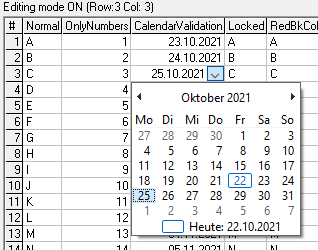
To ensure unique format you may put following in ValidateEdit event.
Code:
If Cancel = False Then
    ' Ensure unique date format before commit. (override possible custom format of the text box)
    VBFlexGrid1.EditText = VBFlexGrid1.ComboCalendarValue
End If
Beside ComboCalendarValue, there is also ComboCalendarMinDate/ComboCalendarMaxDate available.
-
Oct 24th, 2021, 03:55 AM
#661
Addicted Member
Re: VBFlexGrid Control (Replacement of the MSFlexGrid control)
Originally Posted by Krool
Update released.
Included enum FlexComboModeCalendar.
... .. .
To ensure unique format you may put following in ValidateEdit event.
Code:
If Cancel = False Then
    ' Ensure unique date format before commit. (override possible custom format of the text box)
    VBFlexGrid1.EditText = VBFlexGrid1.ComboCalendarValue
End If
Beside ComboCalendarValue, there is also ComboCalendarMinDate/ComboCalendarMaxDate available.
Amazing, Krool. The project I am currently working on involves having dates in combo columns. While I was happy filling the combo column cells with dates itself, you have provided a calendar too additionally! Wow!!! Thanks a TON. I think I will be able to find a case to avail the calendar combo too in my project now!
Kind regards.
-
Oct 24th, 2021, 04:18 AM
#662
Addicted Member
Re: VBFlexGrid Control (Replacement of the MSFlexGrid control)
Originally Posted by Krool
That's an interesting question. So, a visual cue that a dropdown will appear when attempting to edit.
The not disturbing approach would be not to always show such a "chevron" but only when that cell is selected. Using the RowColChange event.
However, using a picture with right align and no overlap would be the easiest and dynamically set/clear upon RowColChange.
Difficult part is to create such a dynamic scaled picture at run-time. (Using DrawFrameControl etc.)
With respect to the above, can there be a boolean property in the vbFlexGrid (say 'ComboVisualCue') so that making it true will show the chevron while mouse hovers on the combo cells? Well, I understand the difficulty factor you mention in drawing the chevron during run-time, but since it is just for one cell only at any point of time, if and when you hit upon a way to achieve drawing the 'dynamically scaled' chevron in an easier manner, you may kindly think of my suggestion for a ComboVisualCue property. Thanks in advance.
And, I take this opportunity to once again thank you for the UseCrLf property in RichTextBox.
Kind regards.
Last edited by softv; Oct 24th, 2021 at 09:24 AM.
-
Oct 24th, 2021, 04:46 AM
#663
Addicted Member
Re: VBFlexGrid Control (Replacement of the MSFlexGrid control)
Originally Posted by softv
Dear krool,
... .. . Object browser told me that .colsvisible "Returns the total number of columns or rows visible in the flex grid."
To understand the above statement from the Object Browser better, I just experimented with a sample 10*10 flex grid. I realised that even if I hide some columns (say 1, 2 and 3) and reduce the width of the grid to show only 2 columns (i.e. only column 0 and column 4), then also .colsvisible will return 5 and not 2. Is it so by design? Just a clarification. Thats all.
.rowsvisible also behaves similarly with a similar experiment as above. So, just wanted to clarify whether .colsvisible and .rowsvisible are designed to report values in the above manner only. ... .. .
I await your clarification on the above, Krool. In other words, suppose I have 20 columns in a grid; I set '.ColHidden = True' for columns 2 to 19; make columns 1 and 20 only visible to user, then also .ColsVisible reports 20 and not 2? Is that correct?
Kind regards.
-
Oct 25th, 2021, 07:58 AM
#664
Re: VBFlexGrid Control (Replacement of the MSFlexGrid control)
Originally Posted by softv
I await your clarification on the above, Krool. In other words, suppose I have 20 columns in a grid; I set '.ColHidden = True' for columns 2 to 19; make columns 1 and 20 only visible to user, then also .ColsVisible reports 20 and not 2? Is that correct?
Kind regards.
20 are count before the first "non-visible".
Technically it is correct. What's your need?
-
Oct 25th, 2021, 09:16 AM
#665
Addicted Member
Re: VBFlexGrid Control (Replacement of the MSFlexGrid control)
Originally Posted by Krool
20 are count before the first "non-visible".
Technically it is correct. What's your need?
Dear Krool,
Kindly please consider the 2 cases (Case 1 and Case 2) in the following code, for a 20 columns grid. As mentioned by me (in two of the comments in the following code), .ColsVisible prints "20" in both cases, whereas logically I was expecting only "2" to be printed, since I have hidden the other 18 columns. In other words, in my form itself, only 2 columns from the grid will be visible in both the cases.
So, I am honestly not able to understand why .ColsVisible should print "20" and not "2"? Is printing "20" only technically correct by design itself? I mean, .ColsVisible will always ignore hidden columns in its count? I just want your clarification/confirmation on this. Thanks.
Code:
  For i = 2 To 19 'i.e. I have made 0th and 1st indexed columns alone to be visible in the grid. I have kept other columns hidden by setting .ColHidden = true for them
    flx1000.ColHidden(i) = True
  Next i
  flx1000.TextMatrix(0, 0) = "Column 0"
  flx1000.TextMatrix(0, 1) = "Column 1"
  Debug.Print vbCrLf
  Debug.Print "No. of visible columns in flx1000, in Case 1 = ", flx1000.ColsVisible
  'the above prints "20" and not "2"

  With flx1000
    .ColHidden(.Cols - 1) = False '19th indexed column is made visible again
    For i = 1 To 18 'i.e. I have made 0th and 19th indexed columns (in other words, first and last columns) alone to be visible in the grid. I have kept 1st to 18th indexed columns hidden
      .ColHidden(i) = True
    Next i
    .TextMatrix(0, 0) = "Column 0"
    .TextMatrix(0, 19) = "Column 19"
  End With
  Debug.Print "No. of visible columns in flx1000, in Case 2 = ", flx1000.ColsVisible
  'the above also prints "20" and not "2"
Kind regards.
EDIT-1 (to add further more clarity [hopefully] to my query):
Suppose my code is just the following one line alone (i.e. completely ignoring the above code and the 2 cases in it), then, if I keep the width of my 20 columns grid in such a way that the first 2 columns alone are fully visible in my form, then flx1000.ColsVisible prints "2" which is correct, because out of the 20 columns, I have kept the width of the grid in such a way that the first 2 columns alone are fully visible in my form.
Code:
  Debug.Print "No. of visible columns in flx1000 = ", flx1000.ColsVisible
  'this prints "2" which is correct
Now, suppose I keep the width of my 20 columns grid in such a way that the first 5 columns alone are fully visible in my form. Then, flx1000.ColsVisible prints "5" which is again correct, because out of the 20 columns, I have kept the grid's width in such a way that the first 5 columns (0th to 4th indexed columns) alone are fully visible in my form.
But, if I hide columns 1 to 2 (i.e. for 1st and 2nd indexed columns, I set .ColHidden = True) and keep the width of my 20 columns grid in such a way that only 5 columns are visible (i.e. the 0th, 3rd, 4th, 5th and 6th indexed columns are only fully visible), then flx1000.ColsVisible prints "7" (and not "5") which, personally for me, sounds logically incorrect since I have already kept the width of the grid in such a way that only 5 columns are fully visible. Please see screenshot below.

The thing is that though ".ColHidden" has been set to "True" for 1st and 2nd indexed columns, they have also been included in the .ColsVisible count. Please see code below. But, if this is how .ColsVisible is set to behave technically, by design, then no issues at all. But, I just wanted a confirmation on that. That's all. Nothing else. Thanks.
Code:
  With flx1000
    For i = 1 To 2
      .ColHidden(i) = True
    Next i
    .TextMatrix(0, 0) = "Column 0"
    .TextMatrix(0, 1) = "Column 1"
    .TextMatrix(0, 2) = "Column 2"
    .TextMatrix(0, 3) = "Column 3"
    .TextMatrix(0, 4) = "Column 4"
    .TextMatrix(0, 5) = "Column 5"
    .TextMatrix(0, 6) = "Column 6"
    Debug.Print vbCrLf, Now
    Debug.Print "No. of visible columns in flx1000 = ", .ColsVisible
  End With
  'the above prints 7 and not 5
Kind Regards.
Last edited by softv; Oct 25th, 2021 at 10:46 AM.
-
Oct 25th, 2021, 12:37 PM
#666
Re: VBFlexGrid Control (Replacement of the MSFlexGrid control)
Originally Posted by softv
Dear Krool,
Kindly please consider the 2 cases (Case 1 and Case 2) in the following code, for a 20 columns grid. As mentioned by me (in two of the comments in the following code), .ColsVisible prints "20" in both cases, whereas logically I was expecting only "2" to be printed, since I have hidden the other 18 columns. In other words, in my form itself, only 2 columns from the grid will be visible in both the cases.
So, I am honestly not able to understand why .ColsVisible should print "20" and not "2"? Is printing "20" only technically correct by design itself? I mean, .ColsVisible will always ignore hidden columns in its count? I just want your clarification/confirmation on this. Thanks.
Code:
  For i = 2 To 19 'i.e. I have made 0th and 1st indexed columns alone to be visible in the grid. I have kept other columns hidden by setting .ColHidden = true for them
    flx1000.ColHidden(i) = True
  Next i
  flx1000.TextMatrix(0, 0) = "Column 0"
  flx1000.TextMatrix(0, 1) = "Column 1"
  Debug.Print vbCrLf
  Debug.Print "No. of visible columns in flx1000, in Case 1 = ", flx1000.ColsVisible
  'the above prints "20" and not "2"

  With flx1000
    .ColHidden(.Cols - 1) = False '19th indexed column is made visible again
    For i = 1 To 18 'i.e. I have made 0th and 19th indexed columns (in other words, first and last columns) alone to be visible in the grid. I have kept 1st to 18th indexed columns hidden
      .ColHidden(i) = True
    Next i
    .TextMatrix(0, 0) = "Column 0"
    .TextMatrix(0, 19) = "Column 19"
  End With
  Debug.Print "No. of visible columns in flx1000, in Case 2 = ", flx1000.ColsVisible
  'the above also prints "20" and not "2"
Kind regards.
EDIT-1 ( to add further more clarity [hopefully] to my query):
Suppose my code is just the following one line alone ( i.e. completely ignoring the above code and the 2 cases in it), then, if I keep the width of my 20 columns grid in such a way that the first 2 columns alone are fully visible in my form, then flx1000.ColsVisible prints "2" which is correct, because out of the 20 columns, I have kept the width of the grid in such a way that the first 2 columns alone are fully visible in my form.
Code:
  Debug.Print "No. of visible columns in flx1000 = ", flx1000.ColsVisible
  'this prints "2" which is correct
Now, suppose I keep the width of my 20 columns grid in such a way that the first 5 columns alone are fully visible in my form. Then, flx1000.ColsVisible prints "5" which is again correct, because out of the 20 columns, I have kept the grid's width in such a way that the first 5 columns (0th to 4th indexed columns) alone are fully visible in my form.
But, if I hide columns 1 to 2 (i.e. for 1st and 2nd indexed columns, I set .ColHidden = True) and keep the width of my 20 columns grid in such a way that only 5 columns are visible (i.e. the 0th, 3rd, 4th, 5th and 6th indexed columns are only fully visible), then flx1000.ColsVisible prints "7" (and not "5") which, personally for me, sounds logically incorrect since I have already kept the width of the grid in such a way that only 5 columns are fully visible. Please see screenshot below.
The thing is that though ".ColHidden" has been set to "True" for 1st and 2nd indexed columns, they have also been included in the .ColsVisible count. Please see code below. But, if this is how .ColsVisible is set to behave technically, by design, then no issues at all. But, I just wanted a confirmation on that. That's all. Nothing else. Thanks.
Code:
  With flx1000
    For i = 1 To 2
      .ColHidden(i) = True
    Next i
    .TextMatrix(0, 0) = "Column 0"
    .TextMatrix(0, 1) = "Column 1"
    .TextMatrix(0, 2) = "Column 2"
    .TextMatrix(0, 3) = "Column 3"
    .TextMatrix(0, 4) = "Column 4"
    .TextMatrix(0, 5) = "Column 5"
    .TextMatrix(0, 6) = "Column 6"
    Debug.Print vbCrLf, Now
    Debug.Print "No. of visible columns in flx1000 = ", .ColsVisible
  End With
  'the above prints 7 and not 5
Kind Regards.
That's discuss-able what is "correct".
However, the behavior is similar to the .ColIsVisible property.
Check this out in MS(H)FlexGrid what it prints on a column that is "hidden" (ColWidth = 0) but between two "visible" cols.
It returns True..
-
Oct 25th, 2021, 01:15 PM
#667
Addicted Member
Re: VBFlexGrid Control (Replacement of the MSFlexGrid control)
Originally Posted by Krool
That's discuss-able what is "correct".
However, the behavior is similar to the .ColIsVisible property.
Check this out in MS(H)FlexGrid what it prints on a column that is "hidden" (ColWidth = 0) but between two "visible" cols.
It returns True..
Oh okay, Krool. So, it is like that, by design. Understood. No issues then. Thanks a TON.
Kind regards.
-
Oct 26th, 2021, 12:19 PM
#668
Junior Member
Re: VBFlexGrid Control (Replacement of the MSFlexGrid control)
Last edited by R.J. Dunnill; Oct 26th, 2021 at 01:00 PM.
-
Oct 28th, 2021, 02:59 PM
#669
Re: VBFlexGrid Control (Replacement of the MSFlexGrid control)
Update released.
Thanks to inspiration by softv I introduced now the ComboCue property.
It needs to be set at run-time to either 0 - None, 1 - DropDown or 2 - Button.
The demo project was updated to use this new functionality.
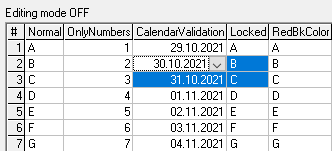
This is how it needs to be set. As you see below the ComboCue and the actual ComboMode for editing are independent of each other.
So, it is the app responsobility to apply the correct ComboCue upon RowColChange event.
Code:
Private Sub VBFlexGrid1_RowColChange()
' The combo cue can only be displayed on the current cell.
If VBFlexGrid1.Row >= VBFlexGrid1.FixedRows Then
    Select Case VBFlexGrid1.Col
        Case COL_CALENDARVALIDATION, COL_COMBODROPDOWN, COL_COMBOEDITABLE
            VBFlexGrid1.ComboCue = FlexComboCueDropDown
        Case COL_COMBOBUTTON
            VBFlexGrid1.ComboCue = FlexComboCueButton
        Case Else
            VBFlexGrid1.ComboCue = FlexComboCueNone
    End Select
Else
    VBFlexGrid1.ComboCue = FlexComboCueNone
End If
End Sub
The new hit result enum FlexHitResultComboCue helps to identify the graphical cue.
However, it is not only a cue. It makes it also easier to start editing.
When a cue is displayed and you click on it then the editing is started and the drop-down list will be shown.
The new edit reason enums FlexEditReasonComboCueClick, FlexEditReasonComboCueDblClick and FlexEditReasonComboCueF4 helps for this.
What's missing (for now):
Like for ComboButtonValueDisabled maybe a disabled graphical cue might be helpful.
For ComboCueDropDown the alt-down arrow key may also start editing. (enum FlexEditReasonComboCueAltKey ?)
Hot-tracking for the graphical cue.
Last edited by Krool; Oct 28th, 2021 at 03:06 PM.
-
Oct 29th, 2021, 10:31 AM
#670
Addicted Member
Re: VBFlexGrid Control (Replacement of the MSFlexGrid control)
Originally Posted by Krool
Update released.
Thanks to inspiration by softv I introduced now the ComboCue property.
It needs to be set at run-time to either 0 - None, 1 - DropDown or 2 - Button.
The demo project was updated to use this new functionality.
This is how it needs to be set. As you see below the ComboCue and the actual ComboMode for editing are independent of each other.
So, it is the app responsobility to apply the correct ComboCue upon RowColChange event.
Code:
Private Sub VBFlexGrid1_RowColChange()
' The combo cue can only be displayed on the current cell.
If VBFlexGrid1.Row >= VBFlexGrid1.FixedRows Then
    Select Case VBFlexGrid1.Col
        Case COL_CALENDARVALIDATION, COL_COMBODROPDOWN, COL_COMBOEDITABLE
            VBFlexGrid1.ComboCue = FlexComboCueDropDown
        Case COL_COMBOBUTTON
            VBFlexGrid1.ComboCue = FlexComboCueButton
        Case Else
            VBFlexGrid1.ComboCue = FlexComboCueNone
    End Select
Else
    VBFlexGrid1.ComboCue = FlexComboCueNone
End If
End Sub
The new hit result enum FlexHitResultComboCue helps to identify the graphical cue.
However, it is not only a cue. It makes it also easier to start editing.
When a cue is displayed and you click on it then the editing is started and the drop-down list will be shown.
The new edit reason enums FlexEditReasonComboCueClick, FlexEditReasonComboCueDblClick and FlexEditReasonComboCueF4 helps for this.
What's missing (for now):
Like for ComboButtonValueDisabled maybe a disabled graphical cue might be helpful.
For ComboCueDropDown the alt-down arrow key may also start editing. (enum FlexEditReasonComboCueAltKey ?)
Hot-tracking for the graphical cue.
Dear krool,
Infinite Thanks to God. Infinite Thanks to you. The cue and the provision for easier editing are excellent! Absolutely Excellent!
God is Great. Just yesterday only I was thinking of writing to you today, requesting for the ComboCalendar to pop down immediately on a single click, if at all possible. And, to my pleasant surprise, you have paved the way for the same already! Great, krool. Great. Through hot-tracking (which you have kept in your pipeline), I was able to just single click (much similar to combo boxes) and make the ComboCalendar to pop down. i.e. Hover -> See the Cue -> Click the Cue -> Pop Down. That's all.
I just tried a similar code as the one you have given above, in the 'Mouse_Move event' (after MouseTrack = true) of the gird, just for a single Combo Cell, and I could make the ComboCue appear on mouse hover and thereafter the ComboCalendar to pop down with a single click on the ComboCue. Thanks in TONs again. Of course I would still await your ideal and professional approach to achieve the hot-tracking of ComboCue. As of now, I am just informing you that I experimented, found it working for a single Combo cell and my joy and gratitude knew no bounds. . For the time being, I will try to extend my logic to cover any Combo cell and use the same. Once you release your own perfect hot-tracking code, I would adopt the same, of course, obviously.
And, until I extend my abovementioned logic, I will continue using my current code (as given below) for achieving the ComboCalendar to pop down (with a single click on the Cue area). I am having the following code in the 'CellClick' event of a grid (say flx1, whose .ColComboMode(1) = FlexComboModeCalendar). There must be a better way of course (than the following code) but the following code itself suits my requirements. You must be able to suggest a better way though.
Code:
If col = 1 Then
    flx1.StartEdit
    Call MouseClick 'simulates a single left click on the cell's ComboCue.
End If
Apart from 'mouse hover' ComboCue, personally, for my own requirements, I thought that perhaps having the ComboCue permanently on the topmost cell of a ComboColumn (i.e. in the top row alone) also would be helpful, from users' point of view. That is also possible for me to achieve now with your ComboCue property. . Thanks a TON again.
May be a boolean property (say 'ComboCueInTopRow') to do the above automatically would be helpful too but this is just a very small and random thought.
Well, once again thanking you, in TONS - not only for ComboCue, but for every bit of matchless goodness you have given to this world society through your free controls. God Bless you! God Bless all!
Kind regards.
Last edited by softv; Oct 29th, 2021 at 10:34 AM.
-
Oct 29th, 2021, 11:50 AM
#671
Re: VBFlexGrid Control (Replacement of the MSFlexGrid control)
softv,
With hot-tracking I mean to hotlight the button.
What you mean is to display the ComboCue on the MouseRow/Col instead of the current focused Row/Col, right?
How did you make it? Change code?
-
Oct 29th, 2021, 12:35 PM
#672
Re: VBFlexGrid Control (Replacement of the MSFlexGrid control)
Originally Posted by softv
Code:
If col = 1 Then
    flx1.StartEdit
    Call MouseClick 'simulates a single left click on the cell's ComboCue.
End If
Make instead of Call MouseClick the following.
Code:
flx1.ComboButtonValue = FlexComboButtonValuePressed
-
Oct 30th, 2021, 09:25 AM
#673
Addicted Member
Re: VBFlexGrid Control (Replacement of the MSFlexGrid control)
Originally Posted by Krool
softv,
With hot-tracking I mean to hotlight the button.
What you mean is to display the ComboCue on the Mouse Row/Col instead of the current focused Row/Col, right?
How did you make it? Change code?
Dear Krool,
How divinely fortunate that I thought that by 'Hot-Tracking' you meant 'Mouse Hover' ComboCue! Because, because of that only, I started writing code to show the ComboCue on MouseHover.
Well, first of all, sorry for the delay in posting this reply. The reason was when you posted your above reply I had tried writing code locally only. i.e. for showing ComboCue (on mouse hover) for any particular grid's Combo cells in my own forms only (via the MouseMove event). I had not written a global code which would show the ComboCue for any ComboCell in any grid in any form in any project. Since you asked me 'Change code?', I just presumed it to mean that you are asking me whether I changed the code in the VBFlexGrid.ctl itself. And, since you asked me 'How did you make it?', I thought I will do the global code also and provide both the codes to you (i.e. local and global). Hence, the delay.
The local code (in the 'MouseMove' event of any particular grid in a form).
Code:
  With VBFlexGrid1
    'Debug.Print .MouseCol, .ColComboMode(.MouseCol)
    Select Case .ColComboMode(.MouseCol)
    Case FlexComboModeCalendar, FlexComboModeDropDown, FlexComboModeEditable
      .Row = .MouseRow
      .Col = .MouseCol
      .ComboCue = FlexComboCueDropDown
    Case Else
      .ComboCue = FlexComboCueNone
    End Select
  End With
The global code in the WM_MouseMove of WindowProcControl function in VBFlexGrid.ctl
Code:
        Dim flx As Control
        Set flx = GetControlFromhWnd(hWnd)
        'Debug.Print "here outside", flx.Name, flx.Row, flx.Col, UserControl.Ambient.DisplayName
        With flx
          Select Case .ColComboMode(.MouseCol)
          Case FlexComboModeCalendar, FlexComboModeDropDown, FlexComboModeEditable
            'Debug.Print "here inside", Now, .MouseRow, .MouseCol, .ColComboMode(.MouseCol), flx.Name
            .Row = .MouseRow
            .Col = .MouseCol
            .ComboCue = FlexComboCueDropDown
            'Debug.Print "yes"
          Case Else
            .ComboCue = FlexComboCueNone
          End Select
        End With
I wrote the global code only because you asked me and thus inspired me. Otherwise, as written already, you are the best one to effect the global code in the right way (in the most ideal, perfect, concise and optimal manner).
Actually, I have just like that placed the above code before the following line
Code:
Call ProcessMouseMove(GetMouseStateFromParam(wParam), Get_X_lParam(lParam), Get_Y_lParam(lParam))
I don't know whether placing my global code in the above manner would affect the call to 'ProcessMouseMove' or not. I see that my global code is working for me as of now. But, as written earlier, I await your ideal code (placed ideally). Thanks in advance.
Thanks a TON once again for all your free controls. God Bless you! God Bless all!
Kind regards.
EDIT-1:
The following "seems" to be enough (instead of "Set flx = GetControlFromhWnd(hWnd)", where GetControlFromhWnd is my own function). So, I am quite happy that I could get a much faster/straightforward way to get the control's reference. There still might be a more straightforward way to get the control's reference, which I am missing somehow. So, I await your most ideal and optimal code eagerly.
Code:
Set flx = Parent().Controls(UserControl.Ambient.DisplayName)
EDIT-2:
On further exploring, I understood and learnt that the following simple and straightforward code itself will do (as the global code), instead of my above-given global code. Thanks Krool, for inspiring persons like me to explore and learn more.
Code:
Select Case ColComboMode(MouseCol)
Case FlexComboModeCalendar, FlexComboModeDropDown, FlexComboModeEditable
  Row = MouseRow
  Col = MouseCol
  ComboCue = FlexComboCueDropDown
Case Else
  ComboCue = FlexComboCueNone
End Select
Kind regards.
Last edited by softv; Oct 31st, 2021 at 08:32 AM.
-
Nov 1st, 2021, 02:10 AM
#674
Addicted Member
Re: VBFlexGrid Control (Replacement of the MSFlexGrid control)
Originally Posted by Krool
Make instead of Call MouseClick the following.
Code:
flx1.ComboButtonValue = FlexComboButtonValuePressed
Worked like a charm! Thanks a TON, as always.
Kind regards.
-
Nov 2nd, 2021, 03:02 AM
#675
Re: VBFlexGrid Control (Replacement of the MSFlexGrid control)
Update released. Included the ComboCueRow/ComboCueCol property which lets you determine where to display the combo cue.
It's possible to reset the ComboCueRow/ComboCueCol to -1 so that it is always the current focused cell. (equal .Row/.Col)
To have this "hot-tracking" behavior. Ensure VBFlexGrid.MouseTrack is True and have following code.
Code:
Private Sub VBFlexGrid1_MouseLeave()
VBFlexGrid1.ComboCue = FlexComboCueNone
VBFlexGrid1.ComboCueRow = -1
VBFlexGrid1.ComboCueCol = -1
End Sub

Private Sub VBFlexGrid1_MouseMove(Button As Integer, Shift As Integer, X As Single, Y As Single)
VBFlexGrid1.HitTest X, Y
If VBFlexGrid1.HitResult = FlexHitResultNoWhere Then
    VBFlexGrid1.ComboCue = FlexComboCueNone
    VBFlexGrid1.ComboCueRow = -1
    VBFlexGrid1.ComboCueCol = -1
    Exit Sub
End If
If VBFlexGrid1.HitRow >= VBFlexGrid1.FixedRows Then
    Select Case VBFlexGrid1.HitCol
        Case COL_CALENDARVALIDATION, COL_COMBODROPDOWN, COL_COMBOEDITABLE
            VBFlexGrid1.ComboCue = FlexComboCueDropDown
            VBFlexGrid1.ComboCueRow = VBFlexGrid1.HitRow
            VBFlexGrid1.ComboCueCol = VBFlexGrid1.HitCol
        Case COL_COMBOBUTTON
            VBFlexGrid1.ComboCue = FlexComboCueButton
            VBFlexGrid1.ComboCueRow = VBFlexGrid1.HitRow
            VBFlexGrid1.ComboCueCol = VBFlexGrid1.HitCol
        Case Else
            VBFlexGrid1.ComboCue = FlexComboCueNone
            VBFlexGrid1.ComboCueRow = -1
            VBFlexGrid1.ComboCueCol = -1
    End Select
Else
    VBFlexGrid1.ComboCue = FlexComboCueNone
    VBFlexGrid1.ComboCueRow = -1
    VBFlexGrid1.ComboCueCol = -1
End If
End Sub
Last edited by Krool; Nov 2nd, 2021 at 03:22 AM.
-
Nov 2nd, 2021, 03:26 AM
#676
Addicted Member
Re: VBFlexGrid Control (Replacement of the MSFlexGrid control)
Originally Posted by Krool
Update released. Included the ComboCueRow/ComboCueCol property which lets you determine where to display the combo cue.
It's possible to reset the ComboCueRow/ComboCueCol to -1 so that it is always the current focused cell. (equal .Row/.Col) ... .. .
Thanks a TON, krool.
Earlier, while I was exploring, I tried HitTest (in my global code) also but when I set the row and col, it started highlighting the rows and columns until the cell where the ComboCue got displayed. So, though the ComboCue got displayed, it was highlighting many other cells upto it. Now, I understand why. Thanks for the ComboCueRow and ComboCueCol properties. I will try with them now. I think the highlighting issue won't arise now (in my global code). Thanks again.
Kind regards.
EDIT-1:
yes, highlighting issue does not arise while using ComboCueRow and ComboCueCol after HitTest. Thanks.
And, I just now see that you have added one more enhancement (if I am right, this was not present when I first posted my above message), which is "Included the CellComboCue property. (plus corresponding enum FlexCellComboCue). This let's you define a fixed combo cue for an individual cell or a range of cells.". This is fantastic. If my understanding of what you have written is correct, I think with this I can now show a ComboCue always for the cells at the top row. Thank you soooooooooooooooo much. Let me try it out and write back.
Kind regards.
Last edited by softv; Nov 2nd, 2021 at 06:00 AM.
-
Nov 2nd, 2021, 06:08 AM
#677
Re: VBFlexGrid Control (Replacement of the MSFlexGrid control)
Originally Posted by softv
EDIT-1:
yes, highlighting issue does not arise while using ComboCueRow and ComboCueCol after HitTest. Thanks.
And, I just now see that you have added one more enhancement (if I am right, this was not present when I first posted my above message), which is "Included the CellComboCue property. (plus corresponding enum FlexCellComboCue). This let's you define a fixed combo cue for an individual cell or a range of cells.". This is fantastic. If my understanding of what you have written is correct, I think with this I can now show a ComboCue always for the cells at the top row. Thank you soooooooooooooooo much. Let me try it out and write back.
Kind regards.
Yes, the ComboCue is dynamic. Like for focused/hot-track.
The new CellComboCue can be used to place fixed spots or even an entire column (set FillStyle to repeat for effectiveness) to a combo cue.
-
Nov 2nd, 2021, 07:35 AM
#678
Addicted Member
Re: VBFlexGrid Control (Replacement of the MSFlexGrid control)
Originally Posted by Krool
... .. . place fixed spots or even an entire column (set FillStyle to repeat for effectiveness) to a combo cue.
just a while ago, tried it. Its all SUPERB. So, all the requirements I requested for have been provided by you, as of now. Infinite thanks.
Thanks for the tip on FillStyle. Otherwise, I would have forgotten. You have magnanimously provided (and keep providing) so many properties and functions for each free control that sometimes I forget about one or more of them.
Kind regards.
-
Nov 2nd, 2021, 08:22 AM
#679
Re: VBFlexGrid Control (Replacement of the MSFlexGrid control)
Update again for combo cue.
Added enum FlexComboCueDisabledDropDown and FlexComboCueDisabledButton.
This is just to reflect the counterpart for FlexComboButtonValueDisabled. (Edit portion possible but dropdown button deactivated)
The new hit result FlexHitResultComboCueDisabled helps to differentiate it. The normal one triggers an edit operation and this here just eat's the button down.
-
Nov 4th, 2021, 04:51 PM
#680
Re: VBFlexGrid Control (Replacement of the MSFlexGrid control)
Experimental feature 'AllowUserFreezing'.
Please test and report any behavior mismatch or suggestions.
After feedback it will be integrated into the current version.
Thanks
Last edited by Krool; Nov 6th, 2021 at 01:35 AM.
Reason: Attachment removed to save space
 Posting Permissions
- You may not post new threads
- You may not post replies
- You may not post attachments
- You may not edit your posts
-
Forum Rules
|
Click Here to Expand Forum to Full Width
|



 Reply With Quote