|

-
Aug 23rd, 2021, 01:53 AM
#561
Re: VBFlexGrid Control (Replacement of the MSFlexGrid control)
Here is an updated (v2) experimental version (VBFlexGrid.ctl only) for the ExtendLastCol property.
Please everyone interested in the ExtendLastCol. Please make extensive testings and report any bugs/misbehavior etc.
The behavior is most important as this was done according to my gut feeling. I don't have a vsFlexGrid to compare the behavior.
Thanks
Edit: Removed attachment to save space.
Last edited by Krool; Aug 27th, 2021 at 01:09 AM.
-
Aug 23rd, 2021, 10:31 AM
#562
Member

 Re: VBFlexGrid Control (Replacement of the MSFlexGrid control) Re: VBFlexGrid Control (Replacement of the MSFlexGrid control)
 Originally Posted by Krool

Here is an updated (v2) experimental version (VBFlexGrid.ctl only) for the ExtendLastCol property.
Please everyone interested in the ExtendLastCol. Please make extensive testings and report any bugs/misbehavior etc.
The behavior is most important as this was done according to my gut feeling. I don't have a vsFlexGrid to compare the behavior.
Thanks
Dear Krool thank you very much for the update, the Extend LastCol seems to work fine. There is a small detail you can see in the attached picture. Apart from this, I wanted to take advantage of asking, how would it be done to sort (ascending, descending) when clicking on the header of the grid, regardless of whether the data in the columns are of type date, string, etc. Thank you very much for your answers.Attachment 182148
-
Aug 24th, 2021, 02:29 AM
#563
Re: VBFlexGrid Control (Replacement of the MSFlexGrid control)
Originally Posted by lizano diaz
Dear Krool thank you very much for the update, the Extend LastCol seems to work fine. There is a small detail you can see in the attached picture. Apart from this, I wanted to take advantage of asking, how would it be done to sort (ascending, descending) when clicking on the header of the grid, regardless of whether the data in the columns are of type date, string, etc. Thank you very much for your answers. Attachment 182148
I can't replicate your picture issue and with rows set to 300.
Concerning your sorting. Below is a code example showing how it can be done. Please note to fill in .ColData() on all columns on your data population with the VarType values. (e.g. vbString, vbDate)
Code:
Private LastColSort As Long

Private Sub Form_Load()
LastColSort = -1
End Sub

Private Sub VBFlexGrid1_BeforeMouseDown(ByVal Button As Integer, ByVal Shift As Integer, ByVal X As Single, ByVal Y As Single, Cancel As Boolean)
With VBFlexGrid1
.HitTest X, Y
If .HitResult = FlexHitResultCell And .HitRow < .FixedRows And .HitCol > .FixedCols - 1 Then
    If (Button And vbLeftButton) = vbLeftButton Then
        .Sort = FlexSortNone
        If LastColSort > -1 And LastColSort <> .HitCol Then .ColSort(LastColSort) = FlexSortNone
        LastColSort = .HitCol
        Call FlexSetColSort(VBFlexGrid1, LastColSort, True)
        .Cell(FlexCellSort, .FixedRows, LastColSort, .Rows - 1, LastColSort) = FlexSortUseColSort
        Cancel = True
    End If
End If
End With
End Sub

Public Sub FlexSetColSort(ByRef This As VBFlexGrid, ByVal iCol As Long, ByVal Toggle As Boolean)
With This
Select Case .ColData(iCol)
    Case vbString
        If Toggle = True Then
            If .ColSort(iCol) = FlexSortStringAscending Then
                .ColSort(iCol) = FlexSortStringDescending
            Else
                .ColSort(iCol) = FlexSortStringAscending
            End If
        Else
            If .ColSort(iCol) <> FlexSortStringDescending Then .ColSort(iCol) = FlexSortStringAscending
        End If
    Case vbDate
        If Toggle = True Then
            If .ColSort(iCol) = FlexSortDateAscending Then
                .ColSort(iCol) = FlexSortDateDescending
            Else
                .ColSort(iCol) = FlexSortDateAscending
            End If
        Else
            If .ColSort(iCol) <> FlexSortDateDescending Then .ColSort(iCol) = FlexSortDateAscending
        End If
    Case vbCurrency
        If Toggle = True Then
            If .ColSort(iCol) = FlexSortCurrencyAscending Then
                .ColSort(iCol) = FlexSortCurrencyDescending
            Else
                .ColSort(iCol) = FlexSortCurrencyAscending
            End If
        Else
            If .ColSort(iCol) <> FlexSortCurrencyDescending Then .ColSort(iCol) = FlexSortCurrencyAscending
        End If
    Case vbDecimal, vbDouble, vbSingle, vbLong, vbInteger, vbByte
        If Toggle = True Then
            If .ColSort(iCol) = FlexSortNumericAscending Then
                .ColSort(iCol) = FlexSortNumericDescending
            Else
                .ColSort(iCol) = FlexSortNumericAscending
            End If
        Else
            If .ColSort(iCol) <> FlexSortNumericDescending Then .ColSort(iCol) = FlexSortNumericAscending
        End If
    Case Else
        If Toggle = True Then
            If .ColSort(iCol) = FlexSortGenericAscending Then
                .ColSort(iCol) = FlexSortGenericDescending
            Else
                .ColSort(iCol) = FlexSortGenericAscending
            End If
        Else
            If .ColSort(iCol) <> FlexSortGenericDescending Then .ColSort(iCol) = FlexSortGenericAscending
        End If
End Select
End With
End Sub
-
Aug 24th, 2021, 10:45 AM
#564
Member
Re: VBFlexGrid Control (Replacement of the MSFlexGrid control)
Originally Posted by Krool
I can't replicate your picture issue and with rows set to 300.
Concerning your sorting. Below is a code example showing how it can be done. Please note to fill in .ColData() on all columns on your data population with the VarType values. (e.g. vbString, vbDate)
Code:
Private LastColSort As Long

Private Sub Form_Load()
LastColSort = -1
End Sub

Private Sub VBFlexGrid1_BeforeMouseDown(ByVal Button As Integer, ByVal Shift As Integer, ByVal X As Single, ByVal Y As Single, Cancel As Boolean)
With VBFlexGrid1
.HitTest X, Y
If .HitResult = FlexHitResultCell And .HitRow < .FixedRows And .HitCol > .FixedCols - 1 Then
    If (Button And vbLeftButton) = vbLeftButton Then
        .Sort = FlexSortNone
        If LastColSort > -1 And LastColSort <> .HitCol Then .ColSort(LastColSort) = FlexSortNone
        LastColSort = .HitCol
        Call FlexSetColSort(VBFlexGrid1, LastColSort, True)
        .Cell(FlexCellSort, .FixedRows, LastColSort, .Rows - 1, LastColSort) = FlexSortUseColSort
        Cancel = True
    End If
End If
End With
End Sub

Public Sub FlexSetColSort(ByRef This As VBFlexGrid, ByVal iCol As Long, ByVal Toggle As Boolean)
With This
Select Case .ColData(iCol)
    Case vbString
        If Toggle = True Then
            If .ColSort(iCol) = FlexSortStringAscending Then
                .ColSort(iCol) = FlexSortStringDescending
            Else
                .ColSort(iCol) = FlexSortStringAscending
            End If
        Else
            If .ColSort(iCol) <> FlexSortStringDescending Then .ColSort(iCol) = FlexSortStringAscending
        End If
    Case vbDate
        If Toggle = True Then
            If .ColSort(iCol) = FlexSortDateAscending Then
                .ColSort(iCol) = FlexSortDateDescending
            Else
                .ColSort(iCol) = FlexSortDateAscending
            End If
        Else
            If .ColSort(iCol) <> FlexSortDateDescending Then .ColSort(iCol) = FlexSortDateAscending
        End If
    Case vbCurrency
        If Toggle = True Then
            If .ColSort(iCol) = FlexSortCurrencyAscending Then
                .ColSort(iCol) = FlexSortCurrencyDescending
            Else
                .ColSort(iCol) = FlexSortCurrencyAscending
            End If
        Else
            If .ColSort(iCol) <> FlexSortCurrencyDescending Then .ColSort(iCol) = FlexSortCurrencyAscending
        End If
    Case vbDecimal, vbDouble, vbSingle, vbLong, vbInteger, vbByte
        If Toggle = True Then
            If .ColSort(iCol) = FlexSortNumericAscending Then
                .ColSort(iCol) = FlexSortNumericDescending
            Else
                .ColSort(iCol) = FlexSortNumericAscending
            End If
        Else
            If .ColSort(iCol) <> FlexSortNumericDescending Then .ColSort(iCol) = FlexSortNumericAscending
        End If
    Case Else
        If Toggle = True Then
            If .ColSort(iCol) = FlexSortGenericAscending Then
                .ColSort(iCol) = FlexSortGenericDescending
            Else
                .ColSort(iCol) = FlexSortGenericAscending
            End If
        Else
            If .ColSort(iCol) <> FlexSortGenericDescending Then .ColSort(iCol) = FlexSortGenericAscending
        End If
End Select
End With
End Sub
Thank you very much for your answer, friend Krool, Taking advantage of the message, for when would you be launching new updates like, CheckBox, progress in cells, a drop-down Grid (for teacher - detail)?
-
Aug 24th, 2021, 11:22 AM
#565
Re: VBFlexGrid Control (Replacement of the MSFlexGrid control)
I still wait for behavior (and bugs of course) feedback for the ExtendLastCol. Preferable from somebody who has a vsFlexGrid. Thanks
-
Aug 24th, 2021, 12:38 PM
#566
Member
 Re: VBFlexGrid Control (Replacement of the MSFlexGrid control) Re: VBFlexGrid Control (Replacement of the MSFlexGrid control)
Originally Posted by Krool
I still wait for behavior (and bugs of course) feedback for the ExtendLastCol. Preferable from somebody who has a vsFlexGrid. Thanks
My dear Krool, apparently the Extend LastCol code works correctly as far as I tested it, just notice in the appearance of the grid the following (attached picture), the one above is the VbFlexgrid and the one below is the vsFlexgrid:
1. When hovering the mouse over the line in the last column, the tip of the mouse appears in the shape of an arrow, on the other hand that arrow does not appear in the vsflexgrid.
2. When sorting by column in the vbflexgrid, it would be necessary to draw that arrow that indicates in which position it is ordered (red color of the picture).
3. The scrollbars are different in the two grids, the vbflexgrid is small and the vsflexgrid is large in proportion to the content (in pink).Attachment 182160
-
Aug 24th, 2021, 03:25 PM
#567
Re: VBFlexGrid Control (Replacement of the MSFlexGrid control)
It’s a different control. You can’t expect it to be on the pixel the same as some other control.
If you like the vsFlexGrid so much why don’t you keep using it.
-
Aug 24th, 2021, 03:51 PM
#568
Member
 Re: VBFlexGrid Control (Replacement of the MSFlexGrid control) Re: VBFlexGrid Control (Replacement of the MSFlexGrid control)
Originally Posted by Arnoutdv
It’s a different control. You can’t expect it to be on the pixel the same as some other control.
If you like the vsFlexGrid so much why don’t you keep using it.
Hello dear
because the question is simple.
1.- Krool I was wondering if the extendlastcol presents any problem so that he can correct and give way to other properties.
2.- Krool and several contributors to the code what we are looking for is a similarity to VsFlexgrid in its properties and add many more functions.
quite apart from that Vsflexgrid will no longer have new improvements, instead our VbFlexgrid is open source and can have many more improvements.
-
Aug 24th, 2021, 04:15 PM
#569
Re: VBFlexGrid Control (Replacement of the MSFlexGrid control)
If it’s open source you can either contribute or create your own fork and add your specific requirements
-
Aug 25th, 2021, 01:25 AM
#570
Re: VBFlexGrid Control (Replacement of the MSFlexGrid control)
Originally Posted by lizano diaz
My dear Krool, apparently the Extend LastCol code works correctly as far as I tested it, just notice in the appearance of the grid the following (attached picture), the one above is the VbFlexgrid and the one below is the vsFlexgrid:
1. When hovering the mouse over the line in the last column, the tip of the mouse appears in the shape of an arrow, on the other hand that arrow does not appear in the vsflexgrid.
2. When sorting by column in the vbflexgrid, it would be necessary to draw that arrow that indicates in which position it is ordered (red color of the picture).
3. The scrollbars are different in the two grids, the vbflexgrid is small and the vsflexgrid is large in proportion to the content (in pink). Attachment 182160
1. I don't know what you mean. On the blurry screenshots I see nothing.
2. Good idea. There are "sort arrow" chars that can be printed from a new property .ColSortArrow() which can be none, up or down. Leaving it to the app to deal with.
3. The scroll bar on vbFlexGrid is by column count. The nPage for proportional scroll bar is not used as this would require equal sized column widths.
Is the vsFlexGrid pixel based on the scrolling? If yes than nPage is easy to determine as it's just the client rect.
-
Aug 25th, 2021, 09:10 AM
#571
Re: VBFlexGrid Control (Replacement of the MSFlexGrid control)
What features are beyond MSFlexGrid?
-
Aug 25th, 2021, 09:16 AM
#572
Re: VBFlexGrid Control (Replacement of the MSFlexGrid control)
In order to use the DataSource/DataMember property a reference to msdatsrc.tlb (pre-installed since Win2k) is required.
The same principle, how to select other controls in the property settings of the control?
For example, to develop a control ABC, add two control forms (names ABC1, ABC2), develop a control ccc, and want to set an attribute in control B2, you can choose ABC1 or ABC2. How to achieve this?
-
Aug 25th, 2021, 10:02 AM
#573
Member
Re: VBFlexGrid Control (Replacement of the MSFlexGrid control)
Originally Posted by lizano diaz
My dear Krool, apparently the Extend LastCol code works correctly as far as I tested it, just notice in the appearance of the grid the following (attached picture), the one above is the VbFlexgrid and the one below is the vsFlexgrid:
1. When hovering the mouse over the line in the last column, the tip of the mouse appears in the shape of an arrow, on the other hand that arrow does not appear in the vsflexgrid.
2. When sorting by column in the vbflexgrid, it would be necessary to draw that arrow that indicates in which position it is ordered (red color of the picture).
3. The scrollbars are different in the two grids, the vbflexgrid is small and the vsflexgrid is large in proportion to the content (in pink). Attachment 182160
Hello Krool, thank you very much for your reply.
What I'm trying to do now is to implement the code from post # 563 about column ordering in the same control, in such a way that the end user would only add the control in the form and in "load_form" the user could define its data type of columns
(example: Form_Load ()
VBFlexGrid1.ColData (1) = vbString
VBFlexGrid1.ColData (2) = vbInteger
VBFlexGrid1.ColData (3) = vbDate
VBFlexGrid1.ColData (4) = vbString
)
What do you think of the idea friend? At the moment I am indisposed due to health problems in the Bronchi.
I sincerely thank you for your support to the vb 6.0 community
-
Aug 26th, 2021, 01:08 AM
#574
Re: VBFlexGrid Control (Replacement of the MSFlexGrid control)
Originally Posted by lizano diaz
1. When hovering the mouse over the line in the last column, the tip of the mouse appears in the shape of an arrow, on the other hand that arrow does not appear in the vsflexgrid.
Ah. I maybe get what you want to say. Do you mean the resize arrows ?
You mean the vsFlexGrid does not allow to resize the last column in ExtendLastCol mode ?
-
Aug 26th, 2021, 09:41 AM
#575
Member
 Re: VBFlexGrid Control (Replacement of the MSFlexGrid control) Re: VBFlexGrid Control (Replacement of the MSFlexGrid control)
Originally Posted by Krool
Ah. I maybe get what you want to say. Do you mean the resize arrows ?
You mean the vsFlexGrid does not allow to resize the last column in ExtendLastCol mode ?
Hello friend Krool,
The Vsflexgrid when hovering the mouse over the last line, the mouse pointer changes to normal mode (Highlighted in the picture with the red box) and does not allow changing the size of the column from the last line, that is, from right to left, the other functions if normal.
Attachment 182173
Last edited by lizano diaz; Aug 26th, 2021 at 10:46 AM.
-
Aug 27th, 2021, 01:11 AM
#576
Re: VBFlexGrid Control (Replacement of the MSFlexGrid control)
Here is an updated (v3) experimental version (VBFlexGrid.ctl only) for the ExtendLastCol property.
Internal fix (subscript out of range) and the extended last column cannot be user resized anymore.
Please everyone interested in the ExtendLastCol. Please make extensive testings and report any bugs/misbehavior etc.
The behavior is most important as this was done according to my gut feeling. I don't have a vsFlexGrid to compare the behavior.
Thanks
Edit: Removed attachment to save space.
Last edited by Krool; Sep 7th, 2021 at 02:21 PM.
-
Aug 27th, 2021, 09:04 AM
#577
Member
Re: VBFlexGrid Control (Replacement of the MSFlexGrid control)
Originally Posted by Krool
Here is an updated (v3) experimental version (VBFlexGrid.ctl only) for the ExtendLastCol property.
Internal fix (subscript out of range) and the extended last column cannot be user resized anymore.
Please everyone interested in the ExtendLastCol. Please make extensive testings and report any bugs/misbehavior etc.
The behavior is most important as this was done according to my gut feeling. I don't have a vsFlexGrid to compare the behavior.
Thanks
Hi Krool, excellent update now if it works perfect, you are a programming genius.
Friend a question: when would a new version be maybe already included (Progressbar, checkbox; in the cells, also a master-type drop-down grid would be excellent - detail, example picture attached).
My sincere thanks and a big hug to your person.
Last edited by lizano diaz; Aug 27th, 2021 at 09:31 PM.
-
Aug 27th, 2021, 07:12 PM
#578
Fanatic Member
Re: VBFlexGrid Control (Replacement of the MSFlexGrid control)
Originally Posted by lizano diaz
Hi Krool, excellent update now if it works perfect, you are a programming genius.
Friend a question: when would a new version be maybe already included (Progressbar, checkbox; in the cells, also a master-type drop-down grid would be excellent - detail, example picture attached).
My sincere thanks and a big hug to your person.
Remove your attachment, the screenshot is 10xxx Grid.
-
Aug 27th, 2021, 09:31 PM
#579
Member
Re: VBFlexGrid Control (Replacement of the MSFlexGrid control)
Originally Posted by DaveDavis
Remove your attachment, the screenshot is 10xxx Grid.
Hi there. Everything is an example, it is also available to all public; That does not mean exactly that everything is being done the same as the grid shown. There are several demo grid of similar characteristics
-
Aug 27th, 2021, 09:38 PM
#580
Re: VBFlexGrid Control (Replacement of the MSFlexGrid control)
No one control contains all functions. If some functions are not too difficult, adding some is good.
In the end we still had to use multiple OCX controls.
-
Sep 1st, 2021, 01:27 PM
#581
Addicted Member
Re: VBFlexGrid Control (Replacement of the MSFlexGrid control)
Krool
Is there a way to sort items when clicking the column header?
thanks
-
Sep 1st, 2021, 05:24 PM
#582
Member
 Re: VBFlexGrid Control (Replacement of the MSFlexGrid control) Re: VBFlexGrid Control (Replacement of the MSFlexGrid control)
Originally Posted by Adebiyi24
Krool
Is there a way to sort items when clicking the column header?
thanks
Hello, there is one of this form exposed in # 563.
but the ideal thing would be that everything goes within the same control and when loading the form - client the user can indicate what type of values are in each column of the grid and when clicking on the header of the grid indicate whether it is ascending or descending ( an arrow)
-
Sep 1st, 2021, 06:30 PM
#583
Addicted Member
Re: VBFlexGrid Control (Replacement of the MSFlexGrid control)
lizano diaz
thank you sir
-
Sep 2nd, 2021, 09:40 AM
#584
Addicted Member
Re: VBFlexGrid Control (Replacement of the MSFlexGrid control)
Originally Posted by Krool
Here is an updated (v3) experimental version (VBFlexGrid.ctl only) for the ExtendLastCol property.
Internal fix (subscript out of range) and the extended last column cannot be user resized anymore.
Please everyone interested in the ExtendLastCol. Please make extensive testings and report any bugs/misbehavior etc.
The behavior is most important as this was done according to my gut feeling. I don't have a vsFlexGrid to compare the behavior.
Thanks
--------------------------------------------------------------------------------------
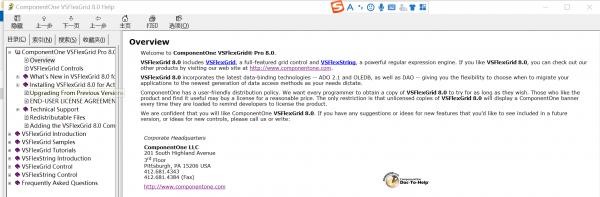
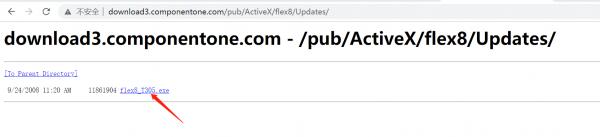
If you need a comparison of VSFLEXGRID, there is an official trial version download link of the VSFLEXGRID control below. I hope it can be helpful to you.
Thank you very much Krool!
License conditions:
ComponentOne has a user-friendly distribution policy. We want every programmer to obtain a copy of VSFlexGrid 8.0 to try for as long as they wish. Those who like the product and find it useful may buy a license for a reasonable price. The only restriction is that unlicensed copies of VSFlexGrid 8.0 will display a ComponentOne banner every time they are loaded to remind developers to license the product.
Download link:
http://download3.componentone.com/pu...flex8/Updates/
Last edited by smileyoufu; Sep 2nd, 2021 at 09:44 AM.
-
Sep 2nd, 2021, 10:02 PM
#585
Re: VBFlexGrid Control (Replacement of the MSFlexGrid control)
ComponentOne creates a Gantt chart integrated with Microsoft Project. This company is very powerful, far more than just form controls like VSFLEXGRID. Report printing, flowcharts, brain maps, almost omnipotent, as well as the web version of the WEB report.
The advantage of the .NET or ocx version is that you can add N different controls on one interface, visualize operations, and set any properties, and you can see the effect immediately.
Page web version echarts report and other controls or jquery.js
It lacks functions such as control combination, visual operation, binding, and smart code prompting.
The IDE made by web version JS, if you want to achieve similar functions of VB6, it may cost 100 billion US dollars.
-
Sep 2nd, 2021, 10:13 PM
#586
Re: VBFlexGrid Control (Replacement of the MSFlexGrid control)
Is there a flicker-free data refresh function and data cache function?
Ordinary DATAGRID or VSLEXGRID controls will redraw the entire control when refreshed, resulting in no data update or individual field values being modified, the controls are refreshed frequently, and the eyes are tired.
The desired function, refresh the data as little as possible, use less redrawing, and reduce flicker.
For example, to bind an ADO data record set, there are 3000 rows of data, and the visible part is 40 rows (the current cursor is 101-140 rows), if you want to refresh the control
If the data does not change, the UI control interface does not refresh. If only a few cells change, refresh the local cell text and redraw.
If the binding is a two-dimensional array, if there is only a small number of row and column changes, the grid control can reduce the refresh or only partial redraw, it is even more powerful.
-
Sep 3rd, 2021, 11:26 PM
#587
Member
Re: VBFlexGrid Control (Replacement of the MSFlexGrid control)
Originally Posted by xiaoyao
Is there a flicker-free data refresh function and data cache function?
Ordinary DATAGRID or VSLEXGRID controls will redraw the entire control when refreshed, resulting in no data update or individual field values being modified, the controls are refreshed frequently, and the eyes are tired.
The desired function, refresh the data as little as possible, use less redrawing, and reduce flicker.
For example, to bind an ADO data record set, there are 3000 rows of data, and the visible part is 40 rows (the current cursor is 101-140 rows), if you want to refresh the control
If the data does not change, the UI control interface does not refresh. If only a few cells change, refresh the local cell text and redraw.
If the binding is a two-dimensional array, if there is only a small number of row and column changes, the grid control can reduce the refresh or only partial redraw, it is even more powerful.
Hello, I was just wondering, I don't know how that functionality could be done, if you can do it in any way, please, I would appreciate it if you could publish it.
-
Sep 7th, 2021, 02:21 PM
#588
Re: VBFlexGrid Control (Replacement of the MSFlexGrid control)
Update released.
ExtendLastCol property finally included.
-
Sep 7th, 2021, 04:23 PM
#589
Member
Re: VBFlexGrid Control (Replacement of the MSFlexGrid control)
Originally Posted by Krool
Update released.
ExtendLastCol property finally included.
Friend Krool thank you very much for your contribution, one more question taking advantage of the thread: how could the exposed in # 564 be integrated for the ascending and descending ordering within the CTL (control) and on the other hand also that exposed in No. 586 , to update the data without having to redraw the grid ?.
Friend Krool thanks and greetings from a distance.
-
Sep 8th, 2021, 11:15 AM
#590
Member
Re: VBFlexGrid Control (Replacement of the MSFlexGrid control)
Originally Posted by xiaoyao
Is there a flicker-free data refresh function and data cache function?
Ordinary DATAGRID or VSLEXGRID controls will redraw the entire control when refreshed, resulting in no data update or individual field values being modified, the controls are refreshed frequently, and the eyes are tired.
The desired function, refresh the data as little as possible, use less redrawing, and reduce flicker.
For example, to bind an ADO data record set, there are 3000 rows of data, and the visible part is 40 rows (the current cursor is 101-140 rows), if you want to refresh the control
If the data does not change, the UI control interface does not refresh. If only a few cells change, refresh the local cell text and redraw.
If the binding is a two-dimensional array, if there is only a small number of row and column changes, the grid control can reduce the refresh or only partial redraw, it is even more powerful.
Hello again, what I was able to get from the grid function is a data refresh if I blink like this:
tuGrid.DataRefresh
-
Sep 8th, 2021, 02:25 PM
#591
Re: VBFlexGrid Control (Replacement of the MSFlexGrid control)
Update released.
Proportional thumb for the ScrollBars.
Originally Posted by lizano diaz
3. The scrollbars are different in the two grids, the vbflexgrid is small and the vsflexgrid is large in proportion to the content (in pink). Attachment 182160
This is now fixed. I previously said this is not possible, but it was actually very easy...
the nPage member of the scrollinfo was set to 0.
Actually for the ScrollBar it has following formula for the maximum value.
Code:
nMax - max( nPage – 1, 0)
So, having an nPage of 1 or 0 is no difference.
The VBFlexGrid now sets it to 1, thus the thumb appears proportional. 
-
Sep 8th, 2021, 03:24 PM
#592
Member
Re: VBFlexGrid Control (Replacement of the MSFlexGrid control)
Originally Posted by Krool
Update released.
Proportional thumb for the ScrollBars.
This is now fixed. I previously said this is not possible, but it was actually very easy...
the nPage member of the scrollinfo was set to 0.
Actually for the ScrollBar it has following formula for the maximum value.
Code:
nMax - max( nPage – 1, 0)
So, having an nPage of 1 or 0 is no difference.
The VBFlexGrid now sets it to 1, thus the thumb appears proportional.
Hello friend, it does work well for the horizontal scrollbar, but it would still be missing for the Vertical scrollbar.
on the other hand you could help me with the code:
Select Case wMsg
Case WM_LBUTTONUP
RaiseEvent CellClick(.HitRow, .HitCol, vbLeftButton)
'''''''''''''''''''''''''''''''''''''''''''''''''
Me.HitTest X, y
'--- ORDENAR''''''''
'If .HitRow = 0 And .HitCol <> 0 Then
If .HitRow = 0 Then
Dim Row1 As Long, Row2 As Long
Dim Col1 As Long, Col2 As Long
Me.GetSelRange Row1, Col1, Row2, Col2
Me.RowID(Me.Row) = 1 ' Temporary identification
If (mlLastColumnOrder <> .HitCol) Or (mbOrdDesc) Then
'Me.Sort = FlexSortStringAscending ' = FlexSortStringNoCaseAscending
If Me.HitResult = FlexHitResultCell And Me.HitRow < Me.FixedRows And Me.HitCol > Me.FixedCols - 1 Then
If (vbLeftButton) = vbLeftButton Then
Me.Sort = FlexSortNone
' If LastColSort > -1 And LastColSort <> Me.HitCol Then Me.ColSort(LastColSort) = FlexSortNone
If LastColSort > -1 And LastColSort <> Me.HitCol Then Me.ColSort(LastColSort) = FlexSortNone
mlLastColumnOrder = Me.HitCol
Call FlexSetColSort(Me.VBFlexGrid1, LastColSort, True)
Me.Cell(FlexCellSort, Me.FixedRows, LastColSort, Me.Rows - 1, LastColSort) = FlexSortUseColSort
Cancel = True
End If
End If
mbOrdDesc = False
Else
' Me.Sort = FlexSortStringDescending ' = FlexSortStringNoCaseDescending
If .HitResult = FlexHitResultCell And .HitRow < Me.FixedRows And .HitCol > Me.FixedCols - 1 Then
If (vbLeftButton) = vbLeftButton Then
Me.Sort = FlexSortNone
If LastColSort > -1 And LastColSort <> .HitCol Then Me.ColSort(LastColSort) = FlexSortNone
LastColSort = .HitCol
Call FlexSetColSort(VBFlexGrid1, LastColSort, True)
Me.Cell(FlexCellSort, Me.FixedRows, LastColSort, Me.Rows - 1, LastColSort) = FlexSortUseColSort
Cancel = True
End If
End If
mbOrdDesc = True
End If
mlLastColumnOrder = .HitCol
Me.Row = Me.RowIndex(1)
Me.RowID(Me.RowIndex(1)) = 0 ' Remove temporary identification
Me.CellEnsureVisible
If Row1 <> Row2 Then Me.RowSel = IIf(Row1 < Me.Row, Row1, Row2)
If Col1 <> Col2 Then Me.ColSel = IIf(Col1 < Me.Col, Col1, Col2)
End If
'-------'FIN ORDENAR''''''''
''''
what I am looking for is that the ascending and descending order is within the control (ctl)Attachment 182281
-
Sep 8th, 2021, 09:02 PM
#593
Member
Re: VBFlexGrid Control (Replacement of the MSFlexGrid control)
Originally Posted by lizano diaz
Hello friend, it does work well for the horizontal scrollbar, but it would still be missing for the Vertical scrollbar.
on the other hand you could help me with the code:
Select Case wMsg
Case WM_LBUTTONUP
RaiseEvent CellClick(.HitRow, .HitCol, vbLeftButton)
'''''''''''''''''''''''''''''''''''''''''''''''''
Me.HitTest X, y
'--- ORDENAR''''''''
'If .HitRow = 0 And .HitCol <> 0 Then
If .HitRow = 0 Then
Dim Row1 As Long, Row2 As Long
Dim Col1 As Long, Col2 As Long
Me.GetSelRange Row1, Col1, Row2, Col2
Me.RowID(Me.Row) = 1 ' Temporary identification
If (mlLastColumnOrder <> .HitCol) Or (mbOrdDesc) Then
'Me.Sort = FlexSortStringAscending ' = FlexSortStringNoCaseAscending
If Me.HitResult = FlexHitResultCell And Me.HitRow < Me.FixedRows And Me.HitCol > Me.FixedCols - 1 Then
If (vbLeftButton) = vbLeftButton Then
Me.Sort = FlexSortNone
' If LastColSort > -1 And LastColSort <> Me.HitCol Then Me.ColSort(LastColSort) = FlexSortNone
If LastColSort > -1 And LastColSort <> Me.HitCol Then Me.ColSort(LastColSort) = FlexSortNone
mlLastColumnOrder = Me.HitCol
Call FlexSetColSort( Me.VBFlexGrid1, LastColSort, True)
Me.Cell(FlexCellSort, Me.FixedRows, LastColSort, Me.Rows - 1, LastColSort) = FlexSortUseColSort
Cancel = True
End If
End If
mbOrdDesc = False
Else
' Me.Sort = FlexSortStringDescending ' = FlexSortStringNoCaseDescending
If .HitResult = FlexHitResultCell And .HitRow < Me.FixedRows And .HitCol > Me.FixedCols - 1 Then
If (vbLeftButton) = vbLeftButton Then
Me.Sort = FlexSortNone
If LastColSort > -1 And LastColSort <> .HitCol Then Me.ColSort(LastColSort) = FlexSortNone
LastColSort = .HitCol
Call FlexSetColSort( VBFlexGrid1, LastColSort, True)
Me.Cell(FlexCellSort, Me.FixedRows, LastColSort, Me.Rows - 1, LastColSort) = FlexSortUseColSort
Cancel = True
End If
End If
mbOrdDesc = True
End If
mlLastColumnOrder = .HitCol
Me.Row = Me.RowIndex(1)
Me.RowID(Me.RowIndex(1)) = 0 ' Remove temporary identification
Me.CellEnsureVisible
If Row1 <> Row2 Then Me.RowSel = IIf(Row1 < Me.Row, Row1, Row2)
If Col1 <> Col2 Then Me.ColSel = IIf(Col1 < Me.Col, Col1, Col2)
End If
'-------'FIN ORDENAR''''''''
''''
what I am looking for is that the ascending and descending order is within the control (ctl) Attachment 182281
Hello, the function of ascending or descending order is already integrated in the control, the end user will only have to add the control to his form and declare:
private form_load ()
grid.coldata (1) = vbInteger, etc. according to your type of load data in your grid.
- Friend krool rather we could advance with progressbar in the cells, icons in the cells, similar to what is stated in: # 577.
thank you very much kroolAttachment 182282
-
Sep 8th, 2021, 11:29 PM
#594
Re: VBFlexGrid Control (Replacement of the MSFlexGrid control)
Originally Posted by lizano diaz
Hello friend, it does work well for the horizontal scrollbar, but it would still be missing for the Vertical scrollbar.
It's also for the vertical scrollbar but most of the cases the thumb is small as the row count is large.
-
Sep 9th, 2021, 04:10 AM
#595
Member
Re: VBFlexGrid Control (Replacement of the MSFlexGrid control)
Hello Krool!
Thank you for your excellent work and this control. I'd really love to include this grid in my software.
Attachment 182286
But I'm still using the msHFlexGrid control, because I need a multicolumn sort like showed in the example above. As you see the columns are sorted ascending and descending depending on other columns left or right. The title of each column shows the level (dots) and the order (up/down) of the columns sorting. The columns may be in any order as the user can easily rearrange them without affecting the sorted order.
Can we solve this sorting example in the vbFlexGrid?
Regards
Seniorchef
-
Sep 9th, 2021, 04:27 AM
#596
Re: VBFlexGrid Control (Replacement of the MSFlexGrid control)
Originally Posted by Seniorchef
Hello Krool!
Thank you for your excellent work and this control. I'd really love to include this grid in my software.
Attachment 182286
But I'm still using the msHFlexGrid control, because I need a multicolumn sort like showed in the example above. As you see the columns are sorted ascending and descending depending on other columns left or right. The title of each column shows the level (dots) and the order (up/down) of the columns sorting. The columns may be in any order as the user can easily rearrange them without affecting the sorted order.
Can we solve this sorting example in the vbFlexGrid?
Regards
Seniorchef
The attachment does not work. But multi column sort is possible.
-
Sep 9th, 2021, 07:16 AM
#597
Member
Re: VBFlexGrid Control (Replacement of the MSFlexGrid control)
Hello, Krool!
I'm an unexperienced forum user. in preview mode i can see my uploaded image, also when i click 'Attachment 182286'. What am I doing wrong?
Greetings
Seniorchef
-
Sep 9th, 2021, 07:51 AM
#598
Re: VBFlexGrid Control (Replacement of the MSFlexGrid control)
It seems you can't see attachments from other users.
Some kind of forum bug I assume.
-
Sep 9th, 2021, 08:13 AM
#599
Member
Re: VBFlexGrid Control (Replacement of the MSFlexGrid control)
Ok - I'll try it in words.
I am quite sure the grid supports multicolumn sort. Here the columns to sort are not simply from left to right nor beneath each other.
E.g. a grid with 5 columns 'City' 'Name' 'Firstname' 'Street' 'Record' are to be sorted like a phonebook. That is 'City', 'Name', 'Firstname' - no matter what column number 'City' or 'Name' etc. are. I've seen the properties Grid.ColSort and Grid.ColData, but I guess I need a way to tell the sorting routine the order 'City' - 'Name' - 'Firstname' or better, the indices of the columns, not the range like Grid.Col and Grid.ColSel.
Greetings
Seniorchef
-
Sep 12th, 2021, 10:36 PM
#600
Member
 Re: VBFlexGrid Control (Replacement of the MSFlexGrid control) Re: VBFlexGrid Control (Replacement of the MSFlexGrid control)
Originally Posted by Krool
The attachment does not work. But multi column sort is possible.
Dear Krool, please, how could you adapt these features to the VbFlexgrid (attached image).
Thank you very much for your replyAttachment 182314
 Posting Permissions
- You may not post new threads
- You may not post replies
- You may not post attachments
- You may not edit your posts
-
Forum Rules
|
Click Here to Expand Forum to Full Width
|



 Reply With Quote