|

-
Aug 16th, 2021, 04:57 PM
#41
Re: If I wanted to have a Windows PC that only ran VB6 programs...
 Originally Posted by Niya

It is actually a Windows Service that runs under the LocalSystem account which I believe is the most powerful account on a Windows system, even more powerful than Administrator accounts. It's used as part of a system I created to implement my own home grown version of Team Viewer. One of the problems I ran into early in it's design was not being able to screen capture and transmit input to and from the WinLogon desktop. I had to dive into the world of Window Stations and Desktops to implement that functionality. Once I got it, I never really explored what other possiblities there were with these series of APIs. Here is a small piece of code I used to capture the screen of the console session:-
A lot of API functions like SendInput are sensitive to what Desktop/WindowStation/Session they are called from. The above function can in a sense project the function call from one session like where a Windows Service is executed to the session/Window Station/Desktop of the currently logged in user or even in WinLogon(no user logged in).
A Window Service can do it of course. It would need admin rights to setup.
I noticed that XInput was processed on multiple desktops, so I needed to add desktop awareness to the instances. Essentially turning them idle if the current desktop was not the same as the desktop that it started on. Only one instance per desktop can be run at once, so the code needs to allow multiple instances but still detect that condition. Finally got it working recently.
-
Aug 16th, 2021, 05:56 PM
#42
Re: If I wanted to have a Windows PC that only ran VB6 programs...
Originally Posted by TTn
A Window Service can do it of course. It would need admin rights to setup.
Yea, it's a high-trust piece of software which is one of the reasons I decided against releasing the source of an early version of it. A nefarious person could really do some damage with it if they managed to get onto someone's PC with an admin account. For instance, it has all the pieces in there to easily put together a keylogger and I don't mean those fly-by-night user mode keyloggers, one that's capable of capturing all kinds of input from any session, even when no user is logged in.
Originally Posted by TTn
I noticed that XInput was processed on multiple desktops, so I needed to add desktop awareness to the instances. Essentially turning them idle if the current desktop was not the same as the desktop that it started on. Only one instance per desktop can be run at once, so the code needs to allow multiple instances but still detect that condition. Finally got it working recently.
One of the things that people might find surprising is that most of what Windows does is actually sandboxed inside desktops. It's really rare to find situations where your applications have to be aware of them. It can be kind of jarring when you find out you've been living in a Window Station all your life  Most people never get to find out Most people never get to find out 
-
Aug 16th, 2021, 06:28 PM
#43
Re: If I wanted to have a Windows PC that only ran VB6 programs...
Originally Posted by Niya
Yea, it's a high-trust piece of software which is one of the reasons I decided against releasing the source of an early version of it. A nefarious person could really do some damage with it if they managed to get onto someone's PC with an admin account. For instance, it has all the pieces in there to easily put together a keylogger and I don't mean those fly-by-night user mode keyloggers, one that's capable of capturing all kinds of input from any session, even when no user is logged in.
One of the things that people might find surprising is that most of what Windows does is actually sandboxed inside desktops. It's really rare to find situations where your applications have to be aware of them. It can be kind of jarring when you find out you've been living in a Window Station all your life Most people never get to find out
Exactly. Application Morpheus, is this the matrix? {we're all just programs hacking programs}
Security and accessibility overlap. Running applications on the UAC/Winlogon screen would seem dangerous at first, but not if they provide screen reader support or XInput mouse support. Then it makes sense to authorize it. Another possibility is to run on UAC(user account control) screen in order to whitelist applications that the user selects. In fact, the UAC dialog itself has an option for whitelisting but Microsoft never implemented the option.
-
Aug 17th, 2021, 07:23 AM
#44
Re: If I wanted to have a Windows PC that only ran VB6 programs...
Originally Posted by Niya
It is actually a Windows Service that runs under the LocalSystem account which I believe is the most powerful account on a Windows system, even more powerful than Administrator accounts. It's used as part of a system I created to implement my own home grown version of Team Viewer. One of the problems I ran into early in it's design was not being able to screen capture and transmit input to and from the WinLogon desktop. I had to dive into the world of Window Stations and Desktops to implement that functionality. Once I got it, I never really explored what other possiblities there were with these series of APIs. Here is a small piece of code I used to capture the screen of the console session:-
Code:
Public Class ScreenCapture

    Private Shared gshr_objSync As New Object

    Public Shared Function GetScreenshot() As Bitmap

        'Makes this method threadsafe. Multiple threads can call it at the same time and it would be ordered.
        SyncLock gshr_objSync

            Dim windowStation As Win32.SafeWindowStationHandle = Nothing
            Dim originalWindowStation As Win32.SafeWindowStationHandle = Nothing
            Dim originalDesktop As IntPtr = IntPtr.Zero

            Dim inputdesktopHdc As IntPtr
            Dim inputDesktopHwnd As IntPtr

            Dim ptrInputDesktop As IntPtr = IntPtr.Zero
            Dim bmp As Bitmap

            windowStation = Win32.OpenWindowStation("WinSta0", False, Win32.ACCESS_MASK.GENERIC_ALL)

            Try
                If windowStation.IsInvalid Then
                    Throw New ScreenCaptureException("Failed to open window station", ScreenCaptureErrorCodes.FailedToOpenWinSta)

                Else
                    originalWindowStation = Win32.GetProcessWindowStation()
                    If originalWindowStation.IsInvalid Then
                        Throw New ScreenCaptureException("Failed to get process window station", ScreenCaptureErrorCodes.FailedToGetProcWinSta)
                    Else

                        If Not Win32.SetProcessWindowStation(windowStation) Then
                            Throw New ScreenCaptureException("Failed to change current process's window station", ScreenCaptureErrorCodes.FailedToChangeWinSta)
                        Else

                            ptrInputDesktop = Win32.OpenInputDesktop(0, False, Win32.ACCESS_MASK.GENERIC_ALL)

                            If ptrInputDesktop = IntPtr.Zero Then
                                Throw New ScreenCaptureException("Failed to open input desktop", ScreenCaptureErrorCodes.FailedToOpenInputDskTop)
                            Else
                                originalDesktop = Win32.GetThreadDesktop(Win32.GetCurrentThreadId())

                                If originalDesktop = IntPtr.Zero Then
                                    Throw New ScreenCaptureException("Unable to get original desktop", ScreenCaptureErrorCodes.FailedToGetOriginalDesktop)
                                Else
                                    If Not Win32.SetThreadDesktop(ptrInputDesktop) Then
                                        Throw New ScreenCaptureException("Unable to change the current threads desktop", ScreenCaptureErrorCodes.FailedToChangeCurrentThreadDskTop)
                                    Else
                                        inputDesktopHwnd = Win32.GetDesktopWindow()

                                        If inputDesktopHwnd <> IntPtr.Zero Then
                                            inputdesktopHdc = Win32.GetDC(inputDesktopHwnd)

                                            If inputdesktopHdc = IntPtr.Zero Then
                                                Throw New ScreenCaptureException("Unable to get desktop DC", ScreenCaptureErrorCodes.FailedToAcquireDskTopDC)
                                            Else

                                                Try
                                                    bmp = CopyDC(inputdesktopHdc, 0, 0, Screen.PrimaryScreen.Bounds.Width, Screen.PrimaryScreen.Bounds.Height)
                                                    Return bmp
                                                Catch ex As Exception

                                                    Throw New ScreenCaptureException("Failed to copy device context", ScreenCaptureErrorCodes.CopyDCFailed, ex)
                                                End Try


                                            End If

                                        End If

                                    End If

                                End If

                            End If

                        End If

                    End If

                End If

            Finally

                Win32.ReleaseDC(inputDesktopHwnd, inputdesktopHdc)
                Win32.CloseDesktop(ptrInputDesktop)
                Win32.SetThreadDesktop(originalDesktop)
                Win32.SetProcessWindowStation(originalWindowStation)


                windowStation.Close()

            End Try

            Return Nothing
        End SyncLock
    End Function

    Private Shared Function CopyDC(ByVal hdc As IntPtr, ByVal x As Integer, ByVal y As Integer, ByVal width As Integer, ByVal height As Integer) As Bitmap

        Dim memDC As IntPtr = Win32.CreateCompatibleDC(hdc)
        Dim memhBitmap As IntPtr = Win32.CreateCompatibleBitmap(hdc, width, height)
        Dim stockBitmap As IntPtr = Win32.SelectObject(memDC, memhBitmap)

        Try

            If Not Win32.StretchBlt(memDC, x, y, width, height, hdc, x, y, width, height, Win32.TernaryRasterOperations.SRCCOPY) Then
                Throw New Exception("Failed to copy device context")
            Else
                memhBitmap = Win32.SelectObject(memDC, stockBitmap)

                Dim returnBitmap As Bitmap = Bitmap.FromHbitmap(memhBitmap)

                Return returnBitmap
            End If

        Finally
            Win32.DeleteObject(memhBitmap)
            Win32.DeleteDC(memDC)
        End Try


    End Function


End Class
Here's another important piece of code that allows me to execute any function as if it were being executed in the console session itself.
Code:
Private Shared Sub ExecuteOnInputDesktop(ByVal proc As Action)
        Dim windowStation As Win32.SafeWindowStationHandle = Nothing
        Dim originalWindowStation As Win32.SafeWindowStationHandle = Nothing
        Dim originalDesktop As IntPtr = IntPtr.Zero

        'Dim inputdesktopHdc As IntPtr
        'Dim inputDesktopHwnd As IntPtr

        Dim ptrInputDesktop As IntPtr = IntPtr.Zero

        'Open the interactive Window Station of the current session. This is the only Window Station that can
        'contain Desktops to be displayed.
        windowStation = Win32.OpenWindowStation("WinSta0", False, Win32.ACCESS_MASK.GENERIC_ALL)

        Try
            If windowStation.IsInvalid Then
                Throw New WindowsMessagePlayerException("Failed to open window station", ScreenCaptureErrorCodes.FailedToOpenWinSta)

            Else
                originalWindowStation = Win32.GetProcessWindowStation()
                If originalWindowStation.IsInvalid Then
                    Throw New WindowsMessagePlayerException("Failed to get process window station", ScreenCaptureErrorCodes.FailedToGetProcWinSta)
                Else

                    If Not Win32.SetProcessWindowStation(windowStation) Then
                        Throw New WindowsMessagePlayerException("Failed to change current process's window station", ScreenCaptureErrorCodes.FailedToChangeWinSta)
                    Else

                        'Open the Input Desktop. The Input Desktop is the one currently being
                        'displayed and used by the user. There can only be one at a time for obvious reasons.
                        ptrInputDesktop = Win32.OpenInputDesktop(0, False, Win32.ACCESS_MASK.GENERIC_ALL)

                        If ptrInputDesktop = IntPtr.Zero Then
                            Throw New WindowsMessagePlayerException("Failed to open input desktop", ScreenCaptureErrorCodes.FailedToOpenInputDskTop)
                        Else
                            originalDesktop = Win32.GetThreadDesktop(Win32.GetCurrentThreadId())

                            If originalDesktop = IntPtr.Zero Then
                                Throw New WindowsMessagePlayerException("Unable to get original desktop", ScreenCaptureErrorCodes.FailedToGetOriginalDesktop)
                            Else
                                If Not Win32.SetThreadDesktop(ptrInputDesktop) Then
                                    Throw New WindowsMessagePlayerException("Unable to change the current threads desktop", ScreenCaptureErrorCodes.FailedToChangeCurrentThreadDskTop)
                                Else
                                    proc.Invoke()
                                End If

                            End If

                        End If

                    End If

                End If

            End If

        Finally

            'Win32.ReleaseDC(inputDesktopHwnd, inputdesktopHdc)
            Win32.CloseDesktop(ptrInputDesktop)
            Win32.SetThreadDesktop(originalDesktop)
            Win32.SetProcessWindowStation(originalWindowStation)


            windowStation.Close()

        End Try

    End Sub
A lot of API functions like SendInput are sensitive to what Desktop/WindowStation/Session they are called from. The above function can in a sense project the function call from one session like where a Windows Service is executed to the session/Window Station/Desktop of the currently logged in user or even in WinLogon(no user logged in).
it's vb.net,not vb6?
Is the purpose to take a screenshot of the screen or a window with a specified handle when the screen is locked?
-
Aug 17th, 2021, 07:35 AM
#45
Re: If I wanted to have a Windows PC that only ran VB6 programs...
Let's take this temporary deviation to its own thread please and keep on the subject. Thankyou!
https://github.com/yereverluvinunclebert
Skillset: VMS,DOS,Windows Sysadmin from 1985, fault-tolerance, VaxCluster, Alpha,Sparc. DCL,QB,VBDOS- VB6,.NET, PHP,NODE.JS, Graphic Design, Project Manager, CMS, Quad Electronics. classic cars & m'bikes. Artist in water & oils. Historian.
By the power invested in me, all the threads I start are battle free zones - no arguing about the benefits of VB6 over .NET here please. Happiness must reign.
-
Aug 17th, 2021, 08:07 AM
#46
Re: If I wanted to have a Windows PC that only ran VB6 programs...
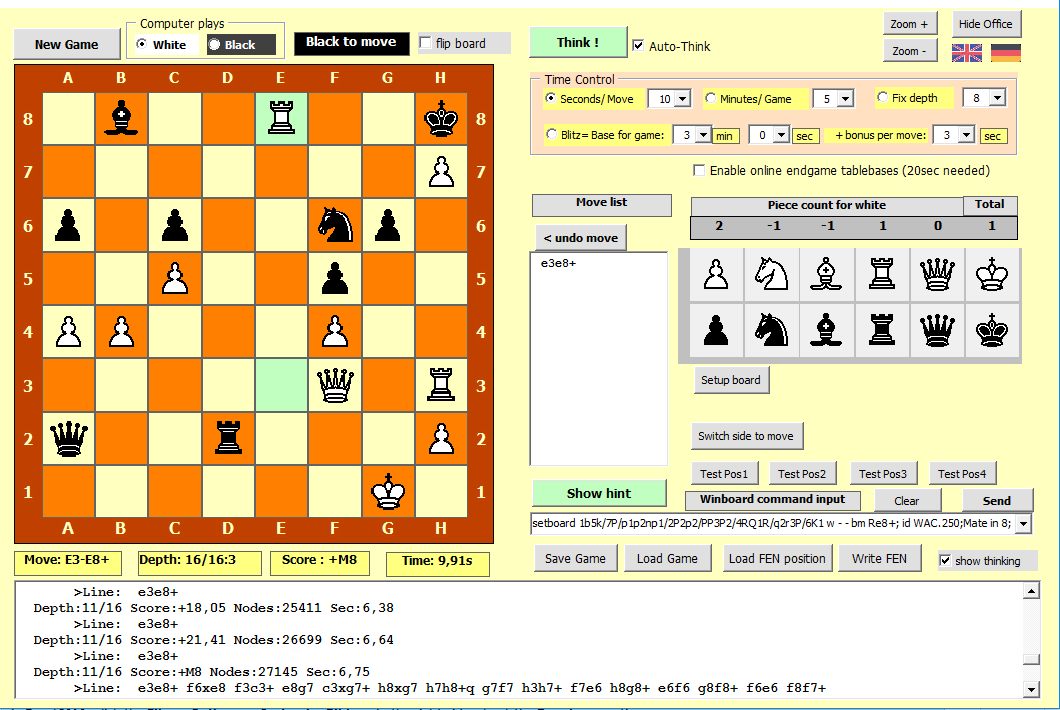
Back on track with ChessBrain, a chess engine written in VB6. ChessBrain II was promised and was mooted to be in a different language but it never arrived so it is still in VB6. ChessBrain is a chess engine and needs to be used with a Chess GUI such as Arena, the two in combination shown here:
https://github.com/yereverluvinunclebert
Skillset: VMS,DOS,Windows Sysadmin from 1985, fault-tolerance, VaxCluster, Alpha,Sparc. DCL,QB,VBDOS- VB6,.NET, PHP,NODE.JS, Graphic Design, Project Manager, CMS, Quad Electronics. classic cars & m'bikes. Artist in water & oils. Historian.
By the power invested in me, all the threads I start are battle free zones - no arguing about the benefits of VB6 over .NET here please. Happiness must reign.
-
Aug 17th, 2021, 08:33 AM
#47
Re: If I wanted to have a Windows PC that only ran VB6 programs...
Originally Posted by xiaoyao
it's vb.net,not vb6?
Is the purpose to take a screenshot of the screen or a window with a specified handle when the screen is locked?
It's purpose is to reach across session boundaries to take a screen shot of the console session, which is basically the entire screen. The console session is the session that contain whatever a person would see when he actually sits down at the computer. The second piece of code is part of a larger whole that allows you to send input keyboard and mouse messages to the console session. These two things combined allow you to implement TeamViewer-like functionality.
Originally Posted by yereverluvinuncleber
Back on track with ChessBrain, a chess engine written in VB6. ChessBrain II was promised and was mooted to be in a different language but it never arrived so it is still in VB6. ChessBrain is a chess engine and needs to be used with a Chess GUI such as Arena, the two in combination shown here:
Reminds me of the 90s. Writing a chess engine was a right of passage for a lot of people back in the 90s.
Last edited by Niya; Aug 17th, 2021 at 08:37 AM.
-
Aug 17th, 2021, 08:39 AM
#48
Re: If I wanted to have a Windows PC that only ran VB6 programs...
Originally Posted by Niya
Reminds me of the 90s. Writing a chess engine was a right of passage for a lot of people back in the 90s.
Feel free to share your own VB6 version. I think this particular one is step up from those and is used by advanced Chess experts. I had a chess program that I hacked a bit on my 16K Sinclair ZX80 but the only game I wrote back in the 80s was "noughts and crosses" in 1K, 991 bytes of program and 9 bytes of display - oops, sorry 1015 bytes of program!
https://github.com/yereverluvinunclebert
Skillset: VMS,DOS,Windows Sysadmin from 1985, fault-tolerance, VaxCluster, Alpha,Sparc. DCL,QB,VBDOS- VB6,.NET, PHP,NODE.JS, Graphic Design, Project Manager, CMS, Quad Electronics. classic cars & m'bikes. Artist in water & oils. Historian.
By the power invested in me, all the threads I start are battle free zones - no arguing about the benefits of VB6 over .NET here please. Happiness must reign.
-
Aug 17th, 2021, 08:44 AM
#49
Re: If I wanted to have a Windows PC that only ran VB6 programs...
Originally Posted by yereverluvinuncleber
Feel free to share your own VB6 version. I think this particular one is step up from those and is used by advanced Chess experts. I had a chess program that I hacked a bit on my 16K Sinclair ZX80 but the only game I wrote back in the 80s was "noughts and crosses" in 1K, 991 bytes of program and 9 bytes of display.
In the time period I'm talking about, VB6 wasn't even born yet. Also, it's quite interesting that I maybe one of the few people who never attempted to write a version of chess. There were sooo many in the 90s. One of my biggest weaknesses in programing would be in the domain of artificial intelligence. I've always stayed clear of writing "thinking" code. I'm very bad at it. I can write code to make random decisions and disguise it as intelligence, my 2D engines being examples, but anything approaching true intelligence, I have no clue how to begin quantifying intelligence.
 Posting Permissions
- You may not post new threads
- You may not post replies
- You may not post attachments
- You may not edit your posts
-
Forum Rules
|
Click Here to Expand Forum to Full Width
|



 Reply With Quote

