|

-
May 25th, 2021, 10:40 AM
#3161
Re: CommonControls (Replacement of the MS common controls)
 Originally Posted by TTn

The compiler does an error parsing in a specific order, when looking for definitions deciding to filter a parsed error or not.
What do you mean with that?
It compiles just fine, no errors.
Originally Posted by TTn
Errors like that can cause false results
What do you mean by "false results"??????
Originally Posted by TTn
as seen
Where?
You didn't show anything.
Originally Posted by TTn
Why would you want to continue using the word Format if it can cause global jumps
What do you mean with "global jumps"? How to reproduce that "issue"?
Are you willing to help or what is this about?
Because it you are trying to help, do what I asked to you: detail step by step how to reproduce one problem.
And don't say that you already did because you did nothing so far, only loose and ambiguous claims about alleged errors that nobody knows what you are talking about.
I think you are unable to show anything, because the best you could do so far is to say "random errors" (that of course, only allegedly happen in your machine).
-
May 25th, 2021, 10:54 AM
#3162
Re: CommonControls (Replacement of the MS common controls)
[Redacted as I like Eduardo]
Last edited by yereverluvinuncleber; May 25th, 2021 at 01:50 PM.
-
May 25th, 2021, 11:10 AM
#3163
Re: CommonControls (Replacement of the MS common controls)
The name "shadowing" problems are hypothetical. Can occur if changes are made in certain way so that some hideous errors are introduced unintentionally.
Highly doubt there are any actual problems that stem from using keywords for identifiers throughout the codebase, otherwise TTn would be the first to point these out.
cheers,
</wqw>
-
May 25th, 2021, 11:56 AM
#3164
Hyperactive Member

Re: CommonControls (Replacement of the MS common controls)
Originally Posted by yereverluvinuncleber
That was a bit aggressive Eduardo, no need to start a battle or a flamewar...
This isn't Ttn's product so he doesn't have to do any work at all. He is simply raising an issue. If it was raised to me and I was the author, I would go off and do some digging myself based upon the error reported. I might ask politely for some more information if I required it but there is no onus on anyone to do anything when they are trying to help.
You are correct in the sense that there is no need to start a battle or flamewar, but I don't think that was the intention of Eduardo's post. If anything, he may have been a bit "protective".
If you go back through the nearly 3200 posts in this thread, you'll see that Krool (= the author) not only been has been giving this great set of controls free of charge to everybody, he also has been providing a great amount of support to everyone who had questions.
I'm not in the position to judge Ttn's claims, too technical for me, but as an "educated outsider" I'd be very surprised that what is claimed to be a "fundamental design error" only pops up after 9 years where the controls have been used in a large number of projects around the globe. I for example, have used these controls to replace 1700 controls in one of my apps, and have not experienced any problems.
Eduardo on the other hand, I think is in the position to judge Ttn's claims, as he's the author of the SSTabEx control which I see as an extension of the Krool's set of controls. So, I think all he was trying to do, it to get to the root of the problem.
-
May 25th, 2021, 12:23 PM
#3165
Re: CommonControls (Replacement of the MS common controls)
Originally Posted by Erwin69
You are correct in the sense that there is no need to start a battle or flamewar, but I don't think that was the intention of Eduardo's post. If anything, he may have been a bit "protective".
Of course I didn't and don't want to start any flame war.
The problem, and the thing that I didn't like, is that he writes like he is addressing a serious problem, and the people that don't understand what he is saying might feel insecure using the controls, when in fact there is no problem at all.
The problem is if you modify the code without knowing what you are doing, but that's always a problem in any project.
About those words, that are not reserved keywords (otherwise VB wouldn't allow to compile) but names used by VB elsewhere, it is my personal opinion and what I usually do, is to avoid using them to avoid any possible confusion, but not because there is a real problem.
-
May 25th, 2021, 12:43 PM
#3166
Re: CommonControls (Replacement of the MS common controls)
In the sake of now starting any flame war, I'm out of the thread (I don't mean forever  ). ).
-
May 25th, 2021, 01:14 PM
#3167
Re: CommonControls (Replacement of the MS common controls)
Sorry, just one more message for completeness, here is a list of VB reserved keywords:
Abs Any Array As Attribute Boolean ByRef Byte ByVal Call Case CBool CByte CCur CDate CDbl CDec CDecl CInt Circle CLng CLngLng CLngPtr Close Const CSng CStr Currency CVar CVErr Date Debug Decimal Declare DefBool DefByte DefCur DefDate DefDbl DefDec DefInt DefLng DefLngLng DefLngPtr DefObj DefSng DefStr DefVar Dim Do DoEvents Double Each Else ElseIf Empty End EndIf Enum Erase Event Exit False Fix For Friend Function Get Global GoSub GoTo If Implements In Input Input InputB Int Integer LBound Len LenB Let LINEINPUT Lock Long LongLong LongPtr Loop LSet Me New Next Nothing Null On Open Option Optional ParamArray Preserve Print Private PSet Public Put RaiseEvent ReDim Resume Return RSet Scale Scale Seek Select Set Sgn Shared Single Spc Static Stop String String Sub Tab Then To True Type UBound Unlock Until Variant VB_Base VB_Control VB_Creatable VB_Customizable VB_Description VB_Exposed VB_Ext_KEY VB_GlobalNameSpace VB_HelpID VB_Invoke_Func VB_Invoke_Property VB_Invoke_PropertyPut VB_Invoke_PropertyPutRefVB_MemberFlags VB_Name VB_PredeclaredId VB_ProcData VB_TemplateDerived VB_UserMemId VB_VarDescription VB_VarHelpID VB_VarMemberFlags VB_VarProcData VB_VarUserMemId Wend While With WithEvents Write Write
You cannot use those, VB won't allow.
Taken from here.
-
May 25th, 2021, 01:18 PM
#3168
Re: CommonControls (Replacement of the MS common controls)
Step 1. Locate the sub procedure called "OLEObjectsAddFromPicture", inside the "RichTextBox" module.
Step 2. Right Click the Variant parameter called "Format".
Step 3. Select "Definition" from the menu.
Step 4. Notice that VB jumps to a parameter of a completely different procedure called "SaveFile".
Step 5. Notice that the type of this parameter is "defined" as an emumeration not a variant:
Public Enum RtfLoadSaveFormatConstants
RtfLoadSaveFormatRTF = 0
RtfLoadSaveFormatText = 1
RtfLoadSaveFormatUnicodeText = 2
End Enum
6. Now, edit the parameter inside SaveFile, from "Format" to "fmt".
7. Navigate back to "OLEObjectsAddFromPicture procedure, and try again.
8. Notice that you jumped to another procedure this time called "LoadFile"
9. Edit the parameter inside LoadFile, from Format to fmt.
10. Try again, now you finally get the correct procedure with a variant definition.
But, you're still using a reserved definition that somehow can jump out from one procedure to another as another type. In a general use module, it would be better to clear this up. Or be stubborn about it, your choice. There are thousands of lines in the code, but the VBA 6.5 parser caught only a couple dozen.
-
May 25th, 2021, 01:54 PM
#3169
Re: CommonControls (Replacement of the MS common controls)
Quitting drinking, having a headache is a good enough reason for being grumpy on any thread... my random thought for the day.
So, if TTn is correct (and I am not qualified to say either way) then it is just a matter of whether it is important or not. If it is both correct and important then Krool can weigh up the work and decide if he wants to make the change.
Last edited by yereverluvinuncleber; May 25th, 2021 at 02:34 PM.
-
May 25th, 2021, 02:09 PM
#3170
Re: CommonControls (Replacement of the MS common controls)
Originally Posted by TTn
Step 1. Locate the sub procedure called "OLEObjectsAddFromPicture", inside the "RichTextBox" module.
Step 2. Right Click the Variant parameter called "Format".
Step 3. Select "Definition" from the menu.
Step 4. Notice that VB jumps to a parameter of a completely different procedure called "SaveFile".
Step 5. Notice that the type of this parameter is "defined" as an emumeration not a variant:
Public Enum RtfLoadSaveFormatConstants
RtfLoadSaveFormatRTF = 0
RtfLoadSaveFormatText = 1
RtfLoadSaveFormatUnicodeText = 2
End Enum
6. Now, edit the parameter inside SaveFile, from "Format" to "fmt".
7. Navigate back to "OLEObjectsAddFromPicture procedure, and try again.
8. Notice that you jumped to another procedure this time called "LoadFile"
9. Edit the parameter inside LoadFile, from Format to fmt.
10. Try again, now you finally get the correct procedure with a variant definition.
But, you're still using a reserved definition that somehow can jump out from one procedure to another as another type. In a general use module, it would be better to clear this up. Or be stubborn about it, your choice. There are thousands of lines in the code, but the VBA 6.5 parser caught only a couple dozen.
This is a bug in the IDE. Check this out:
Step 1. Locate the sub procedure called "OLEObjectsAddFromPicture", inside the "RichTextBox" module.
Step 2. Rename Variant parameter called "Format" to "fmt".
Step 3. Press F5 and get "Argument not optional" on IsMissing(Format) line
This comes to show that "Format" identifier inside "OLEObjectsAddFromPicture" is clearly not resolved as "Format" parameter neither of "SaveFile" not "LoadFile" functions. It is either a local parameter or the VBA.Format function.
VB6 parser is complicated mess. For instance in a class you can add a property called Left (like in Top, Left, Width, Height) but still in the same class in the body of its methods you can call str = Left(str, 5) to invoke VBA.Left without requiring libname prefix i.e. the compiler disambiguates on the number of parameters specifically for Left, otherwise every user-control and every user-form in every VB6 project would be mostly broken by having intrinsic Left property shadowing VBA.Left runtime function.
cheers,
</wqw>
-
May 25th, 2021, 02:22 PM
#3171
Re: CommonControls (Replacement of the MS common controls)
Originally Posted by wqweto
This is a bug in the IDE. Check this out:
Step 3. Press F5 and get "Argument not optional" on IsMissing(Format) line
Which one of those do you think has an argument not optional? The same original error would indicate that the VBA.Format function is still missing an argument, even though the parameter was changed to fmt.
-
Jun 6th, 2021, 10:28 AM
#3172
New Member
Re: CommonControls (Replacement of the MS common controls)
Hi Krool,
The CommandButtonW with Style vbButtonGraphical does not support 32bpp Icon.
The reason as far as I understand is the use of ButtonPicture.Render in the WindowProcUserControl WM_DRAWITEM.
Is it possible to use the DrawState (like you do in case the Button is disabled and no DisabledPicture is provided)?
Something like this should work (DSS_NORMAL = 0)
ElseIf ButtonPicture.Type = vbPicTypeIcon Then
DrawState DIS.hDC, 0, 0, ButtonPicture.Handle, 0, X, Y, CX, CY, DST_ICON
This would be great!
Great Controls and Thanks.
-
Jun 8th, 2021, 03:05 AM
#3173
Re: CommonControls (Replacement of the MS common controls)
Originally Posted by NilsB
The CommandButtonW with Style vbButtonGraphical does not support 32bpp Icon.
The reason as far as I understand is the use of ButtonPicture.Render in the WindowProcUserControl WM_DRAWITEM.
Is it possible to use the DrawState (like you do in case the Button is disabled and no DisabledPicture is provided)?
Something like this should work (DSS_NORMAL = 0)
ElseIf ButtonPicture.Type = vbPicTypeIcon Then
DrawState DIS.hDC, 0, 0, ButtonPicture.Handle, 0, X, Y, CX, CY, DST_ICON
Thanks for your post. The CommandButtonW/CheckBoxW/OptionButtonW controls can now render 32bpp alpha bitmaps and icons when Style property is set to 1 - vbButtonGraphical.
-
Jun 23rd, 2021, 11:44 AM
#3174
Addicted Member
Re: CommonControls (Replacement of the MS common controls)
Dear Krool,
Warm Greetings and Thanks as always for your invaluable controls.
Attachment 181706
Case1:
In the above picture (of a coolbar control with 2 bands), I need the space pointed to by the RED arrow to be of the same size as the space pointed to by the GREEN arrow.
Case2:
When the 'BandBorders' option is kept ticked, the same coolbar control appears as follows. Therein too, I do not need that much space (as pointed to by the RED arrow) between the control's edge and the band border. I just need the control in band 1 to fill that space leaving only a 1 pixel gap between the control and the band border (very similar to the way the control in the 2nd band leaves only a 1 pixel gap between its edge and the coolbar border).
May be by design, the spaces are so in the above cases. But, is there any way at all by which I can achieve what I want in the above cases? Case1 is the most important for me. Anyway, if it is achievable in both the cases, well and good. I presume if Case2 is achievable, Case1 will automatically be achieved (with 'BandBorders' option kept UNTICKED).
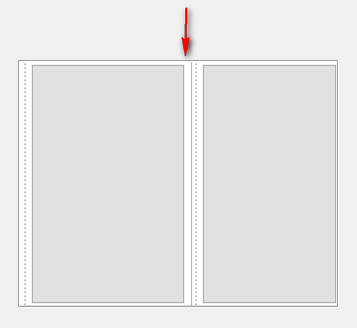
Last edited by softv; Jun 23rd, 2021 at 11:49 AM.
-
Jun 27th, 2021, 09:56 AM
#3175
New Member
Re: CommonControls (Replacement of the MS common controls)
Hi Krool,
thanks again for the 32bpp alpha bitmaps and icons support in the CommandButtonW.
I have another question: Can you add an option for DoubleBuffering to the CommandButtonW?
It flickers (again with Style vbButtonGraphical + Icon) sometimes - noticeable especially once there are a bunch of Buttons on a form.
A quick test (copying the double buffering code from another of your controls) solved the problem.
Maybe there is another way to prevent the flicker - I think it has to do with the way the picture/icon is drawn onto the control.
Thanks.
Addendum:
The TextboxW with MultiLine property set to true seem to have the same flicker problem.
Addendum 2:
This affects way more controls.
A Test with the CommandButtonW (vbButtonGraphical) with the ClipControls set to false seems to solve the problem too.
Last edited by NilsB; Jul 1st, 2021 at 01:57 AM.
-
Jul 14th, 2021, 02:24 AM
#3176
New Member
Re: CommonControls (Replacement of the MS common controls)
Hi Krool, thanks for your work.
I am using your coolbars and statusbars and wanted to report these issues.
1) Statusbar with multiple panels including one with Autosize = Content. During the Form_Load set panel.Text with a string that exceeds the initial prefixed space and the text is cut.
At the moment I solved with:
Code:
StatusBar1.Panels(2).Width = TextWidth(StatusBar1.Panels(2).Text) + 120
2) I'm using a krool coolbar with an MS toolbar inside. But when opening the property page (to set child) I don't see the MS toolbar.
But if I add a fake krool toolbar, I can now see the MS toolbar.
Attached project with Form1 for view the bug and Form2 with workaround patch.
Krool.zip
-
Jul 15th, 2021, 03:21 AM
#3177
Re: CommonControls (Replacement of the MS common controls)
Originally Posted by nello355
I am using your coolbars and statusbars and wanted to report these issues.
1) Statusbar with multiple panels including one with Autosize = Content. During the Form_Load set panel.Text with a string that exceeds the initial prefixed space and the text is cut.
At the moment I solved with:
Code:
StatusBar1.Panels(2).Width = TextWidth(StatusBar1.Panels(2).Text) + 120
2) I'm using a krool coolbar with an MS toolbar inside. But when opening the property page (to set child) I don't see the MS toolbar.
But if I add a fake krool toolbar, I can now see the MS toolbar.
Attached project with Form1 for view the bug and Form2 with workaround patch.
Krool.zip
1) Update released. The problem was that the internal DisplayText was not immediately updated on setting a new panel.Text. (which is used for text measurement)
This got now fixed. (highlighted in blue)
Code:
Friend Property Let FPanelText(ByVal Index As Long, ByVal Value As String)
If StatusBarHandle <> 0 Then
    PropShadowPanels(Index).Text = Replace$(Value, vbTab, vbNullString)
    Call SetPanelText(Index)
    Call GetDisplayText(Index, PropShadowPanels(Index).DisplayText)
    If PropShadowPanels(Index).AutoSize = SbrPanelAutoSizeContent Then Call SetParts
End If
End Property
2) The MS ToolBar gives a "Property is write-only" error when accessing a 'Get' ControlEnum.hWnd. Which I don't understand yet..
Originally Posted by softv
Case1:
In the above picture (of a coolbar control with 2 bands), I need the space pointed to by the RED arrow to be of the same size as the space pointed to by the GREEN arrow.
Case2:
When the 'BandBorders' option is kept ticked, the same coolbar control appears as follows. Therein too, I do not need that much space (as pointed to by the RED arrow) between the control's edge and the band border. I just need the control in band 1 to fill that space leaving only a 1 pixel gap between the control and the band border (very similar to the way the control in the 2nd band leaves only a 1 pixel gap between its edge and the coolbar border).
May be by design, the spaces are so in the above cases. But, is there any way at all by which I can achieve what I want in the above cases? Case1 is the most important for me. Anyway, if it is achievable in both the cases, well and good. I presume if Case2 is achievable, Case1 will automatically be achieved (with 'BandBorders' option kept UNTICKED).
I don't understand what you mean. Also the attachment isn't working..
Originally Posted by NilsB
thanks again for the 32bpp alpha bitmaps and icons support in the CommandButtonW.
I have another question: Can you add an option for DoubleBuffering to the CommandButtonW?
It flickers (again with Style vbButtonGraphical + Icon) sometimes - noticeable especially once there are a bunch of Buttons on a form.
A quick test (copying the double buffering code from another of your controls) solved the problem.
Maybe there is another way to prevent the flicker - I think it has to do with the way the picture/icon is drawn onto the control.
Thanks.
Addendum:
The TextboxW with MultiLine property set to true seem to have the same flicker problem.
Addendum 2:
This affects way more controls.
A Test with the CommandButtonW (vbButtonGraphical) with the ClipControls set to false seems to solve the problem too.
The TextBoxW seems to be difficult to double-buffer. However, CommandButtonW/CheckBoxW/OptionButtonW (vbButtonGraphical) can be double-buffered.
VBCCR17 ought to be the last version. Perhaps I will just make them double-buffer someday without exposing a DoubleBuffer property..
-
Jul 17th, 2021, 04:31 AM
#3178
-
Jul 21st, 2021, 03:25 AM
#3179
New Member
Re: CommonControls (Replacement of the MS common controls)
Hi Krool,
another request from me:
The LabelW BorderStyle single does not work anymore as it uses UserControl.Line and in a recent optimization the DrawStyle changed to Transparent.
-
Jul 21st, 2021, 07:46 AM
#3180
Re: CommonControls (Replacement of the MS common controls)
Originally Posted by NilsB
another request from me:
The LabelW BorderStyle single does not work anymore as it uses UserControl.Line and in a recent optimization the DrawStyle changed to Transparent.
Update released. Thanks !
-
Jul 21st, 2021, 07:10 PM
#3181
Re: CommonControls (Replacement of the MS common controls)
Originally Posted by NilsB
Hi Krool,
another request from me:
The LabelW BorderStyle single does not work anymore as it uses UserControl.Line and in a recent optimization the DrawStyle changed to Transparent.
Can it be transparent? If it can be placed on top of other controls, it is still convenient. I used a lot of effort to make listview and textbox. The transparent function still has a lot of bugs.
-
Jul 22nd, 2021, 03:03 AM
#3182
Re: CommonControls (Replacement of the MS common controls)
Originally Posted by xiaoyao
Can it be transparent? If it can be placed on top of other controls, it is still convenient. I used a lot of effort to make listview and textbox. The transparent function still has a lot of bugs.
The .BackStyle can still be transparent..
-
Jul 23rd, 2021, 09:43 AM
#3183
New Member
Re: CommonControls (Replacement of the MS common controls)
Originally Posted by Krool
Update released. Thanks !
Hi Krool,
I looked at the git commit. You did just set the LabelW DrawStyle back to vbSolid. So this uses an additional GDI handle for the pen effectively killing the optimization that introduced the problem.
You could actually have the best of both worlds as the DrawStyle can be set at runtime! I guess since most people use the label without any border at all you could just switch the DrawStyle to vbSolid
in case someone sets the BorderStyle to Single and leave it vbInvisible in the default case. Bit more code but maybe worth it!
Thanks
-
Jul 23rd, 2021, 10:44 AM
#3184
Addicted Member
Re: CommonControls (Replacement of the MS common controls)
Dear Krool,
It is time to say my hearty thanks,once again, for your matchless contribution to the society.
Well, I noticed a few things while using Labels in Coolbar.
- If I have only label controls (either intrinsic or yours) placed on a coolbar (e.g. cbr1), then the labels' captions do not show up. Borders, backcolor, etc. as well.
- When I open the 'Properties' window of cbr1 and try to add the labels to the bands, the dropdown does not list the labels.
- If I add a command button extra to cbr1, then the labels get listed in the dropdown (of cbr1's Bands tab) but their properties (caption, border, etc.) still do not show up even if I add them to any of the bands.
- Moreover, when I try to execute my app, presence of the labels in cbr1 leads to an error in the following code at the line "Set .Child = .Child". So, effectively, I am not able to use label controls in Coolbars.
Code:
Private Sub TimerInitChilds_Timer() Dim Count As Long Count = Me.Bands.Count If Count > 0 Then Dim i As Long If CoolBarDesignMode = False Then For i = 1 To Count With Me.Bands(i) Set .Child = .Child 'Throws ERROR in this line. Run-time error '380': Invalid property value End With Next i Else Dim RBBI As REBARBANDINFO With RBBI .cbSize = LenB(RBBI) .fMask = RBBIM_CHILD For i = 0 To Count - 1 .hWndChild = 0 SendMessage CoolBarHandle, RB_SETBANDINFO, i, ByVal VarPtr(RBBI) .hWndChild = -1 SendMessage CoolBarHandle, RB_SETBANDINFO, i, ByVal VarPtr(RBBI) Next i End With Call UserControl_Resize End If End If TimerInitChilds.Enabled = False End Sub
Sorry if my above observations are wrong. Kindly let me know what mistake I am doing while adding the label controls to cbr1.
Kind regards.
Last edited by softv; Jul 23rd, 2021 at 11:11 AM.
-
Jul 23rd, 2021, 11:29 AM
#3185
Re: CommonControls (Replacement of the MS common controls)
Originally Posted by NilsB
Hi Krool,
I looked at the git commit. You did just set the LabelW DrawStyle back to vbSolid. So this uses an additional GDI handle for the pen effectively killing the optimization that introduced the problem.
You could actually have the best of both worlds as the DrawStyle can be set at runtime! I guess since most people use the label without any border at all you could just switch the DrawStyle to vbSolid
in case someone sets the BorderStyle to Single and leave it vbInvisible in the default case. Bit more code but maybe worth it!
Thanks
Good idea. Didn't thought so far. When I have some time will do it.
-
Jul 24th, 2021, 09:18 AM
#3186
Re: CommonControls (Replacement of the MS common controls)
Originally Posted by NilsB
I looked at the git commit. You did just set the LabelW DrawStyle back to vbSolid. So this uses an additional GDI handle for the pen effectively killing the optimization that introduced the problem.
You could actually have the best of both worlds as the DrawStyle can be set at runtime! I guess since most people use the label without any border at all you could just switch the DrawStyle to vbSolid
in case someone sets the BorderStyle to Single and leave it vbInvisible in the default case. Bit more code but maybe worth it!
Done. Thanks
Originally Posted by softv
Well, I noticed a few things while using Labels in Coolbar.
There is a small bug that a Label can be listed in the property page when there is another valid control. I noted it down for next occasion to fix.
However, what I want to mention is that a Label is windowless and therefore can never be put "on another" control. Solution would be to embed such a Label in a PictureBox and have that as a child control.
Last edited by Krool; Jul 24th, 2021 at 09:27 AM.
-
Aug 3rd, 2021, 10:33 AM
#3187
Fanatic Member

-
Aug 3rd, 2021, 01:03 PM
#3188
Re: Unexpected error message when using a 32bit icon with the ImageList
Originally Posted by Mith
VB6 SP6 & VBCCR17
hi krool,
i got a unexpected error message when using the imagelist (32bit, 48x48px) with Windows Vista or Windows 8:
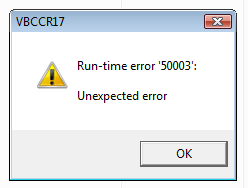 
At Windows 7 & 10 everything runs fine.
I have attached a test project created under Win7:
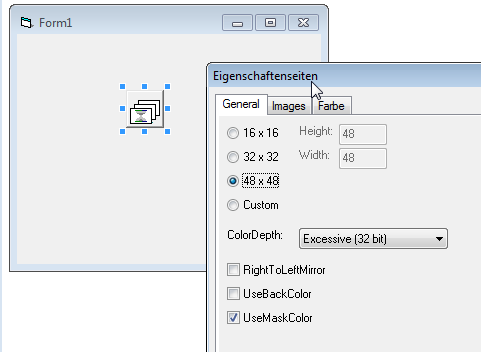 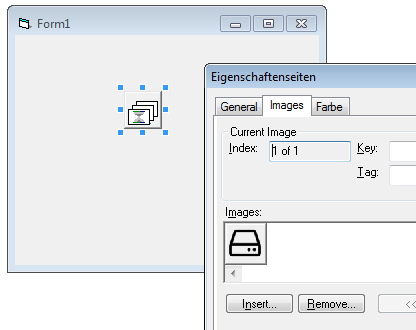
Any idea why the ImageList is not working at Vista & Win8 using the 32bit-icon with your ImageList?
On which OS you load the pictures (design time) ?
-
Aug 3rd, 2021, 06:34 PM
#3189
Fanatic Member
Re: Unexpected error message when using a 32bit icon with the ImageList
Originally Posted by Krool
On which OS you load the pictures (design time) ?
Windows 7.
I also get no error message using the compiled exe of the sample project with Windows 10!
Last edited by Mith; Aug 3rd, 2021 at 06:37 PM.
-
Aug 5th, 2021, 12:20 PM
#3190
Re: CommonControls (Replacement of the MS common controls)
Originally Posted by softv
Well, I noticed a few things while using Labels in Coolbar.
Bug is fixed in PPCoolBarBands. It shouldn't list anymore "valid but windowless" controls. Now it lists only "valid with window handle".
Problem was that the internal window handle variable in the enumeration was not cleared.
Originally Posted by Mith
Windows 7.
I also get no error message using the compiled exe of the sample project with Windows 10!
I use the OleLoadPicturePath to load Pictures at design time in the ImageList control.
From what I have read and have as memory as well :
On Win7, it will error out with a 32-bit icon; but on Win10 it does not
So, can you test to have Windows 10 as design time loader ?
Last edited by Krool; Aug 5th, 2021 at 12:31 PM.
-
Aug 5th, 2021, 03:38 PM
#3191
Hyperactive Member
Re: CommonControls (Replacement of the MS common controls)
It's been a while since I came by. Interesting reading up on what happend since.
At this point I have one new question:
My app dynamically applies translations to the captions of controls. At app startup all values are stored in a collection that is defined in a class. When a dialog is opened, for each control the translated caption is retrieved from the collection, and applied to the control. This is done at Form_Load.
I noticed that one dialog, with 128 controls, seemed slow to open. Investigating further, it turns out that applying the translations to the CCR controls takes 1 second, while applying it to the the original MS controls took 0.4 seconds. Strangely enough there are another dialogs with 213, 136, and 129 controls that only take 0.8, 0.5, and 0.6 seconds to apply the translations.
The main difference between the dialogs seems to be the number of option buttons.
Am I missing some setting that causes delays?
-
Aug 5th, 2021, 07:45 PM
#3192
Fanatic Member
Re: CommonControls (Replacement of the MS common controls)
Originally Posted by Krool
I use the OleLoadPicturePath to load Pictures at design time in the ImageList control.
From what I have read and have as memory as well :
So, can you test to have Windows 10 as design time loader ?
Sorry, i can't, i don't have VB6 installed on Win10. I only use Win7 for VB6 development.
-
Aug 5th, 2021, 08:21 PM
#3193
Fanatic Member
Re: CommonControls (Replacement of the MS common controls)
Originally Posted by Erwin69
My app dynamically applies translations to the captions of controls. At app startup all values are stored in a collection that is defined in a class. When a dialog is opened, for each control the translated caption is retrieved from the collection, and applied to the control. This is done at Form_Load.
I do exactly the same with my apps.
Originally Posted by Erwin69
I noticed that one dialog, with 128 controls, seemed slow to open.
After reading your post i was curious and added a timer and counter to my translation function:
Translating 318 VBCCR17 controls (caption & tooltiptext) on a form at the form load event took "only" 2 seconds (2964 ticks from GetTickCount).
Loading the same form without using the translation function takes 2 seconds and "only" 2730 ticks.
Tested with VB6SP6 on Win7 running the app in the IDE.
Judging by my results it looks like the bottleneck doenst come from the VBCCR controls.
-
Aug 8th, 2021, 12:21 PM
#3194
Member
Re: CommonControls (Replacement of the MS common controls)
First, thank you so much for your work with these controls - much appreciated!
A few major bugs with the RichTextBox control:
1) It it is limited to 65k text! It can load more than this but you cannot type any more (it will block you from typing any additional characters) and if you change scrollbar setting (to turn word wrap on/off) it will truncate to 65k text. One of the major benefits of the original RTB control was that it was NOT limited to 65k text like the standard VB textbox. This is a major showstopper for me. This is easy to verify with your project - open a text file with more than 65k text in Notepad and then copy into the RTB and you'll see it cuts it off.
2) There is another major difference between this control and the VB OCX. That relates to CRLF's in selected text and the related sel properties (especially selstart, sellength etc). Internally RichText 2.0+ only use CR or LF (I can't remember which) but not both, unlike RichText 1.0 which internally stored as CRLF (vbwrap). The problem is that this replacement RTB uses CRLF (as it should) for display and in relation to its Text property, but the sel properties only reference the LF (or CR) since that's what it internally stores as. But this means that SelStart will be off by 1 for every wrap (CRLF) that exists prior to SelStart and that SelLength will be off by 1 for every wrap (CRLF) that exists in the selected text. It also means that SelText only contains the LF (or CR) but not both. This is easy to verify. Create a "Copy" button on the form and put this for it's code: SetClipboardText RichTextBox1.SelText
and then open project and make the text have a blank line in between lines so there are 3 lines of text with a blank line between them. Select all 3 lines and click that copy button. Paste into Notepad. You'll see Notepad doesn't show the blank line because it only shows CRLF's and the SelText property only uses the LF without the CR (or vice-versa, I can't remember). If you use the right-click Edit menu or press CTRL+C (not using the SelText code) and paste into Notepad you'll see it DOES show the blank line because SelText wasn't used. If in that same project, you highlight only the 3rd line and check the SelStart number, it will be off by 1 compared to the exact same thing using the VB RichTextBox OCX.
-
Aug 8th, 2021, 01:45 PM
#3195
Re: CommonControls (Replacement of the MS common controls)
Originally Posted by chrislong2
First, thank you so much for your work with these controls - much appreciated!
A few major bugs with the RichTextBox control:
1) It it is limited to 65k text! It can load more than this but you cannot type any more (it will block you from typing any additional characters) and if you change scrollbar setting (to turn word wrap on/off) it will truncate to 65k text. One of the major benefits of the original RTB control was that it was NOT limited to 65k text like the standard VB textbox. This is a major showstopper for me. This is easy to verify with your project - open a text file with more than 65k text in Notepad and then copy into the RTB and you'll see it cuts it off.
2) There is another major difference between this control and the VB OCX. That relates to CRLF's in selected text and the related sel properties (especially selstart, sellength etc). Internally RichText 2.0+ only use CR or LF (I can't remember which) but not both, unlike RichText 1.0 which internally stored as CRLF (vbwrap). The problem is that this replacement RTB uses CRLF (as it should) for display and in relation to its Text property, but the sel properties only reference the LF (or CR) since that's what it internally stores as. But this means that SelStart will be off by 1 for every wrap (CRLF) that exists prior to SelStart and that SelLength will be off by 1 for every wrap (CRLF) that exists in the selected text. It also means that SelText only contains the LF (or CR) but not both. This is easy to verify. Create a "Copy" button on the form and put this for it's code: SetClipboardText RichTextBox1.SelText
and then open project and make the text have a blank line in between lines so there are 3 lines of text with a blank line between them. Select all 3 lines and click that copy button. Paste into Notepad. You'll see Notepad doesn't show the blank line because it only shows CRLF's and the SelText property only uses the LF without the CR (or vice-versa, I can't remember). If you use the right-click Edit menu or press CTRL+C (not using the SelText code) and paste into Notepad you'll see it DOES show the blank line because SelText wasn't used. If in that same project, you highlight only the 3rd line and check the SelStart number, it will be off by 1 compared to the exact same thing using the VB RichTextBox OCX.
1)
The RTB initial limit is 32k. EM_EXLIMITTEXT will be called at creation with 0 (default) which sets the RTB limit to 65k.
So I would suggest you calc the length of your source and set it accordingly. Or just set an crazy high value.
2)
I know this quirk and have no idea how to solve. I need help in this.
-
Aug 8th, 2021, 06:10 PM
#3196
Member
Re: CommonControls (Replacement of the MS common controls)
Originally Posted by Krool
1)
The RTB initial limit is 32k. EM_EXLIMITTEXT will be called at creation with 0 (default) which sets the RTB limit to 65k.
So I would suggest you calc the length of your source and set it accordingly. Or just set an crazy high value.
2)
I know this quirk and have no idea how to solve. I need help in this.
Thanks for the reply! 
1) Ok, so I set MaxLength to a really high number and it works for the initial load of text (I can now type beyond 65k), however, as soon as I change scrollbars (to control word wrapping) or otherwise refresh the control, it loses the maxlength and goes back to 65k. So there still seems to be a bug with how MaxLength is handled where it is not always honored.
2) Well, I've managed to work around it. You might want to consider doing something of similar approach in the control itself for the returned SelStart and SelLength vars so they are correct to begin with. First, you have to ensure that there's no word wrapping going on so scrollbars to horizontal. See specific code below, but in general I get the GetLineFromChar with SelStart to get all the wraps prior to SelStart. And then do another GetLineFromChar for the end of the SelLength + any found wraps, and then I subtract the first GetLineFromChar value from 2nd one to obtain the number of wraps for the selected text itself. Here's how I'm currently working around it in my code:
Code:
    PreSelStartLineCounts = RichTextBox1.GetLineFromChar(RichTextBox1.SelStart + 1) - 1
    SelTStartPos = RichTextBox1.SelStart + PreSelStartLineCounts
    SelTEndPos = RichTextBox1.SelStart + RichTextBox1.SelLength + PreSelStartLineCounts
    LineCountsInclSel = RichTextBox1.GetLineFromChar(SelTEndPos) - 1
    If PreSelStartLineCounts > 0 Then
        InSelLineCounts = LineCountsInclSel - PreSelStartLineCounts
    Else
        InSelLineCounts = LineCountsInclSel
    End If
    SelTEndPos = SelTEndPos + InSelLineCounts
But I'll bet there's an easier way (I just have no idea what it is!)
EDIT: Also, this only addresses the SelStart & SelLength, but doesn't address SelText itself. I don't know how to maybe fix SelText itself except to literally go through character by character looking for character 10 (LF) and inserting a character 13 (CR) before it (if I'm remembering right that the SelText is only doing LF's and not CR's, otherwise the opposite).
Last edited by chrislong2; Aug 8th, 2021 at 06:16 PM.
-
Aug 8th, 2021, 11:34 PM
#3197
Re: CommonControls (Replacement of the MS common controls)
You know, I think it's common practice among most S tier production level software to virtualize a control's access to data when there's a lot of it. Basically, they never load all the data into the control at once. They only take a view of the data that covers what is being displayed to the user and little before and after what is displayed. Older versions of SQL Server Management Studio did this when ever you displayed all data in a table and there's a lot of it. I seriously doubt that Word, Excel or PDF viewers try to load all the data at once whenever they encounter freakishly large documents.
If your program is loading documents so large that they are overwhelming standard controls, it might be time to take a page out of their book and think about some kind of paging system to load the data as needed.
-
Aug 8th, 2021, 11:40 PM
#3198
Member
Re: CommonControls (Replacement of the MS common controls)
Originally Posted by Niya
You know, I think it's common practice among most S tier production level software to virtualize a control's access to data when there's a lot of it. Basically, they never load all the data into the control at once. They only take a view of the data that covers what is being displayed to the user and little before and after what is displayed. Older versions of SQL Server Management Studio did this when ever you displayed all data in a table and there's a lot of it. I seriously doubt that Word, Excel or PDF viewers try to load all the data at once whenever they encounter freakishly large documents.
If your program is loading documents so large that they are overwhelming standard controls, it might be time to take a page out of their book and think about some kind of paging system to load the data as needed.
I appreciate that, but 65kb isn't all that large at all (I have several text documents over that), and yes, many programs including Notepad do try to load it all at once. In any event with my program a paging system isn't really an option and in this case the issue is that the RTB replacement does not work correctly with >65k whereas the 90's era OCX does.
-
Aug 8th, 2021, 11:49 PM
#3199
Re: CommonControls (Replacement of the MS common controls)
I've seen Notepad buckle under the weight of large documents. They just have a much higher tolerance than 65 KB. Whenever that happens to me, I just load the document in Wordpad which can easily handle a document of any size.
My point is, when your application starts falling apart like that over large documents, it might be time to roll up your sleeves and try some kind of do-it-yourself work around. I don't think MS put much thought into designing standard controls for developers to handle large data sets like that, even as small as 65 K. At least not in the days of VB6.
-
Aug 9th, 2021, 01:23 AM
#3200
Member
Re: CommonControls (Replacement of the MS common controls)
Yeah, I've seen notepad buckle under large docs too, but not usually till you get to many MB's. 65K is a small amount. But I agree with your overall point.
Anyway, it's fine. In line with what Krool pointed to, I've modified the RTB to just change the StreamStringIn and StreamFileIn functions to call EM_EXLIMITTEXT with PropMaxLength instead of 0 and it works fine now. That really I think is the way it should be anyway as it should always be using the PropMaxLength value (if a value is not set, then it will default to 0 anyway so it should just call it with PropMaxLength instead of a hardcoded 0 val). Then if anyone cares about >65k, they can just set the PropMaxLength to whatever they want. I would argue that PropMaxLength should even be set by default to a much higher value (like 1MB). I just tested and 1MB file was opened quick and worked with quickly on my 10yo machine. I tried a 30MB file and that also worked but was much more sluggish a la what Notepad does.
 Posting Permissions
- You may not post new threads
- You may not post replies
- You may not post attachments
- You may not edit your posts
-
Forum Rules
|
Click Here to Expand Forum to Full Width
|



 Reply With Quote


 Windows 11 & VBCCR17
 Unexpected error message when using a 32bit icon with the ImageList
