|

-
Apr 18th, 2020, 11:59 AM
#2721
Re: CommonControls (Replacement of the MS common controls)
 Originally Posted by pepegriyo2016

Hello,
Bug:
On the button, when you add a picture, the "style" property does not change to "vbButtonGraphical"
It's not a bug. You can have a picture assigned with either style, normal or graphical.
-
Apr 18th, 2020, 07:30 PM
#2722
Fanatic Member


Re: CommonControls (Replacement of the MS common controls)
Originally Posted by Krool
Is it free? Where could i download it?
No, its not for free but you can download a free test version at this website: FolderView ActiveX Control
VB example project: test - Command button.zip
-
Apr 19th, 2020, 01:37 AM
#2723
Re: CommonControls (Replacement of the MS common controls)
Originally Posted by pepegriyo2016
The Name of Variable is different in Original Texbox of Microsoft
El nombre de la variable de TextBox original de Microsoft es KeyAscii
Code:
Private Sub Text1_KeyPress(KeyAscii As Integer)

End Sub
In this project the name of variable is KeyChar in event KeyPress
Code:
Private Sub TextBoxW1_KeyPress(KeyChar As Integer)

End Sub
That's absolutely not harmful.
VB6 events do not care about param names as long as the types are correct. So any migration won't fail.
If you add new events then the name is 'KeyChar' but if you want you can rename to 'KeyAscii' in the form. It will succeed.
-
Apr 19th, 2020, 06:33 AM
#2724
Re: CommonControls (Replacement of the MS common controls)
Originally Posted by Elroy
I thought about speed as well, but Krool is only making those calls when the window is being destroyed. So, it's not calling those functions every time through the subclassing procedure. Either way is fine with me. I just thought it would be a little nicety for me and maybe others who organize their module names like I do.
Yes, should not be a big deal. Anyhow, I updated now ComCtlsBase.bas (and VBFlexGridBase.bas) to not to reference itself.
It's done now as LaVolpe suggested with an internal module variable.
-
Apr 19th, 2020, 11:13 AM
#2725
Re: CommonControls (Replacement of the MS common controls)
Originally Posted by Mith
Ok, I installed it on a dummy VM and could replicate it.
The reason is that VB6 still thinks the UserControl is active and sends UserControl_AccessKeyPress on CommandButtonW.
So be patient, solution will come.
Last edited by Krool; Apr 19th, 2020 at 01:56 PM.
-
Apr 19th, 2020, 02:13 PM
#2726
Re: CommonControls (Replacement of the MS common controls)
Update released.
Forgot to include WM_KILLFOCUS DeActivateIPAO on CheckBoxW/CommandButtonW/CommandLink/LinkLabel/OptionButtonW.
@ Mith, your issue is now fixed.. Thanks for pointing out.
-
Apr 19th, 2020, 02:53 PM
#2727
Member
Re: CommonControls (Replacement of the MS common controls)
Hello Krool,
Object IPAddress in .ocx.
Exist the .Address Property
In Exe Module, exist .Text or .Value
Could You check this?
-
Apr 19th, 2020, 03:20 PM
#2728
Re: CommonControls (Replacement of the MS common controls)
Originally Posted by pepegriyo2016
Hello Krool,
Object IPAddress in .ocx.
Exist the .Address Property
In Exe Module, exist .Text or .Value
Could You check this?
Yes, it was changed on 17-Apr-2020. Once VBCCR17 will be released the OCX and Exe are in Sync then again..
-
Apr 19th, 2020, 03:36 PM
#2729
Member
-
Apr 19th, 2020, 05:02 PM
#2730
Member
Re: CommonControls (Replacement of the MS common controls)
Last edited by pepegriyo2016; Apr 19th, 2020 at 07:15 PM.
Reason: Delete Post
-
Apr 19th, 2020, 07:18 PM
#2731
Member
Re: CommonControls (Replacement of the MS common controls)
Krool,
If your insert a Frame and inside insert a TextBoxW, when you change Frame.Enabled=False, the TexBox have the cursor inside.
I have fixed this
TextBoxW is Multiline and Scrooll=Both
-
Apr 19th, 2020, 08:35 PM
#2732
Fanatic Member
Re: CommonControls (Replacement of the MS common controls)
Originally Posted by Krool
Update released.
Forgot to include WM_KILLFOCUS DeActivateIPAO on CheckBoxW/CommandButtonW/CommandLink/LinkLabel/OptionButtonW.
@ Mith, your issue is now fixed.. Thanks for pointing out.
I can confirm this. The problem is solved.
The focus stays now inside the other control.
Well done!!
-
Apr 19th, 2020, 09:39 PM
#2733
Re: CommonControls (Replacement of the MS common controls)
Originally Posted by Krool
Yes, should not be a big deal. Anyhow, I updated now ComCtlsBase.bas (and VBFlexGridBase.bas) to not to reference itself.
It's done now as LaVolpe suggested with an internal module variable.
Thank you. 
Any software I post in these forums written by me is provided "AS IS" without warranty of any kind, expressed or implied, and permission is hereby granted, free of charge and without restriction, to any person obtaining a copy. To all, peace and happiness.
-
Apr 19th, 2020, 10:00 PM
#2734
Fanatic Member
Re: CommonControls (Replacement of the MS common controls)
Krool:
I'm still using VB5 but would like to use _W versions (your controls).
Per your #3 Post:
Only the common controls 5.0 from MS are linked to the comctl32.dll, but the COM hull is very old and so they have a leak of the latest functions and properties. Also controls like the DTPicker, MonthView or UpDown are not included.
Any issues with using your controls with VB5, and if so (issues), is there a workaround?
Thanks
David
-
Apr 19th, 2020, 10:20 PM
#2735
Fanatic Member
Re: CommonControls (Replacement of the MS common controls)
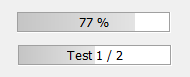
Feature request for the Progress Bar:
Is it maybe possible to add a .text/.caption or a .DisplayPercentage property to display the current percentage inside the progress bar?
I currently use my own progress bar usercontrol with this feature but i want/try to transfer all controls used in my project to VBCCR if possible...
Last edited by Mith; Apr 20th, 2020 at 03:42 AM.
-
Apr 20th, 2020, 06:29 AM
#2736
Fanatic Member
ListView AutoSize question
Im using the following code to auto size each column in my ListView:
Code:
.AutoSize (LvwColumnHeaderAutoSizeToItems Or LvwColumnHeaderAutoSizeToHeader)
Result:

How can i avoid the stretching of the last column to the end of the control ?
I want that the autosize of the last column is the same like all other columns:

Is there maybe another flag availble to change this behavior?
-
Apr 20th, 2020, 07:51 AM
#2737
Re: CommonControls (Replacement of the MS common controls)
Originally Posted by vb6forever
Any issues with using your controls with VB5, and if so (issues), is there a workaround?
There are significant differences between usercontrols in VB5 & VB6, and of course some v6 functions that didn't exist in v5. However, that doesn't mean that Krool's controls are using something incompatible with VB5. You should simply try it and report back on success or failure. You might want to do a quick scan for "vba6.dll" and replace with "vba5.dll" first.
-
Apr 20th, 2020, 10:01 AM
#2738
Fanatic Member
Re: CommonControls (Replacement of the MS common controls)
LaVolpe:
LaVolpe: Thanks for responding.
You should simply try it and report back on success or failure.
My Bad. Had hoped someone had already put forth the effort.
Probably wasting my time, but trying to move all code as much as possible to API usage in case M$ pulls the plug on Classic
hoping I might have a better shot at portability to something else.
-
Apr 22nd, 2020, 08:31 AM
#2739
Lively Member
Re: CommonControls (Replacement of the MS common controls)
toolbar question:
does the toolbar have a DC? reason I am asking, because I would like to print text on the toolbar mainly on placeholders (without the need to add a picturebox on it)
Last edited by Semke; Apr 22nd, 2020 at 06:12 PM.
-
Apr 23rd, 2020, 08:45 AM
#2740
Lively Member
Re: CommonControls (Replacement of the MS common controls)
StatusBar
Code:
StatusBar.Panels("aPanel").Width = lWidth
returns error 383:Property is read-only
in the MS Controls this was Read/Write
-
Apr 23rd, 2020, 09:30 AM
#2741
Re: CommonControls (Replacement of the MS common controls)
Originally Posted by LaVolpe
Any changes you make to enhance/redesign a Windows class, recommend ensuring the updated control will honor windows messages designed for that windows class.
For the FrameW I added the handlers WM_SETTEXT/WM_GETTEXT/WM_GETTEXTLENGTH now.
Because..
just remembered that from 03-Jul-2017 onwards the FrameW renders now directly on the UserControl, without resorting to BS_GROUPBOX window.
Like it was done recently with the IPAddress control. (not resorting to SysIPAddress32)
-
Apr 24th, 2020, 02:35 AM
#2742
Junior Member
Re: CommonControls (Replacement of the MS common controls)
VB6:
Private Sub ctTextBox_GotFocus()
‘’
End Sub
Private Sub ctTextBox_LostFocus()
‘’
End Sub
'''''''''''''''''''''''''''''''''''''''''''''''''''''''''''''''''''''''''''''''''''''''
Suggest adding events:
Private Sub ctTextBoxW_GotFocus()
''''
End Sub
Private Sub ctTextBoxW_LostFocus()
''''
End Sub
-
Apr 24th, 2020, 03:54 AM
#2743
Junior Member
Re: ListView AutoSize question
Originally Posted by Mith
Im using the following code to auto size each column in my ListView:
Code:
.AutoSize (LvwColumnHeaderAutoSizeToItems Or LvwColumnHeaderAutoSizeToHeader)
Result:
How can i avoid the stretching of the last column to the end of the control ?
I want that the autosize of the last column is the same like all other columns:
Is there maybe another flag availble to change this behavior?
Just don't use LvwColumnHeaderAutoSizeToHeader with the last column. According to MSDN "If you use this value with the last column, its width is set to fill the remaining width of the list-view control".
-
Apr 24th, 2020, 06:49 AM
#2744
Fanatic Member
Re: ListView AutoSize question
Originally Posted by Caine
Just don't use LvwColumnHeaderAutoSizeToHeader with the last column. According to MSDN "If you use this value with the last column, its width is set to fill the remaining width of the list-view control".
Using only LvwColumnHeaderAutoSizeToItems doesnt help, because the last column will look like this if the item text is smaller than the header caption:

It looks like there is no solution to set the width of the last column like this:
IF header caption > items width THEN use header width
IF items width > header caption THEN use items width
-
Apr 26th, 2020, 01:26 PM
#2745
Re: CommonControls (Replacement of the MS common controls)
Bugfix in the GetClipboardText function (CF_UNICODETEXT clipboard) in the Common.bas.
As maybe some make use of my Common.bas I think I need to report this quite crucial bugfix.
The bug was in fact that, for the string length determination, the function GlobalSize of the memory block was used.
In most cases, this was really the length of the string.
However, for example MS Excel applies for very large copy blocks a bigger memory block than actually needed, which resulted in garbade trailing chars.
Large copy blocks from MS Notepad always apply the memory block just perfect. However, MS Excel seems to be a bit sloppy. (probably due to a internal "ReDim style" chunk increase efficiency)
So, instead of GlobalSize the lstrlen function is used (after GlobalLock) for the string length determination. This of course cut-offs any in-between null chars.
However, the VB.Clipboard.GetText(vbCFText) function behaves the same as it also cut-offs any in-between null chars.
-
Apr 26th, 2020, 02:14 PM
#2746
Member
-
Apr 27th, 2020, 03:57 AM
#2747
Re: CommonControls (Replacement of the MS common controls)
Update released.
Bugfix for the ListView control.
1.
When inserting the very first item in a ListView control, the focus is automatically set to it. (Index = 1)
However, the ItemFocus event was not fired.
The bug lied in LvwListItems.cls in the .Add function.
FListItemsAdd was called which led the control to set focus to the first item. However, problem was that the LvwListItems collection did not yet include that item. That was the reason ItemFocus event did not fire.
Now the order is changed, first include new item to the collection and then let SysListView32 add new item.
New
Code:
If Key = vbNullString Then
    PropListItem.Add NewListItem
Else
    PropListItem.Add NewListItem, Key
End If
ShadowListView.FListItemsAdd Ptr, Index, Text
Old
Code:
ShadowListView.FListItemsAdd Ptr, Index, Text
If Key = vbNullString Then
    PropListItem.Add NewListItem
Else
    PropListItem.Add NewListItem, Key
End If
But watch out because the ItemFocus event is now firing when inserting the very first ListItem. Any possible ListSubItem does not yet exist. So, it's anyway a safe advise to check the existense of any subitems first when handling ItemFocus event. (if subitems are needed at all for handling ItemFocus event, depends on your app.)
But that's the same behavior as the ItemSelect event. (which fired before already at very first ListItem, depending on the AutoSelectFirstItem property)
2.
When clearing the list view the ItemFocus event fired with an Item parameter as Nothing. This was clearly a mis-feature.
The ItemSelect event also did not fire at that point. When an event is firing the parameter must be valid and cannot be Nothing.
Originally Posted by pepegriyo2016
I'am using the last version of OCX (1.6.0.93) and Source Code (26-Apr-2020)
With images it is easier to understand
For the IPAddress there is currently a mismatch between the OCX and Std-EXE version.
Reason is that it was completely re-done from scratch to make it "VB-ish". (update 17-Apr-2020)
So for the OCX to be using the new component it is necessary to wait until VBCCR17.
Last edited by Krool; Apr 27th, 2020 at 05:49 AM.
-
Apr 29th, 2020, 12:13 PM
#2748
Member
Re: CommonControls (Replacement of the MS common controls)
Hello Krool,
The ForeColor in object "CheckboxW" is not working. I set the color "&H00FF0000&" in design mode and the color is not show . Runtime does not work either.
-
Apr 29th, 2020, 12:39 PM
#2749
Re: CommonControls (Replacement of the MS common controls)
Originally Posted by pepegriyo2016
Hello Krool,
The ForeColor in object "CheckboxW" is not working. I set the color "&H00FF0000&" in design mode and the color is not show . Runtime does not work either.
Do you have theming enabled?
-
Apr 29th, 2020, 03:29 PM
#2750
Member
Re: CommonControls (Replacement of the MS common controls)
Hello Krool,
Do you have theming enabled?
yes
-
Apr 30th, 2020, 12:20 AM
#2751
Re: CommonControls (Replacement of the MS common controls)
Originally Posted by pepegriyo2016
Hello Krool,
yes
The ForeColor works only when un-themed or style = graphical.
-
Apr 30th, 2020, 06:01 AM
#2752
Re: CommonControls (Replacement of the MS common controls)
Update released.
Internal improvement for the OptionButtonW control. (actually a bugfix)
The problem was that I thought that the OLE_OPTEXCLUSIVE must be triggered via UserControl.PropertyChanged "Value" only for the TRUE value.
However, that works as long as the order is "sequential" in the .frm file. Now the OLE_OPTEXCLUSIVE will be triggered in either case.
Best to explain in pictures. In Frame1 the order in the .frm file is first W3 then W4.
But in Frame2 the order in the .frm file is also W5 and then W6. However, W6 was put then afterwards before W5 and the TabIndex was changed.
Both W3 and W6 are pre-defined with value TRUE at design time. (important for the test)
Now compare the behavior when simply "tabbing" through.
Before:

After:

-
May 2nd, 2020, 07:34 PM
#2753
Fanatic Member
Re: CommonControls (Replacement of the MS common controls)
Hi Krool.
Thanks again for the great unicode-aware combo box.
If you remember, in post #57 under http://www.vbforums.com/showthread.p...ombo-box/page2, I requested some changes:
1. bas module renames (both the module name itself in the IDE and the file name) to have a "ComCtls" or "CC" prefix.
2. class module renames (both the class module name itself in the IDE and the file name) to have a "ComCtls" or "CC" prefix.
3. folder name changes: All four folders (Builds, Common, OLEGuids and Resources) to have a "ComCtls" or "CC" prefix in their names.
4. Creation of one separate folder called Demo, so that every file and folder that is only part of the demo be moved in there.
For example all the frm and frx files as well as the ComCtlsDemo.vbp and ComCtlsDemo.vbw and some other files and also the entire folder "Resources" need to be moved under the Demo folder.
Or for another example, why is the Startup.bas module currently under the "Common" folder? It only belongs in the demo, so it shouldn't be there.
Not sure if you ever had a chance to review my suggestions or not, because you haven't responded to them yet.
And I don't know if I should continue to wait for a response or not.
But, I believe there are good reasons to have those changes:
1. The programmer may have bas and class modules by the same name in his own vbp project and there will be a conflict or at least a confusion.
2. Currently with every new release of the ComCtls, the programmer has to do all of these renamings and relocations himself. But, if all these changes were made in the ComCtls package itself, with each new release of a new version of ComCtrls, the programmer could simply download the new package, unzip it and overwrite the old files and folders with the files and folders from the newly released package. Currently, it is not just download, unzip and overwrite. Currently it is a bit of a painful job to do all of necessary steps to replace the old version with the new one.
3. The programmer may unnecessarily add the demo forms and the Startup.bas to his own project.
4. There is real value for any package to be very well organized.
5. Other reasons.
The ComCtls that you have developed are really world-class stuff, and this causes people to expect that they be very well organized.
That is why I am requesting these changes.
Just my humble opinion.
If you don't agree with me or don't want to make these changes for any reason, that would be understandable.
But, at lease a response (even a "No" response would be greatly appreciated.
You never responded to my request, so I am still in the dark as to what will happen.
Once again, thanks a lot for these great controls.
Ilia
-
May 3rd, 2020, 03:25 AM
#2754
Re: CommonControls (Replacement of the MS common controls)
Originally Posted by IliaPreston
If you remember, in post #57 under http://www.vbforums.com/showthread.p...ombo-box/page2, I requested some changes:
1. bas module renames (both the module name itself in the IDE and the file name) to have a "ComCtls" or "CC" prefix.
2. class module renames (both the class module name itself in the IDE and the file name) to have a "ComCtls" or "CC" prefix.
3. folder name changes: All four folders (Builds, Common, OLEGuids and Resources) to have a "ComCtls" or "CC" prefix in their names.
4. Creation of one separate folder called Demo, so that every file and folder that is only part of the demo be moved in there.
For example all the frm and frx files as well as the ComCtlsDemo.vbp and ComCtlsDemo.vbw and some other files and also the entire folder "Resources" need to be moved under the Demo folder.
Or for another example, why is the Startup.bas module currently under the "Common" folder? It only belongs in the demo, so it shouldn't be there.
Not sure if you ever had a chance to review my suggestions or not, because you haven't responded to them yet.
And I don't know if I should continue to wait for a response or not.
But, I believe there are good reasons to have those changes:
1. The programmer may have bas and class modules by the same name in his own vbp project and there will be a conflict or at least a confusion.
2. Currently with every new release of the ComCtls, the programmer has to do all of these renamings and relocations himself. But, if all these changes were made in the ComCtls package itself, with each new release of a new version of ComCtrls, the programmer could simply download the new package, unzip it and overwrite the old files and folders with the files and folders from the newly released package. Currently, it is not just download, unzip and overwrite. Currently it is a bit of a painful job to do all of necessary steps to replace the old version with the new one.
3. The programmer may unnecessarily add the demo forms and the Startup.bas to his own project.
4. There is real value for any package to be very well organized.
5. Other reasons.
The ComCtls that you have developed are really world-class stuff, and this causes people to expect that they be very well organized.
That is why I am requesting these changes.
Just my humble opinion.
If you don't agree with me or don't want to make these changes for any reason, that would be understandable.
But, at lease a response (even a "No" response would be greatly appreciated.
You never responded to my request, so I am still in the dark as to what will happen.
Sorry for not responding. Here my response:
I am likely not to change it because this would cause conflicts for my internal naming conventions. Because I use these common stuff also for other projects and as it is now is more convenient "for me" to copy & paste.
I would like to point something out. I encourage to use the OCX version as it is a "plug and play" replace. There you don't have to bother about any naming conflicts.
It is very ABNORMAL to even provide a Std-EXE source at all... most VB6 componenents are ONLY available as OCX.
I already thought about the idea to dis-miss the Std-EXE version at all and to only provide a OCX version to ease everything and to reduce questions.
Wouldn't it be just more easy to everyone to just provide a OCX. Then I could say "just register it and there you go".
However, I still think that for some use-cases it still makes sense to use a Std-EXE version to be "as portable as possible"..
So, using the OCX has also other advantages if an update comes out - just copy paste the new OCX file - you don't have to re-compile your app. (only if a big change comes like soon 1.6 -> 1.7)
But that's a one-time thing and 1.7 will be most probably the last version as then everything will be clean in an "infrastructure" point of view of the sources.
Thanks for your idea. I hope you understand my point.
-
May 3rd, 2020, 08:45 AM
#2755
Re: CommonControls (Replacement of the MS common controls)
Originally Posted by Krool
The problem was that I thought that the OLE_OPTEXCLUSIVE must be triggered via UserControl.PropertyChanged "Value" only for the TRUE value.
However, that works as long as the order is "sequential" in the .frm file. Now the OLE_OPTEXCLUSIVE will be triggered in either case.
This seems like the only case when passing *actual* (non-empty) property name to PropertyChanged notification makes huge difference to the container.
cheers,
</wqw>
-
May 3rd, 2020, 12:33 PM
#2756
Re: CommonControls (Replacement of the MS common controls)
Originally Posted by Mith
Feature request for the Progress Bar:
Is it maybe possible to add a .text/.caption or a .DisplayPercentage property to display the current percentage inside the progress bar?
I currently use my own progress bar usercontrol with this feature but i want/try to transfer all controls used in my project to VBCCR if possible...
Good idea. I think a .Font, .Text and .TextColor (.ForeColor already in use by ProgressBar) is enough?
If Text is not a NullString then overlay draw is enabled. (Overlay draw being also the technical term, because a double-buffer style drawing is not possible, at least not for the themed ProgressBar as otherwise the "draw movement" is "too fast")
The text shall be drawn always Center/VCenter so there is no need for extra alignment properties.
The text property should be able to process placeholders (e.g. {0} = Value, {1} = Min, {2} = Max and {3} = Percent value between 0 and 100)
Am I missing something?
Last edited by Krool; May 4th, 2020 at 11:36 AM.
-
May 4th, 2020, 01:52 PM
#2757
Fanatic Member
Re: CommonControls (Replacement of the MS common controls)
Originally Posted by Krool
......
(only if a big change comes like soon 1.6 -> 1.7)
......
Thanks a lot for your response.
And do you have any idea as to when probably that version 1.7 will come out?
I just downloaded the latest version, and in the Readme.txt file there is no mention of what version it is.
Nor is any mention in the List of Revisions.txt
They mention the release date, but not the release version number.
It would be nice to specify the version number in one of these two text files as well, because it is easier to refer to them (even before deploying the whole package in VB6 IDE.)
Thanks.
-
May 4th, 2020, 03:06 PM
#2758
Re: CommonControls (Replacement of the MS common controls)
Update released.
as suggested already yesterday the ProgressBar includes now new Font/Text/TextColor property.
Important to note are the text placeholders {0} = Value, {1} = Min, {2} = Max and {3} = Percent value between 0 and 100.
Using these are recommended to avoid unecessary redrawings. (applying new .Text will invalidate the region, whereas placeholder will automatically be used on ordinary draw when new value change occurs)
So a commonly needed .Text property may be: "{3} %"
I must quoute now Karl77 as he asked already for such a feature back in Dec, 2016 
Originally Posted by Karl77
While we are at that, a caption property for the progressbar would be nice.
Like in the old old CCRP.
EDIT: using WM_PRINTCLIENT on the ProgressBar will include also the new Text property.
Originally Posted by IliaPreston
I just downloaded the latest version, and in the Readme.txt file there is no mention of what version it is.
Nor is any mention in the List of Revisions.txt
They mention the release date, but not the release version number.
You are looking in the wrong thread. This here is the Std-EXE version. Here is the OCX version.
There in the List of Revisions.txt you find the version number history with the release dates.
Last edited by Krool; May 4th, 2020 at 03:11 PM.
-
May 5th, 2020, 06:06 AM
#2759
Lively Member
Re: CommonControls (Replacement of the MS common controls)
on the imagelist, when I set a maskcolor, the images get a funny colour in the property window. on the toolbar it is ok, but in some places they are bad (I think its when I use the picture property of the image)
-
May 5th, 2020, 08:35 PM
#2760
Fanatic Member
Missing NEXT property using the TvwNode
Im converting old TreeView source code to the new VBCCR TreeView but i struggle with the missing NEXT property of the tree node:
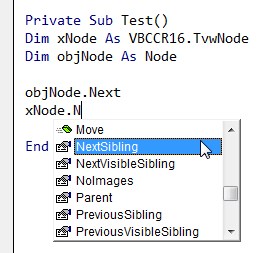
Normally the NEXT property is used to loop through the node childs:
Code:
Set xNode = Node.Child

For I = 1 To Node.Children

   xNode.Checked = True
   Set xNode = xNode.Next

Next I
Any ideas?
SOLTUION:
ok, i got it, the equivalent for the NEXT property is NextSibling...is there any reason to use another name for this property?
Last edited by Mith; May 5th, 2020 at 08:55 PM.
Reason: solution added
 Posting Permissions
- You may not post new threads
- You may not post replies
- You may not post attachments
- You may not edit your posts
-
Forum Rules
|
Click Here to Expand Forum to Full Width
|



 Reply With Quote

