|

-
Feb 27th, 2020, 12:48 AM
#2601
Re: CommonControls (Replacement of the MS common controls)
I download and started ComCtlsDemo and I get:

so I can't do much. it freezes the IDE and I need to hard-close the IDE.
https://i.postimg.cc/28VKdRKd/Image1.png
-
Feb 27th, 2020, 12:54 AM
#2602
Re: CommonControls (Replacement of the MS common controls)
 Originally Posted by baka

Overwrite with new OLEGuids.tlb.
-
Feb 27th, 2020, 01:01 AM
#2603
Re: CommonControls (Replacement of the MS common controls)
-
Feb 27th, 2020, 02:19 AM
#2604
Re: CommonControls (Replacement of the MS common controls)
Originally Posted by baka
Did you replace the file in SysWOW64 folder? (or System32)
-
Feb 27th, 2020, 03:21 PM
#2605
Member

Re: CommonControls (Replacement of the MS common controls)
Thanks for your effort
I'm using your CommonDialog and maybe there is an issue easy to solve but...
Option Explicit
Public myPrinter As Printer ' initialized in app.main
Public Sub SetMyPrinter()
With New CommonDialog
.CancelError = False
.PrinterDefault = False
.PrinterDefaultInit = False
.PrinterName = myPrinter.DeviceName
.PrinterPort = myPrinter.Port
.PrinterDriver = myPrinter.DriverName
If .ShowPrinter Then
If Len(.PrinterName) = 0 Then
' if the default printer was selected Krool's CommonDialog returns true but printer parms are not set
' Using the Printer object solves this issue
Set myPrinter = Printer
Else
Dim objPrinter As Printer
For Each objPrinter In Printers
If objPrinter.DeviceName = .PrinterName Then
Set myPrinter = objPrinter
Exit For
End If
Next
End If
End If
End With
End Sub
If the default printer was selected CommonDialog returns true but printer parms are not set
Is this the way it works?
Or maybe the following:
If ((DNAMES.wDefault And DN_DEFAULTPRN) = 0) Then
should be:
If ((DNAMES.wDefault And DN_DEFAULTPRN) = 0) Or (PropPrinterDefaultInit = False) Then
or better:
Dim bReq As Byte
If (PDLG.Flags And CdlPDReturnDefault) = 0 Then
bReq = PropPrinterDefaultInit = False And Not (PropPrinterDriver = vbNullString Or PropPrinterName = vbNullString _
Or PropPrinterPort = vbNullString)
If ((DNAMES.wDefault And DN_DEFAULTPRN) = 0) Or bReq Then
QUESTION:
Is it possible to use CommonDialog as above and skip User input like when PropFlags = CdlPDReturnDefault
-
Feb 27th, 2020, 05:03 PM
#2606
Re: CommonControls (Replacement of the MS common controls)
Update released. (VBCCR16.OCX also updated on this)
Originally Posted by Simos
If the default printer was selected CommonDialog returns true but printer parms are not set
I always use CdlPDReturnDC so this didn't bother me yet.
Also the MS Common Dialog doesn't provide such functionality, so there is no "comparable behavior" to consider.
The idea was: if the params return null then the default printer was selected. (kind of alias)
However, for some use cases it might not appropriate. Thanks for your feedback.
Therefore I changed it now and the printer params are now *always* returned.
The flag DN_DEFAULTPRN is now only taken to decide whether or not to change the default printer when PropPrinterDefault = True.
Originally Posted by Simos
Is it possible to use CommonDialog as above and skip User input like when PropFlags = CdlPDReturnDefault
No.
-
Feb 27th, 2020, 05:16 PM
#2607
Member
Re: CommonControls (Replacement of the MS common controls)
-
Feb 28th, 2020, 05:04 PM
#2608
Member
Re: CommonControls (Replacement of the MS common controls)
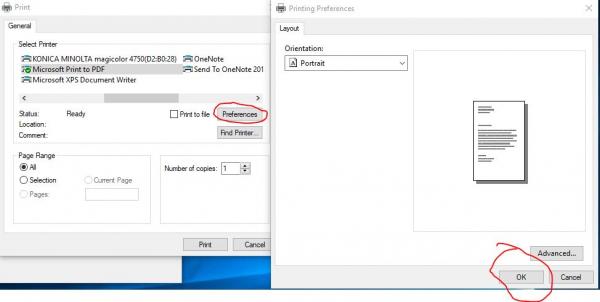
please check also:
with new CommonDialog: .ShowPrinter: end with
In the Dialog click Preferences and then click OK.
You must use Task Manager to end the IDE or restart the pc if this action was from an exe
-
Feb 28th, 2020, 05:17 PM
#2609
Re: CommonControls (Replacement of the MS common controls)
Originally Posted by Simos
please check also:
with new CommonDialog: .ShowPrinter: end with
In the Dialog click Preferences and then click OK.
You must use Task Manager to end the IDE or restart the pc if this action was from an exe
I don't understand anything..
-
Feb 28th, 2020, 05:24 PM
#2610
Member
Re: CommonControls (Replacement of the MS common controls)
just call .ShowPrinter . When the PrintDialog appears then click the button Preferences. When the new Dialog appears click the button OK.
-
Feb 28th, 2020, 05:40 PM
#2611
Member
Re: CommonControls (Replacement of the MS common controls)
Originally Posted by Simos
just call .ShowPrinter . When the PrintDialog appears then click the button Preferences. When the new Dialog appears click the button OK.
-
Feb 29th, 2020, 04:36 AM
#2612
Member
Re: CommonControls (Replacement of the MS common controls)
Originally Posted by Simos
I found that this problem exists only if the first selected printer is "Microsoft Print to PDF"
If you click on any other printer then PrintDialog->Preferences->OK works fine
Next click the printer "Microsoft Print to PDF" then Preferences->OK don't crash !!!
-
Feb 29th, 2020, 06:17 AM
#2613
Member
Re: CommonControls (Replacement of the MS common controls)
Sorry to bother you.
In order to reproduce the CommonDialog crash you must:
1. set "Miscrosoft Print to PDF" printer as default OR set PrinterName="Microsoft Print to PDF", PrinterPort="Ne01:", PrinterDriver="winspool"
2. call ShowPrinter and when PrintDialog appears with the above printer selected, don't click on any other printer … just click Preferences and then OK
I hope that this time I was able to give you the correct info to reproduce the crash.
-
Feb 29th, 2020, 06:17 AM
#2614
Member
Re: CommonControls (Replacement of the MS common controls)
Please let me know if you reproduced the problem
Last edited by Simos; Feb 29th, 2020 at 06:23 AM.
-
Mar 1st, 2020, 02:45 PM
#2615
Member
Re: CommonControls (Replacement of the MS common controls)
About the CommonDialog problem:
MSDN: The DEVMODE structure actually used by a printer driver contains the device-independent part
followed by a driver-specific part that varies in size and content with each driver and driver version.
Because of this driver dependence, it is very important for applications to query the driver for the correct
size of the DEVMODE structure before allocating a buffer for it.
I have changed the ShowPrinter function to copy DEVMODE structure in the correct buffer as above and the crash problem is fixed now.
If you wish I can upload it.
Thank you
-
Mar 1st, 2020, 02:52 PM
#2616
Re: CommonControls (Replacement of the MS common controls)
Originally Posted by Simos
About the CommonDialog problem:
MSDN: The DEVMODE structure actually used by a printer driver contains the device-independent part
followed by a driver-specific part that varies in size and content with each driver and driver version.
Because of this driver dependence, it is very important for applications to query the driver for the correct
size of the DEVMODE structure before allocating a buffer for it.
I have changed the ShowPrinter function to copy DEVMODE structure in the correct buffer as above and the crash problem is fixed now.
If you wish I can upload it.
Thank you
Please. Thanks
-
Mar 1st, 2020, 02:57 PM
#2617
Member
Re: CommonControls (Replacement of the MS common controls)
-
Mar 2nd, 2020, 09:15 AM
#2618
Member
Re: CommonControls (Replacement of the MS common controls)
I created the Private Function PrinterDevMode(ByVal hWndOwner As Long, ByRef dmOutBuf() As Byte, ByRef bufsize As Long) As Boolean
and updated ShowPrinter, ShowPrinterEx and ShowPageSetup.
CommonDialog.zip
-
Mar 2nd, 2020, 11:28 AM
#2619
Member
Re: CommonControls (Replacement of the MS common controls)
New issue: propPrinterPort = Left$(Buffer, InStr(Buffer, vbNullChar) - 1)
It seems that the last vbNullChar is optional.
Error if you select "OneNote" printer.
Fixed as: propPrinterPort = Left$(Buffer, InStr(Buffer & vbNullChar, vbNullChar) - 1)
-
Mar 2nd, 2020, 12:10 PM
#2620
Re: CommonControls (Replacement of the MS common controls)
@Simos, great bug reports. Such things are needed. Will ensure that all gets fixed soon. Thanks
-
Mar 2nd, 2020, 12:45 PM
#2621
Member
Re: CommonControls (Replacement of the MS common controls)
Originally Posted by Krool
@Simos, great bug reports. Such things are needed. Will ensure that all gets fixed soon. Thanks
Krool. I know that CommonDialog is not on this thread contents and you can't deal with it now.
Maybe I should work on this and when finished I will let you know. I will mark all changes.
Is this ok?
-
Mar 2nd, 2020, 04:44 PM
#2622
Re: CommonControls (Replacement of the MS common controls)
Originally Posted by Simos
Maybe I should work on this and when finished I will let you know. I will mark all changes.
Is this ok?
Not needed. I already released an update now to address
1. the issue with the vbNullChar
2. the DEVMODE structure
In fact I did go another way than you did for point 2.
You query the whole DEVMODE struct.
However, I do the "light version" and only retrieve the buffer length to define DMDriverExtra.
And then of course in the allocation to add the DMDriverExtra.
Code:
DMODE.DMSize = LenB(DMODE)
If PropPrinterDefaultInit = False And Not (PropPrinterDriver = vbNullString Or PropPrinterName = vbNullString Or PropPrinterPort = vbNullString) Then
    DMODE.DMDriverExtra = GetDMDriverExtra(DMODE.DMSize, PropPrinterName)
    Buffer = Left$(PropPrinterName, CCHDEVICENAME)
    CopyMemory DMODE.DMDeviceName(0), ByVal StrPtr(Buffer), LenB(Buffer)
Else
    DMODE.DMDriverExtra = GetDMDriverExtra(DMODE.DMSize)
End If
[...]
PDLG.hDevMode = GlobalAlloc(GMEM_MOVEABLE Or GMEM_ZEROINIT, LenB(DMODE) + DMODE.DMDriverExtra)
The helper function GetDMDriverExtra: (using OpenPrinterW/DocumentPropertiesW)
Code:
Private Declare Function DocumentProperties Lib "winspool.drv" Alias "DocumentPropertiesW" (ByVal hWnd As Long, ByVal hPrinter As Long, ByVal lpszDeviceName As Long, ByVal lpDevModeOutput As Long, ByVal lpDevModeInput As Long, ByVal fMode As Long) As Long
Private Declare Function OpenPrinter Lib "winspool.drv" Alias "OpenPrinterW" (ByVal lpszPrinterName As Long, ByRef hPrinter As Long, ByVal lpDefault As Long) As Long
Private Declare Function ClosePrinter Lib "winspool.drv" (ByVal hPrinter As Long) As Long
Private Declare Function GetDefaultPrinter Lib "winspool.drv" Alias "GetDefaultPrinterW" (ByVal lpszPrinterName As Long, ByRef cch As Long) As Long

Private Function GetDMDriverExtra(ByVal DMSize As Long, Optional ByVal PrinterName As String) As Long
' According to MSDN:
' The DEVMODE structure actually used by a printer driver contains the device-independent part
' followed by a driver-specific part that varies in size and content with each driver and driver version.
' Because of this driver dependence, it is very important for applications to query the driver for the correct
' size of the DEVMODE structure before allocating a buffer for it.
If PrinterName = vbNullString Then
    Dim Length As Long
    GetDefaultPrinter 0, Length
    If Length > 0 Then
        Dim Buffer As String
        Buffer = String(Length, vbNullChar)
        GetDefaultPrinter StrPtr(Buffer), Length
        PrinterName = Left$(Buffer, Length - 1)
    End If
End If
Dim hPrinter As Long
If OpenPrinter(StrPtr(PrinterName), hPrinter, 0) Then
    Dim RetVal As Long
    RetVal = DocumentProperties(0, hPrinter, StrPtr(PrinterName), 0, 0, 0)
    If RetVal > -1 Then
        If RetVal > DMSize Then GetDMDriverExtra = RetVal - DMSize
    End If
    ClosePrinter hPrinter
    hPrinter = 0
End If
End Function
Last edited by Krool; Mar 2nd, 2020 at 04:50 PM.
-
Mar 2nd, 2020, 04:53 PM
#2623
Member
Re: CommonControls (Replacement of the MS common controls)
-
Mar 2nd, 2020, 05:51 PM
#2624
Member
Re: CommonControls (Replacement of the MS common controls)
About vbNullChar: You must also add size to CCHDEVNAMESEXTRA. OneDriver printer has wExtra > 120
-
Mar 3rd, 2020, 12:18 AM
#2625
Re: CommonControls (Replacement of the MS common controls)
Originally Posted by Simos
About vbNullChar: You must also add size to CCHDEVNAMESEXTRA. OneDriver printer has wExtra > 120
It's defined currently as 100. What value do you suggest?
There is no clear definition. I guess it can be any?
So let's go for 200 then?
Edit:
Also must the dmSpecVersion be always set fixed to = DM_SPECVERSION ?
Last edited by Krool; Mar 3rd, 2020 at 12:37 AM.
-
Mar 3rd, 2020, 05:54 AM
#2626
Member
Re: CommonControls (Replacement of the MS common controls)
Originally Posted by Krool
It's defined currently as 100. What value do you suggest?
There is no clear definition. I guess it can be any?
So let's go for 200 then?
Edit:
Also must the dmSpecVersion be always set fixed to = DM_SPECVERSION ?
1.200 should be sufficient enough to cover long Network Printer names and PortNames like OneNote. Just in case don't remove the last "& vbNullChar"
2.I don't know. This is why I fetched the driver's buffer. The info about DeviceName, SpecVersion, … exist in that buffer and you don't have to set these values to DMODE
QUESTION:
Will you add the CommonDialogW to your excellent collection?
If you don't and with your permission I will create an ActiveX CommonDialogW
Maybe you don't know that your CommomDialogW solves the problem of "Generic / Text" printer and "Device font 10cpi"
Last edited by Simos; Mar 3rd, 2020 at 05:59 AM.
-
Mar 3rd, 2020, 06:38 AM
#2627
Re: CommonControls (Replacement of the MS common controls)
Originally Posted by Simos
1.200 should be sufficient enough to cover long Network Printer names and PortNames like OneNote. Just in case don't remove the last "& vbNullChar"
2.I don't know. This is why I fetched the driver's buffer. The info about DeviceName, SpecVersion, … exist in that buffer and you don't have to set these values to DMODE
QUESTION:
Will you add the CommonDialogW to your excellent collection?
If you don't and with your permission I will create an ActiveX CommonDialogW
Maybe you don't know that your CommomDialogW solves the problem of "Generic / Text" printer and "Device font 10cpi"
CommonDialog is included in the OCX. Don't get your question.
-
Mar 3rd, 2020, 06:46 AM
#2628
Member
Re: CommonControls (Replacement of the MS common controls)
 Sorry...Yes it exists in toolbar. Was it there a year ago? Sorry...Yes it exists in toolbar. Was it there a year ago?
-
Mar 3rd, 2020, 06:55 AM
#2629
Member
Re: CommonControls (Replacement of the MS common controls)
No... Actually it's not in the toolbox "ComCtlsDemo" project
-
Mar 3rd, 2020, 07:18 AM
#2630
Member
Re: CommonControls (Replacement of the MS common controls)
Sorry... Forget the above. I was just looking the controls collection. (Replace vb's CommonDialog). No need to make a UserControl for this.
Just curious... Do you know the "Generic / Text" and "Device font 10cpi" problem ?
-
Mar 3rd, 2020, 08:57 AM
#2631
Re: CommonControls (Replacement of the MS common controls)
Originally Posted by Simos
Do you know the "Generic / Text" and "Device font 10cpi" problem ?
No I don't.
-
Mar 3rd, 2020, 10:07 AM
#2632
Member
Re: CommonControls (Replacement of the MS common controls)
Originally Posted by Krool
No I don't.
Easy to reproduce.
Use vbCommonDialog or any other wrapper PrintDlgA (vbAccelerator, …). Select this printer and print something(even to file)
That's it. The printer object's font changes to "Device Font 10cpi" and there is no way to set another font to the printer.
You must exit the app and start over. The strange thing is that if the first printout off the app was with another normal printer this problem no longer exists. I don't know if this exists only in Unicode environments.(here is Greece dif.codepage). Since then I always check the first printout and stop it if the printer is the above.
-
Mar 3rd, 2020, 11:44 AM
#2633
Re: CommonControls (Replacement of the MS common controls)
Originally Posted by Simos
2.I don't know. This is why I fetched the driver's buffer. The info about DeviceName, SpecVersion, … exist in that buffer and you don't have to set these values to DMODE
The "correct" way is even longer.
https://support.microsoft.com/en-us/...rties-function
1. Determine size (fMode = 0)
2. Read (fMode = DM_OUT_BUFFER)
3. Modify DevMode
4. Merge (fMode = DM_IN_BUFFER OR'ing DM_OUT_BUFFER)
You skipped point 4 and I skipped all except 3, with yesterday update skipped 2 and 4.
I will do it properly and will update soon w/o any skips.
-
Mar 3rd, 2020, 12:34 PM
#2634
Member
Re: CommonControls (Replacement of the MS common controls)
I think step 4 is not needed. You have already merged the DevMode part. PrintDlgW will do the rest
Last edited by Simos; Mar 3rd, 2020 at 12:38 PM.
-
Mar 3rd, 2020, 12:58 PM
#2635
Member
Re: CommonControls (Replacement of the MS common controls)
I think step 4 was actually when I copied DMODE back to the dmoutbuf() and then CopyMemory ByVal lpDevMode, dmOutbuf(0), buflen
-
Mar 3rd, 2020, 01:24 PM
#2636
Re: CommonControls (Replacement of the MS common controls)
Originally Posted by Simos
I think step 4 was actually when I copied DMODE back to the dmoutbuf() and then CopyMemory ByVal lpDevMode, dmOutbuf(0), buflen
That's the hard merge. However DM_IN_BUFFER OR'ing DM_OUT_BUFFER merges involving the driver so that eventual amendments in the private section can be done, according to MSDN.
-
Mar 3rd, 2020, 01:35 PM
#2637
Member
Re: CommonControls (Replacement of the MS common controls)
I still think that since we return in dmOutbuf() the size of our DMODE struct the driver will adjust the private part. But you may not agree.
-
Mar 3rd, 2020, 01:45 PM
#2638
Member
Re: CommonControls (Replacement of the MS common controls)
when DMODE gets the dmOutbuf() data the DMODE.DMSize is either 0 or 1. This is something to think about. Perhaps Old/New DMODE struct
-
Mar 3rd, 2020, 02:22 PM
#2639
Member
Re: CommonControls (Replacement of the MS common controls)
Please run this:
Sub Main()
Debug.Print Printer.FontName ' should be any font
Dim obj As Printer
For Each obj In Printers
If obj.DeviceName = "Generic / Text Only" Then
Set Printer = obj
Debug.Print Printer.FontName ' also the above font
Printer.FontName = "Tahoma" ' or any other font
Debug.Print Printer.FontName ' Ooops...Device Font 10cpi... you must exit IDE
Exit For
End If
Next
End Sub
-
Mar 3rd, 2020, 03:24 PM
#2640
Member
Re: CommonControls (Replacement of the MS common controls)
Since you are working on CommonDialogW maybe you should make some other changes to make it more user friendly.
1. Trim out not supported flags. e.e. CdlPDNoNetworkButton and cdlPDPrintSetup not supported in ShowPrinterEx and the error returned is generic
2. Maybe propFlags should be set to zero on exit of all Show functions. (After ShowPrinter I called ShowColor without setting any flags and I got an error)
 Posting Permissions
- You may not post new threads
- You may not post replies
- You may not post attachments
- You may not edit your posts
-
Forum Rules
|
Click Here to Expand Forum to Full Width
|



 Reply With Quote