


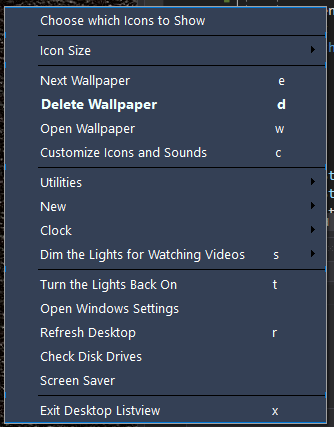
Hi everyone, I came across this code and it's not mine, but I thought maybe someone would like to see it. For many months I've looked for how to make just one line of text in a context menu be bold and I never found a way until now.
I don't use the Designer to make context menus so I hope you will not be upset with me for that
Here is the code that calls a function to make the item font be bold...
And here's the function that does the Font...Code:myString = "d" myString = myString.PadLeft(CInt(31)) DeleteWallpaper = New ToolStripMenuItem("&Delete Wallpaper" & myString) ret = rk.GetValue("ShowDeleteWallpaperIcon") 'Get value from registry With DeleteWallpaper If CBool(ret) Then .Image = My.Resources.trash With ShowMenuImages .ShowDeleteWallpaperIcon.Checked = True 'If true, Menu Icons are visible End With End If .ImageScaling = ToolStripItemImageScaling.SizeToFit .ForeColor = Color.Beige .Font = CreateFont("Segoe UI", CInt(9.5), True, False, False) <-- SET THE FONT End With
So if you too ever wondered if you can make a single string in a context menu bold, this will do the jobCode:Public Function CreateFont(ByVal fontName As String, ByVal fontSize As Integer, ByVal isBold As Boolean, ByVal isItalic As Boolean, ByVal isStrikeout As Boolean) As Font Dim styles As FontStyle = FontStyle.Regular If (isBold) Then styles = styles Or FontStyle.Bold End If If (isItalic) Then styles = styles Or FontStyle.Italic End If If (isStrikeout) Then styles = styles Or FontStyle.Strikeout End If Dim newFont As New Font(fontName, fontSize, styles) Return newFont End Function
Thanks for checking this out. Hope someone finds it useful...
Edit: Here's a screen shot of my context menu. The "Delete" line uses Color.Azure


 Reply With Quote