|

-
Jun 19th, 2019, 06:17 AM
#2281
Junior Member

Re: CommonControls (Replacement of the MS common controls)
One reason I can think of is for long-term archival in source control. I've been in the situation where you no longer know what source images were used, and no one wrote that down either. But you could export & checkin the text file listing.
(Not saying it is worth the effort just for this... )
-
Jun 19th, 2019, 07:56 PM
#2282
Addicted Member
Re: CommonControls (Replacement of the MS common controls)
 Originally Posted by Karl77

Can't we just copy/paste the whole control that holds the images?
EDIT:
I load the images from a res file at runtime anyway.
It is more convenient than to handle the images in the imagelist directly.
Also for what DaveInCaz says.
This is a good idea, and I will consider reading from the RES later so that I can leave the toolbar.
-
Jun 20th, 2019, 04:48 PM
#2283
Lively Member
Re: CommonControls (Replacement of the MS common controls)
Originally Posted by Karl77
Can't we just copy/paste the whole control that holds the images?
EDIT:
I load the images from a res file at runtime anyway.
It is more convenient than to handle the images in the imagelist directly.
Also for what DaveInCaz says.
do you use the res file to load the image list, could you please show the code how you do it
-
Jun 21st, 2019, 04:41 AM
#2284
Fanatic Member
Re: CommonControls (Replacement of the MS common controls)
Semke:
do you use the res file to load the image list
Oh well, now I must show my ugly code...
It is far easier to load the images from internal resources.
I think it is better to search here in the forum for an explainable solution.
My approach is not good as a retraceable example.
Code:
Dim i As VBCCR.ImageList
Dim s As String
Dim R As New c_ResFromDLL

s = "_24"

R.LibraryFilePath = App.Path & "\RES20.dll"

StartGDIPlus

Set i = MF.imgl_Menu

i.ListImages.Clear
i.ColorDepth = ImlColorDepth32Bit
i.ImageWidth = 0
i.ImageHeight = 0

ResDLLToImgl i, R, "tips" & s 'and this a few 100 times with the single images

Set i = Nothing

StopGDIPlus

R.CloseLibrary
Set R = Nothing


Public Sub ResDLLToImgl(ByRef imgl As VBCCR.ImageList, _
                        ByRef TheClass As c_ResFromDLL, _
                        ByVal key As String)
imgl.ListImages.Add , key, TheClass.DLL_LoadPNG(key)
End Sub
-
Jun 25th, 2019, 05:38 AM
#2285
Lively Member
Re: CommonControls (Replacement of the MS common controls)
is there a way to increase checkbox size of a listbox and checkbox.
also is it possible to have a carriage return in a list, so each selected item is two lines.
it looks like the only way to do it is by using owner draw, which is implemented in these controls (thank you krool), however I do need some directing, of how to do it.
I guess that the ItemDraw event comes into play, but that's all I have figured out for now
having a font size of 18 and a tiny checkbox is really unattractive.
Last edited by Semke; Jun 25th, 2019 at 06:39 AM.
-
Jul 1st, 2019, 03:07 PM
#2286
Hyperactive Member
Re: CommonControls (Replacement of the MS common controls)
Selecting the Toolbar DisabledImageList and HotImageList property page entries cause an immediate crash to desktop. Regular ImageList and PressedImageList work fine. I checked an older CCR version from January and that was OK. Active-X and STD on Windows 10.
I was running in the IDE without manifesting for VB6.exe.
Also, it only happens when clicking in the VB MDI property page properties. I can set the same properties using the pop-up property window without killing VB.
Last edited by ahenry; Jul 2nd, 2019 at 12:48 PM.
-
Jul 6th, 2019, 12:04 PM
#2287
Re: CommonControls (Replacement of the MS common controls)
Originally Posted by ahenry
Selecting the Toolbar DisabledImageList and HotImageList property page entries cause an immediate crash to desktop. Regular ImageList and PressedImageList work fine. I checked an older CCR version from January and that was OK. Active-X and STD on Windows 10.
I was running in the IDE without manifesting for VB6.exe.
Also, it only happens when clicking in the VB MDI property page properties. I can set the same properties using the pop-up property window without killing VB.
Sorry. I can't replicate the problem. Can you provide a demo with the steps to encounter the crash? Thanks
-
Jul 8th, 2019, 09:51 AM
#2288
Hyperactive Member
Re: CommonControls (Replacement of the MS common controls)
I've had trouble replicating it myself. I can get it to consistently fail, and then I'll open another project and it starts working again. Maybe I'm mixing incompatible versions somehow, but when things are breaking, it's easy to reproduce:
Open VB - Create a new Project - Add VBCCR16 as a component - Add Toolbar on the main form
Then when I click on the HotImageList property, VB will exit after about a half-second.
The Application logs shows:
Faulting application name: VB6.EXE, version: 6.0.97.82, time stamp: 0x403acf6c
Faulting module name: ntdll.dll, version: 10.0.17134.799, time stamp: 0x636bcb43
Exception code: 0xc0000374
Fault offset: 0x000d8519
Faulting process id: 0x148c
Faulting application start time: 0x01d53597850cbd50
Faulting application path: C:\Program Files (x86)\Microsoft Visual Studio\VB98\VB6.EXE
Faulting module path: C:\WINDOWS\SYSTEM32\ntdll.dll
Report Id: ffce8926-a4e0-4cbc-a64c-c55bd9fed625
But if I remember to stay away from those properties in the generic VB properties window, everything is OK, so it's no big deal.
Now the whole reason I was trying out the Toolbar replacement was to use 32-bit alpha-channel images, which don't really work anyhow. But being able to use ImageList controls with 32-bit images stored makes things easier regardless.
-
Jul 9th, 2019, 12:50 PM
#2289
Re: CommonControls (Replacement of the MS common controls)
Critical update released for ListView control.
The application could crash. Mostly relevant when using the 'UseColumnFilterBar' feature.
The root problem was that the internal SysHeader32 control missed the activation/deactivation of the VBCCR's IOleInPlaceActiveObject object.
This got now fixed.
The reason why it certainly only applies for the 'UseColumnFilterBar' feature is really sneaky. Details below:
The ListView was only *unstable* when the internal SysHeader32 control received focus and the previous window didn't receive WM_KILLFOCUS.
A normal SetFocus API should be safe as it ensures WM_KILLFOCUS...
So where's the problem? -> comctl32 is the problem. (partially)
Because the comctl32 SysListView32 control for the internal filter edit window (in the filter bar) only sends WM_KILLFOCUS to the edit window when the user clicks something else or by a focus change by code.
However, when the user types ESC or RETURN in the filter edit window comctl32 will only send EN_KILLFOCUS. No WM_KILLFOCUS whatsoever.
And after EN_KILLFOCUS the SysHeader32 control will receive focus.. that's the starting point of the upcoming potential crash.
So now the VBCCR's IOleInPlaceActiveObject object still is activated. And as the SysHeader32 window does not care about VBCCR's IOleInPlaceActiveObject, it is still activated. (but after this fix it will take care)
Now depending on the next action the application will crash or not:
- Clicking another VBCCR control. Safe again, no crash.
- Something else like clicking a VB control... maybe or maybe not, let's see:
Still no crash so far. But now any action that will modify the original VB's IOleInPlaceActiveObject can cause a crash. And what can do this?
Well for example, let's assume the user then clicked a VB.CommandButton to open a Modal VB.Form. Still no crash.
In that modal VB.Form the user then clicks another VB.CommandButton that will make a Unload on the modal form. Here the crash happens.
Because the VBCCR's IOleInPlaceActiveObject reference to the original VB object is outdated. By outdated I mean VB can refresh it's own IOleInPlaceActiveObject reference, e.g. when a modal form opens.
Then the user Unloads the form which will then raise a IOleInPlaceActiveObject::EnableModeless call and as the reference to the original VB object is outdated the crash is executing... 
I know it's very specific issue but I just want to point out which strange circumstances can cause a crash.
Last edited by Krool; Jul 9th, 2019 at 01:04 PM.
-
Jul 24th, 2019, 01:50 AM
#2290
Fanatic Member
Re: CommonControls (Replacement of the MS common controls)
Feature request.
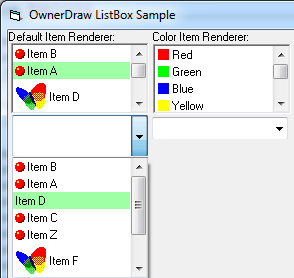
ComboBoxW and ListBoxW item background or foreground color settable (ownerdrawn items)?
Before used emorcillo's ODComboBox and ODListBox for this purpose, but like to switch Krool's controls.
-
Jul 24th, 2019, 11:24 AM
#2291
Re: CommonControls (Replacement of the MS common controls)
Originally Posted by Tech99
Feature request.
ComboBoxW and ListBoxW item background or foreground color settable (ownerdrawn items)?
Before used emorcillo's ODComboBox and ODListBox for this purpose, but like to switch Krool's controls.
Both, ComboBoxW and ListBoxW, have a DrawMode property which you can set to OwnerDraw.
A little bit of browsing thru the props would help..
-
Jul 24th, 2019, 12:45 PM
#2292
Fanatic Member
Re: CommonControls (Replacement of the MS common controls)
Originally Posted by Krool
Both, ComboBoxW and ListBoxW, have a DrawMode property which you can set to OwnerDraw.
A little bit of browsing thru the props would help..
Sure, i looked properties and made test app
Code:
Private Sub Form_Load()
Dim i As Long
SetupVisualStyles Me
MainForm.Show vbModeless

For i = 1 To 10
If i = 3 Then ComboBoxW1.ListBackColor = vbRed Else ComboBoxW1.ListBackColor = vbWhite
ComboBoxW1.AddItem "1." & Format(i, "00000")
Next i

ComboBoxW1.ListIndex = 0
End Sub
Tried to set DrawMode to cboOwnerDrawFixed and then cboOwnerDrawVariable, also tried to set ExtendedUI = True.
Dropdown part does not list any items ie. draws only dropdown border, item list is does not show.

-
Jul 24th, 2019, 02:06 PM
#2293
Re: CommonControls (Replacement of the MS common controls)
Originally Posted by Tech99
Sure, i looked properties and made test app
Code:
Private Sub Form_Load()
Dim i As Long
SetupVisualStyles Me
MainForm.Show vbModeless

For i = 1 To 10
If i = 3 Then ComboBoxW1.ListBackColor = vbRed Else ComboBoxW1.ListBackColor = vbWhite
ComboBoxW1.AddItem "1." & Format(i, "00000")
Next i

ComboBoxW1.ListIndex = 0
End Sub
Tried to set DrawMode to cboOwnerDrawFixed and then cboOwnerDrawVariable, also tried to set ExtendedUI = True.
Dropdown part does not list any items ie. draws only dropdown border, item list is does not show.
You need to draw your stuff of course.
Look ItemMeasure and ItemDraw events.
ItemMeasure is only needed when OwnerDraw is Variable.
-
Aug 1st, 2019, 04:16 PM
#2294
Fanatic Member
Re: CommonControls (Replacement of the MS common controls)
Is there a way to disable an item in a ComboBoxW dropdown list?
-
Aug 2nd, 2019, 09:23 AM
#2295
Fanatic Member
Re: CommonControls (Replacement of the MS common controls)
Has anyone used the OwnerDraw abilities of these controls? I see that the ability exists but have no idea how to get started. Is there a basic tutorial or sample project on how to use these properties of the controls?
-
Aug 2nd, 2019, 04:42 PM
#2296
Re: CommonControls (Replacement of the MS common controls)
Originally Posted by AAraya
Is there a way to disable an item in a ComboBoxW dropdown list?
There is a .Locked property. But it will disable all items. There is no easy way to disable particular items.
If really needed. You would need to go the hard way and subclass the ComboLBox window and suppress certain input message manually at certain mouse locations.
Originally Posted by AAraya
Has anyone used the OwnerDraw abilities of these controls? I see that the ability exists but have no idea how to get started. Is there a basic tutorial or sample project on how to use these properties of the controls?
If you use the easier Fixed OwnerDraw then you only need to handle the ItemDraw event. That event is a direct forward call of an WM_DRAWITEM message.
So if you google for other OwnerDraw example handling WM_DRAWITEM then you might have your starting point already. You certainly only need to adapt some few things to consider the event parameter namings etc.
-
Aug 4th, 2019, 05:06 AM
#2297
-
Aug 4th, 2019, 06:53 AM
#2298
Re: ListBowW MultiColumn Colum Width is wrong
Originally Posted by Mith
VBCCR16 v.1.6.38 09-Jul-2019
VB6 Sp6
There is a problem with the calculation of the column width at the ListBoxW control using MultiColumn=True.
The text of some items is larger than the column width.
It's not a bug, it's a feature. The MS ListBox column width is fixed.
However, the ListBoxW column width is flexible.
Solution to your problem is to measure the longest string and call the .SetColumnWidth method. (or manually LB_SETCOLUMNWIDTH with SendMessage API)
Code:
lbDays.SetColumnWidth Me.TextWidth("letzten Donnerstag") + 375 ' check state image and extra buffer
If your content would be even larger than you would struggle with the MS ListBox. Because as the column width is fixed you can't even change with LB_SETCOLUMNWIDTH.
So I found it for the ListBoxW the best solution to depend on LB_SETCOLUMNWIDTH and not fixing something in the drawing.
Last edited by Krool; Aug 4th, 2019 at 07:00 AM.
-
Aug 4th, 2019, 07:48 PM
#2299
Fanatic Member
Re: CommonControls (Replacement of the MS common controls)
Originally Posted by Krool
If you use the easier Fixed OwnerDraw then you only need to handle the ItemDraw event. That event is a direct forward call of an WM_DRAWITEM message.
So if you google for other OwnerDraw example handling WM_DRAWITEM then you might have your starting point already. You certainly only need to adapt some few things to consider the event parameter namings etc.
Thanks, this was helpful. I was able to use this information and some code from Elroy to change the forecolor of an item in the list. Cool!
-
Aug 4th, 2019, 10:11 PM
#2300
Fanatic Member

Re: ListBowW MultiColumn Colum Width is wrong
Originally Posted by Krool
[I]Solution to your problem is to measure the longest string and call the .SetColumnWidth method. (or manually LB_SETCOLUMNWIDTH with SendMessage API)
Thanks for the information and the quick solution!
Now i use the API GetTextExtentPoint32W to determine the text width and everything looks fine.
Originally Posted by Krool
Code:
lbDays.SetColumnWidth Me.TextWidth("letzten Donnerstag") + 375 ' check state image and extra buffer
I only struggle a little bit with the fixed value 375 because many ppl using DPI scaling higher than 100% and i guess this value have to increase too, or?
-
Aug 5th, 2019, 12:10 AM
#2301
Re: ListBowW MultiColumn Colum Width is wrong
Originally Posted by Mith
I only struggle a little bit with the fixed value 375 because many ppl using DPI scaling higher than 100% and i guess this value have to increase too, or?
A fixed twips value is better than a fixed pixel value.
A fixed twips value will be converted into more pixel in case of higher DPI.
I use in VBCCR a lot of fixed pixel values but call them DIP. (Device independent pixels)
That DIP will then be multiplied with PixelsPerDIP_X()
However, storing twips is in this case easier.
-
Aug 5th, 2019, 03:20 AM
#2302
Fanatic Member
Re: ListBowW MultiColumn Colum Width is wrong
-
Aug 5th, 2019, 12:43 PM
#2303
Fanatic Member
Re: ListBowW MultiColumn Colum Width is wrong
Mith, I would check 225% too.
I had some issues with that setting.
Just a thought.
-
Aug 8th, 2019, 04:24 AM
#2304
Addicted Member
Re: CommonControls (Replacement of the MS common controls)
H krool ,
In listview , while in virtual mode enabled , the forecolor property is neglected and reverts the forecolor to black .
-
Aug 8th, 2019, 06:49 AM
#2305
Re: CommonControls (Replacement of the MS common controls)
Originally Posted by Hosam AL Dein
H krool ,
In listview , while in virtual mode enabled , the forecolor property is neglected and reverts the forecolor to black .
Please provide a Demo. Did you disable the ForeColor with the VirtualDisabledInfos?
-
Aug 8th, 2019, 06:54 AM
#2306
Addicted Member
Re: CommonControls (Replacement of the MS common controls)
Originally Posted by Krool
Please provide a Demo. Did you disable the ForeColor with the VirtualDisabledInfos?
No , no disabled info at all , I even tested it in comctlsdemo project .
you can reproduce the issue by setting the listview forecolor to any color say "red" and run the demo form for virtualised controls and the color is black .
-
Aug 8th, 2019, 08:33 AM
#2307
Fanatic Member
Re: CommonControls (Replacement of the MS common controls)
Originally Posted by Krool
If you use the easier Fixed OwnerDraw then you only need to handle the ItemDraw event. That event is a direct forward call of an WM_DRAWITEM message.
So if you google for other OwnerDraw example handling WM_DRAWITEM then you might have your starting point already. You certainly only need to adapt some few things to consider the event parameter namings etc.
I was able to use this information to prevent the selection of certain combo items. Thanks! Now I'd like to make a small visual tweak. I'd like the separator bar item to be half the height of a normal combo item.
I changed from Fixed to Variable Owner Drawn and am handling the ItemMeasure event. I leave all of the item's ItemHeight values as default except for the separator bar. I leave ItemDraw event code exactly as it was when in Fixed mode. This works properly for sizing the individual items but there's a problem - the combo dropdown list is not the correct size - rather than being large enough to show all of the items in the list it's only as large as one of the items. Is this a bug or am I supposed to be handling this somewhere?
The ItemMeasure event seems to be only for the combo items. Do I need to add some code to ItemDraw in Variable mode which I don't need in Fixed mode?
Appreciate any guidance you can provide.
-
Aug 8th, 2019, 09:52 AM
#2308
Re: CommonControls (Replacement of the MS common controls)
JFYI, variable sized owner-drawn combo boxes are completely useless as there is this bug since Windows 9x that the drop-down list animates the scrolling in *opposite* direction which is really confusing for end-user and everyone.
Just use fixed height owner-drawn lists and prevent mouse down reaching original wndproc on disabled items. For keyboard selected ones I usually spoof the ListIndex property (or Value) to return -1 (or Empty) or something along these lines.
cheers,
</wqw>
-
Aug 8th, 2019, 10:29 AM
#2309
Fanatic Member
Re: CommonControls (Replacement of the MS common controls)
Originally Posted by wqweto
JFYI, variable sized owner-drawn combo boxes are completely useless as there is this bug since Windows 9x that the drop-down list animates the scrolling in *opposite* direction which is really confusing for end-user and everyone.
Just use fixed height owner-drawn lists and prevent mouse down reaching original wndproc on disabled items. For keyboard selected ones I usually spoof the ListIndex property (or Value) to return -1 (or Empty) or something along these lines.
cheers,
</wqw>
Good to know. Thank you.
-
Aug 8th, 2019, 11:45 AM
#2310
Re: CommonControls (Replacement of the MS common controls)
Originally Posted by AAraya
Good to know. Thank you.
Btw, just tested it. This bug seems to be fixed in Windows 10 so one can safely use CBS_OWNERDRAWVARIABLE nowadays it appears.
My bad!
</wqw>
-
Aug 8th, 2019, 02:00 PM
#2311
Re: CommonControls (Replacement of the MS common controls)
Originally Posted by Hosam AL Dein
No , no disabled info at all , I even tested it in comctlsdemo project .
you can reproduce the issue by setting the listview forecolor to any color say "red" and run the demo form for virtualised controls and the color is black .
I can't reproduce your problem. I think you do something wrong.
In the GetVirtualItem event please make following:
Code:
If VirtualProperty = LvwVirtualPropertyForeColor Then Value = vbRed
In my testings this works. Please check again.
Originally Posted by AAraya
Now I'd like to make a small visual tweak. I'd like the separator bar item to be half the height of a normal combo item.
I changed from Fixed to Variable Owner Drawn and am handling the ItemMeasure event. I leave all of the item's ItemHeight values as default except for the separator bar. I leave ItemDraw event code exactly as it was when in Fixed mode. This works properly for sizing the individual items but there's a problem - the combo dropdown list is not the correct size - rather than being large enough to show all of the items in the list it's only as large as one of the items. Is this a bug or am I supposed to be handling this somewhere?
The ItemMeasure event seems to be only for the combo items. Do I need to add some code to ItemDraw in Variable mode which I don't need in Fixed mode?
Appreciate any guidance you can provide.
It should work. I did a quick test and there was definitely more than 1 item in the list.
What's the setting of the MaxDropDownItems property?
Can you provide a demo project showing your issue? It would be good to know if there is maybe indeed a bug.
-
Aug 10th, 2019, 01:09 PM
#2312
Re: CommonControls (Replacement of the MS common controls)
Update released for the ListView control.
In the MS common controls it is possible to change the .Key of an item in the control's collection. I didn't know it was even possible 
I will internally achieve this by adding a new item on the collection with the new key (or blank) and removing the old item. (of course the order is important in case of an error break)
Of course the ObjPtr() of the real item will stay the same..
Each control will need it's own procedure for this. Therefore I started with the ListView control (.ListItems) and others will follow then step by step.
VBCCR16 got also updated and will benefit from this.
In theory this must break compatibility as an property was read-only and now is read/write. However, VB6 treats only interface changes as compatibility break. And in this case it's only an addition. (Let Procedure of the Key property)
However, I must admit that it can cause confusion if an old VBCCR16 version has different behavior than the new one.
But I don't want to split now the StdExe version from the OCX version... also it would be too long for the OCX to benefit from this.
Last edited by Krool; Aug 11th, 2019 at 02:00 AM.
-
Aug 10th, 2019, 10:17 PM
#2313
Fanatic Member
 ListView mouse event bug ListView mouse event bug
VBCCR16 v.1.6.38
VB6sp6 Win7
i found a mouse-event bug at the ListView control:
the MouseUp-event will be triggered 2 times from one mouse click.
How to reproduce:
- ListView with subitems using report view
- FullRowSelect=false
- MultiSelect=false
- first you must do one mouse-click on a item (mouse events are ok)
Now everytime you click on a subitem the following happens:
- the MouseUP-event starts
- the MouseDown-event starts
- the MouseUP-event starts
The issue can be reproduced with the attached vb-project: test - ListView MouseUp event bug.zip
I hope you can fix this nasty event-bug easily...
Last edited by Mith; Aug 10th, 2019 at 10:31 PM.
Reason: additional information
-
Aug 11th, 2019, 01:59 AM
#2314
Re: ListView mouse event bug
Originally Posted by Mith
i found a mouse-event bug at the ListView control:
the MouseUp-event will be triggered 2 times from one mouse click.
How to reproduce:
- ListView with subitems using report view
- FullRowSelect=false
- MultiSelect=false
- first you must do one mouse-click on a item (mouse events are ok)
Now everytime you click on a subitem the following happens:
- the MouseUP-event starts
- the MouseDown-event starts
- the MouseUP-event starts
Easy fix done. An additional variable reset was necessary..
The TreeView could encounter the same bug (in theory) so I applied the same there.
-
Aug 11th, 2019, 07:34 PM
#2315
Fanatic Member
 ListView: How to show a ToolTipText at the column header? ListView: How to show a ToolTipText at the column header?
I need to display a ToolTipText when the user moves the MouseCursor over a column header at the ListView (Report mode) but i cant get the column header at the MouseMove event.
Any ideas how to do that?
BTW: i already display individual ToolTipText's for Items and SubItems using the MouseEvent
-
Aug 12th, 2019, 05:24 AM
#2316
Re: ListView: How to show a ToolTipText at the column header?
Originally Posted by Mith
I need to display a ToolTipText when the user moves the MouseCursor over a column header at the ListView (Report mode) but i cant get the column header at the MouseMove event.
Any ideas how to do that?
BTW: i already display individual ToolTipText's for Items and SubItems using the MouseEvent
For the Items and SubItems you can use the ToolTipText property? Why the workaround with MouseEvent?
Example:
Code:
With ListView1.ListItems(1)
.ToolTipText = "item tip"
.ListSubItems(1).ToolTipText = "sub item tip"
End With
Concerning the header. Just like the MS ListView the header will not be forwarded to MouseMove event.
I may consider ColumnMouse* events in future or just add an easy to use ToolTipText property for the ColumnHeaders.
However, in the meantime you can only subclass the .hWndHeader and catch WM_MOUSEMOVE yourself.
-
Aug 12th, 2019, 08:03 PM
#2317
Fanatic Member
Re: ListBowW MultiColumn Colum Width is wrong
Originally Posted by Karl77
Mith, I would check 225% too.
I had some issues with that setting.
i run some tests with win10 using the follwing DPI scaling values and everything looks fine: 125%, 150%, 175%, 200%, 225%, 250% and 300%.
-
Aug 12th, 2019, 08:10 PM
#2318
Fanatic Member
Re: ListView: How to show a ToolTipText at the column header?
Originally Posted by Krool
For the Items and SubItems you can use the ToolTipText property? Why the workaround with MouseEvent
The reason is that the old vb tooltip style looks so ugly.
At my tests (win7) the VisualStyles property doenst change the old tooltip style to the new modern style.
Now i use a tooltip class and replace the tooltiptext property of all controls on the form for a more fresh look.
-
Aug 12th, 2019, 10:04 PM
#2319
Fanatic Member
 Solution: Missing msstdfmt.dll using Win10 and VBCCR16 Solution: Missing msstdfmt.dll using Win10 and VBCCR16
Here is a solution if someone get the error message "missing msstdfmt.dll..." under win10:
open the frm-file and check the code for the following lines:
Code:
BeginProperty DataFormat
...
EndProperty
Delete the complete DataFormat property and the app runs without error message again.
Reason:
Setting the DataFormat property of a VBCCR16 control at design time will add a dependency for the file "msstdfmt.dll".
-
Aug 12th, 2019, 11:15 PM
#2320
Re: ListView: How to show a ToolTipText at the column header?
Originally Posted by Mith
The reason is that the old vb tooltip style looks so ugly.
At my tests (win7) the VisualStyles property doenst change the old tooltip style to the new modern style.
Now i use a tooltip class and replace the tooltiptext property of all controls on the form for a more fresh look.
The tooltip class will be considered in the VisualStyles property in VBCCR16..
 Posting Permissions
- You may not post new threads
- You may not post replies
- You may not post attachments
- You may not edit your posts
-
Forum Rules
|
Click Here to Expand Forum to Full Width
|



 Reply With Quote
