|

-
Jun 2nd, 2019, 06:27 PM
#1
Thread Starter
Fanatic Member

How can I display the thumbnail of a video file in a Picturebox?
How can I display the thumbnail of a video file in a Picturebox?
Is there an easy way of doing this?
Please note that I don't need to save the thumbnail. I just need to display the thumbnail in a VB6 Picturebox on a form.
Please advise.
Thanks.
-
Jun 2nd, 2019, 08:13 PM
#2
Re: How can I display the thumbnail of a video file in a Picturebox?
Bare minimum example with no error checking. Most of the code here is involved in scaling the thumbnail to fit maintaining the original aspect ratio and then rendering it centered in the PictureBox control.
Code:
Option Explicit

'Hard-coded test value:
Private Const VIDEO_FILE As String = _
    "D:\Mad World - Vintage Vaudeville - Style Cover ft. " _
  & "Puddles Pity Party & Haley Reinhart.mp4"

Private Declare Function IStream_Read Lib "shlwapi" ( _
    ByVal Stream As stdole.IUnknown, _
    ByRef v As Byte, _
    ByVal cb As Long) As Long 'HRESULT

Private Declare Function IStream_Size Lib "shlwapi" ( _
    ByVal Stream As stdole.IUnknown, _
    ByRef ui As Currency) As Long 'HRESULT

Private ImageFile As WIA.ImageFile
Private ImageProcess As WIA.ImageProcess

Private Sub Form_Load()
    Const ssfDESKTOP = 0
    Dim Stream As stdole.IUnknown
    Dim ui As Currency
    Dim Bytes() As Byte

    Label2.Caption = VIDEO_FILE
    With CreateObject("Shell.Application").NameSpace(ssfDESKTOP).ParseName(VIDEO_FILE)
        Set Stream = .ExtendedProperty("System.ThumbnailStream")
    End With
    IStream_Size Stream, ui
    ReDim Bytes(0 To CLng(ui * 10000@) - 1)
    IStream_Read Stream, Bytes(0), CLng(ui * 10000@)
    With New WIA.Vector
        .BinaryData = Bytes
        Set ImageFile = .ImageFile
    End With
    Set ImageProcess = New WIA.ImageProcess
    With ImageProcess
        .Filters.Add .FilterInfos.Item("Scale").FilterID
        .Filters(1).Properties.Item("PreserveAspectRatio").Value = True
    End With
End Sub

Private Sub Form_Resize()
    Dim Picture As stdole.StdPicture

    If WindowState <> vbMinimized Then
        With Label2
            .Width = ScaleWidth
            Picture1.Move 0, .Top + .Height, ScaleWidth, ScaleHeight - (.Top + .Height)
        End With
        With ImageProcess
            With .Filters(1).Properties
                .Item("MaximumWidth").Value = _
                    Picture1.ScaleX(Picture1.ScaleWidth, Picture1.ScaleMode, vbPixels)
                .Item("MaximumHeight").Value = _
                    Picture1.ScaleY(Picture1.ScaleHeight, Picture1.ScaleMode, vbPixels)
            End With
            Set Picture = .Apply(ImageFile).FileData.Picture
        End With
        With Picture1
            .AutoRedraw = True
            .Cls
            .PaintPicture Picture, _
                          (.ScaleWidth - .ScaleX(Picture.Width, vbHimetric)) / 2, _
                          (.ScaleHeight - .ScaleY(Picture.Height, vbHimetric)) / 2, _
                          .ScaleX(Picture.Width, vbHimetric), _
                          .ScaleY(Picture.Height, vbHimetric)
            .AutoRedraw = True
        End With
    End If
End Sub
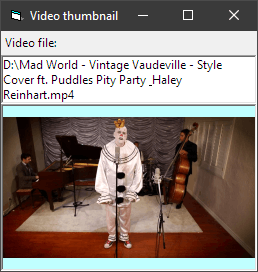
Controls: Label1, Label2 (white with a border), Picture1 (pale cyan).
Oops!
Label2.UseMnemonic = False now, though the screenshot above was before I remembered to do that. That's where the "phantom underscore" came from. 
Last edited by dilettante; Jun 2nd, 2019 at 08:30 PM.
-
Jun 3rd, 2019, 05:04 AM
#3
Thread Starter
Fanatic Member
Re: How can I display the thumbnail of a video file in a Picturebox?
 Originally Posted by dilettante

Bare minimum example with no error checking. Most of the code here is involved in scaling the thumbnail to fit maintaining the original aspect ratio and then rendering it centered in the PictureBox control.
Code:
   ......
Private ImageFile As WIA.ImageFile
Private ImageProcess As WIA.ImageProcess
   ......
Thanks.
On this line:
Code:
Private ImageFile As WIA.ImageFile
it gives me an error: User defined type not defined.
How can I fix it please?
Also, if I have a Picturebox of fixed size, can I do away with the function Form_Resize?
I am trying to have this functionality under a commandbutton (when the user clicks on a commandbutton (and not when the form loads). And the Picturebox on the form has a fixed size.
So, I guess that whole function Form_Resize can be completely left out.
Am I right?
Please advise.
Thanks.
-
Jun 3rd, 2019, 06:08 AM
#4
Re: How can I display the thumbnail of a video file in a Picturebox?
Originally Posted by IliaPreston
User defined type not defined.
How can I fix it please?
Reference the Windows Image Acquisition?
https://docs.microsoft.com/de-de/win...-wia-startpage
Last edited by Zvoni; Tomorrow at 31:69 PM.
----------------------------------------------------------------------------------------
One System to rule them all, One Code to find them,
One IDE to bring them all, and to the Framework bind them,
in the Land of Redmond, where the Windows lie
---------------------------------------------------------------------------------
People call me crazy because i'm jumping out of perfectly fine airplanes.
---------------------------------------------------------------------------------
Code is like a joke: If you have to explain it, it's bad
-
Jun 3rd, 2019, 09:32 AM
#5
Re: How can I display the thumbnail of a video file in a Picturebox?
Yes, you need a reference to Microsoft Windows Image Acquisition Library v2.0 for this example.
You only need to scale and position the thumbnail graphic if you want it sized to fit and aligned. Why would you expect Explorer/Shell to read your mind about the size you want and scale it for you? 
-
Jun 3rd, 2019, 09:38 AM
#6
Re: How can I display the thumbnail of a video file in a Picturebox?
If you don't want to use WIA 2.0 you could always read the IStream, scale the image, and paint it using naked GDI+ Flat API calls. If your program might fetch more than one thumbnail you might want to cache an instance of the Shell object or the Desktop Folder object too rather than creating new ones each time.
-
Jun 4th, 2019, 07:22 PM
#7
Re: How can I display the thumbnail of a video file in a Picturebox?
You can also just use the Explorer thumbnail...
(with oleexp.tlb, and mIID.bas or IID_IShellItemImageFactory otherwise defined)
Code:
Private Function GetFileThumbnail(sFile As String, pidlFQ As Long, CX As Long, CY As Long) As Long
'Specificy EITHER full path in sFile, OR fully qualified pidl in pidlFQ
Dim isiif As IShellItemImageFactory
Dim pidl As Long
On Error GoTo e0

If pidlFQ Then
    Call oleexp.SHCreateItemFromIDList(pidlFQ, IID_IShellItemImageFactory, isiif)
Else
    oleexp.SHCreateItemFromParsingName StrPtr(sFile), Nothing, IID_IShellItemImageFactory, isiif
End If
isiif.GetImage CX, CY, SIIGBF_THUMBNAILONLY Or SIIGBF_RESIZETOFIT, GetFileThumbnail
Set isiif = Nothing
On Error GoTo 0
Exit Function

e0:
Debug.Print "GetFileThumbnail.Error->" & Err.Description & " (" & Err.Number & ")"

End Function
Then you just need a standard HBITMAP->PictureBox routine...
Code:
Public Declare Function GetObject Lib "gdi32" Alias "GetObjectA" (ByVal hObject As Long, ByVal nCount As Long, lpObject As Any) As Long
Public Declare Function ImageList_Add Lib "comctl32.dll" (ByVal himl As Long, ByVal hbmImage As Long, ByVal hBMMask As Long) As Long
Public Declare Function ImageList_Create Lib "comctl32.dll" (ByVal CX As Long, ByVal CY As Long, ByVal Flags As IL_CreateFlags, ByVal cInitial As Long, ByVal cGrow As Long) As Long
Public Declare Function ImageList_Destroy Lib "comctl32.dll" (ByVal himl As Long) As Boolean
Public Declare Function ImageList_Draw Lib "comctl32.dll" (ByVal himl As Long, ByVal i As Long, ByVal hdcDst As Long, ByVal X As Long, ByVal Y As Long, ByVal fStyle As IL_DrawStyle) As Boolean
Public Enum IL_CreateFlags
  ILC_MASK = &H1
  ILC_COLOR = &H0
  ILC_COLORDDB = &HFE
  ILC_COLOR4 = &H4
  ILC_COLOR8 = &H8
  ILC_COLOR16 = &H10
  ILC_COLOR24 = &H18
  ILC_COLOR32 = &H20
  ILC_PALETTE = &H800                  ' (no longer supported...never worked anyway)
  '5.0
  ILC_MIRROR = &H2000
  ILC_PERITEMMIRROR = &H8000
  '6.0
  ILC_ORIGINALSIZE = &H10000
  ILC_HIGHQUALITYSCALE = &H20000
End Enum
Public Enum IL_DrawStyle
  ILD_NORMAL = &H0
  ILD_TRANSPARENT = &H1
  ILD_MASK = &H10
  ILD_IMAGE = &H20
'#If (WIN32_IE >= &H300) Then
  ILD_ROP = &H40
'#End If
  ILD_BLEND25 = &H2
  ILD_BLEND50 = &H4
  ILD_OVERLAYMASK = &HF00

  ILD_SELECTED = ILD_BLEND50
  ILD_FOCUS = ILD_BLEND25
  ILD_BLEND = ILD_BLEND50
End Enum

Private Type BITMAP
    BMType As Long
    BMWidth As Long
    BMHeight As Long
    BMWidthBytes As Long
    BMPlanes As Integer
    BMBitsPixel As Integer
    BMBits As Long
End Type

Private Sub hBitmapToPictureBox(picturebox As Object, hBitmap As Long, Optional X As Long = 0&, Optional Y As Long = 0&)

'This or similar is always given as the example on how to do this
'But it results in transparency being lost
'So the below method seems a little ackward, but it works. It can
'be done without the ImageList trick, but it's much more code
Dim himlBmp As Long
Dim tBMP As BITMAP
Dim CX As Long, CY As Long
Call GetObject(hBitmap, LenB(tBMP), tBMP)
CX = tBMP.BMWidth
CY = tBMP.BMHeight
If CX = 0 Then
    Debug.Print "no width"
    Exit Sub
End If
himlBmp = ImageList_Create(CX, CY, ILC_COLOR32, 1, 1)

ImageList_Add himlBmp, hBitmap, 0&

ImageList_Draw himlBmp, 0, picturebox.hDC, X, Y, ILD_NORMAL

ImageList_Destroy himlBmp
End Sub
------------------
PS: Since you're using my control, if this is for a project with it, you can get video thumbs like above quicker...
Code:
Dim hbm As Long

Dim psi As IShellItem
Set psi = ucShellBrowse1.SelectedItem

Dim isiif As IShellItemImageFactory
Set isiif = psi
isiif.GetImage 96, 96, SIIGBF_THUMBNAILONLY Or SIIGBF_RESIZETOFIT, hbm 'substitute whatever width/height for 96
Set isiif = Nothing

'Now you have an HBITMAP. You can set it to your own external PictureBox with the
'HBitmapToPictureBox function from this post, or set it as the preview in the ucShellBrowse
'Preview Box (View->Preview Pane to turn it on at runtime, or .PreviewPane property to set
'via code or in the Design Time properties). Since the preview handler might load a video
'player with the first few seconds instead of a static image.

ucShellBrowse1.SetPreviewPictureWithHBITMAP hbm
Last edited by fafalone; Jun 4th, 2019 at 08:05 PM.
-
Jun 9th, 2019, 06:34 PM
#8
Thread Starter
Fanatic Member
Re: How can I display the thumbnail of a video file in a Picturebox?
Originally Posted by dilettante
Bare minimum example with no error checking. ...
Thanks again for this.
I implemented your code with some few modifications (removing labels, putting the whole thing into one procedure, etc.), but the main logic is exactly the same:
Code:
Private Sub cmdShowVidThumbnail_Click()

   Dim VIDEO_FILE As String
   VIDEO_FILE = "C:\MyFiles\MyVids\Music\Classical-Music\J.S. Bach - St. Matthew Passion, BWV 244 _ Aria- -Erbarme dich, mein Gott.mp4"

   Call Show_Video_Thumbnail(VIDEO_FILE, Picture1)
End Sub

Private Sub Show_Video_Thumbnail(ByVal VIDEO_FILE As String, ByRef PicBox As picturebox)

    Const ssfDESKTOP = 0
    Dim Stream As stdole.IUnknown
    Dim ui As Currency
    Dim Bytes() As Byte

    With CreateObject("Shell.Application").NameSpace(ssfDESKTOP).ParseName(VIDEO_FILE)
        Set Stream = .ExtendedProperty("System.ThumbnailStream")
    End With
    IStream_Size Stream, ui
    ReDim Bytes(0 To CLng(ui * 10000@) - 1)
    IStream_Read Stream, Bytes(0), CLng(ui * 10000@)
    With New WIA.Vector
        .BinaryData = Bytes
        Set ImageFile = .ImageFile
    End With
    Set ImageProcess = New WIA.ImageProcess
    With ImageProcess
        .Filters.Add .FilterInfos.Item("Scale").FilterID
        .Filters(1).Properties.Item("PreserveAspectRatio").Value = True
    End With


    Dim Picture As stdole.StdPicture

    If WindowState <> vbMinimized Then
        With ImageProcess
            With .Filters(1).Properties
                .Item("MaximumWidth").Value = _
                    PicBox.ScaleX(PicBox.ScaleWidth, PicBox.ScaleMode, vbPixels)
                .Item("MaximumHeight").Value = _
                    PicBox.ScaleY(PicBox.ScaleHeight, PicBox.ScaleMode, vbPixels)
            End With
            Set Picture = .Apply(ImageFile).FileData.Picture
        End With
        With PicBox
            .AutoRedraw = True
            .Cls
            .PaintPicture Picture, _
                          (.ScaleWidth - .ScaleX(Picture.Width, vbHimetric)) / 2, _
                          (.ScaleHeight - .ScaleY(Picture.Height, vbHimetric)) / 2, _
                          .ScaleX(Picture.Width, vbHimetric), _
                          .ScaleY(Picture.Height, vbHimetric)
            .AutoRedraw = True
        End With
    End If
End Sub
And it works perfectly for me.
There is only one tiny problem that I don't know how to fix:
The above code properly resizes the thumbnail to best fit into the picturebox.
However, just because the aspect ratio of the thumbnail may be different than the aspect ratio of the original picturebox, the best possible fit is not really perfect.
The above code perfectly sizes the longest dimension (height or width) of the thumbnail to the corresponding fixed dimension of the picturebox (This is desireable and expected).
But then the other dimension (width or height) of the thumbnail is smaller than the corresponding dimension of the picturebox (this is not desireable).
So, a little bit of empty space (two strips of empty space) are left next to the thumbnail inside the picturebox.
So, an additional resizing of the picturebox at the end of the above code is needed to eliminate those two strips of empty space inside the picturebox.
I am trying to do that, but am not sure how to do it.
Can you please help?
Thanks.
Ilia
-
Jun 9th, 2019, 08:38 PM
#9
Re: How can I display the thumbnail of a video file in a Picturebox?
Calling .Apply(ImageFile) returns a new ImageFile. If you cache that you can use its Width and Height properties.
Those are in pixels so you'll need to convert them to the Form's ScaleMode.
After that you'll need to add the sizes of the PictureBox's borders to get sizes to assign to the PictureBox. Since border sizes don't change unless your program is fully aware of run time DPI changes you can grab and hold them for future use during Form_Load.
-
Jun 9th, 2019, 09:16 PM
#10
Re: How can I display the thumbnail of a video file in a Picturebox?
Example:
Code:
Option Explicit

'Here we assume that Label2.Width and Picture1.Width are both equal to Form.ScaleWidth.
'We also assume that Picture1.Height is the maximum height we are after.

'Hard-coded test value:
Private Const VIDEO_FILE As String = "D:\DREAM - My Will Live.mp4"

Private Declare Function IStream_Read Lib "shlwapi" ( _
    ByVal Stream As stdole.IUnknown, _
    ByRef v As Byte, _
    ByVal cb As Long) As Long 'HRESULT

Private Declare Function IStream_Size Lib "shlwapi" ( _
    ByVal Stream As stdole.IUnknown, _
    ByRef ui As Currency) As Long 'HRESULT

Private ImageFile As WIA.ImageFile
Private ImageProcess As WIA.ImageProcess
Private BordersWidth As Single 'ScaleMode.
Private BordersHeight As Single 'ScaleMode.

Private Sub Form_Load()
    Const ssfDESKTOP = 0
    Dim Stream As stdole.IUnknown
    Dim ui As Currency
    Dim Bytes() As Byte

    Label2.Caption = VIDEO_FILE
    With CreateObject("Shell.Application").NameSpace(ssfDESKTOP).ParseName(VIDEO_FILE)
        Set Stream = .ExtendedProperty("System.ThumbnailStream")
    End With
    IStream_Size Stream, ui
    ReDim Bytes(0 To CLng(ui * 10000@) - 1)
    IStream_Read Stream, Bytes(0), CLng(ui * 10000@)
    With New WIA.Vector
        .BinaryData = Bytes
        Set ImageFile = .ImageFile
    End With
    Set ImageProcess = New WIA.ImageProcess
    With ImageProcess
        .Filters.Add .FilterInfos.Item("Scale").FilterID
        With .Filters(1).Properties
            .Item("PreserveAspectRatio").Value = True
            .Item("MaximumWidth").Value = _
                Picture1.ScaleX(Picture1.ScaleWidth, Picture1.ScaleMode, vbPixels)
            .Item("MaximumHeight").Value = _
                Picture1.ScaleY(Picture1.ScaleHeight, Picture1.ScaleMode, vbPixels)
        End With
    End With
    With Picture1
        BordersWidth = .Width - .ScaleWidth
        BordersHeight = .Height - .ScaleHeight
    End With
End Sub

Private Sub Form_Resize()
    Dim Picture As stdole.StdPicture
    Dim NewWidth As Single
    Dim NewHeight As Single

    If WindowState <> vbMinimized Then
        With ImageProcess.Apply(ImageFile)
            Set Picture = .FileData.Picture
            NewWidth = ScaleX(.Width, vbPixels, ScaleMode) + BordersWidth
            NewHeight = ScaleY(.Height, vbPixels, ScaleMode) + BordersHeight
        End With
        With Picture1
            .Move (ScaleWidth - NewWidth) / 2, Label2.Top + Label2.Height, NewWidth, NewHeight
            .AutoRedraw = True
            .Cls
            .PaintPicture Picture, 0, 0
            .AutoRedraw = False
        End With
    End If
End Sub
This one doesn't support resizing Form1 because it caches the max width and height during Form_Load.
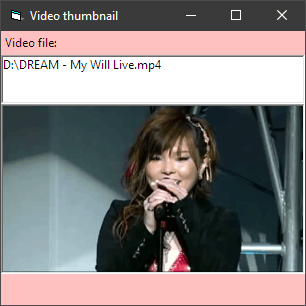
Last edited by dilettante; Jun 9th, 2019 at 09:22 PM.
-
Jun 10th, 2019, 03:40 AM
#11
Fanatic Member
Re: How can I display the thumbnail of a video file in a Picturebox?
Originally Posted by dilettante
Example:
Code:
Option Explicit

'Here we assume that Label2.Width and Picture1.Width are both equal to Form.ScaleWidth.
'We also assume that Picture1.Height is the maximum height we are after.

'Hard-coded test value:
Private Const VIDEO_FILE As String = "D:\DREAM - My Will Live.mp4"

Private Declare Function IStream_Read Lib "shlwapi" ( _
    ByVal Stream As stdole.IUnknown, _
    ByRef v As Byte, _
    ByVal cb As Long) As Long 'HRESULT

Private Declare Function IStream_Size Lib "shlwapi" ( _
    ByVal Stream As stdole.IUnknown, _
    ByRef ui As Currency) As Long 'HRESULT

Private ImageFile As WIA.ImageFile
Private ImageProcess As WIA.ImageProcess
Private BordersWidth As Single 'ScaleMode.
Private BordersHeight As Single 'ScaleMode.

Private Sub Form_Load()
    Const ssfDESKTOP = 0
    Dim Stream As stdole.IUnknown
    Dim ui As Currency
    Dim Bytes() As Byte

    Label2.Caption = VIDEO_FILE
    With CreateObject("Shell.Application").NameSpace(ssfDESKTOP).ParseName(VIDEO_FILE)
        Set Stream = .ExtendedProperty("System.ThumbnailStream")
    End With
    IStream_Size Stream, ui
    ReDim Bytes(0 To CLng(ui * 10000@) - 1)
    IStream_Read Stream, Bytes(0), CLng(ui * 10000@)
    With New WIA.Vector
        .BinaryData = Bytes
        Set ImageFile = .ImageFile
    End With
    Set ImageProcess = New WIA.ImageProcess
    With ImageProcess
        .Filters.Add .FilterInfos.Item("Scale").FilterID
        With .Filters(1).Properties
            .Item("PreserveAspectRatio").Value = True
            .Item("MaximumWidth").Value = _
                Picture1.ScaleX(Picture1.ScaleWidth, Picture1.ScaleMode, vbPixels)
            .Item("MaximumHeight").Value = _
                Picture1.ScaleY(Picture1.ScaleHeight, Picture1.ScaleMode, vbPixels)
        End With
    End With
    With Picture1
        BordersWidth = .Width - .ScaleWidth
        BordersHeight = .Height - .ScaleHeight
    End With
End Sub

Private Sub Form_Resize()
    Dim Picture As stdole.StdPicture
    Dim NewWidth As Single
    Dim NewHeight As Single

    If WindowState <> vbMinimized Then
        With ImageProcess.Apply(ImageFile)
            Set Picture = .FileData.Picture
            NewWidth = ScaleX(.Width, vbPixels, ScaleMode) + BordersWidth
            NewHeight = ScaleY(.Height, vbPixels, ScaleMode) + BordersHeight
        End With
        With Picture1
            .Move (ScaleWidth - NewWidth) / 2, Label2.Top + Label2.Height, NewWidth, NewHeight
            .AutoRedraw = True
            .Cls
            .PaintPicture Picture, 0, 0
            .AutoRedraw = False
        End With
    End If
End Sub
This one doesn't support resizing Form1 because it caches the max width and height during Form_Load.
Code:
IStream_Read Stream, Bytes(0), CLng(ui * 10000@)
    With New WIA.Vector
        .BinaryData = Bytes
        Set ImageFile = .ImageFile 。error  --2147024809 (80070057)'

    End With
-
Jun 10th, 2019, 03:42 AM
#12
Fanatic Member
Re: How can I display the thumbnail of a video file in a Picturebox?
Originally Posted by dilettante
Example:
Code:
Option Explicit

'Here we assume that Label2.Width and Picture1.Width are both equal to Form.ScaleWidth.
'We also assume that Picture1.Height is the maximum height we are after.

'Hard-coded test value:
Private Const VIDEO_FILE As String = "D:\DREAM - My Will Live.mp4"

Private Declare Function IStream_Read Lib "shlwapi" ( _
    ByVal Stream As stdole.IUnknown, _
    ByRef v As Byte, _
    ByVal cb As Long) As Long 'HRESULT

Private Declare Function IStream_Size Lib "shlwapi" ( _
    ByVal Stream As stdole.IUnknown, _
    ByRef ui As Currency) As Long 'HRESULT

Private ImageFile As WIA.ImageFile
Private ImageProcess As WIA.ImageProcess
Private BordersWidth As Single 'ScaleMode.
Private BordersHeight As Single 'ScaleMode.

Private Sub Form_Load()
    Const ssfDESKTOP = 0
    Dim Stream As stdole.IUnknown
    Dim ui As Currency
    Dim Bytes() As Byte

    Label2.Caption = VIDEO_FILE
    With CreateObject("Shell.Application").NameSpace(ssfDESKTOP).ParseName(VIDEO_FILE)
        Set Stream = .ExtendedProperty("System.ThumbnailStream")
    End With
    IStream_Size Stream, ui
    ReDim Bytes(0 To CLng(ui * 10000@) - 1)
    IStream_Read Stream, Bytes(0), CLng(ui * 10000@)
    With New WIA.Vector
        .BinaryData = Bytes
        Set ImageFile = .ImageFile
    End With
    Set ImageProcess = New WIA.ImageProcess
    With ImageProcess
        .Filters.Add .FilterInfos.Item("Scale").FilterID
        With .Filters(1).Properties
            .Item("PreserveAspectRatio").Value = True
            .Item("MaximumWidth").Value = _
                Picture1.ScaleX(Picture1.ScaleWidth, Picture1.ScaleMode, vbPixels)
            .Item("MaximumHeight").Value = _
                Picture1.ScaleY(Picture1.ScaleHeight, Picture1.ScaleMode, vbPixels)
        End With
    End With
    With Picture1
        BordersWidth = .Width - .ScaleWidth
        BordersHeight = .Height - .ScaleHeight
    End With
End Sub

Private Sub Form_Resize()
    Dim Picture As stdole.StdPicture
    Dim NewWidth As Single
    Dim NewHeight As Single

    If WindowState <> vbMinimized Then
        With ImageProcess.Apply(ImageFile)
            Set Picture = .FileData.Picture
            NewWidth = ScaleX(.Width, vbPixels, ScaleMode) + BordersWidth
            NewHeight = ScaleY(.Height, vbPixels, ScaleMode) + BordersHeight
        End With
        With Picture1
            .Move (ScaleWidth - NewWidth) / 2, Label2.Top + Label2.Height, NewWidth, NewHeight
            .AutoRedraw = True
            .Cls
            .PaintPicture Picture, 0, 0
            .AutoRedraw = False
        End With
    End If
End Sub
This one doesn't support resizing Form1 because it caches the max width and height during Form_Load.
Code:
IStream_Read Stream, Bytes(0), CLng(ui * 10000@)
    With New WIA.Vector
        .BinaryData = Bytes
        Set ImageFile = .ImageFile 。error  --2147024809 (80070057)'

    End With
-
Jun 10th, 2019, 06:58 AM
#13
Re: How can I display the thumbnail of a video file in a Picturebox?
The sample code doesn't have any error checking. I suspect there is something about the file you provided that prevents fetching System.ThumbnailStream, such as an inappropriate file type or a missing codec.
Try checking what gets returned from .ExtendedProperty("System.ThumbnailStream") which might be Nothing, Empty, or Null.
-
Jun 10th, 2019, 06:21 PM
#14
Fanatic Member
Re: How can I display the thumbnail of a video file in a Picturebox?
Originally Posted by dilettante
The sample code doesn't have any error checking. I suspect there is something about the file you provided that prevents fetching System.ThumbnailStream, such as an inappropriate file type or a missing codec.
Try checking what gets returned from .ExtendedProperty("System.ThumbnailStream") which might be Nothing, Empty, or Null.
you are right .thanks
-
Jun 15th, 2019, 08:42 PM
#15
Thread Starter
Fanatic Member
Re: How can I display the thumbnail of a video file in a Picturebox?
I have tried the solution provided by dilettante and it works perfectly for me. (Thanks dilettante)
It takes 160 milliseconds on average to show the thumbnail of a video.
I may also want to try the other solution provided by fafalone (post #7), as he says it would be faster. (Thanks fafalone)
Before I go ahead and try fafalone's proposed solution, does anybody know how much faster it would be?
For example if dilettante's solution shows a video thumbnail in 160 milliseconds, will fafalone's solution show the same thumbnail in 100 milliseconds? 50 milliseconds? 10 milliseconds? or what?
Any rough idea would be good.
Also, how stable is that mIID.bas?
How often does it change?
Please advise.
Thanks.
Ilia
-
Jun 16th, 2019, 02:57 AM
#16
Re: How can I display the thumbnail of a video file in a Picturebox?
It will probably depend more on the size and format of the video more than anything else.
Explorer caches thumbnails, so if the cached thumbnail is available the IShellItemImageFactory->HBitmapToPictureBox method in mine will show it in <=15ms.
AVI's were all over the place for new generation, but close enough to be negligible for one offs (are you going to adapt this to bulk generation or something? displaying to a user in a picturebox one at a time it won't much matter if its 1500ms or 1800ms).
MP4s I couldn't compare, guess I don't have the right codec. (Explorer thumbnails are entirely disabled on my system so there's no image being generated there either)
My code earlier in the thread is really about the Preview Pane inside the browser control. If your system thumbnails are enabled I don't think you even need to do anything extra to see the video thumbnails (besides have ExtendedThumbnails property = True, which it is by default).
If you need to render to a picturebox outside the control, this is the method that it uses:
Code:
Private Declare Function DeleteObject Lib "gdi32" (ByVal hObject As Long) As Long
Private Declare Function GetObject Lib "gdi32" Alias "GetObjectA" (ByVal hObject As Long, ByVal nCount As Long, lpObject As Any) As Long
Private Declare Function ImageList_Create Lib "comctl32.dll" (ByVal CX As Long, ByVal CY As Long, ByVal Flags As IL_CreateFlags, ByVal cInitial As Long, ByVal cGrow As Long) As Long
Private Declare Function ImageList_Add Lib "comctl32.dll" (ByVal himl As Long, ByVal hbmImage As Long, ByVal hBMMask As Long) As Long
Private Declare Function ImageList_Draw Lib "comctl32.dll" (ByVal himl As Long, ByVal i As Long, ByVal hdcDst As Long, ByVal X As Long, ByVal Y As Long, ByVal fStyle As IL_DrawStyle) As Boolean
Private Declare Function ImageList_Destroy Lib "comctl32.dll" (ByVal himl As Long) As Boolean
Private Enum IL_CreateFlags
  ILC_MASK = &H1
  ILC_COLOR = &H0
  ILC_COLORDDB = &HFE
  ILC_COLOR4 = &H4
  ILC_COLOR8 = &H8
  ILC_COLOR16 = &H10
  ILC_COLOR24 = &H18
  ILC_COLOR32 = &H20
  ILC_PALETTE = &H800                  ' (no longer supported...never worked anyway)
  '5.0
  ILC_MIRROR = &H2000
  ILC_PERITEMMIRROR = &H8000
  '6.0
  ILC_ORIGINALSIZE = &H10000
  ILC_HIGHQUALITYSCALE = &H20000
End Enum

Private Enum IL_DrawStyle
  ILD_NORMAL = &H0
  ILD_TRANSPARENT = &H1
  ILD_MASK = &H10
  ILD_IMAGE = &H20
'#If (WIN32_IE >= &H300) Then
  ILD_ROP = &H40
'#End If
  ILD_BLEND25 = &H2
  ILD_BLEND50 = &H4
  ILD_OVERLAYMASK = &HF00

  ILD_SELECTED = ILD_BLEND50
  ILD_FOCUS = ILD_BLEND25
  ILD_BLEND = ILD_BLEND50
End Enum


Private Type BITMAP
    BMType As Long
    BMWidth As Long
    BMHeight As Long
    BMWidthBytes As Long
    BMPlanes As Integer
    BMBitsPixel As Integer
    BMBits As Long
End Type

Public Sub SetPreviewPictureWithHBITMAP(picturebox As Object, hBmp As Long, Optional bDestroy As Boolean = False)
picturebox.Cls
hBitmapToPictureBox picturebox, hBmp
picturebox.Refresh
If bDestroy Then
    DeleteObject hBmp
End If
End Sub
Private Sub hBitmapToPictureBox(picturebox As Object, hBitmap As Long, Optional X As Long = 0&, Optional Y As Long = 0&)

'This or similar is always given as the example on how to do this
'But it results in transparency being lost
'So the below method seems a little awkward, but it works. It can
'be done without the ImageList trick, but it's much more code
Dim himlBmp As Long
Dim tBMP As BITMAP
Dim CX As Long, CY As Long
Call GetObject(hBitmap, LenB(tBMP), tBMP)
CX = tBMP.BMWidth
CY = tBMP.BMHeight
If CX = 0 Then
    Debug.Print "Invalid Image"
    Exit Sub
End If
himlBmp = ImageList_Create(CX, CY, ILC_COLOR32, 1, 1)

ImageList_Add himlBmp, hBitmap, 0&
If (X = 0) And (Y = 0) Then
    'not manually specified, so center
    If CY < picturebox.ScaleHeight Then
        Y = ((picturebox.ScaleHeight - CY) / 2) '* Screen.TwipsPerPixelY
    End If
    If CX < picturebox.ScaleWidth Then
        X = ((picturebox.ScaleWidth - CX) / 2) '* Screen.TwipsPerPixelX
    End If
End If

ImageList_Draw himlBmp, 0, picturebox.hDC, X, Y, ILD_NORMAL

ImageList_Destroy himlBmp
End Sub
Last edited by fafalone; Jun 16th, 2019 at 03:14 AM.
-
Jun 16th, 2019, 08:48 AM
#17
Re: How can I display the thumbnail of a video file in a Picturebox?
Just did some testing with this (nothing extensive, I'll add - about half a dozen files). Dil's method is faster, it seems (factor ~2?).
That is...
Dil: Extract image in its native size and then resize to target dimensions
versus
faf: Extract image in the target dimensions
None of the files tested had thumbnail images cached. In cases where they were, faf's code is much faster (naturally enough). Also, when calling faf's method with the target dimensions deliberately set to the native width and height (thereby eliminating the resizing element, presumably), Dil's code remains ~twice as fast...
If you don't know where you're going, any road will take you there...
My VB6 love-children: Vee-Hive and Vee-Launcher
-
Jun 16th, 2019, 06:07 PM
#18
Thread Starter
Fanatic Member
Re: How can I display the thumbnail of a video file in a Picturebox?
Originally Posted by fafalone
It will probably depend more on the size and format of the video more than anything else.
...
I am also experimenting with Fafalone's code.
I copied GetFileThumbnail from his post #7 and hBitmapToPictureBox from his post #16 (because the one in post #16 looks more complete).
And I call them as follows (Not sure what those two parameters CX and CY are.):
Code:
   Dim hBitmap         As Long
   VIDEO_FILE = "C:\MyFiles\MyVids\Music\Classical-Music\J.S. Bach - St. Matthew Passion, BWV 244 _ Aria- -Erbarme dich, mein Gott.mp4"
   hBitmap = GetFileThumbnail(VIDEO_FILE, 0, Picture1.Width, Picture1.Height)
   Call hBitmapToPictureBox(Picture1, hBitmap)
This does NOTHING. The picturebox doesn't show anything.
I then change it to the following:
Code:
   Dim hBitmap         As Long
   VIDEO_FILE = "C:\MyFiles\MyVids\Music\Classical-Music\J.S. Bach - St. Matthew Passion, BWV 244 _ Aria- -Erbarme dich, mein Gott.mp4"
   hBitmap = GetFileThumbnail(VIDEO_FILE, 0, 0, 0)
   Call hBitmapToPictureBox(Picture1, hBitmap)
This one too does NOTHING. The picturebox doesn't show anything
Please help.
Thanks.
-
Jun 16th, 2019, 06:43 PM
#19
Re: How can I display the thumbnail of a video file in a Picturebox?
Did you change the picturebox's AutoRedraw property to True? Probably want to change ScaleMode to vbPixel as well. These are on the design-time Properties box like where the Name is.
And also see the SetPreviewPictureWithHBITMAP function that's setting it in my code?
Code:
picturebox.Cls
hBitmapToPictureBox picturebox, hBmp
picturebox.Refresh
(Don't forget the DeleteObject call when you're done with the hbitmap as well.)
And cx and cy are width/height. You definitely don't want a 0x0 image. Gotta change that picturebox scalemode to vbPixels if you're using picturebox.width/height as the size too, or you'll get a giant image.
Last edited by fafalone; Jun 16th, 2019 at 06:49 PM.
-
Jun 16th, 2019, 08:35 PM
#20
Thread Starter
Fanatic Member
Re: How can I display the thumbnail of a video file in a Picturebox?
Originally Posted by fafalone
Did you change the picturebox's AutoRedraw property to True? Probably want to change ScaleMode to vbPixel as well. These are on the design-time Properties box like where the Name is.
And also see the SetPreviewPictureWithHBITMAP function that's setting it in my code?
Code:
picturebox.Cls
hBitmapToPictureBox picturebox, hBmp
picturebox.Refresh
(Don't forget the DeleteObject call when you're done with the hbitmap as well.)
And cx and cy are width/height. You definitely don't want a 0x0 image. Gotta change that picturebox scalemode to vbPixels if you're using picturebox.width/height as the size too, or you'll get a giant image.
Thanks.
I did all the above.
I changed Picturebox's AutoRedraw to True.
I changed its scalemode to Pixels.
And changed the code as follows:
Code:
   VIDEO_FILE = "C:\MyFiles\MyVids\Music\Classical-Music\J.S. Bach - St. Matthew Passion, BWV 244 _ Aria- -Erbarme dich, mein Gott.mp4"

   Picture1.Cls
   hBitmap = GetFileThumbnail(VIDEO_FILE, 0, Picture1.Width, Picture1.Height)
   Call hBitmapToPictureBox(Picture1, hBitmap)
   Picture1.Refresh
   DeleteObject hBitmap
This produces a very large thumbnail (far larger than the Picturebox). Therefore the Picturebox shows only a small part of the thumbnail's top-left corner.
Now, if I go to design mode and hugely enlarge the Picturebox in design mode, and run again, it again produces a very large thumbnail. This time the thumbnail shows completely inside the Picturebox, but the thumbnail's size is smaller than the Picturebox (because now the Picturebox is huge)
I don't know how to get it to show the thumbnail properly resized to fit the Picturebox.
Please note that the Picturebox's dimensions are to remain fixed. The thumbnail should be produced in the right size to fit the Picturebox.
Please advise.
Thanks.
-
Jun 16th, 2019, 08:44 PM
#21
Re: How can I display the thumbnail of a video file in a Picturebox?
Here's a version wrapped around the OleLoadPicture() API call and VB's PaintPicture() method for scaling the thumbnail. This might fail if a PNG video thumbnail gets returned but that doesn't seem to be the case, at least in my tests. See the comments.
In case I wasn't clear: This is just a demonstration, but one you don't want to rely on. OleLoadPicture() is too limited for general use with thumbnails. For example a folder containing PNG image files won't work.
It also dumps a number of thumbnails for a folder of videos into a one-column MSHFlexGrid (instead of just one into a PictureBox).
So no WIA 2.0, and no GDI+ usage at all.
Code:
Option Explicit

'NOTES
'
'   o Picture1: Appearance flat, BorderStyle none, Visible false (used as a canvas for
'               image resizing via PaintPicture).
'
'               Could be visible if you use it for displaying a single thumbnail and
'               skip the MSHFlexGrid.
'
'   o Could use a ListView with ImageList instead of the MSHFlexGrid to display
'     multiple thumbs.  The FlexGrid was just a simpler alternative for demo purposes.
'
'   o The call to OleLoadPicture() might fail if Shell32 returned an unsupported image
'     type like PNG!  So far I haven't see it fail though.
'
'   o Form1 and MSHFlexGrid1 have the same Font so we can use Form1.TextHeight() to
'     measure text to put into cells.

'Hard-coded test values:
Private Const VIDEO_FOLDER As String = "D:\Some Videos"
Private Const THUMB_WIDTH As Single = 276 'Pixels, just a size that fit my Form1.
Private Const THUMB_HEIGHT As Single = 207

Private Const S_OK As Long = 0

Private Type IID
    Data1 As Long
    Data2 As Integer
    Data3 As Integer
    Data4(0 To 7) As Byte
End Type

Private Declare Function CLSIDFromString Lib "ole32" ( _
    ByVal psz As Long, _
    ByRef clsid As IID) As Long

Private Declare Function OleLoadPicture Lib "oleaut32" ( _
    ByVal IStream As stdole.IUnknown, _
    ByVal Size As Long, _
    ByVal Runmode As Long, _
    ByRef IID As IID, _
    ByRef IPicture As stdole.IPicture) As Long

Private ThumbWidthTwips As Single
Private ThumbHeightTwips As Single

Private Sub Form_Load()
    Dim iidIPicture As IID
    Dim Folder As Object
    Dim ShellFolderItem As Object
    Dim IStream As stdole.IUnknown
    Dim IPicture As stdole.IPicture
    Dim AspectRatio As Double
    Dim Row As Long

    CLSIDFromString StrPtr("{7BF80980-BF32-101A-8BBB-00AA00300CAB}"), iidIPicture
    ThumbWidthTwips = ScaleX(THUMB_WIDTH, vbPixels, vbTwips)
    ThumbHeightTwips = ScaleY(THUMB_HEIGHT, vbPixels, vbTwips)

    With MSHFlexGrid1
        .Cols = 1
        .FixedCols = 0
        .Rows = 1
        .FixedRows = 0
        .ColWidth(0) = ThumbWidthTwips + ScaleX(4, vbPixels, vbTwips) 'Borders.
        Set Folder = CreateObject("Shell.Application").NameSpace(VIDEO_FOLDER)
        For Each ShellFolderItem In Folder.Items
            If Not (ShellFolderItem.IsFolder Or ShellFolderItem.IsLink) Then
                Set IStream = Nothing
                On Error Resume Next
                Set IStream = ShellFolderItem.ExtendedProperty("System.ThumbnailStream")
                On Error GoTo 0
                If Not IStream Is Nothing Then
                    If OleLoadPicture(IStream, 0, False, iidIPicture, IPicture) = S_OK Then
                        If Row > 0 Then .Rows = Row + 1
                        .Row = Row
                        .CellPictureAlignment = flexAlignCenterBottom
                        With Picture1
                            AspectRatio = CDbl(IPicture.Width) / CDbl(IPicture.Height)
                            If ThumbWidthTwips / AspectRatio > ThumbHeightTwips Then
                                .Width = Int(ThumbHeightTwips * AspectRatio + 0.5)
                                .Height = ThumbHeightTwips
                            Else
                                .Width = ThumbWidthTwips
                                .Height = Int(ThumbWidthTwips / AspectRatio + 0.5)
                            End If
                            .AutoRedraw = True
                            .Cls
                            .PaintPicture IPicture, 0, 0, .ScaleWidth, .ScaleHeight
                            .AutoRedraw = False
                            MSHFlexGrid1.RowHeight(Row) = _
                                    .ScaleHeight _
                                  + ScaleY(4, vbPixels, vbTwips) _
                                  + ScaleY(TextHeight("Wgyj"), ScaleMode, vbTwips)
                            Set MSHFlexGrid1.CellPicture = .Image
                        End With
                        .CellAlignment = flexAlignCenterTop
                        .Text = ShellFolderItem.Name
                        Row = Row + 1
                    End If
                End If
            End If
        Next
    End With
    Caption = "Thumb count = " & CStr(Row)
End Sub

Private Sub Form_Resize()
    If WindowState <> vbMinimized Then
        MSHFlexGrid1.Move 0, 0, ScaleWidth, ScaleHeight
    End If
End Sub
Last edited by dilettante; Jun 17th, 2019 at 04:08 PM.
Reason: added warning
-
Jun 16th, 2019, 11:10 PM
#22
Re: How can I display the thumbnail of a video file in a Picturebox?
Originally Posted by IliaPreston
Thanks.
I did all the above.
I changed Picturebox's AutoRedraw to True.
I changed its scalemode to Pixels.
And changed the code as follows:
Code:
   VIDEO_FILE = "C:\MyFiles\MyVids\Music\Classical-Music\J.S. Bach - St. Matthew Passion, BWV 244 _ Aria- -Erbarme dich, mein Gott.mp4"

   Picture1.Cls
   hBitmap = GetFileThumbnail(VIDEO_FILE, 0, Picture1.Width, Picture1.Height)
   Call hBitmapToPictureBox(Picture1, hBitmap)
   Picture1.Refresh
   DeleteObject hBitmap
This produces a very large thumbnail (far larger than the Picturebox). Therefore the Picturebox shows only a small part of the thumbnail's top-left corner.
Now, if I go to design mode and hugely enlarge the Picturebox in design mode, and run again, it again produces a very large thumbnail. This time the thumbnail shows completely inside the Picturebox, but the thumbnail's size is smaller than the Picturebox (because now the Picturebox is huge)
I don't know how to get it to show the thumbnail properly resized to fit the Picturebox.
Please note that the Picturebox's dimensions are to remain fixed. The thumbnail should be produced in the right size to fit the Picturebox.
Please advise.
Thanks.
Instead of Picture1.Width and Picture1.Height, pass Picture1.ScaleWidth and Picture1.ScaleHeight
-
Jun 17th, 2019, 05:37 AM
#23
Thread Starter
Fanatic Member
Re: How can I display the thumbnail of a video file in a Picturebox?
Originally Posted by fafalone
Instead of Picture1.Width and Picture1.Height, pass Picture1.ScaleWidth and Picture1.ScaleHeight
I did the above (I used Picture1.ScaleWidth and Picture1.ScaleHeight), and the problem is solved.
The thumbnail is displayed with its width perfectly fitting the PictureBox's width.
However a tiny bit of an issue is that the thumbnail's height is slightly shorter than the Picturebox's height.
This is because the thumbnail image's aspect ratio is not the same as the Picturebox's aspect ratio.
This code always makes the width of the thumbnail fit the Picturebox's width
Then if the thumbnail's height is less than the Picturebox's height, two empty strips of horizontal space appear above and below the thumbnail inside the Picturebox.
The other way around is that if the thumbnail's height is greater than the Picturebox's height, the thumbnail is cut-off vertically by the borders of the Picturebox.
Now, I have to put some additional code at the end if the above code to change the Picturebox's height to fit the thumbnail's height
But, I don't know how.
Can you please help?
Thanks.
-
Jun 17th, 2019, 06:11 AM
#24
Re: How can I display the thumbnail of a video file in a Picturebox?
Then if the thumbnail's height is less than the Picturebox's height, two empty strips of horizontal space appear above and below the thumbnail inside the Picturebox.
The other way around is that if the thumbnail's height is greater than the Picturebox's height, the thumbnail is cut-off vertically by the borders of the Picturebox.
Since the image returned from IShellItemImageFactory is using the flag to proportionally scale the bitmap, sounds like it only cares about aspect ratio and not necessarily scaling to passed dimensions. Otherwise, the returned bitmap should never be larger than the requested dimensions. That 2nd statement above should never happen otherwise.
You may want to tweak the hBitmapToPictureBox routine to ensure the passed bitmap is scaled to the passed picturebox, i.e.
- get bitmap dimensions (already being done)
- get picturebox dimensions (already being done)
- scale bitmap to picturebox and create image list based on those scaled dimensions (not being done)
untested, changes in blue...
Code:
Private Sub hBitmapToPictureBox(picturebox As Object, hBitmap As Long, _
                     Optional X As Long = 0&, Optional Y As Long = 0&, _
                     Optional CanUpScale As Boolean = False)

'This or similar is always given as the example on how to do this
'But it results in transparency being lost
'So the below method seems a little awkward, but it works. It can
'be done without the ImageList trick, but it's much more code
Dim himlBmp As Long
Dim tBMP As BITMAP
Dim CX As Long, CY As Long
Dim dblPri As Double, dblAlt As Double

Call GetObject(hBitmap, LenB(tBMP), tBMP)
CX = tBMP.BMWidth
CY = tBMP.BMHeight
If CX = 0 Then
    Debug.Print "Invalid Image"
    Exit Sub
End If

dblPri = picturebox.ScaleWidth / CX
dblAlt = picturebox.ScaleHeight / CY
If dblAlt < dblPri Then dblPri = dblAlt
If CanUpScale = False Then
    If dblPri > 1 Then dblPri = 1 ' keep 1:1 scale
End If
CX = CX * dblPri: CY = CY * dblPri

himlBmp = ImageList_Create(CX, CY, ILC_COLOR32, 1, 1)

ImageList_Add himlBmp, hBitmap, 0&
If (X = 0) And (Y = 0) Then
    'not manually specified, so center
    If CY < picturebox.ScaleHeight Then
        Y = ((picturebox.ScaleHeight - CY) / 2) '* Screen.TwipsPerPixelY
    End If
    If CX < picturebox.ScaleWidth Then
        X = ((picturebox.ScaleWidth - CX) / 2) '* Screen.TwipsPerPixelX
    End If
End If

ImageList_Draw himlBmp, 0, picturebox.hDC, X, Y, ILD_NORMAL

ImageList_Destroy himlBmp
End Sub
If the image is smaller than the picturebox, then the original code above centers it when X,Y passed as zero. Recommend setting the picturebox backcolor to some solid color to act as a border when image is smaller. If you absolutely need to resize the picturebox, you can do that. Ignore the modifications in blue above, and add code in there something like this, right before or after the "himlBmp = ImageList_Create(..)" line:
Code:
Dim cntCx As Single, cntCy As Single
Dim cntSM As ScaleModeConstants

With picturebox   ' assumption is that the picbox container is a form or another picbox
    cntSM = .Container.ScaleMode    ' handle User-defined scalemodes
    If cntSM = vbUser Then          ' cache current scale dimensions
        cntCx = .Container.ScaleWidth: cntCy = .Container.ScaleHeight
    End If
    .Container.ScaleMode = .ScaleMode
    .Move .Left, .Top, CX + .Width - .ScaleWidth, CY + .Height - .ScaleHeight
    If cntSM = vbUser Then          ' restore original scale dimensions
        .Container.ScaleWidth = cntCx: .Container.ScaleHeight = cntCy
    Else
        .Container.ScaleMode = cntSM ' restore original scalemode
    End If
End With
Edited: I personally would opt to scale the image. I don't like the idea of resizing controls based on measurements outside of my control, unless you add code to prevent unreasonable sizes.
Last edited by LaVolpe; Jun 17th, 2019 at 10:22 AM.
-
Jan 5th, 2020, 10:02 PM
#25
Thread Starter
Fanatic Member
Re: How can I display the thumbnail of a video file in a Picturebox?
Originally Posted by fafalone
......
And also see the SetPreviewPictureWithHBITMAP function that's setting it in my code?
Code:
picturebox.Cls
hBitmapToPictureBox picturebox, hBmp
picturebox.Refresh
(Don't forget the DeleteObject call when you're done with the hbitmap as well.)
......
I am using the code that you provided in post #16.
Thanks for your help.
Let me see if I have understood this right or not.
Here is how I use DeleteObject:
Code:
Private Declare Function DeleteObject Lib "gdi32" (ByVal hObject As Long) As Long
Code:
Public Sub SetPreviewPictureWithHBITMAP(picturebox As Object, hBmp As Long, Optional bDestroy As Boolean = False)
picturebox.Cls
hBitmapToPictureBox picturebox, hBmp
picturebox.Refresh
If bDestroy Then
    DeleteObject hBmp
End If
End Sub
Code:
      Thumbnail_P_B.Cls
      hBitmap = GetFileThumbnail(Video_File_Path, 0, Thumbnail_P_B.ScaleWidth, Thumbnail_P_B.ScaleHeight)
      Call hBitmapToPictureBox(Thumbnail_P_B, hBitmap)
      Thumbnail_P_B.Refresh
      DeleteObject hBitmap
Is that all you mean?
Or should I call it elsewhere as well?
Also, somebody suggested that I can cache the thumbnails, and re-use them, and that at the end when I no longer need to re-use them, I need to delete those cached thumbnails.
I don't know how to do that.
A. How can I cache thumbnails for later re-use?
B. How do I re-use cached thumbnails?
C. How do I delete cached thumbnails in the end?
Please advise.
Thanks.
Ilia
-
Jan 12th, 2020, 06:29 AM
#26
Thread Starter
Fanatic Member
Re: How can I display the thumbnail of a video file in a Picturebox?
Any comment or response to my post #25 (the post right above this) would be greatly appreciated.
Thanks in advance.
Ilia
-
Jan 12th, 2020, 08:39 AM
#27
Re: How can I display the thumbnail of a video file in a Picturebox?
Originally Posted by IliaPreston
Any comment or response to my post #25 (the post right above this) would be greatly appreciated.
You might want to test the cGDIPlusCache-Class (which is not dependent on RC5).
It comes with support for ShellItem-Image-Rendering - and (as the Class-name states already),
will support caching of Image-Resources under arbitrary String-Keys.
http://www.vbforums.com/showthread.p...-cls-revisited
Just include cGDIPlusCache.cls into your project, and then try whether the following works
(untested on my end)...
Code:
Option Explicit

Private GC As New cGDIPlusCache

Private Sub Form_Click()
  Const Video_File_Path As String = "c:\temp\test.mp4"

  Thumbnail_P_B.AutoRedraw = True
  Thumbnail_P_B.ScaleMode = vbPixels
  Thumbnail_P_B.Cls
    GC.AddFromShell "My_MP4_Vid_Key", Video_File_Path, Thumbnail_P_B.ScaleHeight
    GC.DrawImage Thumbnail_P_B.hDC, "My_MP4_Vid_Key"
  Thumbnail_P_B.Refresh
End Sub
HTH
Olaf
-
Jan 12th, 2020, 09:40 PM
#28
Thread Starter
Fanatic Member
Re: How can I display the thumbnail of a video file in a Picturebox?
Originally Posted by Schmidt
You might want to test the cGDIPlusCache-Class (which is not dependent on RC5).
It comes with support for ShellItem-Image-Rendering - and (as the Class-name states already),
will support caching of Image-Resources under arbitrary String-Keys.
http://www.vbforums.com/showthread.p...-cls-revisited
Just include cGDIPlusCache.cls into your project, and then try whether the following works
(untested on my end)...
Code:
Option Explicit

Private GC As New cGDIPlusCache

Private Sub Form_Click()
  Const Video_File_Path As String = "c:\temp\test.mp4"

  Thumbnail_P_B.AutoRedraw = True
  Thumbnail_P_B.ScaleMode = vbPixels
  Thumbnail_P_B.Cls
    GC.AddFromShell "My_MP4_Vid_Key", Video_File_Path, Thumbnail_P_B.ScaleHeight
    GC.DrawImage Thumbnail_P_B.hDC, "My_MP4_Vid_Key"
  Thumbnail_P_B.Refresh
End Sub
HTH
Olaf
Thanks a lot for the great help and the great GDI class module.
I just used it and copied your code (with minuscule changes such as name of the picturebox, name of the video file, etc.)
Code:
Private Sub cmdShowVidThumbnail_Click()
  Const Video_File_Path      As String = "D:\MyFiles\MyVids\Music\Classical-Music\D.Scarlatti - Fandango.mp4"

  picThumbnail1.AutoRedraw = True
  picThumbnail1.ScaleMode = vbPixels
  picThumbnail1.Cls
    GC.AddFromShell "My_MP4_Vid_Key", Video_File_Path, picThumbnail1.ScaleHeight
    GC.DrawImage picThumbnail1.hDC, "My_MP4_Vid_Key"
  picThumbnail1.Refresh
End Sub
It works.
It shows the thumbnail. But there are two problems:
1. It does not resize the image to fit the picture box.
2. It does not center-justify the image inside the picturebox. Here is a screen print:
https://i.imgur.com/s8u0aJ5.jpg
How can I change my code to show the thumbnail in the right size (to fit perfectly inside the picturebox) and center-justified inside the picturebox?
Please note that what I want to do may leave two horizontal strips of empty space below and above the thumbnail if the thumanail's width is greater than its height, or will leave two vertical strips of empty space to the left and right of the thumbnail if the thumanail's height is greater than its width.
And those two strips of empty space inside the picturebox are ok with me.
Please advise.
thanks.
Ilia
-
Jan 12th, 2020, 10:02 PM
#29
Re: How can I display the thumbnail of a video file in a Picturebox?
Originally Posted by IliaPreston
I am using the code that you provided in post #16.
Thanks for your help.
Let me see if I have understood this right or not.
Here is how I use DeleteObject:
Code:
Private Declare Function DeleteObject Lib "gdi32" (ByVal hObject As Long) As Long
Code:
Public Sub SetPreviewPictureWithHBITMAP(picturebox As Object, hBmp As Long, Optional bDestroy As Boolean = False)
picturebox.Cls
hBitmapToPictureBox picturebox, hBmp
picturebox.Refresh
If bDestroy Then
    DeleteObject hBmp
End If
End Sub
Code:
      Thumbnail_P_B.Cls
      hBitmap = GetFileThumbnail(Video_File_Path, 0, Thumbnail_P_B.ScaleWidth, Thumbnail_P_B.ScaleHeight)
      Call hBitmapToPictureBox(Thumbnail_P_B, hBitmap)
      Thumbnail_P_B.Refresh
      DeleteObject hBitmap
Is that all you mean?
Or should I call it elsewhere as well?
Also, somebody suggested that I can cache the thumbnails, and re-use them, and that at the end when I no longer need to re-use them, I need to delete those cached thumbnails.
I don't know how to do that.
A. How can I cache thumbnails for later re-use?
B. How do I re-use cached thumbnails?
C. How do I delete cached thumbnails in the end?
Please advise.
Thanks.
Ilia
You don't need to call DeleteObject twice.
To reuse it, you just create the handle once and don't use DeleteObject until you're done with it.
-
Jan 12th, 2020, 10:10 PM
#30
Thread Starter
Fanatic Member
Re: How can I display the thumbnail of a video file in a Picturebox?
Originally Posted by fafalone
You don't need to call DeleteObject twice.
To reuse it, you just create the handle once and don't use DeleteObject until you're done with it.
Thanks for the help.
And:
A. How can I cache thumbnails for later re-use?
B. How do I re-use cached thumbnails?
C. How do I delete cached thumbnails in the end?
Thanks.
Ilia
-
Jan 12th, 2020, 10:22 PM
#31
Re: How can I display the thumbnail of a video file in a Picturebox?
Once you create it once it's cached in memory until you call DeleteObject. You just reuse the handle. Once you're done, then you call DeleteObject.
-
Jan 19th, 2020, 07:54 PM
#32
Thread Starter
Fanatic Member
Re: How can I display the thumbnail of a video file in a Picturebox?
Any response to my post #28 would be greatly appreciated.
I am trying to fix this problem:
https://i.imgur.com/s8u0aJ5.jpg
That is, (using the technique that was provided in post#27) I need to make the thumbnail show center-justified and be the correct size (fit the picturebox).
I don't know how to do that.
Please help.
Thanks
-
Jan 20th, 2020, 04:59 AM
#33
Re: How can I display the thumbnail of a video file in a Picturebox?
Originally Posted by IliaPreston
Any response to my post #28 would be greatly appreciated.
...
I need to make the thumbnail show center-justified and be the correct size (fit the picturebox).
I don't know how to do that.
The cGDIPlusCache.DrawImage method has additional (optional x, y, ...) Params to offer.
IMO you need to play around more with IntelliSense.
(I often just "type an extra space" in between Params for a fast lookup of a Method-Defs ParamList).
And as for "how to calculate centered Offsets".
I think you're programming long enough, to have seen this "halfed-difference" thing a few times:
x = (ContainerObj.Width - ObjToCenter.Width) / 2 'same for y-Offsets with the Heights
Here's the caching-code again, which now does that...
Code:
Option Explicit

Private GC As New cGDIPlusCache

Private Sub Form_Click()
  CacheAndRenderThumb "c:\temp\test.avi", Thumbnail_P_B
End Sub

Private Sub CacheAndRenderThumb(FileName As String, PB As PictureBox)
  PB.AutoRedraw = True
  PB.Cls
  PB.ScaleMode = vbPixels
    Dim Key As String, x As Long, y As Long
        Key = Mid$(FileName, InStrRev(FileName, "\") + 1)
    If Not GC.Exists(Key) Then GC.AddFromShell Key, FileName, PB.ScaleWidth
    x = (PB.ScaleWidth - GC.Width(Key)) / 2
    y = (PB.ScaleHeight - GC.Height(Key)) / 2
    GC.DrawImage PB.hDC, Key, x, y
  PB.Refresh
End Sub
Olaf
-
May 23rd, 2024, 01:00 PM
#34
Fanatic Member
Re: How can I display the thumbnail of a video file in a Picturebox?
Originally Posted by Schmidt
The cGDIPlusCache.DrawImage method has additional (optional x, y, ...) Params to offer.
IMO you need to play around more with IntelliSense.
(I often just "type an extra space" in between Params for a fast lookup of a Method-Defs ParamList).
And as for "how to calculate centered Offsets".
I think you're programming long enough, to have seen this "halfed-difference" thing a few times:
x = (ContainerObj.Width - ObjToCenter.Width) / 2 'same for y-Offsets with the Heights
Here's the caching-code again, which now does that...
Code:
Option Explicit

Private GC As New cGDIPlusCache

Private Sub Form_Click()
  CacheAndRenderThumb "c:\temp\test.avi", Thumbnail_P_B
End Sub

Private Sub CacheAndRenderThumb(FileName As String, PB As PictureBox)
  PB.AutoRedraw = True
  PB.Cls
  PB.ScaleMode = vbPixels
    Dim Key As String, x As Long, y As Long
        Key = Mid$(FileName, InStrRev(FileName, "\") + 1)
    If Not GC.Exists(Key) Then GC.AddFromShell Key, FileName, PB.ScaleWidth
    x = (PB.ScaleWidth - GC.Width(Key)) / 2
    y = (PB.ScaleHeight - GC.Height(Key)) / 2
    GC.DrawImage PB.hDC, Key, x, y
  PB.Refresh
End Sub
Olaf
Hi Olaf
I know this is an old topic , but is there a way to change what thumbnail is created. ie a certain timecode or frame
tks
-
May 23rd, 2024, 01:50 PM
#35
Re: How can I display the thumbnail of a video file in a Picturebox?
There are several ways to create a thumbnail from a video file. Most of them only deliver the first frame. A few years ago I wrote something with the MediaFoundation and GDI+ where you can jump to a certain time in the video and then create a thumbnail. Search on ActiveVB.de in the upload/download area for VBC_MF_GDI+_VideoThumbnail.zip This is just a test code and no TLB is used.
-
May 23rd, 2024, 02:07 PM
#36
Re: How can I display the thumbnail of a video file in a Picturebox?
All the Media Foundation stuff is defined in oleexp.tlb, if you think having an IDE-only dependency is worth the massive gain in readability, approachability, and far closer resemblance to SDK/MSDN examples over endless DispCallFunc calls
-
May 23rd, 2024, 02:15 PM
#37
Re: How can I display the thumbnail of a video file in a Picturebox?
I know Fafalone that you created an excellent TLB for this. I have my reasons why I mostly avoid TLBs and everyone is free to convert my code to your TLB. 
-
May 23rd, 2024, 03:28 PM
#38
Re: How can I display the thumbnail of a video file in a Picturebox?
That way actually works better for WinRT because even simple things pull in an absolute rats nest of obfuscated interfaces. I lost patience for tracking down unrelated names and GUIDs before I finished my first project lol.
-
May 23rd, 2024, 03:56 PM
#39
Re: How can I display the thumbnail of a video file in a Picturebox?
WinRT is so simple once you understand it. At the beginning I also looked at a few AutoHotkey codes and reprogrammed them to learn from them and you can do that too. You just have to be willing to learn something new. 
-
May 25th, 2024, 03:49 PM
#40
Re: How can I display the thumbnail of a video file in a Picturebox?
With -Franky-'s permission, I've posted a normal-interface using, 64bit compatible, WinDevLib-based twinBASIC version of the VBC_MF_GDI+_VideoThumbnail project to grab a thumbnail of any point in time of a video, if anyone is interested:
https://github.com/fafalone/VideoThumbnails
I've also made the thumbnail size settable on the form, displayed the video Form-sized instead of thumbnail-sized, and greatly simplified all the time/duration stuff by using LongLong instead of Currency. If you don't like typelibs, tB is the best of both worlds as you can define the interfaces using BASIC-style syntax right in the project, as WinDevLib does (it's an internal dependency like adding some .bas files).
Would be pretty simple to convert further and backport to VB6/oleexp; all the MF interfaces are there. Just be careful, the oleexp enum has the wrong value for MFMEDIASOURCE_CAN_SEEK.
(PS- I'm confused on the point of using a UDT for PROPVARIANT? You know they're identical to VARIANT in every way besides the list of C/C++ types allowed, and you can use VB's Variant to hold a PROPVARIANT, right? I simplified that too.)
Great work on the original project and thanks for letting me post a modified version! 
Last edited by fafalone; May 25th, 2024 at 03:57 PM.
 Posting Permissions
- You may not post new threads
- You may not post replies
- You may not post attachments
- You may not edit your posts
-
Forum Rules
|
Click Here to Expand Forum to Full Width
|



 Reply With Quote


