


Example:
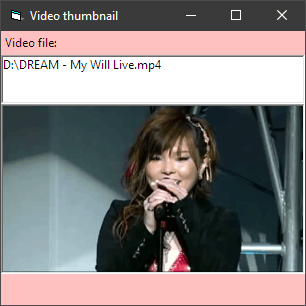
This one doesn't support resizing Form1 because it caches the max width and height during Form_Load.Code:Option Explicit 'Here we assume that Label2.Width and Picture1.Width are both equal to Form.ScaleWidth. 'We also assume that Picture1.Height is the maximum height we are after. 'Hard-coded test value: Private Const VIDEO_FILE As String = "D:\DREAM - My Will Live.mp4" Private Declare Function IStream_Read Lib "shlwapi" ( _ ByVal Stream As stdole.IUnknown, _ ByRef v As Byte, _ ByVal cb As Long) As Long 'HRESULT Private Declare Function IStream_Size Lib "shlwapi" ( _ ByVal Stream As stdole.IUnknown, _ ByRef ui As Currency) As Long 'HRESULT Private ImageFile As WIA.ImageFile Private ImageProcess As WIA.ImageProcess Private BordersWidth As Single 'ScaleMode. Private BordersHeight As Single 'ScaleMode. Private Sub Form_Load() Const ssfDESKTOP = 0 Dim Stream As stdole.IUnknown Dim ui As Currency Dim Bytes() As Byte Label2.Caption = VIDEO_FILE With CreateObject("Shell.Application").NameSpace(ssfDESKTOP).ParseName(VIDEO_FILE) Set Stream = .ExtendedProperty("System.ThumbnailStream") End With IStream_Size Stream, ui ReDim Bytes(0 To CLng(ui * 10000@) - 1) IStream_Read Stream, Bytes(0), CLng(ui * 10000@) With New WIA.Vector .BinaryData = Bytes Set ImageFile = .ImageFile End With Set ImageProcess = New WIA.ImageProcess With ImageProcess .Filters.Add .FilterInfos.Item("Scale").FilterID With .Filters(1).Properties .Item("PreserveAspectRatio").Value = True .Item("MaximumWidth").Value = _ Picture1.ScaleX(Picture1.ScaleWidth, Picture1.ScaleMode, vbPixels) .Item("MaximumHeight").Value = _ Picture1.ScaleY(Picture1.ScaleHeight, Picture1.ScaleMode, vbPixels) End With End With With Picture1 BordersWidth = .Width - .ScaleWidth BordersHeight = .Height - .ScaleHeight End With End Sub Private Sub Form_Resize() Dim Picture As stdole.StdPicture Dim NewWidth As Single Dim NewHeight As Single If WindowState <> vbMinimized Then With ImageProcess.Apply(ImageFile) Set Picture = .FileData.Picture NewWidth = ScaleX(.Width, vbPixels, ScaleMode) + BordersWidth NewHeight = ScaleY(.Height, vbPixels, ScaleMode) + BordersHeight End With With Picture1 .Move (ScaleWidth - NewWidth) / 2, Label2.Top + Label2.Height, NewWidth, NewHeight .AutoRedraw = True .Cls .PaintPicture Picture, 0, 0 .AutoRedraw = False End With End If End Sub

 Reply With Quote