|

-
May 14th, 2019, 04:38 PM
#281
Re: VBFlexGrid Control (Replacement of the MSFlexGrid control)
Updated released.
The following point now got removed from the "List of incompatibilities in relation to the MSFlexGrid control"
Code:
- Fixed cell(s) without cell(s). (e.g. FixedRows = 1 and Rows = 1)
Thus at run-time it is now supported to have following code with the possibility where RecordCount is 0:
Code:
VBFlexGrid1.Rows = VBFlexGrid1.FixedRows + RecordCount
Thus the FixedRows is equal of Rows, having no scrollable rows in fact. (when RecordCount was 0)
The same applies of course for the cols.
This was one of the last steps before I release the next OCX version. I just wait for a while awaiting possible bug reports before I deploy the 1.3 OCX version.
-
May 15th, 2019, 05:02 PM
#282
Re: VBFlexGrid Control (Replacement of the MSFlexGrid control)
Update related to 13-May-2019 update. (renamings)
Sorry for this inconvenience caused but I still had the chance to rename something before next OCX, so I did. 
Following run-time properties got renamed:
EditDropDownList -> ComboList
EditDroppedDown -> ComboDroppedDown
hWndEditButton -> hWndComboButton
hWndEditList -> hWndComboList
This way everything related to the drop-down list has the prefix "Combo" and everything related to the text box has the prefix "Edit".
Doing this way it's cleaner seperated.
Included ComboCount/ComboItem/ComboIndex run-time properties helping to interact with the drop-down list during edit.
Included ComboDropDown/ComboCloseUp event. (like in a normal ComboBox)
Included ColComboList run-time property. It works similar to the ComboList property, except it applies to entire columns.
If both are defined then ComboList has precedence over ColComboList. (ComboList > ColComboList)
Last edited by Krool; May 15th, 2019 at 05:11 PM.
-
May 15th, 2019, 11:53 PM
#283
Re: VBFlexGrid Control (Replacement of the MSFlexGrid control)
If were me, I prefer to name them like this:
ComboEditable
ComboButtonWnd
ComboListWnd
Last edited by dreammanor; May 16th, 2019 at 12:40 AM.
-
May 16th, 2019, 03:26 AM
#284
Re: VBFlexGrid Control (Replacement of the MSFlexGrid control)
 Originally Posted by dreammanor

If were me, I prefer to name them like this:
ComboEditable
ComboButtonWnd
ComboListWnd
OK, I would propose following renamings then:
ComboList -> ComboEditable
ColComboList -> ColComboEditable
ComboItem -> ComboList
ComboCount -> ComboListCount
ComboIndex -> ComboListIndex
hWndComboButton and hWndComboList I want to keep as I used always the prefix "hWnd"... for such things, also in VBCCR.
-
May 16th, 2019, 12:01 PM
#285
Re: VBFlexGrid Control (Replacement of the MSFlexGrid control)
Update released.
Final renamings now again..
ComboList -> ComboEditable
ColComboList -> ColComboEditable
ComboItem -> ComboList
ComboCount -> ComboListCount
ComboIndex -> ComboListIndex
The ComboEditable features comes in two flavor. Either as DropDownCombo or as DropDownList. The DropDownCombo already implemented auto selecting as the user types. However, the DropDownList now also supports incremental search as you type. So in both modes you can just start editing by typing, below image illustrates:

Last edited by Krool; Mar 29th, 2020 at 12:23 PM.
-
May 17th, 2019, 05:23 PM
#286
Re: VBFlexGrid Control (Replacement of the MSFlexGrid control)
Update released.
bugfix concerning right-to-left and the combo button and combo list for the in-cell editing window.
Also the combo button window is now being hot-tracked and drawn accordingly.
For this I have a open question:
Currently the combo button is drawn via DrawFrameControl with the old grayish look even when theming is enabled.
Should I keep it like this? It would fit in the overall look of the grid control?
Or use uxtheme and draw proper dropdown button ? (CP_DROPDOWNBUTTON with CBXS_DISABLED, CBXS_HOT, CBXS_NORMAL, CBXS_PRESSED)

Last edited by Krool; Mar 29th, 2020 at 12:23 PM.
-
May 18th, 2019, 04:58 AM
#287
Re: VBFlexGrid Control (Replacement of the MSFlexGrid control)
Originally Posted by Krool
Or use uxtheme and draw proper dropdown button ? (CP_DROPDOWNBUTTON with CBXS_DISABLED, CBXS_HOT, CBXS_NORMAL, CBXS_PRESSED)
I'd use uxtheme internally - but would also raise an event to the outside, to give the user a chance to ownerdraw this thing,
in case the Button shall be used for ones own Cell-Dialogue-PopUps or something (which is not a ComboDropDown)...
Event OwnerDrawCellButton(hDC, Width, Height, State)
The hDC:
- represents the "rectangular button-canvas-area to draw to"
- it could be pre-filled with the internal rendering (in case the user does not want to overdraw it completely, but just wants to "add little indicator-drawings")
- it should be properly clipped and translated (so that its origin is at 0,0)
Olaf
-
May 18th, 2019, 06:05 AM
#288
Re: VBFlexGrid Control (Replacement of the MSFlexGrid control)
I think I would add a Style property that could set all the colors, border (flat or not and the thickness) to some predefined settings.
And add another property named VisualStyles that could set the colors to the Windows theme when is set to True (the same that you already did for other controls). And also set the border, line colors and such according to the theme.
About the drop down buttons:
When the user clicks a drop down button, I would raise an event and allow to cancel the display of the Combo list (adding a Cancel parameter ByRef) and then allow to handle the operation "manually", for example showing a custom form with some custom rules (and may be validations).
That would give much power to what can be done.
-
May 18th, 2019, 07:04 AM
#289
Re: VBFlexGrid Control (Replacement of the MSFlexGrid control)
Originally Posted by Eduardo-
When the user clicks a drop down button, I would raise an event and allow to cancel the display of the Combo list (adding a Cancel parameter ByRef) and then allow to handle the operation "manually", for example showing a custom form with some custom rules (and may be validations).
That would give much power to what can be done.
Yep, that was my thought behind the OwnerDrawEvent for this Button (to be able to signalize, "that other things will pop-up or drop-down").
And in case the "regular DropDown-List" is shown -
is this already a separate instance of the GridControl itself which hosts the Item-Listing?
If not, I would switch to that behaviour - since this allows (in the vsFlex) to render MultiColumn-DropDownLists
(when an appropriate MultiColumn-DataSource-Container was prepared beforehand)
Olaf
-
May 18th, 2019, 08:41 AM
#290
Re: VBFlexGrid Control (Replacement of the MSFlexGrid control)
I think it also would worth checking what other grids controls do, I mean mostly commercial controls (may be even for other languages).
To see if there is any standard in how they do the things.
For this feature and for any feature with which the Flex grid is improved/added.
-
May 18th, 2019, 09:13 AM
#291
Re: VBFlexGrid Control (Replacement of the MSFlexGrid control)
Along with the "styles" another feature that is nice sometimes to have is the ability to set alternate colors for the rows.
The property could be named perhaps AlternateRowsBackColor or AlternatingRowsBackColor.
In case you decide to implement predefines "styles" it could be part of what is preset.
This helps the user to visually follow the rows when the grids are wide without going up or down to a wrong row.
PS: the 'Printscreen To Clipboard' button in your demo doesn't work, the .Picture property returns just a 1x1 bitmap with a black pixel.
-
May 18th, 2019, 11:35 AM
#292
Re: VBFlexGrid Control (Replacement of the MSFlexGrid control)
Originally Posted by Eduardo-
Along with the "styles" another feature that is nice sometimes to have is the ability to set alternate colors for the rows.
The property could be named perhaps AlternateRowsBackColor or AlternatingRowsBackColor.
In case you decide to implement predefines "styles" it could be part of what is preset.
This helps the user to visually follow the rows when the grids are wide without going up or down to a wrong row.
PS: the 'Printscreen To Clipboard' button in your demo doesn't work, the .Picture property returns just a 1x1 bitmap with a black pixel.
There is already a 'BackColorAlt' property.
Thanks about the printscreen bug advise. Will check soon.
Originally Posted by Eduardo-
About the drop down buttons:
When the user clicks a drop down button, I would raise an event and allow to cancel the display of the Combo list (adding a Cancel parameter ByRef) and then allow to handle the operation "manually", for example showing a custom form with some custom rules (and may be validations).
That would give much power to what can be done.
Good idea. Will include a Cancel parameter in the ComboDropDown event.
Originally Posted by Schmidt
I'd use uxtheme internally - but would also raise an event to the outside, to give the user a chance to ownerdraw this thing,
in case the Button shall be used for ones own Cell-Dialogue-PopUps or something (which is not a ComboDropDown)...
Event OwnerDrawCellButton(hDC, Width, Height, State)
That sounds easier than providing a ton of properties to control customized extra wishes. Will check soon.
Last edited by Krool; May 18th, 2019 at 11:39 AM.
-
May 18th, 2019, 01:16 PM
#293
Re: VBFlexGrid Control (Replacement of the MSFlexGrid control)
Originally Posted by Krool
There is already a 'BackColorAlt' property.
Ah OK, very good.
-
May 18th, 2019, 05:26 PM
#294
Re: VBFlexGrid Control (Replacement of the MSFlexGrid control)
Originally Posted by Eduardo-
the 'Printscreen To Clipboard' button in your demo doesn't work, the .Picture property returns just a 1x1 bitmap with a black pixel.
Update released. Fixed.
Originally Posted by Eduardo-
I think it also would worth checking what other grids controls do, I mean mostly commercial controls (may be even for other languages).
To see if there is any standard in how they do the things.
For this feature and for any feature with which the Flex grid is improved/added.
The vsFlexGrid seems to have an alias in their ComboList property.
Translated to VBFlexGrid this would mean following:
If the ComboEditable (or ColComboEditable) is either "..." or "|..." then a pop-up button is shown, else a drop-down button.
The difference between "..." and "|..." is that the first one would be read-only edit window and the second one a normal edit window.
Clicking on the pop-up button would fire an CellButtonClick event.
I think that's a good approach, no?
-
May 18th, 2019, 07:42 PM
#295
Re: VBFlexGrid Control (Replacement of the MSFlexGrid control)
Originally Posted by Krool
OK, I would propose following renamings then:
ComboList -> ComboEditable
ColComboList -> ColComboEditable
ComboItem -> ComboList
ComboCount -> ComboListCount
ComboIndex -> ComboListIndex
hWndComboButton and hWndComboList I want to keep as I used always the prefix "hWnd"... for such things, also in VBCCR.
If it is not set in stone already, I would like to say that I don't agree with those changes.
These property names are not intuitive for what they are or they do, at least to me.
I was trying to figure how to use them and what each one does, and to compare to the vsFlexGrid... (in order to form an opinion to answer your last message)
Why at least not to stick to the names already used by vsFlexGrid?
About to set the style of the dropdown button, the "standard" options would be arrow down (like a combobox), horizontal ellipsis, and not it is becoming popular also the vertical ellipsis used by Google (mostly in Android, but also in Google Chrome for Windows): ⁝
Also, here I found documentation of the vsFlexGrid, it could be useful.
Last edited by Eduardo-; May 18th, 2019 at 07:45 PM.
-
May 18th, 2019, 09:45 PM
#296
Addicted Member

Re: VBFlexGrid Control (Replacement of the MSFlexGrid control)
VBFlexGrid1.Col = 0
VBFlexGrid1.Row = 1
VBFlexGrid1.ColSel = VBFlexGrid1.Cols - 1
VBFlexGrid1.RowSel = VBFlexGrid1.Rows - 1
These codes can select the specified line. What if you cancel the selection of one line or all(Other lines remain selected)?
-
May 19th, 2019, 05:41 AM
#297
Re: VBFlexGrid Control (Replacement of the MSFlexGrid control)
Originally Posted by Eduardo-
If it is not set in stone already, I would like to say that I don't agree with those changes.
These property names are not intuitive for what they are or they do, at least to me.
I was trying to figure how to use them and what each one does, and to compare to the vsFlexGrid... (in order to form an opinion to answer your last message)
Why at least not to stick to the names already used by vsFlexGrid?
About to set the style of the dropdown button, the "standard" options would be arrow down (like a combobox), horizontal ellipsis, and not it is becoming popular also the vertical ellipsis used by Google (mostly in Android, but also in Google Chrome for Windows): ⁝
Also, here I found documentation of the vsFlexGrid, it could be useful.
As long as the 1.3 OCX is not released I can change names. However, the names used by the vsFlexGrid are also not always intuitive.
We can agree for the in-cell editing drop-down functionality the prefix "Combo" should be used.
A normal ComboBox has a List, ListCount and ListIndex property.
So in order to assume the same output the grid's properties are then ComboList, ComboListCount and ComboListIndex.
In order to enable the drop-down functionality the property ComboEditable (or ColComboEditable) is used.
If it's empty the combo is not used, else it contains the strings used for populating the list. (separated by pipe chars)
So in fact the ComboEditable works like the ComboList property in vsFlexGrid. But I don't find ComboList intuitive, as the List property in a ComboBox returns a item by a given index.
Originally Posted by ChenLin
VBFlexGrid1.Col = 0
VBFlexGrid1.Row = 1
VBFlexGrid1.ColSel = VBFlexGrid1.Cols - 1
VBFlexGrid1.RowSel = VBFlexGrid1.Rows - 1
These codes can select the specified line. What if you cancel the selection of one line or all(Other lines remain selected)?
The VBFlexGrid (same as MSFlexGrid) does not support multi-selection blocks. It's either single or all.
What might be added in future is a special SelectionMode 'ListBox' which can work in conjunction with a RowSelected property to allow partial selections by rows. (like a ListBox can do)
Originally Posted by Schmidt
is this already a separate instance of the GridControl itself which hosts the Item-Listing?
What do you mean exactly?
Originally Posted by Schmidt
I'd use uxtheme internally
Done.
Last edited by Krool; May 19th, 2019 at 06:32 AM.
-
May 19th, 2019, 12:29 PM
#298
Re: VBFlexGrid Control (Replacement of the MSFlexGrid control)
Originally Posted by Krool
As long as the 1.3 OCX is not released I can change names. However, the names used by the vsFlexGrid are also not always intuitive.
We can agree for the in-cell editing drop-down functionality the prefix "Combo" should be used.
A normal ComboBox has a List, ListCount and ListIndex property.
So in order to assume the same output the grid's properties are then ComboList, ComboListCount and ComboListIndex.
In order to enable the drop-down functionality the property ComboEditable (or ColComboEditable) is used.
If it's empty the combo is not used, else it contains the strings used for populating the list. (separated by pipe chars)
So in fact the ComboEditable works like the ComboList property in vsFlexGrid. But I don't find ComboList intuitive, as the List property in a ComboBox returns a item by a given index.
I totally agree, vsFlexGrid's Combo* property names are not intuitive either. My point was that the people will have only one set of unintuitive properties and not two.
I'll tell you my experience: yesterday (or may be the day before), I downloaded your control to take a look to what you have added lately. I remembered you have been working in the editing feature, so I wanted to check it.
Then I went to the middle of the property window and looked for a property with "E", something like "Editable", "Edit*" . I found nothing. Then I looked really quicky to see if I saw any property name that can be for editing and I found nothing. I opened the property pages, again navigated all the pages and took a quick look to all the properties, but I found nothing that could be intended for editing.
I thought "it is still not implemented in this version".
After that, I downloaded the vsFlexGrid to study some things. I went to the "E" and found the property "Editable".
After a while, reading here this thread I found that the property was named "AllowUserEditing", that seems fine now that I think... but I didn't find it at first.
Another thing that I noticed is that your property is Boolean whilst the vs has two options for editing. From their names it seems that one is by keyboard and the other by mouse. But in practice I didn't find a difference.
Another difference that I found is that with the vbFlexGrid you require double click to enter the edit mode whilst the vs enters the edit mode with just one click.
I think it would be nice to have both options.
With the vs one Enter keystroke over a cell means to enter the Edit mode. With yours I didn't find a way to enter the edit mode with the keyboard.
In regard to property names. I see it is difficult to find good property names for these properties.
After thinking a bit, an option could be:
Editable (or EditMode) with three options: no, simple click, double click
EditDropList or EditDropPipedList or EditModeList or EditModePipedList
EditDropListCount or EditModeListCount
EditDropListIndex or EditModeListIndex
After considering, I think I prefer:
EditMode
EditModeList (but still considering EditModePipedList)
EditModeListCount
EditModeListIndex
That's my opinion.
-
May 19th, 2019, 01:53 PM
#299
Re: VBFlexGrid Control (Replacement of the MSFlexGrid control)
Originally Posted by Eduardo-
After a while, reading here this thread I found that the property was named "AllowUserEditing", that seems fine now that I think... but I didn't find it at first.
The intention about "AllowUserEditing" is that it enables the end-user to initiate editing by keyboard or mouse.
It is however always possible to start editing by code, even if AllowUserEditing is False.
Having a Editable property would sound that even by code it's not possible..
Originally Posted by Eduardo-
Another difference that I found is that with the vbFlexGrid you require double click to enter the edit mode whilst the vs enters the edit mode with just one click.
I think it would be nice to have both options.
With the vs one Enter keystroke over a cell means to enter the Edit mode. With yours I didn't find a way to enter the edit mode with the keyboard.
It's possible to start editing by keystroke.
It has following starting modes: (in bold the ones for keyboard)
FlexEditReasonCode = 0
FlexEditReasonF2 = 1
FlexEditReasonSpace = 2
FlexEditReasonKeyPress = 3
FlexEditReasonDblClick = 4
It is easy to enhance it so editing can be started by an return key:
Code:
Private Sub VBFlexGrid1_KeyDown(KeyCode As Integer, Shift As Integer)
If KeyCode = vbKeyReturn Then VBFlexGrid1.StartEdit
End Sub
Or to allow a simple click, instead of double click:
Code:
Private Sub VBFlexGrid1_CellClick(ByVal Row As Long, ByVal Col As Long, ByVal Button As Integer)
If Row >= VBFlexGrid1.FixedRows And Col >= VBFlexGrid1.FixedCols Then VBFlexGrid1.StartEdit Row, Col
End Sub

Private Sub VBFlexGrid1_BeforeEdit(Row As Long, Col As Long, ByVal Reason As FlexEditReasonConstants, Cancel As Boolean)
If Reason = FlexEditReasonDblClick Then Cancel = True
End Sub
As you see there is a set of standard implementation, but it's easy to change it.
Last edited by Krool; May 19th, 2019 at 02:12 PM.
-
May 19th, 2019, 04:36 PM
#300
Re: VBFlexGrid Control (Replacement of the MSFlexGrid control)
Update released.
For the namings I made now following decision:
Removed ComboEditable/ColComboEditable property as it got now replaced by two new properties.
The two new properties are:
ComboMode/ColComboMode As FlexComboModeConstants
ComboItems/ColComboItems As String
The ComboMode property is defining the combo functionality mode:
- FlexComboModeNone -> No combo button, normal editing
- FlexComboModeDropDown -> Allows to modify by drop-down list only (edit field is read-only)
- FlexComboModeEditable -> Allows to modify by edit field and drop-down list, some specific behavior.
The ComboItems property defines the list items to be used for the drop-down list. (each item seperated by "|")
It is possible to have ComboMode <> FlexComboModeNone and ComboItems = "". This results then in a drop-down list with no items.
This architecture is more clear and doesn't requires cumbersome aliases for the string property that defines the drop-down list.
Also it is then easier to include new modes, e.g. FlexComboModePopUp.
FlexComboModePopUp would be just a combo button without any drop-down list. (Thus ComboItems would be ignored)
In FlexComboModePopUp the combo button would then be a normal button with ellipsis ("...")
Again, doing this way no aliases are necessary and gives better understanding even without reading any documentation. Because it is really cumbersome without reading any documentation or the demo project to know what aliases would be necessary to have a specific mode, like the vsFlexGrid do.
Last edited by Krool; May 19th, 2019 at 04:39 PM.
-
May 19th, 2019, 04:46 PM
#301
Re: VBFlexGrid Control (Replacement of the MSFlexGrid control)
[built-in drop-down-listings]
Originally Posted by Krool
What do you mean exactly?
I've not played around with the newer versions of the VBFlexGrid, but it seems (from the ScreenShots),
that ComboList-DropDown-areas can be shown when interacting with the Grid...
My suggestion was, to not show "normal Combo-Dropdown-areas", but instead show your own Popup-Window,
which doesn't contain a DropDown-Listing via CommonControls-functionality (or whatever is in use currently),
but instead shows a (VB-)PopUp-Window, with a dynamically created extra-Instance of the VBFlexGrid on it
(to easier support Multi-Column-DropDowns).
As for the vsFlex... and its Button- and DropDown-support...
This always seemed to me, like it didn't get much love from the developers (after the main-functionality was finished) -
meaning that it could be done nicer ... so, implementing it exactly as in the vsFlex would be worthwhile only,
when "strict vsFlex-compatibility" is a long-term-goal...
Olaf
Last edited by Schmidt; May 19th, 2019 at 07:52 PM.
-
May 20th, 2019, 12:11 AM
#302
New Member
Re: VBFlexGrid Control (Replacement of the MSFlexGrid control)
Hello,
I am using this control without problems in Windows 7 and Windows 10 64-bit.
But I found an error 50003 when using thsi control with Windows 10 Pro 32-bit.
Could you check this and make a new release?
Originally Posted by Krool
This project is intended to replace the MSFlexGrid control for VB6.
The "MSFLXGRD.OCX" can be replaced completly.
Even though some enhancements of the MS HFlexGrid control are included, it can't replace it completly (yet).
But there are also new features included that are not available on both MSFlexGrid and MSHFlexGrid.
The VBFlexGrid supports Unicode and is DPI-Aware.
At design time (IDE) there is only one dependency. (OLEGuids.tlb)
This is a modified version of the original .tlb from the vbaccelerator website.
But for the compiled .exe there are no dependencies, because the .tlb gets then compiled into the executable.
In order to use the DataSource/DataMember property a reference to msdatsrc.tlb (pre-installed since Win2k) is required.
Everything should be self explained, because all functions and properties have a description.
The source code of the project can also be viewed on GitHub.
ActiveX Control version, together with a Registration-Free (Side-by-side) solution:
Version 1.2
Notes:
- When using the SetParent or MoveWindow API, pass .hWndUserControl and not .hWnd.
- When changing the "Project Name", have all forms open, else all properties are lost. Because the library to which the controls are referring to is the "Project Name" itself. Having all forms open will ensure that the .frx files will be updated with the new "Project Name".
- In order to trap error raises via "On Error Goto ..." or "On Error Resume Next" it is necessary to have "Break on Unhandled Errors" selected instead of "Break in Class Module" on Tools -> Options... -> General -> Error Trapping.
List of revisions:
Code:
20-May-2019
- Removed ComboEditable/ColComboEditable as it got replaced by ComboMode/ColComboMode and ComboItems/ColComboItems.
- New ComboMode/ColComboMode property with FlexComboModeConstants
  - FlexComboModeNone -> No combo button, normal editing.
  - FlexComboModeDropDown -> Allows to modify by drop-down list only.
  - FlexComboModeEditable -> Allows to modify by edit and drop-down list.
- New ComboItems/ColComboItems property that defines the list items to be used when ComboMode is DropDown or Editable.
19-May-2019
- Bugfix in the Picture property. (related to 08-May-2019 update)
- Combo button window now drawm themed, if applicable.
18-May-2019
- Bugfix concerning RightToLeftLayout for in-cell editing combo button and combo list window.
- Combo button window is now being hot-tracked.
16-May-2019
- Renaming of properties related to 15-May-2019 update:
  - ComboList -> ComboEditable
  - ColComboList -> ColComboEditable
  - ComboItem -> ComboList
  - ComboCount -> ComboListCount
  - ComboIndex -> ComboListIndex
- Incremental search now enabled for the drop-down list when editing a cell.
15-May-2019
- Renaming of properties related to 13-May-2019 update
  - EditDropDownList -> ComboList
  - EditDroppedDown -> ComboDroppedDown
  - hWndEditButton -> hWndComboButton
  - hWndEditList -> hWndComboList
- Included ComboCount/ComboItem/ComboIndex run-time property that are valid when using drop-down combo lists.
- Included ComboDropDown/ComboCloseUp event.
- Included ColComboList run-time property. It works similar to the ComboList property, except it applies to entire columns.
14-May-2019
- Eliminated run-time limitation of no support for having fixed cell(s) without cell(s). (e.g. FixedRows = 1 and Rows = 1)
13-May-2019
- Included the EditDropDownList/EditDroppedDown run-time property that allows to use a drop-down list when editing a cell.
10-May-2019
- Finetuning concerning RightToLeftLayout for in-cell editing window.
09-May-2019
- Bugfix related to 08-May-2019 update.
08-May-2019
- Major drawing performance boost. (~20%)
07-May-2019
- Bugfix related to 06-May-2019 update concerning in-cell editing window.
06-May-2019
- When in-cell editing window is scrolled off then any key input will now bring it back into view.
- Included WS_CLIPCHILDREN on VBFlexGridWndClass creation.
05-May-2019
- Included enum FlexSelectionModeFreeByRow and FlexSelectionModeFreeByColumn in the SelectionMode property.
01-May-2019
- Row/Col params in the BeforeEdit event now ByRef instead ByVal.
25-Apr-2019
- Finetuning with WM_NCCALCSIZE/WM_NCHITTEST/WM_NCPAINT for in-cell editing window.
23-Apr-2019
- Bugfix in the internal FlexTopParentValidateControls function.
17-Apr-2019
- Bugfix related to 15-Apr-2019 update when scrolling while editing fixed cells.
- Finetuning with EM_SETMARGINS for in-cell editing window.
15-Apr-2019
- Scrolling will now update the in-cell editing window accordingly.
13-Apr-2019
- Included the in-cell editing functionality.
  - AllowUserEditing property.
  - StartEdit/CancelEdit/CommitEdit method. (works even if AllowUserEditing is False)
  - BeforeEdit/EnterEdit/ValidateEdit/LeaveEdit/AfterEdit events.
  - EditSetupStyle/EditSetupWindow/EditQueryClose/EditChange/EditKeyDown/EditKeyUp/EditKeyPress events.
  - hWndEdit/EditRow/EditCol/EditReason/EditCloseMode read-only run-time property.
  - EditText/EditMaxLength/EditSelStart/EditSelLength/EditSelText run-time property.
- Included the IMEMode property.
- Included the GetMergedRange method.
12-Apr-2019
- Merged cells are now able to fetch custom data source 'FlexDataSource'.
11-Apr-2019
- Minor modification in the internal ProcessKeyDown method.
10-Apr-2019
- Minor modification in the WM_LBUTTONDOWN handler.
04-Apr-2019
- Included optional parameter Row and Col in the CellEnsureVisible method.
  So instead the current cell an arbitrary cell can now be ensured to be visible, scrolling if necessary.
03-Apr-2019
- Bugfix in CellWrapBehavior property.
  It didn't work as expected when there were hidden or zero height/width rows/cols.
02-Apr-2019
- Bugfix in FormatString property when no alignment prefix for a column was specified.
  FlexAlignmentGeneral is now used then instead of FlexAlignmentLeftCenter.
26-Mar-2019
- Minor bugfix in the WM_MOUSEACTIVATE handler.
24-Mar-2019
- Compatibility fix for the CellWidth/CellHeight property.
18-Mar-2019
- Internal performance improvement.
10-Mar-2019
- Improvement in VTableHandle.bas concerning 'DeactivateIPAO'.
02-Mar-2019
- More user friendly behavior when SelectionMode is ByRow/ByCol and pressing cursor keys.
26-Feb-2019
- Included the CellClick and CellDblClick event.
30-Jan-2019
- CellPicture property can now render 32bpp alpha bitmaps.
23-Jan-2019
- VBA bugfix.
17-Jan-2019
- Improvement in VTableHandle.bas concerning 'DeactivateIPAO'.
09-Nov-2018
- Internal improvement concerning design-mode handling.
26-Oct-2018
- Bugfix related to 25-Oct-2018 update.
- Minor internal improvements.
25-Oct-2018
- Internal improvement concerning divider drag of the last row or col.
09-Oct-2018
- WM_SYSKEYDOWN/WM_SYSKEYUP considered now for KeyDown/KeyUp events.
04-Oct-2018
- RowID/RowIndex property included. The usage is similar to the ColKey/ColIndex property.
  RowIndex returns a row given its ID, whereas RowID returns/sets the ID given its row.
27-Sep-2018
- Included the SingleLine property.
12-Sep-2018
- Included optional argument Direction in the FindItem function. Also FindItem cannot be used anymore on a fixed row.
11-Sep-2018
- Included the FlexDataSource property (run-time only) to set a custom data source which fetches data from the IVBFlexDataSource interface.
  It comes along with several limitations (e.g. cannot use .Sort) and the behavior/definitions are similar to the IVSFlexDataSource from VSFlexGrid.
- Included the DataRefresh method which forces the control to re-fetch all data from its data source. (and/or custom data source)
- Included optional argument Wrap in the FindItem function.
- The AddItem method now respects the ClipMode property setting.
04-Sep-2018
- Included optional argument ExcludeHidden in the FindItem function.
- Added WS_EX_TRANSPARENT for the internal tooltip control which solved two issues:
  - The control did not receive focus when clicking on a tip from another control.
  - In Win10 the mouse wheel will scroll even if the mouse hovers over a tip. (in-place tip)
03-Sep-2018
- Bugfix in the Cell property for FlexCellSort setting.
27-Aug-2018
- Further optimization of the internal GetHitTestInfo function.
26-Aug-2018
- Major performance boost for internal GetHitTestInfo function.
12-Aug-2018
- TEXTMETRIC structure was declared as ANSI. Fixed to WIDE version.
  Unicode did not lack due to this bug, but it was a memory risk as WIDE version is larger than ANSI.
28-Jul-2018
- Internal GDI leak fixed. (forgot to restore old font handle in a hDCScreen)
09-Jul-2018
- Bugfix in the WrapCellBehavior property. Bug only affected when SelectionMode was ByRow or ByColumn.
02-May-2018
- Renamed enum 'FlexClipModeIncludeHidden' to 'FlexClipModeNormal'.
- Included optional argument ExcludeHidden in the AutoSize method.
22-Apr-2018
- Included the ClipMode property that controls whether to include or exclude hidden cells in a clip command.
20-Apr-2018
- Internal bugfix in page scroll up and down in relation to zero width rows.
- WM_LBUTTONDOWN intercepted (no MouseDown event) in case of divider row/col dragging.
  This is the same behavior as in the original MS(H)FlexGrid.
16-Apr-2018
- Bugfix in the CellFontName property, related to update on 05-Dec-2017. (This bug had only effect when FillStyle is set to FlexFillStyleRepeat)
14-Mar-2018
- Optimized the divider row/col dragging.
- Included the HitRowDivider/HitColDivider property which returns the divider row/col from the last invoked .HitTest.
  The divider row/col contains already the necessary offset for FlexHitResultDividerRowTop and FlexHitResultDividerColumnLeft.
  In addition the offset includes hidden rows/cols. (zero width rows/cols are not offset to preserve MSFlexGrid compatibility)
13-Mar-2018
- Included the DividerDblClick event.
09-Mar-2018
- Bugfix related to custom sorting bugfix on 08-Mar-2018.
08-Mar-2018
- Critical bugfix for custom sorting. (FlexSortCustom)
- Included enum FlexSortCurrencyAscending/FlexSortCurrencyDescending and FlexSortDateAscending/FlexSortDateDescending in Sort/ColSort property.
04-Mar-2018
- Bugfix in VTableHandle.bas related to 25-Feb-2018 update. (concerns unload stability in IDE only)
25-Feb-2018
- Major internal improvement in the VTableHandle.bas concerning IOleInPlaceActiveObject.
20-Feb-2018
- Unicode support when generating ASCII key combos, e.g. ALT + 3333.
11-Feb-2018
- Included the AutoSize method.
23-Jan-2018
- Included the TextWidth/TextHeight function that calculates for the current or an arbitrary cell the width and height length.
  For multiline text the heights are cumulated and for the width the line with the greatest width is taken. Similar to VB.Form's TextWidth function.
21-Dec-2017
- Improved the WM_MOUSEWHEEL handler for fine-grained wheel changes.
09-Dec-2017
- Improved VTableHandle.bas so it does not crash anymore when using VBCCRxx.OCX and VBFLXGRDxx.OCX in paralell. (concerns ActiveX control only)
05-Dec-2017
- Major performance fix. (Caused by update on 23-Nov-2017)
- Bugfix in the CellFontName property.
  A change will now overwrite the CellFontCharset settings.
23-Nov-2017
- Final tweak to run in the VBA environment. (meaningful for OCX only)
22-Nov-2017
- Minor internal improvements.
18-Nov-2017
- Bugfix for generic sorting.
27-Oct-2017
- Again minor tweaks to run better in the VBA environment. (meaningful for OCX only)
20-Oct-2017
- Minor tweaks to run better in the VBA environment. (meaningful for OCX only)
26-Sep-2017
- Included the BeforeMouseDown event.
  The event is identical as in the MouseDown event, but an additional Cancel parameter allows you to prevent the default processing.
22-Sep-2017
- Minor bugfix in the internal GetHitTestInfo function.
19-Sep-2017
- Included the FormatString property.
- Bugfix that the FixedAlignment returned not the ColAlignment when not preset.
- FixedAlignment accepts now a value of -1 so that it is not preset anymore.
17-Sep-2017
- The Rows/Cols property can now be set lower or equal to the FixedRows/FixedCols property without raising an error.
  Like in the MS(H)FlexGrid the FixedRows/FixedCols property will be adjusted then accordingly.
02-Sep-2017
- The Font property is not written to the property bag anymore when it equals to Ambient.Font.
  Included new function OLEFontIsEqual in Common.bas.
01-Sep-2017
- Included the ClipSeparators property which enables to define two custom distinct characters to be used in clip strings.
26-Aug-2017
- Alpha (32bpp) icons in 'CellPicture' now drawn correctly per DrawIconEx instead of Picture.Render.
07-Aug-2017
- The HelpContextID and WhatsThisHelpID property is now also available when setting to a shadow object. ('Set' command)
27-Jul-2017
- Internal "DPI Aware" improvements.
  Improved the functions PixelsPerDIP_X/PixelsPerDIP_Y in Common.bas.
25-Jul-2017
- Pixels in the property bag are now treated as DIPs. (Device-independent pixels)
  There is no compatibility break in the property bag when there were saved at 100% (96) DPI.
  Included new functions PixelsPerDIP_X/PixelsPerDIP_Y in Common.bas.
  This "DPI Aware" enhancement affects the RowHeightMin/RowHeightMax and ColWidthMin/ColWidthMax property.
24-Jul-2017
- Included the EllipsisFormatFixed property which enables the setting to be differentiated between fixed and non-fixed cells.
23-Jul-2017
- Included the DataSource/DataMember property which allows to bind an Adodc control, DateEnvironment designer or ADODB.Recordset object.
  A reference to the msdatsrc.tlb (pre-installed since Win2k) is required.
  The new conditional compiliation constant 'ImplementDataSource' controls if the new feature is turned on.
  If turned off the 'DataBindingBehavior' might be changed back from 'vbComplexBound' to 'vbNone'.

[...]

14-Jun-2017
- First release.
-
May 20th, 2019, 12:13 AM
#303
New Member
Re: VBFlexGrid Control (Replacement of the MSFlexGrid control)
Hello,
i found an error 50003 when using this control with Windows 10 Pro 32-Bit.
Could you check thsi and release an update?
-
May 20th, 2019, 04:45 PM
#304
Re: VBFlexGrid Control (Replacement of the MSFlexGrid control)
Update released to cleanup the combo functionality and make definitive decision about the namings.
The ComboMode/ColComboMode run-time property allows to use combo functionality when editing a cell, it returns/sets.
- FlexComboModeNone -> Normal editing.
- FlexComboModeDropDown -> Allows to modify by drop-down list only.
- FlexComboModeEditable -> Allows to modify by normal editing and drop-down list.
- FlexComboModeButton -> Allows to modify by button only, which is a request to open a custom editor.
The ComboButtonValue run-time property which sets the value of the combo button by code, it returns/sets:
- FlexComboButtonValueUnpressed -> Normal.
- FlexComboButtonValuePressed -> Shows drop-down list or raises ComboButtonClick. (depending on ComboMode)
- FlexComboButtonValueDisabled -> Cannot click, grayed and closes up drop-down list if necessary.
ComboItems/ColComboItems run-time property is the definition of the strings to be used for the drop-down list.
Each item is separated with "|". If ComboMode property is Button then this property is ignored.
ComboList/ComboListCount/ComboListIndex run-time property are helping to interact with the drop-down list by code.
ComboDropDown/ComboCloseUp event, which occurs only when ComboMode is DropDown or Editable.
ComboButtonClick event, which occurs only when ComboMode is Button.
ComboButtonDrawMode run-time property and corresponding ComboButtonOwnerDraw event.
Last edited by Krool; May 22nd, 2019 at 04:05 PM.
-
May 21st, 2019, 01:12 AM
#305
New Member
Re: VBFlexGrid Control (Replacement of the MSFlexGrid control)
Hello,
will the new release also solve the mentioned run time error 50003?
-
May 21st, 2019, 02:00 AM
#306
Re: VBFlexGrid Control (Replacement of the MSFlexGrid control)
Originally Posted by polytron
Hello,
will the new release also solve the mentioned run time error 50003?
Did you use google? It seems a registration issue on your machine.
-
May 22nd, 2019, 04:04 PM
#307
Re: VBFlexGrid Control (Replacement of the MSFlexGrid control)
OCX version 1.3 released.
-
Jun 3rd, 2019, 02:44 PM
#308
Re: VBFlexGrid Control (Replacement of the MSFlexGrid control)
Update released.
If drop-down list extends beyond bottom edge of the screen (MonitorFromWindow API) then it will be displayed above the edit window.
Just like a normal ComboBox would behave.

Last edited by Krool; Mar 29th, 2020 at 12:24 PM.
-
Jun 10th, 2019, 08:04 PM
#309
Addicted Member
Re: VBFlexGrid Control (Replacement of the MSFlexGrid control)
hi Krool,Can I specify a format for the column? For example
Code:
Set vbgflexgrid.DataSource = adoGh
Vbgflexgrid.colformat(1,"0.00")
-
Jun 14th, 2019, 12:59 PM
#310
Re: VBFlexGrid Control (Replacement of the MSFlexGrid control)
Update released.
Included additional PictureAlignment enum constants to allow pictures to not overlap with the text.
Red ones are new and blue ones are the related "normal" enums.
So the normal enum + 20 is the NoOverlap range. I reserved some space to maybe also allow Center* pictures to have no overlap counterpart, but I think there is no need for it. (?)
And for Stretch or Tile it never makes sense to have a NoOverlap counterpart.
Code:
Public Enum FlexPictureAlignmentConstants
FlexPictureAlignmentLeftTop = 0
FlexPictureAlignmentLeftCenter = 1
FlexPictureAlignmentLeftBottom = 2
FlexPictureAlignmentCenterTop = 3
FlexPictureAlignmentCenterCenter = 4
FlexPictureAlignmentCenterBottom = 5
FlexPictureAlignmentRightTop = 6
FlexPictureAlignmentRightCenter = 7
FlexPictureAlignmentRightBottom = 8
FlexPictureAlignmentStretch = 9
FlexPictureAlignmentTile = 10
FlexPictureAlignmentLeftTopNoOverlap = 20
FlexPictureAlignmentLeftCenterNoOverlap = 21
FlexPictureAlignmentLeftBottomNoOverlap = 22
FlexPictureAlignmentRightTopNoOverlap = 26
FlexPictureAlignmentRightCenterNoOverlap = 27
FlexPictureAlignmentRightBottomNoOverlap = 28
End Enum
Illustration to show the difference: (Alignment of the text is in both cases left; so to effectively see the difference)

This way the CellPicture behaves more like an 'icon' instead like a background picture.
Originally Posted by ChenLin
Can I specify a format for the column?
Noted. Feature will be added soon. (ColFormat property)
In the meantime you may loop the column and format each cell manually. (via .TextMatrix)
Last edited by Krool; Jun 14th, 2019 at 01:56 PM.
-
Jun 17th, 2019, 03:37 PM
#311
Re: VBFlexGrid Control (Replacement of the MSFlexGrid control)
Originally Posted by ChenLin
Can I specify a format for the column? For example
Code:
Set vbgflexgrid.DataSource = adoGh
Vbgflexgrid.colformat(1,"0.00")
Done.
-
Jun 17th, 2019, 07:04 PM
#312
Addicted Member
Re: VBFlexGrid Control (Replacement of the MSFlexGrid control)
Already tested and successful, thank you @Krool

-
Jun 18th, 2019, 01:21 AM
#313
Addicted Member
Re: VBFlexGrid Control (Replacement of the MSFlexGrid control)
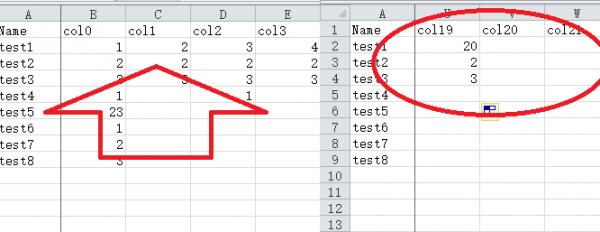
Another idea: If you have a lot of columns, maybe adding a freeze pane will make it easier to view, just like Excel does.
-
Jun 18th, 2019, 04:55 AM
#314
Re: VBFlexGrid Control (Replacement of the MSFlexGrid control)
Originally Posted by ChenLin
Another idea: If you have a lot of columns, maybe adding a freeze pane will make it easier to view, just like Excel does.
Good suggestion. In Farpoint Spread and my Spread, there are ColsFrozen and RowsFrozen properties. Maybe Excel uses different names.
-
Jun 19th, 2019, 02:20 AM
#315
Re: VBFlexGrid Control (Replacement of the MSFlexGrid control)
Same for the vsFlexGrid control.
-
Jun 19th, 2019, 09:51 AM
#316
Fanatic Member
Re: VBFlexGrid Control (Replacement of the MSFlexGrid control)
Hi.
some time ago it worked for me but now it does not compile or run in the ide closes everything completely.
commoncontrol does not work as it closes.
the reference is correct OLEGuids\OLEGuids.tlb
use windows 10 home
a greeting and forgiveness for the language
-
Jul 27th, 2019, 07:28 AM
#317
Re: VBFlexGrid Control (Replacement of the MSFlexGrid control)
DirectionAfterReturn property included.
This is actually a simple feature and long overdue..
It allows to move the position of the current cell when the user presses return (Enter) key.
It also works in conjunction with the WrapCellBehavior property. (like the TabBehavior property does)
-
Aug 10th, 2019, 12:07 PM
#318
New Member
Re: VBFlexGrid Control (Replacement of the MSFlexGrid control)
Krool, thank you for this grid. Could you activate property AllowUserEditing? I would like to forbid cell's editing.
-
Aug 10th, 2019, 12:43 PM
#319
Re: VBFlexGrid Control (Replacement of the MSFlexGrid control)
Originally Posted by SPB-667
Could you activate property AllowUserEditing? I would like to forbid cell's editing.
I don't understand. If you want to forbid cell's editing then set AllowUserEditing to False (Default)
-
Aug 10th, 2019, 12:43 PM
#320
New Member
Re: VBFlexGrid Control (Replacement of the MSFlexGrid control)
Originally Posted by SPB-667
Krool, thank you for this grid. Could you activate property AllowUserEditing? I would like to forbid cell's editing.
Nevermind. I found it )
But I have another question: can you add autosave of data from grid to database (like MS DataGrid 6.0) after changing cells.
 Posting Permissions
- You may not post new threads
- You may not post replies
- You may not post attachments
- You may not edit your posts
-
Forum Rules
|
Click Here to Expand Forum to Full Width
|



 Reply With Quote