|

-
Aug 10th, 2018, 02:35 PM
#41
Thread Starter
Addicted Member

Re: CheckBoxCombo 1.4 (A professional, effective and ready-to-use Multi-select ComboB
 Originally Posted by bormman

Version 1.4 - there was a problem.
Registration is done by the administrator.
Attachment 160881
Hope you have successfully registered CheckBoxCombo 1.4.
The reason might be because, you might have used an older version of CheckBoxCombo with Excel previously.
Then, try following the below steps.
1. Just go to your profile AppData Folder (Eg: "C:\Users\[your_profile_name]\AppData")
2. In AppData folder, search for EXD files (*.exd).
3. Then delete all CheckBoxCombo_ActiveX.exd files you find.
4. Now try inserting the control again in Excel.
Last edited by PGBSoft; Aug 10th, 2018 at 02:41 PM.
-
Aug 10th, 2018, 03:03 PM
#42
New Member
Re: CheckBoxCombo 1.4 (A professional, effective and ready-to-use Multi-select ComboB
Originally Posted by PGBSoft
Hope you have successfully registered CheckBoxCombo 1.4.
The reason might be because, you might have used an older version of CheckBoxCombo with Excel previously.
Then, try following the below steps.
I did, but it does not help. The error is the same.
-
Aug 10th, 2018, 10:51 PM
#43
Thread Starter
Addicted Member
Re: CheckBoxCombo 1.4 (A professional, effective and ready-to-use Multi-select ComboB
Originally Posted by bormman
I did, but it does not help. The error is the same.
If so, the problem might be related to the security and privacy settings for the ActiveX controls of your Office package. Let's try the following steps.
1. First you unregister the CheckBoxCombo.ocx and register it again with administrative privileges.
To unregister, use: regsvr32 -u CheckBoxCombo.ocx 'assume you are in the command prompt, where the CheckBoxCombo.ocx exists.
To register, use: regsvr32 CheckBoxCombo.ocx 'assume you are in the command prompt, where the latest CheckBoxCombo.ocx exists.
Note: It is better you always maintain one location to keep the ocx file (such as "C:\Windows\System32" (32-bit OS) or "C:\Windows\SysWOW64" (64-bit OS)).
2. Then, open Excel and go to:
File > Excel Options > Trust Center > Trust Center Settings... > ActiveX Settings and make the changes as in the following screensthot or as per your requirement (without selecting the first option).
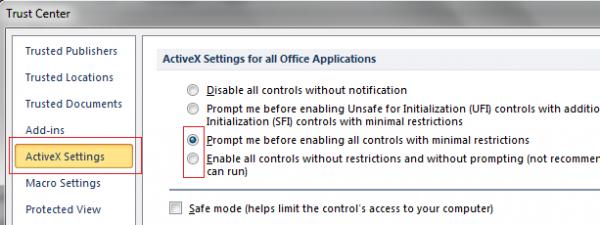
3. Then, try to insert the control again in Excel.
Last edited by PGBSoft; Aug 10th, 2018 at 10:59 PM.
-
Aug 11th, 2018, 06:19 AM
#44
New Member
Re: CheckBoxCombo 1.4 (A professional, effective and ready-to-use Multi-select ComboB
Last edited by bormman; Aug 11th, 2018 at 06:28 AM.
Reason: delite
-
Aug 11th, 2018, 06:26 AM
#45
New Member
Re: CheckBoxCombo 1.4 (A professional, effective and ready-to-use Multi-select ComboB
Originally Posted by PGBSoft
If so, the problem might be related to the security and privacy settings for the ActiveX controls of your Office package. Let's try the following steps......
All of these steps I have already done, moreover, I deleted all the records associated with CheckBoxCombo ..... from the registry. Then, once again, I Unregister and Registered the component ..... nothing helps. Error is the same.
CheckBoxCombo.ocx does not work only in Excel, in VB6 works perfectly.
Strange situation...
-
Aug 11th, 2018, 08:47 AM
#46
Thread Starter
Addicted Member
Re: CheckBoxCombo 1.4 (A professional, effective and ready-to-use Multi-select ComboB
Originally Posted by bormman
CheckBoxCombo.ocx does not work only in Excel, in VB6 works perfectly.
Strange situation...
Hmm.., strange..., Unfortunately, I can't reproduce this problem.
- Can you add the control to UserForms within Excel?
- Can you add the control in other office applications like Word, Access, etc.?
- What version of Office package you are using?
Just go to the following Microsoft support pages and see their instructions/updates apply for you.
P.S. Have you tried inserting CheckBoxCombo 1.3 to Excel worksheet previously with success results?
Last edited by PGBSoft; Aug 11th, 2018 at 10:03 AM.
-
Aug 11th, 2018, 11:16 AM
#47
New Member
Re: CheckBoxCombo 1.4 (A professional, effective and ready-to-use Multi-select ComboB
- Can you add the control to UserForms within Excel?................................................................................... YES
- Can you add the control in other office applications like Word, Access, etc.?.................................................. YES
- What version of Office package you are using?.......................................................................................... Office 2016 Pro+
- Have you tried inserting CheckBoxCombo 1.3 to Excel worksheet previously with success results?................... YES
The problem was solved as follows:
Delete TEMP *.exd file if necessary. (link General) In the sub-folders Excel8.0 and VBE folder Temp was a 2 CheckBoxCombo_ActiveX.exd files (my Temp folder is not on the system disk.)
PGBSoft Thank you.
Last edited by bormman; Aug 11th, 2018 at 11:36 AM.
-
Nov 23rd, 2019, 04:03 PM
#48
Addicted Member
Re: CheckBoxCombo 1.4 (A professional, effective and ready-to-use Multi-select ComboB
Awesome control PGBSoft ,
When I set the Onlistsearch property to true and opening the list by mouse it auto-closes itself , while this is not the behavior when opening the list by arrow or f4
-
Nov 23rd, 2019, 09:59 PM
#49
Thread Starter
Addicted Member
Re: CheckBoxCombo 1.4 (A professional, effective and ready-to-use Multi-select ComboB
Thanks Hosam. That issue had been reported and I have already made a fix. I will update the CodeBank.
-
Nov 23rd, 2019, 11:21 PM
#50
Thread Starter
Addicted Member
Re: CheckBoxCombo 1.4 (A professional, effective and ready-to-use Multi-select ComboB
Revision update 1.4.1 Released (24-11-2019)
- Fixed a minor bug in list search.
Download the latest here.
Last edited by PGBSoft; Nov 23rd, 2019 at 11:40 PM.
-
Feb 22nd, 2026, 07:33 PM
#51
New Member
Re: CheckBoxCombo 1.4 (A professional, effective and ready-to-use Multi-select ComboB
Will there be updates for this ActiveX?
Excel 2021 and 2024 are experiencing crashes.
-
Feb 23rd, 2026, 04:24 AM
#52
Re: CheckBoxCombo 1.4 (A professional, effective and ready-to-use Multi-select ComboB
Originally Posted by bormman
Will there be updates for this ActiveX?
Excel 2021 and 2024 are experiencing crashes.
There is source code included so that everyone can fix whatever issues they face -- that's the magic of OSS and everyone is invited to contribute.
I wouldn't be surprised if OP moved to JavaScript or other green field development long time ago so you can either fix issues yourself or continue waiting which is not very productive. . .
cheers,
</wqw>
-
Feb 23rd, 2026, 02:24 PM
#53
New Member
Re: CheckBoxCombo 1.4 (A professional, effective and ready-to-use Multi-select ComboB
wqweto
Are you a WinApi expert? I'm not.
If the problem were occurring in VB6, it would be possible to catch the error during debugging, but the error (stack overflow) occurs in Excel VBA.
-
Feb 24th, 2026, 03:59 AM
#54
Re: CheckBoxCombo 1.4 (A professional, effective and ready-to-use Multi-select ComboB
Originally Posted by bormman
wqweto
Are you a WinApi expert? I'm not.
If the problem were occurring in VB6, it would be possible to catch the error during debugging, but the error (stack overflow) occurs in Excel VBA.
Well, happens to professional, effective and ready-to-use Multi-select ComboBoxes all the time. . .
cheers,
</wqw>
-
Feb 24th, 2026, 05:35 AM
#55
Re: CheckBoxCombo 1.4 (A professional, effective and ready-to-use Multi-select ComboB
Originally Posted by bormman
wqweto
Are you a WinApi expert? I'm not.
If the problem were occurring in VB6, it would be possible to catch the error during debugging, but the error (stack overflow) occurs in Excel VBA.
You must change the control error, to compile a debug project
 Posting Permissions
- You may not post new threads
- You may not post replies
- You may not post attachments
- You may not edit your posts
-
Forum Rules
|
Click Here to Expand Forum to Full Width
|



 Reply With Quote

