|

-
Aug 3rd, 2018, 01:16 AM
#1
Thread Starter
Member


 [RESOLVED] Mixing sounds with DirectX and recording them [RESOLVED] Mixing sounds with DirectX and recording them
Hi, I am trying to mix many short audio files (wav or mp3), about 30 or 40 files, using DirectX8. I already studied the tutorial here of CVMichael and now I am with the SDK.
I've tried to access the primary buffer to get the packet of bytes already automatically mixed with DirectSound to save it to file, but it give me "error 5". I guess we can't direct access the sound by hardware anymore, post WinXP.
Now I'm trying to reproduce the sounds using the DirectMusic API, audiopaths in buffer chains, trying to make the automatic mixing in a secondary buffer, not primary, in order to access those bytes to be able to record them. Although I have not yet achieved it.
I do not know if my approach is wrong. I've been in this for several weeks because I've never worked with sounds.
Some clue?
Thank you.
-
Aug 3rd, 2018, 04:10 AM
#2
Re: Mixing sounds with DirectX and recording them
Why wouldn't you mix the files just by addition? Just open all files, convert all the data to the common format, and mix them just by adding the samples together.
-
Aug 3rd, 2018, 11:08 AM
#3
Thread Starter
Member
 Re: Mixing sounds with DirectX and recording them Re: Mixing sounds with DirectX and recording them
 Originally Posted by The trick

Why wouldn't you mix the files just by addition? Just open all files, convert all the data to the common format, and mix them just by adding the samples together.
Thanks, Trick.
Yes, the option you mention I think is my plan B. But I see that for each file we have to apply a manual correction factor to avoid saturation of the amplitude or volume of the final sound.
It also loses the modifications made in each individual sound like volume, pan, frequency, effects, etc. In other words, I could only work with each original sound, load without play them and to make the mixing and later recording.
-
Aug 3rd, 2018, 11:25 AM
#4
Re: Mixing sounds with DirectX and recording them
Code:
But I see that for each file we have to apply a manual correction factor to avoid saturation of the amplitude or volume of the final sound.
You can use a floating-point format and a normalization after addition.
Code:
It also loses the modifications made in each individual sound like volume, pan, frequency, effects, etc. In other words, I could only work with each original sound, load without play them and to make the mixing and later recording.
You can't access to the data without playing the sound. AFAIK DS mixes the buffers in the kernel mixer and passes it to the driver.
-
Aug 14th, 2018, 06:08 AM
#5
Thread Starter
Member
Re: Mixing sounds with DirectX and recording them
Originally Posted by The trick
Code:
But I see that for each file we have to apply a manual correction factor to avoid saturation of the amplitude or volume of the final sound.
You can use a floating-point format and a normalization after addition.
Code:
It also loses the modifications made in each individual sound like volume, pan, frequency, effects, etc. In other words, I could only work with each original sound, load without play them and to make the mixing and later recording.
You can't access to the data without playing the sound. AFAIK DS mixes the buffers in the kernel mixer and passes it to the driver.
Thanks Trick, I have done as you advise, play each sound channel in its own circular buffer. I access it and recover the array to mix it and/or record it. But it (red marked) does not preserve the individual modifications of volume, panorama, sampling frequency or assigned effects. Only I can listen them. The recorded is the same copy of the original file.
Would you know how to access the data of the sound that is playing with effects? Thank you.
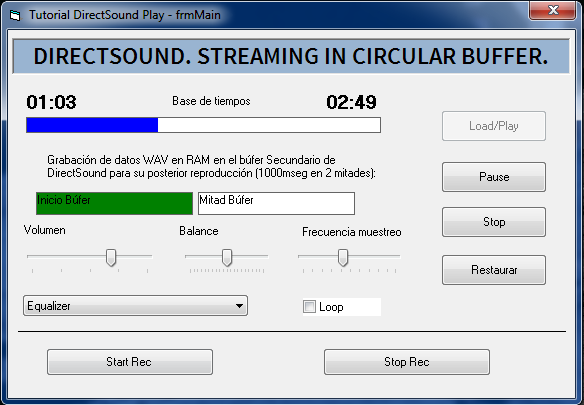
Code:
 Private Sub DirectXEvent8_DXCallback(ByVal eventid As Long)

  Dim WaveBuffer() As Byte

      If Not (oSecondaryBuffer Is Nothing) Then
          If eventid = StartEvent Or eventid = MidEvent Then
              ReDim WaveBuffer(HalfBuffLen - 1) ' array 176400 bytes (1000mseg).
              RaiseEvent NeedWavData(WaveBuffer) 'read data array from file sound
          End If

          If Not (oSecondaryBuffer Is Nothing) Then
              Select Case eventid
               Case StartEvent
                  oSecondaryBuffer.WriteBuffer HalfBuffLen, HalfBuffLen, WaveBuffer(0), DSBLOCK_DEFAULT

                  If fRecording Then 'flag clicked recording button
                      oSecondaryBuffer.ReadBuffer 0, HalfBuffLen, WaveBuffer(0), DSBLOCK_DEFAULT 'read the other half buffer playing
                      Call SoundRec(WaveBuffer()) 'save buffer array to file
                  End If

               Case MidEvent
                  oSecondaryBuffer.WriteBuffer 0, HalfBuffLen, WaveBuffer(0), DSBLOCK_DEFAULT

                  If fRecording Then 'flag clicked recording button
                      oSecondaryBuffer.ReadBuffer HalfBuffLen, HalfBuffLen, WaveBuffer(0), DSBLOCK_DEFAULT 'read the other half buffer playing
                      Call SoundRec(WaveBuffer())
                  End If

               Case EndEvent
                  ' not used
              End Select
          End If

  End If

  End Sub
Last edited by enribuz; Aug 14th, 2018 at 06:20 AM.
-
Aug 14th, 2018, 07:42 AM
#6
Re: Mixing sounds with DirectX and recording them
Would you know how to access the data of the sound that is playing with effects?
I think you can record the sound from the Stereo-Mixer.
-
Aug 17th, 2018, 11:29 AM
#7
Thread Starter
Member
Re: Mixing sounds with DirectX and recording them
Thanks Trick, got it.
I mix it using multiple DirectSound secondary buffers channels with effects, individual volume, etc. Automatically everything is mixed in the primary buffer.
I was trying to configure Buffer Chains with DirectMusic Audiopaths, but the secondary buffer object that I extracted from the shared Mix-in type where the others are mixed, does not accept ReadBuffer or SaveToFile methods among others. For being incompatible.
Finally I managed to make the recording through the MCI strings in the Stero-Mixer, as you advise.
Regards
-
Feb 3rd, 2020, 01:11 AM
#8
New Member
Re: Mixing sounds with DirectX and recording them
enribuz,
I am trying to do exactly adjusting volume of a list of very short sound effects on a form for a childrens project, would you share that form code for me to see how to adjust the volume.
I have a short application loading and playing the wavs fine, but cannot get how to allocate the volume to the sepperate wavs.
All the best
Andy
Originally Posted by enribuz
Thanks Trick, I have done as you advise, play each sound channel in its own circular buffer. I access it and recover the array to mix it and/or record it. But it (red marked) does not preserve the individual modifications of volume, panorama, sampling frequency or assigned effects. Only I can listen them. The recorded is the same copy of the original file.
Would you know how to access the data of the sound that is playing with effects? Thank you.
Code:
 Private Sub DirectXEvent8_DXCallback(ByVal eventid As Long)

  Dim WaveBuffer() As Byte

      If Not (oSecondaryBuffer Is Nothing) Then
          If eventid = StartEvent Or eventid = MidEvent Then
              ReDim WaveBuffer(HalfBuffLen - 1) ' array 176400 bytes (1000mseg).
              RaiseEvent NeedWavData(WaveBuffer) 'read data array from file sound
          End If

          If Not (oSecondaryBuffer Is Nothing) Then
              Select Case eventid
               Case StartEvent
                  oSecondaryBuffer.WriteBuffer HalfBuffLen, HalfBuffLen, WaveBuffer(0), DSBLOCK_DEFAULT

                  If fRecording Then 'flag clicked recording button
                      oSecondaryBuffer.ReadBuffer 0, HalfBuffLen, WaveBuffer(0), DSBLOCK_DEFAULT 'read the other half buffer playing
                      Call SoundRec(WaveBuffer()) 'save buffer array to file
                  End If

               Case MidEvent
                  oSecondaryBuffer.WriteBuffer 0, HalfBuffLen, WaveBuffer(0), DSBLOCK_DEFAULT

                  If fRecording Then 'flag clicked recording button
                      oSecondaryBuffer.ReadBuffer HalfBuffLen, HalfBuffLen, WaveBuffer(0), DSBLOCK_DEFAULT 'read the other half buffer playing
                      Call SoundRec(WaveBuffer())
                  End If

               Case EndEvent
                  ' not used
              End Select
          End If

  End If

  End Sub
Tags for this Thread
 Posting Permissions
- You may not post new threads
- You may not post replies
- You may not post attachments
- You may not edit your posts
-
Forum Rules
|
Click Here to Expand Forum to Full Width
|



 Reply With Quote
