|

-
Mar 4th, 2018, 04:03 AM
#17
Re: any user list box like telegram?
 Originally Posted by Black_Storm

... i dont want use just module and create dunamic form by rc5,...
You don't have to, since it is possible to "add and host RC5-Widgets" on normal VB6-Forms -
by using a little Project-Private-UserControl (named ucPanel and saved as ucPanel.ctl)...
I've already posted the code for that little Control in #14...
Originally Posted by Black_Storm
... can u send sample code used in #14 ...
As said, I will post the entire Solution finally, when you are willing to learn a few things - by "staying in dialogue with me" here.
The first thing you could try to understand is, that "direct integration of some new functionality into a larger Project"
is often not advisable - IMO your "larger integration project" will be better, when it (later) incorporates:
- separately developed parts
- which were developed in their own, isolated project
- then throughly tested (and later also maintained there, in that isolated project)
Only in a last step will these Components (usually Classes) be moved over into the Main-Project.
So, please make an isolated Project TestVList.vbp (choose any name you like) - and do the following:
- ensure references to vbRichClient5 and vbWidgets
- add a *.bas-module to it, and name it modMain.bas
- ensure that modMain.bas contains the following (at the moment):
Code:
Sub Main()
  Form1.Show
End Sub
- now ensure in your ProjectSettings, that your Project indeed starts via Sub Main() (by placing a break-point at Form1.Show)
- now add a new Private UserControl to your Project - name it ucPanel and paste the code from #14 into it
- create a new Instance (ucPanel1) on your Form1
- and finally place the following code in Form1
Code:
Option Explicit

Private Lbl1 As cwLabel, Lbl2 As cwLabel

Private Sub Form_Load()
  ucPanel1.Root.BackColor = vbWhite

  Set Lbl1 = ucPanel1.Widgets.Add(New cwLabel, "Lbl1", 5, 5, 120, 28)
      Lbl1.Alignment = vbLeftJustify
      Lbl1.InnerSpace = 2
      Lbl1.Caption = "Hello World"

  Set Lbl2 = ucPanel1.Widgets.Add(New cwLabel, "Lbl2", 5, 40, 120, 28)
      Lbl2.Alignment = vbRightJustify
      Lbl2.InnerSpace = 2
      Lbl2.Caption = ChrW(&H633) & ChrW(&H644) & ChrW(&H627) & ChrW(&H645) & ChrW(&H20) & ChrW(&H62F) & ChrW(&H646) & ChrW(&H6CC) & ChrW(&H627)
End Sub
The result should look like that:
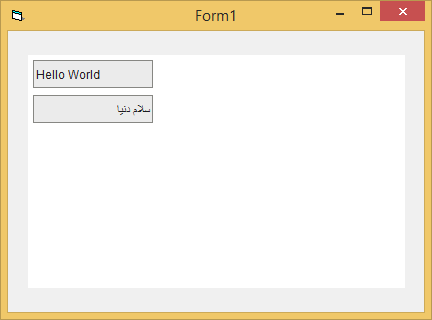
If you reached this point (your new little TestProject working this way), the rest will become fairly simple...
Olaf
Tags for this Thread
 Posting Permissions
- You may not post new threads
- You may not post replies
- You may not post attachments
- You may not edit your posts
-
Forum Rules
|
Click Here to Expand Forum to Full Width
|



 Reply With Quote