|

-
Jan 16th, 2018, 05:00 PM
#1
Thread Starter
Fanatic Member


-
Jan 16th, 2018, 08:55 PM
#2
Re: how can show my png image on form with display blur effect under it-need user con
VB6 doesn't support PNG format but it is possible by using GDI API, See post #2 at this topic http://www.vbforums.com/showthread.p...n-Visual-Basic
-
Jan 16th, 2018, 10:01 PM
#3
Re: how can show my png image on form with display blur effect under it-need user con
Windows 7 is now all but dead, and Aero Glass is gone.
You may as well be asking for help on how to make your stuff look like Windows 1.0 or something.
-
Jan 16th, 2018, 10:46 PM
#4
Re: how can show my png image on form with display blur effect under it-need user con
theres different ways to do it,
one way is to use 2 forms, one is the "original" that you hide and the other is the one you show.
now, using different API you copy the entire client area to a memory DC, and then do all the "effects" you want to do and then render it to the form that is empty but visible.
theres a bit of "mouse" subclassing, as you need to operate the hidden form, but nothing hard to accomplish.
another way is to loop through the hidden form and create "custom" whatever of your choice into the "empty" but visible form.
-
Jan 17th, 2018, 01:47 PM
#5
Re: how can show my png image on form with display blur effect under it-need user con
 Originally Posted by baka

theres different ways to do it,
one way is to use 2 forms, one is the "original" that you hide and the other is the one you show.
now, using different API you copy the entire client area to a memory DC, and then do all the "effects" you want to do and then render it to the form that is empty but visible.
theres a bit of "mouse" subclassing, as you need to operate the hidden form, but nothing hard to accomplish.
another way is to loop through the hidden form and create "custom" whatever of your choice into the "empty" but visible form.
I'd surely like to see an example of the above approach, which accomplishes the same thing as shown below...:
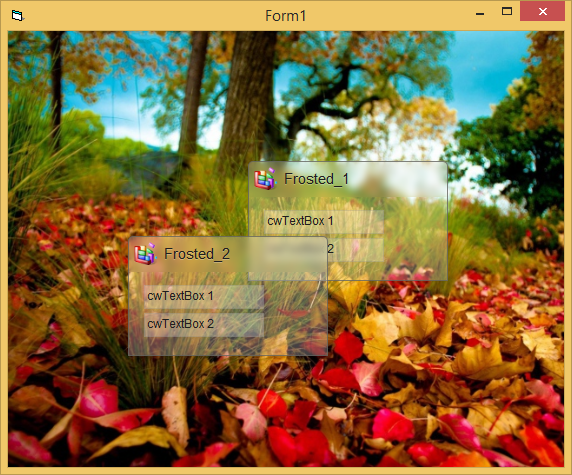
The above shows the desired "frosted glass effect" in the "Caption-Area" of the two little "Form-like Widgets".
Each of the two Widgets has two editable TextBoxes in it, which are Child-Widgets of these "Form-Widgets" -
and no - it's not that easy to do all that Alpha-rendering correctly, when "things get nested".
(Please move the Widgets around - or resize the Form, which changes the BackGround-Image underneath, to see what I mean).
That's one of the reasons, why the RC5 (and its Alpha-capable Form- and Widget-engine) exists -
to make it easier for VB-devs, to accomplish such complex things in "no time" and with only a handful of code-lines (steps and code shown below):
- open a new empty Form-Project and ensure two Project-References: vbRichClient5 and vbWidgets
- now create a new Class-module and name it: cwFrosted
Code:
Option Explicit

Private WithEvents W As cWidgetBase, Blr As cCairoSurface, Offs As Long

Private Sub Class_Initialize()
  Set W = Cairo.WidgetBase 'as usual, set the WidgetBase and define a few defaults
      W.Moveable = -1: W.Alpha = 0.25
      W.FontSize = 11: W.BackColor = vbWhite
  'add two TextBoxes into this little "Form-like" widget-container
  Widgets.Add(New cwTextBox, "txt1", 16, 49, 120, 24).Text = "cwTextBox 1"
  Widgets.Add(New cwTextBox, "txt2", 16, 77, 120, 24).Text = "cwTextBox 2"
End Sub

Public Property Get Widget() As cWidgetBase: Set Widget = W: End Property
Public Property Get Widgets() As cWidgets:  Set Widgets = W.Widgets: End Property

Private Sub W_Paint(CC As cCairoContext, ByVal xAbs As Single, ByVal yAbs As Single, ByVal dx_Aligned As Single, ByVal dy_Aligned As Single, UserObj As Object)
  Set Blr = W.BackBuffer.GaussianBlur(4, Offs) 'get a blured Surface from the current BackBuffer
  CC.RoundedRect 0, 0, W.Width, 36, 4.5, , cmTop 'define a clipping-region (using a Path-definition)
  CC.Clip: CC.RenderSurfaceContent Blr, -Offs, -Offs: CC.ResetClip 'render the blurred Surface within the clip

  CC.SetLineWidth 1 'the rest is normal Widget-Rendering as usual in the Paint-event
  CC.RoundedRect 0, 0, W.Width, W.Height, 4.5, True, cmTop 'a rounded Rectangle (now in full height)
  CC.Fill True, Cairo.CreateSolidPatternLng(W.BackColor, W.Alpha) 'let's fill it
  CC.Stroke , Cairo.CreateSolidPatternLng(W.BorderColor, 0.8) 'and stroke a border around it

  If Len(W.ImageKey) Then CC.RenderSurfaceContent W.ImageKey, 5, 4, 25, 25 'render the Icon
  W.SelectFontSettingsInto CC, W.BackColor: CC.TextOut 36, 10, W.Key, , 0.25 'CaptionText-Effect
  W.SelectFontSettingsInto CC, W.ForeColor: CC.TextOut 36, 9, W.Key 'CaptionText-Output in normal Color
End Sub
- finally put the following code into your Form
Code:
Option Explicit

Private Pnl As cWidgetForm

Private Sub Form_Load()
  With New_c.Downloads 'add a BG-Image to the ImageList (per download from a Web-Resource)...
    If .Download("http://vbRichClient.com/Downloads/bg.jpg").WaitForCompletion(9) Then _
       Cairo.ImageList.AddImage "bg", .Item(0).GetContentData
  End With
  Cairo.ImageList.AddIconFromResourceFile "ico", "shell32", 167, 32, 32 'add an Icon as well

  Set Pnl = Cairo.WidgetForms.CreateChild(hWnd) 'create a PicBox-like ChildPanel over the CairoForm-engine
      Pnl.WidgetRoot.ImageKey = "bg" 'set the panel-background to the ImageList-Key we ensured above
      Pnl.Widgets.Add(New cwFrosted, "Frosted_1", 240, 130, 200, 120).Widget.ImageKey = "ico"
      Pnl.Widgets.Add(New cwFrosted, "Frosted_2", 120, 205, 200, 120).Widget.ImageKey = "ico"
End Sub

Private Sub Form_Resize()
  ScaleMode = vbPixels: Pnl.Move 0, 0, ScaleWidth, ScaleHeight
End Sub

Private Sub Form_Terminate()
  If Forms.Count = 0 Then New_c.CleanupRichClientDll
End Sub
Well, that's it.
Olaf
-
Jan 17th, 2018, 04:00 PM
#6
Re: how can show my png image on form with display blur effect under it-need user con
sure, Olaf, that would be exactly what he need, but he wrote he want to do it himself, i just wrote a possible way without the need to create a huge project.
i have a project where i hook a form, fetching the hdc, hide the form and using another form where i render it using different resize methods, both gdi+ & gdi32 for choices.
the reason is that the form client area is fixed and can not be resized. now, using this method i can resize.
even if hidden, the hidden form is still operating, i can use the mouse and keys, type stuff etc, like the resize form is its own.
something similar could be done with what OP asks.
could be to loop through all the controls and "paste" new and enchanted one in the "visible form", it will be in real-time and of course take a bit cpu but its doable.
similar to a game, we use a loop.
its not a perfect solution, and the "effect" only works compiled, but at least it should be possible to make with not much code involved.
-
Jan 17th, 2018, 08:52 PM
#7
Thread Starter
Fanatic Member
Re: how can show my png image on form with display blur effect under it-need user con
Originally Posted by Schmidt
I'd surely like to see an example of the above approach, which accomplishes the same thing as shown below...:

The above shows the desired "frosted glass effect" in the "Caption-Area" of the two little "Form-like Widgets".
Each of the two Widgets has two editable TextBoxes in it, which are Child-Widgets of these "Form-Widgets" -
and no - it's not that easy to do all that Alpha-rendering correctly, when "things get nested".
(Please move the Widgets around - or resize the Form, which changes the BackGround-Image underneath, to see what I mean).
That's one of the reasons, why the RC5 (and its Alpha-capable Form- and Widget-engine) exists -
to make it easier for VB-devs, to accomplish such complex things in "no time" and with only a handful of code-lines (steps and code shown below):
- open a new empty Form-Project and ensure two Project-References: vbRichClient5 and vbWidgets
- now create a new Class-module and name it: cwFrosted
Code:
Option Explicit

Private WithEvents W As cWidgetBase, Blr As cCairoSurface, Offs As Long

Private Sub Class_Initialize()
  Set W = Cairo.WidgetBase 'as usual, set the WidgetBase and define a few defaults
      W.Moveable = -1: W.Alpha = 0.25
      W.FontSize = 11: W.BackColor = vbWhite
  'add two TextBoxes into this little "Form-like" widget-container
  Widgets.Add(New cwTextBox, "txt1", 16, 49, 120, 24).Text = "cwTextBox 1"
  Widgets.Add(New cwTextBox, "txt2", 16, 77, 120, 24).Text = "cwTextBox 2"
End Sub

Public Property Get Widget() As cWidgetBase: Set Widget = W: End Property
Public Property Get Widgets() As cWidgets:  Set Widgets = W.Widgets: End Property

Private Sub W_Paint(CC As cCairoContext, ByVal xAbs As Single, ByVal yAbs As Single, ByVal dx_Aligned As Single, ByVal dy_Aligned As Single, UserObj As Object)
  Set Blr = W.BackBuffer.GaussianBlur(4, Offs) 'get a blured Surface from the current BackBuffer
  CC.RoundedRect 0, 0, W.Width, 36, 4.5, , cmTop 'define a clipping-region (using a Path-definition)
  CC.Clip: CC.RenderSurfaceContent Blr, -Offs, -Offs: CC.ResetClip 'render the blurred Surface within the clip

  CC.SetLineWidth 1 'the rest is normal Widget-Rendering as usual in the Paint-event
  CC.RoundedRect 0, 0, W.Width, W.Height, 4.5, True, cmTop 'a rounded Rectangle (now in full height)
  CC.Fill True, Cairo.CreateSolidPatternLng(W.BackColor, W.Alpha) 'let's fill it
  CC.Stroke , Cairo.CreateSolidPatternLng(W.BorderColor, 0.8) 'and stroke a border around it

  If Len(W.ImageKey) Then CC.RenderSurfaceContent W.ImageKey, 5, 4, 25, 25 'render the Icon
  W.SelectFontSettingsInto CC, W.BackColor: CC.TextOut 36, 10, W.Key, , 0.25 'CaptionText-Effect
  W.SelectFontSettingsInto CC, W.ForeColor: CC.TextOut 36, 9, W.Key 'CaptionText-Output in normal Color
End Sub
- finally put the following code into your Form
Code:
Option Explicit

Private Pnl As cWidgetForm

Private Sub Form_Load()
  With New_c.Downloads 'add a BG-Image to the ImageList (per download from a Web-Resource)...
    If .Download("http://vbRichClient.com/Downloads/bg.jpg").WaitForCompletion(9) Then _
       Cairo.ImageList.AddImage "bg", .Item(0).GetContentData
  End With
  Cairo.ImageList.AddIconFromResourceFile "ico", "shell32", 167, 32, 32 'add an Icon as well

  Set Pnl = Cairo.WidgetForms.CreateChild(hWnd) 'create a PicBox-like ChildPanel over the CairoForm-engine
      Pnl.WidgetRoot.ImageKey = "bg" 'set the panel-background to the ImageList-Key we ensured above
      Pnl.Widgets.Add(New cwFrosted, "Frosted_1", 240, 130, 200, 120).Widget.ImageKey = "ico"
      Pnl.Widgets.Add(New cwFrosted, "Frosted_2", 120, 205, 200, 120).Widget.ImageKey = "ico"
End Sub

Private Sub Form_Resize()
  ScaleMode = vbPixels: Pnl.Move 0, 0, ScaleWidth, ScaleHeight
End Sub

Private Sub Form_Terminate()
  If Forms.Count = 0 Then New_c.CleanupRichClientDll
End Sub
Well, that's it.
Olaf
i writed note because is important.
note: i dont want use richclient refrences or another ocx in my user control.
its important for me to dont use richclient i want just create my user control without any other dll or ocx.
any other idea(just send with sample code,i know descriptions but i am looking for source code samples)
-
Jan 21st, 2018, 11:19 PM
#8
Thread Starter
Fanatic Member
Re: how can show my png image on form with display blur effect under it-need user con
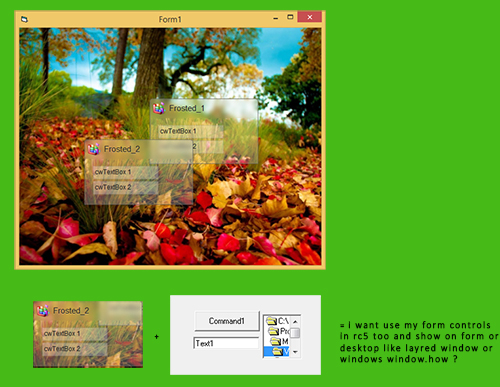
if no other way and i should be use rc5 so how can show outside from form too, i like show a window with blured effect under title bar on desktop like window in windows.
for exmaple i want hv been two command button and one text box and show it with titlebar blured effect in a new window on desktop .
my means is how can show frosted windows outside from form and merged with controls like text box comand button or on form or outside from form(layred window)... ?
Last edited by Black_Storm; Jan 22nd, 2018 at 12:28 AM.
-
Jan 24th, 2018, 12:14 AM
#9
Re: how can show my png image on form with display blur effect under it-need user con
Originally Posted by Black_Storm
... i like show a window with blured effect under title bar on desktop like window in windows.
I don't understand - if you are using Vista or Win7 - then your Form-Titlebar should already show a "blurred glass effect" -
and on Win10 (where the effect is off by default) you can enable that blurring-transparency with a relative simple API-call.
So what remains are "XP and Win8" (which are not much in use anymore "percent-wise", most users are running either Win7 or Win10 these days).
Olaf
-
Jan 24th, 2018, 08:17 AM
#10
Thread Starter
Fanatic Member
Re: how can show my png image on form with display blur effect under it-need user con
my means is about 2 problem.
1-how can show controls like textbox image box dir or list box or any on form with cairo too? in your sample code u use :
Code:
Pnl.Widgets.Add(New cwFrosted, "Frosted_1", 240, 130, 200, 120).Widget.ImageKey = "ico"
so this is a widget but i want show my controls on form in cwfrosted or any other window created by cairo
2-my means is about output from form is for example :
i hv a form with any controls like image box text box labels or tree view or any control,now how can show it on a blured window with title like frosted window but out of form,like as layerd window(like as widgets or gadjets on desktop)
i want create my activex for use,i dont want use win 7 or 8 or ... for enable gassing effect in windows.
Tags for this Thread
 Posting Permissions
- You may not post new threads
- You may not post replies
- You may not post attachments
- You may not edit your posts
-
Forum Rules
|
Click Here to Expand Forum to Full Width
|



 how can show my png image on form with display blur effect under it-need user control
hi,i want create my user control name like as png image,and then

 Reply With Quote


