|

-
Sep 20th, 2017, 04:39 AM
#1761
Fanatic Member

Re: CommonControls (Replacement of the MS common controls)
 Originally Posted by Eduardo-

That's not what happens to me.
Eduardo, Krool is right.
In here, it also happens with your example.
Not always.
Krool's suggestion to do the selection on MouseUp helps, kind of.
As we must be able to set the focus by Tab key, we need the GotFocus event.
Works good.
But when we set the focus by mouse, the GotFocus kicks in, and does something which is not ok.
No problem, MouseUp cures it.
But it doesn't look clean, we can see the selection change from GotFocus to MouseUp.
I remember there is a possibility to check HOW a control got the focus.
http://www.devx.com/vb2themax/Tip/18274
EDIT:
Solved.
We just need to invoke the selection routine in both GotFocus and MouseUp.
See attached project.
Textbox problem SOLVED.zip.docx
Sorry Krool for the suspicion on your control.
Last edited by Karl77; Sep 20th, 2017 at 04:56 AM.
-
Sep 20th, 2017, 05:04 AM
#1762
Re: CommonControls (Replacement of the MS common controls)
Originally Posted by Karl77
As we must be able to set the focus by Tab key, we need the GotFocus event.
Works good.
But when we set the focus by mouse, the GotFocus kicks in, and does something which is not ok.
No problem, MouseUp cures it.
But it doesn't look clean, we can see the selection change from GotFocus to MouseUp
That is handled in my example...
Code:
Private Sub TextBoxW2_GotFocus()
If GetMouseStateFromMsg() = 0 Then
    With TextBoxW2
    .SelStart = 0
    .SelLength = Len(.Text)
    .Tag = "Focused"
    End With
End If
End Sub
-
Sep 20th, 2017, 05:09 AM
#1763
Fanatic Member
Re: CommonControls (Replacement of the MS common controls)
Originally Posted by Krool
That is handled in my example...
Code:
Private Sub TextBoxW2_GotFocus()
If GetMouseStateFromMsg() = 0 Then
    With TextBoxW2
    .SelStart = 0
    .SelLength = Len(.Text)
    .Tag = "Focused"
    End With
End If
End Sub
Oh well, I didn't see, my eyes only saw the Tag property.
Sorry again.
-
Sep 20th, 2017, 05:26 AM
#1764
Re: CommonControls (Replacement of the MS common controls)
Originally Posted by Karl77
Eduardo, Krool is right.
In here, it also happens with your example.
Ah, now I think that you mean that it happens to the standard VB TextBox when the focus comes from a Krool's TexBoxW.
I didn't test that.
I tested just with a CommandButton and an UserControl, and it doesn't happen.
Originally Posted by Karl77
Not always.
Only when the click is long. May be VB checks that if the click doesn't pass the double click time, then it preserves the selection, always (at least here in my machine).
-
Sep 21st, 2017, 05:02 AM
#1765
Fanatic Member
Re: CommonControls (Replacement of the MS common controls)
Pager small error
I wondered why it is not possible to set the border of a Pager, or the button size.
To retrace, place a command button on the Pager form in the demo, and try
Code:
With Pager1
.BorderWidth = 5
.ButtonSize = 200
End With
Or use the properties panel.
Nothing happens, because
Code:
Public Property Let BorderWidth(ByVal Value As Single)
If Value < 0 Then
    If Ambient.UserMode = False Then
        MsgBox "Invalid property value", vbCritical + vbOKOnly
        Exit Property
    Else
        Err.Raise 380
    End If
End If
Dim IntValue As Integer, ErrValue As Long
On Error Resume Next
IntValue = CInt(UserControl.ScaleX(Value, vbContainerSize, vbPixels))
ErrValue = Err.Number
On Error GoTo 0
If IntValue >= 0 And ErrValue = 0 Then
    PropBorderWidth = IntValue
    If PagerHandle <> 0 Then
        SendMessage PagerHandle, PGM_SETBORDER, 0, ByVal PropBorderWidth
        Me.Refresh
    End If
Else
    If Ambient.UserMode = False Then
        MsgBox "Invalid property value", vbCritical + vbOKOnly
        Exit Property
    Else
        Err.Raise 380
    End If
End If
UserControl.PropertyChanged "BorderWidth"
End Property
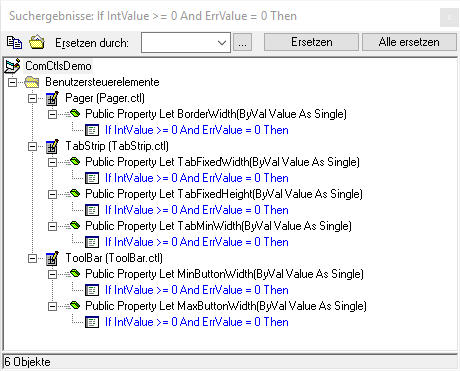
Something is wrong with IntValue.
If I, just for a test, use Value, then something happens.
---
Perhaps there are some more 'instances' of this.
Karl
Last edited by Karl77; Sep 21st, 2017 at 05:11 AM.
Reason: I wrote nonsense before
-
Sep 21st, 2017, 07:14 AM
#1766
Re: CommonControls (Replacement of the MS common controls)
Originally Posted by Karl77
Pager small error
I wondered why it is not possible to set the border of a Pager, or the button size.
To retrace, place a command button on the Pager form in the demo, and try
Code:
With Pager1
.BorderWidth = 5
.ButtonSize = 200
End With
Or use the properties panel.
Nothing happens, because
Code:
Public Property Let BorderWidth(ByVal Value As Single)
If Value < 0 Then
    If Ambient.UserMode = False Then
        MsgBox "Invalid property value", vbCritical + vbOKOnly
        Exit Property
    Else
        Err.Raise 380
    End If
End If
Dim IntValue As Integer, ErrValue As Long
On Error Resume Next
IntValue = CInt(UserControl.ScaleX(Value, vbContainerSize, vbPixels))
ErrValue = Err.Number
On Error GoTo 0
If IntValue >= 0 And ErrValue = 0 Then
    PropBorderWidth = IntValue
    If PagerHandle <> 0 Then
        SendMessage PagerHandle, PGM_SETBORDER, 0, ByVal PropBorderWidth
        Me.Refresh
    End If
Else
    If Ambient.UserMode = False Then
        MsgBox "Invalid property value", vbCritical + vbOKOnly
        Exit Property
    Else
        Err.Raise 380
    End If
End If
UserControl.PropertyChanged "BorderWidth"
End Property
Something is wrong with IntValue.
If I, just for a test, use Value, then something happens.
---
Perhaps there are some more 'instances' of this.
Karl
That's normal. Since the ScaleMode of the Form is Twips a value of 5 results in 0 pixels.
-
Sep 21st, 2017, 11:21 AM
#1767
Fanatic Member
Re: CommonControls (Replacement of the MS common controls)
Code:
That's normal. Since the ScaleMode of the Form is Twips a value of 5 results in 0 pixels.
Again I was stupid.
Twips not Pixels.
-
Sep 22nd, 2017, 05:21 AM
#1768
Re: CommonControls (Replacement of the MS common controls)
Update released.
The reason why the StatusBar flickers so much because it flashes between erasing (WM_ERASEBKGND) and drawing (WM_PAINT).
As there was no in-built DoubleBuffer support for the StatusBar it needed to be done manually.
This was achieved by blocking WM_ERASEBKGND and do the erasing and drawing into a memory DC in WM_PAINT.
-
Sep 22nd, 2017, 03:23 PM
#1769
Re: CommonControls (Replacement of the MS common controls)
Also updated the ToolBar concerning the DoubleBuffer property.
The built-in TBSTYLE_EX_DOUBLEBUFFER style is not used anymore. It is now done "manually", likewise as in the StatusBar control now.
This has the advantage that the BackColor and Transparent property are now also working whe DoubleBuffer is set to True.
Also it can be used on comctl32 version 5.8x. (TBSTYLE_EX_DOUBLEBUFFER needed version 6.0 or higher)
-
Sep 23rd, 2017, 02:56 AM
#1770
Fanatic Member
Re: CommonControls (Replacement of the MS common controls)
Spinbox question
Tried in the 2017-09-22 demo
I want do disallow the user input by keyboard, only the up/down buttons and the mousewheel shall work.
Is the Locked property the right one?
Seems to have no effect...
And what about HideSelection?
I see no difference when True/False.
I assume I'm too blind again, but can't avoid to ask.
What do I have to do to disable the textbox part for direct input?
Thanks,
Karl
-
Sep 23rd, 2017, 03:59 AM
#1771
Re: CommonControls (Replacement of the MS common controls)
Originally Posted by Karl77
I want do disallow the user input by keyboard, only the up/down buttons and the mousewheel shall work.
Is the Locked property the right one?
Seems to have no effect...
And what about HideSelection?
I see no difference when True/False.
The Locked property is the right one. On my side it is working. (also the HideSelection property works as expected)
-
Sep 23rd, 2017, 04:21 AM
#1772
Fanatic Member
Re: CommonControls (Replacement of the MS common controls)
Originally Posted by Krool
The Locked property is the right one. On my side it is working. (also the HideSelection property works as expected)
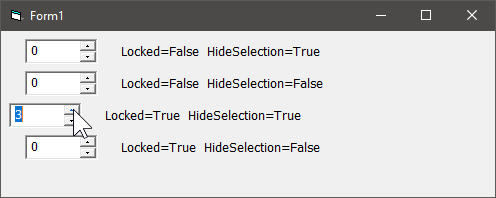
Yes, Locked locks the input.
But the cursor blinks, also the whole text is selected.
It looks like an input is possible.
It gets selected when using the up/down buttons.
Try with the attached example.
I get this:
Spin.zip
-
Sep 23rd, 2017, 04:27 AM
#1773
Re: CommonControls (Replacement of the MS common controls)
For those with HideSelection = False did you select the 0 before, because when nothing is selected there is no difference between HideSelection False or True.
The Locked property works as in the normal TextBox. It is your responsibility to give it a "Locked look" by for example setting BackColor to vbButtonFace.
-
Sep 23rd, 2017, 05:33 AM
#1774
Fanatic Member
Re: CommonControls (Replacement of the MS common controls)
Originally Posted by Krool
For those with HideSelection = False did you select the 0 before, because when nothing is selected there is no difference between HideSelection False or True..
Ok, I didn't understand the meaning of HideSelection, now I do.
The Locked property works as in the normal TextBox. It is your responsibility to give it a "Locked look" by for example setting BackColor to vbButtonFace.
Also understood.
In a normal TextBox I can HideCaret on GotFocus.
Code:
Call HideCaret(SpinBox3.hWndEdit)
Fine.
Now it doesn't look like as we can type in something.
When the SpinBox has the focus the border indicates that it has it.
When I now use the arrow up/down keys or the mousewheel, we can see the changing numbers.
But when I use the up/down buttons with the mouse, the text gets highlighted.
Not wanted.
I tried this, but it has no effect:
Code:
Private Sub SpinBox3_TextChange()

Debug.Print "SpinBox3_TextChange"

SpinBox3.SelStart = 0
SpinBox3.SelLength = 0

Debug.Print "len(SpinBox3.SelText)", Len(SpinBox3.SelText)

End Sub
Any idea what I can do to remove the highlight when using the buttons?
-
Sep 23rd, 2017, 03:51 PM
#1775
Re: CommonControls (Replacement of the MS common controls)
Originally Posted by Karl77
When the SpinBox has the focus the border indicates that it has it.
When I now use the arrow up/down keys or the mousewheel, we can see the changing numbers.
But when I use the up/down buttons with the mouse, the text gets highlighted.
Not wanted.
According to MSDN about UpDown controls with edit buddy control:
"WM_LBUTTONUP: Completes the position change and releases the mouse capture if the up-down control has captured the mouse. If the buddy window is an edit control, it selects all the text in the edit control."
So you could process the MouseUp event and undo the text highlighting.
But why you want an locked SpinBox control at all?
If you do not "trust" user input you can validate the user input right away after every input:
Code:
Private Sub SpinBox1_TextChange()
Static InProc As Boolean
If InProc = True Then Exit Sub
InProc = True
SpinBox1.ValidateText
InProc = False
' other stuff to do
End Sub
Or later on:
Code:
Private Sub SpinBox1_LostFocus()
SpinBox1.ValidateText
End Sub
Last edited by Krool; Sep 23rd, 2017 at 03:55 PM.
-
Sep 24th, 2017, 03:26 AM
#1776
Fanatic Member
Re: CommonControls (Replacement of the MS common controls)
But why you want an locked SpinBox control at all?
Because it will replace a now existing selfmade spinbox UC (>10 years old).
And I don't want to change feel.
I will end up in re-creating my old Spinbox UC.
It has a feature that is not there in VBCCR:
Fire the change event after a determined time only.
This means that when I scroll from 1 to 100, I don't get 100 change events.
But after let's say after 0.2 sec. from the last real change.
This 'Change delay' is quite useful when there is more time consuming code to execute.
-
Sep 25th, 2017, 01:48 AM
#1777
Addicted Member
Re: CommonControls (Replacement of the MS common controls)
Originally Posted by Karl77
Because it will replace a now existing selfmade spinbox UC (>10 years old).
And I don't want to change feel.
I will end up in re-creating my old Spinbox UC.
It has a feature that is not there in VBCCR:
Fire the change event after a determined time only.
This means that when I scroll from 1 to 100, I don't get 100 change events.
But after let's say after 0.2 sec. from the last real change.
This 'Change delay' is quite useful when there is more time consuming code to execute.
You can implement this behavior by putting the time-consuming code in a timer. The timer should be initially disabled, interval=200.
Then, all you have to do is:
vb Code:
Private Sub SpinBox1_TextChange() Timer1.Enabled = False 'Reset timer Timer1.Enabled = True End Sub Private Sub Timer1_Timer() Timer1.Enabled = False 'Your code ... End Sub
Last edited by Cube8; Sep 25th, 2017 at 01:55 AM.
-
Sep 25th, 2017, 02:34 AM
#1778
Fanatic Member
Re: CommonControls (Replacement of the MS common controls)
Originally Posted by Cube8
You can implement this behavior by putting the time-consuming code in a timer. The timer should be initially disabled, interval=200.
Then, all you have to do is:
vb Code:
Private Sub SpinBox1_TextChange() Timer1.Enabled = False 'Reset timer Timer1.Enabled = True End Sub Private Sub Timer1_Timer() Timer1.Enabled = False 'Your code ... End Sub
That's what I have in my old ugly UC.
I would like to have the timer in the UC, because if you have some SpinBoxes on a form, then you need as much timers or a more sophisticated approach.
Not so comfy and save.
EDIT:
Regarding the manual input into the SpinBox, I changed my mind.
While investigating the old UC, I saw there is the min/max range check already in the change event.
So no risk to trust the user, the value is always correct.
EDIT2:
This automatic 'stay in range' is not given in the VBCCR SpinBox.
Set Max to 10, and type in 123.
It can be that that is a correct behavior.
But correct doesn't always make sense.
EDIT3:
The VBCCR SpinBox is far better than mine, no question.
Mousewheel, arrow keys etc.
That's why I want to use it instead of my 'solution'.
Last edited by Karl77; Sep 25th, 2017 at 02:51 AM.
-
Sep 25th, 2017, 05:11 AM
#1779
Fanatic Member
Re: CommonControls (Replacement of the MS common controls)
In the end, too easy...
I can pack the VBCCR Spinbox into an own UC and add the wanted functionality.
Still don't like that the text gets selected when using the up/down control.
Ok, I could set the SpinBox text again in it's Change event, but with a delay it doesn't look very well.
So I leave it as it is.
This is my solution now:
DelayedSpin.zip
EDIT:
Found a glitch in the VBCCR SpinBox.
If I paste a value using the context menu, the Change event doesn't fire.
To retrace:
Select the text in the SpinBox by mouse.
Right-click, and Paste.
As the Change event doesn't come, no chance to check for the Min/Max range.
Last edited by Karl77; Sep 25th, 2017 at 07:49 AM.
-
Sep 26th, 2017, 08:12 AM
#1780
Addicted Member
Re: CommonControls (Replacement of the MS common controls)
I was using a previous version of the ocx . It was the one released about 10 days ago and everything was fine . I have a user control which has a listview .
I have just updated to the current version and here is what happens :
If the listview is populated and I end the project by "End" word or even by pressing the "break"command in IDE , VB crashes . This does not happen when the listview is not populated .
Note 1 I use no subclassing at all .
Edit 1 : I have no code in form_unload or in usercontrol_terminate
Edit 2 : the previous version number is
14-Sep-2017
- Revision update. (Version 1.4.51)
Last edited by Hosam AL Dein; Sep 26th, 2017 at 01:45 PM.
-
Sep 26th, 2017, 01:43 PM
#1781
Re: CommonControls (Replacement of the MS common controls)
Originally Posted by Karl77
EDIT:
Found a glitch in the VBCCR SpinBox.
If I paste a value using the context menu, the Change event doesn't fire.
To retrace:
Select the text in the SpinBox by mouse.
Right-click, and Paste.
As the Change event doesn't come, no chance to check for the Min/Max range.
It's not a bug. The Change event does only fire when the .Value property changes.
When I open your project and Paste via ContextMenu a value of 342 the Change event will be fired as the value has changed to 100.
In case you paste again 342 you get then "342342". However the value has not changed from 100. (equal to Max)
If you want to catch up everything you need to handle the TextChange event and do .ValidateText.
Originally Posted by Hosam AL Dein
I was using a previous version of the ocx . It was the one released about 10 days ago and everything was fine . I have a user control which has a listview .
I have just updated to the current version and here is what happens :
If the listview is populated and I end the project by "End" word or even by pressing the "break"command in IDE , VB crashes . This does not happen when the listview is not populated.
I cannot replicate with the current OCX. at least in a blank project. Can you provide a demo showing the problem?
Last edited by Krool; Sep 26th, 2017 at 01:50 PM.
-
Sep 26th, 2017, 01:50 PM
#1782
Junior Member
Re: CommonControls (Replacement of the MS common controls)
Originally Posted by Krool
The reason why the StatusBar flickers so much because it flashes between erasing (WM_ERASEBKGND) and drawing (WM_PAINT).
As there was no in-built DoubleBuffer support for the StatusBar it needed to be done manually.
This was achieved by blocking WM_ERASEBKGND and do the erasing and drawing into a memory DC in WM_PAINT.
Thanks Krool, this was probably the cause of the issue I mentioned in a prior post . I'll try to setup my example again and confirm if the problem is gone.
-
Sep 26th, 2017, 02:27 PM
#1783
Addicted Member
Re: CommonControls (Replacement of the MS common controls)
I made a separate project then added the usercontrol with the latest ocx version and the problem does not occur . How can I replicate the bug which causes vb to crash ?
-
Sep 26th, 2017, 03:22 PM
#1784
Re: CommonControls (Replacement of the MS common controls)
Originally Posted by Hosam AL Dein
I made a separate project then added the usercontrol with the latest ocx version and the problem does not occur . How can I replicate the bug which causes vb to crash ?
If that didn't work the typical strategy is to start with a copy of your project, and continue stripping it down until you find your bug.
-
Sep 26th, 2017, 03:38 PM
#1785
Addicted Member
Re: CommonControls (Replacement of the MS common controls)
Originally Posted by DEXWERX
If that didn't work the typical strategy is to start with a copy of your project, and continue stripping it down until you find your bug.
thanks dexwerx , I will give this a try
-
Sep 26th, 2017, 08:31 PM
#1786
Addicted Member
Re: CommonControls (Replacement of the MS common controls)
the frameW control forecolor is not working . Is this because I am using an earlier version or I am missing something ? . I am using version 14-Sep-2017 - Revision update. (Version 1.4.51)
-
Sep 26th, 2017, 11:24 PM
#1787
Re: CommonControls (Replacement of the MS common controls)
Originally Posted by Hosam AL Dein
the frameW control forecolor is not working . Is this because I am using an earlier version or I am missing something ? . I am using version 14-Sep-2017 - Revision update. (Version 1.4.51)
The new FrameW is only in the Std-EXE version. It will be included in the next OCX version 1.5.
-
Sep 28th, 2017, 10:11 AM
#1788
Addicted Member
Re: CommonControls (Replacement of the MS common controls)
Originally Posted by Hosam AL Dein
I made a separate project then added the usercontrol with the latest ocx version and the problem does not occur . How can I replicate the bug which causes vb to crash ?
btw, ending a project with "END" keyword should only be used for debugging purpose.
it's like telling Vb to "crash" the project, like the Stop button in the IDE.
all handle will stay open wich might under some circonstance crash the project like you experience.
Krool: does some of the component of the use Subclassing ? could crash under some circonstance.
-
Sep 28th, 2017, 11:02 AM
#1789
Fanatic Member
Re: CommonControls (Replacement of the MS common controls)
RichTextBox
.SelFontName returns the string + a bunch of 00.
When using Richtx32.ocx it's correct.
Try the attached.RTF-VBCCR-2017-09-28.zip
-
Sep 28th, 2017, 02:16 PM
#1790
Re: CommonControls (Replacement of the MS common controls)
Originally Posted by Karl77
RichTextBox
.SelFontName returns the string + a bunch of 00.
When using Richtx32.ocx it's correct.
Done. Thanks
OCX + Std-EXE got updated.
Originally Posted by VbNetMatrix
Krool: does some of the component of the use Subclassing ? could crash under some circonstance.
What do you mean? If you mean the ComCtls then yes, they make heavy use of subclassing. Also VTable wise subclassing.
The Std-EXE version will never be "End" secure as even when the subclassing could be done via ASM the VTable subclassing will still crash.
So I stick to non-ASM subclassing (as it makes no sense) and just catch the "Stop" button via ComCtlsInitIDEStopProtection.
However, the OCX should be certainly crash-free, even by "End".
Last edited by Krool; Sep 28th, 2017 at 02:21 PM.
-
Sep 29th, 2017, 11:33 AM
#1791
Fanatic Member
Re: CommonControls (Replacement of the MS common controls)
Toolbar question
I use the EXE version, but it is exactly the same with the OCX.
I found that my way of populating a toolbar takes quite long.
39 buttons/placeholders take 250msec.
Also while a toolbar gets filled, the whole screen flickers.
This happens when the containing form gets loaded, at this time it is not visible.
Don't know if the toolbar itself flickers.
I'm unhappy with the _screen_ flicker and the long processing time.
I already tried to set Visible and Enabled, but it has no effect on the loading times and still flickers.
Is there a built-in method to get that much faster, and also to avoid the screen flicker?
Code:
tc = GetTickCount

With MF.tbr_Main

    .AllowCustomize = False
    .BackColor = ToolbarBackColor
    .Buttons.Clear
    Set .ImageList = IL 'the ImageList is a VBBCR ImageList
    .Divider = False
    .ShowTips = True
    .DoubleBuffer = False
    .Transparent = Not True
    .MinButtonWidth = 0
    .MaxButtonWidth = 0
    .TextAlignment = TbrTextAlignBottom

    Set B = .Buttons.Add(, "new", , TbrButtonStyleDefault, "new")
    B.ToolTipText = "New"

    Set B = .Buttons.Add(, , , TbrButtonStyleSeparator)

    'etc.

    .GetIdealSize WS, HS
    .Width = WS
    .Height = HS

    Set B = Nothing

End With

ms = CStr(GetTickCount - tc) & " msec."
m = m & "Time to populate: " & vbCrLf & ms & vbCrLf

'this comes after all toolbars are ready
Debug.Print m
Karl
-
Sep 29th, 2017, 12:22 PM
#1792
Re: CommonControls (Replacement of the MS common controls)
Make .DoubleBuffer = True instead of False to avoid flicker.
-
Sep 29th, 2017, 12:44 PM
#1793
Fanatic Member
Re: CommonControls (Replacement of the MS common controls)
Originally Posted by Krool
Make .DoubleBuffer = True instead of False to avoid flicker.
I tried before.
No effect on the screen flicker.
It is a desktop flicker, not the toolbar itself.
I can clearly see in my app the flicker comes from populating the toolbars.
I have 11 toolbars, and the flicker occurs 11x.
Nothing else is done when it happens.
Unfortunately, and 'of course', in a small demo app there is no desktop flicker.
But the long time to populate.
The CC5 toolbar is ready in no time.
Hmm.
Still need an idea.
-
Sep 29th, 2017, 01:12 PM
#1794
Fanatic Member
Re: CommonControls (Replacement of the MS common controls)
What is the possibility of getting a multicolumn Combobox in the queue? Or is there one already there?
-
Sep 29th, 2017, 01:48 PM
#1795
Fanatic Member
Re: CommonControls (Replacement of the MS common controls)
Originally Posted by Karl77
Still need an idea.
Found out how to avoid the screen flicker.
When I comment out this:
Code:
.TextAlignment = TbrTextAlignBottom
then no flicker occurs.
EDIT:
Also the performance is FAR better, 78 instead of 250msec.
Of course without the TextAlignment property, the toolbars are not as intended.
EDIT2:
The flicker is also there when I set TextAlignment after populating the buttons.
Last edited by Karl77; Sep 29th, 2017 at 02:05 PM.
-
Sep 29th, 2017, 02:50 PM
#1796
Re: CommonControls (Replacement of the MS common controls)
Update released.
The performance of the ToolBar has been increased.
This was achieved by internally doing at some points (if applicable) a invalidation instead of a refresh.
Originally Posted by Karl77
Found out how to avoid the screen flicker.
When I comment out this:
Code:
.TextAlignment = TbrTextAlignBottom
then no flicker occurs.
Changing .TextAlignment will cause re-creating of the control. During the re-creation LockWindowUpdate is used:
Code:
Private Sub ReCreateToolBar()
Dim Locked As Boolean
With Me
Locked = CBool(LockWindowUpdate(UserControl.hWnd) <> 0)
[...]
If Locked = True Then LockWindowUpdate 0
.Refresh
End With
Maybe LockWindowUpdate does cause a screen flicker in your particular app, just a guess.
Solution could be to set the .TextAlignment already at design-time to the wanted value.
Originally Posted by gwboolean
What is the possibility of getting a multicolumn Combobox in the queue? Or is there one already there?
You mean something like this ?
Last edited by Krool; Sep 29th, 2017 at 02:57 PM.
-
Sep 29th, 2017, 03:25 PM
#1797
Re: CommonControls (Replacement of the MS common controls)
Hi Krool,
That's a nifty little C# project you've linked to in the prior post. Too bad it's not VB6.
It looks like they've taken a standard ComboBox and attached a ListView to it for the dropdown. With that understanding, this seems like it'd be a fairly straightforward project for a custom User Control (possibly using your controls to start with). It's also somewhat nifty that the dropdown can go outside of the main form (which is also true of a standard ComboBox). It may take a bit of doing to work that out, but not that big a deal. As stated in a recent thread, I'd just use a second form to do that.
Take Care,
Elroy
Any software I post in these forums written by me is provided "AS IS" without warranty of any kind, expressed or implied, and permission is hereby granted, free of charge and without restriction, to any person obtaining a copy. To all, peace and happiness.
-
Sep 29th, 2017, 03:48 PM
#1798
Fanatic Member
Re: CommonControls (Replacement of the MS common controls)
Originally Posted by Krool
During the re-creation LockWindowUpdate is used:
From what I understand, MS says WM_SETREDRAW should be used instead.
https://msdn.microsoft.com/de-de/lib...(v=vs.85).aspx
Why did you decide for LockWindowUpdate?
Just curious.
-
Sep 29th, 2017, 04:30 PM
#1799
Re: CommonControls (Replacement of the MS common controls)
Originally Posted by Karl77
Refer to http://www.vbforums.com/showthread.p...=1#post5108773 for reason and explanation.
-
Sep 30th, 2017, 01:26 AM
#1800
Member

Re: CommonControls (Replacement of the MS common controls)
Hello,
Sorry for my English, (google translated!)
Me too, I noticed this effect with "LockWindowUpdate (0)" . The whole screen is refreshed, causing the flicker. . The whole screen is refreshed, causing the flicker.
I prefer the "ValidateRect / InvalidateRect" method and generate a PAINT when necessary. Or make a DoEvents (by managing the reantrance)..
With this method, I do not have the blinking of the screen.
 Posting Permissions
- You may not post new threads
- You may not post replies
- You may not post attachments
- You may not edit your posts
-
Forum Rules
|
Click Here to Expand Forum to Full Width
|



 Reply With Quote

