|

-
Sep 7th, 2017, 03:26 PM
#1681
Fanatic Member

Re: CommonControls (Replacement of the MS common controls)
 Originally Posted by DEXWERX

do you have this thread link? trying to find it.
http://www.vbforums.com/showthread.p...ry-slow-in-VB6
(was a few post here ago)
-
Sep 7th, 2017, 11:17 PM
#1682
Re: CommonControls (Replacement of the MS common controls)
As said the unloading will be fast soon.
However, loading is no real change.
Seems to be no diff between..
..Current:
Code:
Dim NewListItem As New LvwListItem
..and new approach:
Code:
Dim NewListItem As LvwListItem
Set NewListItem = New_LvwListItem ' Olaf's function
But of course that change in loading will drastically improve unloading.
-
Sep 8th, 2017, 12:09 AM
#1683
Hyperactive Member
Re: CommonControls (Replacement of the MS common controls)
The MS ListView also suffer from this performance hit when too many rows/items are displayed. Perhaps MS did not intend ListView for such usage. I believe their Windows Explorer also do not read all files in the beginning but only read the folders/items as and when required (when node is selected). This gives the UI a good user experience.
vbVision has a sample project called Virtual ListView Demo that seems to load 1,000,000 rows in a flash but it is not really that. Instead it merely "displays on-demand" the info that is viewable. The info can be in an array or in recordset.
http://www.mvps.org/vbvision/Sample_..._ListView_Demo
Last edited by chosk; Sep 8th, 2017 at 12:15 AM.
-
Sep 8th, 2017, 02:58 AM
#1684
Addicted Member
Re: CommonControls (Replacement of the MS common controls)
Originally Posted by Krool
Memory leak solved. 
Hi Krool,
can you give us the step you used to diagnosed and find the memory leak ?
it could be usefull for debuging.
I'm fighting with a nasty one using MsFlexGrid... trying to find out if that's coming from my component or not.
thanks
-
Sep 8th, 2017, 05:22 AM
#1685
Member
Re: CommonControls (Replacement of the MS common controls)
In the meanwhile I did some tests with the previously attached project.
Intent was to check if slowness might be related to the ListSubItems only or by defining several columns (data fields) or both.
Volume C: about 280000 files in 45000 directories = 325000 rows
1st test:
Still defined four columns for the listview.
But writing all data fields of my UD-Array into one column only (.ListItems.Add,,srcArr(Z).FName & "|" & srcArr(Z).FLen & "|" & srcArr(Z).FSize & "|" & srcArr(Z).FType).
Result: Loading takes about 25-35 secs only in IDE. Clearing is not significantly reduced (still 100-120 secs).
2nd test:
Listview contains only one column.
Writing all data fields of my UD-Array into this column (.ListItems.Add,,srcArr(Z).FName & "|" & srcArr(Z).FLen & "|" & srcArr(Z).FSize & "|" & srcArr(Z).FType).
Result: Loading takes about 15-25 secs only in IDE. Clearing time is the same as in the 1st test.
3rd test:
Listview contains only one column.
Writing filepaths only of my UD-Array into this column (.ListItems.Add,,srcArr(Z).FName).
Result: mainly the same as in the 2nd test.
So, would it be "bold" to say that chsok is right - but in general only?
It seems that loading and unloading time is also influenced by the number of data fields used (columns/.ListSubItems).?
But maybe my testing approach is also faulty and doesn't say anything.
Again, this is an undiscovered area for me. I just do a little more than guessing.
Will now try to implement Schmidts approach into my example project.
While having a first look into his code I see that it is far beyond my skills.
But leastwise, I think that I understand how to use it.
Will report if this is of any interest.
Krool,
wouldn't it speed up things if you try to implement your working solution (including your memory leak solution) into one of the next updates?
I'm convinced that this will greatly enhance your project (...just a suggestion).
-
Sep 8th, 2017, 01:01 PM
#1686
Re: CommonControls (Replacement of the MS common controls)
removed as performance boost for ListView control was "false measured". Sorry..
Last edited by Krool; Sep 9th, 2017 at 10:24 AM.
-
Sep 8th, 2017, 01:13 PM
#1687
Hyperactive Member
Re: CommonControls (Replacement of the MS common controls)
I found this in snippets I collected over the years. This one is from Randy Birch This will clear the listview in a jiffy. I see if I can find loading. If I recall vaguely, it is also using API but I am not sure. I know I did API add with ComboBox and it speed up a lot.
In a Module:
Code:
Public Declare Function SendMessage Lib "user32" Alias "SendMessageA" (ByVal hWnd As Long, ByVal Msg As Long, ByVal wParam As Long, lParam As Any) As Long
In Private Sub cmdClear_Click():
Code:
    TimeStart

    Const LVM_FIRST As Long = &H1000
    Const LVM_DELETEALLITEMS  As Long = (LVM_FIRST + 9)

    Dim r As Long

    r = SendMessage(lvwData.hWnd, LVM_DELETEALLITEMS, 0&, ByVal 0&)

    Me.StatusBar.Panels(3).Text = TimeEnd
-
Sep 8th, 2017, 01:25 PM
#1688
Re: CommonControls (Replacement of the MS common controls)
Originally Posted by chosk
I found this in snippets I collected over the years. This one is from Randy Birch This will clear the listview in a jiffy. I see if I can find loading. If I recall vaguely, it is also using API but I am not sure. I know I did API add with ComboBox and it speed up a lot.
In a Module:
Code:
Public Declare Function SendMessage Lib "user32" Alias "SendMessageA" (ByVal hWnd As Long, ByVal Msg As Long, ByVal wParam As Long, lParam As Any) As Long
In Private Sub cmdClear_Click():
Code:
    TimeStart

    Const LVM_FIRST As Long = &H1000
    Const LVM_DELETEALLITEMS  As Long = (LVM_FIRST + 9)

    Dim r As Long

    r = SendMessage(lvwData.hWnd, LVM_DELETEALLITEMS, 0&, ByVal 0&)

    Me.StatusBar.Panels(3).Text = TimeEnd
Chosk..
I am doing this already since beginning.
Code:
Public Sub Clear()
ShadowListView.FListItemsClear
Set PropListItem = New Collection
End Sub
Code:
Friend Sub FListItemsClear()
If ListViewHandle <> 0 Then SendMessage ListViewHandle, LVM_DELETEALLITEMS, 0, ByVal 0&
Call CheckItemFocus(0)
End Sub
However, LVM_DELETEALLITEMS will not cleanup the Collection to free up the memory.
-
Sep 8th, 2017, 01:53 PM
#1689
Hyperactive Member
Re: CommonControls (Replacement of the MS common controls)
Hi Krool,
Normally, I do not look into your codes. I am not aware you are using this already. It so happen that I found the code and substitute it into Sub cmdClear_Click() and the result was 1.97 sec vs 260 sec for nearly 600,000 rows. I just tested again and you are right that memory was not free up.
I do not know what cause the difference in clearing speed when used in the Sub.
-
Sep 9th, 2017, 10:32 AM
#1690
Re: CommonControls (Replacement of the MS common controls)
I think I will not implement Schmidts approach for fast class allocation and destruction because there is an risk for an memory leak.
If it would be an isolated area with no outside influence I would go that way. But here we have influence of "outside", means the end-user developing with the ListView control.
When the end-user developer now caches the ListItems and call .Clear then Schmidts approach will fail as the RefCounter was influenced by the end-user developer.
So there is always a risk here..
The only way I see to get an real performance boost in general is to get rid of the 1 Class usage per Row in the ListView control. (go the UDT way)
However, the down-side of this is that the end-user developer cannot compare two items if there are the same, e.g.
Code:
Private Sub ListView1_ItemClick(ByVal Item As LvwListItem, ByVal Button As Integer)
If Item Is ListView1.ListItems(1) Then MsgBox "test123"
End Sub
would not work anymore.
So question to everyone, which way to go? Or keep like it is?
-
Sep 9th, 2017, 11:37 AM
#1691
Fanatic Member
Re: CommonControls (Replacement of the MS common controls)
Originally Posted by Krool
Code:
Private Sub ListView1_ItemClick(ByVal Item As LvwListItem, ByVal Button As Integer)
If Item Is ListView1.ListItems(1) Then MsgBox "test123"
End Sub
would not work anymore.
So question to everyone, which way to go? Or keep like it is?
Go the UDT road.
-
Sep 9th, 2017, 02:15 PM
#1692
Re: CommonControls (Replacement of the MS common controls)
Originally Posted by Karl77
Go the UDT road.
To be honest I have no mood to go that road either..
It is so convenient the current way as the 1 class per row is stored as ObjPtr in the lParam member of LVITEM.
Changing this has for sure other perfomance drawbacks.
So I am likely to suggest for such large lists: go virtual.
-
Sep 9th, 2017, 04:35 PM
#1693
Fanatic Member
Re: CommonControls (Replacement of the MS common controls)
Originally Posted by Krool
To be honest I have no mood to go that road either..
It is so convenient the current way as the 1 class per row is stored as ObjPtr in the lParam member of LVITEM.
Changing this has for sure other perfomance drawbacks.
So I am likely to suggest for such large lists: go virtual.
Yes, you are right.
Especially for this seldom case.
-
Sep 9th, 2017, 05:10 PM
#1694
Member
Re: CommonControls (Replacement of the MS common controls)
I'm still on testing, but I would like to post a preliminary opinion here:
In case the claimed performance boost affects loading only I would also say No, don't change anything.
In general - does one optimisation justifies a dependent drawback of a program?
I think Yes- but only if strength of optimisation is better than the drawback on the other side.
Is this the case here?
For me and and in practical terms, loading time for big data is not so important as long as it is complies
to general/common rules (vb standards).
Anybody of us knows that loading big data takes its time before you can do some further actions in a programm.
In contrast, the unloading slowness has a much bigger weight for me.
It does NOT comply to general vb standards here and is much more annoying than any kind of loading speed.
Not just that you can't do anything while your program is running, it also still consumes cpu performance
and resides in memory the time it takes to unload the listview after you tried to close the program
(tested by procexp - or use taskmgr if you want).
So, unless anybody finds a reliable AND valid solution for an unloading slowness I tend to say that
Krool shouldn't change anything here (test results will follow).
-
Sep 10th, 2017, 07:13 AM
#1695
Addicted Member
Re: CommonControls (Replacement of the MS common controls)
hi krool ,
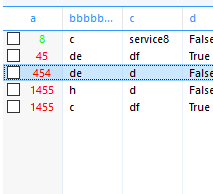
in listview , setting the forecolor property at runtime affects only the first column. A bug or I am missing something ?
Edit 1
another notice .
if I set the forecolor for the first item in column 1 to green and then changed the listview forecolor to red , besides the point that it only affects the first column , it also does not affect the item which is colored green which I colored by code .
Last edited by Hosam AL Dein; Sep 10th, 2017 at 07:24 AM.
-
Sep 10th, 2017, 07:23 AM
#1696
Hyperactive Member
Re: CommonControls (Replacement of the MS common controls)
ListView1.ListItems(r).ListSubItems(c).ForeColor = whatevercoloryouwant
r for row
c for column
-
Sep 10th, 2017, 07:33 AM
#1697
Addicted Member
Re: CommonControls (Replacement of the MS common controls)
Originally Posted by chosk
ListView1.ListItems(r).ListSubItems(c).ForeColor = whatevercoloryouwant
r for row
c for column
no problem with this , I mean setting the forecolor for the listview in general . Or it is designed for setting forecolor item by item
-
Sep 10th, 2017, 07:40 AM
#1698
Hyperactive Member
Re: CommonControls (Replacement of the MS common controls)
Originally Posted by Hosam AL Dein
no problem with this , I mean setting the forecolor for the listview in general . Or it is designed for setting forecolor item by item
I was replying to your post before you made the edit. Note the time of my post and your edit.
-
Sep 10th, 2017, 09:31 AM
#1699
Re: CommonControls (Replacement of the MS common controls)
Originally Posted by Hosam AL Dein
Edit 1
another notice .
if I set the forecolor for the first item in column 1 to green and then changed the listview forecolor to red , besides the point that it only affects the first column , it also does not affect the item which is colored green which I colored by code .
OMG. You are right. How can this be...
Update released. Was a very tiny bugfix as can be seen below: (red marked)
Code:
Friend Sub FListSubItemsAdd(ByRef SubItemIndex As Long, ByVal Index As Long, Optional ByVal Key As String, Optional ByVal Text As String, Optional ByVal ReportIconIndex As Long)
PropShadowListSubItemsCount = PropShadowListSubItemsCount + 1
If Index = 0 Then
    SubItemIndex = PropShadowListSubItemsCount
Else
    SubItemIndex = Index
End If
ReDim Preserve PropShadowListSubItems(1 To PropShadowListSubItemsCount) As ShadowListSubItemStruct
If SubItemIndex < PropShadowListSubItemsCount Then
    Dim i As Long
    For i = PropShadowListSubItemsCount To SubItemIndex + 1 Step -1
        LSet PropShadowListSubItems(i) = PropShadowListSubItems(i - 1)
    Next i
    LSet PropShadowListSubItems(i) = PropShadowDefaultListSubItem
Else
    LSet PropShadowListSubItems(SubItemIndex) = PropShadowDefaultListSubItem
End If
With PropShadowListSubItems(SubItemIndex)
.Key = Key
.Text = Text
.ReportIconIndex = ReportIconIndex
End With
End Sub
OCX was also updated of course.
-
Sep 10th, 2017, 12:13 PM
#1700
Addicted Member
Re: CommonControls (Replacement of the MS common controls)
it is worth effort this awesome listview
-
Sep 10th, 2017, 12:25 PM
#1701
Addicted Member
Re: CommonControls (Replacement of the MS common controls)
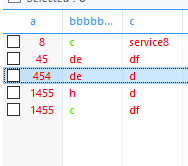
still the point of the edit in my post krool . if you set a different color by code to an item , and then changed the forecolor again , the forecolor now applies to all the items except the one you changed by code . the bug fix solved the point that it only colors the first column .
like
Code:
listview1.listitems(1).forecolor=vbgreen

listview1.forecolor=vbred
now all the items will have the red color except item 1 which you have previously set its color to green
Edit 1 :
this includes listitems and listsubitems
Last edited by Hosam AL Dein; Sep 10th, 2017 at 12:32 PM.
-
Sep 10th, 2017, 01:54 PM
#1702
Re: CommonControls (Replacement of the MS common controls)
Originally Posted by Hosam AL Dein
still the point of the edit in my post krool . if you set a different color by code to an item , and then changed the forecolor again , the forecolor now applies to all the items except the one you changed by code . the bug fix solved the point that it only colors the first column .
like
Code:
listview1.listitems(1).forecolor=vbgreen

listview1.forecolor=vbred
now all the items will have the red color except item 1 which you have previously set its color to green
Edit 1 :
this includes listitems and listsubitems
That behavior is expected to be. To reset an fore color of an list item or list sub item set to -1.
-
Sep 10th, 2017, 02:07 PM
#1703
Addicted Member
Re: CommonControls (Replacement of the MS common controls)
shouldn`t forecolor paint all items ?
I am performing a conditional formatting on the items . Each matched item will have a specific different color . To reset it to the default color , I will have to loop and paint item by item with the default forecolor .
and what does this mean
To reset an fore color of an list item or list sub item set to -1.
set which value to -1 ?
Last edited by Hosam AL Dein; Sep 10th, 2017 at 02:13 PM.
-
Sep 10th, 2017, 02:18 PM
#1704
Re: CommonControls (Replacement of the MS common controls)
When you have set ListView1.ListItems(r).ForeColor and/or ListView1.ListItems(r).ListSubItems(c).ForeColor it will be painted with that color, regardless what is defined by ListView1.ForeColor.
To "reset" the color at ListView1.ListItems(r).ForeColor and/or ListView1.ListItems(r).ListSubItems(c).ForeColor set them to -1. Then they will again "inherit" the ListView1.ForeColor.
-
Sep 10th, 2017, 02:41 PM
#1705
Addicted Member
Re: CommonControls (Replacement of the MS common controls)
I think the normal behavior should be : forecolor will paint all items .. this is the main case or original need for this property
but you use this logic : forecolor will paint all the items except those whose fore color has been previously set despite the fact that the majority will set a different forecolor for a specific item for less reasons and in very specific situations . I mean this is the exception not the main case .
example : in my case here , this will force me to loop and check for item fore color if it is not equal the main forecolor then I will set it to -1 despite I have already looped for a specific condition on all items . now ,to set their color back I will have to loop again . but why do that while I have a forecolor property which should apply the whole thing . I mean conditions are exceptions but forecolor means paint all the items and this seems more logic to me . what do you think ?
-
Sep 10th, 2017, 02:48 PM
#1706
Re: CommonControls (Replacement of the MS common controls)
Originally Posted by Hosam AL Dein
I think the normal behavior should be : forecolor will paint all items .. this is the main case or original need for this property
but you use this logic : forecolor will paint all the items except those whose fore color has been previously set despite the fact that the majority will set a different forecolor for a specific item for less reasons and in very specific situations . I mean this is the exception not the main case .
example : in my case here , this will force me to loop and check for item fore color if it is not equal the main forecolor then I will set it to -1 despite I have already looped for a specific condition on all items . now ,to set their color back I will have to loop again . but why do that while I have a forecolor property which should apply the whole thing . I mean conditions are exceptions but forecolor means paint all the items and this seems more logic to me . what do you think ?
That is the same behavior as in the original MS ListView.
The specific overrides the general.
It would be terrible if changing the ListView1.ForeColor would reset all ListItems and ListSubItems ForeColor settings.
-
Sep 10th, 2017, 03:06 PM
#1707
Addicted Member
Re: CommonControls (Replacement of the MS common controls)
say 1000 rows :: filter some(50) to color red . so I will filter after setting the general . I will loop to preform this . I dont need to loop again to set the 1000 color to original .
the logic if I want to perform this
1- set the forecolor (if we want to color all items)
2- filter loop for exceptions (which surely will be less than all the items count)
so yes , specific overrides the general , thats why there is a method for changing the item forecolor .but also this method should be called after we generally set the main forecolor . so forecolor will paint all and if we want to color some other items, we have made you a method to color the specific item and it surely will override the general but also should be called after the genaral beacuse if you use it you are willing to filter only some items which are less than the all surely .
your consider it terrible and you are right if I set the item fore color before setting the general forecolor . the opposite should be done and will be more logic and also will not face the problem you mentioned above
-
Sep 10th, 2017, 04:00 PM
#1708
Addicted Member
Re: CommonControls (Replacement of the MS common controls)
Is this convincing ? or I am totally wrong or what ?
-
Sep 10th, 2017, 11:17 PM
#1709
Hyperactive Member
Re: CommonControls (Replacement of the MS common controls)
Originally Posted by Krool
That is the same behavior as in the original MS ListView.
The specific overrides the general.
It would be terrible if changing the ListView1.ForeColor would reset all ListItems and ListSubItems ForeColor settings.
Hi Krool,
I hope you keep to the original MS behaviour. Because I have preference setting for users to change forecolor and row backcolor, while keeping those cells already colored unchanged. Example, for alternate row backcolors of white and green the forecolor usually black. For alternate row backcolors of gray and black the forecolor usually white. Those cells already colored before the change maintain their cell colors. If you change away from original MS behaviour, not only will I be screwed but others also using your controls who are coding according to MS behaviour.
Last edited by chosk; Sep 10th, 2017 at 11:22 PM.
-
Sep 11th, 2017, 01:52 AM
#1710
Addicted Member
Re: CommonControls (Replacement of the MS common controls)
A ResetAllColors method could be added, which would do what Hosam AL Dein requests.
-
Sep 11th, 2017, 06:10 AM
#1711
Hyperactive Member
Re: CommonControls (Replacement of the MS common controls)
This will reset the ListView ForeColor.
Code:
'Private Sub ResetListViewForeColor(lvw As VBCCR14.ListView, FColor As Long)
Private Sub ResetListViewForeColor(lvw As ListView, FColor As Long)
    Dim i As Long
    Dim j As Long

    lvw.ForeColor = FColor

    lvw.Visible = False
    For i = 1 To lvw.ListItems.Count
        lvw.ListItems(i).ForeColor = lvw.ForeColor
        For j = 1 To lvw.ColumnHeaders.Count - 1
            lvw.ListItems(i).ListSubItems(j).ForeColor = lvw.ForeColor
        Next
    Next
    lvw.Visible = True
End Sub
Usage:
Code:
ResetListViewForeColor ListView1, vbBlack
-
Sep 11th, 2017, 06:51 AM
#1712
Hyperactive Member
Re: CommonControls (Replacement of the MS common controls)
This should be neater. Do away with the lvw.ForeColor = FColor
Code:
'Private Sub ResetListViewForeColor(lvw As VBCCR14.ListView, FColor As Long)
Private Sub ResetListViewForeColor(lvw As ListView, FColor As Long)
    Dim i As Long
    Dim j As Long

    lvw.Visible = False
    For i = 1 To lvw.ListItems.Count
        lvw.ListItems(i).ForeColor = FColor
        For j = 1 To lvw.ColumnHeaders.Count - 1
            lvw.ListItems(i).ListSubItems(j).ForeColor = FColor
        Next
    Next
    lvw.Visible = True
End Sub
-
Sep 11th, 2017, 07:49 AM
#1713
Re: CommonControls (Replacement of the MS common controls)
Originally Posted by chosk
This should be neater. Do away with the lvw.ForeColor = FColor
Code:
'Private Sub ResetListViewForeColor(lvw As VBCCR14.ListView, FColor As Long)
Private Sub ResetListViewForeColor(lvw As ListView, FColor As Long)
    Dim i As Long
    Dim j As Long

    lvw.Visible = False
    For i = 1 To lvw.ListItems.Count
        lvw.ListItems(i).ForeColor = FColor
        For j = 1 To lvw.ColumnHeaders.Count - 1
            lvw.ListItems(i).ListSubItems(j).ForeColor = FColor
        Next
    Next
    lvw.Visible = True
End Sub
I would suggest as following. (Red marked)
Code:
'Private Sub ResetListViewForeColor(lvw As VBCCR14.ListView)
Private Sub ResetListViewForeColor(lvw As ListView)
    Dim i As Long
    Dim j As Long

    lvw.Redraw = False
    For i = 1 To lvw.ListItems.Count
        With lvw.ListItems(i)
        .ForeColor = -1
        For j = 1 To lvw.ColumnHeaders.Count - 1
            .ListSubItems(j).ForeColor = -1
        Next
        End With
    Next
    lvw.Redraw = True
End Sub
EDIT: I will not change the behavior. It will remain like in the original MS ListView.
Last edited by Krool; Sep 11th, 2017 at 03:28 PM.
-
Sep 11th, 2017, 08:55 PM
#1714
Addicted Member
Re: CommonControls (Replacement of the MS common controls)
Guys , I do not have a problem with code here , I was talking about something which I thought ( and still - according to my little knowledge - ) to be more logical . ِِِِِAnyway , seems that I could not propose it or it is having some side effects which I do not recognize .
Last edited by Hosam AL Dein; Sep 12th, 2017 at 02:12 AM.
-
Sep 12th, 2017, 01:16 AM
#1715
Addicted Member
Re: CommonControls (Replacement of the MS common controls)
Originally Posted by Hosam AL Dein
Guys , I do not have a problem with code here , I was talking about something which I thought ( and still - according to my little knowledge - ) to be more logical . ِِِِِAnyway , seems that I could not propose it or it is having some side effects which I do not recognize .
It would be "too much" to make these changes in functionality to such a "simple" method/property. That's why we proposed a new method for what you ask.
-
Sep 12th, 2017, 05:27 AM
#1716
Addicted Member
Re: CommonControls (Replacement of the MS common controls)
I will retry to make my point more clear by some questions :
1 - What is the purpose of this explanation ?
the purpose of this explanation is to make a comparison between two behaviors being discussed about the way we should follow when calling this line of code listview1.forecolor=.... .
2 - what are the two ways being compared ?
way1 Setting the listview forecolor should be applied to all items and sub items of a listview regardless of the specifically colored items . So , when we call listview1.forecolor=vbrgreen , we expect all items to be colored by green including specifically colored items
way2 Setting the listview forecolor should be applied to all items and sub items of a listview except the specifically colored items . So , when we call listview1.forecolor=vbrgreen , we expect all items to colored by green excluding specifically colored items . And to reset any item to its original forecolor (green) , we should use listview1.listitem(i).forecolor = -1 to set item i color to be the main forecolor for the listview (green) .
3 - why do I think that way2 is not the appropriate one (according to my opinion ) ?
If I have a listview with forecolor green and has - say - 1000 items and I want to color some few items to be red (based on some condition) . I will run a loop through 1000 records and do comparison and set the item color to red if it met the condition and nothing wrong with that in both ways .
The problem will rise up at this next point . When I intend to Re-run conditional formatting function , I should add a line of code before setting any specific items colors . This line should reset all items forecolors to its default using listview1.forecolor=listview1.forecolor and I expect all items to be colored to default as way1 suggests .
On the other hand , using way2 , will force me to write another loop through 1000 items and perform this instruction listview1.listitem(i).forecolor = -1 to reset the 1000 items forecolor the listview main forecolor or add it to an existing loop which is not guaranteed in all of the cases and situations as loop may exist or not . Even if it existed , then we have added to it more 1000 * n instructions execution time through usercontrol classes , collections and properties and this will surely deteriorate its performance in large scale listviews.
way1
Code:
Dim i as integer
listview1.forecolor=listview1.forecolor
for i=1 to 1000
if number(i) > 7 then listview1.listitems(i).forecolor=vbred next i
way2
Code:
Dim i as integer
for i=1 to 1000
listview1.listitems(i).forecolor= -1 if number(i) > 7 then listview1.listitems(i).forecolor=vbred next i
Also consider , in the previous code , I have made use of the already running loop to escape creating another loop to set colors to default . But in some cases not related to this example , this loop might not be available.
4 - can items populating loop implicate or act as an already running loop to host item by item coloring ?
yes , but in some cases , - like mine - which is also very common , this can not be done as the user calls a window where he can select the column and the condition for conditional formatting . So , this can not be done during items population phase . And also I dont want to repopulate the list view before running the conditional format function causing another loop to run before conditional formatting function loop to guarantee that all items colors are set to default . Note 1 : Items population after listview clearing method sets forecolors to the deafult
5 - why did Microsoft provide a forecolor property for a lsitview ?
to apply the color to all listview items .
6 - why did Microsoft provide an item.forecolor property for a lsitview ?
also to apply the color to all listview items ???!!!!! No . the one up there handles this mission . So , the answer is : they thought some users will need to color some specific items by some different color while keeping the general forecolor to handle all the items . So it is made for EXCEPTIONS . Seems logic to me .
7 - what about the MS original list view which uses the same behavior ?
At this moment , I feel like it is some type of bug or un-handled analysis which they did not take care of . Otherwise , there is a piece of information I dont know which made it necessary while setting the forecolor property to leave all specifically colored items as they are . I thought about one issue but I also dont find it a complete answer . I thought of they said : "Set the forecolor as you want by the general forecolor . Now for exceptions use item.forecolor and don`t worry when you reset the general forecolor again we will not touch your exceptions to not oblige you to re-run the code for coloring exceptions again (saving performnce) and if you want to reset your exceptions to default use the value -1 to the item.forecolor using likely a loop (no performance saving here) " . But this has many more questions to be asked about the way they implemented it . Could it has been done more easier and logical and also performance-considerations aware ? . why dont I pass -1 to the general forecolor ? why to keep my exceptions while mainly in the level of items re-populating it erases all settings (this happens more often than just passing a forecolor to the listview) so I will anyway populate the items (now all colors removed see note 1 above) and I will color my exceptions again each time I refresh my data .
To simplify : Which one of these scenarios occur more often than the other ?
1- setting the general forecolor at runtime for a listview . (there where Microsoft wants to keep specific forecolors)
2- refreshing list items and repopulating the list view . (which will remove all specific forecolors)
surely the second case with a ratio about 300 :1
What is the worth of protecting exceptions while they will be demolished 300 times before it is even needed to be protected . Not only this is not useful , but also this protection operation will cost more performance load to recover from.
I mean , the general forecolor setting occurrance which will happen 1 time to 300 times repopulating which will demolish your protection to the (1 occurrance ) which also cost you over performance load . Why did not they even design this protection in a better way to recover from ? if I even consider this protection was necessary . They saved your effort in one time and you will exert it 300 times each time you repopulate the items .
So , It is an open discussion for everybody who can provide us with a case where he could not do without this feature or cases supporting my point . Maybe we can change the mind about going original MS road . If it was badly designed , can we improve this issue ?
This is not a personal demand , even about this performance issue , it will not exhaust my apps which dont usually load more then 30 to 60 thousands records where such loops will not heavily affect performance . I opened the discussion just to improve it IF AND ONLY IF we agree to the point I have declared above . And of course you are free to decide krool .
Maybe I am missing something which makes my post totally wrong , but I will be glad to learn if so . I created my opinion based on that I did not find any reason for keeping these exceptions not affected by the general forecolor and the negative effect on performance while trying to recover from this protection .
@chosk @Cube8 . Firstly thanks for trying to help by code but it was not the problem for me . I was talking about performance . Thanks again
Hi Krool,
I hope you keep to the original MS behaviour. Because I have preference setting for users to change forecolor and row backcolor, while keeping those cells already colored unchanged. Example, for alternate row backcolors of white and green the forecolor usually black. For alternate row backcolors of gray and black the forecolor usually white. Those cells already colored before the change maintain their cell colors. If you change away from original MS behaviour, not only will I be screwed but others also using your controls who are coding according to MS behaviour.
This is not an issue to be affected by any of the two methods chosk . It is a visual matter which can be solved by assigning the appropriate colors to each theme .
Last edited by Hosam AL Dein; Sep 12th, 2017 at 05:46 AM.
-
Sep 12th, 2017, 05:48 AM
#1717
Hyperactive Member
Re: CommonControls (Replacement of the MS common controls)
Originally Posted by Hosam AL Dein
This is not an issue to be affected by any of the methods chosk . It is a visual matter which can be solved by assigning the appropriate colors to each theme .
You are not getting it. It is not about color themes. It is about there is no existing color themes and the user have the freedom to choose any combination of colors.
The problem I see here is that you are putting your arguments against the way MS designed their controls and insisting MS is wrong and therefore any developers of controls that follow MS controls behaviors are also wrong.
Please take a step back and look at your own post carefully. I am sorry if I am rude which I think I am.
-
Sep 12th, 2017, 05:57 AM
#1718
Hyperactive Member
Re: CommonControls (Replacement of the MS common controls)
I normally don't like to show off. But I make an exception yet still taming my own mind.
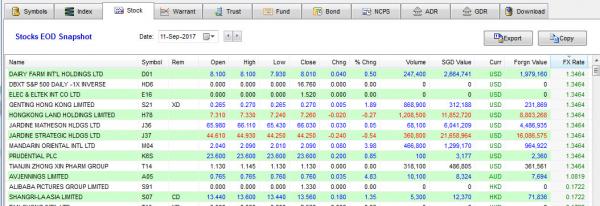
I have done this for more than 10 years now from as long as VB6 was borned, first using MS controls and then using Krool's. Every row can be any color (in this case the chosen ones are black, blue and red) and they can change from one day to the next. Some cells on the right have another color different from the row. There are several ListViews and I don't have performance problem.
-
Sep 12th, 2017, 06:16 AM
#1719
Hyperactive Member
Re: CommonControls (Replacement of the MS common controls)
Originally Posted by Hosam AL Dein
This is not a personal demand
Then why are you so insistence on changing the .Forecolor behaviour? Perhaps you should politely with respect to Krool put forth a feature request instead of insisting that .Forecolor behaviour is wrong and therefore must be changed to your liking.
I would like to be able to copy codes from the Internet to test and explore whenever I encountered a coding problem and they just work with Krool's controls . No one will be able to do this if Krool's controls are not to MS behavior.
-
Sep 12th, 2017, 06:52 AM
#1720
Hyperactive Member
Re: CommonControls (Replacement of the MS common controls)
Originally Posted by Hosam AL Dein
way1
Code:
Dim i as integer
listview1.forecolor=listview1.forecolor
for i=1 to 1000
if number(i) > 7 then listview1.listitems(i).forecolor=vbred next i
way2
Code:
Dim i as integer
for i=1 to 1000
listview1.listitems(i).forecolor= -1 if number(i) > 7 then listview1.listitems(i).forecolor=vbred next i
How about this? Then listview1.listitems(i).ForeColor = -1 will not be executed when not necessary.
way 2
Code:
Dim i As Integer
For i = 1 To 1000
    If Number(i) > 7 Then
        listview1.listitems(i).ForeColor = vbRed
    Else
        listview1.listitems(i).ForeColor = -1
    End If
Next i
Sorry if I am rude again although I know you like to say you don't have problem with coding.
Last edited by chosk; Sep 12th, 2017 at 06:56 AM.
 Posting Permissions
- You may not post new threads
- You may not post replies
- You may not post attachments
- You may not edit your posts
-
Forum Rules
|
Click Here to Expand Forum to Full Width
|



 Reply With Quote
