|

-
Jul 6th, 2017, 05:54 PM
#4
Re: Save checked selections from a listbox?
Hmmm, I was thinking he was wanting something like the following:
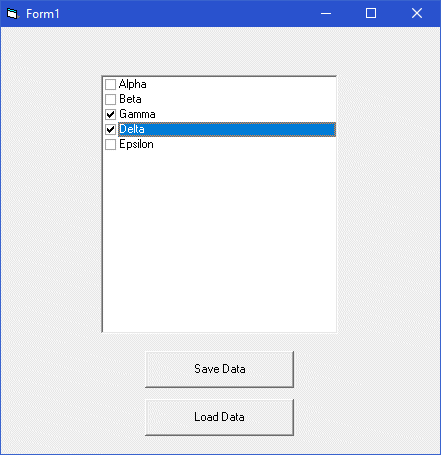
It's a List1 listbox with its Style property set to "Checkbox". And then a Command1 button ("Save Data" as caption). And a Command2 button ("Load Data" as caption).
And then, this code:
Code:
Option Explicit

Private Sub Command1_Click()
    Dim iFle As Long
    Dim i As Long
    '
    iFle = FreeFile
    Open App.Path & "\SavedData.txt" For Output As iFle
        For i = 0 To List1.ListCount - 1
            If List1.Selected(i) Then Print #iFle, List1.List(i)
        Next i
    Close iFle
End Sub

Private Sub Command2_Click()
    Dim iFle As Long
    Dim s As String
    Dim i As Long
    '
    ' Un-select everything.
    For i = 0 To List1.ListCount - 1
        List1.Selected(i) = False
    Next i
    List1.ListIndex = -1
    '
    iFle = FreeFile
    Open App.Path & "\SavedData.txt" For Input As iFle
        Do While Not EOF(iFle)
            Line Input #iFle, s
            For i = 0 To List1.ListCount - 1
                If List1.List(i) = s Then List1.Selected(i) = True
            Next i
        Loop
    Close iFle
End Sub

Private Sub Form_Load()
    List1.AddItem "Alpha"
    List1.AddItem "Beta"
    List1.AddItem "Gamma"
    List1.AddItem "Delta"
    List1.AddItem "Epsilon"
End Sub
You run the program, make your selections, and save your data. Exit the program, run it again, and load the data, and voila.
I'm assuming the words are always pre-loaded, as they're not defined by this process.
Also, the ListBox is doing something funky with it's colors, but I didn't spend the time to suss that out.
Enjoy,
Elroy
EDIT1: Also, just to say it, if it were me doing this, I wouldn't put my data file in with my program, but that was just convenient for the demo. Also, I didn't check for the file's existence on loading the data. If you haven't saved first, you'll get an error.
EDIT2: I also fixed the little color selection problem. It's the somewhat larger line of code in the above that fixes it.
Last edited by Elroy; Jul 6th, 2017 at 06:05 PM.
Any software I post in these forums written by me is provided "AS IS" without warranty of any kind, expressed or implied, and permission is hereby granted, free of charge and without restriction, to any person obtaining a copy. To all, peace and happiness.
 Posting Permissions
- You may not post new threads
- You may not post replies
- You may not post attachments
- You may not edit your posts
-
Forum Rules
|
Click Here to Expand Forum to Full Width
|



 Reply With Quote