|

-
Jul 6th, 2017, 04:40 PM
#3
Re: Save checked selections from a listbox?
Justin
As an alternative, maybe something like this ...
First, I created and saved an empty text file named "D:\VBForums\SAVEDList.txt"
Then, on a form, I placed
Check2(0) .. A CheckBox named Check2, with the Index set to 0, to make it a control array.
Command1 .. CommandButton to load 9 other CheckBoxes and read the file (assumed empty at first)
Command2 .. CommandButton that saves "marked" CheckBoxes to the file.
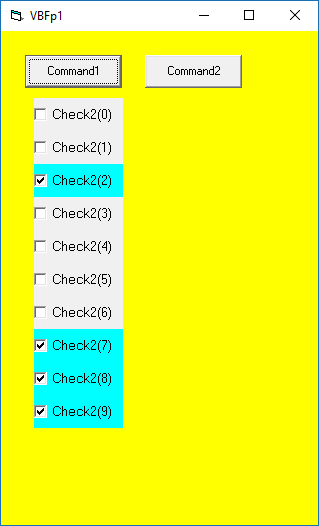
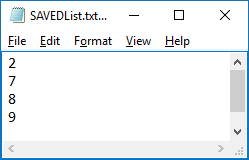
The first time I ran the app, I checked boxes 2, 7, 8, 9
Here is the code snippet
Code:
Private Sub Command1_Click()
    '
    Check2(0).Top = 1000
    Check2(0).Left = 500
    ' load 9 more
    For ii = 1 To 9
        Load Check2(ii)
        With Check2(ii)
            .Left = 500
            .Top = Check2(ii - 1).Top + Check2(ii - 1).Height
            .Caption = "Check2(" & ii & ")"
            .Visible = True
        End With
    Next ii
    ' read the file
    ' mark "as checked" as applies
    fpath = "D:\VBForums\SAVEDList.txt"
    Open fpath For Input As #1
    Do While Not EOF(1)
        Line Input #1, xtr
        With Check2(CInt(xtr))
            .Value = 1
            .BackColor = vbCyan
        End With
    Loop
    '
End Sub
'
'
Sub Command2_Click()
    '
    ' save to txt file
    If v = 30 Then
        fpath = "D:\VBForums\SAVEDList.txt"
        Close #1
        Open fpath For Output As #1
        For ii = 0 To 9
            If Check2(ii).Value = 1 Then
                Write #1, ii
            End If
        Next ii
        Close #1
    End If
    '
End Sub
Here is an image when I re-run the app.
Here is an image of the text file.
Natch, this is concept only.
You'll need to modify it to meet your needs.
Spoo
Last edited by Spooman; Jul 6th, 2017 at 04:49 PM.
 Posting Permissions
- You may not post new threads
- You may not post replies
- You may not post attachments
- You may not edit your posts
-
Forum Rules
|
Click Here to Expand Forum to Full Width
|



 Reply With Quote