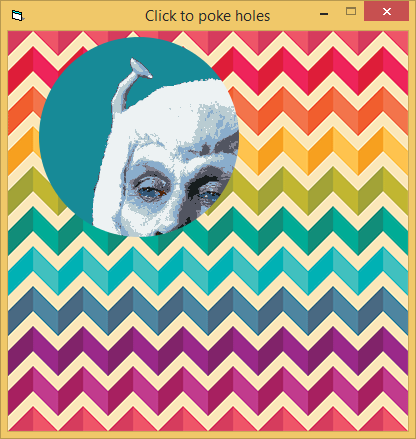
If you want to redraw the picture with the hole you can create a round clip region, select the region into the hDC you are drawing on, then redraw the picture, and remove the clip region and delete it. Optionally, create round clip region XOR'd with the size of the image and fill the region with a solid color.
Option 1 APIs: SelectClipRgn, CreateRoundRecRgn or CreateEllipticRgn, DeleteObject
Option 2 APIs: Same APIs as above + CombineRgn, CreateRectRgn, CreateSlolidBrush, FillRgn
If this sounds 'greek' to you, maybe more details would help.
Insomnia is just a byproduct of, "It can't be done"
Here's a FORM with a 'hole'...albeit rectangular. Probably not what you're looking for. What do you want to see 'in the hole' of your picture? Some control behind it?
It is hard to know what you mean by "crop a circle" because you could paint it white, black, etc. but if you want transparency then there is more to the story. If you want something to "show through the hole" then you have to play games compositing images, or in some cases you could use layered windows.
Here's a simple demo that uses the layered child windows facility we've had since Windows 8 (but not before):
Last edited by dilettante; Jul 5th, 2017 at 01:31 PM.
Er, on downlevel versions of Windows you'll only see "white" circles get painted. Normally a run in the IDE will do the same thing because to get layered child windows your process must be marked Win8-aware using an application manifest.
For those who want to check it out with a reference to vbRichClient5 (offering antialiasing on the Clip-Regions,
and working on any Win-OS), here's replacement code for Form1 of dilettantes WIA-demo.
Code:
Option Explicit

Private CC As cCairoContext

Private Sub Form_Load()
  Cairo.ImageList.AddImage "BackDrop", LoadResData("BACKDROP", "PNG")
  Cairo.ImageList.AddImage "Curtain", LoadResData("CURTAIN", "PNG")

  ScaleMode = vbPixels
  Set CC = Cairo.CreateSurface(ScaleWidth, ScaleHeight).CreateContext
  Redraw
  Picture1.Visible = False '<- we don't need that
End Sub

Private Sub Form_MouseMove(Button As Integer, Shift As Integer, X As Single, Y As Single)
  Redraw X, Y, 100
End Sub

Private Sub Redraw(Optional ByVal xc&, Optional ByVal yc&, Optional ByVal Radius&)
  CC.RenderSurfaceContent "Curtain", 0, 0
  CC.ARC xc, yc, Radius
  CC.Clip
    CC.RenderSurfaceContent "BackDrop", 0, 0
  CC.ResetClip
  Set Picture = CC.Surface.Picture
End Sub

Private Sub Form_Terminate()
  New_c.CleanupRichClientDll
End Sub
For those who want to check it out with a reference to vbRichClient5 (offering antialiasing on the Clip-Regions,
and working on any Win-OS), here's replacement code for Form1 of dilettantes WIA-demo.
Code:
Option Explicit

Private CC As cCairoContext

Private Sub Form_Load()
  Cairo.ImageList.AddImage "BackDrop", LoadResData("BACKDROP", "PNG")
  Cairo.ImageList.AddImage "Curtain", LoadResData("CURTAIN", "PNG")

  ScaleMode = vbPixels
  Set CC = Cairo.CreateSurface(ScaleWidth, ScaleHeight).CreateContext
  Redraw
  Picture1.Visible = False '<- we don't need that
End Sub

Private Sub Form_MouseMove(Button As Integer, Shift As Integer, X As Single, Y As Single)
  Redraw X, Y, 100
End Sub

Private Sub Redraw(Optional ByVal xc&, Optional ByVal yc&, Optional ByVal Radius&)
  CC.RenderSurfaceContent "Curtain", 0, 0
  CC.ARC xc, yc, Radius
  CC.Clip
    CC.RenderSurfaceContent "BackDrop", 0, 0
  CC.ResetClip
  Set Picture = CC.Surface.Picture
End Sub

Private Sub Form_Terminate()
  New_c.CleanupRichClientDll
End Sub
Producing this:
Olaf
Is there a development document about vbRichClient.dll ?
Is there a development document about vbRichClient.dll ?
The usage of the cairo-graphics-classes is explained in great detail in the cairo-tutorial on vbRichClient.com (Section Demos>GUI>CairoDrawing)
The other larger part (SQLite) is explained in another large tutorial in section Demos>SQLite.
Olaf
Last edited by Schmidt; Jul 8th, 2017 at 07:48 AM.



 Crop A Circle From A Picture


 Reply With Quote


 Originally Posted by dilettante