[RESOLVED] Create common event for array of controls
Hello!
Help me, please, with such problem:
I have usual checkboxes and array of checkboxes on my form.
After attempt to create a common event for control that represents an array I get error:
Object or Class does not support the set of events.
Form:
Code:
Option Explicit

Private ControlsEvent() As New clsEvents

Private Sub Form_Load()
    Dim i   As Long
    Dim ctl As Control
    Dim Chk As CheckBox

    For Each ctl In Me.Controls
        i = i + 1
        ReDim Preserve ControlsEvent(1 To i)
        Select Case TypeName(ctl)
            Case "CheckBox"
                Set Chk = ctl
                Set ControlsEvent(i).chkBoxInArr = ctl
        End Select
    Next ctl
End Sub
Class clsEvents
Code:
Option Explicit

Public WithEvents chkBoxInArr   As CheckBox

Private Sub chkBoxInArr_Click()
    MsgBox "CheckBox has been clicked. Name = " & chkBoxInArr.Caption
End Sub
How to identify that control is a part of array?
How to access to each control in array in the enumeration to add him to the set of events?
Warmer.
And is it possible to check whether control has a property (without 'On Error') ?
Never really delved into that possibility much. I do know you can use IDispatch and if you do, test both compiled and uncompiled. Here's an example and it's not light code. In that project, I query for specific properties of controls. Maybe you can tweak the code for what you are looking for. Personally, I don't see a reason not to use On Error -- it's easier.
Insomnia is just a byproduct of, "It can't be done"
About my last post, do note that that project I linked you to was designed to find properties that reference specific value types, i.e., stdPicture & stdFont. So a lot of those parts are not applicable. But in that code, I do need to know the property name. The idea is to use code similar to that just to see if a property name is implemented. In your case it would be a lot of extra code that can be achieved/replaced simply by using On Error Resume Next.
Edited. In fact, if On Error statements would've worked for me, I would've used it. However, in that project, the code was required to locate property names without knowing the property names. It had to discover them. I did not want the code to use hardcoded property names because it was a requirement to test any type of control, not specific ones. And because of that, any control (especially custom controls) could have a property named anything the author wanted -- nothing really to hardcode, no hard-fast rules. But in your case, this is not an issue, you know the control type and the property you want to validate: Index
Last edited by LaVolpe; Jul 1st, 2017 at 10:37 AM.
Insomnia is just a byproduct of, "It can't be done"
It's okay. I understand it. pvGetPropNames. Good example. Thank you.
1 question is solved. And 1 remains: why can't I assign an event for control, if control is an element of array of controls? And is it possible to bypass?
Short story? Assuming because WithEvents doesn't allow for an Index parameter which would be required for control arrays. Maybe VB uses a different interface (that implements the default interface) for control arrays? When WithEvents is used, guessing the events are from that default.
One of the suggestions in those links (or it was in a link within one of those) was to create the checkboxes dynamically. This requires no control array, i.e., Me.Controls.Add. Once created, you can set properties and position as needed, and then add it to your class. It is a workaround at least.
Insomnia is just a byproduct of, "It can't be done"
LaVolpe, yea, I saw. Brutal workaround. It's good if we are just planning a design of our application.
If it would be my practical task to add events if GUI is ready, it requires a much work: remove arrays, re-write them as dynamic controls, restoring all values in properties.
In such case I'd better excluded array's controls from class of events and added usual separate event for each array.
P.S. Thanks for searching forum instead me I didn't read Classic VB article yet.
as control arrays already have common events, it is not so usual to need to do like this, more common with runtime added controls or vba controls for common events, where no control arrays exist
i do my best to test code works before i post it, but sometimes am unable to do so for some reason, and usually say so if this is the case. Note code snippets posted are just that and do not include error handling that is required in real world applications, but avoid On Error Resume Next
dim all variables as required as often i have done so elsewhere in my code but only posted the relevant part
come back and mark your original post as resolved if your problem is fixed
pete
LaVolpe, yea, I saw. Brutal workaround. It's good if we are just planning a design of our application.
If it would be my practical task to add events if GUI is ready, it requires a much work: remove arrays, re-write them as dynamic controls, restoring all values in properties.
In such case I'd better excluded array's controls from class of events and added usual separate event for each array.
P.S. Thanks for searching forum instead me I didn't read Classic VB article yet.
Hello Dragokas,
you might want to pass the selected Checkboxes on to a Listbox(Style=1)
and take it from there.
just an Idea
Code...
Code:
Option Explicit

Private Daten() As String

Private Sub Form_Load()
    ReDim Daten(Check1.LBound To Check1.UBound)
End Sub

Private Sub Command1_Click()
'Set List1 Style to Checkbox
'add selected Checkboxes to List1
    Dim Index As Long
    List1.Clear
    For Index = Check1.LBound To Check1.UBound
        If Check1(Index).Value = 1 Then
            List1.AddItem Check1(Index).Caption
            Daten(Index) = Check1(Index).Caption
        End If
    Next
End Sub

Private Sub Command2_Click()
'which one(s) where selected in List1
Dim i As Long
For i = 0 To List1.ListCount - 1
    If List1.Selected(i) Then MsgBox List1.List(i)
Next i
End Sub
yea, I did similar, a bit simplified, based on Merri version. But, it is for dynamically created controls only:
Form:
Code:
Option Explicit

Dim mo_Events As Collection

Private Sub Form_Load()
    Dim i&
    Dim Btn As CommandButton
    Set mo_Events = New Collection
    For i = 1 To 3
        Set Btn = Me.Controls.Add("VB.CommandButton", "Cmd_" & i)
        Btn.Move 0, 360 * (i - 1), 3600, 360
        Btn.Visible = True
        mo_Events.Add New cEvents
        mo_Events(i).Add_CommandButton Btn, i
    Next
End Sub

Public Sub ButtonClick(p_idx As Long)
    MsgBox "Button is clicked # " & p_idx
End Sub

Private Sub Form_Unload(Cancel As Integer)
    Set mo_Events = Nothing
End Sub
cEvents class
Code:
Option Explicit

Public WithEvents Button As CommandButton

Private m_idx As Long

Public Function Add_CommandButton(p_Btn As CommandButton, p_idx As Long)
    m_idx = p_idx
    Set Button = p_Btn
End Function

Private Sub Button_Click()
    Button.Parent.ButtonClick m_idx
End Sub

Private Sub Class_Terminate()
    Set Button = Nothing
End Sub
ChrisE, thank you for try. But it's offtopic.
As a result of discussion:
1. We cannot dynamically create an event for control arrays using 'WithEvents' to point to common function.
2. We can create an event statically for concrete control array.
3. Also we can use subclassing to do this task for any control.
4. We can identify whether control is a member of control array to exclude it from been enumerated in 'For each Ctl in me.Controls' or just use 'On error resume next' to omit runtime error 'Object or Class does not support the set of events.'
5. We can use dynamically created controls instead of control arrays.
Not sure about your concrete scenario (what you want to accomplish in the end)...
But if it's only about a "centralized Event" on a given Parent-Form (for only a handful of intrinsic Control-Types),
then a simple "Control-Wrapping-approach" (using a "Public Sub Convention" on the Parent) might be sufficient and quite elegant:
Let's assume you write little Wrapper-Controls around the few Intrinsic-Controls you plan to "extend" and use on your Forms
(here I'm using an example which wraps a VB.CheckBox):
Into a Private UserControl (delegating two Events currently, Click and MouseMove):
Code:
Option Explicit

Event Click()
Event MouseMove(Button As Integer, Shift As Integer, X As Single, Y As Single)

Private Sub Check1_Click()
  RaiseEvent Click 'normal Event-Delegation first
  RaiseBubblingEvent "Click" 'and in addition a we raise a Bubbling-Event
End Sub

Private Sub Check1_MouseMove(Button As Integer, Shift As Integer, X As Single, Y As Single)
  RaiseEvent MouseMove(Button, Shift, X, Y)  'and another one, ...
  RaiseBubblingEvent "MouseMove", Button, Shift, X, Y 'to demonstrate EventParameter-Transport as well
End Sub

Private Sub RaiseBubblingEvent(EventName As String, ParamArray P())
  On Error Resume Next
  Select Case UBound(P) + 1
    Case 0: Parent.BubblingEvent Check1, EventName, CtlName
    Case 1: Parent.BubblingEvent Check1, EventName, CtlName, P(0)
    Case 2: Parent.BubblingEvent Check1, EventName, CtlName, P(0), P(1)
    Case 3: Parent.BubblingEvent Check1, EventName, CtlName, P(0), P(1), P(2)
    Case 4: Parent.BubblingEvent Check1, EventName, CtlName, P(0), P(1), P(2), P(3)
    'a.s.o.
  End Select
  If Err Then Err.Clear
End Sub

Private Function CtlName() As String
On Error GoTo WithoutIndex
  CtlName = Extender.Name
  Dim Idx As Long
      Idx = -1: Idx = Extender.Index
   If Idx >= 0 Then CtlName = CtlName & "(" & Idx & ")"
WithoutIndex:
End Function

Private Sub UserControl_Resize()
  Check1.Move 0, 0, ScaleWidth, ScaleHeight
End Sub
What then has to exist in the ParentForm, after you created a few Instances of your CheckBox-Wrapper-Control -
a few of them as a Control-Array if you like... is only (without using any further Helper-Classes or anything):
Code:
Option Explicit

'Bubbling-Event-Signature by "Public-Sub-convention" (not using an Interface to force conformity)
Public Sub BubblingEvent(WrappedCtl As Object, EventName$, ExtenderName$, ParamArray P())
  Debug.Print TypeName(WrappedCtl), EventName, ExtenderName
End Sub
If VarType(Me.Controls(ctl.Name)) = vbObject Then
' // Array
Else
' // Not array
End if
2. You should implement an array events interface and bind an instance of that interface with ConnectionPoint.
For example, for checkbox the interface identifier = 33AD4EFB-6699-11CF-B70C-00AA0060D393. You should just add the first index parameter to all methods (the original was taken from VB6.OLB):
Code:
[
  odl,
  uuid(33AD4EFB-6699-11CF-B70C-00AA0060D393),
  helpstring("Displays an X when selected; the X disappears when the CheckBox is cleared."),
]
interface CheckBoxEvents_Array : IUnknown {
    [helpstring("Occurs when the user presses and then releases a mouse button over an object."), helpcontext(0x000dfb4e)]
    HRESULT _stdcall Click(long* Index);
    [helpstring("Occurs when a drag-and-drop operation is completed."), helpcontext(0x000dfb50)]
    HRESULT _stdcall DragDrop(
					long* Index,
                    [in, out] Control** Source,
                    [in, out] single* X,
                    [in, out] single* Y);
    [helpstring("Occurs when a drag-and-drop operation is in progress."), helpcontext(0x000dfb51)]
    HRESULT _stdcall DragOver(
					long* Index,
                    [in, out] Control** Source,
                    [in, out] single* X,
                    [in, out] single* Y,
                    [in, out] short* State);
    [helpstring("Occurs when an object receives the focus."), helpcontext(0x000dfb53)]
    HRESULT _stdcall GotFocus(long* Index);
    [helpstring("Occurs when the user presses a key while an object has the focus."), helpcontext(0x000dfb55)]
    HRESULT _stdcall KeyDown(
					long* Index,
                    [in, out] short* KeyCode,
                    [in, out] short* Shift);
    [helpstring("Occurs when the user presses and releases an ANSI key."), helpcontext(0x000dfb56)]
    HRESULT _stdcall KeyPress(
					long* Index,
					[in, out] short* KeyAscii);
    [helpstring("Occurs when the user releases a key while an object has the focus."), helpcontext(0x000dfb57)]
    HRESULT _stdcall KeyUp(
					long* Index,
                    [in, out] short* KeyCode,
                    [in, out] short* Shift);
    [helpstring("Occurs when an object loses the focus."), helpcontext(0x000dfb5e)]
    HRESULT _stdcall LostFocus(long* Index);
    [helpstring("Occurs when the user presses the mouse button while an object has the focus."), helpcontext(0x000dfb5f)]
    HRESULT _stdcall MouseDown(
					long* Index,
                    [in, out] short* Button,
                    [in, out] short* Shift,
                    [in, out] single* X,
                    [in, out] single* Y);
    [helpstring("Occurs when the user moves the mouse."), helpcontext(0x000dfb60)]
    HRESULT _stdcall MouseMove(
					long* Index,
                    [in, out] short* Button,
                    [in, out] short* Shift,
                    [in, out] single* X,
                    [in, out] single* Y);
    [helpstring("Occurs when the user releases the mouse button while an object has the focus."), helpcontext(0x000dfb61)]
    HRESULT _stdcall MouseUp(
					long* Index,
                    [in, out] short* Button,
                    [in, out] short* Shift,
                    [in, out] single* X,
                    [in, out] single* Y);
    [helpstring("Occurs when the mouse is moved over the control during an OLE drag/drop operation, if its OLEDropMode property is set to manual."), helpcontext(0x000dfb76)]
    HRESULT _stdcall OLEDragOver(
					long* Index,
                    [in, out] DataObject** Data,
                    [in, out] long* Effect,
                    [in, out] short* Button,
                    [in, out] short* Shift,
                    [in, out] single* X,
                    [in, out] single* Y,
                    [in, out] short* State);
    [helpstring("Occurs when data is dropped onto the control via an OLE drag/drop operation, and OLEDropMode is set to manual."), helpcontext(0x000dfb77)]
    HRESULT _stdcall OLEDragDrop(
					long* Index,
                    [in, out] DataObject** Data,
                    [in, out] long* Effect,
                    [in, out] short* Button,
                    [in, out] short* Shift,
                    [in, out] single* X,
                    [in, out] single* Y);
    [helpstring("Occurs at the source control of an OLE drag/drop operation when the mouse cursor needs to be changed."), helpcontext(0x000dfb78)]
    HRESULT _stdcall OLEGiveFeedback(
					long* Index,
                    [in, out] long* Effect,
                    [in, out] VARIANT_BOOL* DefaultCursors);
    [helpstring("Occurs when an OLE drag/drop operation is initiated either manually or automatically."), helpcontext(0x000dfb79)]
    HRESULT _stdcall OLEStartDrag(
					long* Index,
                    [in, out] DataObject** Data,
                    [in, out] long* AllowedEffects);
    [helpstring("Occurs at the OLE drag/drop source control when the drop target requests data that was not provided to the DataObject during the OLEDragStart event."), helpcontext(0x000dfb7a)]
    HRESULT _stdcall OLESetData(
					long* Index,
                    [in, out] DataObject** Data,
                    [in, out] short* DataFormat);
    [helpstring("Occurs at the OLE drag/drop source control after a manual or automatic drag/drop has been completed or canceled."), helpcontext(0x000dfb7b)]
    HRESULT _stdcall OLECompleteDrag(
					long* Index,
					[in, out] long* Effect);
    [helpstring("Occurs when a control loses focus to a control that causes validation."), helpcontext(0x000dfb87)]
    HRESULT _stdcall Validate(
					long* Index,
					[in, out] VARIANT_BOOL* Cancel);
};
Then you should implement that interface in your event-handler class as well add code to bind ConnectionPoint with the common instance of array handler:
Code:
Option Explicit

Private Declare Sub IIDFromString Lib "ole32" (ByVal lpsz As Long, ByRef lpiid As Any)

Implements CheckBoxEvents_Array

Dim lToken  As Long
Dim cChk    As CheckBox

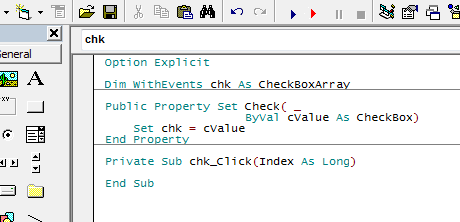
Public Property Set Check( _
                    ByVal cValue As CheckBox)

    Set cChk = cValue

    SetClsEvent

End Property

Private Sub SetClsEvent( _
            Optional ByVal bUnadvise As Boolean)
    Dim cContainer  As IConnectionPointContainer
    Dim cPoint      As IConnectionPoint
    Dim tIID        As UUID
    Dim cChkEvents  As CheckBoxEvents_Array

    IIDFromString StrPtr("{33AD4EFB-6699-11CF-B70C-00AA0060D393}"), tIID

    Set cContainer = cChk
    Set cChkEvents = Me

    Set cPoint = cContainer.FindConnectionPoint(tIID)

    If bUnadvise Then
        If lToken Then
            cPoint.Unadvise lToken
        End If
    Else
        lToken = cPoint.Advise(cChkEvents)
    End If

End Sub

Private Sub Class_Terminate()
    SetClsEvent True
End Sub

Private Sub CheckBoxEvents_Array_Click(Index As Long)
    MsgBox "Click on " & Index
End Sub

Private Sub CheckBoxEvents_Array_DragDrop(Index As Long, Source As Control, X As Single, Y As Single)

End Sub

Private Sub CheckBoxEvents_Array_DragOver(Index As Long, Source As Control, X As Single, Y As Single, State As Integer)

End Sub

Private Sub CheckBoxEvents_Array_GotFocus(Index As Long)

End Sub

Private Sub CheckBoxEvents_Array_KeyDown(Index As Long, KeyCode As Integer, Shift As Integer)

End Sub

Private Sub CheckBoxEvents_Array_KeyPress(Index As Long, KeyAscii As Integer)

End Sub

Private Sub CheckBoxEvents_Array_KeyUp(Index As Long, KeyCode As Integer, Shift As Integer)

End Sub

Private Sub CheckBoxEvents_Array_LostFocus(Index As Long)

End Sub

Private Sub CheckBoxEvents_Array_MouseDown(Index As Long, Button As Integer, Shift As Integer, X As Single, Y As Single)

End Sub

Private Sub CheckBoxEvents_Array_MouseMove(Index As Long, Button As Integer, Shift As Integer, X As Single, Y As Single)
    Debug.Print "MouseMove on "; Index, X, Y
End Sub

Private Sub CheckBoxEvents_Array_MouseUp(Index As Long, Button As Integer, Shift As Integer, X As Single, Y As Single)

End Sub

Private Sub CheckBoxEvents_Array_OLECompleteDrag(Index As Long, Effect As Long)

End Sub

Private Sub CheckBoxEvents_Array_OLEDragDrop(Index As Long, Data As DataObject, Effect As Long, Button As Integer, Shift As Integer, X As Single, Y As Single)

End Sub

Private Sub CheckBoxEvents_Array_OLEDragOver(Index As Long, Data As DataObject, Effect As Long, Button As Integer, Shift As Integer, X As Single, Y As Single, State As Integer)

End Sub

Private Sub CheckBoxEvents_Array_OLEGiveFeedback(Index As Long, Effect As Long, DefaultCursors As Boolean)

End Sub

Private Sub CheckBoxEvents_Array_OLESetData(Index As Long, Data As DataObject, DataFormat As Integer)

End Sub

Private Sub CheckBoxEvents_Array_OLEStartDrag(Index As Long, Data As DataObject, AllowedEffects As Long)

End Sub

Private Sub CheckBoxEvents_Array_Validate(Index As Long, Cancel As Boolean)

End Sub
Now you can process events from array of checkboxes.
Re: [RESOLVED] Create common event for array of controls
Well, I also thought it was very cool. Through the years, I've actually asked several times how to catch events of control arrays, and never gotten an answer, or worked out a solution. And there it is (post #17).
However, I do wish it was a bit more generic. In other words, how do we do it for TextBoxes, OptionButtons, maybe RTB, or the ultimate would be for a User Control. Just spit-balling there.
Elroy
EDIT1: Also, from what I understand about TypeLibs, we wouldn't have to concern ourselves with distributing any of them via this approach, but it'd be nice to have that verified. When a situation comes up again where I need this, I'll do my own testing though.
Any software I post in these forums written by me is provided "AS IS" without warranty of any kind, expressed or implied, and permission is hereby granted, free of charge and without restriction, to any person obtaining a copy. To all, peace and happiness.
Re: [RESOLVED] Create common event for array of controls
Originally Posted by Elroy
However, I do wish it was a bit more generic. In other words, how do we do it for TextBoxes, OptionButtons, maybe RTB, or the ultimate would be for a User Control. Just spit-balling there.
AFAIK (i can't claim it) you can get IID for any intrinsic control just adding 1 to first IID.Data1. All the standard interfaces definitions you can get from VB6.OLB in VB98 folder. For example, if you want to use array of labels you can open VB6.OLB in any OLE-viewer and look up the Labell coclass definition, then you should see the default outgoing-interface LabelEvents. That interface has IID = 33AD4EDA-6699-11CF-B70C-00AA0060D393 just adding 1 to Data1 member get 33AD4EDB-6699-11CF-B70C-00AA0060D393 - it's our ArrayControlInterface for label. I'll maybe tell about other controls (UserControls and External controls) later because it requires the time to reversing and investigating, maybe someone already know.
Originally Posted by Elroy
EDIT1: Also, from what I understand about TypeLibs, we wouldn't have to concern ourselves with distributing any of them via this approach, but it'd be nice to have that verified. When a situation comes up again where I need this, I'll do my own testing though.
The type library isn't needed after compilation.
Last edited by The trick; Jul 5th, 2017 at 01:33 PM.
Re: [RESOLVED] Create common event for array of controls
Okay, I thought I'd try and replicate Trick's trick with the TextBox control. I was well on my way, but one stumbling block.
I don't have C++ installed on my new machine, and I don't even have easy access to a CD drive at the moment.
I'm going to post the IDL file for what I think will be the TextBox version. Someone setup for using MIDL and has C++ installed, if you could compile and then re-attach the resulting TLB, that would be greatly appreciated.
Thanks,
Elroy
Hmmm, it keeps saying "Invalid File" on the attachment. Here's the source to it:
Code:
[
   uuid(67f122b6-92cb-4087-939c-ba518ced7c0c),
   helpstring("TextBoxes array events interface"),
]
library chk_arr {

   importlib("stdole2.tlb");
   importlib("C:\Program Files (x86)\Microsoft Visual Studio\VB98\VB6.OLB");
   importlib("msvbvm60.dll\3");

   typedef float single;

[
  odl,
  uuid(33AD4EE3-6699-11CF-B70C-00AA0060D393),
  helpstring("Displays information entered at design time by the user, or in code at run time."),
  helpcontext(0x000dfa32)
]
interface TextBoxEvents_Array : IUnknown {
    [helpstring("Occurs when the contents of a control have changed."), helpcontext(0x000dfb4d)]
    HRESULT _stdcall Change();
    [helpstring("Occurs when a drag-and-drop operation is completed."), helpcontext(0x000dfb50)]
    HRESULT _stdcall DragDrop(
                    [in, out] Control** Source,
                    [in, out] single* X,
                    [in, out] single* Y);
    [helpstring("Occurs when a drag-and-drop operation is in progress."), helpcontext(0x000dfb51)]
    HRESULT _stdcall DragOver(
                    [in, out] Control** Source,
                    [in, out] single* X,
                    [in, out] single* Y,
                    [in, out] short* State);
    [helpstring("Occurs when an object receives the focus."), helpcontext(0x000dfb53)]
    HRESULT _stdcall GotFocus();
    [helpstring("Occurs when the user presses a key while an object has the focus."), helpcontext(0x000dfb55)]
    HRESULT _stdcall KeyDown(
                    [in, out] short* KeyCode,
                    [in, out] short* Shift);
    [helpstring("Occurs when the user presses and releases an ANSI key."), helpcontext(0x000dfb56)]
    HRESULT _stdcall KeyPress([in, out] short* KeyAscii);
    [helpstring("Occurs when the user releases a key while an object has the focus."), helpcontext(0x000dfb57)]
    HRESULT _stdcall KeyUp(
                    [in, out] short* KeyCode,
                    [in, out] short* Shift);
    [helpstring("Occurs when a DDE conversation terminates."), helpcontext(0x000dfb58)]
    HRESULT _stdcall LinkClose();
    [helpstring("Occurs when there is an error during a DDE conversation."), helpcontext(0x000dfb59)]
    HRESULT _stdcall LinkError([in, out] short* LinkErr);
    [helpstring("Occurs when a DDE conversation is being initiated."), helpcontext(0x000dfb5c)]
    HRESULT _stdcall LinkOpen([in, out] short* Cancel);
    [helpstring("Occurs when an object loses the focus."), helpcontext(0x000dfb5e)]
    HRESULT _stdcall LostFocus();
    [helpstring("Occurs when the source has changed the DDE data if the LinkMode property of the destination control is Notify."), helpcontext(0x000dfb5b)]
    HRESULT _stdcall LinkNotify();
    [helpstring("Occurs when the user presses the mouse button while an object has the focus."), helpcontext(0x000dfb5f)]
    HRESULT _stdcall MouseDown(
                    [in, out] short* Button,
                    [in, out] short* Shift,
                    [in, out] single* X,
                    [in, out] single* Y);
    [helpstring("Occurs when the user moves the mouse."), helpcontext(0x000dfb60)]
    HRESULT _stdcall MouseMove(
                    [in, out] short* Button,
                    [in, out] short* Shift,
                    [in, out] single* X,
                    [in, out] single* Y);
    [helpstring("Occurs when the user releases the mouse button while an object has the focus."), helpcontext(0x000dfb61)]
    HRESULT _stdcall MouseUp(
                    [in, out] short* Button,
                    [in, out] short* Shift,
                    [in, out] single* X,
                    [in, out] single* Y);
    [helpstring("Occurs when the user presses and then releases a mouse button over an object."), helpcontext(0x000dfb4e)]
    HRESULT _stdcall Click();
    [helpstring("Occurs when the user presses and releases a mouse button and then presses and releases it again over an object."), helpcontext(0x000dfb4f)]
    HRESULT _stdcall DblClick();
    [helpstring("Occurs when the mouse is moved over the control during an OLE drag/drop operation, if its OLEDropMode property is set to manual."), helpcontext(0x000dfb76)]
    HRESULT _stdcall OLEDragOver(
                    [in, out] DataObject** Data,
                    [in, out] long* Effect,
                    [in, out] short* Button,
                    [in, out] short* Shift,
                    [in, out] single* X,
                    [in, out] single* Y,
                    [in, out] short* State);
    [helpstring("Occurs when data is dropped onto the control via an OLE drag/drop operation, and OLEDropMode is set to manual."), helpcontext(0x000dfb77)]
    HRESULT _stdcall OLEDragDrop(
                    [in, out] DataObject** Data,
                    [in, out] long* Effect,
                    [in, out] short* Button,
                    [in, out] short* Shift,
                    [in, out] single* X,
                    [in, out] single* Y);
    [helpstring("Occurs at the source control of an OLE drag/drop operation when the mouse cursor needs to be changed."), helpcontext(0x000dfb78)]
    HRESULT _stdcall OLEGiveFeedback(
                    [in, out] long* Effect,
                    [in, out] VARIANT_BOOL* DefaultCursors);
    [helpstring("Occurs when an OLE drag/drop operation is initiated either manually or automatically."), helpcontext(0x000dfb79)]
    HRESULT _stdcall OLEStartDrag(
                    [in, out] DataObject** Data,
                    [in, out] long* AllowedEffects);
    [helpstring("Occurs at the OLE drag/drop source control when the drop target requests data that was not provided to the DataObject during the OLEDragStart event."), helpcontext(0x000dfb7a)]
    HRESULT _stdcall OLESetData(
                    [in, out] DataObject** Data,
                    [in, out] short* DataFormat);
    [helpstring("Occurs at the OLE drag/drop source control after a manual or automatic drag/drop has been completed or canceled."), helpcontext(0x000dfb7b)]
    HRESULT _stdcall OLECompleteDrag([in, out] long* Effect);
    [helpstring("Occurs when a control loses focus to a control that causes validation."), helpcontext(0x000dfb87)]
    HRESULT _stdcall Validate([in, out] VARIANT_BOOL* Cancel);
};
}
I had it named "textbox_arr.idl", and was hoping for a "textbox_arr.tlb" file.
Last edited by Elroy; Jul 5th, 2017 at 03:04 PM.
Any software I post in these forums written by me is provided "AS IS" without warranty of any kind, expressed or implied, and permission is hereby granted, free of charge and without restriction, to any person obtaining a copy. To all, peace and happiness.
Re: [RESOLVED] Create common event for array of controls
See attachment.
Code form:
Code:
Option Explicit

Dim cEvents As CTextBoxEvents

Private Sub Form_Load()

    Set cEvents = New CTextBoxEvents
    cEvents.Control = Text1

End Sub
Class:
Code:
Option Explicit

Dim WithEvents cTextBox As TextBox_Array
Dim cCtlArray           As Object

Public Property Let Control( _
                    ByRef vValue As Variant)
    Set cCtlArray = vValue
    Set cTextBox = cCtlArray.Item(1)
End Property

Private Sub cTextBox_Change(index As Long)
    Debug.Print "Text in " & cCtlArray(index).Name & "(" & index & ") has been changed '" & cCtlArray(index).Text & "'"
End Sub

Private Sub cTextBox_Click(index As Long)
    MsgBox "Click on " & cCtlArray(index).Name & "(" & index & ")"
End Sub
Tlb (sorry for formating):
Code:
[
   uuid(67f122b6-92cb-4087-939c-ba518ced7c0d),
   helpstring("TextBoxes array events interface"),
]
library TextBoxes_arr {

   importlib("stdole2.tlb");
   importlib("C:\Program Files (x86)\Microsoft Visual Studio\VB98\VB6.OLB");
   importlib("msvbvm60.dll\3");

   typedef float single;

[
  odl,
  uuid(33AD4EE3-6699-11CF-B70C-00AA0060D393),
  helpstring("Displays information entered at design time by the user, or in code at run time."),
  helpcontext(0x000dfa32)
]
interface TextBoxEvents_Array : IUnknown {
    [helpstring("Occurs when the contents of a control have changed."), helpcontext(0x000dfb4d)]
    HRESULT _stdcall Change(long *index);
    [helpstring("Occurs when a drag-and-drop operation is completed."), helpcontext(0x000dfb50)]
    HRESULT _stdcall DragDrop(long *index,
                    [in, out] Control** Source,
                    [in, out] single* X,
                    [in, out] single* Y);
    [helpstring("Occurs when a drag-and-drop operation is in progress."), helpcontext(0x000dfb51)]
    HRESULT _stdcall DragOver(long *index,
                    [in, out] Control** Source,
                    [in, out] single* X,
                    [in, out] single* Y,
                    [in, out] short* State);
    [helpstring("Occurs when an object receives the focus."), helpcontext(0x000dfb53)]
    HRESULT _stdcall GotFocus(long *index);
    [helpstring("Occurs when the user presses a key while an object has the focus."), helpcontext(0x000dfb55)]
    HRESULT _stdcall KeyDown(long *index,
                    [in, out] short* KeyCode,
                    [in, out] short* Shift);
    [helpstring("Occurs when the user presses and releases an ANSI key."), helpcontext(0x000dfb56)]
    HRESULT _stdcall KeyPress(long *index,
		[in, out] short* KeyAscii);
    [helpstring("Occurs when the user releases a key while an object has the focus."), helpcontext(0x000dfb57)]
    HRESULT _stdcall KeyUp(long *index,
                    [in, out] short* KeyCode,
                    [in, out] short* Shift);
    [helpstring("Occurs when a DDE conversation terminates."), helpcontext(0x000dfb58)]
    HRESULT _stdcall LinkClose(long *index );
    [helpstring("Occurs when there is an error during a DDE conversation."), helpcontext(0x000dfb59)]
    HRESULT _stdcall LinkError(long *index, [in, out] short* LinkErr);
    [helpstring("Occurs when a DDE conversation is being initiated."), helpcontext(0x000dfb5c)]
    HRESULT _stdcall LinkOpen(long *index, [in, out] short* Cancel);
    [helpstring("Occurs when an object loses the focus."), helpcontext(0x000dfb5e)]
    HRESULT _stdcall LostFocus(long *index );
    [helpstring("Occurs when the source has changed the DDE data if the LinkMode property of the destination control is Notify."), helpcontext(0x000dfb5b)]
    HRESULT _stdcall LinkNotify(long *index );
    [helpstring("Occurs when the user presses the mouse button while an object has the focus."), helpcontext(0x000dfb5f)]
    HRESULT _stdcall MouseDown(long *index,
                    [in, out] short* Button,
                    [in, out] short* Shift,
                    [in, out] single* X,
                    [in, out] single* Y);
    [helpstring("Occurs when the user moves the mouse."), helpcontext(0x000dfb60)]
    HRESULT _stdcall MouseMove(long *index,
                    [in, out] short* Button,
                    [in, out] short* Shift,
                    [in, out] single* X,
                    [in, out] single* Y);
    [helpstring("Occurs when the user releases the mouse button while an object has the focus."), helpcontext(0x000dfb61)]
    HRESULT _stdcall MouseUp(long *index,
                    [in, out] short* Button,
                    [in, out] short* Shift,
                    [in, out] single* X,
                    [in, out] single* Y);
    [helpstring("Occurs when the user presses and then releases a mouse button over an object."), helpcontext(0x000dfb4e)]
    HRESULT _stdcall Click(long *index );
    [helpstring("Occurs when the user presses and releases a mouse button and then presses and releases it again over an object."), helpcontext(0x000dfb4f)]
    HRESULT _stdcall DblClick(long *index );
    [helpstring("Occurs when the mouse is moved over the control during an OLE drag/drop operation, if its OLEDropMode property is set to manual."), helpcontext(0x000dfb76)]
    HRESULT _stdcall OLEDragOver(long *index,
                    [in, out] DataObject** Data,
                    [in, out] long* Effect,
                    [in, out] short* Button,
                    [in, out] short* Shift,
                    [in, out] single* X,
                    [in, out] single* Y,
                    [in, out] short* State);
    [helpstring("Occurs when data is dropped onto the control via an OLE drag/drop operation, and OLEDropMode is set to manual."), helpcontext(0x000dfb77)]
    HRESULT _stdcall OLEDragDrop(long *index,
                    [in, out] DataObject** Data,
                    [in, out] long* Effect,
                    [in, out] short* Button,
                    [in, out] short* Shift,
                    [in, out] single* X,
                    [in, out] single* Y);
    [helpstring("Occurs at the source control of an OLE drag/drop operation when the mouse cursor needs to be changed."), helpcontext(0x000dfb78)]
    HRESULT _stdcall OLEGiveFeedback(long *index,
                    [in, out] long* Effect,
                    [in, out] VARIANT_BOOL* DefaultCursors);
    [helpstring("Occurs when an OLE drag/drop operation is initiated either manually or automatically."), helpcontext(0x000dfb79)]
    HRESULT _stdcall OLEStartDrag(long *index,
                    [in, out] DataObject** Data,
                    [in, out] long* AllowedEffects);
    [helpstring("Occurs at the OLE drag/drop source control when the drop target requests data that was not provided to the DataObject during the OLEDragStart event."), helpcontext(0x000dfb7a)]
    HRESULT _stdcall OLESetData(long *index,
                    [in, out] DataObject** Data,
                    [in, out] short* DataFormat);
    [helpstring("Occurs at the OLE drag/drop source control after a manual or automatic drag/drop has been completed or canceled."), helpcontext(0x000dfb7b)]
    HRESULT _stdcall OLECompleteDrag(long *index, [in, out] long* Effect);
    [helpstring("Occurs when a control loses focus to a control that causes validation."), helpcontext(0x000dfb87)]
    HRESULT _stdcall Validate(long *index, [in, out] VARIANT_BOOL* Cancel);
};


[
  uuid(33AD4EE0-6699-11CF-B70C-00AA0060D393),
  helpstring("Displays information entered at design time by the user, or in code at run time."),
  noncreatable
]
coclass TextBox_Array {
    [default] interface IUnknown;
    [default, source] interface TextBoxEvents_Array;
};

}
Re: [RESOLVED] Create common event for array of controls
Ahhh, I see. I forgot to add the Index argument. And I also forgot to rename the library.
This is truly fabulous work.
One question though. Where are you getting the uuid(67f122b6-92cb-4087-939c-ba518ced7c0d) number? Are you just making it up?
Thanks,
Elroy
Say trick, if you'll answer the above question about the uuid, I'll pull together the IDL files for the rest of the VB6 intrinsic controls.
Last edited by Elroy; Jul 5th, 2017 at 05:47 PM.
Any software I post in these forums written by me is provided "AS IS" without warranty of any kind, expressed or implied, and permission is hereby granted, free of charge and without restriction, to any person obtaining a copy. To all, peace and happiness.
Re: [RESOLVED] Create common event for array of controls
Alrighty then, it's attached for the OptionButton.
I still have to give Trick most of the credit because he's the one who sorted out how to make sense of the stuff in VB6.OLB. Here are the steps I took:
I admit it, I started with Trick's work.
View and dump the TypeLib information in VB6.olb.
Take a look at what Trick did in the TextBox version of this (post#24) and grab the textbox_arr.idl file.
Rename it to option_arr.idl and then edit it.
Increment the uuid at the very top. We will need to make sure these don't step on other TypeLib UUIDs.
On line #5, rename TextBoxes_arr to Option_arr.
Replace lines #14 to 17 with the lines just above the "interface TextBoxEvents" section from the VB6.OLB file.
Now, this is the tricky part. On line #15, increment the first hex section by one. In other words, in this case, the UUID from the VB6.OLB file was (33AD4F02-6699-11CF-B70C-00AA0060D393), and I had to rename it to (33AD4F03-6699-11CF-B70C-00AA0060D393).
Next, you must copy-and-replace the entire "interface TextBoxEvents_Array" section with the "interface OptionButtonEvents" section from the VB6.OLB, and then rename it to "OptionButtonEvents_Array".
Next, you must add a "long *index" argument to the beginning of each event in this new OptionButtonEvents_Array section.
At the bottom of this file, below the new OptionButtonEvents_Array section, you should still have another UUID and a coclass section. You can leave the UUID alone. However the coclass section needs a bit of work. It must be renamed from "TextBox_Array" to "OptionButton_Array", and the interface must be renamed from "TextBoxEvents_Array" to "OptionButtonEvents_Array". This was all guided by what was in the VB6.OLB.
Lastly, you must compile the new IDL with the MIDL compiler. This also requires the CL compiler. I'll let you work that one out.
After you get your TypeLib compiled, you're pretty much set. Just reference it in your project, and create a class with code that looks something like the following:
Code:
Option Explicit

Dim WithEvents cOption As OptionButton_Array
Dim cCtlArray           As Object

Public Property Let Control(ByRef vValue As Variant)
    Set cCtlArray = vValue
    Set cOption = cCtlArray.Item(1)
End Property

Private Sub cOption_Click(index As Long)
    MsgBox "Click on " & cCtlArray(index).Name & "(" & index & ")"
End Sub
Again, I just followed Tricks lead and named this class "COptionEvents". And then, I created an OptionButton array, and put the following code in the test Form1:
Code:
Option Explicit

Dim cEvents As COptionEvents

Private Sub Form_Load()

    Set cEvents = New COptionEvents
    cEvents.Control = Option1

End Sub
I'm now confident that I can do this for all the intrinsic controls, as I see their event declarations in the VB6.OLB dump that I have.
Best Regards,
Elroy
Any software I post in these forums written by me is provided "AS IS" without warranty of any kind, expressed or implied, and permission is hereby granted, free of charge and without restriction, to any person obtaining a copy. To all, peace and happiness.
Re: [RESOLVED] Create common event for array of controls
Originally Posted by Eduardo-
Just asking, is it possible to receive the events by name? Something like:
Code:
Private Sub ControlEvents(EventName As String, ParamArray Params())

End Sub
For single external control you can use VBControlExtender. Anyway there is possibility to write class/module that will accept any control and make event/call interface method like you wrote. You should just get info about outgoing-interface, make v-table according that info and make stack-converter.
Re: [RESOLVED] Create common event for array of controls
Originally Posted by The trick
For single external control you can use VBControlExtender. Anyway there is possibility to write class/module that will accept any control and make event/call interface method like you wrote. You should just get info about outgoing-interface, make v-table according that info and make stack-converter.
Thanks, I knew about that, but just wondered if perhaps there were something like the VBControlExtender but for the intrinsic controls (that could be made available with a typelib) and without having to implement all the events (one by one) for every control.
I see there is not. Thanks.
Last edited by Eduardo-; Jul 6th, 2017 at 03:24 AM.
Re: [RESOLVED] Create common event for array of controls
I can't seem to track down the default interface definition of a Control Array.
Item/Count/UBound/LBound/NewEnum
If we can't find the default interface of the coclass, it should really be IDispatch.
Code:
    [
      uuid(33AD4EF9-6699-11CF-B70C-00AA0060D393),
      helpstring("Displays an X when selected; the X disappears when the CheckBox is cleared."),
      helpcontext(0x000dfa20),
      noncreatable
    ]
    coclass CheckBoxArray {
        [default] interface IDispatch;
        [default, source] interface CheckBoxArrayEvents;
    };
Last edited by DEXWERX; Jul 6th, 2017 at 07:15 AM.
Re: [RESOLVED] Create common event for array of controls
Say Trick,
Another question. The following block of code is from your post #24, where you did it for TextBoxes ...
Code:
[
  uuid(33AD4EE0-6699-11CF-B70C-00AA0060D393),
  helpstring("Displays information entered at design time by the user, or in code at run time."),
  noncreatable
]
coclass TextBox_Array {
    [default] interface IUnknown;
    [default, source] interface TextBoxEvents_Array;
};
The line uuid(33AD4EE0-6699-11CF-B70C-00AA0060D393) is directly copied from the VB6.OLB. This is obviously related to making things work with the WithEvents keyword. However, it's the same UUID that's in the VB6.OLB that's associated with coclass TextBox. Aren't we potentially setting up for a conflict of the UUIDs?
All The Best,
Elroy
Any software I post in these forums written by me is provided "AS IS" without warranty of any kind, expressed or implied, and permission is hereby granted, free of charge and without restriction, to any person obtaining a copy. To all, peace and happiness.
Re: [RESOLVED] Create common event for array of controls
Originally Posted by Elroy
Aren't we potentially setting up for a conflict of the UUIDs?
I think no, we aren't. It depends on scenario, that coclass has non-creatable attribute you shouldn't create it using CreateInstance or CoCreateInstance. In our case we using that declaration for obtaining events only.
Re: [RESOLVED] Create common event for array of controls
About external ActiveX controls.
VB6 assigns a random GUID for the event interface and save it to *.OCA file. In order to handle the events from array of ActiveX controls in your application you should open OCA file and get IID of array interface.
For example, if you want to use ListView array, you should open comctl32.oca in the OLE View and get _\x01Event10 (on my computer, yours see in description) interface definition. But if you try to use that IID you'll be wrong because VB6 (as far as i understood) uses 0x30 offset to first event method instead 0x0c. Therefore you should create a base class with the 9 empty methods (seems midl already has the options to set vTable offset, but i couldn't remember them). I've checked that methods both in IDE and in EXE are set to zero. Maybe VB6 uses them to data binding etc. Generally it requires debugging to check it exactly.
Okay, make that tlb:
Code:
[
  uuid(6de481a3-2360-4005-8fe4-50ade6a77bbb)
]
library ListView_ControlArray_Interface
{
   importlib("stdole2.tlb");
   importlib("C:\Program Files (x86)\Microsoft Visual Studio\VB98\VB6.OLB");
   importlib("msvbvm60.dll\3");
   importlib("comctl32.ocx");

   typedef float single;

[ odl,
  uuid(e11ea785-60c6-48c6-84b8-6f75f39e0083),
  hidden,
  nonextensible,
  restricted
]
interface _VB6_unk_event: IUnknown {
	[restricted] void unk_method0();
	[restricted] void unk_method1();
	[restricted] void unk_method2();
	[restricted] void unk_method3();
	[restricted] void unk_method4();
	[restricted] void unk_method5();
	[restricted] void unk_method6();
	[restricted] void unk_method7();
	[restricted] void unk_method8();
};

[
  odl,
  uuid(67D8CF6A-0F34-4D40-A650-D5D6F7F02DD3),
  version(3.0),
  helpstring("Event interface for List View Control"),
  helpcontext(0x000336af),
  hidden,
  nonextensible
]
interface _Event10 : _VB6_unk_event {
    [helpstring("Occurs when a user attempts to edit the label of the currently selected ListItem or Node object."), helpcontext(0x000335b7)]
    HRESULT _stdcall BeforeLabelEdit(
                    [in] short* Index,
                    short* Cancel);
    [helpstring("Occurs after a user edits the label of the currently selected Node or ListItem object."), helpcontext(0x000335b8)]
    HRESULT _stdcall AfterLabelEdit(
                    [in] short* Index,
                    short* Cancel,
                    BSTR* NewString);
    [helpstring("Occurs when a ColumnHeader object in a ListView control is clicked."), helpcontext(0x000335b9)]
    HRESULT _stdcall ColumnClick(
                    [in] short* Index,
                    ColumnHeader* ColumnHeader);
    [helpstring("Occurs when a ListItem object is clicked or selected"), helpcontext(0x000335ba)]
    HRESULT _stdcall ItemClick(
                    [in] short* Index,
                    ListItem* Item);
    [helpstring("Occurs when the user presses a key while an object has the focus."), helpcontext(0x000335bb)]
    HRESULT _stdcall KeyDown(
                    [in] short* Index,
                    short* KeyCode,
                    [in] short* Shift);
    [helpstring("Occurs when the user releases a key while an object has the focus."), helpcontext(0x000335bc)]
    HRESULT _stdcall KeyUp(
                    [in] short* Index,
                    short* KeyCode,
                    [in] short* Shift);
    [helpstring("Occurs when the user presses and releases an ANSI key."), helpcontext(0x000335bd)]
    HRESULT _stdcall KeyPress(
                    [in] short* Index,
                    short* KeyAscii);
    [helpstring("Occurs when the user presses the mouse button while an object has the focus."), helpcontext(0x000335be)]
    HRESULT _stdcall MouseDown(
                    [in] short* Index,
                    [in] short* Button,
                    [in] short* Shift,
                    [in] single* x,
                    [in] single* y);
    [helpstring("Occurs when the user moves the mouse."), helpcontext(0x000335bf)]
    HRESULT _stdcall MouseMove(
                    [in] short* Index,
                    [in] short* Button,
                    [in] short* Shift,
                    [in] single* x,
                    [in] single* y);
    [helpstring("Occurs when the user releases the mouse button while an object has the focus."), helpcontext(0x000335c0)]
    HRESULT _stdcall MouseUp(
                    [in] short* Index,
                    [in] short* Button,
                    [in] short* Shift,
                    [in] single* x,
                    [in] single* y);
    [helpstring("Occurs when the user presses and then releases a mouse button over an object."), helpcontext(0x000335c1)]
    HRESULT _stdcall Click([in] short* Index);
    [helpstring("Occurs when you press and release a mouse button and then press and release it again over an object."), helpcontext(0x000335c2)]
    HRESULT _stdcall DblClick([in] short* Index);
    [helpstring("OLEStartDrag event"), helpcontext(0x000336cf)]
    HRESULT _stdcall OLEStartDrag(
                    [in] short* Index,
                    [in, out] DataObject** Data,
                    [in, out] long* AllowedEffects);
    [helpstring("OLEGiveFeedback event"), helpcontext(0x000336d0)]
    HRESULT _stdcall OLEGiveFeedback(
                    [in] short* Index,
                    [in, out] long* Effect,
                    [in, out] VARIANT_BOOL* DefaultCursors);
    [helpstring("OLESetData event"), helpcontext(0x000336d1)]
    HRESULT _stdcall OLESetData(
                    [in] short* Index,
                    [in, out] DataObject** Data,
                    [in, out] short* DataFormat);
    [helpstring("OLECompleteDrag event"), helpcontext(0x000336d2)]
    HRESULT _stdcall OLECompleteDrag(
                    [in] short* Index,
                    [in, out] long* Effect);
    [helpstring("OLEDragOver event"), helpcontext(0x000336d3)]
    HRESULT _stdcall OLEDragOver(
                    [in] short* Index,
                    [in, out] DataObject** Data,
                    [in, out] long* Effect,
                    [in, out] short* Button,
                    [in, out] short* Shift,
                    [in, out] single* x,
                    [in, out] single* y,
                    [in, out] short* State);
    [helpstring("OLEDragDrop event"), helpcontext(0x000336d4)]
    HRESULT _stdcall OLEDragDrop(
                    [in] short* Index,
                    [in, out] DataObject** Data,
                    [in, out] long* Effect,
                    [in, out] short* Button,
                    [in, out] short* Shift,
                    [in, out] single* x,
                    [in, out] single* y);
    [helpstring("Occurs when an object receives the focus."), helpcontext(0x000dfb53)]
    HRESULT _stdcall GotFocus([in] short* Index);
    [helpstring("Occurs when an object loses the focus."), helpcontext(0x000dfb5e)]
    HRESULT _stdcall LostFocus([in] short* Index);
    [helpstring("Occurs when a drag-and-drop operation is completed."), helpcontext(0x000dfb50)]
    HRESULT _stdcall DragDrop(
                    [in] short* Index,
                    [in, out] Control** Source,
                    [in, out] single* x,
                    [in, out] single* y);
    [helpstring("Occurs when a drag-and-drop operation is in progress."), helpcontext(0x000dfb51)]
    HRESULT _stdcall DragOver(
                    [in] short* Index,
                    [in, out] Control** Source,
                    [in, out] single* x,
                    [in, out] single* y,
                    [in, out] short* State);
    [helpstring("Occurs when a control loses focus to a control that causes validation."), helpcontext(0x000dfb87)]
    HRESULT _stdcall Validate(
                    [in] short* Index,
                    [in, out] VARIANT_BOOL* Cancel);
};


[
  uuid(2FEE4F40-BE91-4395-934E-EBB8E78657E7),
  helpcontext(0x0003357e),
  noncreatable
]
coclass ListView_Array {
    [default] interface IDispatch;
    [default, source] interface _Event10;
};


}
Now we can process events from an array of exteranal control. You can use that tlb until you delete the OCA file. I don't attach an example because anyway nobody has my IIDs. Don't worry about different IIDs because it get stored to EXE and runtime collect interface at loading time therefore you shouldn't redistribute your tlb.
Last edited by The trick; Jul 7th, 2017 at 10:21 AM.
Re: [RESOLVED] Create common event for array of controls
@TheTrick can you find the default interface for Control Arrays? the IDE uses them, but it seems to almost generate a new definition every time You try to use the object explorer to find the typelib.
Re: [RESOLVED] Create common event for array of controls
Originally Posted by DEXWERX
@TheTrick can you find the default interface for Control Arrays? the IDE uses them, but it seems to almost generate a new definition every time You try to use the object explorer to find the typelib.
It seems isn't documented interface. The small research shows that common array interface has IID = E93AD7C1-C347-11D1-A3E2-00A0C90AEA82. All the methods are reversed (only in EXE, not IDE) and i concluded that interface has the next structure:
The first 9 methods are the stubs, and always returns HRESULT = 0x800A01A9, i marked it with restricted attribute. The remain methods are the standard methods like in the Collection class. The most interesting thing is vTable of that interface has the members else but it's probably either other interface or IVB6ControlsArray is the base interface for something other interface. This follows from the fact that most of vTables has a zero entry but after Count method it has QueryInterface, AddRef, Release method but they don't work, because they accept other object type.
I made the TLB and the test application. You can see that interface works with any arrays of controls (menus, intrinsic, UC, ActiveX):
Code:
Option Explicit

Private Sub Form_Load()

    PrintControlsArray mnuArr
    PrintControlsArray txtArr
    PrintControlsArray imgArr
    PrintControlsArray uctArr
    PrintControlsArray rtbArr

End Sub

Private Sub PrintControlsArray( _
            ByVal cArr As IVB6ControlsArray)
    Dim cCtl    As Control

    Set cCtl = cArr(1)

    Debug.Print
    Debug.Print "Controls name: "; cCtl.Name
    Debug.Print "Count: "; cArr.Count()
    Debug.Print "LBound: "; cArr.LBound()
    Debug.Print "UBound: "; cArr.UBound()
    Debug.Print

End Sub
Last edited by The trick; Jul 7th, 2017 at 03:31 PM.
Re: [RESOLVED] Create common event for array of controls
Cool stuff Trick. I wholeheartedly approve.
Any software I post in these forums written by me is provided "AS IS" without warranty of any kind, expressed or implied, and permission is hereby granted, free of charge and without restriction, to any person obtaining a copy. To all, peace and happiness.



 [RESOLVED] Create common event for array of controls

 Reply With Quote

 Originally Posted by Dragokas

 I didn't read Classic VB article yet.