There is a lot of code floating around the Web for programatically ejecting CD/DVDs and removable drives such as USB flash drives. Much of it is a bit flaky, and some of it works by using disapproved approaches involving registry spelunking and calls to APIs that are not meant for use by applications (worst offender: setupapi.dll).
Of course the code example there is written in C, but it is easily converted to VB6 and refactored to remove a bunch of layered procedure calls. The result is a small static module EjectVolMod.bas with one public function:
EjectVolume(Driveletter)
I have wrapped this in a demo Project EjectDrive that you can try out. There are notes in MainMod.bas and in the ReadMe file to explain how to do IDE testing and compile this as a fully-functioning command line EXE. These notes only apply to the demo Project and are not required when using EjectVolume in your own programs.
There are constants relating to drive locking timeouts that you may wish to adjust. I found the KB Article's 10 seconds a bit long and shaved it to 3 seconds.
The code works in Vista and Windows 7. I assume since it was written for Win2K and XP it still works there too!
One thing the ReadMe fails to mention about the demo:
You can test in the IDE, or you can compile and prepare the EXE (as described in the ReadMe) for command line execution. There is no point in double-clicking the EXE, it is meant to be run from the command line passing the drive to eject as an argument, as in:
C:\Users\Fred\Desktop\EjectVolume>EjectDrive E
I hope that clarifies that point.
Last edited by dilettante; Jan 20th, 2017 at 08:30 AM.
Reason: removed broken attachment link
Re: [VB6] Properly Eject CD/DVD and USB Drives Safely
I downloaded this the other day but have no idea how to use it in vb 6.3. I have a ms basic compiler, i know how to call a program from vbasic but i don't understand the directions at all.
What I want to do is to eject the flash drive after backing up one excel file to it. the path is hardcoded for the usb drive X:\XL\file.xls), but the Drive letter is not etched in stone. i have a vb6 routine that
searches for a removable drive type and checks to see if the drive is ready. if it is, it saves a copy to the hardcoded directory but the drive could be F: or G: or whatever. The routine I wrote works fine,
but I want to be able to run or call a program that ejects drive "X:" after the aforementioned file is written to it.
How do I go about doing that? I wrote software for a living a while back but Never did anything along these lines.
Re: [VB6] Properly Eject CD/DVD and USB Drives Safely
Just include the EjectVolMod.bas and when you want to eject the drive call the EjectVolume() function passing the drive letter and examine the returned result to determine success or failure.
Re: [VB6] Properly Eject CD/DVD and USB Drives Safely
Originally Posted by dilettante
Just include the EjectVolMod.bas and when you want to eject the drive call the EjectVolume() function passing the drive letter and examine the returned result to determine success or failure.
Re: [VB6] Properly Eject CD/DVD and USB Drives Safely
No idea what's going wrong, but here is EjectVolMod.bas posted as inline text:
Code:
Option Explicit
Private Const INVALID_HANDLE_VALUE = -1
Private Const DRIVE_REMOVABLE = 2
Private Const DRIVE_CDROM = 5
Private Const GENERIC_READ = &H80000000
Private Const GENERIC_WRITE = &H40000000
Private Const FILE_SHARE_READ = 1
Private Const FILE_SHARE_WRITE = 2
Private Const OPEN_EXISTING = 3
Private Const FILE_ATTRIBUTE_NORMAL = &H80&
Private Const LOCK_TIMEOUT = 3000 '3 seconds.
Private Const LOCK_RETRIES = 10
Private Const FSCTL_DISMOUNT_VOLUME = &H90020
Private Const FSCTL_LOCK_VOLUME = &H90018
Private Const IOCTL_STORAGE_MEDIA_REMOVAL = &H2D4804
Private Const IOCTL_STORAGE_EJECT_MEDIA = &H2D4808
Public Enum EjectVolumeResults
evrEjected = 0
evrCanBeRemoved = 1
evrDriveTypeWrong = 10
evrCreateFileErr = 11
evrCloseHandleErr = 12
evrInUse = 100
End Enum
'Preserve case of Enum value names:
#If False Then
Dim evrEjected, evrCanBeRemoved, evrDriveTypeWrong
Dim evrCreateFileErr, evrCloseHandleErr, evrInUse
#End If
Private Declare Function CloseHandle Lib "kernel32" (ByVal hObject As Long) As Long
Private Declare Function CreateFile Lib "kernel32" Alias "CreateFileW" ( _
ByVal lpFileName As Long, _
ByVal dwDesiredAccess As Long, _
ByVal dwShareMode As Long, _
ByVal lpSecurityAttributes As Long, _
ByVal dwCreationDisposition As Long, _
ByVal dwFlagsAndAttributes As Long, _
ByVal hTemplateFile As Long) As Long
Private Declare Function DeviceIoControl Lib "kernel32" ( _
ByVal hDevice As Long, _
ByVal dwIoControlCode As Long, _
ByVal lpInBuffer As Long, _
ByVal nInBufferSize As Long, _
ByVal lpOutBuffer As Long, _
ByVal nOutBufferSize As Long, _
ByRef lpBytesReturned As Long, _
ByVal lpOverlapped As Long) As Long
Private Declare Function GetDriveType Lib "kernel32" Alias "GetDriveTypeW" ( _
ByVal nDrive As Long) As Long
Private Declare Sub Sleep Lib "kernel32" (ByVal dwMilliseconds As Long)
Private Function DevCtl(ByVal hVolume As Long, ByVal IOCtlCode As Long) As Boolean
Dim dwBytesReturned As Long
Dim PMRBuffer As Long 'PREVENT_MEDIA_REMOVAL struct, really only used when
'IOCtlCode = IOCTL_STORAGE_MEDIA_REMOVAL.
'PMRBuffer = 0
DevCtl = CBool(DeviceIoControl(hVolume, _
IOCtlCode, _
VarPtr(PMRBuffer), LenB(PMRBuffer), _
0, 0, dwBytesReturned, 0))
End Function
Public Function EjectVolume(ByVal DriveLetter As String) As EjectVolumeResults
Dim uDriveType As Long
Dim szVolumeName As String
Dim szRootName As String
Dim dwAccessFlags As Long
Dim hVolume As Long
Dim dwSleepAmount As Long
Dim nTryCount As Long
Dim fRemoveSafely As Boolean
Dim fAutoEject As Boolean
DriveLetter = UCase$(Left$(DriveLetter, 1))
szRootName = DriveLetter & ":\"
uDriveType = GetDriveType(StrPtr(szRootName))
Select Case uDriveType
Case DRIVE_REMOVABLE
dwAccessFlags = GENERIC_READ Or GENERIC_WRITE
Case DRIVE_CDROM
dwAccessFlags = GENERIC_READ
Case Else
EjectVolume = evrDriveTypeWrong
Exit Function
End Select
szVolumeName = "\\.\" & DriveLetter & ":"
hVolume = CreateFile(StrPtr(szVolumeName), _
dwAccessFlags, _
FILE_SHARE_READ Or FILE_SHARE_WRITE, _
0, OPEN_EXISTING, FILE_ATTRIBUTE_NORMAL, 0)
If hVolume = INVALID_HANDLE_VALUE Then
EjectVolume = evrCreateFileErr
Exit Function
End If
dwSleepAmount = LOCK_TIMEOUT / LOCK_RETRIES
For nTryCount = 1 To LOCK_RETRIES
If DevCtl(hVolume, FSCTL_LOCK_VOLUME) Then
If DevCtl(hVolume, FSCTL_DISMOUNT_VOLUME) Then
fRemoveSafely = True
If DevCtl(hVolume, IOCTL_STORAGE_MEDIA_REMOVAL) Then
fAutoEject = DevCtl(hVolume, IOCTL_STORAGE_EJECT_MEDIA)
End If
End If
Exit For
End If
Sleep dwSleepAmount
Next
If CloseHandle(hVolume) = 0 Then
EjectVolume = evrCloseHandleErr
Exit Function
End If
If fAutoEject Then
If dwAccessFlags = GENERIC_READ Or GENERIC_WRITE Then
EjectVolume = evrCanBeRemoved
Else
EjectVolume = evrEjected
End If
ElseIf fRemoveSafely Then
EjectVolume = evrCanBeRemoved
Else
EjectVolume = evrInUse
End If
End Function
Re: [VB6] Properly Eject CD/DVD and USB Drives Safely
Here is MainMod.bas:
Code:
Option Explicit
'Test in the IDE by putting your drive string ("E" or "E:" etc.) into:
'
'   IDE Menu:          Project|EjectDriveDemo Properties...
'   Properties Dialog: Make tab
'   Field:             Command Line Arguments
'
'AFTER COMPILING: The compiled EXE must be relinked for the Console
'subsystem.  Do this by dragging and dropping the EXE onto the supplied
'LinkConsole.vbs script, which may need editing if you installed VB6
'to an unusual location (see remarks in the script).
'

Private Const STD_OUTPUT_HANDLE = -11

Private Declare Function GetStdHandle Lib "kernel32" ( _
    ByVal nStdHandle As Long) As Long

Private Declare Function WriteFile Lib "kernel32" ( _
    ByVal hFile As Long, _
    ByVal lpBuffer As Long, _
    ByVal nNumberOfBytesToWrite As Long, _
    ByRef lpNumberOfBytesWritten As Long, _
    ByVal lpOverlapped As Long) As Long

Public Property Get IDEMode() As Boolean
    On Error Resume Next
    Debug.Assert CBool(1 / 0)
    IDEMode = CBool(Err.Number)
End Property

Private Sub Main()
    Dim Drive As String
    Dim Result As EjectVolumeResults
    Dim Response As String

    Drive = Trim$(Command$())
    If Len(Drive) < 1 Then
        Response = "Missing drive letter command line argument"
    Else
        Result = EjectVolume(Drive)
        Select Case Result
            Case evrEjected
                Response = "Ejected!"
            Case evrCanBeRemoved
                Response = "Can safely be removed!"
            Case evrDriveTypeWrong
                Response = "Error, wrong drive type!"
            Case evrCreateFileErr
                Response = "Error, CreateFile failed!"
            Case evrCloseHandleErr
                Response = "Error, Closehandle failed!"
            Case evrInUse
                Response = "Failed, device is in use!"
        End Select
        Response = "Result = " & CStr(Result) & ": " & Response
    End If
    If IDEMode() Then
        MsgBox Response
    Else
        Response = StrConv(Response, vbFromUnicode)
        WriteFile GetStdHandle(STD_OUTPUT_HANDLE), _
                  StrPtr(Response), LenB(Response), Result, 0
    End If
End Sub
Re: [VB6] Properly Eject CD/DVD and USB Drives Safely
Here is LinkConsole.vbs:
Code:
Option Explicit
'LinkConsole.vbs
'
'This is a WSH script used to make it easier to edit
'a compiled VB6 EXE using LINK.EXE to create a console
'mode program.
'
'Drag the EXE's icon onto the icon for this file, or
'execute it from a command prompt as in:
'
'        LinkConsole.vbs <path>\my.exe
'
'Be sure to set up LINK to match your VB6 installation.

Const LINK = """C:\Program Files\Microsoft Visual Studio\VB98\LINK.EXE"""
Dim strEXE, WshShell

strEXE = """" & WScript.Arguments(0) & """"
Set WshShell = CreateObject("WScript.Shell")
WshShell.Run LINK & " /EDIT /SUBSYSTEM:CONSOLE " & strEXE, 0, True
WScript.Echo "Relinking complete!"
Re: [VB6] Properly Eject CD/DVD and USB Drives Safely
Here is ReadMe.txt:
Code:
===================================
EjectVolume and the EjectDrive Demo
===================================

Using EjectVolume
-----------------

EjectVolMod.bas can be added to your projects and you can simply call
the function:

    Public Function EjectVolume(ByVal DriveLetter As String) As EjectVolumeResults

Also note the enum:

    Public Enum EjectVolumeResults
        evrEjected = 0
        evrCanBeRemoved = 1
        evrDriveTypeWrong = 10
        evrCreateFileErr = 11
        evrCloseHandleErr = 12
        evrInUse = 100
    End Enum

Testing and Compiling the EjectDrive Demo
-----------------------------------------

Test in the IDE by putting your drive string ("E" or "E:" etc.) into:

   IDE Menu:          Project|EjectDriveDemo Properties...
   Properties Dialog: Make tab
   Field:             Command Line Arguments

AFTER COMPILING: The compiled EXE must be relinked for the Console
subsystem.  Do this by dragging and dropping the EXE onto the supplied
LinkConsole.vbs script, which may need editing if you installed VB6
to an unusual location (see remarks in the script).

TESTING THE COMPILED DEMO: This is done by opening a console window
and running the program passing the drive letter to eject as the
command line argument:

    C:\Users\Fred\Desktop\EjectVolume>EjectDrive F
Re: [VB6] Properly Eject CD/DVD and USB Drives Safely
Not sure what's going on with the link. It's broken for me, as well, which shouldn't be a surprise. I've elevated the question to the admins in hope of getting some clarification on it.
Re: [VB6] Properly Eject CD/DVD and USB Drives Safely
Originally Posted by Shaggy Hiker
Not sure what's going on with the link. It's broken for me, as well, which shouldn't be a surprise. I've elevated the question to the admins in hope of getting some clarification on it.
Can you try to upload the file again? It isn't showing on our server based on the attachment ID.
Have you given out your reputation points today? Select the Rate This Post link to give points for good posts!
-------------------------------------------------------------
Brad! Jones
Lots of Software, LLC (I wrote: C Programming in One Hour a Day)(Dad Jokes Book)(Follow me on Twitter)
--------------------------------------------------------------
Re: [VB6] Properly Eject CD/DVD and USB Drives Safely
Originally Posted by Shaggy Hiker
Not sure what's going on with the link. It's broken for me, as well, which shouldn't be a surprise. I've elevated the question to the admins in hope of getting some clarification on it.
Also, I have the problem that any link I send in message , the message will be rejected!
Re: [VB6] Properly Eject CD/DVD and USB Drives Safely
Originally Posted by dilettante
One more try!
Seems to have been blackholed yet again.
Email me the file and I'll see if it will upload for me.
Have you given out your reputation points today? Select the Rate This Post link to give points for good posts!
-------------------------------------------------------------
Brad! Jones
Lots of Software, LLC (I wrote: C Programming in One Hour a Day)(Dad Jokes Book)(Follow me on Twitter)
--------------------------------------------------------------
Re: [VB6] Properly Eject CD/DVD and USB Drives Safely
Originally Posted by brad jones
Try adding a link to your post without using the link bbCode or the link button. Simply include it as text.
This work, of course, only when I send as text only.
But:
1) If I modify the message before to send, in preview mode the text-link become a true-link (automatically), so I can't send.
2) If I reply to a message which contains any link, I can't send reply. To reply to your message, I had to remove your link www-vbforums-com!
Because on both cases I riceive this message:
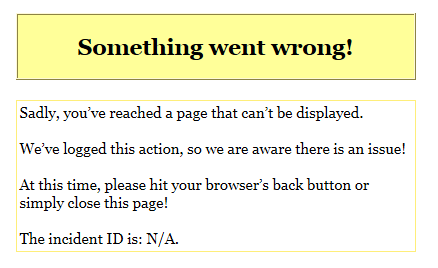
Something went wrong!
Sadly, you’ve reached a page that can’t be displayed.
We’ve logged this action, so we are aware there is an issue!
At this time, please hit your browser’s back button or simply close this page!
The incident ID is: N/A.
If I send the reply directly (without preview) then the message is accepted.
Have you given out your reputation points today? Select the Rate This Post link to give points for good posts!
-------------------------------------------------------------
Brad! Jones
Lots of Software, LLC (I wrote: C Programming in One Hour a Day)(Dad Jokes Book)(Follow me on Twitter)
--------------------------------------------------------------
Re: [VB6] Properly Eject CD/DVD and USB Drives Safely
The link in post #20 isn't working for me. No matter what I try, I get an error similar to the following:
I downloaded it multiple times. That part seems to go fine. However, when I attempt to open it, no cigar. I tried with Windows Explorer and 7-Zip. 7-Zip just hangs up, whereas Windows Explorer gives the above error.
I also tried downloading and unzipping another file from these forums, and that worked just fine.
Not sure what's going on, but it ain't workin' here.
Regards,
Elroy
Any software I post in these forums written by me is provided "AS IS" without warranty of any kind, expressed or implied, and permission is hereby granted, free of charge and without restriction, to any person obtaining a copy. To all, peace and happiness.
Re: [VB6] Properly Eject CD/DVD and USB Drives Safely
You're right!
I should have gone further with me testing. When I said "it worked" above I only meant that the download downloaded... something. I didn't try to use it.
The original ZIP file is 4437 bytes long.
Maybe at some level some security software is triggering on the file name or something? There are no binaries within the ZIP.
Re: [VB6] Properly Eject CD/DVD and USB Drives Safely
It's the only one that has messed up for me that I can remember. I don't download ZIPs from this site everyday, but I do often enough that I'd remember if something seemingly more systemic was going wrong.
Any software I post in these forums written by me is provided "AS IS" without warranty of any kind, expressed or implied, and permission is hereby granted, free of charge and without restriction, to any person obtaining a copy. To all, peace and happiness.



 Reply With Quote
 Re: [VB6] Properly Eject CD/DVD and USB Drives Safely
 Originally Posted by dilettante