|

-
Nov 22nd, 2016, 07:20 PM
#1
New SVG-based Icon-Editor
Hi guys,
here's a new App I've recently finished - together with a colleague and friend of mine
(J. Schätzke, a graphics-designer extraordinaire, who's responsible for the huge SVG-ClipArt-DB which comes with the App).
It's a Vector-based Icon-Editor, which allows "layered recombination" of vectorized Base-Icons and -Shapes -
all in a modern style ("flat" and "semi-flat"), combinable with several effects (as e.g. "light-reflection", "long-shadow" and others).
It seems to be the only Icon-Editor of that kind currently, which can Import and Export resolution-independent Icons in SVG-format
(but exports to other formats - e.g. to *.png or *.ico - in user-adjustable pixel-resolutions are possible as well).
I'd like to get some feedback for it, how it behaves on your systems (to rule out potential "localization-issues" -
or general Win-System-related ones). We did test it quite intensively on "german-localized" Win8/Win10-systems -
but not as much on Win7/XP (although it seems to work properly on these as well).
So, if you still use Win7/XP or have a locale which differs from "german", I'd be interested in your feedback.
Also any "weirdness" with systems that sport "multiple-screens" - or have a very high DPI-resolution would be of interest
(the Application is "DPI-Aware" and supports an adjustable "User-Zoom" in its Settings-Menu).
Of course also any other suggestion you'd like to make (with regards to User-Interface - or potential features you feel are
"badly missing", would be highly appreciated of course.
Here's a link to the Website where you can download a Trial-version from:
http://colibrico.de/en/index.htm
(the trial is only limited with regards to the exported-images/icons, which would have a "water-mark" -
otherwise the functionality is not restricted - and there's also no "nag-screens" or something silly like that).
And here another link to a few YouTube-Vids, which show a few "How-To"-sequences.
http://colibrico.de/en/videos.htm
Finally a few ScreenShots, what it currently looks like:
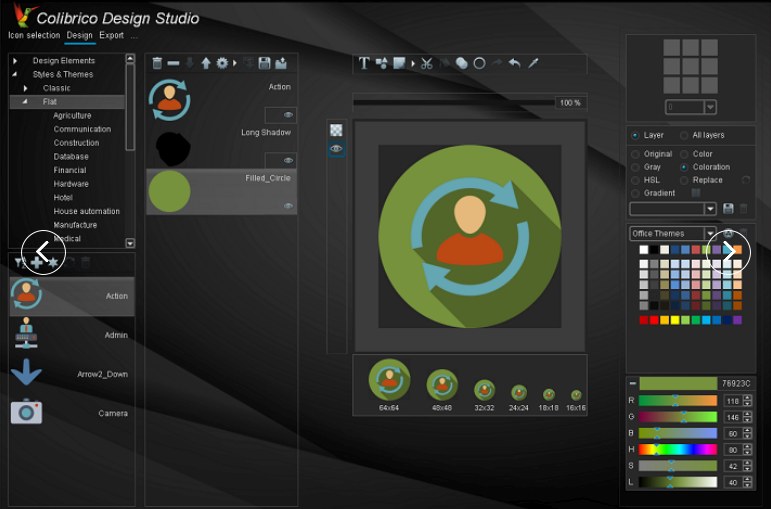
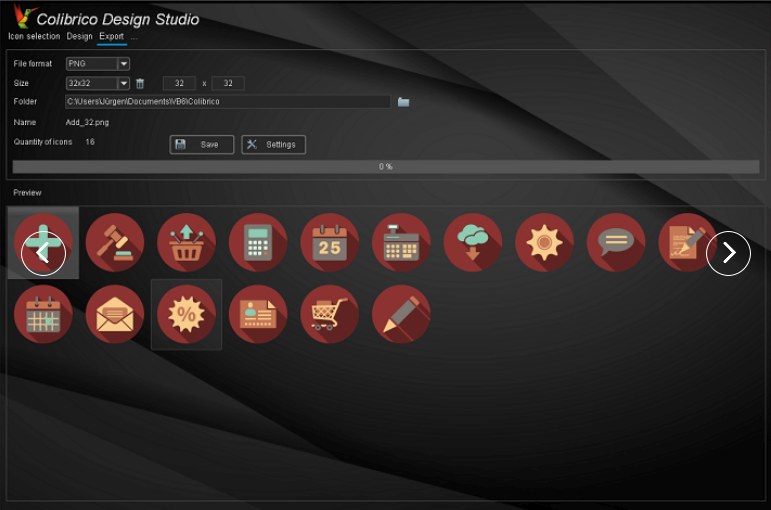
Olaf
-
Nov 22nd, 2016, 09:01 PM
#2
Re: New SVG-based Icon-Editor
-
Nov 23rd, 2016, 01:07 PM
#3
Re: New SVG-based Icon-Editor
Hi Olaf, I've not had much of a chance yet to have a really good 'play' with it, but it struck me that the available effects were a bit limited; just shadow types, currently. Anyway, I made a suggestion at your friends forum for a kind of 'outline' effect (for mouse-overs and such). Even threw in some illustrative code that I'm sure you can improve on 
If you don't know where you're going, any road will take you there...
My VB6 love-children: Vee-Hive and Vee-Launcher
-
Nov 23rd, 2016, 05:44 PM
#4
Addicted Member

Re: New SVG-based Icon-Editor
A quick error search
When you use TAB to move focus
- some elements indicated focus with highlight some not
- some elements with no action indicated focus with highlight
- using SHIFT + TAB does not resycle same as TAB
Laptop with 1366x768, put scaling to 400%
- very difficult to reset without replacing database
- top left corner, put somekind reset, revert, ...
Icons, Electronic, Flip_Switches
- only arm should move, not the whole switch
I like the GUI color but you should use solid background
-
Nov 23rd, 2016, 09:19 PM
#5
Re: New SVG-based Icon-Editor
 Originally Posted by ColinE66

Hi Olaf, I've not had much of a chance yet to have a really good 'play' with it, but it struck me that the available effects were a bit limited; just shadow types, currently. Anyway, I made a suggestion at your friends forum for a kind of 'outline' effect (for mouse-overs and such). Even threw in some illustrative code that I'm sure you can improve on
Hi Colin,
Yep - saw your suggestion in the Colibrico-Forum, thanks BTW -
and indeed the VB6-code to ensure that dynamically is quite straight forward...
But it is doing that "Blurred-Glowing"-effect on Image-Surfaces (Pixel-Surfaces),
per Pixel-Operations (Cairo-Pixel-Operators as ATOP, the two Blur-Methods and also
RenderSurfaceContent are kind of "Alpha-capable-Pixel-Only"-Operations
(more acting like a BitBlt on steroids - then putting Pixel-areas into the SVG -
kinda like it's possible to put a normal Bitmap per BitBlt into an EMF - which works,
but in higher resolutions will only look well, when the underlying BitMap was oversized
in a way, that it offers enough reserves for Higher-Resolution-Renderings).
So, to keep open the Option, to later export a constructed Image to SVG, we have to stay away
from these Pixel-Operations (to keep up the resolution-independence of the resulting SVG - and
the Filesizes of the exported SVGs relatively small).
It's nevertheless possible "by other means" - but this would start with a pre-scan of the
"surrounding-path" of a given Source-Image (which is not easy, since several SVG-Layers
can be combined in the App) - and then - on that scanned Path - applying several Strokes
(with decreasing LineWidth and increasing Alpha, to achieve a similar effect.
So, it's doable in an SVG-export-compatible manner, but with a bit more efforts (though we have that feature on our "to-do"-list already).
In the meantime VB6-Users could apply that effect dynamically (similar to what you've outlined) dynamically
(directly in the VB6-App, which could then use a normal Image-resource, which comes without any effects pre-applied).
That's the way I'd prefer to work with an Icon-Set anyways - only creating a single Icon-Set for the normal-case
as my "shipped Resource", then applying only dynamic-live-effects, depending on the current states
(for Hover, Disabled, Pressed, etc.).
If it doesn't have to be an images contour (the current Images-Outline) which shall have the Glow-Effect,
but "Images where the framing remains in a constant shape" - there's several Glow- and Reflection-
effects possible already, by using the pre-fabricated Basic-Shapes in a layered combination.
The Video #3 (creating a Button) shows a bit, how to work with these "Shape-Layers": http://colibrico.de/en/videos.htm
Olaf
-
Nov 23rd, 2016, 09:36 PM
#6
Re: New SVG-based Icon-Editor
Originally Posted by pekko
When you use TAB to move focus
- some elements indicated focus with highlight some not
- some elements with no action indicated focus with highlight
- using SHIFT + TAB does not resycle same as TAB
Yep, more unique focus-indicators for the "dark adapted Widgets" (as well as broader
support for Key-based navigation per ShortCuts and such) is on our Todo, but
with a lesser priority than other stuff...
Originally Posted by pekko
Laptop with 1366x768, put scaling to 400%
- very difficult to reset without replacing database
- top left corner, put somekind reset, revert, ...
Ah great - thanks for catching that (that's the kind of thing I was hoping for).
I guess this would be solvable comparably easy, by just suppressing/disabling the higher
Zoom-Factors on "lower-res-screens" (but an easy reachable "Zoom-Reset"-button
sounds like a good idea as well).
Originally Posted by pekko
Icons, Electronic, Flip_Switches
- only arm should move, not the whole switch
I will duly relate that to Jürgen (also preparing myself mentally already for the ensuing
discussion about "suppressed artistic freedom" and the like) - nah, just kidding...
Originally Posted by pekko
I like the GUI color but you should use solid background
Sounds like a CheckBox (no BackGround-Image) in the Settings-Screen would be a good idea
for the next release, consider it done... 
Thanks for testing Pekko...
Olaf
-
Nov 24th, 2016, 01:51 AM
#7
Fanatic Member
Re: New SVG-based Icon-Editor
I haven't yet played deeply. I created a PNG, It works very well in Win10/32Bit.
Edited 1:
On left side, the item text alignment is not proper in the list.
Last edited by DaveDavis; Nov 24th, 2016 at 01:55 AM.
-
Nov 24th, 2016, 04:33 AM
#8
Addicted Member
Re: New SVG-based Icon-Editor
Strange behavior in export tab, please note File will expire in 23 hours
https://dropfile.to/phaCeQX
-
Nov 24th, 2016, 08:12 PM
#9
Re: New SVG-based Icon-Editor
Originally Posted by DaveDavis
I haven't yet played deeply. I created a PNG, It works very well in Win10/32Bit.
Ok - although you can use it, to produce single-icons, step-by-step (as wont from other Icon-Editors) -
the App is especially strong in changing a "complete set of icons" - as e.g. "everything you have in a ToolBar" like:
- changing a "blueish" set of icons (which you can store in a template in the Design-Views Layer-List) - to a "reddish one"
- or changing the "framing" or some overlays on a given set, to a different framing- or overlay-effect
This way you can influence and export the same set of "base-images" into e.g. different Resource-Subfolders,
which then hold the different "states" of your Toolbar-iconset (hovered, focused, pressed, disabled, etc.).
Or you can produce "changed, differently colored sets", in case you introduce a lighter or darker background in your App
(to achieve better contrasts of the re-exported set on the changed background-theme).
The video-link I posted further above contains a few movies, which show the needed steps for that.
Originally Posted by DaveDavis
On left side, the item text alignment is not proper in the list.
Thanks for testing Dave - could you upload a ScreenShot of where you discovered the issue?
Olaf
-
Nov 24th, 2016, 08:35 PM
#10
Re: New SVG-based Icon-Editor
Originally Posted by pekko
Strange behavior in export tab, please note File will expire in 23 hours ...
Ok, now there's a "very stubborn User, not following instructions"...
More seriously, you're right - the behaviour is not optimal as it is currently.
The upcoming Settings-Frame (which reflects its Parts back into the resulting Filename on the left),
should have been initialized with the 'Name'-part (which came before '_' in the Filename-Label) -
this way all the nerving MessageBoxes could have been avoided.
The issue is duly noted, thanks for catching that.
Olaf
-
Nov 25th, 2016, 01:38 AM
#11
Addicted Member
Re: New SVG-based Icon-Editor
Originally Posted by Schmidt
Ok, now there's a "very stubborn User, not following instructions"...
I thought that you would like to know all mistakes you have done. 
Originally Posted by Schmidt
this way all the nerving MessageBoxes could have been avoided.
And you mean ALL MessageBoxes.
https://dropfile.to/YRHnkgR
You have invented self closing MessageBox. 
https://dropfile.to/W7V7mWX
-
Nov 25th, 2016, 06:00 AM
#12
Re: New SVG-based Icon-Editor
-
Nov 26th, 2016, 03:54 AM
#13
Addicted Member
Re: New SVG-based Icon-Editor
With minimum size 1024x720 you can't use color picker tool.
Look what happen when I double click "Arrow_Previous" => "Arrow_Refresh" is added to list.
That same double click issue happens also in icon selection tab.
https://dropfile.to/xS38CuW
Other issue in icon selection tab.
Normal mouse click without shift or anything else.
https://dropfile.to/B8MgvUm
and a few other in queue...
-
Nov 26th, 2016, 04:36 AM
#14
Re: New SVG-based Icon-Editor
Originally Posted by pekko
With minimum size 1024x720 you can't use color picker tool.
Yep, the minimum supported ScreenSize for the App is 1024x768 currently - I guess we should lower that
to 1024x720 (because there's still a few older 'NetBooks' out there with a 1280x720 screen-res).
Originally Posted by pekko
Look what happen when I double click "Arrow_Previous" => "Arrow_Refresh" is added to list.
That same double click issue happens also in icon selection tab.
Other issue in icon selection tab.
Normal mouse click without shift or anything else.
Thanks, yes both are related to the "scroll into view" behaviour of the VList-Widget, in case of a "partially shown row at the bottom".
(the VList will need to "block other Mouse-Actions" whilst this "scrolling into view" takes place).
Olaf
-
Nov 26th, 2016, 06:57 PM
#15
Addicted Member
Re: New SVG-based Icon-Editor
http://colibrico.de/en/eula.htm
Licensing
If you purchased a license for commercial usage, you are allowed to use the software and the graphics for commercial usage as well.
Restrictions
The licensee is not entitled to distribute graphics that come with Colibrico, be it in the original or an altered form.
?????
-
Nov 27th, 2016, 06:25 AM
#16
Re: New SVG-based Icon-Editor
Ok, seems there was a glitch in the english translation - the intent the appropriate paragraph was
trying to express is, that "distributing or selling *only* the produced graphics" shall not be allowed.
Meaning: "use and distribute Colibrico-produced graphics within your *own* App/Site/Product only" (as a secondary resource),
but don't sell/distribute *only* the produced graphics as "pure Icon-Sets" to others.
In yet other words:
- "acting as an IconSet-vendor" (by just ripping off Colibrico-Icons from its DB, selling only them) = not allowed
- "distributing your App as the primary product" (the Colibrico-Icons being App-resources of secondary nature) = allowed
It's to protect the huge vector-clipart-library which comes with Colibrico, from being "ripped-off and sold-out"
(since there's about 8 man-years of work in it, it'd be kind of unfair when Users would try to make money with *only* the artwork).
But you're right - the way it is formulated currently, doesn't make that very clear.
Olaf
-
Nov 27th, 2016, 08:05 AM
#17
Addicted Member
Re: New SVG-based Icon-Editor
ALT + TAB list, icon is not Colibrico.
When you populate new items to lower list
it does not always initialize VScrollBar value.
https://dropfile.to/N0qRgs4
-
Nov 27th, 2016, 09:46 AM
#18
Re: New SVG-based Icon-Editor
Originally Posted by Schmidt
So, it's doable in an SVG-export-compatible manner, but with a bit more efforts (though we have that feature on our "to-do"-list already).
Aaah, OK. I had no idea it would be so much more difficult due to the SVG aspects. Thanks for explaining...
If you don't know where you're going, any road will take you there...
My VB6 love-children: Vee-Hive and Vee-Launcher
-
Nov 27th, 2016, 05:40 PM
#19
Addicted Member
Re: New SVG-based Icon-Editor
When you click empty space on list, all items will be selected.
Note different behavior with last item, I didn't click "Select All Icons" button.
https://dropfile.to/hSpXr8m
-
Nov 28th, 2016, 01:03 PM
#20
Re: New SVG-based Icon-Editor
Thanks, noted in our todo-list as well...
Olaf
-
Feb 6th, 2017, 08:16 PM
#21
Re: New SVG-based Icon-Editor
A bit late to the party here - just wanted to say that I purchased a Colibrico license and have been very happy with the software and impressed by the work you and Jürgen have put into it. Support has been very responsive regarding feature requests which is great! Thanks gentlemen
-
Jan 10th, 2018, 06:36 PM
#22
New Member
Re: New SVG-based Icon-Editor
WOW, looks like a really good icon editor. I wish I can make something like this.
 Posting Permissions
- You may not post new threads
- You may not post replies
- You may not post attachments
- You may not edit your posts
-
Forum Rules
|
Click Here to Expand Forum to Full Width
|



 Reply With Quote