|

-
Nov 19th, 2015, 03:15 PM
#841
Lively Member

Re: CommonControls (Replacement of the MS common controls)
Thank you mine was set to 'Break in class modules' now changed it and works fine
-
Nov 19th, 2015, 04:14 PM
#842
Re: CommonControls (Replacement of the MS common controls)
 Originally Posted by Jonney

I added PaperKind Enum.
I was thinking to include "Copies" and "Orientiation" property to my CommonDialog class.
But, when so thinking. I should also include, as you did, "PaperKind". And also others such as "ColorMode", "PaperBin" and so on.
And MS CommonDialog does not deal with the VB.Printer object. So when not using "PrinterDefault" or CdlPDReturnDC to use ".hDC" your like lost. At my CommonDialog the VB.Printer is set so you can deal with.
And also the problem of priority. When "Copies" property is not same as "VB.Printer.Copies" upon dialog call, choose what?
So at the end I decided to not include "Copies" and "Orientation" property.
Like chosk did, its easy to save the needed properties into variables after dialog return before actually printing. (multiple copies with orientation landscape for instance)
PS: Very stupid from VB to reset all when Printer.EndDoc is called.
Last edited by Krool; Nov 19th, 2015 at 04:18 PM.
-
Nov 19th, 2015, 04:57 PM
#843
Lively Member
Re: CommonControls (Replacement of the MS common controls)
these controls are great on a side note will you be making a gridcontrol replacement
-
Nov 19th, 2015, 06:58 PM
#844
Frenzied Member
Re: CommonControls (Replacement of the MS common controls)
Originally Posted by Krool
PS: Very stupid from VB to reset all when Printer.EndDoc is called.
Nothing complain. User can create a class or something else to hold our setting after "Apply" or "OK" button Pressed.
-
Nov 21st, 2015, 05:35 PM
#845
Re: CommonControls (Replacement of the MS common controls)
-
Nov 29th, 2015, 09:01 AM
#846
Hyperactive Member
Re: CommonControls (Replacement of the MS common controls)
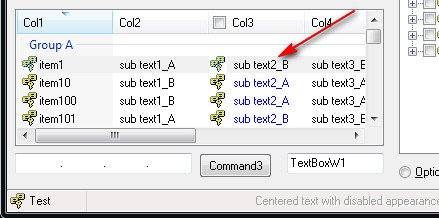
I just happen to notice this as I am getting the same result when I try to do this. The text of the whole Col3 should be in blue but the first row of Col3 would appear in black when first presented. Then click anywhere in the ListView and the first row Col3 will then become blue.
Edit to add: On closer observation, this might not be the case. Looks like actually the first row is "grey" making the text black. Sort of selected but not focus.
Last edited by chosk; Nov 29th, 2015 at 09:15 AM.
-
Dec 2nd, 2015, 04:09 AM
#847
Hyperactive Member
Re: CommonControls (Replacement of the MS common controls)
I noticed an issue with the ListView in the 23-Nov-2015 version.
The design:
a) I have a popup menu on the right mouse click.
b) The left mouse click only select the row, no popup.
Observation:
a) There is now a lag when I right mouse click. On the first right mouse click, the popup menu may or may not appear. Subsequent right mouse click the popup will appear.
b) After a right mouse click, the immediate next left mouse click will popup menu. It should not.
Resolve:
I use back the 16-Nov-2015 ListView version and all is well. By this I mean I copy only the ListView folder into my project.
-
Dec 2nd, 2015, 12:05 PM
#848
Hyperactive Member
Re: CommonControls (Replacement of the MS common controls)
I just found an issue with the CommonDialog class:
Code:
280    With CommonDialog1
...
...
400       .Filter = "Workspaces (*.tfw)|*.tfw"
410       .ShowSave
...
...
470       WorkspacePath = .Filename
480       WorkspaceName = .FileTitle
...
...
When I input abc as the filename, both .Filename and .FileTitle do not show the ".tfw" but only abc and save the file as abc without file extension.
Next when I test to save another time as abc again. I get a prompt that abc already exist. This means it also just check for abc, instead of abc.tfw.
Previously with the VB6 ComonDialog, it handles the extension automatically.
-
Dec 2nd, 2015, 12:45 PM
#849
Hyperactive Member
Re: CommonControls (Replacement of the MS common controls)
I add a new line:
.DefaultExt = "tfw"
and it works now.
Edit to add:
The .DefaultExt will make the file to be saved with the file ext (abc.tfw). But when checking for file exist before saving, it is still checking without the file ext (abc).
Last edited by chosk; Dec 2nd, 2015 at 01:36 PM.
-
Dec 2nd, 2015, 02:28 PM
#850
Re: CommonControls (Replacement of the MS common controls)
Originally Posted by chosk
I noticed an issue with the ListView in the 23-Nov-2015 version.
The design:
a) I have a popup menu on the right mouse click.
b) The left mouse click only select the row, no popup.
Observation:
a) There is now a lag when I right mouse click. On the first right mouse click, the popup menu may or may not appear. Subsequent right mouse click the popup will appear.
b) After a right mouse click, the immediate next left mouse click will popup menu. It should not.
Resolve:
I use back the 16-Nov-2015 ListView version and all is well. By this I mean I copy only the ListView folder into my project.
Update released.
Indeed, this bug happens on the ListView and TreeView control after the update on 21-Nov-2015.
But this has been fixed now. Thanks!
-
Dec 2nd, 2015, 04:44 PM
#851
Addicted Member
Re: CommonControls (Replacement of the MS common controls)
Originally Posted by chosk
I add a new line:
.DefaultExt = "tfw"
and it works now.
Edit to add:
The .DefaultExt will make the file to be saved with the file ext (abc.tfw). But when checking for file exist before saving, it is still checking without the file ext (abc).
This is an issue with the common dialog itself.
I use GetSaveFileName directly and I also sometimes get the file without the extension. I guess in this case we should check the nFilterIndex property of the OPENFILENAME structure and append the appropriate extension or just append the extension if there is only 1 option.
-
Dec 9th, 2015, 02:57 AM
#852
Re: CommonControls (Replacement of the MS common controls)
A couple questions on the unusual version of oleguids.tlb that's included...
-IEnumeration is just a renamed IEnumVARIANT... but what is IEnumerationVB? A custom interface? I can't find a match for the CLSID.
-Same question with the others like that; IPerPropertyBrowsing even has nearly identical methods except one in the middle (MapPropertyToPage)-- wouldn't that throw off the vtable?
-If you're going to include placeholder interfaces that aren't valid, would you consider renaming them to __VB as well? IDataObject and IStorage are very frequently used and any project that also uses your controls has to always remember to explicitly type them since VB sometimes thinks a variable refers to the oleguids placeholder.
I had originally just wanted to eliminate the reference in my project due to the conflicts; but need to understand the renamed and possibly custom interfaces first.
Last edited by fafalone; Dec 9th, 2015 at 03:10 AM.
-
Dec 9th, 2015, 06:18 AM
#853
Re: CommonControls (Replacement of the MS common controls)
Originally Posted by fafalone
A couple questions on the unusual version of oleguids.tlb that's included...
-IEnumeration is just a renamed IEnumVARIANT... but what is IEnumerationVB? A custom interface? I can't find a match for the CLSID.
-Same question with the others like that; IPerPropertyBrowsing even has nearly identical methods except one in the middle (MapPropertyToPage)-- wouldn't that throw off the vtable?
-If you're going to include placeholder interfaces that aren't valid, would you consider renaming them to __VB as well? IDataObject and IStorage are very frequently used and any project that also uses your controls has to always remember to explicitly type them since VB sometimes thinks a variable refers to the oleguids placeholder.
I had originally just wanted to eliminate the reference in my project due to the conflicts; but need to understand the renamed and possibly custom interfaces first.
IEnumeration is equivalent to IEnumVARIANT, but "unrestricted". Thus it can be implemented into objects in VB.
IEnumerationVB is a custom interface, but actually not needed anymore cause its now working with raise events in the Enumeration.cls
But I kept the IEnumerationVB in the OLEGuids.tlb as it does not cause any harm. And it will also not be compiled into when it's not used in the VB project.
For the others: That's why I declared all my references to OLEGuids.tlb with 'OLEGuids.*', e.g. "As OLEGuids.IDataObject"
That is the preferred method to eliminate those conflicts.
-
Dec 9th, 2015, 08:53 AM
#854
Re: CommonControls (Replacement of the MS common controls)
Apart from the *VB interfaces everything is also in olelib/oleexp.. Are the other ones used in a way the real ones can't be? Would just be nice to have one less reference and not have to worry about explicit typing (As OLEGuids.whatever).
-
Dec 9th, 2015, 11:20 AM
#855
Re: CommonControls (Replacement of the MS common controls)
Originally Posted by fafalone
Apart from the *VB interfaces everything is also in olelib/oleexp.. Are the other ones used in a way the real ones can't be? Would just be nice to have one less reference and not have to worry about explicit typing (As OLEGuids.whatever).
You could use the OCX version. No OLEGuids.tlb needed for it.
-
Dec 9th, 2015, 12:30 PM
#856
Re: CommonControls (Replacement of the MS common controls)
I'm trying to get rid of an IDE-only dependency, how do you think I feel about ocx dependencies lol. Your controls don't even replace the common controls ocx's for me, they replace me doing things with CreateWindowEx myself on controls I don't need to customize, because I don't even like those depends 
I'm just asking for a little information to determine whether it is possible to use the Windows version of all the interfaces.. I'll do all the work myself I just thought you'd be able to answer whether it was possible or not before I spent hours on it to find out 'nope'.
-
Dec 9th, 2015, 01:48 PM
#857
Re: CommonControls (Replacement of the MS common controls)
Originally Posted by fafalone
I'm trying to get rid of an IDE-only dependency, how do you think I feel about ocx dependencies lol. Your controls don't even replace the common controls ocx's for me, they replace me doing things with CreateWindowEx myself on controls I don't need to customize, because I don't even like those depends
I'm just asking for a little information to determine whether it is possible to use the Windows version of all the interfaces.. I'll do all the work myself I just thought you'd be able to answer whether it was possible or not before I spent hours on it to find out 'nope'.
I don't get what you want. Even the non *VB interfaces are needed in the OLEGuids.tlb in order to work.
What you can do is to build your own .tlb with only the *VB interfaces from OLEGuids.tlb and the other referring to your other ole typlib. Because these are std windows interfaces.
-
Dec 9th, 2015, 04:23 PM
#858
Re: CommonControls (Replacement of the MS common controls)
All of the non-*VB interfaces are defined in my primary typelib. I don't want to have conflicts (yes I'm aware I can type to a specific typelib, but that and having the extra depend is what I'm trying to avoid). So I want to know if your controls depend on the customizations made by the *VB interfaces in such a way that modifying the code to simply use the normal interface instead is impossible/would require a ground-up rewrite.
-
Dec 9th, 2015, 06:11 PM
#859
Re: CommonControls (Replacement of the MS common controls)
Originally Posted by fafalone
So I want to know if your controls depend on the customizations made by the *VB interfaces in such a way that modifying the code to simply use the normal interface instead is impossible/would require a ground-up rewrite.
No, without rewrite it is not possible to get the controls to work without the *VB interfaces.
You could try to create VB class objects for all *VB interfaces and replace them accordingly.
-
Dec 10th, 2015, 09:40 AM
#860
New Member
Re: CommonControls (Replacement of the MS common controls)
Hello everybody,
we are just trying to take advantage of the whole in our Access 2010 database. We need a ListView, which allows Unicode. Sorry, we do not know how we will use the OCX from page 16 correctly.
EDIT: We found a way to insert the new ListView Control but Access 2007 & 2010 crashes while adding this control to our form. Any ideas?
We are unfortunately beginner in this regard.
Thank you
Last edited by selma; Dec 11th, 2015 at 04:26 AM.
-
Dec 16th, 2015, 01:42 PM
#861
Re: CommonControls (Replacement of the MS common controls)
Originally Posted by selma
we are just trying to take advantage of the whole in our Access 2010 database. We need a ListView, which allows Unicode. Sorry, we do not know how we will use the OCX from page 16 correctly.
EDIT: We found a way to insert the new ListView Control but Access 2007 & 2010 crashes while adding this control to our form. Any ideas?
The OCX is for VB6 only.
-
Dec 26th, 2015, 07:40 AM
#862
New Member
Re: CommonControls (Replacement of the MS common controls)
i know may be this is repeated or stupid question
i work as developer , company have internal application built in VB6 SP6 , after i found this MS-Common-Control Replacement i want to change all VB Native Control to its equivalent in this VBCCR12 ... the forms in our project are more than 240 forms and controls i think in thousands so changing control by control is a heavy load and may be will take months , is there any tool or pre-written by any user that can do the right job as i described , i will truly appreciate if some one help me about this ,,, ha ha dont ask me to post my company applicaion source may be i will be fired and even sued if i do that
-
Dec 26th, 2015, 09:22 AM
#863
Re: CommonControls (Replacement of the MS common controls)
Originally Posted by ErpEg2015
i know may be this is repeated or stupid question
i work as developer , company have internal application built in VB6 SP6 , after i found this MS-Common-Control Replacement i want to change all VB Native Control to its equivalent in this VBCCR12 ... the forms in our project are more than 240 forms and controls i think in thousands so changing control by control is a heavy load and may be will take months , is there any tool or pre-written by any user that can do the right job as i described , i will truly appreciate if some one help me about this ,,, ha ha dont ask me to post my company applicaion source may be i will be fired and even sued if i do that
You could open the .frm files in notepad and do "Replace All". For example "VB.TextBox" to "VBCCR12.TextBoxW" and so on.
-
Dec 26th, 2015, 12:51 PM
#864
Frenzied Member
Re: CommonControls (Replacement of the MS common controls)
I am testing the ListboxW on high DPI 200%. Look like ListBoxW has one issue. But I don't know how to describe.
Code:
Private Sub UserControl_Resize()
Static InProc As Boolean
If InProc = True Then Exit Sub
If ListBoxHandle = 0 Then Exit Sub
With UserControl
Dim WndRect As RECT
'Krool Original Code
'MoveWindow ListBoxHandle, 0, 0, .ScaleWidth, .ScaleHeight, 1
'Changed to:
MoveWindow ListBoxHandle, 0, 0, Extender.Width - 2, Extender.Height - 2, 1
If PropIntegralHeight = True Then
    GetWindowRect ListBoxHandle, WndRect
    InProc = True
    .Size .scaleX((WndRect.right - WndRect.left), vbPixels, vbTwips), .scaleY((WndRect.bottom - WndRect.top), vbPixels, vbTwips)
    InProc = False
End If
End With
End Sub
I modified to use Extender size, Works OK but I am not sure the side effect.
Edited: -2 is border thickness for my case (space for shadow).
Last edited by Jonney; Dec 26th, 2015 at 08:56 PM.
-
Dec 26th, 2015, 02:07 PM
#865
Re: CommonControls (Replacement of the MS common controls)
Originally Posted by Jonney
I am testing the ListboxW on high DPI 200%. Look like ListBoxW has one issue. But I don't know how to describe.
Code:
Private Sub UserControl_Resize()
Static InProc As Boolean
If InProc = True Then Exit Sub
If ListBoxHandle = 0 Then Exit Sub
With UserControl
Dim WndRect As RECT
'Krool Original Code
'MoveWindow ListBoxHandle, 0, 0, .ScaleWidth, .ScaleHeight, 1
'Changed to:
MoveWindow ListBoxHandle, 0, 0, Extender.Width - 2, Extender.Height - 2, 1
If PropIntegralHeight = True Then
    GetWindowRect ListBoxHandle, WndRect
    InProc = True
    .Size .scaleX((WndRect.right - WndRect.left), vbPixels, vbTwips), .scaleY((WndRect.bottom - WndRect.top), vbPixels, vbTwips)
    InProc = False
End If
End With
End Sub
I modified to use Extender size, Works OK but I am not sure the side effect.
The MoveWindow API is just responsible to fill the ListBox window to the UserControl space. As the MoveWindow API expects pixels I use the UserControl.ScaleWidth/Height property. (ScaleMode of the UserControl is set to pixels).
This has nothing to do with the DPI.
-
Dec 26th, 2015, 02:26 PM
#866
Re: CommonControls (Replacement of the MS common controls)
Originally Posted by Krool
This has nothing to do with the DPI.
The problem is that VB usercontrols do not scale well at 200% DPI. This is because the UC Width,Height property values are not the same as reported by the host; therefore the ScaleWidth,ScaleHeight are incorrect also. If you run your test project in 200% DPI, you should see the issue/problem. This DPI 'bug' occurs when 1440 / DPI <> a whole number, i.e., 1440 / 192 (200%) = 7.5
Edited: Of course DPI virtualization must be disabled or project manifested to be DPI-aware. Otherwise, at 200% DPI, VB will likely run in Virtualized 96 DPI and the problem doesn't exist, but the scaling of the project is rather unprofessional.
Last edited by LaVolpe; Dec 26th, 2015 at 02:36 PM.
-
Dec 26th, 2015, 08:59 PM
#867
Frenzied Member
Re: CommonControls (Replacement of the MS common controls)
With above modification, I tested 100%,125%,150% and 200%, check on or off "XP Style Scale", all work ok.
but the scaling of the project is rather unprofessional.
Code:
If PropIntegralHeight = True Then
    GetWindowRect ListBoxHandle, WndRect
    InProc = True
    .Size .scaleX((WndRect.right - WndRect.left), vbPixels, vbTwips), .scaleY((WndRect.bottom - WndRect.top), vbPixels, vbTwips)
    InProc = False
End If
If I set PropIntegralHeight =True, things get complicated. So I always use PropIntegralHeight = False to avoid going into such loop.
Conclusion: Always use MoveWindow/SetWindowPos API and Extender.Width/Height in UserControl_Resize to resolve DPI issue.
Last edited by Jonney; Dec 26th, 2015 at 10:17 PM.
-
Dec 27th, 2015, 03:53 AM
#868
Re: CommonControls (Replacement of the MS common controls)
But Extender.Width could be in twips? (ScaleMode of container)
So maybe just use GetClientRect from UC's hWnd and size according to this. Does that work?
-
Dec 27th, 2015, 04:20 AM
#869
Frenzied Member
Re: CommonControls (Replacement of the MS common controls)
Originally Posted by Krool
But Extender.Width could be in twips? (ScaleMode of container)
So maybe just use GetClientRect from UC's hWnd and size according to this. Does that work?
Both Twips and Pixels mode work OK from what I tested.
Noted: I only took out ListBoxW UserControl then tested it, not the whole CCRP project.
Tips from Lavolpe:
1. if the Extender object does not support the Left,Top properties, you simply cannot use it for positioning.
2. If the Extender does support Width,Height then you can use SetWindowPos instead of MoveWindow.
3. If the Extender object does not support any of those, you can use GetWindowRect to retrieve dimensions, scale them to DPI if needed, then use MoveWindow,SetWindowPos.
-
Dec 27th, 2015, 05:18 AM
#870
Re: CommonControls (Replacement of the MS common controls)
Btw, using Move w/o passing width/height seems to fix the issue in high DPI. Something like this
Code:
If 1440 \ Screen.TwipsPerPixelX = 1440 / Screen.TwipsPerPixelX Then
    oCtl.Move oCtl.Left, oCtl.Top, newWidth, newHeight
Else
    oCtl.Move oCtl.Left + Screen.TwipsPerPixelX, oCtl.Top, newWidth, newHeight
    oCtl.Move oCtl.Left - Screen.TwipsPerPixelX
End If
(code from LaVolpe)
cheers,
</wqw>
-
Dec 27th, 2015, 07:10 AM
#871
Re: CommonControls (Replacement of the MS common controls)
Originally Posted by wqweto
Btw, using Move w/o passing width/height seems to fix the issue in high DPI. Something like this
Code:
If 1440 \ Screen.TwipsPerPixelX = 1440 / Screen.TwipsPerPixelX Then
    oCtl.Move oCtl.Left, oCtl.Top, newWidth, newHeight
Else
    oCtl.Move oCtl.Left + Screen.TwipsPerPixelX, oCtl.Top, newWidth, newHeight
    oCtl.Move oCtl.Left - Screen.TwipsPerPixelX
End If
(code from LaVolpe)
cheers,
</wqw>
Ok, thats for sizing the UserControl itself. But the issue Jonney raised was with MoveWindow and fitting the ListBox window into the UserControl space. That could be simply solved by GetClientRect instead of ScaleWidth/Height, right?
Last edited by Krool; Dec 27th, 2015 at 07:14 AM.
-
Dec 27th, 2015, 08:21 AM
#872
Frenzied Member
Re: CommonControls (Replacement of the MS common controls)
Originally Posted by Krool
Ok, thats for sizing the UserControl itself. But the issue Jonney raised was with MoveWindow and fitting the ListBox window into the UserControl space. That could be simply solved by GetClientRect instead of ScaleWidth/Height, right?
for my case, showing Listbox at certain Position, for example, Textbox + ListboxW = drop down ComboBox showing in Grid Cell with a double click.
After more tests, the simply way is to set the usercontrol (ListBoxW) scale mode from Twips to Pixels.
1. ScaleMode: Twips:
MoveWindow ListBoxHandle, 0, 0, Extender.Width , Extender.Height, 1
2. ScaleMode: Pixels:
MoveWindow ListBoxHandle, 0, 0, .ScaleWidth, .ScaleHeight, 1
Or: MoveWindow ListBoxHandle, 0, 0, Extender.Width , Extender.Height, 1
Last edited by Jonney; Dec 27th, 2015 at 08:25 AM.
-
Dec 27th, 2015, 08:50 AM
#873
Re: CommonControls (Replacement of the MS common controls)
The UserControl ScaleMode is already set to pixels. I dont get it why Extender.Width/Height should work.
-
Dec 27th, 2015, 10:54 AM
#874
Re: CommonControls (Replacement of the MS common controls)
With high DPI, specifically non-whole number VB DPI (1440 / DPI), there are 2 separate issues. Internal resizing from the UC and external reszing from the UC's host. For simplicity, we will assume no non-client borders, i.e., no WS_BORDER, etc. And also, for simplicity, we'll say the host & UC are in the same scalemode. One last caveat, the stuff below pertains to VB being the host for the UC. The Extender object's Width,Height properties are not guaranteed to be supported in any non-VB host, i.e., Access, IE, Word, etc.
First. At 200% DPI, VB runs internally at 214% DPI. But if the UC and host sizes were in sync, this wouldn't be an issue. 214% DPI is equivalent to: (1440 / 7) / 96. At 200% DPI the system's twips per pixel would be 7.5 but VB uses 7.
Second. UC dimensions are saved as twips by VB within the project files.
Internally: ScaleWidth,ScaleHeight cannot be trusted. It can be less than what the host reports. If UC is designed with a width of 200 pixels, 3000 twips, in 96 DPI and shown in 200% DPI, then at 200% DPI, you would expect the host to report the UC as 400 pixels, twice as large at twice the original DPI. But not so. The host still reports the UC as 3000 twips as expected, but the size in pixels would be 3000 / 7 = 428.571. If your UC's scalemode were pixels, you'd expect its ScaleWidth to report 428.571. However, the UC's scalewidth in twips is 2800 and in pixels: 400, 28.571 pixels smaller than the host.The difference in VB and System twips per pixel can be used to show that difference: 3000 * 7 / 7.5 = 2800
For hWnd controls, SetWindowPos,MoveWindow can be used. However, GetClientRect or GetWindowRect is not useful, as is. Why? Well, you are getting pixel size from one API and supplying it to another API, no change in data. The UC, internally, should rescale itself during the resize event. The pixels returned from the API should be first scaled by the Extender property, using vbContainerSize, before sending to MoveWindow,SetWindowPos.
For Windowless controls, the reported size by the UC width,height or scalewidth,scaleheight are not really important. When the UC's Paint event is called, the size reported by the host is passed via the clipping rectangle in the passed hDC. But to know the real size, there are a few ways to get to it, with the Extender property being the easiest.
Externally: Simply changing the UC dimensions from the host, does not rescale the UC correctly in all cases. The code posted in #870 can be used without need for APIs, though slight modifications are needed if the UC can be Top/Bottom aligned.
Bottom line. ScaleWidth,ScaleHeight and Width,Height cannot be trusted. They will NOT report the same dimensions as the host in some DPIs
Above being said. Yes, an API window can be sized exactly to the UC scalewidth,scaleheight. However, that scalewidth,scaleheight may not be correctly scaled relative to the actual width/height. What happens is that your control on the form appears smaller, when drawn, than it should be when compared to other non-UCs. From a professional point of view: yuck. This can be easily proven and visualized with a simple test.
1. At 96 DPI, start new project. Add a picturebox & set properties: BackColor=Red, Borderless, not-3D
2. Add a new UC to the project and set it's backcolor to white
3. Place an instance of the UC inside the picturebox. Sizing UC doesn't matter right now
4. Add a button and behind the button, add this code:
UserControl1.Move 0, 0, Picture1.ScaleWidth, Picture1.ScaleHeight 5. Save the project and change your system to 200% DPI
6. Disable DPI virtualization: VB6.exe properties compatibility tab. Check "Disable display scaling on high DPI settings"
7. Run the test project and click the button. You should see the UC did not 'fill up' the picturebox when drawn, though the picturebox & uc sizes are identical from the host's point of view
Tip: You'll know if VB is not running in virtual DPI, at all DPIs other than 96, if the Screen.TwipsPerPixelX returns something other than 15.
Edited: If your O/S doesn't have that compatibility tab option, you may need to disable DPI virtualization by creating an external manifest for vb6.exe saying that VB is DPI-aware.
Last edited by LaVolpe; Dec 27th, 2015 at 11:35 AM.
-
Dec 27th, 2015, 11:40 AM
#875
Re: CommonControls (Replacement of the MS common controls)
Originally Posted by wqweto
Btw, using Move w/o passing width/height seems to fix the issue in high DPI. Something like this
Code:
If 1440 \ Screen.TwipsPerPixelX = 1440 / Screen.TwipsPerPixelX Then
    oCtl.Move oCtl.Left, oCtl.Top, newWidth, newHeight
Else
    oCtl.Move oCtl.Left + Screen.TwipsPerPixelX, oCtl.Top, newWidth, newHeight
    oCtl.Move oCtl.Left - Screen.TwipsPerPixelX
End If
(code from LaVolpe)
cheers,
</wqw>
You mean the following addition in the UserControl_Resize handler fixes the DPI issue?
Code:
If 1440 \ Screen.TwipsPerPixelX = 1440 / Screen.TwipsPerPixelX Then
    Extender.Move Extender.Left, Extender.Top
Else
    Extender.Move Extender.Left + Screen.TwipsPerPixelX, Extender.Top
    Extender.Move Extender.Left - Screen.TwipsPerPixelX
End If
-
Dec 27th, 2015, 11:59 AM
#876
Re: CommonControls (Replacement of the MS common controls)
Originally Posted by Krool
You mean the following addition in the UserControl_Resize handler fixes the DPI issue?
Code:
If 1440 \ Screen.TwipsPerPixelX = 1440 / Screen.TwipsPerPixelX Then
    Extender.Move Extender.Left, Extender.Top
Else
    Extender.Move Extender.Left + Screen.TwipsPerPixelX, Extender.Top
    Extender.Move Extender.Left - Screen.TwipsPerPixelX
End If
Yes & no.
1. When the IF statement is true, you do not need to make any adjustments
2. Otherwise, the simple answer is yes with one major caveat. The Extender object MUST support .Move, .Left & .Top. VB, as the host, supports them. Other non-VB hosts, maybe not. I'd also suggest adding a flag in the event to address recursion during the double move
3. Though that would 'fix' the DPI issue, it doesn't address resizing your control from within, if needed. Most controls are not self-sizing.
4. If the control has the Alignable property set to true, then the double move should be tweaked if the control is set to be Top or Bottom aligned. The tweak is to adjust the Top property, not the Left property.
Edited: Regarding #4, this would need to be tested, but will adjusting both Top & Left handle the Alignable control regardless what side of the window it is aligned to? i.e.,
Code:
    Extender.Move Extender.Left + Screen.TwipsPerPixelX, Extender.Top + Screen.TwipsPerPixelY
    Extender.Move Extender.Left - Screen.TwipsPerPixelX, Extender.Top - Screen.TwipsPerPixelY
Last edited by LaVolpe; Dec 27th, 2015 at 12:25 PM.
-
Dec 27th, 2015, 12:27 PM
#877
Re: CommonControls (Replacement of the MS common controls)
Originally Posted by LaVolpe
Yes & no.
1. When the IF statement is true, you do not need to make any adjustments
2. Otherwise, the simple answer is yes with one major caveat. The Extender object MUST support .Move, .Left & .Top. VB, as the host, supports them. Other non-VB hosts, maybe not. I'd also suggest adding a flag in the event to prevent recursion during the double move
3. Though that would 'fix' the DPI issue, it doesn't address resizing your control from within, if needed. Most controls are not self-sizing.
4. If the control has the Alignable property set to true, then the double move should be tweaked if the control is set to be Top or Bottom aligned. The tweak is to adjust the Top property, not the Left property.
1. Thought that also.
2. should not be an issue as my controls are working in VB6 only anyway.
3. Some of mine are. E.g. ComboBox, Slider, CoolBar. But the internal resizing is based on the actual API window size. I use GetWindowRect and then UserControl.Size (Values passed there must be in Twips, regardless of scale modes). Anything to take care there or change?
4. That would be no problem to respect.
-
Dec 27th, 2015, 12:52 PM
#878
Re: CommonControls (Replacement of the MS common controls)
#3. Yes.
Code:
Extender.Move Extender.Left, Extender.Top, _
    ScaleX(newWidth, [ScaleMode], vbContainerSize), _
    ScaleY(newHeight, [ScaleMode], vbContainerSize)
[ScaleMode] is the scale that the newWidth,newHeight values are in, be it, twips, pixels, etc.
Again, same caveat as previous reply. Extender.Move must be supported.
Here's one thing that could throw you and would require some testing. I've seen this in a UC I've created, but haven't gone back & finalized my solution. Adding a new control during design-time. The initial size of the Extender object was zero when queried after InitProperties, even though the default size was 128x128. During the resize event, no major issues. Whether 1st loaded or re-loaded from a previous saved project, the resize event is not guaranteed to occur after InitProps/ReadProps. I've seen resize events before and after those props events, but not consistently. Testing should be done, to find the happy zone of when to resize the Extender object for self-sizing controls, if relying on the Extender.
For DPI awareness, do NOT use the UserControl.Size method.
Last edited by LaVolpe; Dec 27th, 2015 at 12:56 PM.
-
Dec 27th, 2015, 01:32 PM
#879
Re: CommonControls (Replacement of the MS common controls)
And just a follow-up regarding my last reply, hopefully clarifying for you & me...
Scenario: 1500x1500 twip (100x100 pixel) UC saved to form in 96 DPI and then later run in 192 DPI (200%). No resizing code in the UC, both the form & UC scalemode is twips
The following columns are: event name, UC.Width, UC.Height, Extender.Width, Extender.Height
The Extender values are also equal to the dimensions reported from the Form's perspective.
Existing control: ReadProperties executed. Here are sizes from some of the events, in order of event execution.
resize1890 1834 1500 1500 readprops1890 1834 1500 1500 resize1498 1498 1500 1500 paint1498 1498 1500 1500
UC added to form by double clicking on it from the toolbox to use default dimensions. InitProperties executed
initprops 1498 1498 0 0 resize 1603 1603 1603 1603 resize 1498 1498 1603 1603 paint 1498 1498 1603 1603
Notes:
1. The 2nd resize event, both scenarios, did not occur when running at 96 DPI
2. Though I didn't add it in the above, the Show event (prior to Paint) reported same as the Paint event
:: Paint events not received if UC AutoRedraw=True
:: Show event not received (runtime) if UC starts out with Visible=False. If UC not on visible part of the form, event fires if Visible=True
3. When the form closes, a final Resize event may occur
As you can see, you cannot trust the Usercontrol's dimensions reported by the UC. The Extender is far more reliable.
Edited: For me, the InitProps scenario is the most frustrating. The default size of the new UC should've been 1500x1500 twips reported by the Extender object.
Last edited by LaVolpe; Dec 27th, 2015 at 03:39 PM.
-
Dec 27th, 2015, 03:07 PM
#880
Lively Member
Re: CommonControls (Replacement of the MS common controls)
Need little help
Got new laptop, its running Windows 10, up until now have been using Windows 7 with no issues.
I have installed VB6 and my existing app runs fine, but I need to add the Linklabel control, so I have added the files and when I try to add the control to my form I get the following error message : The LinkLabel control requires at least version 6.0 of comctl32.dll to use, you have to define a manifest fie for your application.
How do I fix this please.
 Posting Permissions
- You may not post new threads
- You may not post replies
- You may not post attachments
- You may not edit your posts
-
Forum Rules
|
Click Here to Expand Forum to Full Width
|



 Reply With Quote


