|

-
Feb 25th, 2015, 05:10 PM
#1
Thread Starter
Junior Member

Math Issue - Long to WORD converstion problem
I need to take a long value, which ranges between 0~32768, and convert it into a WORD.
I've dimmed two BYTE data types:
Dim Hbyte As Byte
Dim Lbyte As Byte
What is the easiest way to convert the long value into these two bytes? The most painful way is:
TempLONG holds a value ranging between 0 ~ 32768
If TempLONG > 32767 Then TempLONG = TempLONG - 32768: Hbyte = Hbyte + 128
If TempLONG > 16383 Then TempLONG = TempLONG - 16384: Hbyte = Hbyte + 64
If TempLONG > 8191 Then TempLONG = TempLONG - 8192: Hbyte = Hbyte + 32
If TempLONG > 4095 Then TempLONG = TempLONG - 4096: Hbyte = Hbyte + 16
If TempLONG > 2047 Then TempLONG = TempLONG - 2048: Hbyte = Hbyte + 8
If TempLONG > 1023 Then TempLONG = TempLONG - 1024: Hbyte = Hbyte + 4
If TempLONG > 511 Then TempLONG = TempLONG - 512: Hbyte = Hbyte + 2
If TempLONG > 255 Then TempLONG = TempLONG - 256: Hbyte = Hbyte + 1
LByte = TempLONG
The above routine works, but come on... 
Any ideas?
0x34
-
Feb 25th, 2015, 05:37 PM
#2
Re: Math Issue - Long to WORD converstion problem
Since your range only goes to 32768
Code:
If TempLong = 32768 Then rtnInteger = -TempLong Else rtnInteger = TempLong
If you are trying to separate the value into 2 bytes:
Code:
LowByte = TempLong And &HFF
HighByte = (TempLong And &HFF00) \ &H100
Last edited by LaVolpe; Feb 26th, 2015 at 12:37 PM.
-
Feb 26th, 2015, 12:24 PM
#3
Thread Starter
Junior Member
Re: Math Issue - Long to WORD converstion problem
Of course... Sometimes the brain is on vacation...
This works perfectly:
LowByte = TempLong And &HFF
HighByte = (TempLong And &HFF00) \ &H100
Thanks LaVolpe!
0x34
-
Feb 26th, 2015, 12:37 PM
#4
Re: Math Issue - Long to WORD converstion problem
Or even:
Code:
    Dim TempLong As Long
    Dim LowByte As Byte
    Dim HighByte As Byte

    TempLong = 32768
    LowByte = TempLong And &HFF
    HighByte = TempLong \ &H100
As "long" (sorry, bad pun) as you do not exceed 65535 you do not need the extra masking operation.
-
Feb 26th, 2015, 12:39 PM
#5
Re: Math Issue - Long to WORD converstion problem
 Originally Posted by dilettante

As "long" (sorry, bad pun) as you do not exceed 65535 you do not need the extra masking operation.
Very true, just felt better safe than sorry, but could've offered both options
-
Feb 26th, 2015, 12:42 PM
#6
Re: Math Issue - Long to WORD converstion problem
Just spelling it out. Future readers and all that.
-
Feb 26th, 2015, 12:58 PM
#7
Thread Starter
Junior Member
Re: Math Issue - Long to WORD converstion problem
Since I have you guy's attention, I'll pose one more question.
This routine is part of an audio streaming function, which needs to operate as fast as possible. Looking at the following subroutine, can you see a way to make it work faster?
Code:
Private Sub HandleStreamBuffer(bSize As Long) ' Converts LONG into a two byte word
Dim T As Integer
Dim lPTR As Long
Dim Hbyte As Byte
Dim Lbyte As Byte
On Error GoTo Error
    lPTR = 0
    Hbyte = 0: Lbyte = 0
    ReDim MyBytes(0 To 4095) As Byte
    For T = 0 To 2047
        Lbyte = (32767 + CLng(UDPBuffer(T))) And &HFF
        Hbyte = (32767 + CLng(UDPBuffer(T))) \ &H100
        MyBytes(lPTR) = Hbyte
        MyBytes(lPTR + 1) = Lbyte
        lPTR = lPTR + 2
        Hbyte = 0: Lbyte = 0
    Next
Exit Sub
Error:
    Debug.Print "ERROR: " & err.Number & " - " & Error$(err.Number)
End Sub
0x34
-
Feb 26th, 2015, 01:03 PM
#8
Re: Math Issue - Long to WORD converstion problem
Use RtlMoveMemory. For very-very fast work you can to use SIMD-extensions (MMX, SSE etc.), but need to known how its made, and know assembler. For example - addition (mixing) two arrays with saturation (If result > MaxTypeValue Then result = MaxTypeValue, also for negative numbers) use MMX:
Code:
Private Declare Function CallWindowProc Lib "user32" Alias "CallWindowProcA" (ByVal ptrFc As Long, ByVal P1 As Long, ByVal P2 As Long, ByVal P3 As Long, ByVal P4 As Long) As Long
Private Code() As Byte
Private Function HexToBin(Data As String) As Long
    Dim i As Long
    ReDim Code(Len(Data) \ 2 - 1)
    For i = 0 To UBound(Code)
        Code(i) = CByte("&H" & Mid(Data, i * 2 + 1, 2))
    Next i
    HexToBin = VarPtr(Code(0))
End Function
Private Sub MixArray()
    Dim Src() As Byte                       ' Первый массив
    Dim Shp() As Byte                       ' Второй массив
    Dim Count As Long, Asm As Long          ' Число итераций, адрес функции
    Dim X1 As Single, X2 As Single, N As Long
    ' Размер массива должен быть кратен 8
    ' В переменной Count содержится число итераций сложения (1 итерация - 8 байт)
    ReDim Src(65535): ReDim Shp(65535)
    X1 = (6.28 / UBound(Src)) * 10           ' 10 волн синусоиды
    X2 = (6.28 / UBound(Shp)) * 7            ' 7 волн синусоиды
    For N = 0 To UBound(Src): Src(N) = Sin(X1 * N) * 127 + 128: Shp(N) = Sin(X2 * N) * 127 + 128: Next N
    ' Count= LenghtBytes\8
    Count = (UBound(Src) + 1) \ 8
    Asm = HexToBin("5589E55356578B75088B7D0C8B4D100F770F6F070F6F0E0FDCC80F7F0E83C60883C708E2EC0F775F5E5B89EC5DC3")
    CallWindowProc Asm, VarPtr(Src(0)), VarPtr(Shp(0)), Count, 0
End Sub
Private Sub Form_Load()
    MixArray
End Sub
Last edited by The trick; Feb 26th, 2015 at 01:11 PM.
-
Feb 26th, 2015, 01:29 PM
#9
Re: Math Issue - Long to WORD converstion problem
To speed up your array:
1) Cache calculations within a loop if going to be used more than once and then use the cached value
2) Remove unnecessary assignments, i..e, no point in resetting values to zero if they will be immediately reassigned new values
Code:
Dim lngNew As Long
...

For T = 0 To 2047
    lngNew = 32767& + CLng(UDPBuffer(T))
    MyBytes(lPTR + 1) = lngNew And &HFF
    MyBytes(lPTR) =lngNew \ &H100
    lPtr = lPtr + 2
Next
-
Feb 26th, 2015, 01:31 PM
#10
Re: Math Issue - Long to WORD converstion problem
RtlMoveMemroy used REP MOVS - instruction for copy data. Compiled VB-code used simple instruction to generate a cycle body, that already slower than REP MOVS. MMX, SSE (for example) for each instructions copy one 64/128 bit data, but data should be alignment.
-
Feb 26th, 2015, 01:43 PM
#11
Thread Starter
Junior Member
 Re: Math Issue - Long to WORD converstion problem Re: Math Issue - Long to WORD converstion problem
Thanks for the help gentlemen. It works nicely!
0x34
-
Feb 26th, 2015, 02:12 PM
#12
Re: Math Issue - Long to WORD converstion problem
By the way, VB6 itself simplifies expressions and avoids code duplication in expressions also eliminates unused variables which do not have any use, as well as any action with them.
-
Feb 26th, 2015, 02:16 PM
#13
Re: Math Issue - Long to WORD converstion problem
Originally Posted by The trick
By the way, VB6 itself simplifies expressions and avoids code duplication in expressions also eliminates unused variables which do not have any use, as well as any action with them.
Regarding unused variables, if I recall correctly, that only applies at the module level, not in private methods/properties. But when compiled, yes, VB does try to optimize our code.
-
Feb 26th, 2015, 02:31 PM
#14
Re: Math Issue - Long to WORD converstion problem
Lot of cases when VB6 delete a unused variable. For example procedure-level variables.
Code:
Option Explicit

Private Declare Function GetMem4 Lib "msvbvm60" (Src As Any, Dst As Any) As Long

Dim cx      As Currency

Public Function Test() As Long
    Static ok   As Long
    Dim inIde   As Boolean          ' Necessary condition - a variable level procedures

    Debug.Assert MakeTrue(inIde)

    If inIde Then
        ' This code does not get into compiled file with the test
        ' as if the If statement is not present, compiles only branch Else
        ' We use it to bypass overflow
        cx = 0@
        GetMem4 ok, cx
        cx = cx * 137687 + 12.3467@
        GetMem4 cx, ok

    Else
        ' Only the code gets to EXE
        ok = ok * 137687 + 123467

    End If

    Test = ok

End Function

Private Function MakeTrue(value As Boolean) As Boolean
    MakeTrue = True
    value = True
End Function
-
Feb 26th, 2015, 02:47 PM
#15
Re: Math Issue - Long to WORD converstion problem
Per MSDN
Although Visual Basic does remove unused constants, it does not remove unused variables and dead code when you create an .exe. Consider reviewing your code to find and remove unused procedures and variables. For example, Debug.Print statements, while ignored in the run-time .exe, are sometimes present in the .exe file.
Regarding your example above, I don't have a decompiler to verify what you say is true. But if you change the line to read "If Not inIde Then", are you saying your msgbox would be the same result?
Edited: Trick+ ...
Think I see what you are saying, but not sure if 'unused' code lines are being ignored or optimized compilation is the reason. For example. If I leave your code 'as-is' and insert 100 lines of: For ok = 0 to 100: cx = cx + ok: Next, then the exe file size after compiling with the extra code does not grow. However, If I insert in the same place, DIM statements of 100 different variables, then the file size grows after compiled. Personally, instead of trying to determine what will or will not be compiled, think I'll just agree to Microsoft's recommendation & remove unused variables and dead code.
Last edited by LaVolpe; Feb 26th, 2015 at 03:48 PM.
-
Feb 26th, 2015, 10:59 PM
#16
Re: Math Issue - Long to WORD converstion problem
Originally Posted by LaVolpe
Regarding your example above, I don't have a decompiler to verify what you say is true. But if you change the line to read "If Not inIde Then", are you saying your msgbox would be the same result?
If inIde Then (compiled only Else branch):

If Not inIde Then (compiled only True branch):
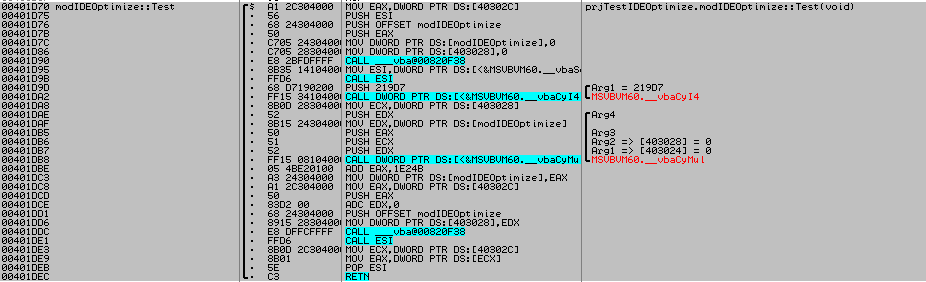
Code:
Public Function Test() As Long
    Static ok   As Long
    Dim inIde   As Boolean          ' Обязательное условие - переменная уровня процедуры
    Dim a       As Long
    Dim b       As Long
    Dim c       As Long
    Dim j       As Single
    Dim l       As Single

    Debug.Assert MakeTrue(inIde)

    If inIde Then
        ' Этот код вообще не попадет в скомпилированный файл вместе с проверкой
        ' как-будто инструкции If нет, скомпилируется только ветка Else
        ' Это мы используем для обхода ошибки переполнения
        cx = 0@
        GetMem4 ok, cx
        cx = cx * 137687 + 12.3467@
        GetMem4 cx, ok

    Else
        ' Только этот код попадет в EXE
        ok = ok * 137687 + 123467

    End If

    Test = ok

End Function
same.
Variant, Array, String, Object - not optimize.
Originally Posted by LaVolpe
Per MSDN
In MSDN and support there are errors. For instance generation algorithm RND is not true.
Last edited by The trick; Feb 26th, 2015 at 11:15 PM.
 Posting Permissions
- You may not post new threads
- You may not post replies
- You may not post attachments
- You may not edit your posts
-
Forum Rules
|
Click Here to Expand Forum to Full Width
|



 Reply With Quote

