|

-
Nov 15th, 2014, 05:40 AM
#561
Member


Re: CommonControls (Replacement of the MS common controls)
hello
Too bad, I'm disappointed.
You have not used the code that I had proposed in the attached zip file.
I just tested the release and it does not work as well as mine.
Roll style "Align = Top" a "Align = Left" and it becomes almost imposible to adjust the width !!
I find your version a bit complicated but I have only tested on XP, so it may be there are things I do not know!
I find the code:
Code:
Private Function ChangeStyle(ByVal bSetMask As Boolean, ByVal Mask As Long) As Boolean
Dim dwStyle As Long, NewStyle As Long

    If ToolBarHandle Then
        dwStyle = SendMessage(ToolBarHandle, TB_GETSTYLE, 0, ByVal 0&)

        If bSetMask Then
            NewStyle = dwStyle Or Mask
        Else
            NewStyle = dwStyle And Not Mask
        End If

        If dwStyle <> NewStyle Then
            SendMessage ToolBarHandle, TB_SETSTYLE, 0, ByVal NewStyle
            ChangeStyle = True
        End If
    End If

End Function

Public Property Let Divider(ByVal Value As Boolean)
    PropDivider = Value

    If ChangeStyle(Not PropDivider, CCS_NODIVIDER) Then
        SetWindowPos ToolBarHandle, 0, 0, 0, 0, 0, SWP_NOMOVE Or SWP_NOSIZE Or SWP_NOOWNERZORDER Or SWP_NOZORDER Or SWP_FRAMECHANGED
        UserControl_Resize
    End If

    UserControl.PropertyChanged "Divider"
End Property
easier to read than:
Code:
Public Property Let Divider(ByVal Value As Boolean)
    PropDivider = Value

    If ToolBarHandle <> 0 Then
Dim dwStyle As Long

        dwStyle = SendMessage(ToolBarHandle, TB_GETSTYLE, 0, ByVal 0&)

        If PropDivider = True Then
            If (dwStyle And CCS_NODIVIDER) = CCS_NODIVIDER Then
                SendMessage ToolBarHandle, TB_SETSTYLE, 0, ByVal dwStyle And Not CCS_NODIVIDER
                SetWindowPos ToolBarHandle, 0, 0, 0, 0, 0, SWP_NOMOVE Or SWP_NOSIZE Or SWP_NOOWNERZORDER Or SWP_NOZORDER Or SWP_FRAMECHANGED
            End If

        Else

            If Not (dwStyle And CCS_NODIVIDER) = CCS_NODIVIDER Then
                SendMessage ToolBarHandle, TB_SETSTYLE, 0, ByVal dwStyle Or CCS_NODIVIDER
                SetWindowPos ToolBarHandle, 0, 0, 0, 0, 0, SWP_NOMOVE Or SWP_NOSIZE Or SWP_NOOWNERZORDER Or SWP_NOZORDER Or SWP_FRAMECHANGED
            End If
        End If

        Call UserControl_Resize
    End If

    UserControl.PropertyChanged "Divider"
End Property
Then my code version is "simpler" and does not have the default when you want to change the height or width if you change the property "Align"
Code:
Private Sub UserControl_Resize()
Static InProc As Boolean

    If ToolBarHandle = 0 Then Exit Sub
Dim dwStyle As Long
Dim mWidth  As Single, mHeight As Single
Dim mAlign  As VBRUN.AlignConstants
    If InProc Then Exit Sub
    InProc = True
    dwStyle = SendMessage(ToolBarHandle, TB_GETSTYLE, 0, ByVal 0&)

    With UserControl
        mAlign = .Extender.Align
'
'Align Change ?
'
        If ChangeStyle(mAlign = vbAlignRight Or mAlign = vbAlignLeft, CCS_VERT) Then ' force resize Height or Width

            Select Case mAlign

                Case vbAlignTop, vbAlignBottom ', vbAlignNone
                    Me.Height = 10

                Case vbAlignLeft, vbAlignRight
                    Me.Width = 10
            End Select

        End If
' necessary if the calculation does not work
' set size AND redraw for TB_AUTOSIZE calc
        MoveWindow ToolBarHandle, 0, 0, .ScaleWidth, .ScaleHeight, 1
'
        SendMessage ToolBarHandle, TB_AUTOSIZE, 0, ByVal 0&

        GetIdealSize mWidth, mHeight
'
' In GetIdealSize() Now
'        If (dwStyle And CCS_NODIVIDER) = 0 Then
'            mHeight = mHeight + .ScaleY(2, vbPixels, vbContainerSize)
'        End If

        Select Case mAlign

            Case vbAlignTop, vbAlignBottom ', vbAlignNone
                mWidth = Me.Width

            Case vbAlignLeft, vbAlignRight
                mHeight = Me.Height

            Case Else
'optional, force a minimum width or height
                If Me.Height > mHeight Then mHeight = Me.Height
                If Me.Width > mWidth Then mWidth = Me.Width
        End Select

        .Size mWidth, mHeight
        MoveWindow ToolBarHandle, 0, 0, .ScaleWidth, .ScaleHeight, 1
    End With

    InProc = False
End Sub
But as I said, I did do the test ONLY on XP, so ....
Otherwise, nice work, I hope I can continue to make my contribution to the building.
kind regards
Last edited by lrd_VB6; Nov 15th, 2014 at 05:51 AM.
-
Nov 15th, 2014, 06:14 AM
#562
Re: CommonControls (Replacement of the MS common controls)
I'm happy with the UserControl_Resize handler how it is now. Only the Padding component was wrong, thanks for this. But the rest is OK for me.
You removed the row count check at the bottom. But if the ToolBar is wrappable then this is necessary when you resize once and the ToolBar adjust itself (row more or less) then the UserControl needs to resize also. For the Align things. This is also not for nothing there. This is when you change the Align at runtime, for instance. The width can be freely set when Align is None.
Last edited by Krool; Nov 15th, 2014 at 06:18 AM.
-
Nov 16th, 2014, 07:36 AM
#563
Junior Member
Re: CommonControls (Replacement of the MS common controls)
Krool
When you release an update is it for the source code, the ocx or both?
Last edited by ishalom; Nov 16th, 2014 at 07:54 AM.
-
Nov 16th, 2014, 08:01 AM
#564
Member
Re: CommonControls (Replacement of the MS common controls)
 Originally Posted by Krool

I
You removed the row count check at the bottom. But if the ToolBar is wrappable then this is necessary when you resize once and the ToolBar adjust itself (row more or less) then the UserControl needs to resize also.
hello
Just for know, have you tried my code?
I removed this part, because it worked very well without.
When the property "Wrappable"is on, resizing works perfectly (on XP).
In either case, the reaction of undetermined. But your version does not seem to do better.
Now it may be there a case I did not think a check. nobody is perfect.
As long as it works well, it is not important.
kind regards
-
Nov 16th, 2014, 08:45 AM
#565
Re: CommonControls (Replacement of the MS common controls)
Originally Posted by lrd_VB6
hello
Just for know, have you tried my code?
I removed this part, because it worked very well without.
When the property "Wrappable"is on, resizing works perfectly (on XP).
In either case, the reaction of undetermined. But your version does not seem to do better.
Now it may be there a case I did not think a check. nobody is perfect.
As long as it works well, it is not important.
kind regards
When you resize with the mouse then the resize handler will be fired constantly. But when you resize only 'once' you will see the point I mean. However..
-
Nov 19th, 2014, 12:35 AM
#566
Re: CommonControls (Replacement of the MS common controls)
Where is the IEnumVARIANT in your project coming from? I don't see it defined in the included OLEGuids and 'show definition' can't find it either. This needs to be explicitly referenced, because if you've defined it in another typelib with the standard declare from oaidl.idl (as it is in olelib.tlb), there's a type mismatch error and full VB crash as soon as you add a control to your form. Until it's specifically referenced I did a temporary fix by just removing it from olelib and recompiling the tlb, but in case I ever need it elsewhere I'd like to figure out a better solution.
Edit: I'm still getting type mismatches at random times in the IDE when I interact with the TextBoxW control, trying to figure out what's causing them, I suspect another conflicting interface. Fixing IEnumVARIANT did make a difference; the errors are no longer immediate. I can force the error by renaming or deleting a standard textbox then clicking on the textboxw. really weird.
Edit2: It's a handled error and changing break on all errors to break on unhandled errors stops the crashing, BUT; all the custom properties disappear. No '(Custom)', no Text, no OleANYTHING. This is just getting weirder by the minute. If I reload VB, they come back, until I do something to another textbox again.
Edit3: That seems to be a problem with having the real windows common controls in the same project. It causes the disappearing properties issue even in the sample project--- but even for the TextBox, which is not part of that in vb.
I may possibly have gotten a hint; I added the TabStrip to my form, restarted VB, and when I tried load the form it was on, I got a Type Mismatch error on this line in UserControl_ReadProperties:
.Contents = PropBag.ReadProperty("InitTabs", 0)
I'm unsure how to fix it though as there's only 1 PropertyBag type. I tried making it explicitly VBRUN.PropertyBag and adding CVar(), but no change.
Edit4: Removing the reference to MS common controls did not fix the problem. I can create a new project, add the new controls, have them work fine, add a reference to MS comctrl, the new controls start losing properties/erroring, I remove the reference to MS comctrols, but the new controls no longer work even if deleted and added again even with a VB restart. Absolutely maddening.
Edit5: Something else is causing an identical issue. I created a whole new project that never referenced MS comctl; error still happened. Really about to give up on this wonderful project and go back to manually doing it without user controls (which i had been doing since i hated ocx's and ctl's to begin with). The conflict is also coming from shell32 shell controls/automation reference, AND ms activex data objects 2.5. Everything good, add reference to one of those, no longer good.
Trying to narrow it down a bit; this line is in VTableHandle.bas causing a type mismatch error. Whether it's the only one I don't know, but it's a clue
Private Function IPPB_GetPredefinedStrings(ByVal This As Object, ByVal DispID As Long, ByRef pCaStringsOut As OLEGuids.OLECALPOLESTR, ByRef pCaCookiesOut As OLEGuids.OLECADWORD) As Long
and also Private Function IPPB_GetDisplayString(ByVal This As Object, ByVal DispID As Long, ByVal lpDisplayName As Long) As Long
and presumably the other IPPB_ function
[...]
Set ShadowIPerPropertyBrowsingVB = This
Last edited by fafalone; Nov 19th, 2014 at 08:41 AM.
-
Nov 19th, 2014, 09:23 AM
#567
Re: CommonControls (Replacement of the MS common controls)
Originally Posted by fafalone
Where is the IEnumVARIANT in your project coming from?
IEnumVARIANT is hidden. It is a member of the stdole library. (stdole2.tlb)
This library is referenced in VB6 by default.
Last edited by Krool; Nov 19th, 2014 at 09:28 AM.
-
Nov 20th, 2014, 10:07 AM
#568
Frenzied Member
Re: CommonControls (Replacement of the MS common controls)
TextBoxW's LeftMarge/RightMarge doesn't work seemly.
-
Nov 20th, 2014, 02:57 PM
#569
Re: CommonControls (Replacement of the MS common controls)
Originally Posted by Jonney
TextBoxW's LeftMarge/RightMarge doesn't work seemly.
What does not work? The property expects a value based on the scale mode of the container, e.g. in twips.
So - in twips - for a 5 pixel margin you would need a value of 75 (5*15) and not 5. (5 would be then actually a margin of 0 pixels)
-
Nov 20th, 2014, 03:07 PM
#570
Re: CommonControls (Replacement of the MS common controls)
maybe a stupid question:
If I rename the OCX as RES and embed it in a project as resource, does it work? and the EXE will run even in a system without VB6Runtimes ?
-
Nov 20th, 2014, 03:12 PM
#571
Re: CommonControls (Replacement of the MS common controls)
Originally Posted by reexre
maybe a stupid question:
If I rename the OCX as RES and embed it in a project as resource, does it work? and the EXE will run even in a system without VB6Runtimes ?
The OCX itself will need the VB6Runtimes. There is no way for this.
Included it in a resource?! Never heard of it.
-
Nov 20th, 2014, 03:35 PM
#572
Re: CommonControls (Replacement of the MS common controls)
Originally Posted by Krool
Included it in a resource?! Never heard of it.
I tried:
-I renamed VBCCR11.OCX to VBCCR11.RES
-Created a project and insert this .RES (Project - add File ... )
-Created the EXE
It Works!
-
Nov 20th, 2014, 04:08 PM
#573
Re: CommonControls (Replacement of the MS common controls)
Originally Posted by reexre
I tried:
-I renamed VBCCR11.OCX to VBCCR11.RES
-Created a project and insert this .RES (Project - add File ... )
-Created the EXE
It Works!
And what is the sense of this? Will the exe run without the OCX registered on another system?
-
Nov 20th, 2014, 05:21 PM
#574
Frenzied Member
Re: CommonControls (Replacement of the MS common controls)
Originally Posted by Krool
What does not work? The property expects a value based on the scale mode of the container, e.g. in twips.
So - in twips - for a 5 pixel margin you would need a value of 75 (5*15) and not 5. (5 would be then actually a margin of 0 pixels)
Feel silly. I Neglected scale mode.
I verify the KeyDown KeyCode differs to KeyUp Keycode. For example,In Baidu Chinese Input Mode, I typing "z" then "w" after press "1" to pick up Word combination:
KeyDown: 229
KeyUp: 90 ---> "z"
KeyDown: 229
KeyUp: 87 --->"w"
KeyDown: 229
KeyPress: 20013
KeyPress: 25991
KeyUp: 49 --"1"
It seems that KeyDown's KeyCode is not correct. KeyUp and KeyPress are OK.
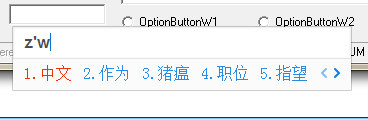
Edited:
VB's Textbox KeyDown also is 229. So ignore my comment . .
KeyDown: 229
KeyUp: 90
KeyDown: 229
KeyUp: 87
KeyDown: 229
KeyPress:-10544
KeyPress:-12604
KeyUp: 49
Last edited by Jonney; Nov 21st, 2014 at 02:43 AM.
-
Nov 20th, 2014, 05:58 PM
#575
Re: CommonControls (Replacement of the MS common controls)
Originally Posted by reexre
I tried:
-I renamed VBCCR11.OCX to VBCCR11.RES
-Created a project and insert this .RES (Project - add File ... )
-Created the EXE
It Works!
I'm quite sure it will not work, when you (priorily to running your Exe) -
first de-register the VBCCR11.ocx from your development-machine.
Olaf
-
Nov 20th, 2014, 07:01 PM
#576
Re: CommonControls (Replacement of the MS common controls)
I forgot to say that in Main Form I have put
Code:
Private Declare Function LoadLibrary Lib "kernel32" Alias "LoadLibraryA" ( _
                                     ByVal lpLibFileName As String) As Long
Private Declare Function FreeLibrary Lib "kernel32" ( _
                                     ByVal hLibModule As Long) As Long


Private Sub Form_Initialize()
    m_hMod = LoadLibrary("shell32.dll")
End Sub

Private Sub Form_Unload(Cancel As Integer)
    FreeLibrary m_hMod
    End
End Sub
it will not work, when you (priorily to running your Exe) -
first de-register the VBCCR11.ocx
I tried but unable to unregister [Search registry with REGEDIT. Did not found VBCCR11]
-
Nov 20th, 2014, 08:24 PM
#577
Re: CommonControls (Replacement of the MS common controls)
Originally Posted by Krool
IEnumVARIANT is hidden. It is a member of the stdole library. (stdole2.tlb)
This library is referenced in VB6 by default.
Ok but what about all the other conflicts? The properties are still disappearing an crashing if I turn off unhandled errors. Having a project with zero other references besides yours is not practical. Shell32 and MSADO 2.5 being present is still causing the issue; verified with a blank project with only these ctl's and those references.
-
Nov 21st, 2014, 12:09 AM
#578
Re: CommonControls (Replacement of the MS common controls)
Originally Posted by fafalone
Ok but what about all the other conflicts? The properties are still disappearing an crashing if I turn off unhandled errors. Having a project with zero other references besides yours is not practical. Shell32 and MSADO 2.5 being present is still causing the issue; verified with a blank project with only these ctl's and those references.
So the crash appears when adding the references? Are there any forms "open" when you do that. Maybe try to close all forms, save, add references, save. ?
And what happens if turn back on unhandled errors?
Last edited by Krool; Nov 21st, 2014 at 12:26 AM.
-
Nov 21st, 2014, 01:56 AM
#579
Re: CommonControls (Replacement of the MS common controls)
Originally Posted by reexre
it will not work, when you (priorily to running your Exe) -
first de-register the VBCCR11.ocx
I tried but unable to unregister [Search registry with REGEDIT. Did not found VBCCR11]
In case you were really using the OCX-version, then you would need a registered version,
to be able to use the OCX in the IDE (and to be able to compile your project) on your Dev-machine.
Are you sure you have no entries in the registry (although the OCX shines up in your IDE-project)?
Olaf
-
Nov 21st, 2014, 04:06 AM
#580
Re: CommonControls (Replacement of the MS common controls)
Originally Posted by Krool
So the crash appears when adding the references? Are there any forms "open" when you do that. Maybe try to close all forms, save, add references, save. ?
And what happens if turn back on unhandled errors?
The crash occurs after adding one of your controls, interacting with another control, then going back to your control. If 'break on all errors' is on, there's a type mismatch error and VB immediately crashes. If its 'break on unhandled errors', all the custom properties disappear until VB is restarted (or I can delete the control and re-add it). This occurs even with a blank project with nothing but 2 controls on the form and said references. I know my original post on this issue was long, but I went as far as I could and through painstaking debug statements identified the line where the error originates:
Set ShadowIPerPropertyBrowsingVB = This in IPPB_GetDisplayString, IPPB_GetPredefinedValue, and IPPB_GetPredefinedStrings
That causes a type mismatch error only when the problem happens so presumably it's the cause, because if I disable the hook that results in it being called the custom properties disappear also. Since both objects are explicitly typed, and there's no duplicate reference that is visible anyway, I don't know how to fix the issue.
Additional Information:
--------
I added an error trap specifically for that line and that line only;
On Error Goto error routine 2
Set IPerProp...
On Error Goto original error routine
with both error routines now having outputs .Error, .Error2. When the error/crash occurs, the errors occur in this sequence (for TextBoxW at least, I suspect it's one error for each custom property).
Code:
VTableHandle.IPPB_GetDisplayString.Error2->Type mismatch
VTableHandle.IPPB_GetDisplayString.Error2->Type mismatch
VTableHandle.IPPB_GetDisplayString.Error2->Type mismatch
VTableHandle.IPPB_GetDisplayString.Error2->Type mismatch
VTableHandle.IPPB_GetDisplayString.Error2->Type mismatch
VTableHandle.IPPB_GetDisplayString.Error2->Type mismatch
VTableHandle.IPPB_GetDisplayString.Error2->Type mismatch
VTableHandle.IPPB_GetDisplayString.Error2->Type mismatch
VTableHandle.IPPB_GetDisplayString.Error2->Type mismatch
VTableHandle.IPPB_GetDisplayString.Error2->Type mismatch
VTableHandle.IPPB_GetDisplayString.Error2->Type mismatch
VTableHandle.IPPB_GetDisplayString.Error2->Type mismatch
VTableHandle.IPPB_GetDisplayString.Error2->Type mismatch
VTableHandle.IPPB_GetDisplayString.Error2->Type mismatch
VTableHandle.IPPB_GetDisplayString.Error2->Type mismatch
VTableHandle.IPPB_GetDisplayString.Error2->Type mismatch
VTableHandle.IPPB_GetDisplayString.Error2->Type mismatch
VTableHandle.IPPB_GetDisplayString.Error2->Type mismatch
VTableHandle.IPPB_GetDisplayString.Error2->Type mismatch
VTableHandle.IPPB_GetDisplayString.Error2->Type mismatch
VTableHandle.IPPB_GetDisplayString.Error2->Type mismatch
VTableHandle.IPPB_GetDisplayString.Error2->Type mismatch
VTableHandle.IPPB_GetDisplayString.Error2->Type mismatch
VTableHandle.IPPB_GetDisplayString.Error2->Type mismatch
VTableHandle.IPPB_GetDisplayString.Error2->Type mismatch
VTableHandle.IPPB_GetDisplayString.Error2->Type mismatch
VTableHandle.IPPB_GetDisplayString.Error2->Type mismatch
VTableHandle.IPPB_GetDisplayString.Error2->Type mismatch
VTableHandle.IPPB_GetDisplayString.Error2->Type mismatch
VTableHandle.IPPB_GetDisplayString.Error2->Type mismatch
VTableHandle.IPPB_GetDisplayString.Error2->Type mismatch
VTableHandle.IPPB_GetDisplayString.Error2->Type mismatch
VTableHandle.IPPB_GetDisplayString.Error2->Type mismatch
VTableHandle.IPPB_GetDisplayString.Error2->Type mismatch
VTableHandle.IPPB_GetDisplayString.Error2->Type mismatch
VTableHandle.IPPB_GetDisplayString.Error2->Type mismatch
VTableHandle.IPPB_GetDisplayString.Error2->Type mismatch
VTableHandle.IPPB_GetDisplayString.Error2->Type mismatch
VTableHandle.IPPB_GetDisplayString.Error2->Type mismatch
VTableHandle.IPPB_GetDisplayString.Error2->Type mismatch
VTableHandle.IPPB_GetDisplayString.Error2->Type mismatch
VTableHandle.IPPB_GetDisplayString.Error2->Type mismatch
VTableHandle.IPPB_GetDisplayString.Error2->Type mismatch
VTableHandle.IPPB_GetDisplayString.Error2->Type mismatch
VTableHandle.IPPB_GetDisplayString.Error2->Type mismatch
VTableHandle.IPPB_GetDisplayString.Error2->Type mismatch
VTableHandle.IPPB_GetDisplayString.Error2->Type mismatch
VTableHandle.IPPB_GetDisplayString.Error2->Type mismatch
VTableHandle.IPPB_GetDisplayString.Error2->Type mismatch
VTableHandle.IPPB_GetPredefinedStrings.Error2->Type mismatch
VTableHandle.IPPB_GetDisplayString.Error2->Type mismatch
VTableHandle.IPPB_GetDisplayString.Error2->Type mismatch
VTableHandle.IPPB_GetDisplayString.Error2->Type mismatch
VTableHandle.IPPB_GetPredefinedStrings.Error2->Type mismatch
Not sure if it's relevant, but additional replacement routines IOleControl_x , IEnumeration_x, and IOleIPAO all have extremely similar Set interface = This statements, and don't produce any errors at any time.
Edit:
So I tried the close, add, save, open routine you suggested and it appears to work ok under a blank project, but existing projects, I can't even save without huge numbers of errors being spawned from missing references, and it doesn't appear to work in any case since I can't dereference everything without taking a few days to comment out code and rebuild forms. Really hope to figure out a better solution since recreating even a minor project to work with this one would take many hours.
Last edited by fafalone; Nov 21st, 2014 at 05:05 AM.
-
Nov 21st, 2014, 06:09 AM
#581
Re: CommonControls (Replacement of the MS common controls)
Originally Posted by fafalone
Edit:
So I tried the close, add, save, open routine you suggested and it appears to work ok under a blank project, but existing projects, I can't even save without huge numbers of errors being spawned from missing references, and it doesn't appear to work in any case since I can't dereference everything without taking a few days to comment out code and rebuild forms. Really hope to figure out a better solution since recreating even a minor project to work with this one would take many hours.
Open the .frm files in the text editor and change it directly there in one swoop. And for instance for the TabStrip control. Of course the 'InitTabs' property will cause an error when converting from the MS comctls. Thus delete the tabs section in the .frm files. You need to recreate the tabs then again in the IDE.
And in general. When adding a new reference to something it is recommended to have all forms close as the UserControls likes to 'die' when a reference is added.
And its true, the OCX will be always more stable in the IDE as the UserControls. Because when the OCX 'dies' then this is a separate binary and does not touch your current project.
-
Nov 21st, 2014, 10:22 AM
#582
Member
Re: CommonControls (Replacement of the MS common controls)
Little of topic here, but while trying out the image combo I noticed that you cant change the colors on it properly. My program lets the users change colors, all the other controls work fine, but on the image combo when I change the background color it doesnt show till ran, which is fine, and the back ground will change color but the text is then inside a white box and ignores any colors I set, also the drop down menu doesnt take any colors changes as well.
I can post a screen shot of you like.
Shane
-
Nov 21st, 2014, 03:46 PM
#583
Re: CommonControls (Replacement of the MS common controls)
Originally Posted by Jonney
I verify the KeyDown KeyCode differs to KeyUp Keycode. For example,In Baidu Chinese Input Mode, I typing "z" then "w" after press "1" to pick up Word combination:
KeyDown: 229
KeyUp: 90 ---> "z"
KeyDown: 229
KeyUp: 87 --->"w"
KeyDown: 229
KeyPress: 20013
KeyPress: 25991
KeyUp: 49 --"1"
It seems that KeyDown's KeyCode is not correct. KeyUp and KeyPress are OK.
Edited:
VB's Textbox KeyDown also is 229. So ignore my comment .
KeyDown: 229
KeyUp: 90
KeyDown: 229
KeyUp: 87
KeyDown: 229
KeyPress:-10544
KeyPress:-12604
KeyUp: 49
I googled this and it seems that if an Input Method Editor is processing key input and the event is keydown, it returns always 229. Thus this is not a bug on my side.
Originally Posted by SMC1979
Little of topic here, but while trying out the image combo I noticed that you cant change the colors on it properly. My program lets the users change colors, all the other controls work fine, but on the image combo when I change the background color it doesnt show till ran, which is fine, and the back ground will change color but the text is then inside a white box and ignores any colors I set, also the drop down menu doesnt take any colors changes as well.
Yes. The BackColor is very restricted in the ImageCombo control. It works the best if the Style property is set to 'DropDownCombo' and not 'DropDownList'.
The drop down menu color change could be included but since it looks ugly (text background color is opaque and cannot be changed, thus its backcolor is then white) I did not include it.
Also the BackColor is in general ignored if you are Vista+ and use VisualStyles.
Yeah, the ImageCombo is a little bit messy at some points.
Last edited by Krool; Nov 21st, 2014 at 04:14 PM.
-
Nov 21st, 2014, 08:09 PM
#584
Re: CommonControls (Replacement of the MS common controls)
Originally Posted by Krool
Open the .frm files in the text editor and change it directly there in one swoop. And for instance for the TabStrip control. Of course the 'InitTabs' property will cause an error when converting from the MS comctls. Thus delete the tabs section in the .frm files. You need to recreate the tabs then again in the IDE.
And in general. When adding a new reference to something it is recommended to have all forms close as the UserControls likes to 'die' when a reference is added.
And its true, the OCX will be always more stable in the IDE as the UserControls. Because when the OCX 'dies' then this is a separate binary and does not touch your current project.
A direct solution is needed. I've also found errors during runtime coming from that line in IOleControl_GetControlInfo too. Since this doesn't happen in any other user control there's gotta be another way of doing things without setting the interface that way. Can you at least elaborate a little bit about what this function is doing so I can implement it another way?
-
Nov 22nd, 2014, 01:03 PM
#585
Re: CommonControls (Replacement of the MS common controls)
Update released.
Quite important when using the ImageList control. (Though it effects actually only WinXP)
-
Nov 25th, 2014, 01:10 PM
#586
Junior Member
Re: CommonControls (Replacement of the MS common controls)
on the toolbar you can only set the image of the bound ImageList by index and not by key, any reason for that?
-
Nov 27th, 2014, 08:47 PM
#587
Frenzied Member
Re: CommonControls (Replacement of the MS common controls)
Krool, Please consider this API SetWindowTheme to add full theme support for Listview / Treeview on Vista/Win7/Win8:
In your demo Main():
Private Declare Function SetWindowTheme Lib "uxtheme.dll" (ByVal hWnd As Long, ByVal pszSubAppName As String, ByVal pszSubIdList As String) As Long
Call ComCtlsInitIDEStopProtection
Call InitVisualStyles
Call SetWindowTheme(MainForm.TreeView1.hWnd, StrConv("explorer" & Chr(0), vbUnicode), vbNullString)
Call SetWindowTheme(MainForm.ListView1.hWnd, StrConv("explorer" & Chr(0), vbUnicode), vbNullString)
Call SetWindowTheme(MainForm.ListView2.hWnd, StrConv("explorer" & Chr(0), vbUnicode), vbNullString)
Call SetWindowTheme(MainForm.ListView3.hWnd, StrConv("explorer" & Chr(0), vbUnicode), vbNullString)
You can use SetWindowThemeW as well.
Refer to screenshot.

-
Nov 30th, 2014, 02:36 PM
#588
Re: CommonControls (Replacement of the MS common controls)
Originally Posted by chosk
I show the vbLongDate and vbLongTime in the StatusBar. With every new version, I would go into StatusBar.ctl's Sub GetDisplayText to change Case SbrPanelStyleTime and Case SbrPanelStyleDate accordingly.
Without changing StatusBar.ctl, is there any way I can make the change in my project Form_Load? This will make it much easier.
For the panel's 'Style' property values 'Time', 'Date' and 'DateTime' the vbShortDate/vbShortTime will be used for the GetDisplayText function. Just like the MS StatusBar control does.
However, I could implement a panel's 'DTFormat' property? Which is set by default with 'Short', but could be then also set to 'Long'.
If set to 'Long' then the GetDisplayText function would use vbLongDate/vbLongTime instead of vbShortDate/vbShortTime.
Let me know your opinion.
Last edited by Krool; Nov 30th, 2014 at 02:43 PM.
-
Nov 30th, 2014, 10:00 PM
#589
Hyperactive Member
Re: CommonControls (Replacement of the MS common controls)
Hi Krool,
This will be great. Thank!
-
Dec 20th, 2014, 01:35 PM
#590
Re: CommonControls (Replacement of the MS common controls)
-
Dec 21st, 2014, 08:03 AM
#591
Hyperactive Member
Re: CommonControls (Replacement of the MS common controls)
Hi Krool,
Thanks very much for the DTFormat. I want to let you know it is very much appreciated.
Thanks again.
-
Dec 27th, 2014, 03:19 PM
#592
Re: CommonControls (Replacement of the MS common controls)
-
Dec 29th, 2014, 07:22 AM
#593
Member
Re: CommonControls (Replacement of the MS common controls)
Hello
I tested the tooltips proposed by VBOCX11 and I do not understand why they have the default graphics that do not have my class ToolTips ...
I watched how the window is initialized "tooltips_class32" and I do not see why it does not work well.
I put in the example images with and without the fault.
Seems like the 3D effect is shifted by 1 pixel.
My ToolTip Attachment 122181
Your ToolTip Attachment 122183
Why did you create ToolTip as a "UserControl"?
Take a look at the "Populate" method is fast to add ToolTips has a form.
We can also attach a ToolTip has an object having no handle (hWnd). for example a "Shape"
I also create a class "cTabStripPictures" for managing bottom of TabStrips boxes with good background colors.
Works properly from "XP" up to "W8".
I hope this will give you ideas.
good continuation.
Best Regards
Attachment 122185
Attachment 122187
Postscript, Sorry for my english (it's rotten, I know)
Last edited by lrd_VB6; Dec 29th, 2014 at 07:27 AM.
-
Dec 29th, 2014, 03:02 PM
#594
Re: CommonControls (Replacement of the MS common controls)
-
Jan 7th, 2015, 08:21 PM
#595
New Member
Re: CommonControls (Replacement of the MS common controls)
Krool,
- What type of license is this library released under?
- Would you be willing to discuss source-code availability?
PM me if you prefer.
Thanks!
-
Jan 8th, 2015, 04:06 AM
#596
Frenzied Member
Re: CommonControls (Replacement of the MS common controls)
A serious bug? The TextBoxW and RichTextBox can't move cursor by Left/Right Key after adding into a UserControl.
Version: 29Dec2014
Last edited by Jonney; Jan 8th, 2015 at 04:14 AM.
-
Jan 8th, 2015, 05:56 AM
#597
Re: CommonControls (Replacement of the MS common controls)
Originally Posted by Jonney
A serious bug? The TextBoxW and RichTextBox can't move cursor by Left/Right Key after adding into a UserControl.
Version: 29Dec2014
This is not a bug. The VB.Form is forwarding the IOleInPlaceActiveObject::TranslateAccelerator method to the UserControl. If now a UserControl (e.g. TextBoxW) is embedded into another UserControl then VB will not forward the IOleInPlaceActiveObject::TranslateAccelerator method to the underlying UserControl.
So in each chain of this embedding the IOleInPlaceActiveObject interface must be implemented and forwarded.
In your case, probably only the case where my UserControl (e.g. TextBoxW) is embedded in "your" UserControl you need to add the following code to "your" UserControl:
Code:
Implements OLEGuids.IOleInPlaceActiveObjectVB

Private Sub IOleInPlaceActiveObjectVB_TranslateAccelerator(ByRef Handled As Boolean, ByRef RetVal As Long, ByVal wMsg As Long, ByVal wParam As Long, ByVal lParam As Long, ByVal Shift As Long)
On Error Resume Next
Dim This As OLEGuids.IOleInPlaceActiveObjectVB
Set This = UserControl.ActiveControl.Object
This.TranslateAccelerator Handled, RetVal, wMsg, wParam, lParam, Shift
End Sub
This topic was already discussed in this thread.
Last edited by Krool; Jan 8th, 2015 at 05:59 AM.
-
Jan 8th, 2015, 06:04 AM
#598
Re: CommonControls (Replacement of the MS common controls)
Originally Posted by adrez
- What type of license is this library released under?
- Would you be willing to discuss source-code availability?
There is no license on the library.
We can discuss source-code for the library. But not the whole. This can be a reason for CLSIDs conflicts for future in the world wide web. 
-
Jan 8th, 2015, 06:08 AM
#599
Re: CommonControls (Replacement of the MS common controls)
Originally Posted by lrd_VB6
Why did you create ToolTip as a "UserControl"?
I am planning to end support of the ToolTip control and remove it from the project. As there are plenty of ToolTip classes already available.
-
Jan 8th, 2015, 06:10 AM
#600
Re: CommonControls (Replacement of the MS common controls)
Originally Posted by ishalom
on the toolbar you can only set the image of the bound ImageList by index and not by key, any reason for that?
Yes, because of performance issues. Especially on the ListView. (obtaining real index by a key in a ImageList control)
For for non-mass items containing controls it can be an option, as the ToolBar or TabStrip is. Will see.  Maybe I will include it someday. Maybe I will include it someday.
 Posting Permissions
- You may not post new threads
- You may not post replies
- You may not post attachments
- You may not edit your posts
-
Forum Rules
|
Click Here to Expand Forum to Full Width
|



 Reply With Quote
