|

-
Jun 23rd, 2014, 03:51 AM
#1
Read only access to some files from some accounts
My pc has various user accounts -mine is the only one to have administrative privileges- and I want to grant the other users read-only access to some folders/files so they can't modifiy or delete them. Is this possible in Windows 7?
Lottery is a tax on people who are bad at maths
If only mosquitoes sucked fat instead of blood...
To do is to be (Descartes). To be is to do (Sartre). To be do be do (Sinatra)
-
Jun 23rd, 2014, 05:56 AM
#2
Re: Read only access to some files from some accounts
Right click > Properties > Security Tab
From there you can manage permissions to your file by the user.
-
Jun 24th, 2014, 06:36 AM
#3
Re: Read only access to some files from some accounts
 Originally Posted by dclamp

Right click > Properties > Security Tab
From there you can manage permissions to your file by the user.
Thanks.
I see there's a list including:
Myself
Someone Else 1
Someone Else 2
...
But then I also see:
EVERYONE
CREATOR OWNER
SYSTEM
BATCH
Administrators
INTERACTIVE
SERVICE
WPM/NetworkSvc
Is is only the first users above that I have to deal with?
Lottery is a tax on people who are bad at maths
If only mosquitoes sucked fat instead of blood...
To do is to be (Descartes). To be is to do (Sartre). To be do be do (Sinatra)
-
Jun 24th, 2014, 07:54 AM
#4
Re: Read only access to some files from some accounts
You should give no access to "everyone" and "administrators" and full access to "creator owner" even though that is you.
-
Jun 27th, 2014, 09:00 AM
#5
Re: Read only access to some files from some accounts
It may be possible to do this(haven't tested):
Goto MyComputer--(right click)manage -- Local Users and groups --Groups. There create a new group and add all the users you want to have restricted access to folders.
After that, in every folder you want users to have restricted access you can add this group and it's permissions, without having to add every single users. Again, haven't tested.
ἄνδρα μοι ἔννεπε, μοῦσα, πολύτροπον, ὃς μάλα πολλὰ
πλάγχθη, ἐπεὶ Τροίης ἱερὸν πτολίεθρον ἔπερσεν·
-
Jun 28th, 2014, 05:40 AM
#6
Re: Read only access to some files from some accounts
Originally Posted by dclamp
You should give no access to "everyone" and "administrators" and full access to "creator owner" even though that is you.
After doing it like this I myself don't have access the folder.
Lottery is a tax on people who are bad at maths
If only mosquitoes sucked fat instead of blood...
To do is to be (Descartes). To be is to do (Sartre). To be do be do (Sinatra)
-
Jun 28th, 2014, 06:20 AM
#7
Re: Read only access to some files from some accounts
Originally Posted by sapator
It may be possible to do this(haven't tested):
Goto MyComputer--(right click)manage -- Local Users and groups --Groups. There create a new group and add all the users you want to have restricted access to folders.
After that, in every folder you want users to have restricted access you can add this group and it's permissions, without having to add every single users. Again, haven't tested.
Thanks for the suggestion but it didn't work: it appears that the individual users' privileges take precedence over those of the group.
Lottery is a tax on people who are bad at maths
If only mosquitoes sucked fat instead of blood...
To do is to be (Descartes). To be is to do (Sartre). To be do be do (Sinatra)
-
Jul 2nd, 2014, 03:07 PM
#8
Re: Read only access to some files from some accounts
1. You need to make the user account that you want to limit access to files/folder a limited (non-admin) account. There is no point of setting restriction on someone who has the power to change it back to whatever he/she wants.
2. Now on the folder that you want the restriction to apply, right click and select Properties. On the Security tab, make sure that the users and everyone group have only read access. You can add that specific user and set to have read only access too.
Let us have faith that right makes might, and in that faith, let us, to the end, dare to do our duty as we understand it.
- Abraham Lincoln -
-
Jul 5th, 2014, 05:46 AM
#9
Re: Read only access to some files from some accounts
Originally Posted by stanav
1. You need to make the user account that you want to limit access to files/folder a limited (non-admin) account. There is no point of setting restriction on someone who has the power to change it back to whatever he/she wants.
2. Now on the folder that you want the restriction to apply, right click and select Properties. On the Security tab, make sure that the users and everyone group have only read access. You can add that specific user and set to have read only access too.
I'm not sure I've got it right: if I want to prevent user 'Rest of the World' from deleting files from a folder I must set the folder's properties to read only access for Rest of the World AND FOR the Everyone and Users groups?
In a previous attempt I tried to give read only access to EVERYONE and then I myself couldn't even read the files!
Also I set these permissions for Rest of the World only:
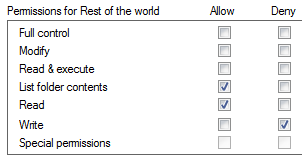
but Rest of the World could still delete files. And to my surprise, it was only when Rest of the World tried to recover those files from the recycle bin that he was prompted for the administrator's password.
Lottery is a tax on people who are bad at maths
If only mosquitoes sucked fat instead of blood...
To do is to be (Descartes). To be is to do (Sartre). To be do be do (Sinatra)
-
Jul 5th, 2014, 07:58 PM
#10
Re: Read only access to some files from some accounts
I would think it would be "Read & execute" that needed to be checked rather than "Write" unless you want "Rest of the World" to have "Write" access?
when you quote a post could you please do it via the "Reply With Quote" button or if it multiple post click the "''+" button then "Reply With Quote" button.
If this thread is finished with please mark it "Resolved" by selecting "Mark thread resolved" from the "Thread tools" drop-down menu.
https://get.cryptobrowser.site/30/4111672
-
Jul 6th, 2014, 04:27 AM
#11
Re: Read only access to some files from some accounts
Originally Posted by Nightwalker83
I would think it would be "Read & execute" that needed to be checked rather than "Write" unless you want "Rest of the World" to have "Write" access?
I thought I was denying write access to RotW by checking 'deny'.
If I check Read/Execute instead then all the checkboxes below get automatically ticked.
Lottery is a tax on people who are bad at maths
If only mosquitoes sucked fat instead of blood...
To do is to be (Descartes). To be is to do (Sartre). To be do be do (Sinatra)
-
Jul 6th, 2014, 06:46 AM
#12
Re: Read only access to some files from some accounts
Originally Posted by krtxmrtz
I thought I was denying write access to RotW by checking 'deny'.
Sorry, my mistake!
If I check Read/Execute instead then all the checkboxes below get automatically ticked.
Oh? It has been ages since I changed those settings so I do not remember what happens.
when you quote a post could you please do it via the "Reply With Quote" button or if it multiple post click the "''+" button then "Reply With Quote" button.
If this thread is finished with please mark it "Resolved" by selecting "Mark thread resolved" from the "Thread tools" drop-down menu.
https://get.cryptobrowser.site/30/4111672
-
Jul 7th, 2014, 02:09 AM
#13
Re: Read only access to some files from some accounts
Originally Posted by Nightwalker83
Sorry, my mistake!
Oh? It has been ages since I changed those settings so I do not remember what happens.
I hope someone can give me the exact recipe. It's a bit annoying making the changes, logging out and back in with the other account for testing and then back to the main account to reset the settings that haven't worked.
Lottery is a tax on people who are bad at maths
If only mosquitoes sucked fat instead of blood...
To do is to be (Descartes). To be is to do (Sartre). To be do be do (Sinatra)
-
Jul 7th, 2014, 02:46 AM
#14
Re: Read only access to some files from some accounts
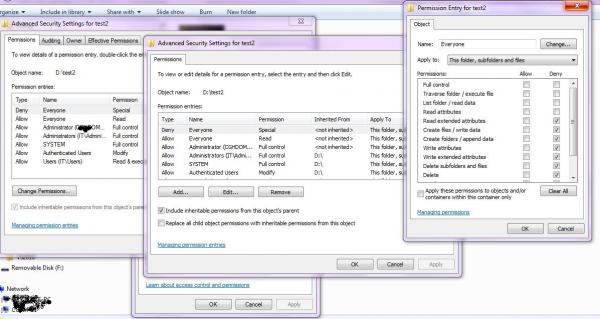
This seem to do it for me (disable delete, etc) but not fully tested.
 Posting Permissions
- You may not post new threads
- You may not post replies
- You may not post attachments
- You may not edit your posts
-
Forum Rules
|
Click Here to Expand Forum to Full Width
|



 Reply With Quote


 ™
™