|

-
May 25th, 2014, 06:57 PM
#41
Re: Oscilloscope (sound wave graph) how do I create one
OK, It's isn't what I thought. It is basically the same as the other except it reads in the wav file in smaller chunks and produces a wave graph per chunck so it kind of gives the appearance of real-time but it still uses a byte array buffer which I think is what you do not want.
Anything I post is an example only and is not intended to be the only solution, the total solution nor the final solution to your request nor do I claim that it is. If you find it useful then it is entirely up to you to make whatever changes necessary you feel are adequate for your purposes.
-
May 25th, 2014, 08:42 PM
#42
Re: Oscilloscope (sound wave graph) how do I create one
 Originally Posted by jmsrickland

OK, It's isn't what I thought. It is basically the same as the other except it reads in the wav file in smaller chunks and produces a wave graph per chunck so it kind of gives the appearance of real-time but it still uses a byte array buffer which I think is what you do not want.
Yes, because the demo in post #36 already does that and also as I mentioned it would take an extremely long time to load the data into the array if the file is as big as the one mentioned.
when you quote a post could you please do it via the "Reply With Quote" button or if it multiple post click the "''+" button then "Reply With Quote" button.
If this thread is finished with please mark it "Resolved" by selecting "Mark thread resolved" from the "Thread tools" drop-down menu.
https://get.cryptobrowser.site/30/4111672
-
May 25th, 2014, 10:01 PM
#43
Re: Oscilloscope (sound wave graph) how do I create one
It wouldn't take a long time as it reads in small pieces of the file, produces the wave graph for that small piece then reads in another small piece etc, etc. so even if you have a very large wave file it still displays the wave graph as the file is being read instead of reading in the entire file first which is what the first example does. It's as close as I could get to real-time without it being true real-time.
I have another example using audio streaming which might be of interest but it is intergrated into a larger client/server application so extracting out the code could be a task.
Anything I post is an example only and is not intended to be the only solution, the total solution nor the final solution to your request nor do I claim that it is. If you find it useful then it is entirely up to you to make whatever changes necessary you feel are adequate for your purposes.
-
May 25th, 2014, 10:22 PM
#44
Re: Oscilloscope (sound wave graph) how do I create one
Originally Posted by jmsrickland
It wouldn't take a long time as it reads in small pieces of the file, produces the wave graph for that small piece then reads in another small piece etc, etc. so even if you have a very large wave file it still displays the wave graph as the file is being read instead of reading in the entire file first which is what the first example does. It's as close as I could get to real-time without it being true real-time.
Maybe I just thought it was taking a long time to input the data because there was not input time elapsed of the example thus I ended up stopping the example before the input had finish.
I have another example using audio streaming which might be of interest but it is intergrated into a larger client/server application so extracting out the code could be a task.
Now I am curious to know what you are talking about!
when you quote a post could you please do it via the "Reply With Quote" button or if it multiple post click the "''+" button then "Reply With Quote" button.
If this thread is finished with please mark it "Resolved" by selecting "Mark thread resolved" from the "Thread tools" drop-down menu.
https://get.cryptobrowser.site/30/4111672
-
May 25th, 2014, 11:56 PM
#45
Re: Oscilloscope (sound wave graph) how do I create one
In case this is thought for systems from Vista onwards, there's a relative simple approach over the CoreAudio-API.
CoreAudio supersedes the WaveIn/WaveOut API (both of those older Base-APIs are known to get sparse support
by some of the SoundCard-vendors, whilst CoreAudio should be supported by all of them in the meantime).
So it is (besides DirectX) the only reliable method to deal with Audio-Streams and -Devices on Vista+.
What CoreAudio allows for example, is the capturing of PCM-SoundBuffers, which were
"just send to the SoundCards outputlines" (no matter what the original encoding of
these sounds was, *.mp3 *.wav *.wma - all have to be decoded finally to produce
sound - and that is what CoreAudio is able to capture as some kind of "redirected-
input-source").
CoreAudio allows also the capturing of "official Hardware-InputSource-Lines" of course
(as e.g. Microphone-In - or Line-In) - but as said, the current output-buffers of the
soundcard can act as an Input-Line for the CoreAudio-recording-direction as well.
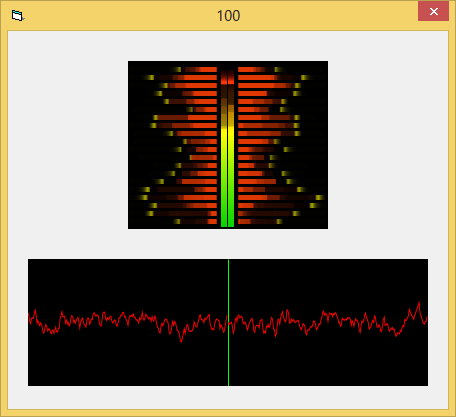
Below is all the code needed (all in a single Form) to accomplish an FFT- a Peak-
and also an Oscilloscope-RealTime-Rendering of the currently playing sound.
Depends on vbRichClient5, two PictureBoxes and a Timer on a Form.
Code:
Option Explicit

Const WavFreq As Long = 44100, WavChannels As Long = 2

Private SrfFFT As cCairoSurface, SrfOSC As cCairoSurface
Private WithEvents ACC As cAudioCaptureClient, FPS

Private Sub Form_Load()
  ScaleMode = vbPixels
  Set SrfFFT = Cairo.CreateSurface(200, 168)
      picFFT.Move (ScaleWidth - SrfFFT.Width) / 2, 30, SrfFFT.Width, SrfFFT.Height
  Set SrfOSC = Cairo.CreateSurface(400, 127)
      picOSC.Move (ScaleWidth - SrfOSC.Width) / 2, 60 + SrfFFT.Height, SrfOSC.Width, SrfOSC.Height

  Set ACC = New_c.AudioCaptureClient
      ACC.InitOn New_c.MMDeviceEnumerator.GetDefaultAudioEndpoint(eRender, eConsole), WavFreq, WavChannels
      ACC.RaiseMeterEvents = True
      ACC.RaiseFFTEvents = True
      ACC.FFTInputLevelFac = 0.8
      ACC.StartStream
End Sub

Private Sub ACC_MeterInfo(ByVal LeftPeak As Single, ByVal RightPeak As Single, LeftFFT() As Single, RightFFT() As Single)
  DrawFFT LeftPeak, RightPeak, LeftFFT, RightFFT
End Sub

Private Sub ACC_NextBuffer(ByVal pCaptureBuf As Long, ByVal CapturedBytes As Long, ByVal BufferFlags As AUDCLNT_BUFFERFLAGS)
Dim i As Long, ii As Long, PCM16BitStereo() As Integer, Float32BitLeft() As Single, Float32BitRight() As Single
  If CapturedBytes < 8 Then Exit Sub
  If CapturedBytes Mod 8 Then CapturedBytes = (CapturedBytes \ 8) * 8
  ReDim PCM16BitStereo(0 To CapturedBytes \ 2 - 1)
  ReDim Float32BitLeft(0 To (CapturedBytes \ 4) - 1)
  ReDim Float32BitRight(0 To (CapturedBytes \ 4) - 1)

  New_c.MemCopy VarPtr(PCM16BitStereo(0)), pCaptureBuf, CapturedBytes
  For i = 0 To UBound(PCM16BitStereo) Step 4
    Float32BitLeft(ii + ii) = ii
    Float32BitLeft(ii + ii + 1) = PCM16BitStereo(i) / 1000
    Float32BitRight(ii + ii) = ii
    Float32BitRight(ii + ii + 1) = PCM16BitStereo(i + 1) / 1000
    ii = ii + 1
  Next i

  If FPS Mod 2 = 0 Then DrawOsc Float32BitLeft, Float32BitRight
  FPS = FPS + 1
End Sub

Private Sub DrawOsc(Float32BitLeft() As Single, Float32BitRight() As Single)
  With SrfOSC.CreateContext
    .SetSourceColor vbBlack
    .Paint
    .DrawLine .Surface.Width / 2, 0, .Surface.Width / 2, .Surface.Height, True, 1, vbGreen

    .TranslateDrawings 0, .Surface.Height / 2
    .ScaleDrawings .Surface.Width / (UBound(Float32BitLeft) + 1), .Surface.Height / 100

    .SetLineWidth 1

    .SetSourceColor vbRed
      .PolygonSingle Float32BitLeft, False, splNone
      .TranslateDrawings (UBound(Float32BitLeft) + 1) / 2, 0
      .PolygonSingle Float32BitRight, False, splNone
    .Stroke

    .Surface.DrawToDC picOSC.hDC
  End With
End Sub

Public Sub DrawFFT(ByVal LeftPeak As Single, ByVal RightPeak As Single, LeftFFT() As Single, RightFFT() As Single)
Dim i As Long, y As Double, mOffsX As Double, WScale As Long, Pat As cCairoPattern
Static TopLPeak As Single, TopRPeak As Single, TopLFFT(0 To 19) As Single, TopRFFT(0 To 19) As Single

  LeftPeak = Log(1.00000000000001 + LeftPeak * 9) / 2.303
  RightPeak = Log(1.00000000000001 + RightPeak * 9) / 2.303

  With SrfFFT.CreateContext
    .SetSourceColor vbBlack, 0.22
    .Paint

    .Save
        mOffsX = 11
        WScale = SrfFFT.Width \ 2 - mOffsX - 6
        'draw the FFT-bars
        .TranslateDrawings SrfFFT.Width \ 2 - 3, SrfFFT.Height
        .ScaleDrawings 1, -1 '<- bottom-up-coord-system
        y = 5
        For i = 0 To UBound(LeftFFT)
          If TopLFFT(i) <= LeftFFT(i) Then TopLFFT(i) = LeftFFT(i) Else If TopLFFT(i) > 0.008 Then TopLFFT(i) = TopLFFT(i) - 0.008
          .DrawLine -mOffsX - TopLFFT(i) * (WScale + 4), y, -mOffsX - TopLFFT(i) * WScale, y, True, 5, vbYellow, 0.3
          .DrawLine -mOffsX, y, -mOffsX - LeftFFT(i) * WScale, y, True, 5, &H40FF&, 0.6

          If TopRFFT(i) <= RightFFT(i) Then TopRFFT(i) = RightFFT(i) Else If TopRFFT(i) > 0.008 Then TopRFFT(i) = TopRFFT(i) - 0.008
          .DrawLine mOffsX + TopRFFT(i) * (WScale + 4), y, mOffsX + TopRFFT(i) * WScale, y, True, 5, vbYellow, 0.3
          .DrawLine mOffsX, y, mOffsX + RightFFT(i) * WScale, y, True, 5, &H40FF&, 0.6
          y = y + 8
        Next i
        y = y - 5

        'the Peak-indicators use a "green-yellow-red-pattern"
        If TopLPeak <= LeftPeak Then TopLPeak = LeftPeak Else If TopLPeak > 0.007 Then TopLPeak = TopLPeak - 0.007
        If TopRPeak <= RightPeak Then TopRPeak = RightPeak Else If TopRPeak > 0.007 Then TopRPeak = TopRPeak - 0.007
        .SetLineWidth 0
        Set Pat = Cairo.CreateLinearPattern(0, 0, 0, y)
            Pat.AddColorStop 0, vbGreen, 0.5
            Pat.AddColorStop 0.6, vbYellow, 1
            Pat.AddColorStop 1, vbRed, 1
        .Rectangle -4, 2 + TopLPeak * y, 6, 4 * TopLPeak, True
        .Rectangle -4, 2, 6, LeftPeak * y, True

        .Rectangle 3, 2 + TopRPeak * y, 6, 4 * TopRPeak, True
        .Rectangle 3, 2, 6, RightPeak * y, True
        .Fill , Pat
    .Restore
  End With
  SrfFFT.DrawToDC picFFT.hDC
End Sub

Private Sub Timer1_Timer()
  Caption = FPS: FPS = 0
End Sub

Private Sub Form_Terminate()
  If Forms.Count = 0 Then New_c.CleanupRichClientDll
End Sub
Here's what the above code puts out (Stereo-LeftChannel to the left-hand-side of the form - and the right channel to the right):
If there's an interest in this stuff, I can also put up a downloadable example (with a few more comments) into the CodeBank.
Olaf
Last edited by Schmidt; May 26th, 2014 at 06:42 AM.
-
May 26th, 2014, 12:52 AM
#46
Re: Oscilloscope (sound wave graph) how do I create one
I have a vb6 project on XP that gives me that same effect using only plain waveOut and no dependencies.
Anything I post is an example only and is not intended to be the only solution, the total solution nor the final solution to your request nor do I claim that it is. If you find it useful then it is entirely up to you to make whatever changes necessary you feel are adequate for your purposes.
-
May 26th, 2014, 02:06 AM
#47
Re: Oscilloscope (sound wave graph) how do I create one
@Schmidt
I receive Error '9' Subscript out of range
Code:
Float32BitLeft(ii + ii + 1) = PCM16BitStereo(i) / 1000
when you quote a post could you please do it via the "Reply With Quote" button or if it multiple post click the "''+" button then "Reply With Quote" button.
If this thread is finished with please mark it "Resolved" by selecting "Mark thread resolved" from the "Thread tools" drop-down menu.
https://get.cryptobrowser.site/30/4111672
-
May 26th, 2014, 05:28 AM
#48
Re: Oscilloscope (sound wave graph) how do I create one
Originally Posted by Nightwalker83
@Schmidt
I receive Error '9' Subscript out of range
Code:
Float32BitLeft(ii + ii + 1) = PCM16BitStereo(i) / 1000
Will upload an Example to the codebank...
@jmsrickland
If you have the same example for XP, then it would need to work per
WaveIn-API (capturing the sound from the WaveOut-Destination-line,
involving fiddeling with the Mixer-API, to find the "reflection-point where to capture from".
Would like to take a look at that, so if you have a link, this would be nice.
Olaf
-
May 26th, 2014, 06:37 AM
#49
Re: Oscilloscope (sound wave graph) how do I create one
Originally Posted by Nightwalker83
@Schmidt
I receive Error '9' Subscript out of range
Code:
Float32BitLeft(ii + ii + 1) = PCM16BitStereo(i) / 1000
Found a mistake I made in calculating the Ubounds for the different Buffers -
updated post #45 with a corrected ACC_NextBuffer event-routine.
Maybe that helps already.
Olaf
-
May 26th, 2014, 08:00 PM
#50
Re: Oscilloscope (sound wave graph) how do I create one
Originally Posted by Schmidt
Found a mistake I made in calculating the Ubounds for the different Buffers -
updated post #45 with a corrected ACC_NextBuffer event-routine.
Thanks! I will try the new code and see if it works.
Edit:
The new code works without any problems.
Last edited by Nightwalker83; May 26th, 2014 at 08:09 PM.
Reason: Adding more!
when you quote a post could you please do it via the "Reply With Quote" button or if it multiple post click the "''+" button then "Reply With Quote" button.
If this thread is finished with please mark it "Resolved" by selecting "Mark thread resolved" from the "Thread tools" drop-down menu.
https://get.cryptobrowser.site/30/4111672
-
May 31st, 2014, 03:29 AM
#51
Re: Oscilloscope (sound wave graph) how do I create one
Originally Posted by jmsrickland
I have a vb6 project on XP that gives me that same effect using only plain waveOut and no dependencies.
Any luck with this?
Edit:
Is this the project you were thinking of?
Last edited by Nightwalker83; May 31st, 2014 at 04:38 AM.
Reason: Adding more!
when you quote a post could you please do it via the "Reply With Quote" button or if it multiple post click the "''+" button then "Reply With Quote" button.
If this thread is finished with please mark it "Resolved" by selecting "Mark thread resolved" from the "Thread tools" drop-down menu.
https://get.cryptobrowser.site/30/4111672
 Posting Permissions
- You may not post new threads
- You may not post replies
- You may not post attachments
- You may not edit your posts
-
Forum Rules
|
Click Here to Expand Forum to Full Width
|



 Reply With Quote