I'm trying to build a dynamic menu based on my database, a simple idea... but, i'ts hard to make it real if you code vb6.
The visual basic 6 default menu tool, is very limited and can't offer all the conditions to make a totally dynamic menu.
I've trying to use something called "SmartMenuXP", through this component i create the dynamic menu... but, i 've found some problems. This component, can be exceeded by another, so when i open some child form inside my mdi, this child control box can exceed my mdi menu created by the ocx.
I'm here looking for some API/Custom Component to make this dynamic menu.
I guess I'd like to know more about what you mean by "dynamic menu". I suppose you have some 'stuff' in your database, and you want to create different menu items (and subitems) based upon that 'stuff'. But, could you be more specific with an example of what you want to do. You may not need APIs...MAYBE, just MAYBE, VB6's inherent menu system CAN support what you want done.
I see what you mean..you would have to create (using VB6 menu editor) the 'base' menu system in order to add/remove/change items. And I suspect you want it dynamically enough so you wouldn't have to create a bunch of 'placeholders'. Interesting....never attempted this...but I am sure someone will give you a good answer...I cannot. Sorry.
I've not looked into it but I would say the key is to use the menu items as arrays, possibly each drop down portion would be a separate array and all of them not visible by default. You should then be able to add items to the menus dynamically and activate only the items you want. Seems like it should be fairly simple but then comes the question what do you want to do when someone clicks on the menu item? You would be passed an index value so you know which item in the drop down was clicked which may be enough depending on what you want the program to do when they are clicked.
But I THINK OP may have, say, 10 TOP-LEVEL menu items (with possibly several submenus); and if so, I BELIEVE OP would need 10 'placeholders' as the top-level to which he can add the arrays of menus. Don't know how to create NEW top-level menuitems. Possible? (Believe that is what is really the OP's issue).
Yes there would need to be some place holders. The top menu items would need to be present, no need for these to be an array.
There would need to be one sub item in each of those menus with the index set to 0
At run time you can load additional items to each of those arrays just like you would with a control.
I have not looked into the possibility of starting with just one item and then creating different levels on the menu, that may or may not be possible. From a coding standpoint it would likely be more readable and easier to have a separate array for each set of sub menus.
Last edited by DataMiser; May 20th, 2014 at 11:52 AM.
Yup...that is what I thought. Believe OP is looking for an easier method where he would not have to create TL placeholders. That probably DOES exist somewhere in the API world, but I wouldn't know. Maybe dilettante will read this thread and make us all wiser! :-)
I am not sure about the sub menus, maybe there is a way to dynamically create them in VB code and maybe not. A popup menu may be an option or you may need to go with some API calls.
I'm still not following exactly what you're trying to do that clsMenuImage can't. You don't need VB menus at all. And the images and text can be loaded from files you could copy from your db to a temp folder.
Here's an example from my current project. Both the menu and submenu are created dynamically, using clsMenuImage to put the images on. If they were in your database, you would extract to a temp file and use .AddImageFromFile instead.
Code:
Public Function LVRCMenuPopup() As Long
'Displays the right click menu for ListView2
'Only way to get images on a popup menu not visible on the main bar
Dim hMenu As Long, hSubMenu As Long
Dim MII As MENUITEMINFO, mii2 As MENUITEMINFO
Dim PT As POINTAPI
Dim idCmd As Long
Dim rnf As RNFile
Dim cc As Long
Dim i As Long
Dim bDisable As Boolean
Dim lCnt As Long
Dim lMax As Long


Const sON As String = "Open File"
Const sNN As String = "Open Folder"
Const sTD As String = "Copy"
Const sDL As String = "Remove from list"
Const sST As String = "View"
Const sHT As String = "Hide Thumbnails"
Const sSR As String = "Save search results..."

Const sVX As String = "Extra Large Icons"
Const sVL As String = "Large Icons"
Const sVS As String = "Small Icons"
Const sVLS As String = "List"
Const sVD As String = "Details"
Const sVT As String = "Tiles"
Const sVTH As String = "Thumbnails"

On Error GoTo e0

Set cMenuImage = New clsMenuImage
Set cSubMenuImage = New clsMenuImage

lCnt = SendMessage(hLVS, LVM_GETSELECTEDCOUNT, 0, ByVal 0&)
lMax = SendMessage(hLVS, LVM_GETITEMCOUNT, 0, ByVal 0&)

'If lvSearch.ListItems.Count = 0 Then bDisable = True
If lCnt = 0 Then bDisable = True

hMenu = CreatePopupMenu()

With cMenuImage
    .Init Me.hwnd, 20, 20

    For i = 0 To 5
        .AddImageFromStream LoadResData("PNG_" & i, "CUSTOM")
    Next i
End With
With cSubMenuImage
    .Init Me.hwnd, 20, 20
    For i = 13 To 19
        .AddImageFromStream LoadResData("PNG_" & i, "CUSTOM")
    Next i
End With

'Construct the View submenu

hSubMenu = CreateMenu()
With mii2
    .cbSize = Len(mii2)


    .fMask = MIIM_STRING Or MIIM_ID Or MIIM_STATE
    .wID = idV_XL
    .dwTypeData = sVX
    .cch = Len(sVX)
    .fState = IIf(iCurViewMode = 0, MFS_CHECKED, MFS_UNCHECKED)
    Call InsertMenuItem(hSubMenu, 0, True, mii2)

    .wID = idV_LG
    .dwTypeData = sVL
    .cch = Len(sVL)
    .fState = IIf(iCurViewMode = 1, MFS_CHECKED, MFS_UNCHECKED)
    Call InsertMenuItem(hSubMenu, 1, True, mii2)

    .wID = idV_SM
    .dwTypeData = sVS
    .cch = Len(sVS)
    .fState = IIf(iCurViewMode = 2, MFS_CHECKED, MFS_UNCHECKED)
    Call InsertMenuItem(hSubMenu, 2, True, mii2)

    .wID = idV_LS
    .dwTypeData = sVLS
    .cch = Len(sVLS)
    .fState = IIf(iCurViewMode = 3, MFS_CHECKED, MFS_UNCHECKED)
    Call InsertMenuItem(hSubMenu, 3, True, mii2)

    .wID = idV_DT
    .dwTypeData = sVD
    .cch = Len(sVD)
    .fState = IIf(iCurViewMode = 4, MFS_CHECKED, MFS_UNCHECKED)
    Call InsertMenuItem(hSubMenu, 4, True, mii2)

    .wID = idV_TI
    .dwTypeData = sVT
    .cch = Len(sVT)
    .fState = IIf(iCurViewMode = 5, MFS_CHECKED, MFS_UNCHECKED)
    Call InsertMenuItem(hSubMenu, 5, True, mii2)

    .fMask = MIIM_ID Or MIIM_TYPE
    .fType = MFT_SEPARATOR
    .wID = 0
    Call InsertMenuItem(hSubMenu, 6, True, mii2)

    .fMask = MIIM_STRING Or MIIM_ID Or MIIM_STATE
    .wID = idV_TH
    .dwTypeData = sVTH
    .cch = Len(sVTH)
    .fState = IIf(iCurViewMode = 6, MFS_CHECKED, MFS_UNCHECKED)
    Call InsertMenuItem(hSubMenu, 7, True, mii2)

End With

With MII
    .cbSize = Len(MII)

    'Open file
    .fMask = MIIM_ID Or MIIM_STRING Or MIIM_STATE
    .wID = idFS_OpenFile
    .dwTypeData = sON
    .cch = Len(sON)
    .fState = IIf(bDisable, MFS_DISABLED, MFS_ENABLED)
    .fState = .fState Or MFS_DEFAULT
    '.fState = IIf(bStates(0), MFS_ENABLED, MFS_DISABLED)
    '.fState = .fState Or IIf(LV2ColCheck(0), MFS_CHECKED, MFS_UNCHECKED)
    Call InsertMenuItem(hMenu, 0, True, MII)

    'Open folder
    .fMask = MIIM_ID Or MIIM_STRING Or MIIM_STATE
    .wID = idFS_OpenFolder
    .dwTypeData = sNN
    .cch = Len(sNN)
    .fState = IIf(bDisable, MFS_DISABLED, MFS_ENABLED)

    '.fState = IIf(bStates(1), MFS_ENABLED, MFS_DISABLED)
    '.fState = .fState Or IIf(LV2ColCheck(1), MFS_CHECKED, MFS_UNCHECKED)

    Call InsertMenuItem(hMenu, 1, True, MII)

    'Copy
    .fMask = MIIM_STRING Or MIIM_ID Or MIIM_STATE
    .wID = idFS_CopyFile
    .dwTypeData = sTD
    .cch = Len(sTD)
    .fState = IIf(bDisable, MFS_DISABLED, MFS_ENABLED)

    '.fState = IIf(bStates(2), MFS_ENABLED, MFS_DISABLED)
    '.fState = .fState Or IIf(LV2ColCheck(2), MFS_CHECKED, MFS_UNCHECKED)

    Call InsertMenuItem(hMenu, 2, True, MII)

     'Copy
    .fMask = MIIM_STRING Or MIIM_ID Or MIIM_STATE
    .wID = idFS_Remove
    .dwTypeData = sDL
    .cch = Len(sDL)
    .fState = IIf(bDisable, MFS_DISABLED, MFS_ENABLED)

    '.fState = IIf(bStates(2), MFS_ENABLED, MFS_DISABLED)
    '.fState = .fState Or IIf(LV2ColCheck(2), MFS_CHECKED, MFS_UNCHECKED)

    Call InsertMenuItem(hMenu, 3, True, MII)

    'Sep
    .fMask = MIIM_ID Or MIIM_TYPE
    .fType = MFT_SEPARATOR
    .wID = 0
    Call InsertMenuItem(hMenu, 4, True, MII)

    'view menu
    .fMask = MIIM_SUBMENU Or MIIM_TYPE
    .fType = MFT_STRING
    .wID = idFS_Thumb
    .dwTypeData = sST
    .cch = Len(sST)
    .hSubMenu = hSubMenu
    Call InsertMenuItem(hMenu, 5, True, MII)

    'Sep
    .fMask = MIIM_ID Or MIIM_TYPE
    .fType = MFT_SEPARATOR
    .wID = 0
    Call InsertMenuItem(hMenu, 6, True, MII)

    'save
    .fMask = MIIM_ID Or MIIM_STRING Or MIIM_STATE
    .wID = idFS_Save
    .dwTypeData = sSR
    .cch = Len(sSR)
    .fState = IIf(lMax = 0, MFS_DISABLED, MFS_ENABLED)

    '.fState = IIf(bStates(1), MFS_ENABLED, MFS_DISABLED)
    '.fState = .fState Or IIf(LV2ColCheck(1), MFS_CHECKED, MFS_UNCHECKED)

    Call InsertMenuItem(hMenu, 7, True, MII)

End With
Debug.Print "iid=" & GetMenuItemID(hMenu, 5)
With cMenuImage
        .PutImageToApiMenu 0, hMenu, 0
        .PutImageToApiMenu 1, hMenu, 1
        .PutImageToApiMenu 2, hMenu, 2
        .PutImageToApiMenu 3, hMenu, 5
        .PutImageToApiMenu 4, hMenu, 7
        .PutImageToApiMenu 5, hMenu, 3
        If Not .IsWindowVistaOrLater Then
            .RemoveMenuCheckApi hMenu
        End If
End With
With cSubMenuImage
        .PutImageToApiMenu 0, hSubMenu, 0
        .PutImageToApiMenu 1, hSubMenu, 1
        .PutImageToApiMenu 2, hSubMenu, 2
        .PutImageToApiMenu 3, hSubMenu, 3
        .PutImageToApiMenu 4, hSubMenu, 4
        .PutImageToApiMenu 5, hSubMenu, 5
        .PutImageToApiMenu 6, hSubMenu, 7
        If Not .IsWindowVistaOrLater Then
            .RemoveMenuCheckApi hMenu
        End If
End With

Call GetCursorPos(PT)

idCmd = TrackPopupMenu(hMenu, TPM_LEFTBUTTON Or TPM_RIGHTBUTTON Or TPM_LEFTALIGN Or TPM_TOPALIGN Or TPM_HORIZONTAL Or TPM_RETURNCMD, PT.X, PT.Y, 0, Me.hwnd, 0)

If idCmd Then
    Select Case idCmd

        Case idFS_OpenFile

'[process code for all commands, not relevent]

    End Select
End If

Call DestroyMenu(hMenu)
Call DestroyMenu(hSubMenu)
Set cMenuImage = Nothing
Set cSubMenuImage = Nothing

LVRCMenuPopup = idCmd

On Error GoTo 0
Exit Function

e0:
DebugAppend "frmSearch.LVRCMenuPopup.Error->" & Err.Description & " (" & Err.Number & ")"

End Function
This is the result:
Last edited by fafalone; May 21st, 2014 at 04:57 AM.
All you have to do to assign a menu like the one I posted; is replace each top level item with a submenu (file, edit, etc), and use CreateMenu() instead of CreatePopmenu(), then you use SetMenu and DrawMenuBar.
All you have to do to assign a menu like the one I posted; is replace each top level item with a submenu (file, edit, etc), and use CreateMenu() instead of CreatePopmenu(), then you use SetMenu and DrawMenuBar.
Really? How about ginning up an entire example project and post it for the OP (and others who may be trying the same thing).
It's an approach which can construct Menus either per hierarchical Helper-Class (cMenuItem) -
but also from JSON-strings directly (the above Helper-Class can deliver this JSON-String after
construction per VB6-codelines in a ToJSON-method) ...
Such strings can then be stored in DB-Table-Fields or elsewhere (including their current state) -
and later on be used to load a Menu directly from this String.
Sorry, I'll refrain from telling people how to do something in the future if I'm not prepared to spend half a day writing all their code for them. What was I thinking.
Sorry to have upset you faf....(not my intent)....what I was saying is that you gave an excellent example for a popup menu system (pretty creative---you should patend it---),but as OP is really looking more for something along the lines of a 'regular' menu system, I thought you might simply make an EXAMPLE in a small project. I also would like to see it, as it sounds like you have a great grasp of VB6.
Sammi
but, i'm facing some problems to complete this work...
I've already tried to use the max link, it's interesting but this solution have some strange way to create menu handles and it's hard to understand this code and do debug.
Schmidt brought a masterpiece to us, but... this solution doesn't work with MDIforms.
Schmidt brought a masterpiece to us, but... this solution doesn't work with MDIforms.
Well, not sure about "masterpiece" - but it can be brought to work with MDI
(when a small picCont-PictureBox is "Aligned at the TOP" of the MDI-Form - and the
cWidgetForm-Panels then created as Child-Controls within that PictureContainers hWnd).
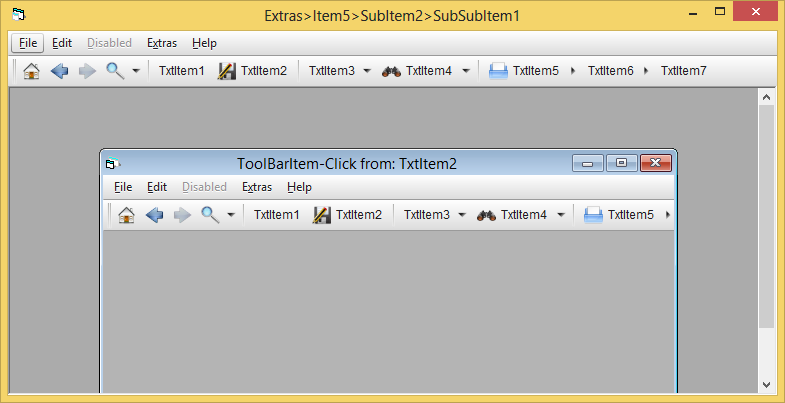
Here's what it looks like then:
Though not sure if I'd go the MDI-route - since the somewhat more modern approach is
to use a "tabbed-interface" instead...
Nevertheless MDI *does* have some advantages in some areas - not sure if those apply
in your case - or if it's a larger legacy-app we talk about here, which would make things
a bit more difficult with regards to "just switching the behaviour to a tabbed Main-Host-Form".
So, if MDI is a must-have, then I would use and adapt one of the solutions which are
based on Standard-Win32-Menus.
Olaf
Last edited by Schmidt; May 22nd, 2014 at 11:04 AM.
Well, not sure about "masterpiece" - but it can be brought to work with MDI
(when a small picCont-PictureBox is "Aligned at the TOP" of the MDI-Form - and the
cWidgetForm-Panels then created as Child-Controls within that PictureContainers hWnd).
Here's what it looks like then:
Though not sure if I'd go the MDI-route - since the somewhat more modern approach is
to use a "tabbed-interface" instead...
Nevertheless MDI *does* have some advantages in some areas - not sure if those apply
in your case - or if it's a larger legacy-app we talk about here, which would make things
a bit more difficult with regards to "just switching the behaviour to a tabbed Main-Host-Form".
So, if MDI is a must-have, then I would use and adapt one of the solutions which are
based on Standard-Win32-Menus.
Well, in case of a maximized MDI-Child - the behaviour is (as said) not fully
"MDI-standard-conform", since it's not really a Standard-MenuBar we talk about here...
With normal Win32-Menus, the MDI-behaviour in maximized state of the MDI-Child is,
that the MDI-Childs Menus are on the very "TOP-Stripe" (the same stripe which also holds the
buttons which switch the MDI-Children back into non-maximized or minimized state).
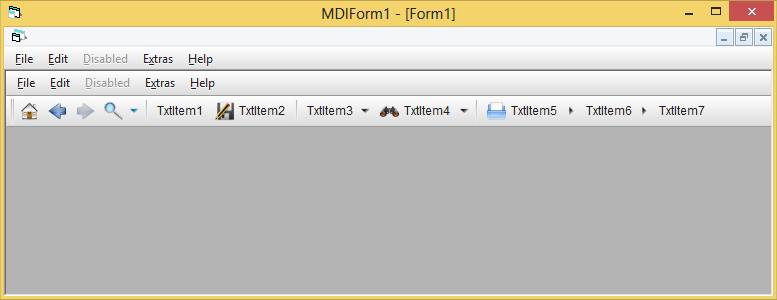
Though with my non-standard-approach, in case of a maximized MDI-Child, you will waste
the space of this TopStripe - and get something like this:
Not sure if that visual output is what you're after - as said, my non-standard approach works
well enough for normal Standard-Form-Projects - but for MDI-scenarios I'd not use it, due to
the above reasons which become apparent in maximized Child-State.



 Reply With Quote
 Originally Posted by gibra

 thank you for the help.